
Mco-home MH3700-HP-US Programmable Thermostat

Introduction
MCOHome programmable thermostat is a Z-Wave enabled device for indoor temperature control. It is mainly applied to heat pump system for heating/cooling, with 3 modes easily switchable: Event, Hold and Holiday. The device is of high reliability and practicability. This product can be included and operated in any Z-Wave network with other Z-Wave-certified devices from any other manufacturers.
Features
- Individual programming events
- 4.0 inches display, Blue backlit, bright and clear
- PC + ABC fire-proof enclosure
- NTC thermistor
- Built-in Z-Wave module (US)
Specification
- Power supply: AC24V, 50Hz, 2 AA batteries (only for backup)
- Power dissipation:50mA
- Dimension: 105*140*29mm
- Output: 1A (resistive load)
- Temperature range: 41ºF -99ºF (5ºC -37ºC)
- Display accuracy: ±0.5 ºC
- Wiring: Terminals
- Installation dimension: 82mm (hole pitch)
Safety Information
To protect yourself and others from danger and to protect the device from damage, please read the safety information before using it.
Important
- A qualified electrician with an understanding of wiring diagrams and knowledge of electrical safety should complete installation following the instructions.
- Before installation, please confirm the real voltage complying with the device’s specification. Cut off any power supply to secure the safety of people and device.
- During installation, protect the device from any physical damage by dropping or bumping. If happens, please contact the supplier for maintenance.
- Keep the device away from acid-base and other corrosive solids, liquids, gases, to avoid damage.
- Avoid overexertion during operation, to protect device from mechanical damage.
- Read all instructions and documentation and save for future reference.
Installation & Wiring
CAUTION: Cut off power supply at circuit breaker or fuse before installation to avoid fire, shock or death!
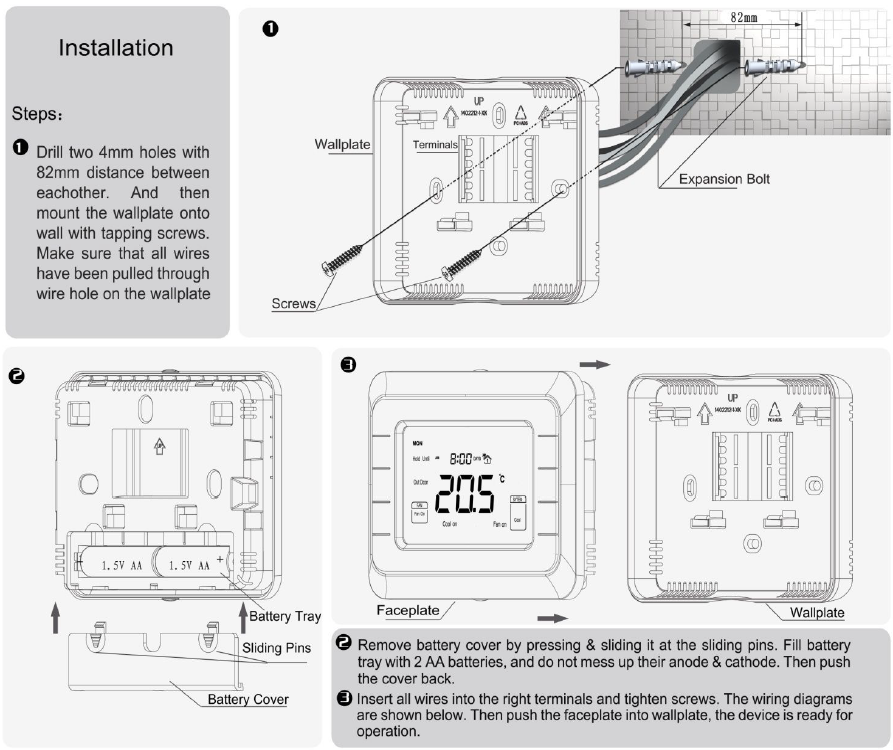
Wiring Terminals

| Terminals | Explanation | Remark |
| RC | Cooling power (two transformers) | Joined with R by jumper (one transformer) |
| R | Heating power (two transformers) | Joined with RC by jumper (one transformer) |
| W (O/B) | Heat output | Changeover valve output (heat pump) |
| Y | Cool output | Compressor output (heat pump) |
| G | Fan output | |
| C | 24VAC common | Connect only when AC power |
| Y2 | Cool output 2 | 2nd stage compressor output (heat pump) |
| W2(AUX) | Heat output 2 | Auxiliary heat output (heat pump) |
Wiring diagram

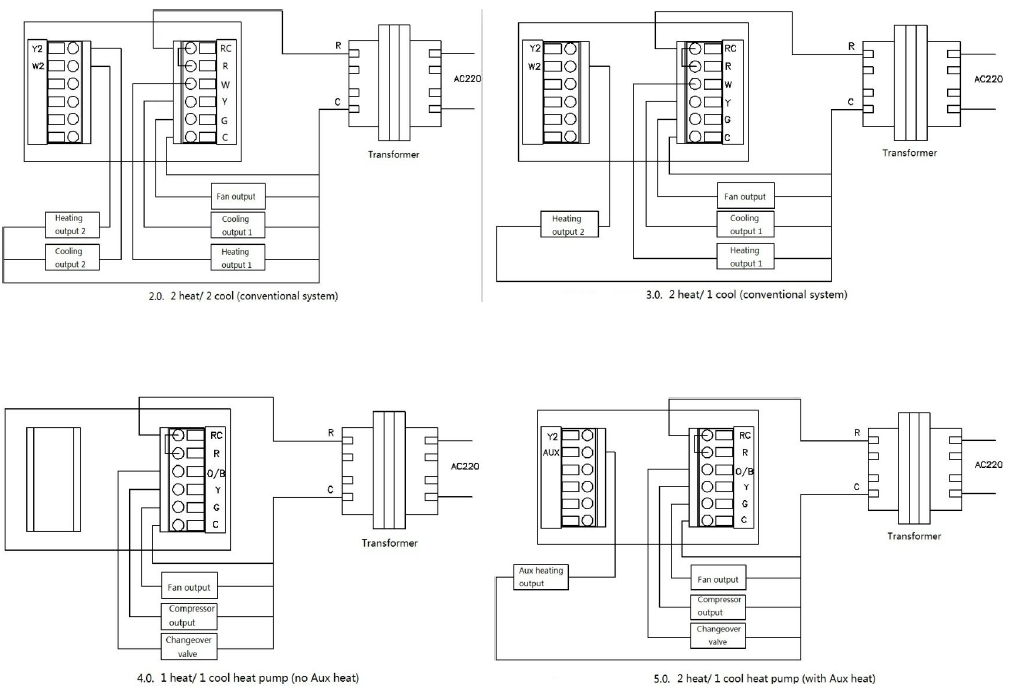
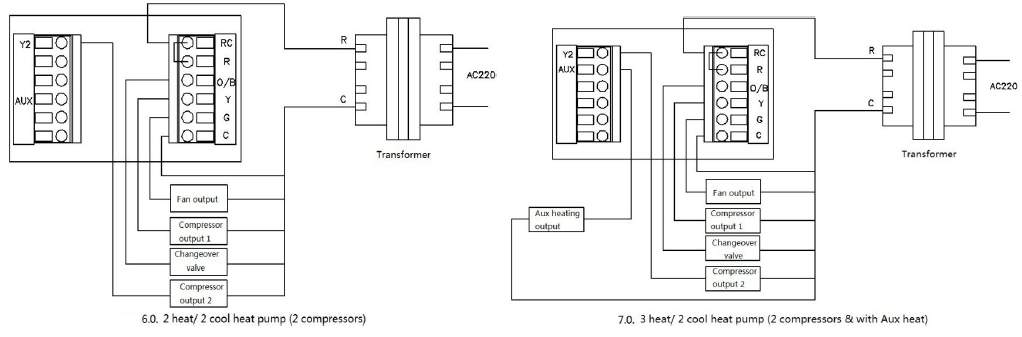
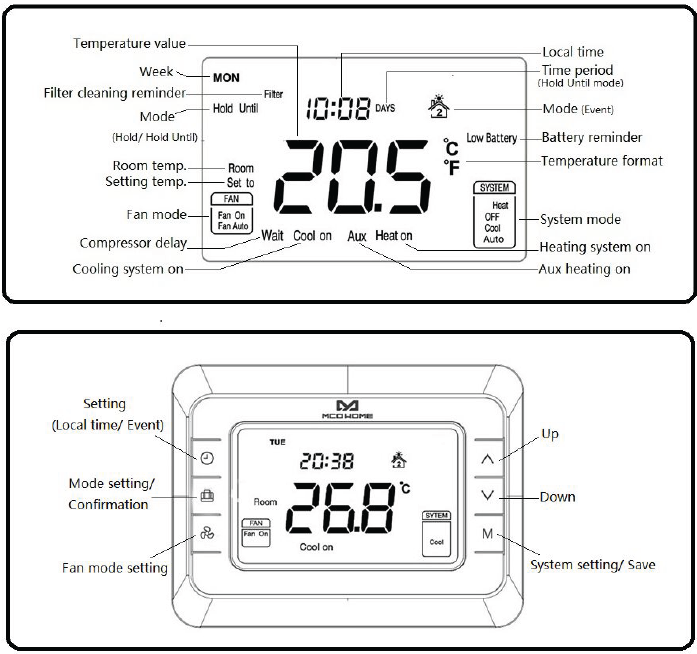
Operation
Temperature format( ℃/ ℉)
- In normal display interface, press
 &
&  button synchronically for at least 3 sec to switch between ℃ and ℉.
Local time setting
Press & hold for 3 sec to enter interface for local time setting. Touch to switch among Week, Hour & Minute, and then press or
or to set the parameters of flashing item. Press once, “SET TO” displayed and temperature value flashing for 5 sec. Users can choose to change the value for temperature setting. If not, press again to save the time value and return to normal display.
System setting
In normal display interface, press M to switch among “Heat, OFF, Cool & Auto”. After the system change, “SET TO” displayed and temperature value flashing for 5 sec. Users can choose to change the value for the temperature setting. If not, press again to save the change and return to normal display.
(Changed value only valid in this current event, and will lose if event, system change or power off)
- OFF: Displayed when Heating, Cooling and Fan are all forced off.
- Auto: Displayed for keeping constant temperature. Device will activate/ stop heating/cooling system automatically according to setting temperature.
Conventional system
Heating
- Room temp.≤Setting temp.-1℃, “Heat on” displays and 1st stage heating system is on;
- Room temp.≤Setting temp.-2℃, “Heat on”& “AUX” display and 2nd stage heating system is on;
- Room temp.≥Setting temp., heating system stops and “Heat on” disappears from screen.
Note: 2nd heat stops and “AUX” disappears when temp. difference is less than 1 ℃.
Cooling
- Room temp.≥ Setting temp.+1 ℃, “Cool on” displays and 1st stage cooling system is on;
- Room temp.≥ Setting temp.+2 ℃, “Cool on” stays and 2nd stage cooling system is on ;
- Room temp.≤ Setting temp., cooling system stops and “Cool on” disappears from screen.
Note: 2nd cool stops when temp. difference is less than 1 ℃.
Heat pump system
- Heating (Changeover valve keep closed)
- Room temp.≤Setting temp.-1℃, “Heat on” displays and 1st stage heating system is on;
- Room temp.≤Setting temp.-2℃, “Heat on” stays and 2nd stage heating system is on;
- Room temp.≤Setting temp.-3℃, “Heat on”& “AUX” display and Aux heating system is on;
- Room temp.≥Setting temp., heating system stops and “Heat on” disappears from screen.
Note: Aux heat stops and “AUX” disappears when temp. difference is less than 2 ℃ . 2nd heat stops when temp. difference is less than 1 ℃.
- Cooling (Changeover valve keep open)
- Room temp.≥ Setting temp.+1 ℃, “Cool on” displays and 1st stage cooling system is on;
- Room temp.≥ Setting temp.+2 ℃, “Cool on” stays and 2nd stage cooling system is on;
- Room temp.≤ Setting temp., cooling system stops and “Cool on” disappears from screen.
Note: 2nd cool stops when temp. difference is less than 1 ℃.
Compressor protection
After an operation of the heating/cooling system, there is a 1 min compressor off time to protect compressor. “Wait” will display on the screen if next operation is activated within the 1 min period.
Fan mode setting
Press to switch among “Fan on & Fan auto”.
- Fan on: Fan is always on. (not in OFF system)
- Fan Auto:Fan runs automatically only when heating/cooling system is on.
Mode setting
- Press to switch among “Event, Hold & Hold Until (Holiday)” modes.
NOTE: Not applied in “OFF” system.
Event
Any icon from  stands for one event, and there are 4 events can be set in one day.
- Press to switch among 7 days → 5+2 days → a whole week: [ MON→TUE→WED→THU →FRI→SAT→SUN→(MON TUE WED THU FRI)→(SAT SUN)→(MON TUE WED THU FRI SAT SUN) ];
- Press or to change the flashing hour, minute & temperature value of the chosen day and event;
- Press to save your setting and enter into next event. Users will enter interface for setting the 1st event of Monday at the first time;
- After 4 events have been set of one day, press to save and enter event setting for the following day.
- During setting, press twice or leave for 15 sec will quit and return to normal display.
Factory setting Events: (Applied in Heat/Cool/Auto system)
| Events | Time | Temperature | Fan | |
| Heating | Cooling/ Auto | |||
| 1 | 06:00 | 21.0℃ | 25.5℃ | Fan On |
| 2 | 08:00 | 16.5℃ | 29.5℃ | Fan On |
| 3 | 18:00 | 21.0℃ | 25.5℃ | Fan On |
| 4 | 22:00 | 16.5℃ | 28.0℃ | Fan On |
Hold
This mode comes after “Event”. In this mode, device will keep a constant temperature until next change.
- “SET TO” displays and temperature value flashing. Press or can change the value, and press to save the setting;
- Press M can set system;
- Press can set fan mode.
Hold Until
This mode comes after “Hold”. In this mode, device will follow the setting temperature and time period when users are out for a holiday. And then back to follow Events after the holiday.
- “SET TO” displays and temperature value flashing. Press or can change the value, and press to save the setting. Then days value flashing, users can choose from 1-365 days by pressing or ;
- Press M can set system;
- Press can set fan mode.
Override temperature setting
- During any Event, press or can enter an interface for temperature setting. Press or to change setting temperature, and press to save the change. The changed setting only valid in the current event, device will follow the original schedule in next event.
Battery reminder
- The device can be supplied by AC24V or 2 AA batteries. Users can choose any of them or both for power supply. AC24V is preferred when both power exist. LOW BATTERY will display when batteries need to be charged/replaced.
Filter cleaning reminder
- “Filter” will flash on the screen to remind users of cleaning furnace filter, and 90 calendar days are the default timing. To press for 3 sec, “Filter” will disappear from screen.
Resorting factory settings
- Press & M for 3 sec, “set to” displays and temperature value flashing, then press to restore factory settings.
Z-Wave operation
Including & Excluding of Z-Wave network
- In normal display, press & hold to enter interface for inclusion or exclusion of Z-Wave network. Before device is included into network, “- – -” will display on the screen. Then press once, device will enter learning mode to get a node ID. If inclusion is success, a node ID will display on the screen in a few seconds.
- A node ID can always inform us whether the device is in the network or not.
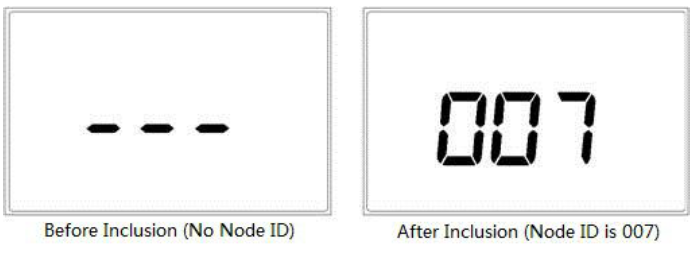
- After inclusion, press & hold will return to normal display. Now the device is ready to be operated by controller/ gateway in Z-Wave network.
Note: Follow the same steps to exclude the device from the network.
Association Group
- Thermostat supports 1 association group. A gateway is suggested to associate with this group.
- Then if any changes happen, such as: temperature, working mode, fan state etc., the thermostat will report to this associated device (gateway).
Command Class supported by the device
- COMMAND_CLASS_BASIC;
- COMMAND_CLASS_THERMOSTAT_SETPOINT;
- COMMAND_CLASS_THERMOSTAT_MODE;
- COMMAND_CLASS_THERMOSTAT_FAN_MODE;
- COMMAND_CLASS_THERMOSTAT_OPERATING_STATE;
- COMMAND_CLASS_SENSOR_MULTILEVEL;
- COMMAND_CLASS_ASSOCIATION;
- COMMAND_CLASS_VERSION;
- COMMAND_CLASS_MANUFACTURER_SPECIFIC
Warranty
1-year Limited Warranty
MCOHome warrants this product to be free from defects in material and workmanship under normal and proper use for one year from the purchase date of the original purchaser. MCOHome will, at its option, either repair or replace any part of its products that prove defective by reason of improper workmanship or materials. THIS LIMITED WARRANTY DOES NOT COVER ANY DAMAGE TO THIS PRODUCT THAT RESULTS FROM IMPROPER INSTALLATION, ACCIDENT, ABUSE, MISUSE, NATURAL DISASTER, INSUFFICIENT OR EXCESSIVE ELECTRICAL SUPPLY, ABNORMAL MECHANICAL OR ENVIRONMENTAL CONDITIONS, OR ANY UNAUTHORIZED DISASSEMBLY, REPAIR OR MODIFICATION.
This limited warranty shall not apply if:
- the product was not used in accordance with any accompanying instructions.
- the product was not used for its intended function. This limited warranty also does not apply to any product on which the original identification information has been altered, obliterated or removed, that has not been handled or packaged correctly, that has been sold as second-hand or that has been resold contrary to Country and other applicable export regulations.
- In Event Mode, long press and synchronically can enter into secret menu, and the code is 5138.
- Press or can change the setting, and press can save and switch to the following item.
Table 1
| Item | Explain | Range | Default | Remark |
| 0 | Controlling Type | 0.0-7.0 | 0.0 | See Table 2 |
| 1 | (1H/1C)Differential | 0.5℃/1℃/1.5℃/2℃ | 1℃ | |
| 2 | Temperature calibration | -10℃~10℃ | 0℃ | |
| 3 | Temperature setting upper limit | 0-99.5℃ | 37℃ | |
| 4 | Temperature setting lower limit | 0-99.5℃ | 5℃ | |
| 5 | Filter change reminder | 1 /2 /30 /60 /90 /120
days |
90 days | |
| 6 | Clock format | 12 /24 hours | 24 | |
| 7 | Compressor protection | 0~10min | 1min | |
| 8 | Temperature format | ℃/℉ | ℃ | |
| 9 | Restore factory setting | OF/ON | OF | ON for restoring |
Table 2
| No. | Type | Terminals | Wiring | Compressor delay |
| 0.0 | 1H/1C (conventional) | R、G、W、Y | Diagram 0.0 | none |
| 1.0 | 1H/2C (conventional) | R、G、W、Y、Y2 | Diagram 1.0 | none |
| 2.0 | 2H/2C (conventional) | R、G、W、Y、W2、Y2 | Diagram 2.0 | none |
| 3.0 | 2H/1C (conventional) | R、G、W、Y、W2 | Diagram 3.0 | none |
| 4.0 | 1H/1C (heat pump) | R、G、O/B、Y | Diagram 4.0 | 1 min (default) |
| 5.0 | 2H/1C (heat pump) | R、G、O/B、Y、AUX | Diagram 5.0 | 1 min (default) |
| 6.0 | 2H/2C (heat pump) | R、G、O/B、Y、Y2 | Diagram 6.0 | 1 min (default) |
| 7.0 | 3H/2C (heat pump) | R、G、O/B、Y、AUX、Y2 | Diagram 7.0 | 1 min (default) |
Reference
Download Manual:
Mco-home MH3700-HP-US Programmable Thermostat User MANUAL