LuxPRO FBA_PSP511LC Programmable Thermostat
INTRODUCTION
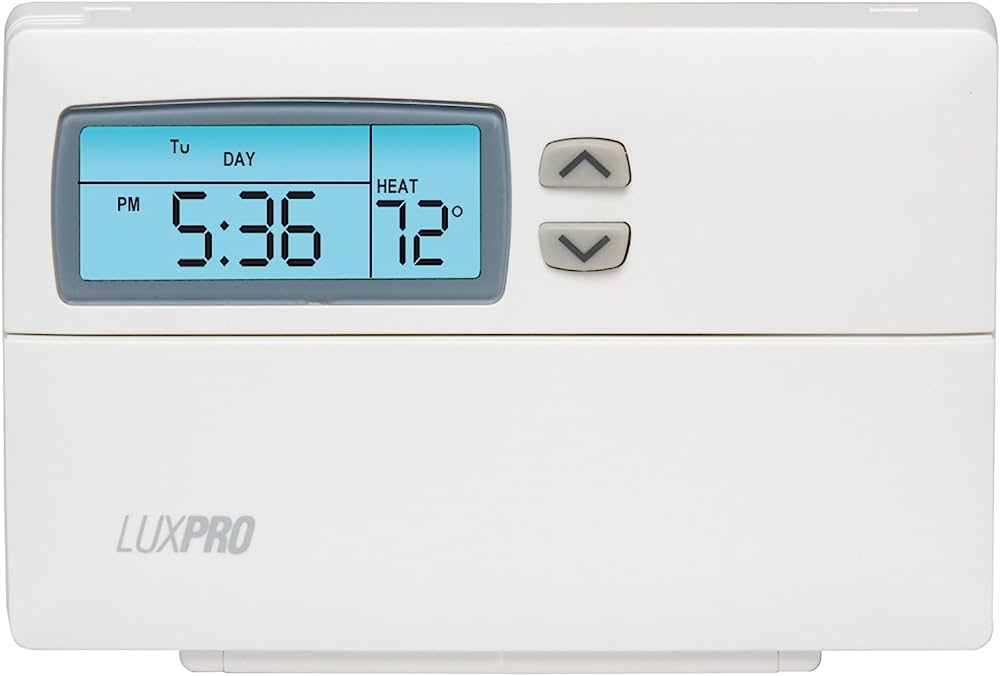
A programmable thermostat with fine control over your heating and cooling system is the LuxPRO FBA_PSP511LC. You may adjust temperature settings depending on your tastes and schedule thanks to its sophisticated features and user-friendly UI. To improve comfort and efficiency in your home or workplace, the thermostat provides a variety of programming choices, energy-saving capabilities, and convenience features.
Key characteristics
The FBA_PSP511LC thermostat has programmable functionality that enables you to design personalized temperature regimens that fit your daily routine. Different temperature settings may be made during various times of the day to provide maximum comfort and energy savings.
- Large Digital Display: The thermostat has a large, simple-to-read digital display that provides quick access to the current temperature, preset settings, and other pertinent data. User-Friendly Design: The thermostat’s user-friendly design makes it easy to find your way around the settings and programming possibilities. The buttons and controls are designed to be simple to use and practical.
- Energy-Saving Features: The FBA_PSP511LC thermostat has an energy-saving OPTION including a programmed setback option, which lets you reduce the temperature while you are away from home or sleeping. This lowers energy use and lowers your electricity costs.
- Temporary Override: The thermostat’s temporary override feature enables you to override the preset settings without altering the overall schedule if you briefly need to change the temperature.
- Filter Change Reminder: The thermostat has a filter change reminder function that notifies you when it’s time to change the air filter in your HVAC system. This ensures that both indoor air quality and performance are at their highest levels.
- Battery Backup: The thermostat incorporates a battery backup mechanism that, in the event of a power failure, keeps the device functioning and preserves the preset settings, providing continuous performance. The FBA_PSP511LC thermostat is suitable for a variety of heating and cooling systems, including heat pumps, gas, oil, and electric furnaces, as well as central air conditioning systems.
- Keypad Lockout: The keypad lockout function enables you to lock the thermostat and requires a password for any changes to be made in order to prevent unauthorized tampering with the thermostat settingsSimple Installation: The thermostat may be placed on the wall using the accompanying mounting hardware and is designed for simple installation. It works with typical wiring setups for thermostats.
Usage
The LuxPRO FBA_PSP511LC Programmable Thermostat should be used as described below:
- Get acquainted with the thermostat: Review the thermostat’s buttons and display for a minute. It needs to feature a digital display panel and a number of programming and setting-adjustment buttons.
- Decide on a time and day: Press the “Set” and “Time” buttons in that order. To change the time, use the up and down arrow buttons; then, click “Next” to switch to the day setting.
- Once again, set the right day using the arrow buttons, and then hit “Next” to continue. You may establish multiple temperature schedules for weekdays and weekends with the PSP511LC thermostat.
- To start programming, click the “Program” button. Create a daily schedule by selecting the relevant time period (e.g., morning, day, evening, or night) using the arrow buttons, then pressing “Next.”
- Using the arrow buttons, choose the preferred temperature for that time period. Then, hit “Next” to go to the following time period. To get the required time periods, repeat this method.
- Create a timetable for the weekend: After creating a weekday plan, you’ll have the opportunity to create a separate one for the weekends.
- Set the preferred temperature for each time period on the weekends using the same procedure as step 4. Manually alter the temperature: Press the “Hold” button whenever you want to do so.
- Choose the preferred temperature using the arrow buttons, and then press “Hold” once again to turn on the manual override.
- Until the start of the next planned period, the thermostat will maintain this setting.
- Enable or disable the program: Click the “Run” button to momentarily turn off the preset timetable.
- The word “Hold” or “Run” will appear on the display depending on whether the timetable is active or not.
- The LuxPRO PSP511LC allows you to adjust additional settings, like swing control, filter change reminders, and more.
- For comprehensive instructions on how to access and modify these settings, refer to the user manual.
- Once programming and configuration adjustments are complete, examine your choices to make sure they reflect your chosen preferences before saving them. To save the settings, click the “Set” button.
- Mount the thermostat: Place the thermostat on the wall in accordance with the directions provided by the manufacturer. Make sure your HVAC system is properly hooked to it and that it is firmly fastened.
- The thermostat should be tested by setting various temperature preferences and watching if the HVAC system reacts as expected once it has been placed and linked.
Faqs
What function does the Programmable Thermostat by LuxPRO FBA_PSP511LC serve?
The LuxPRO FBA_PSP511LC thermostat is intended for use in home or commercial settings to regulate heating and cooling systems.
Are all HVAC systems compatible with this thermostat?
The majority of 24V heating and cooling systems, including electric, gas, and oil systems, are compatible with the LuxPRO FBA_PSP511LC thermostat.
The thermostat can be programmed?
The FBA_PSP511LC thermostat can be programmed, thus yes. To conserve electricity, you may establish various temperature schedules for weekdays and weekends.
Does the screen feature a touchscreen?
No, the touchscreen display on the FBA_PSP511LC thermostat does not exist. It has a straightforward button interface that is simple to use.
Can I change the temperature settings manually?
Yes, you may manually change the temperature settings on the thermostat by using the up and down buttons.
Does the thermostat include a backlight to make it easier to see in the dark?
The LuxPRO FBA_PSP511LC thermostat does indeed include a backlit display for improved viewing in dim lighting.
Can I regulate the humidity with this thermostat?
The thermostat model FBA_PSP511LC does not have an internal humidity control system. It is mostly concerned with temperature regulation.
Is there a timer built into the thermostat?
There is a built-in timer function on the FBA_PSP511LC thermostat that enables you to establish several temperature regimens for various times of the day.
Can I connect to the Internet with this thermostat?
The LuxPRO FBA_PSP511LC thermostat doesn’t support Wi-Fi, thus the answer is no. It functions as a stand-alone thermostat without the ability to be accessed remotely.
Can I use numerous thermostats to establish various temperature zones across my house?
No, multiple thermostat zoning is not supported by the FBA_PSP511LC thermostat. It has one heating and cooling system under its management.
Thermostat battery backup—does it exist?
The FBA_PSP511LC thermostat does indeed include a battery backup that keeps the temperature set during power interruptions.
To avoid illegal temperature adjustments, can I lock the thermostat? The LuxPRO FBA_PSP511LC thermostat does, in fact, include a keypad lock function that lets you lock the thermostat to prevent illegal temperature modifications.
Is there a filter change indication on the thermostat?
The thermostat model FBA_PSP511LC does not come with a built-in filter change indication. It is mostly concerned with temperature regulation.
Can I use this thermostat in a business environment?
Yes, both residential and business settings are suitable for using the LuxPRO FBA_PSP511LC thermostat.
Is this thermostat necessary to be professionally installed?
It is advised to use a professional installer, particularly if you are unfamiliar with wiring and thermostat installation. However, if you have prior expertise installing thermostats, you may do it yourself if you adhere to the safety precautions and installation instructions.
