Leviton RC-1000WHZB Wireless Programmable Thermostat

About your Thermostat
Thank you for purchasing your new Omnistat2 electronic communicating thermostat. Your thermostat will provide you with comfort, convenience, and energy savings for years to come. The Omnistat2 is a precision digital thermostat. It has the capability of being controlled both locally and remotely. It offers stand alone operation, programmability, and communications with automation systems, utility control systems, and personal computers. Please take a few moments to become familiar with all of the features of your new thermostat by reviewing this guide.
Features
- Digitally precise temperature control
- 7 day programmable
- Multicolor backlight, user defined color
- Proximity/motion detector, screen lights up when approached**
- Vacation mode
- Easy to navigate menus
- Communicates with automation systems, utility control systems, and personal computers
- Displays outdoor temperature
- Graphical display of HVAC usage, by week
- Filter reminder
- Large graphical display
- Learns the patterns of your house and uses smart control to apply maximum comfort with efficiency
- Automatic heat/cool changeover
- Fan cycle mode
- Humidity sensing*
- Humidifier control*
- Dehumidifier control*
- Only available on the RC-2000
- Not available on the RC-1500
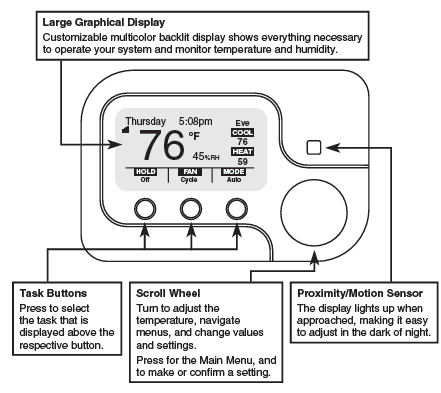
Getting to know your Thermostat’s Controls
To take advantage of all the benefits and features offered by your new thermostat, we recommend that you start by becoming familiar with its controls.
The following icons are used throughout this guide: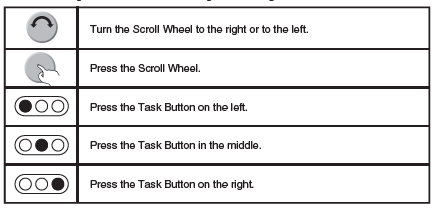
Adjusting the contrast of the thermostat display:
To adjust the contrast of the thermostat display press and hold [FAN] while turning the Scroll Wheel:
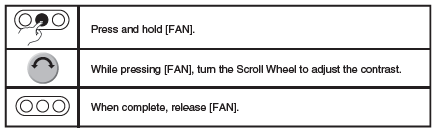
Adjusting the color of the thermostat display:
To adjust the contrast of the thermostat display press and hold [HOLD] while turning the Scroll Wheel:
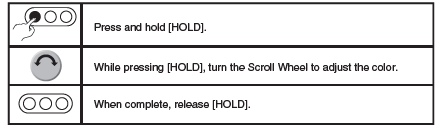
Getting to know your Thermostat’s Display (Advanced Display)
The following graphics will be displayed on the Home Screen when using the Advanced Display: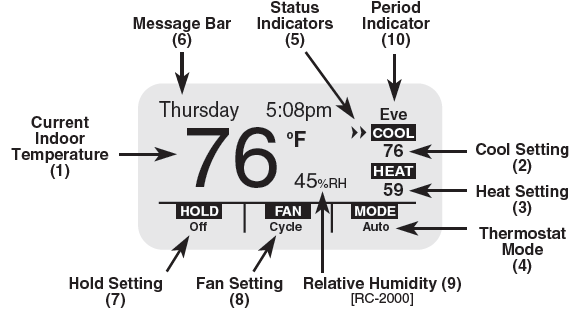
Filter Reminder
Your thermostat logs the amount of time your heating and cooling system has been running and gives you a reminder when it’s time to replace your filter. “Change Filter” will be displayed on the Message Bar when it is time to change your filter.
- Temperature: Displays the current indoor temperature.
- Cool Setting: Displays the desired cool setting.
- Heat Setting: Displays the desired heat setting.
- System Mode: Displays the current system mode: Off, Heat, Cool, Auto, or EM Heat (Emergency Heat for heat pumps).
- Status Indicators:
- Cool 1st stage of air conditioning system is running
- Heat 1st stage of heating system is running
- Cool 1st and 2nd stage of air conditioning system is running
- Heat 1st and 2nd stage of heating system is running
- Note: The Status Indicators may flash to indicate a start-up delay for equipment protection. After a few minutes, the compressor will start and the Status Indicators will stop flashing.
- Message Bar: The message bar displays messages that you enable. If more than one message type is enabled, the message bar will display the first message for 4 seconds, and then the next message is displayed. On the advanced display, the available message types are as follows:
- Date and Time
- Outdoor Status (outdoor temperature and/or outdoor humidity)
- Energy Status
- Energy Messages
- Filter Reminder (time to change the filter)
- Hold Setting: Displays the current hold setting: Off, On, or Vacation
- Fan Setting: Displays the current fan mode: Auto, On, or Cycle
- Relative Humidity: Displays the current relative humidity (RC-2000 only).
- Period Indicator: Morn, Day, Eve, or Night is displayed when temperature changes are made by the thermostat schedule.
Getting to know your Thermostat’s Display (Simplified Display)
The following graphics will be displayed on the Home Screen when using the Simplified Display: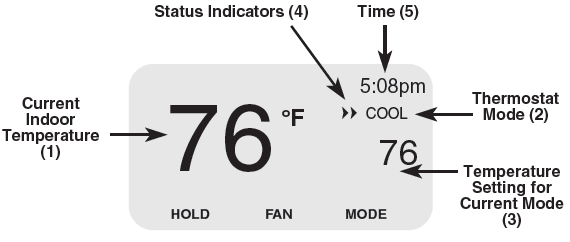
- Temperature: Displays the current indoor temperature.
- System Mode: Displays the current mode: Heat or Cool. If the thermostat is in Off mode, this area is blank.
- Temperature Setting: Displays the desired temperature setting for the current system mode (the mode that is displayed directly above this setting). If the thermostat is in Off mode, this area is blank.
- Status Indicators:
- Cool 1st stage of air conditioning system is running
- Heat 1st stage of heating system is running
- Cool 1st and 2nd stage of air conditioning system is running
- Heat 1st and 2nd stage of heating system is running
- Time: The current time of day is displayed.
Changing the desired temperature settings
To change the desired temperature setting, simply turn the Scroll Wheel. With the first turn of the Scroll Wheel, the Temperature Settings Screen is displayed: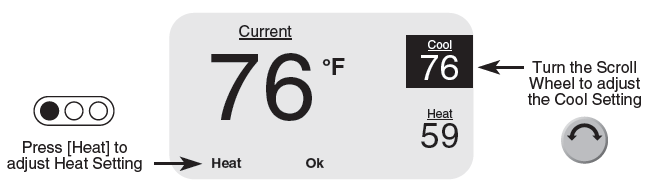
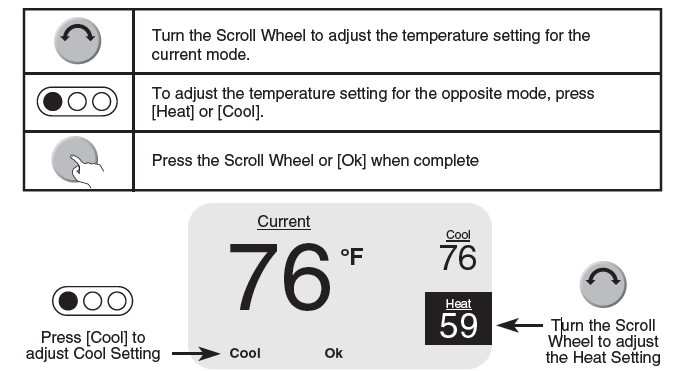
Changing the desired system mode
To change the system mode, press [MODE]. When first pressed, the Mode Setting Screen is displayed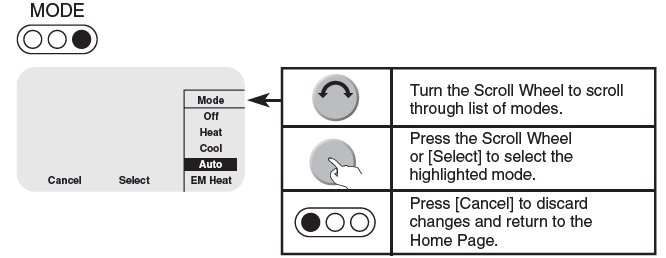
- In Off mode, the heating and air conditioning systems are both off and do not respond to changes in the temperature settings.
- In Heat mode, the heating system responds to maintain your desired heating temperature setting.
- In Cool mode, the air conditioning system responds to maintain your desired cooling temperature setting.
- In Auto mode, your thermostat will automatically switch between heat and cool to maintain your desired heating and cooling temperature settings
- In Emergency Heat mode (for heat pumps with auxiliary heat) the thermostat will turn off the heat pump and use the auxiliary heating to maintain the heating temperature setting. This mode should only be used if the heat pump is malfunctioning because the auxiliary heat costs more to operate than the heat pump
About the Hold and Fan Settings
To change the fan setting, press [FAN]. When first pressed, the Fan Setting Screen is displayed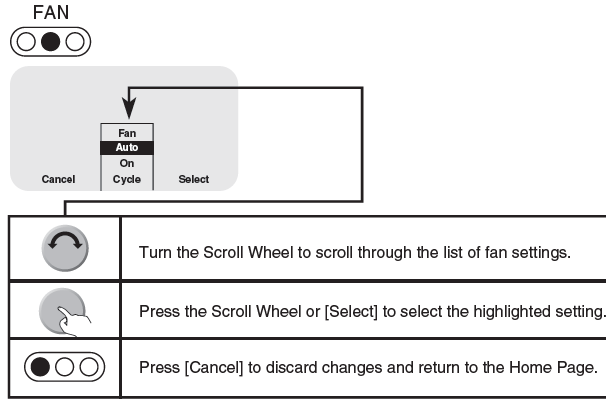
- In Fan Auto mode, the fan runs only when the system calls for heating or cooling.
- In Fan On mode, the fan runs continuously.
- In Fan Cycle mode, the fan is cycled on and off every 10 minutes to circulate the air
To change the hold setting, press [HOLD]. When first pressed, the Hold Setting Screen is displayed: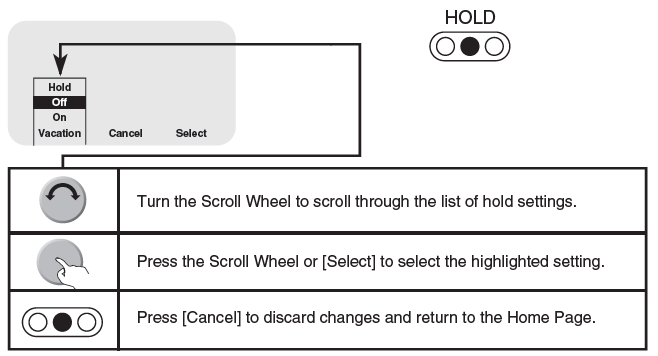
About the Hold Settings
- In Hold mode, the thermostat will not change the desired temperature settings by program schedule or remote system.
- In Hold Off mode, the thermostat responds to the program schedule and remote system temperature setting changes.
- In Hold On mode, the thermostat ignores the program schedule and remote system temperature setting changes.
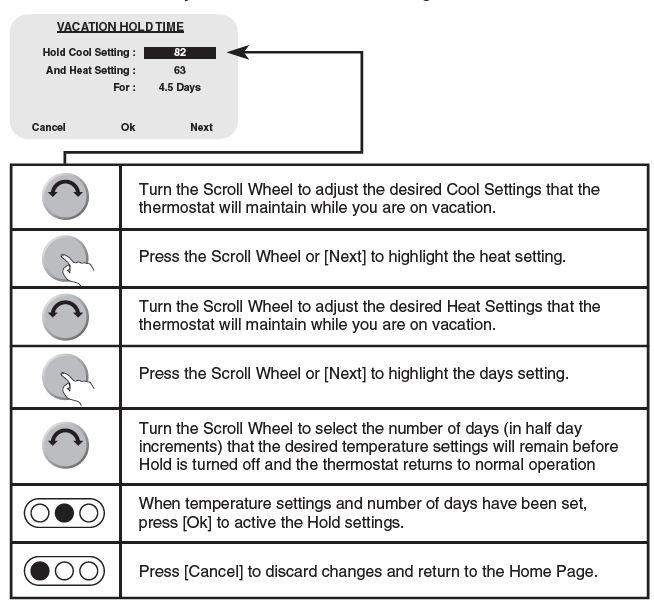
- In Hold Vacation mode, the thermostat ignores the program schedule and the remote system temperature setting changes for the duration of your scheduled time away.
Setting the Time and Date
To set or change the current time and date, press and hold [MODE] for 5 seconds:
Modifying the Program Schedule
- Your new thermostat has been preprogrammed with energy saving settings.
- You may modify the times and temperature settings to maximize energy savings and comfort based on your lifestyle.
Your thermostat may be programmed to adjust the heating and cooling temperature settings up to 4 times per day, with different times and temperature settings for every day of the week (Monday – Sunday). You may also modify the schedule for a day, and then copy that schedule to other days. This is especially beneficial if you have the same schedule on weekdays. You can modify a single day’s schedule and then copy it to the remaining weekdays.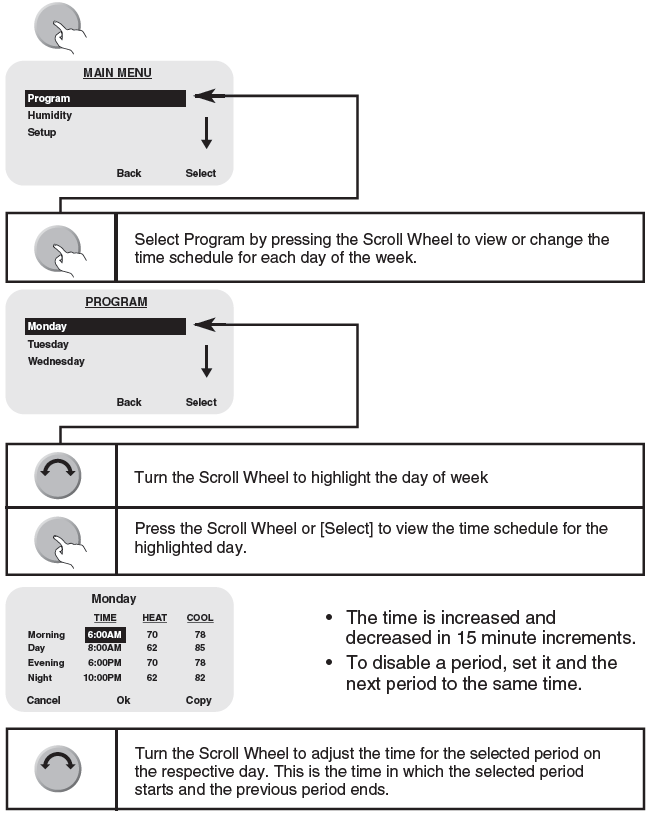
The 4 time periods for each day of the week are as follows: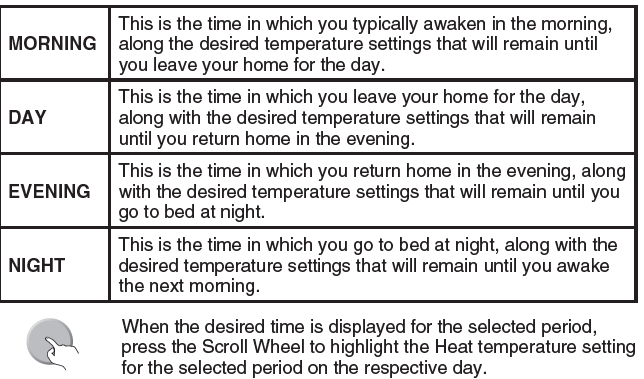
FOR CANADA ONLY
For warranty information and/or product returns, residents of Canada should contact Leviton in writing at Leviton Manufacturing of Canada Ltd to the attention of the Quality Assurance Department, 165 Hymus Blvd, Pointe-Claire (Quebec), Canada H9R 1E9 or by telephone at 1 800 405-5320.
Modifying the Program Schedule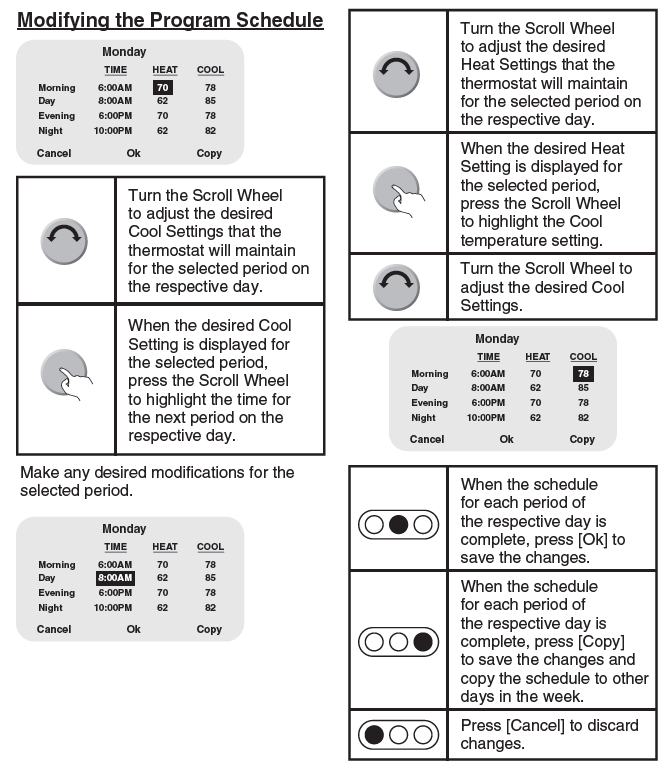
Notes:
- At any time, you can undo changes made to the current schedule on the respective day by pressing [Cancel].
- Select a day from the list of days and modify the program schedule for that day, OR
- Press [Back] twice, to return to the Home Screen
- When all of the modifications are complete, you can save the schedule for the respective day by pressing [Ok].
- Select a different day from the list of days and modify the program schedule for that day, OR
- Press [Back] twice, to return to the Home Screen
- When all of the modifications are complete, you can save and copy the schedule for the respective day to any of the other days in a week by pressing [Copy].
Copying a Time Schedule to other Days
You may copy the program schedule from any given day, and copy it to any other day(s) in a week. After the schedule for the respective day has been completed, press [Copy].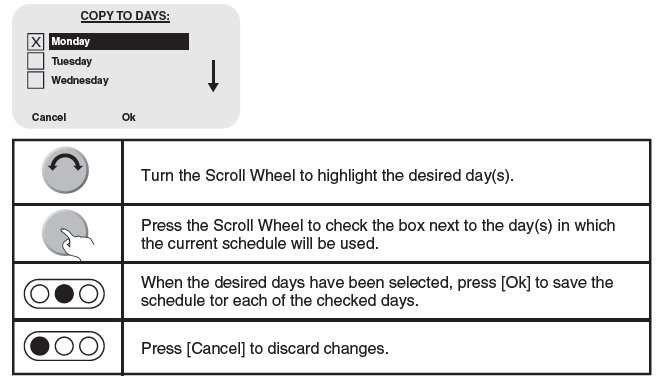
Changing the desired humidity setting (RC-2000)
To change the desired humidity settings, press the Scroll Wheel once to display the Main Menu.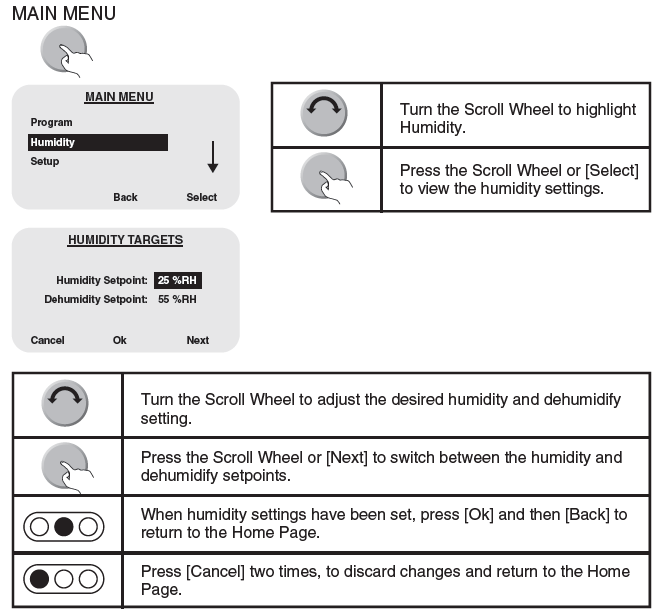
Display the Runtime Graph of Air Conditioning and Heating Usage
To view a System Runtime graph of air conditioning and heating usage over the past 4 weeks, press the Scroll Wheel once to display the Main Menu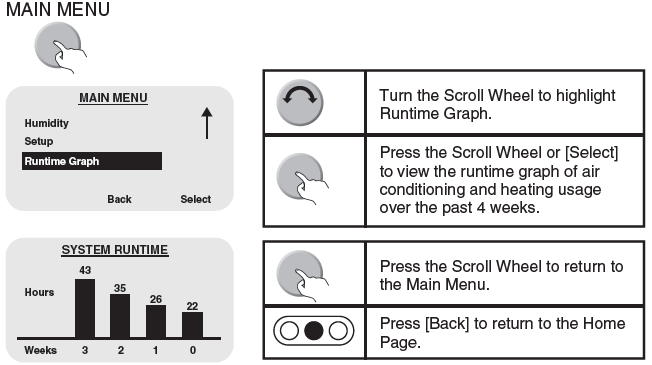
System Runtime Bar Graph 0-3
This area displays the bar values and hours that the air conditioning and/or heating system operated in the current week (Week 0) and in the three previous weeks (Weeks 1-3), respectively.
WARRANTY
LEVITON LIMITED WARRANTY
Leviton warrants to the original consumer purchaser and not for the benefit of anyone else that products manufactured by Leviton under the Leviton brand name (“Product”) will be free from defects in material and workmanship for the time periods indicated below, whichever is shorter:
- OmniPro II and Lumina
- Pro: three (3) years from installation or 42 months from manufacture date.
- OmniLT, Omni IIe, and Lumina: two (2) years from installation or 30 months from manufacture date.
- Thermostats, Accessories: two (2) years from installation or 30 months from manufacture date.
- Batteries: Rechargeable batteries in products are warranted for ninety (90) days from the date of purchase.
Note: Primary (non-rechargeable) batteries shipped in products are not warranted. Products with Windows® Operating Systems: During the warranty period, Leviton will restore corrupted operating systems to factory default at no charge, provided that the product has been used as originally intended. Installation of non-Leviton software or modification of the operating system voids this warranty. Leviton’s obligation under this Limited Warranty is limited to the repair or replacement, at Leviton’s option, of Product that fails due to a defect in material or workmanship. Leviton reserves the right to replace product under this Limited Warranty with new or remanufactured product. Leviton will not be responsible for labor costs of removal or reinstallation of the Product. The repaired or replaced product is then warranted under the terms of this Limited Warranty for the remainder of the Limited Warranty time period or ninety (90) days, whichever is longer. This Limited Warranty does not cover PC-based software products. Leviton is not responsible for conditions or applications beyond Leviton’s control. Leviton is not responsible for issues related to improper installation, including failure to follow written Installation and operation instructions, normal wear and tear, catastrophe, fault or negligence of the user or other problems external to the Product. To view complete warranty and instructions for returning product, please visit us at www.leviton.com.
FCC Compliance
This equipment has been tested and found to comply with the limits for a Class B digital device, pursuant to part 15 of the FCC Rules. These limits are designed to provide reasonable protection against harmful interference in a residential installation. This equipment generates, uses and can radiate radio frequency energy and, if not installed and used in accordance with the instructions, may cause harmful interference to radio communications. However, there is no guarantee that interference will not occur in a particular installation. If this equipment does cause harmful interference to radio or television reception, which can be determined by turning the equipment off and on, the user is encouraged to try to correct the interference by one or more of the following measures:
- Reorient or relocate the receiving antenna.
- Increase the separation between the equipment and the receiver.
- Connect the equipment into an outlet on a circuit different from that to which the receiver is connected.
- Consult the dealer or an experienced radio/TV technician for help.
REFERENCE
DOWNLOAD MANUALS:
Leviton RC-1000WHZB Wireless Programmable Thermostat User Guide
OTHER MANUALS:
Leviton RC-1000WHZB Wireless Programmable Thermostat Product Data Sheet

Leviton RC-1000WHZB Wireless Programmable Thermostat User Guide