
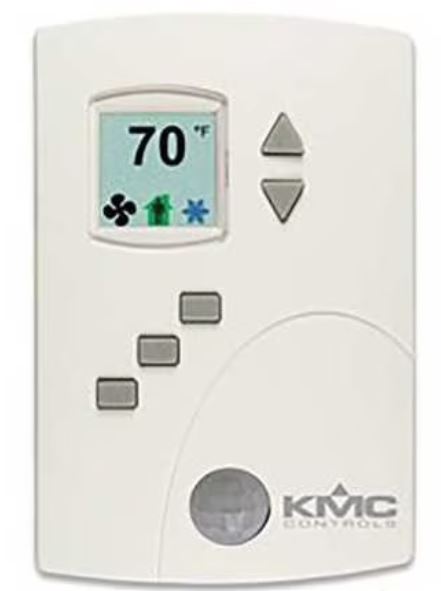
KMC Controls BAC-4201CW0003 BACnet or Stand Alone Thermostat
Applicable models
This installation sheet applies to AppStat controllers for heat pump units. The model numbers for these models end with “0003”. Additional information for the controllers can be found in the document Installation, Operation and Application Guide for the AppStat which is available on the KMC partners web site.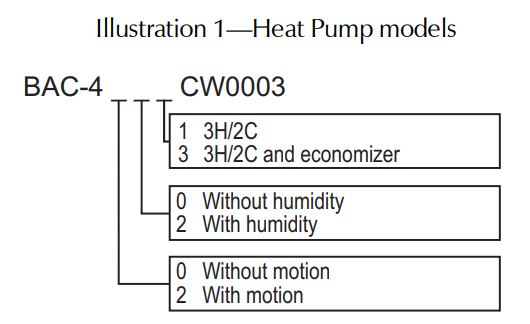
Planning for motion sensing
For models with a motion sensor mount the AppStat on a wall that will have an unobstructed view of the typical traffic in the coverage area. When choosing a location, do not install the sensor in the following areas.
- Behind curtains or other obstructions
- In locations that will expose it to sunlight or heat sources
- Near a heating or cooling inlet or outlet.
- Illustration 2—Typical motion sensing coverage area
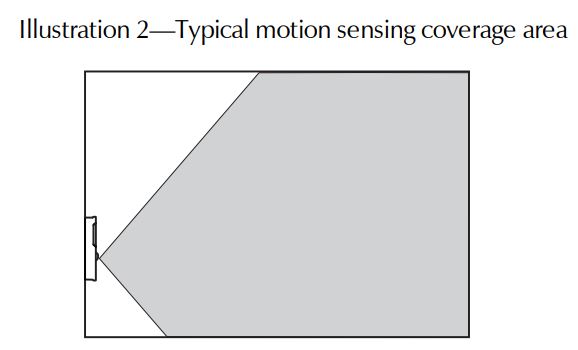
The effective detection range is approximately 10 meters or 33 feet. Factors that may reduce the range include:
- The difference between the surface temperature of the object and the background temperature of the room is too small.
- Object movement in a direct line toward the sensor.
- Very slow or very fast object movement.
- Obstructions as shown in the illustration Typical motion sensing coverage area on page 1.
False detections may be triggered by:
- The temperature inside the detection range suddenly changes because of the entry of cold or warm air from an air-conditioning or heating unit.
- The sensor being directly exposed to sunlight, incandescent light, or another source of far-infrared rays.
- Small animal movement.
Mounting the AppStat
For the most accurate performance, install the AppStat on an inside wall where it can sense the average room temperature. Avoid locations with direct sunlight, heat sources, windows, air vents, and air circulation or obstructions such as curtains, furniture, etc.
The AppStat must not be:
- Mounted on an exterior wall.
- Mounted on or near an object with large a thermal mass such as a concrete block wall.
- Blocked from normal air circulation by obstructions.
- Exposed to heat sources such as lights, computers, copiers, or coffee makers, or to direct sunlight at any time of the day.
- Exposed to drafts from windows, diffusers, or returns.
- Exposed to air flow through connecting conduits or empty spaces behind walls.
For models with motion sensing, see the topic, Planning for motion sensing.
Rough-in preparation
Complete rough-in wiring at each location before mounting an AppStat. This includes the following steps.
- Install the supplied mounting base directly to a wall, a vertical electrical box, or a box with a wall plate kit.
- Routing the connecting cable or cables from the AppStat to the equipment it is controlling.
- If required, install an appropriate wall plate kit.
- Block leaks and airflow from conduits with the plumber’s putty or similar material.
- If replacing an existing thermostat, label existing wires for reference when removing the existing thermostat.
Installing the AppStat
To install the controller on a mounting base, do the following:
- Turn the Allen screw in the base of the sensor clockwise until it clears the case.
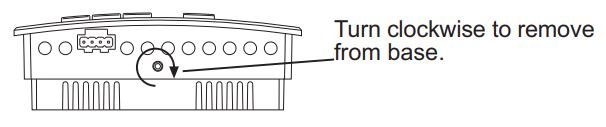
- Swing the AppStat away from the mounting base to remove it.
- Route wiring for the AppStat through the mounting base.
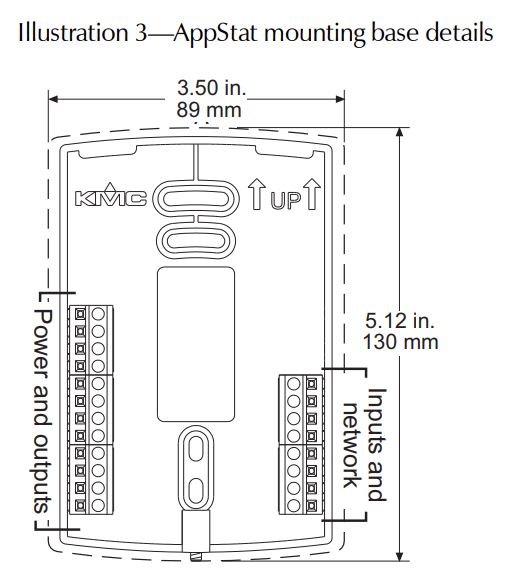
- Position the base with the embossed UP toward the ceiling and fasten it directly to a vertical 2 x 4-inch electrical box. For horizontal boxes or 4 x 4 applications, use a wall plate kit. See Installation Accessories on page 4 for part numbers.
- Connect the wires for the AppStat to the terminals in the mounting base.
- Place the top of the sensor over the top of the mounting base and swing it down over the Allen screw bracket. Be careful not to pinch any wiring.
- Turn the Allen screw counterclockwise until it backs out of the mounting base and engages the case.
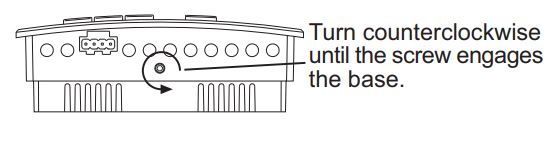
Caution: To prevent mounting screw heads from touching the circuit board in the controller, use only the mounting screws supplied by KMC Controls. Using screws other than the type supplied may damage the AppStat.
Connecting inputs
The inputs for the AppStat are configured for specific functions and do not require setup in the field. Not all inputs are required for every model or application.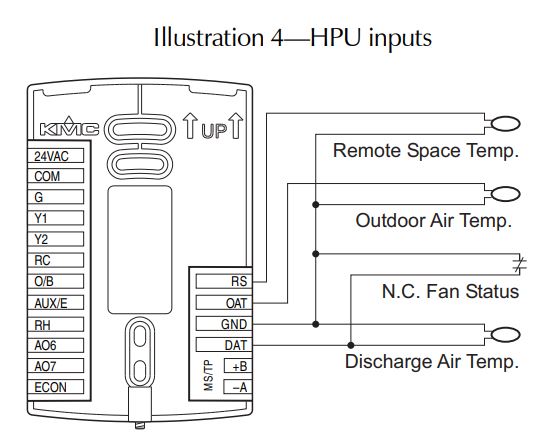
Remote space temperature sensor (optional)
Connect a 10kΩ, Type II thermistor temperature sensor to the remote space temperature (RS) input and ground (GND) terminals. The input includes the internal pull-up resistor. An STE-6011W10 sensor is suitable for this application. Follow the instructions supplied with the sensor for installation.
When a remote space temperature input is connected to the AppStat, the remote temperature is used instead of the internal temperature sensor.
Fan status switch (optional)
Connect a Normally Closed Fan Status switch to the Discharge Air Temperature (DAT) input and ground (GND) terminals. The input includes the internal pull-up resistor. A CSE-1102 differential pressure switch is suitable for this application. Follow the instructions supplied with the switch for installation.
Outdoor air temperature sensor
Connect a 10kΩ, Type III thermistor temperature probe to the outdoor air temperature (OAT) input. The input includes the internal pull-up resistor. An STE-1451 sensor is suitable for this application. Follow the instructions supplied with the sensor for installation.
Discharge air temperature
Connect a 10kΩ, Type III thermistor temperature probe to the discharge air temperature (DAT) input. The input includes the internal pull-up resistor. An STE-1405 sensor is suitable for this application. Follow the instructions supplied with the sensor for installation.
Connecting outputs
The AppStat outputs are model dependent and are configured for specific applications.
- No field programming or setup is required or possible.
- Depending on the model and application, the AppStat outputs are designed for either 24-volt AC or 0-10 volt DC loads.
- The outputs may represent analog or digital signals.
Caution: Improperly connecting loads or equipment to output terminals may damage the equipment. Connect only as shown in the following diagrams or application drawings.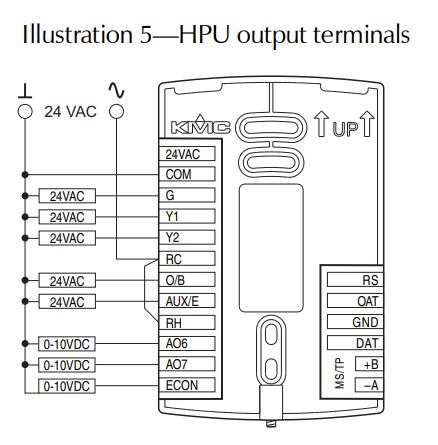
Connecting power
The AppStat requires an external, 24-volt, AC power source. Use the following guidelines when choosing and wiring transformers.
- Use only a Class-2 transformer of the appropriate size to supply power.
- KMC Controls recommends powering the AppStat from a dedicated controls transformer.
- Connect the transformer’s neutral lead to the COM terminal.
- Connect the AC phase lead to the 24VAC terminal.
- Power is applied to the controller when the transformer is powered.
See Installation Accessories on page 4 for a list of transformers available from KMC Controls, Inc.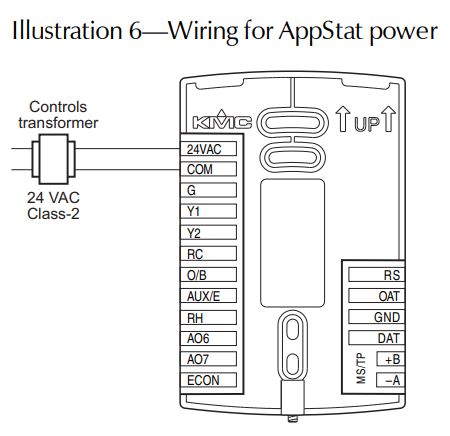
Maintenance
Remove dust as necessary from the holes in the top and bottom. Clean the display with soft, damp cloth and mild soap.
Specifications
AppStat specifications are subject to change without notice.
- Supply Voltage 24 volts AC (–15%, +20%), 50-60 Hz, 12 VA, Class 2 only
- Inputs 0–12 volts DC with internal 10kΩ pull-up resistors
- Relay outputs SPST, 24 volts, 1 amp AC or DC Maximum for all relay outputs is 3 amps
- Analog outputs Environmental limits Short protected 10mA 0–12 VDC
- Operating 34 to 125° F (1.1 to 51.6° C)
- Shipping –40 to 140° F (–40 to 60° C)
- Humidity 0 to 95% RH (non-condensing)
- Regulatory UL 916 Energy Management Equipment
- FCC Class B, Part 15, Subpart B and complies with Canadian ICES-003 Class B
This device complies with part 15 of the FCC Rules. Operation is subject to the following two conditions:(1) This device may not cause harmful interference, and (2) this device must accept any interference received, including interference that may cause undesired operation.
Installation accessories
The following accessories are available from KMC Controls, Inc.
- XEE-6111-040 Single-hub 120-volt power transformer
- XEE-6112-040 Dual-hub 120-volt power transformer
- XEE-6311-075 120/240/277/480VAC, 24 VAC, 75 VA transformer
- HMO-10000W White mounting plate kit for retrofit on horizontal boxes or 4 x 4 handy boxes
Additional resources
The latest support files are always available on the KMC Controls website.
For detailed specifications, installation, operating, application, and system integration information, see The Installation, Operation, and Application Guide for AppStat.
For additional specifications information, see the BAC-4000 AppStat Data Sheet.
Important Notices
The material in this document is for information purposes only. The contents and the product it describes are subject to change without notice. KMC Controls, Inc. makes no representations or warranties with respect to this document. In no event shall KMC Controls, Inc. be liable for any damages, direct or incidental, arising out of or related to the use of this document.
KMC Controls, Inc.
P.O. Box 497
19476 Industrial Drive
New Paris, IN 46553
U.S.A.
TEL: 1.574.831.5250
FAX: 1.574.831.5252
E-mail: [email protected]
REFERENCE:
DOWNLOAD MANUALS:
KMC Controls BAC-4201CW0003 BACnet or Stand Alone Thermostat Installational Guide
KMC Controls BAC-4201CW0003 BACnet or Stand Alone Thermostat Installational Guide