Johnson Controls KONOzw Smart Thermostat

MODELS
KONOzw Smart Hub Thermostat
PACKAGE CONTENTS
- Device
- Wall Plate
- Mounting Hardware
- 4 AA Alkaline Batteries
- Installation Manual
- Wire Labels
ITEMS NEEDED FOR INSTALLATION
- Phillips Screwdrivers
- Wire stripper/cutter
- A Z-Wave Hub / Gateway to operate with KONOzw
SPECIFICATIONS AND COMPLIANCE
- Operating Voltage: 24VAC
- Battery Type: 4 AA premium brand Alkaline
- Operating Temperature: +14F to 122F (+10C to 50C)
- Operating Humidity: 20% to 80% (non-condensing)
- Certifications: Z-Wave Plus
CONNECTING POWER/INSERTING BATTERIES
KONOzw needs either one of the power source options:
- C-terminal
- Battery (4 AA alkaline batteries included)
C-terminal
Separate KONOzw from its base. Pull the wires from your wall through the center hole of the KONOzw base. Secure the base to the wall using the included mounting hardware.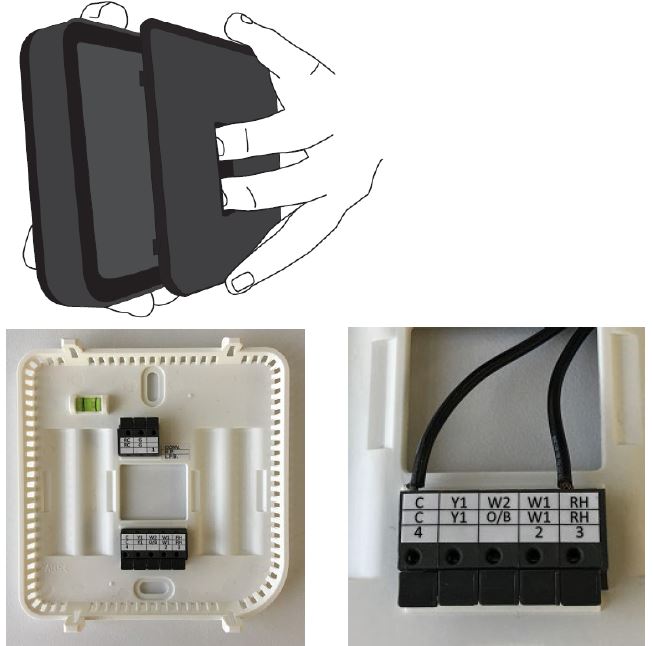
After wiring, secure KONOzw front onto base. Once KONOzw front has been secured to base (line up and firmly push), return power to system.
Battery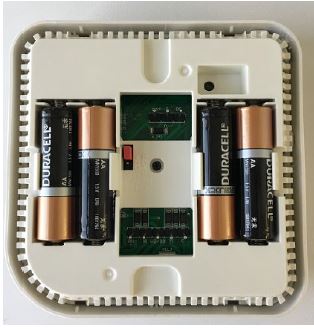
Insert the 4 included AA alkaline batteries and secure KONOzw front onto base.
SYSTEM INCLUSION
During the initial setup, you will be prompted to pair the device with your home control system. If you choose not to pair during the initial setup process, you can manually initiate the inclusion process at any time by following these steps:
Steps of Adding the Device (Device Inclusion)
- Initiate inclusion on your home control system using the instructions provided with it
- In HOME screen, press the knob once to enter the menu settings
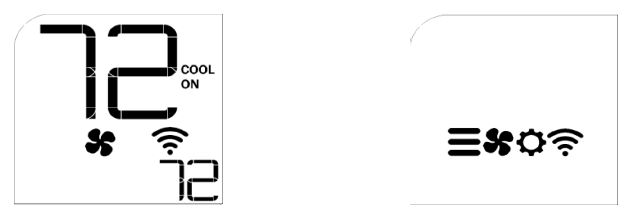
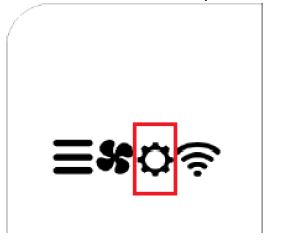
- Rotate the knob to select
 , then press the knob to enter the inclusion/exclusion menu
 - In the inclusion/exclusion menu, select ADD and press the knob to confirm.
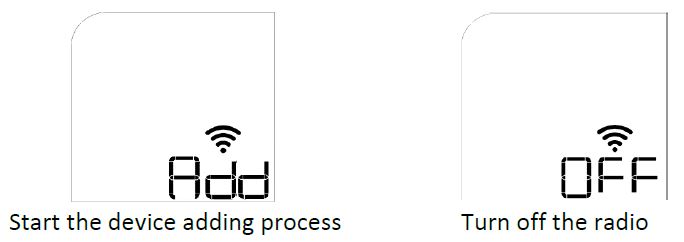
The device will begin the adding process – you will see this screen:
- Step 1: Device prepares to add to the hub:
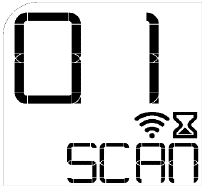
- Step 2: At the hub portal, click “Add device”.
Noted: If the hub is supporting S2 (authenticated) security mode, it will ask the user to provide the DSK code of the device to complete the inclusion process. The DSK code is printed on the product label as shown below: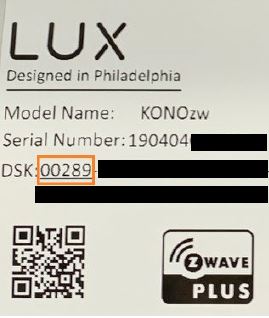
Input the first 5 digits in the hub portal and follow the instructions provided by the hub.
Remove the décor snap cover from the device and the product label is attached on the device front housing. There is also the same product label attached on the product gift-box.
If S0 or S2 (unauthenticated) is used, no DSK is needed then. - Step 3: Device is added to the hub successfully.
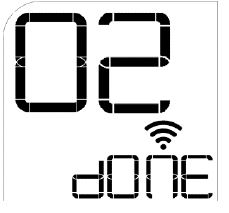
- The device will automatically return to the HOME screen after 5 seconds, or you can press the knob to return to the HOME screen.
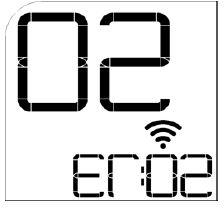
- If the inclusion process is not successful, then the HOME screen will display ER:02 to indicate the error. Press and hold the knob for over 5 seconds to return to the inclusion/exclusion menu and retry the inclusion.
Steps of Removing Device (Device Exclusion)
- In HOME screen, press the knob once to enter the menu settings
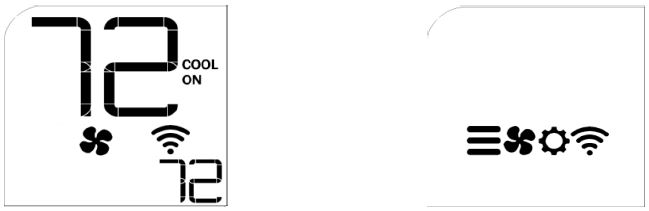
- Rotate the knob to select, then press the knob to enter the inclusion/exclusion menu
- In the inclusion/exclusion menu, select RST and press the knob to confirm
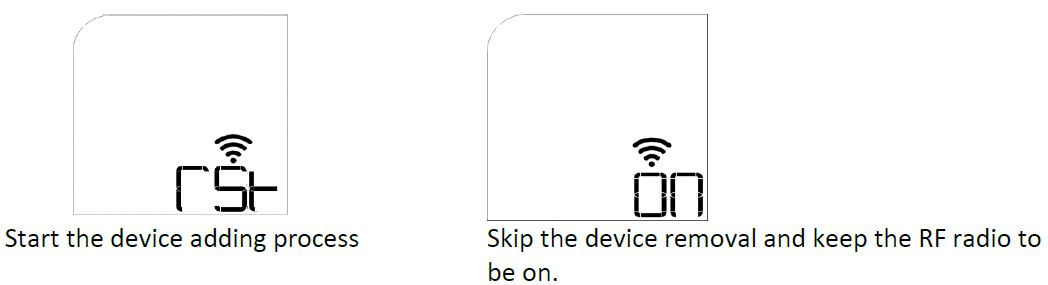
The device will begin the removal process – you will see this screen:
- Step 1: Device prepares to be removed from the hub:
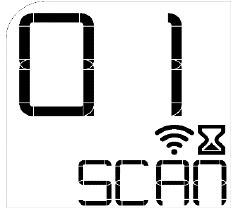
- Step 2: At the hub portal, click “Remove device”.
- Step 3: Device is removed from the hub successfully.
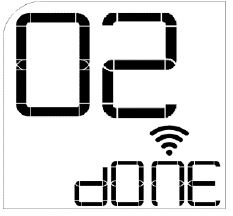
- If the exclusion process is not successful, then HOME screen will display ER:02 to indicate the error. Press and hold the knob for over 5 seconds to return to the inclusion/exclusion menu and retry the exclusion.
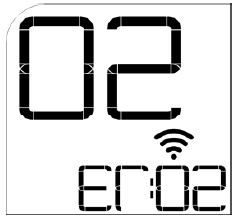
Error code and description
| Error Code | Description |
| Er:00 | System Error – Host Boot up fail |
| Er:01 | System Error – No valve (O or B) connected in Heat Pump system |
| Er:02 | Provisioning error – No network |
| Er:09 | Radio Error – No response from module |
| Er:0A | Radio Error – Poor signal (<-76dBm RSSI) |
| Er:0B | Radio Error – Network not found |
Z-Wave Command Classes
KONOzw supports the following command classes:
Association Group:
| Version | V2 |
| Group ID | 1 |
| Maximum Nodes | 5 |
| Description | Z-Wave Plus Lifeline |
| Association NodeID | 001 |
KONOzw is associated with the Zwave controller/hub in the network.
The following events will trigger a notification(report) from KONOzw to controller.
| Event | Report |
| Device Reset Locally | Device Reset Locally Notification |
| Thermostat Mode Change | Thermostat Mode Report |
| Thermostat Setpoint Change | Thermostat Setpoint Report |
| Fan Mode Change | Thermostat Fan Mode Report |
| Thermostat Operating State Change | Thermostat Operating State Report |
| Battery Level Change | Battery Report |
| Temperature Change | Multilevel Sensor Report |
| AC power connected or
disconnected |
Notification Report – Power Management |
Notification:
| Version | V4 |
| Notification Type | Power Management (0x08) |
| Notification Event | AC mains disconnected (0x02) AC mains connected (0x03) Battery replace soon (0x0A)
Battery replace now (0x0B) |
Security
KONOzw is supporting 3 types of security:
- S2 (authenticated) – each device is assigned with an unique DSK.
- S2 (un-authenticated)
- S0
A Security (S0 or S2) Enabled Z-Wave Controller must be used in order to fully utilize the product.
Basic:
KONOzw supports the Comfort mode (Hold mode) and Energy-Saving mode (Away mode). The Energy-saving mode sets the heat temperature at 62F and the cool temperature at 83F.
To activate the Energy-saving mode, the hub should send a “BASIC_SET 0x00” to KONOzw and an icon of “AWAY” is then shown on the LCD.
There are 2 ways to deactivate the Energy-saving mode:
- Send the BASIC_SET 0xFF from the hub. KONOzw will switch to the Comfort mode (Hold mode).
- Turn or press the knob on the device. In this case, KONOzw will send a BASIC_REPORT with value 0xFF.
Standard Command Class:
| Standard Command Class | Version |
| Application Status | V1 |
| Association* | V2 |
| Association GRP Info* | V1 |
| Basic* | V1 |
| Battery* | V1 |
| Clock* | V1 |
| Configuration * | V1 |
| Device Reset Locally* | V1 |
| Firmware Update Meta Data* | V3 |
| Manufacturer Specific* | V1 |
| Multilevel Sensor* | V7 |
| Notification* | V4 |
| Power level* | V1 |
| Protection* | V2 |
| Security | V1 |
| Security 2 | V1 |
| Supervision | V1 |
| Thermostat Fan Mode* | V1 |
| Thermostat Fan State* | V1 |
| Thermostat Mode* | V2 |
| Thermostat Operating State* | V2 |
| Thermostat Setpoint* | V3 |
| Transport Service | V2 |
| Version* | V2 |
| Z-Wave Plus Info | V2 |
Note: The command classes with “*” will be supported securely when the device is bootstrapped with a security key.
Configuration Command Class
KONOzw supports the following configuration parameters:
| Parameter ID | Parameter Size (Byte) | Parameter Name | Parameter Values | Default Value | Description |
| 1 | 2 | User Temperature Calibration | -250 to 250, step-
size = 10 |
0 | in steps of 0.1°C |
| 2 | 1 | Temperature Unit (C/F) | 0 : C
1 : F |
1 | |
| 3 | 1 | Available Control mode | 0-4 | 0 | 0: Heat and Cool, Auto 1: Heat Only
2: CoolOnly 3: Heat and Cool, no Auto 4: reserved |
| 4 | 1 | System Type | 0-4 | 0 | 0: Furnace Gas
1: Furnace Electric 2: Heat Pump 3: Boiler no fan 4: reserved |
| 5 | 1 | Reversal valve Type in Heat Pump | 0 – O-valve
1 – B-valve |
0 | |
| 6 | reserved | ||||
| 7 | reserved | ||||
| 8 | 2 | Temperature Limit – Heat Max | 60.00F-90.00F (16C-
32C) |
90F
(32C) |
|
| 9 | 2 | Temperature Limit – Heat Min | 45.00F-60.00F (7C-
16C) |
45F (7C) | |
| 10 | 2 | Temperature Limit – Cool Max | 60F-95F (16C-35C) | 95F (35C) | Note: The actual allowable range is dependent on the heat set point limit |
| 11 | 2 | Temperature Limit – Cool Min | 50F-75F (10C-24C) | 50F (10C) | Note: The actual allowable range is dependent on the heat set point limit |
| 12 | 2 | Temperature Minimum Setpoint
Deadband |
100 to 250, stepsize
= 10 |
200
(0xC8) |
in a step of 0.1C |
| 13 | reserved | ||||
| 14 | 2 | Ambient Temperature Change Step- size |
0.5F (0.25C) : 50 1.0F (0.50C) : 100 1.5F (0.75C) : 150 2.0F (1.00C) : 200 2.5F (1.25C) : 250 3.0F (1.50C) : 300 3.5F (1.75C) : 350 4.0F (2.00C) : 400 |
50 | 0.5F – 4F range with a step-size of 0.5F (0.25C): |
| 15 | 1 | Regular Ambient Temperature
Reporting Interval |
1-24 | 4 | 1 – 24 hours |
| 16 | 1 | Regular Operating State Reporting
Interval |
1-24 | 4 | 1 – 24 hours |
| 17 | 1 | Command Echo for
– Thermostat Mode – Thermostat Fan mode – Thermostat Setpoint |
0 or 1 | 0 | 0 – disable
1 – enable |
OTA Firmware Upgrade
KONOzw complies with the Z-wave standard to perform the OTA firmware upgrade on the Host Processor. User can follow the steps below to activate and verify the OTA upgrade process.
- Step 1. Upload the provided OTA image to the hub and push the image to KONOzw
- Step 2. Wait for around ~45mins until KONOzw has completed the firmware download and installation process. The total time may vary depending on the data rate of the hub.
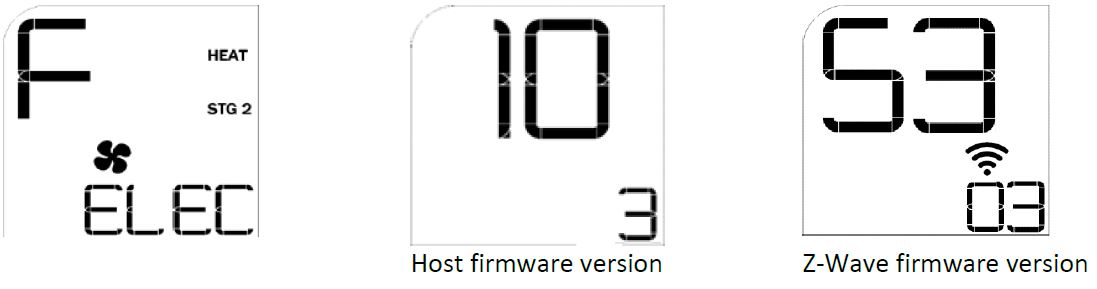
- Step 3. When the OTA upgrade is completed, check the Host firmware version on the KONOzw LCD display.
To check the firmware versions:- In HOME screen, press the knob to enter main menu and select the setting option
- When the screen show ‘iS’, rotate the knob clockwise to select YES and press to confirm
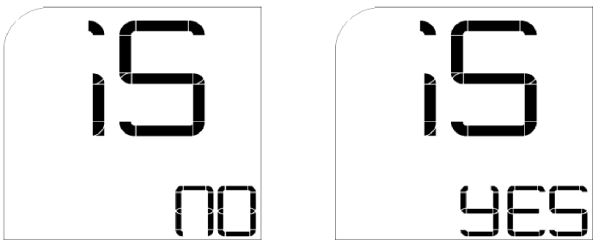
- The first screen will show the system type information. Rotate the knob clockwise to show the Host firmware version. Rotate the knob clockwise again to show the Z-Wave firmware version. Example screens:
- In HOME screen, press the knob to enter main menu and select the setting option
INSTALLATION
- Switch power off at circuit breaker to both heating and cooling systems before performing any wiring
- Remove front of existing thermostat from base
- Photograph current wiring for reference
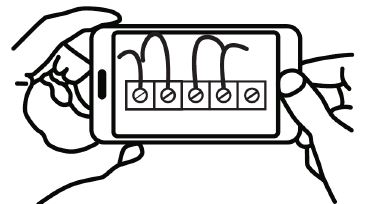
- Release wires and mounting screws and remove base from wall
- Open KONOzw from base and pull wires through
- Secure KONOzw base to wall (mounting hardware and optional wall plate included)
- Referencing your wiring photo, attach your thermostat wires to the KONOzw using your original wiring letters and the following terminal reference as a guide based upon your system type.
CONFIGURE SYSTEM AND DISPLAY SETTINGS
KONOzw will guide you through setup. Rotate the knob to navigate through options and values. To make a selection, press the knob once. To go back, press and hold the knob for 3 seconds. KONOzw will prompt you to select:
- Available system modes (heating, cooling, both, automatic)
- Temperature unit (C/F)
- System type (gas, electric, heat pump, boiler)
- Temperature swing
- Number of heating and cooling stages
- Backlight
- Factory reset
- etc
Installer settings
| Menu Item Number (temp digits) | Function Description | User Option Number (time array) | Default setting |
| 01 | Temperature Scale | F: Fahrenheit C: Celsius | F |
| 02 | User Temperature Calibration | Amb Temp
+/- 5.4OF (+/-3.0C) |
00F (00C) |
| 03 | Available modes | 00 : Heat, Cool & Auto 01 : Heat only
02 : Cool only 03 : Heat, Cool & no Auto |
01 |
| 04 | Max Heat Set Temp (skip if available modes
= cool only) |
F: 60F – 90F (C: 16C – 32C) | 900F (320C) |
| 05 | Min Heat Set Temp (skip if available modes
= cool only) |
F: 45F – 75F (C: 7C – 24C) | 450F (70C) |
| 06 | Max Cool Set Temp (maximum allowed cool set temp) | F: 60F – 95F (C: 16C – 35C) | 950F (350C) |
| 07 | Min Cool Set Temp (minimum allowed cool set temp) | F: 50F – 75F (C: 10C – 24C) | 500F (100C) |
| 08 | System Type
(skip if available modes = cool only) |
Furnace Gas Furnace Electric HP
Boiler without fan |
Furnace Gas |
| 09 | HP valve type | O: O Valve | O |
| (skip if System Type = Furnace) | B: B Valve | ||
| 10 | Minimum On/Off Time | 5: 5 minutes
2: 2 minutes |
5 |
| 11 | Swing | ±0.25°F (±0.14°C)
±0.50°F (±0.28°C) ±1.00°F (±0.56°C) ±2.25°F (±1.25°C) |
0.250F |
| 12 | Stage 2 offset (show only if systemType = Furnace & avMode != Cool only) | OFF ;
-1.0°F (-0.6°C) -2.0°F (-1.1°C) -3.0°F (-1.7°C) -4.0°F (-2.2°C) -5.0°F (-2.8°C) |
OFF / 1°F
(depends on terminal detection) |
| 13 | Stage Aux offset (show only if systemType = HP) | OFF ;
-1.0°F (-0.6°C) -2.0°F (-1.1°C) -3.0°F (-1.7°C) -4.0°F (-2.2°C) -5.0°F (-2.8°C) |
OFF / 2°F
(depends on terminal detection) |
| 15 | Backlight always on? (skip if it is battery powered) | OFF: turns off after 10s ON: always ON | OFF |
| 16 | Filter Life
(Skip if systemType = boiler without fan & avMode = Heat Only) |
OFF
30 days 60 days 90 days 120 days 180 days 365 days |
OFF |
| 98 | Compressor protection bypass | NO: no action
Yes: suspends minimum off time for next 10 mins |
NO |
| 99 | Ex-Factory Reset | NO YES | NO |
KEYPAD LOCK
KONOzw has provided the keypad lock function to limit full user-control. The function can be set either through the device itself or by Z-Wave network.
There are only 1 level of keypad lock on the device
- Level 1: Not available.
- Level 2: When keypad lock is set to level 2, both the rotary and press button will have no function and the device is not capable of leaving home screen.
To control the keypad lock at the device side:
Activate the Lock:
- Press the knob so that backlight is illuminated and home screen is displayed
- Press and Hold the knob for 10 seconds.
- After 10 seconds device will enter keypad lock level 2.
- The rotary control and press button will no longer operate, however the device can still be controlled via the App or web portal.
Cancel the lock:
- Press the knob so that backlight is illuminated and home screen is displayed
- Press and Hold the knob for 10 seconds.
- After 10 seconds device will unlock the keypad
To control the keypad lock / unlock via Z-Wave Command:
| Command Class | Command | Value Definition |
| Protection | 01 – Protection Set | 0x00 : No lockout (default) 0x01 : Reserved
0x02 : Level 2 lockout |
DEVICE RESET
Factory Reset
Note: Please use this procedure only when the network primary controller is missing or otherwise inoperable.
- Enter the installer setting menu and select the installer option #99, then press the knob to confirm.
- All the device parameters will be restored to factory default. The Z-Wave network setting will also be erased. User must perform the device inclusion with their hub / gateway again to re-establish the network.
Hardware Reset
- To reboot the device, remove the KONOzw front from the base. Locate the reset button directly above the battery compartment, then press and hold for 3 seconds to reboot. Alternatively, remove the power or battery completely and then power the device again activate the hard reset.
- Performing hardware reset will not erase the device setting and the Z-Wave network settings.
INTEROPERABILITY
This product can be operated in any Z-Wave network with other Z-Wave certified devices from other manufacturers. All non-battery operated nodes within the network will act as repeaters regardless of vendor to increase reliability of the network.
IMPORTANT:
KONOzw will act as a listening device if it is included in the Z-Wave network while on 24VAC system power, and it will act as a listening sleeping slave if it is included on battery power. DO NOT power the device by battery only if it is previously included while on the system power, otherwise it will shorten the battery life. If user desires to use battery-only power for operations, please make sure the Z-Wave inclusion is done under the battery-only powered condition.
TROUBLESHOOTING
If the device is having trouble with inclusion/exclusion with the controller
- Attempt to move the device to a location closer to the Controller.
- Remove obstacles or other wireless devices between devices to Controller. Large appliances, mirrors, stone/brick, and bookshelves or file cabinets located between the device and the Controller can interfere with communication.
- Ensure the device is compatible with the Controller.
If the device was communicating with the controller but is no longer communicating
- Check if the power cord/batteries to the device has been disconnected or if the power switch is in the OFF position.
- Turn the power to the device OFF and then ON. The device should reconnect with the controller automatically.
MANUFACTURER CONTACT INFORMATION
- If you are experiencing issues with your heating and cooling system or with your thermostat’s functionality, please contact our technical support team

DISPOSAL INSTRUCTIONS
Johnson Controls is committed to responsible environmental stewardship. Please dispose of this product in accordance with local laws and regulations in your area. Contact your local waste disposal authorities or consult www.e-cyclingcentral.com to find an electronics recycling center near you.
WARNING INFORMATION
FCC Part 15C
Warning: Changes or modifications to this unit not expressly approved by the party responsible for compliance could void the user’s authority to operate the equipment.NOTE: This equipment has been tested and found to comply with the limits for a Class B digital device, pursuant to Part 15 of the FCC Rules. These limits are designed to provide reasonable protection against harmful interference in a residential installation. This equipment generates, uses and can radiate radio frequency energy and, if not installed and used in accordance with the instructions, may cause harmful interference to radio communications.
However, there is no guarantee that interference will not occur in a particular installation.If this equipment does cause harmful interference to radio or television reception, which can be determined by turning the equipment off and on, the user is encouraged to try to correct the interference by one or more of the following measures:
- Reorient or relocate the receiving antenna.
- Increase the separation between the equipment and receiver.
- Connect the equipment into an outlet on a circuit different from that to which the receiver is connected.
- Consult the dealer or an experienced radio/TV technician for help.
This device complies with Part 15 of the FCC Rules. Operation is subject to the following two conditions:
- This device may not cause harmful interference, and
- this device must accept any interference received, including interference that may cause undesired operation. FCC RF Radiation Exposure Statement
Caution: To maintain compliance with the FCC’s RF exposure guidelines, place the unit at least 20cm from nearby persons.
RSS-247
This device contains licence-exempt transmitter(s)/receiver(s) that comply with Innovation, Science and Economic Development Canada’s licence-exempt RSS(s). Operation is subject to the following two conditions: (1) this device may not cause interference, and (2) this device must accept any interference, including interference that may cause undesired operation of the device.
REFERENCE:
DOWNLOAD MANUALS:
Johnson Controls KONOzw Smart Thermostat Operating Guide