intertechno ITH-610 wireless thermostat
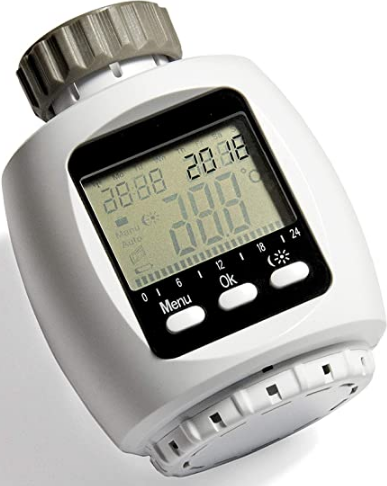
Operating instructions
- The wireless thermostat for radiators can be controlled by any inter-techno teaching transmitter.
- Choose 2 different temperatures using up to 4 transmitters or using the inter-techno Master Gate via smartphone or tablet.
- It also features a weekly program and holiday mode, which allows you to adjust the temperature manually at any time.
Inserting the batteries: Fig. 1
- Open the battery cover on the bottom and insert 2 x 1.5 volt Mignon/AA batteries, making sure the ends are facing the correct direction (negative end against the spring).
- When changing the battery, the data will remain saved for approximately 1 minute.
Mounting on the radiator valve: Fig. 2
- Mount the wireless thermostat on the radiator before you change any settings and before you teach in the transmitter.
- The accessory pack contains adapters for the most common radiator valves.
Threaded valves:
There are two common valve sizes, M30 x 1.5 and M28 x 1.5:
- M30 x 1.5: The wireless thermostat is simply screwed on directly with the grey ring.
- M28 x 1.5: The wireless thermostat is screwed on with the white ring, ensuring the washer is inserted first.
Danfoss valves: Fig. 3
- Push the adapter all the way up, paying attention to the groove in the valve.
- NOTE: For RAV valves you will need to use the pin provided.
Setting the date and time:
- Use the dial to enter the year, month and day and confirm each entry with the OK button.
- The hour will flash. Set the time using the dial and then press OK.
- Once you have adjusted the minutes using the dial and pressed OK to confirm, the thermostat will adapt to the heating valve.
- InS will be shown on the display. Press the OK button and AdA will be displayed.
- Finally, press OK again to adapt to the radiator valve.
- (if there is a faulty connection, error code F1, F2 or F3 will appear)
Setting 2 temperatures (night and daytime temperature):
- Press the button until the daytime temperature appears on the display.
- Select the temperature and confirm using the OK button.
- Next, select the night temperature and press OK.
Teach in the inter-techno transmitter:
- All teaching transmitters can be taught in, including our Smarthome products. 4 transmitters can be taught per thermostat.
- Press the Menu button until Pro appears on the display.
- Turn the dial until rFs appear on the display
- By pressing the OK button, within 30 seconds this can be taught in using the transmitTers ON or OFF signal.
- Repeat the process by pressing tor additional transmitters.
- Ful will appear on tne display at the Tourth teaching-in operation.
- Pressing tne menu Dutton takes you out or the menu.
- The daytime temperature is now selected using the On signal. remotely at any time in either Mar done the temperature remotely at any time in either Manu or Auto operation.
- Note: Wireless remote control is not possible in holiday mode.
- Delete: 1o delete all codings (transmitters). go to Unl in the menu and confirm using OR, exit tne menu using the menu button.
Setting the weekly program
- Press the Menu button until it appears on the display. individual days, a whole week or even MON-FŘ/SAT-SUN. Confrm aucino the Ok h d
- 3 on and off times are available at which a certain temperature can be selected.
- Select a start time with the dial and press OK to confirm.
- Select a finish time with the dial and press OK to confirm.
- select the desired temperature with the dial and press OK.
- YOu will automaticaly be taken to the next time selection screen, proceed as described above.
- If you only require two on/off times, select the same on/off time twice. appeal to me repeatedly pressing the menu button until ‘Auto
- EEY program oy Repeatedly pressing the menu button until “Auto appears.
- The selected times are shown on the display (12/13).
- The temperature can be changed at any time in the weekly program either wire lessly or by using the dial.
Holiday mode
This mode is used to set a desired temperature for when you’re away on holiday (eg. Press the Menu button until appears on the display.The time will flash. Enter the time (by the hour), date and temperature until you return using the dial, and then press the OK button.
This mode is used to set a desired temperature for when you’re away on holiday (eg. Press the Menu button until appears on the display.The time will flash. Enter the time (by the hour), date and temperature until you return using the dial, and then press the OK button.
Note: The thermostat cannot be controlled wirelessly when in Holiday mode! If you would like to switch to the higher selected temperature using your smartphone Derore you arrive, we recommend setting a minimum temperature to avoid rost using an inter-techno Gateway (e.a. MasterGatol temperature remotely
Child lock
- Press the buttons and MENU simultaneously, “LOC” will then be displayed on the screen.
- Press again to deactivate the child safety lock.
Press the Menu button until Pro appears on the display to enter the menu. Likewise, to exit the menu, briefly press the Menu button. Use the dial to access the menu options. Confirm your selection by pressing OK.
- Pro Weekly program
- dAt Date/Time
- AEr Time for the “Window open” recognition feature. The wireless thermostat switches off for a specified period of time as soon as the temperature drops by 1.5°C within 3 minutes. This time can be defined here.
This feature is only active in Auto mode - toF Temperature correction: If the thermostat displays a different temperature to the room thermostat, e.g. because of where it was installed, it can be adjusted by +/-3.5″.
- rES Reset (Factory settings)
- rFS Teach-in operation
- UnL Delete transmitter
- tEP Display the current room temperature for 30 sec.
- InS Adjust the radiator valve (if the thermostat has been removed in the past)

intertechno ITH-610 wireless thermostat Operating Instruction