Insbud Controls TS24HC Programmable Thermostat
Introduction
- Intelligent Temperature Regulation: The Insbud Controls TR3500 Programmable Thermostat is a state-of-the-art device that ensures accurate and reliable temperature regulation, allowing you to maintain the perfect indoor climate.
- Customizable Programming: Take control of your comfort with the thermostat’s programmable capabilities. Create personalized heating and cooling schedules to match your daily routines and preferences, optimizing energy usage and reducing utility bills.
- User-Friendly Interface: Featuring an intuitive digital display and easy-to-use controls, the TR3500 thermostat allows for effortless adjustments, making it accessible to all users.
- Energy Efficiency at Its Core: By utilizing programmable schedules and temperature adjustments, the TR3500 thermostat promotes energy efficiency, contributing to a greener and more sustainable environment.
- Versatile Operating Modes: Choose from various operating modes, such as heating, cooling, or auto, to cater to different weather conditions and seasons, ensuring year-round comfort.
- Vacation Mode: When you’re away from home or the office for an extended period, engage the “Vacation” mode to set an energy-saving temperature, allowing you to return to a comfortable environment upon your arrival.
- Anti-Freeze Function: During colder periods, the TR3500 thermostat includes an anti-freeze function to protect your space and maintain a safe temperature to prevent freezing.
- Memory Function: Rest assured that your programmed settings are saved, even during power outages, thanks to the thermostat’s memory function.
- Reliable Performance: Built with Insbud Controls’ commitment to quality, the TR3500 thermostat is designed for reliability and durability, ensuring years of trouble-free operation.
- Simple Installation: The TR3500 thermostat is designed for easy installation, making it accessible for homeowners and professionals alike.
Specification
- Power supply: 24VAC Insbud Controls,
- Inputs: 1x NTC10K built-in temperature sensor
- Outputs: 1X Zone valve or thermal valve for heating
- 1X Zone valve or thermal valve for cooling
- 3amps each;
- can be dry contacts(selectable by jumper)
- Ambient temperature: 0 °C [+32 °F] ~ +45 °C [+113 °F]
- Operating RH: 0~95% (noncondensing).
- Dimensions:127mm x 95mm x31mm
- Backlight life: 5,000 hours.
- Battery type: CR 1220 (Backs up clock only)
- Battery life: > 5years (10 years Maximum)
What Is In The Box
- Thermostat
- User Manual
- Screws
- External Sensor
Display
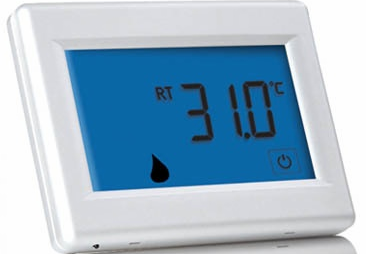
- Large, 4.3-inch touchscreen display;
- Blue, lighted display for easier low-light viewing;
- Larger, easy-to-read character size;
- Extra-large touch keys for easy operation;
- Clean, uncluttered touchscreen display provides easier navigation.
Usage
Using the Insbud Controls TR3500 Programmable Thermostat is simple and efficient, allowing you to regulate the temperature in your residential or commercial space with ease. Here’s a step-by-step guide on how to use the thermostat:
- Installation: Before using the thermostat, ensure it is properly installed and connected to your HVAC system following the manufacturer’s installation instructions. If you are unsure about the installation process, it’s best to seek professional assistance.
- Power On: Power on the thermostat by connecting it to the electrical supply. The digital display should light up once it is powered on.
- Initial Setup: If the thermostat requires initial setup, follow the on-screen prompts to configure the date, time, and basic settings.
- Temperature Adjustment: Use the thermostat’s intuitive digital display and responsive controls to adjust the desired temperature. Press the up or down buttons to increase or decrease the temperature setting to your preferred comfort level.
- Programmable Scheduling: Take advantage of the thermostat’s programmable capabilities to create personalized heating and cooling schedules. Access the programming menu and follow the instructions to set different temperature levels for various times of the day and days of the week to match your daily routines.
- Operating Modes: Select the appropriate operating mode for your needs. You can choose from heating, cooling, or auto mode, depending on the weather conditions and seasons.
- Vacation Mode: Before leaving for an extended period, engage the “Vacation” mode to set an energy-saving temperature, ensuring you return to a comfortable environment while saving energy during your absence.
- Override Function: To temporarily adjust the temperature without altering the programmed schedule, use the “Override” function. This provides flexibility when you need to deviate from the standard settings.
- Anti-Freeze Function: Activate the anti-freeze function during colder periods to prevent freezing and maintain a safe temperature in the space.
- Memory Function: Rest assured that your programmed settings are saved, even during power outages, thanks to the thermostat’s memory function.
- Review and Adjust: Periodically review your thermostat’s programmed schedules and settings. Make adjustments as needed to accommodate changes in your lifestyle and preferences.
- Smartphone App Integration (If Applicable): If the thermostat integrates with a smartphone app, download and install the app on your compatible device. Connect the thermostat to the app following the provided instructions. This allows for remote control and access to additional features.
FAQS
Q1: What is the Insbud Controls TR3500 Programmable Thermostat?
A: The Insbud Controls TR3500 Programmable Thermostat is an advanced device designed for precise temperature control, energy efficiency, and user-friendly programming.
Q2: How does the TR3500 thermostat regulate the temperature in space?
A: The thermostat uses advanced technology to measure and adjust the temperature accurately, maintaining a comfortable indoor environment.
Q3: Can I create personalized heating and cooling schedules with the TR3500 thermostat?
A: Yes, the thermostat offers programmable capabilities, allowing users to create customized schedules for different times and days, maximizing comfort and energy savings.
Q4: Is the TR3500 thermostat easy to use?
A: Yes, the thermostat features an intuitive digital display and user-friendly controls, making it easy to set and adjust the desired temperature.
Q5: How does the programmable feature contribute to energy efficiency?
A: By setting specific heating and cooling schedules and temperature levels, the programmable feature helps optimize energy consumption, leading to cost savings.
Q6: Does the TR3500 thermostat support different operating modes?
A: Yes, the thermostat provides various operating modes, such as heating, cooling, or auto, to cater to different weather conditions and seasons.
Q7: Can I set the TR3500 thermostat to an energy-saving temperature when I go on vacation?
A: Yes, the thermostat includes a “Vacation” mode that allows you to set an energy-saving temperature during your absence.
Q8: How does the anti-freeze function work in the TR3500 thermostat?
A: The anti-freeze function protects your space during colder periods by maintaining a safe temperature to prevent freezing.
Q9: Does the TR3500 thermostat have a memory function?
A: Yes, the thermostat includes a memory function that retains programmed settings, even during power outages.
Q10: Is the TR3500 thermostat suitable for both residential and commercial spaces?
A: Yes, the thermostat is designed for versatile use in both residential homes and commercial establishments.
Q11: What are the key benefits of using the Insbud Controls TR3500 Programmable Thermostat?
A: The main benefits include precise temperature control, customizable programming, energy efficiency, anti-freeze function, and compatibility with different HVAC systems.
Q12: How can I ensure reliable performance of the TR3500 thermostat?
A: Regularly check and clean the thermostat to ensure accurate temperature readings and follow the maintenance guidelines provided in the user manual.
Q13: Can I integrate the TR3500 thermostat with a smart home system?
A: The TR3500 thermostat may or may not have smart home integration capabilities. Please check the product specifications and user manual for compatibility details.
Q14: Is professional installation required for the TR3500 thermostat?
A: While the thermostat can often be installed by homeowners, it is recommended to follow the manufacturer’s guidelines or seek professional assistance for proper installation and setup.
Q15: Is the TR3500 thermostat equipped with a dual-zone control feature?
A: The TR3500 thermostat does not have dual-zone control; however, it offers programmable capabilities to set different schedules for various times and days
