
Insbud Controls TR5100AC Fan Coil Thermostat
Introduction
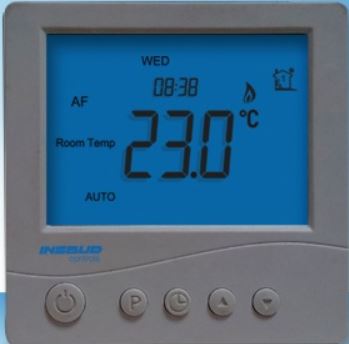
The TR5100AC series thermostat is a stand-alone microprocessor-based thermostat with LCD display. The thermostats are designed to control room temperature by way of on/off controlling the fan coil units(with or without motorized valves), air damper or electric heaters in heating, cooling, and ventilation applications.
Specification
- Power Consumption: < 2W
- Set point Range: 5~35 degree C
- Accuracy: +/-1 degree C
- Max. Load: 400W
- Power Supply: 220V AC + 15% 50/60Hz
- Housing: Anti-flammable ABS
- Dimension: 86X86X13 MM
- Agency Approval: CE compliant
What Is In The Box
- Thermostat
- User Manual
- Screws
- External Sensor
Features
- Large LCD, Luxurious appearance
- Microprocessor-based
- Reliable separate power unit
- Large digital temperature display, easy to operate
- Time display and weekday display
- Adjustable High/medium/low fan speed
- Heating / Cooling mode selection
- Customizing available
Usage
Using the Insbud Controls TR5100AC Fan Coil Thermostat is straightforward and efficient, allowing you to regulate the temperature and airflow in your fan coil unit for maximum comfort. Here’s a step-by-step guide on how to use the thermostat:
- Installation: Before using the thermostat, ensure it is properly installed and wired to your fan coil unit according to the manufacturer’s installation instructions. If you are unsure about the installation process, it’s best to seek professional assistance.
- Power On: Once the thermostat is properly installed and wired, power on your fan coil unit. The TR5100AC thermostat will activate once the power is supplied to the fan coil unit.
- Temperature Adjustment: Use the thermostat’s intuitive interface to adjust the desired temperature. Depending on the model, you may have buttons or a touchscreen display for temperature adjustments. Press the up or down buttons or tap the screen to increase or decrease the temperature setting to your preferred comfort level.
- Fan Speed Control: If your fan coil unit supports multiple fan speeds, use the thermostat’s fan speed control function to adjust the airflow according to your preferences. Select the appropriate fan speed setting for your comfort needs.
- Operating Modes: The TR5100AC thermostat offers various operating modes, such as cooling, heating, fan-only, and auto. Select the mode that matches the current weather conditions and your desired indoor comfort.
- Programmable Scheduling (If Applicable): Depending on the thermostat model, you may have programmable capabilities. If available, take advantage of this feature to create customized heating and cooling schedules based on different times and days of the week.
- Vacation Mode: If your TR5100AC thermostat includes a “Vacation” mode, use it before leaving for an extended period. Engaging this mode allows you to set an energy-saving temperature while you’re away, helping you save on energy costs.
- Override Function: To temporarily adjust the temperature or fan speed without affecting the programmed schedule, use the “Override” function. This provides flexibility when you need to make immediate changes.
- Air Quality Monitoring (If Applicable): If your thermostat includes air quality monitoring, keep an eye on the indoor air conditions to ensure a healthy and comfortable environment.
- Review and Adjust: Periodically review your thermostat’s settings and make adjustments as needed to match changes in weather or your lifestyle.
How To Operate
To operate the Insbud Controls TR5100AC Fan Coil Thermostat, follow these steps:
- Power On: Ensure the thermostat is properly installed and wired to your fan coil unit. Once the power is supplied to the fan coil unit, the thermostat will activate automatically.
- Temperature Adjustment: Use the thermostat’s interface to adjust the desired temperature. Depending on the model, you may have buttons or a touchscreen display. Press the up or down buttons or tap the screen to increase or decrease the temperature setting to your preferred comfort level.
- Fan Speed Control: If your fan coil unit supports multiple fan speeds, use the thermostat’s fan speed control function. Select the appropriate fan speed setting for your comfort needs.
- Operating Modes: The thermostat offers various operating modes, such as cooling, heating, fan-only, and auto. Select the mode that matches the current weather conditions and your desired indoor comfort.
- Programmable Scheduling (If Applicable): Depending on the model, you may have programmable capabilities. If available, take advantage of this feature to create customized heating and cooling schedules based on different times and days of the week.
- Vacation Mode: If your TR5100AC thermostat includes a “Vacation” mode, use it before leaving for an extended period. Engaging this mode allows you to set an energy-saving temperature while you’re away, helping you save on energy costs.
- Override Function: To temporarily adjust the temperature or fan speed without affecting the programmed schedule, use the “Override” function. This provides flexibility when you need to make immediate changes.
FAQS
Q1: What is the Insbud Controls TR5100AC Fan Coil Thermostat?
A: The Insbud Controls TR5100AC is a specialized thermostat designed specifically for fan coil units, providing precise temperature control and energy efficiency.
Q2: What type of HVAC systems is the TR5100AC thermostat compatible with?
A: The TR5100AC thermostat is designed for use with fan coil units.
Q3: How does the TR5100AC thermostat regulate temperature in fan coil units?
A: The thermostat uses advanced technology to accurately measure and control the temperature, ensuring optimal comfort levels.
Q4: What are the key features of the TR5100AC thermostat?
A: The main features include fan coil control, customizable settings, energy efficiency, multiple operating modes, backlit display, fan speed control, and reliable performance.
Q5: Can I customize the temperature and fan speed settings with the TR5100AC thermostat?
A: Yes, the thermostat allows you to set different temperature levels and fan speeds to suit your preferences and create a comfortable environment.
Q6: How does the TR5100AC thermostat contribute to energy efficiency?
A: By providing precise temperature control and customizable settings, the TR5100AC helps optimize energy usage and reduce energy costs.
Q7: What are the available operating modes in the TR5100AC thermostat?
A: The thermostat offers multiple operating modes, including cooling, heating, fan-only, and auto, to adapt to different weather conditions and seasons.
Q8: Is the thermostat’s display backlit for easy visibility?
A: Yes, the TR5100AC thermostat features a backlit display, ensuring visibility and readability in various lighting conditions.
Q9: Can I install the TR5100AC thermostat myself, or do I need professional assistance?
A: The thermostat is designed for simple installation and can be installed by homeowners. However, if you are unsure, it’s best to seek professional assistance.
Q10: How does the memory function work in the TR5100AC thermostat?
A: The thermostat’s memory function saves your settings, including temperature and fan speed, even during power outages.
Q11: Is the TR5100AC thermostat suitable for both residential and commercial applications?
A: Yes, the thermostat is designed for use in both residential homes and commercial spaces with fan coil units.
Q12: How reliable is the performance of the TR5100AC thermostat?
A: The TR5100AC thermostat is built with Insbud Controls’ commitment to quality, ensuring reliable and durable operation.
Q13: Can I adjust the fan speed with the TR5100AC thermostat?
A: Yes, the thermostat provides fan speed control options, allowing you to adjust the airflow according to your preferences.
Q14: Is the thermostat user-friendly for all users?
A: Yes, the TR5100AC thermostat features a user-friendly interface, making it easy to use for all users.
Q15: How can the TR5100AC thermostat enhance my indoor comfort experience?
A: By providing precise temperature control, customizable settings, and fan speed control, the TR5100AC ensures your fan coil unit delivers optimal indoor comfort tailored to your needs.