Hunter 44760 Programmable Thermostat
 Introduction
CONGRATULATIONS!
- Your new Hunter electronic thermostat will provide years of reliable service. By saving energy, your thermostat will pay for itself during its first season of use. Thank you for buying a Hunter product!
- Please read this manual for complete instructions on installing and operating your thermostat. If you require further assistance, call Hunter Support at 888- 830-1326 from 8 AM to 5 PM Central Time.
IMPORTANT
Read the entire installation section of this Owner’s Manual thoroughly before you begin to install or operate your
Hunter Thermostat.
Remove the Mylar label from the LCD display window.
ARMCHAIR PROGRAMMING
You can program your thermostat before installation by inserting the batteries and following the instructions starting on page 16. This can be done while you relax in your favorite chair and is a very good way to familiarize yourself with all the functions of your Hunter Thermostat.
SYSTEM COMPATIBILITY
Your Thermostat is designed to operate these 24-Volt systems:
- Multi-stage heat pumps with auxiliary heat
- Single-stage heat pumps
- 2, 3, or 4 wire gas, oil, and electric furnaces and air conditioning systems
- This thermostat will not control 120/240 Volt systems or millivolt systems.
COMPRESSOR PROTECTION
The thermostat provides a 3.5 minute delay after shutting off the heating or cooling system before it can be restarted. This feature will prevent damage to your compressor caused by rapid cycling.
TEMPERATURE RANGE
6Your thermostat can be programmed between 45°F and 95°F (7°C and 35°C). However, it will display room temperatures from 15°F to 99°F (-9°C and 37°C). “HI” will be displayed if the temperature is higher than 99°F (37°C), and “LO” will be displayed if the temperature is lower than 15°F (-9°C).
AUTO RECOVERY
Your thermostat is set from the factory to gradually recover the room temperature from an energy saving program to your comfort program. Therefore, the thermostat may turn your system on several minutes prior to your programmed time. This operation is normal, but can be turned off. Refer to the Options
OPERATION
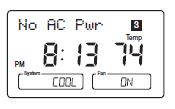
This system operates on your system’s 24 Volt power supply. The supply is monitored by the thermostat, and it will stop functioning if AC power is lost. (When using backup batteries, “No AC Pwr” will be displayed.) All system controls will remain off until power is restored.
NOTE: The INDIGLO® Night-Light will not function when AC power is lost.
BATTERY WARNING
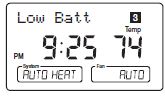
Fresh alkaline batteries will provide over one year of memory backup and clock operation. However, when the batteries become drained, a low battery warning will appear on the display. When this message occurs, install 2 new AAA batteries. You have approximately 30 seconds when changing the batteries to keep thermostat’s clock and program settings.
NOTE: The default system selection at power-on is HEAT. Batteries are recommended to prevent an undesired system change due to a power outage
Features

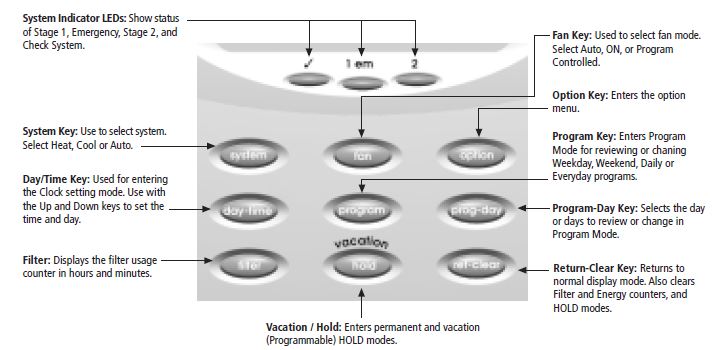
What You Need
This thermostat includes two #8 slotted screws and two wall anchors for mounting. To install your thermostat, you should have the following tools and materials.
- Slotted Screwdriver(s)
- Electric drill and 3/16″ bit
- Phillips Screwdriver
- Two 1.5 V (AA) size alkaline batteries
- Hammer
Remove Old Thermostat
CAUTION: Do not remove any wiring from existing thermostat before reading the instructions carefully. WIRES
MUST BE LABELED PRIOR TO REMOVAL.
- IMPORTANT! Turn off the power to the furnace at the main power panel or at the furnace.
- Remove existing thermostat cover. See Figure 1. Some thermostats will have screws or other locking devices that must first be removed. Once wall mounting plate is exposed, look for wires.
- If wires are not visible, they may be connected to the back of the wallplate. Again, look for screws, tabs, etc. Some models have doors that open to expose wires and mounting screws.
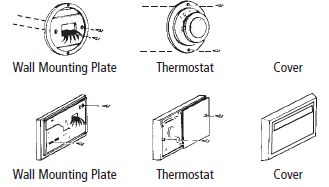
Wire Labeling
- Each wire coming from the wall to the existing thermostat is connected to a terminal point on that thermostat. Each of these terminal points is usually marked with a code letter as shown in Table A on the next page.
- The number of wires in your system can be as few as four (for single-stage systems), as many as eight, or any number in between. If you follow the labeling procedures correctly, you do not have to be concerned about how many wires there are.
- IMPORTANT! BEFORE DISCONNECTING ANY WIRES, APPLY THE SELF-ADHESIVE LABELS PROVIDED TO THE WIRE AS SHOWN IN TABLE A and B ON PAGES 12-13. (For example, attach the label marked W to the wire that goes to the W or H terminal on your existing thermostat.) IGNORE THE COLOR OF THE WIRES since these do not always comply with the standard.
- After labeling wires, disconnect them from the existing thermostat terminals.
- Remove existing wallplate. To make sure wires do not fall back into wall opening, you may want to tape them to the wall.
- If hole in wall is larger than necessary for wires, seal this hole so that no hot or cold air can enter the back of the thermostat from the wall. This air could cause a false thermostat reading.
INSTALLATION
TABLE A – TERMINAL DESCRIPTIONS
| TERMINAL FUNCTION | ||
| LABELS | (HEAT PUMP) | COMMENTS |
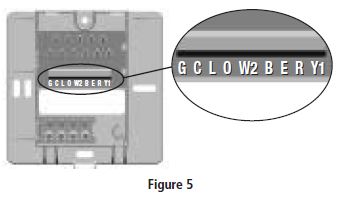
| R | 24V AC supply | Hot wire of 24VAC transformer. Powers the thermostat & system. |
| Y1 | Compressor stage 1 | Activates the 1st stage compressor. (Heat or Cool for Heat Pumps) |
| W2 | Auxiliary heating | Activates the 2nd stage (auxiliary) heating when required. |
| E | Emergency heating | Activates Emergency heating ONLY when the System Switch is in Emergency (em) Mode. |
| O | Reversing valve (cooling mode) | Activates reversing valve in COOL mode. ALWAYS ON in COOL MODE. |
| B | Reversing valve (heating mode) | Activates reversing valve in HEAT mode. ALWAYS ON in HEAT MODE. |
| G | Fan | Activates the system Fan. (Can be Auto, On, or Program controlled) |
| L | System monitor | Activates System Check LED on the front of thermostat. (Controlled by the system, not the thermostat.) |
| C | 24V AC common | Common wire of 24V AC transformer. REQUIRED for thermostat operation. |
TABLE B HEAT PUMP CROSS-REFERENCE CHART
| EXAMPLES OF DIFFERENT SYSTEM TERMINALS | |||||||||
|
HUNTER TERMINALS |
CARRIER |
COLEMAN |
COMFORTMAKER |
BRYANT, PAYNE |
RHEEM- RUUD |
WEATHERTRON |
YORK |
LENNOX (1) |
LENNOX (2) |
| R | R | R | R | R | R | R | R | R | V-VR |
| Y1 | Y or Y1 | Y | Y | Y | Y | Y | Y | Y | M |
| W2 | W2 | W2 | W1 | W2 | W2 | W-U | W | W1 | Y |
| E | E | E | jumper to W2 | E | E | jumper to W2 | jumper to W2 | E | E |
| O | O | O | O | O | O | O | R | ||
| B | B | B | |||||||
| G | G | G | G | G | G | G | G | G | F |
| L | L or F | L | L or X | L | L | X | L | ||
| C | C | X | C, X, X1 | C, C1, X1 | X | B | B | C | X |
| Note: W2 wires no connection | Note: X2 & T wires no connection | ||||||||
Mount Wallplate and Thermostat
- Remove the wallplate from your thermostat by pressing the release tab on the bottom of the thermostat.
- Position wallplate on wall and pull existing wires through large opening. Then level for appearance. Mark holes for plastic anchors provided if your existing holes do not line up with those on the Hunter wallplate.
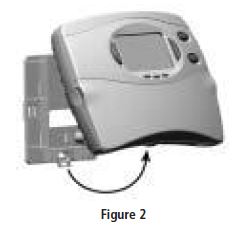
- Drill holes with 3/16″ bit and gently tap anchors into the holes until flush with wall.
- Reposition wallplate to wall, pulling wires through large opening. Insert mounting screws provided into wall anchor and tighten.
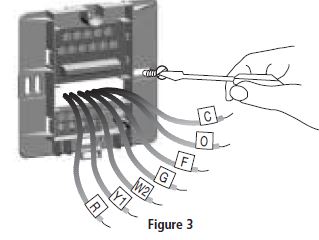
Connect Wires and Mount Thermostat to Wallplate
- Straighten bare end of each wire and cut or strip it to 1/4” maximum. Insert each labeled wire into the bottom of the maching terminal.
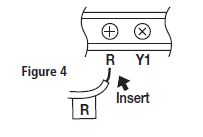
- Hold the wires in each terminal and tighten the terminal screws securely, otherwise a loose wire could cause operational problems with your system or thermostat.
- Push excess wire back into hole to prevent interference with mounting of the thermostat.
- Make sure the Power Switch is set to OFF.
- Insert two AAA size alkaline batteries, observing the polarity marked on the unit.
- Insert the upper tabs on the thermostat body into the slot at the top of the wallplate.
- Press bottom of the thermostat body to snap it into the wallplate.
- (NOTE: Do not force the thermostat onto the wallplate, as the terminal pins may be damaged. If it does not snap properly, the thermostat may not work.)
- Switch on the main power at the panel or furnace
PROGRAMMING
Option Menu
Your thermostat has many settings that can be adjusted to fit your system and preferences.
 Press to enter the Option Menu and to change to the next option selection.
 Press at any time to return to normal mode.
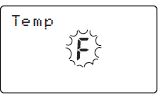
Fahrenheit or Celsius (F°/C°) selection
 to change the thermostat display between
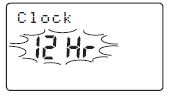
12 Hr or 24 Hr. Clock selection
to change the time format display between 12 hour (AM / PM) and 24 hour (military).
Stage 1 SPAN selection
to change the SPAN setting to 1, 2, or 3. The factory setting is 2. Setting 1 will cause shorter cycle times. Setting 3 will cause longer cycle times.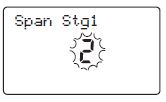
Auto Recovery selection
- to enable “YES” or disable “NO” the Auto
- Recovery Mode. The factory setting is “YES.”
- To change between Heat or Cool recovery modes.
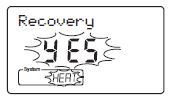
NOTE: Auto Recovery is one of the ENERGY STAR® features of this thermostat. Refer to the Auto Recovery section on pages 45-46 for more information.
LCD Contrast adjustment
to change the LCD contrast between 0 and 9. Lower numbers lighten the display. Higher numbers darken the display. The factory setting is 5.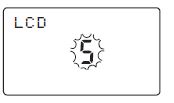
Setting Time and Day
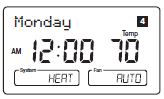
- The LCD will show this information when batteries are first installed, or after the Reset button is pressed. The temperature will update after a few seconds.
- During time and day setting mode, the temperature and program displays will go blank.
- Example: Set the Thermostat to the current time of 2:16 PM on Saturday. Refer to the Steps below.
Steps
- Step 1
 Press to enter time and day setting mode. The current hour and the AM / PM indicator will be flashing.
- Press to change the Hour up or down to the current hour.
- Note the AM / PM indicator, as the display will change at 12 AM and 12 PM.
- Step 2
- Press again to change from hour setting to minute setting. The current minute will be flashing.
- Press to change the Minute up or down to the current minute.
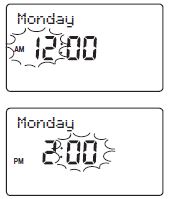
- Step 3
- Press again to change from minute setting to day setting. The current day will be flashing.
- Press to change the Day up or down to the current day.
- Step 4
- or
 Press again to change back to the normal display.
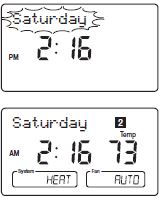 NOTE: You may press ret-clear at any time during Day and Time setting to return to the normal display.
12 Hr. / 24 Hr. Time Format
Your thermostat is set from the factory in normal 12 (AM / PM) time format. To change to 24 hour (military) time, press option at any time while the Hour, Minute, or Day is flashing to toggle between the 12 hour and 24 hour formats. The AM / PM indicator will not be displayed in 24 hour mode. Both the current time and all programs will automatically change to the selected format. The time format may also be changed in the Option Menu.
Programming Introduction
Studies conducted by the Department of Energy estimate that setting your thermostat back 10°F (6°C) for two 8-hour periods during winter can reduce your fuel bill by as much as 33%. By setting your thermostat up 5°F (3°C) for two 8-hour periods during summer you can reduce your fuel bill up to 25%. Your thermostat is capable of holding up to 4 separate programs for each day of the week. You can program weekdays as a group, weekends as a group, all 7 days individually or everyday as a group. The system fan may also be set to run continuously during a program time period. Your Hunter thermostat is pre-programmed to meet the ENERGY STAR® guidelines for energy efficiency.
At power-up or after a reset, all 7 days of the week have these default programs:
| Temperature in F° (C°) | |||
| Program Number | Time | Heat | Cool |
| 1 | 6:00am | 68°F (20°C) | 78°F (26°C) |
| 2 | 8:00am | 60°F (16°C) | 85°F (29°C) |
| 3 | 4:00pm | 68°F (20°C) | 78°F (26°C) |
| 4 | 10:00pm | 60°F (16°C) | 82°F (28°C) |
Personal Program Schedule
Before changing programs, use this Personal Program Schedule to determine which times and temperature settings will best satisfy both your comfort and energy saving requirements Use a pencil so you can revise your records each time you change your temperature settings
Heating
| Day | Prog. 1 | Prog. 2 | Prog. 3 | Prog. 4 | ||||
| Mon. | Time | Temp | Time | Temp | Time | Temp | Time | Temp |
| Tues. | Time | Temp | Time | Temp | Time | Temp | Time | Temp |
| Wed. | Time | Temp | Time | Temp | Time | Temp | Time | Temp |
| Thurs. | Time | Temp | Time | Temp | Time | Temp | Time | Temp |
| Fri. | Time | Temp | Time | Temp | Time | Temp | Time | Temp |
| Sat. | Time | Temp | Time | Temp | Time | Temp | Time | Temp |
| Sun. | Time | Temp | Time | Temp | Time | Temp | Time | Temp |
Cooling
| Day | Prog. 1 | Prog. 2 | Prog. 3 | Prog. 4 | ||||
| Mon. | Time | Temp | Time | Temp | Time | Temp | Time | Temp |
| Tues. | Time | Temp | Time | Temp | Time | Temp | Time | Temp |
| Wed. | Time | Temp | Time | Temp | Time | Temp | Time | Temp |
| Thurs. | Time | Temp | Time | Temp | Time | Temp | Time | Temp |
| Fri. | Time | Temp | Time | Temp | Time | Temp | Time | Temp |
| Sat. | Time | Temp | Time | Temp | Time | Temp | Time | Temp |
| Sun. | Time | Temp | Time | Temp | Time | Temp | Time | Temp |
Programming
Your thermostat can be programmed for weekdays and weekends, have unique programs for all 7 days, or the same program for everyday. Use Weekday/Weekend Programming on page 24, 7-day Programming on page 26, or Everyday Programming on page 28 to enter or revise programs to match your Personal Program Schedule. Familiarize yourself with Manual Programming, so that you can easily modify your programs as your comfort needs change. Follow the steps below to change the program times and temperatures.
NOTE: The program time can be set in 10 minute increments, and remains the same for both Heat and
Cool programs.
- The program temperature can be set in increments of 1°F (1°C).
- The Heat setpoint can not be set higher than the Cool setpoint, and the Cool setpoint can not be set lower than the Heat setpoint.
- If the system selector is in AUTO mode, the current operating mode will be used for programming.
- After 15 seconds without a key press, the thermostat will return to normal display mode.
- When setting the program time, note the AM / PM indicator.
- With the Auto Recovery feature enabled, you do not need to set your comfort program times early. Auto Recovery will determine how early to turn your system on, so that the room is comfortable at the program time.
Weekday/Weekend Programming
- Step 1
 Slide Power Switch to ON.
- Press to select HEAT or COOL to program the corresponding system. (AUTO may be selected, but does not affect the programming steps.)
NOTE: If the power switch is in the OFF position, the last system selected will be programmed.
- Step 2
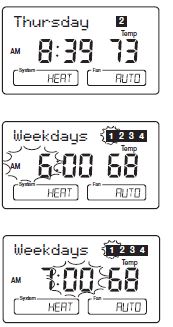
 Press to enter program mode. Weekdays are displayed and program 1 is flashing.
- Step 3
- The Program hour and AM or PM indicator are flashing. Press to change the hour.
- Step 4
- Press again to change to the minute position. The current minute will be flashing.
- Press to change the minute
- Step 5
- Press again to change to the program temperature. The current temperature will be flashing.
- Press to change the temperature.
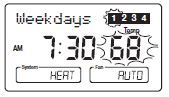
- Step 6
- Press again to move to the next program number.
- Repeat Steps 3 through 5 to change the remaining Weekday programs.
- Step 7
 Press to change to Weekend programs.
- Repeat steps 3 through 5 to complete the weekend programs.
- Press at any time to exit the Program Mode.
- After 15 seconds, the thermostat will return to normal mode automatically.
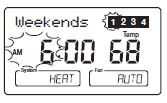
- Step 8
 Change to the other system, and repeat steps 2 through 7.
7-Day Programming
- Step 1
- Slide Power Switch to ON.
- Press to select HEAT or COOL to program the corresponding system.
- (Auto may be selected, but does not affect the programming steps)
- Step 2
- Press to enter program mode, display shows weekday programs.
- Press 2 times to reach the Monday program.
- Step 3
- The Program hour and AM or PM indicator are flashing. Press to change the hour.
- The Program hour and AM or PM indicator are flashing. Press
- Step 4
- Press again to change to the minute position. The current minute will be flashing.
- Press to change the minute.
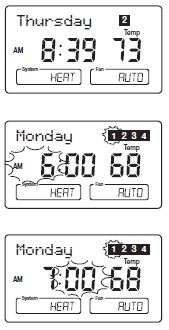
- Step 5
- Press again to change to the program temperature. The current temperature will be flashing.
- Press to change the temperature.
- Step 6
- Press to move to programs 2, 3 and 4.
- Repeat Steps 3 through 5 to complete the programs for Monday.
- Step 7
- Press to change to the next day’s programs.
- Repeat Steps 3 through 6 to complete the selected day’s programs.
- Continue repeating Steps 3 through 7 to program all 7 days of the week.
- Step 8
- When finished, press to return to normal mode.
- After 15 seconds, the thermostat will return to normal mode automatically.
- Step 9
- Change to the other system and repeat steps 2 through 8 above.
Everyday Programming
- Step 1
- Slide Power Switch to ON.
- Press to select HEAT or COOL to program the corresponding system. (Auto may be selected, but does not affect the programming steps)
- Step 2
- Press to enter program mode, display shows weekday programs.
- Press 9 times to reach the Everyday program.
- Step 3
- The Program hour and AM or PM indicator are flashing. Press to change the hour.
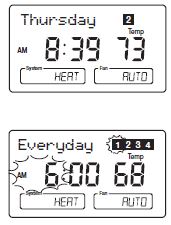
- Step 4
- Press again to change the minute position. The current minute will be flashing.
- Press to change the minute.
- Step 5
- Press again to change to the program temperature. The current temperature will be flashing.
- Press to change the temperature.
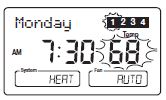
- Step 6
- Press again to move the next program number.
- Repeat Steps 3 through 5 to change the remaining programs.
- Press at any time to exit the Program Mode.
- After 15 seconds, the thermostat will return to Normal mode automatically.
- Step 7
- Change to the other system and repeat steps 2 through 6.
Program Options
Programmable Fan
 Any time during programming, this will change the fan display between “AUTO” and “ON” for the selected system and Program number. (Heat and Cool can be set separately.)
- “AUTO” = Fan control runs when the system is ON
- “ON” = Fan control runs continuously
NOTE: Fan must be set to “PGM” for the Programmable Fan to be activated.
Reviewing Programs
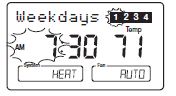
- You may want to review the programs to confirm that the settings are compatible with your lifestyle.
- Press to display M – F programs.
- Press repeatedly to cycle through the 4 programs.
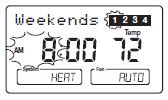
Weekend Programs
- Press to display the Sa – Su programs.
- Press repeatedly to cycle through the 4 programs.
Daily and Everyday Programs
- Press to display M – F programs.
NOTE: Time or Temperature display will be blank when at least one weekday program is different. (All programs will de displayed if programmed in Everyday mode.)
- Press to change to Sa – Su. Again, if part of the display is blank, one of the weekend programs is different.
- Press again to change to Monday’s program.
- Continue pressing to cycle through each day, or to reach the Everyday programs.
- Press repeatedly to cycle through the 4 programs.
- Press to return to normal mode.
- After 15 seconds, the thermostat will return to normal mode automatically.
NOTE: Programs take affect as soon as the thermostat returns to normal mode. If you are armchair programming the thermostat, slide the system selector to the OFF position before mounting the thermostat to the wallplate
Power Switch
- The Power switch on the front of the thermostat determines the operating mode of the thermostat.
- You may select ON, OFF or Emergency Heat (EM). When the Power Switch is OFF, all outputs are positively disconnected from the system.
NOTE: Anytime you install or remove the thermostat from the wallplate, slide the Power Switch to the OFF position to prevent the possibility of a rapid system On-Off.
System Selection Key
- Press to select the desired system.
- When Auto is selected, the system will change between Heat and Cool automatically. Refer to the Auto Season Changeover section on page 39.
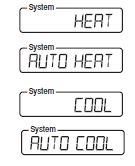
NOTE: The default system selection at power-on or after a resetis HEAT. Therefore it is recommended that 2 AAA batteries be used for backup during power outages.
Fan Key
- Press to set the fan operation.
- AUTO: the fan will turn on with the system.
- ON: the fan will run continuously. PGM Auto or ON: (Programmable Fan) The fan will select AUTO or ON, depending on the setting in the programs
- . Refer to the Program Option section on page 30.
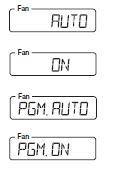
NOTE: The fan must be set to “PGM” for the fan’s program settings to take effect.
OPERATION
System Indicator Light
When the thermostat activates your system, LED lights are turned on just below the LCD display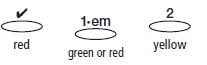
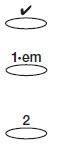
- System Monitor: This red LCD is controlled by your system and will turn on if there is a problem with your system. It can only work if you have a connection to the L terminal.
- Stage 1 Light: This LED will turn on in GREEN when the first stage of heat or cool is activated. When in Emergency Heat mode, this LED will turn on in RED when the first stage of emergency heat is activated.
- Stage 2 Light: This LED will turn ON in YELLOW when the second stage of heat, emergency heat or cool is activated.
The Stage 1/Emergency and Stage 2 LED’s will flash On/Off when the corresponding stage is being held off temporarily. For example, during a compressor delay.
Emergency Heat
When the Power Switch is in the “em” position, the thermostat is placed in the Emergency Heat mode. The compressor will not operate in this mode and only auxiliary heat will be used.
Reviewing the Current Temperature Setting
- Current time and temperature.
- Thermostat is set to AUTO and the heating system is selected.
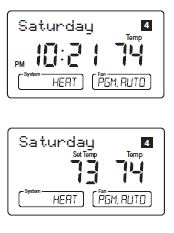
- Press for 1 second or less.
- Set Temperature is shown beside current room temperature.
- If held for over 1 second, Temporary Manual Override mode is entered. Refer to the next section.
Temporary Manual Override
To temporarily change the current set temperature without affecting your program:
- Press and hold for about 1 second to enter
- Manual Override mode. Display will flash.
- Press to change to your desired new temperature.
- Press to return to normal mode, or wait 5 seconds for it to return automatically.
- The current program number will flash to signify the Temporary Override.
- At the next program change, the Temporary Override is canceled, and the next program temperature becomes the setpoint temperature
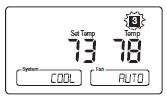
To end the Temporary Manual Override:
- Press to return the set temperature to the current program set temperature.
NOTE: The Auto Season Changeover feature will not operate while the thermostat is in Temporary Manual Override.
- Refer to the Auto Season Changeover feature on page 39 for more information.
NOTE: If Vacation Hold is set, then the number of days remaining will also be displayed. Refer to the Vacation (Programmable) Hold section on page 38 for more information.
Permanent Manual Override
To hold your manual override for an extended period of time:
 Press to make the current room temperature the HOLD temperature. HOLD will alternate on the display with the day and any other messages.
- Follow the Temporary Override instructions above to change the Permanent Override temperature.
- You can confirm the held set temperature by pressing for less than 1 second.
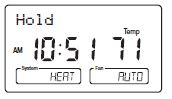
To end the Permanent Manual Override:
- Press to return to the current program. The HOLD display will be canceled.
- NOTE: The Auto Season Changeover feature will not operate while the thermostat is in Permanent Manual Override.
- Refer to the Auto Season Changeover feature on page 39 for more information
Vacation (Programmable) Hold
This thermostat can hold a fixed temperature for a selected number of days (up to 30). After the selected number of days, the thermostat will return to normal program operation. This feature allows you to return home to your normal comfort setpoint temperatures.
- Press and hold for 2 seconds to enter Vacation Hold mode. The set temperature will be the current room temperature and the Vacation counter will be set to 1 day.
- Use to set the Vacation Hold temperature.
- Press to set the Vacation Hold counter to the number of days you will be away from home.
- “Vacation” will alternate on the display with the day and any other messages.
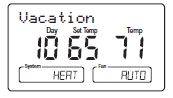
To end Vacation Hold:
- Press to return to the current program. The flashing Vacation display will be canceled.
- NOTE: The Auto Season Changeover feature will not operate while the thermostat is in Vacation (Programmable) HOLD.
- Refer to the Auto Season changeover feature on page 39 for more information.
Auto Season Changeover
When the System Selection is in AUTO position, the thermostat will automatically change between Heating and Cooling systems, depending on your program. We recommend keeping your programmed heating and cooling temperatures at least 5°F (3°C) apart to allow the Auto Season Changeover to occur when the appropriate temperature span has been reached. However, if your heating and cooling programs set temperatures are close, there is a built-in program to prevent the thermostat from changing unnecessarily. Auto Season Changeover is disabled when the thermostat is in Temporary or Permanent Override, or Vacation Hold, as these overrides are energy saving settings. While in any of these modes, “AUTO” will be temporarily removed form the LCD display. “AUTO” will return when these holds are cleared. Auto Season Changeover will still function in Home Today mode, as this is a comfort setting. For example, you may have the following temperatures programmed at a given time:
- Heat Set Temp = 68°F
- Cool Set Temp = 78°F
If the room temperature rises above 78°F, then the thermostat will automatically change to cool mode and turn on the air conditioner. Likewise, the thermostat will automatically change to heat mode and turn on heat when the room temperature falls below 68°F..
Home Today
This Hunter patented feature allows you to quickly and temporarily override your energy saving program setting on days when you are normally away from home with one key press.
 Press to enter the Home Today override. The highest program temperature for today will be selected from your programs in Heat mode and become the set temperature. (In Cool mode, Home Today will select the lowest program temperature for today to be the set temperature.)
- “HOME” will alternate on the display with the day and any other messages.
- When pressed during the first or second program of the day, Home Today will automatically return to program control at the start of the fourth program of the day. If Home Today is pressed after the start of the third program time of the day, the thermostat will remain in Home Today mode until the first program of the next day.
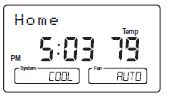
- If Home Today is already active, you may similarly extend it to the first program of the next day by pressing the key again after the start time of the third program.
- If the system is changed between Heat and Cool modes (either manually or by Auto Season Changeover) during the “Home Today” override period, the setpoint temperature will be automatically updated. It will automatically change from the highest heat program setpoint to the lowest cool program setpoint, or from the lowest cool program setpoint to the highest heat program setpoint.
- Press to exit Home Today mode before the schedule ending time. “HOME” is no longer displayed on the LCD screen, and the thermostat returns to the current program.
- You can manually change the setpoint temperature while in Home Today mode. Refer to the Temporary Manual Override instructions on page 36. Manually changing the set temperature while in Home Today mode will not affect the
- Home Today ending time. However, the set temperature will not change automatically with a manual or Automatic change between heating and cooling
- You may also press the Home Today key while in Temporary Manual Override. The operation is the same as the previous point above
Energy Monitor
The Energy monitor feature measures and stores the amount of time the heating and air conditioning system operates. Usage can be displayed for Today (since 12AM), Yesterday, This Month (up to 30 days), Last Month (last 30 days), and Total (up to 999 Hrs. 59 Min.). By monitoring your energy usage, you see how much the setback periods are saving and you can test program adjustment to save even more. Use tables on pages 21-22.
 To review energy usage, press to cycle through Today, Yesterday, [number] Days, Last 30 days, and Total. Press again to return to normal mode, or wait 15 seconds for the display to return to normal mode. You can also return to normal mode at any time by pressing RET CLEAR.
- For example: This LCD display shows Today’s usage to be 10 Hours, 26 minutes.
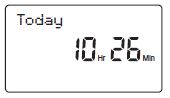
- Press and hold for 3 seconds to reset the Energy Monitor’s counters while in Energy Monitor mode. The display will blink, and all counters will be cleared to zero
Filter Monitor
Your thermostat also keeps a record of the number of hours your filter has been in use. To maximize your system’s performance and energy efficiency, change or clean your filter regularly.
- When the total system run time for heat and cool reaches 500 hours, “FILTER” will alternate on the display with the day to remind you to clean or change your system’s filter. “FILTER” will continue to display until the counter is set back to zero.
 Press to review total filter usage. After 15 seconds, the display will return to normal mode, or you can hit RET CLEAR to exit immediately. The Filter Monitor will display up to 999 hours and 59 minutes of usage. In this example, the counter is at 410 Hours, 26 minutes.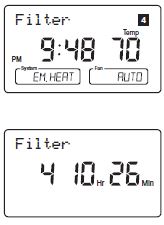
- To reset the Filter Monitor counter, hold for 3 seconds. The display will blink, and the counter will be reset to zero
SPAN Settings
STAGE 1
Your thermostat is set at the factory to cycle at 1°F (0.5°C) above and below the set temperature in Stage 1. (Span = 2.) This setting has been designed to provide a comfortable room temperature under most all conditions. However, if you find your system cycling too fast or too slow, then the Span can be adjusted to modify the cycle time. Refer to the Option Menu Stage 1 Span selection on page 17.
- Span = 1. This decreases the cycle time by causing your system to run shorter.
- Span = 3. This increases the cycle time by causing your system to run longer.
The Span settings remain the same for both HEAT and COOL. The Span can be changed at any time and is independent of program times or temperatures. When the thermostat is powered on or the Reset key is pressed, the Span is reset back to setting 2.
Auto Recovery
Hunter’s Auto Recovery feature meets the ENERGY STAR® guidelines for energy efficiency by allowing the heating or cooling system to recover gradually from an energy-saving setpoint temperature to a comfort setpoint temperature. Auto Recovery calculates how early to turn your system back On, so that the room temperature is already comfortable by the start of the comfort temperature program period. Auto Recovery works in both Heat and Cool modes.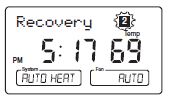
For example, in Heat mode, you could have the following programs:
- Program #4 (Overnight) Program #1 (Morning)
- Set Temp = 60°F Set Temp = 68°F
- Time = 10PM Time = 6AM
The room temperature fell to 60°F overnight. Rather than having the thermostat turning on at 6AM, Auto Recovery would note the temperature difference between 60°F and 68°F and turn the Heat on approximately 30 minutes early. Therefore, the room temperature at 6AM would be about 68°F instead of 60°F.When the thermostat is in Auto Recovery mode, the display will alternate “RECOVERY” with the day, and the program indicator will flash.
Details of Auto Recovery Operation:
- Auto Recovery can be disabled by selecting “NO” in the Option Menu. Refer to page 17.
- Auto Recovery will not operate if Permanent hold, Vacation hold Temporary hold or Home Today is in operation.
- It will also not operate if the thermostat resets due to AC power loss with no backup batteries.
- Auto Recovery can be canceled manually if RET CLEAR is pressed during the recovery process.
- If a recovery process is canceled manually then the recovery process will not start again until the next program period starts (an exception is that if time or program is changed then the thermostat will check Auto Recovery conditions immediately).
- Auto Recovery will be canceled if HOME TODAY or HOLD is pressed during the recovery process.
- The thermostat will enter Home Today, Permanent hold or Vacation hold.
- Auto Recovery will be canceled and change to Temporary Manual Override mode if the setpoint is adjusted during the recovery process
- If the system changes between heat and cool (automatically or manually) then the thermostat will recalculate Auto Recovery again.
- Setpoint temperature will be changed to the opposite system’s comfort temperature if the recovery entry criteria are still met. Otherwise, the recovery process will be canceled and return to program control mode
Keyboard Lock
- The Keyboard can be locked to prevent unauthorized changes to the thermostat.
- To lock or unlock the keyboard, press and hold BOTH keys for 3 seconds.
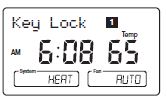
- The keyboard is locked when KEY LOCK appears on the display.
- All keys are locked, but any time a key is pressed, KEY LOCK will appear on the display for 1 second and the backlight will operate
Backlighting (INDIGLO® Night-Light)
Your thermostat has an electroluminescent lamp that backlights the display for easy viewing in the dark. When any key is pressed the display is illuminated. The display will remain illuminated for 15 seconds after the last key is pressed. This allows the light to stay on if you need to operate several keys. The backlight will decrease in brightness before shutting off.
AC Power Monitor
- This thermostat operates on 24V AC, which is provided by your system’s transformer. If the system loses electricity, then the 24V AC power is lost also.
- The 2 AAA batteries provide backup operation of the clock, as well as all programs and settings.
- If the AC power is lost, then the LCD display will alternate “No AC Pwr” with the day.
- Without AC power, the following functions are disabled:
- The system is turned off.
- The Backlight function is disabled.
- The remote sensor temperature readings are not available
Low Battery Warning
Your thermostat has a low battery warning system. When the batteries are detected to be weak, the low battery warning isindicated by “Low Batt” alternating on the LCD display with the day. You then need to replace the batteries with 2 new AAA alkaline batteries. You have 30 seconds to change the batteries before the settings are lost.
Error Mode
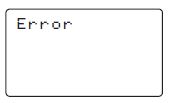
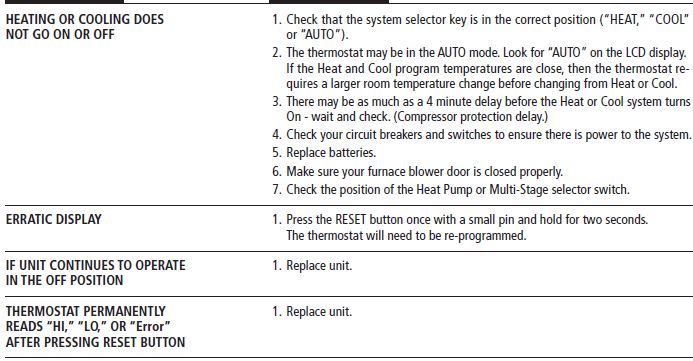
If the thermostat is unable to control your system due to an unexpected problem, the thermostat will enter Error Mode. In this condition, the thermostat flashes “Error” and a code number on the LCD display, and shuts off your system. To correct this problem, replace the batteries with 2 new AAA alkaline batteries, even if you have recently replaced them. Next, use a paper clip to press the RESET button next to the keypad. You will need to reprogram your thermostat and confirm normal operation. If Error Mode returns, please
- call Hunter Technical support
- at 888-830-1326 for further information.
TROUBLESHOOTING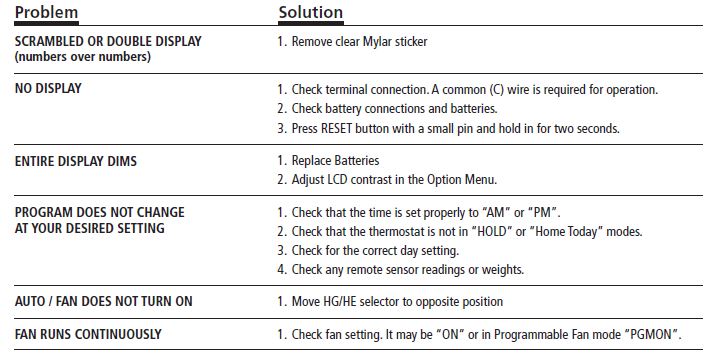
WIRING DIAGRAMS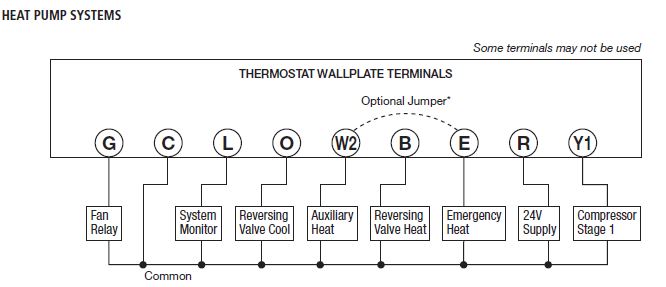
HUNTER
- Hunter Fan Company
- 2500 FRISCO AVENUE
- MEMPHIS, TN 38114
REFERENCE:
DOWNLOAD MANUALS:
Hunter 44760 Programmable Thermostat User Manual