Hotowell HTW-31-H17 Under-Floor Heating Thermostat
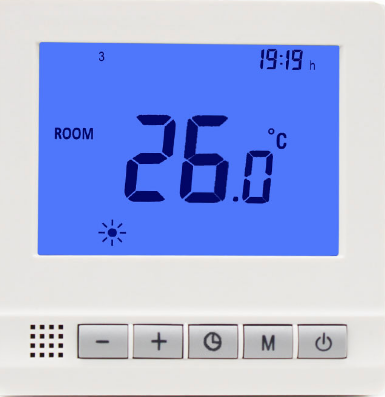
Features
- Attractive and Big LCD Display
- Adjustable Comfort, Energy-saving and Prog. mode control
- Electric Heating System(Max.16A)
- Water Heating System(Max.3A)
- 7 days Programmable (5+1+1)
- Clock
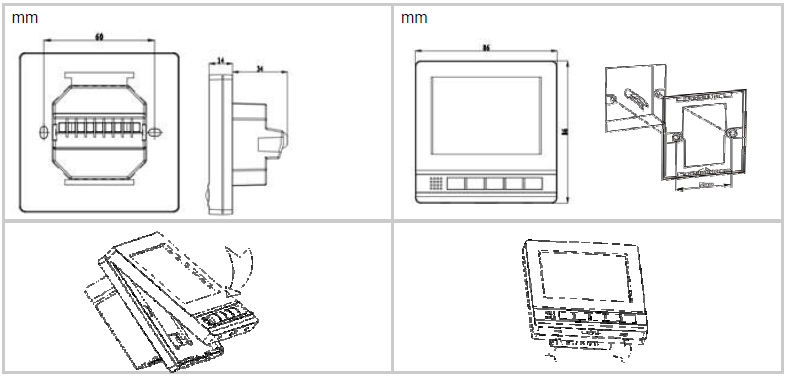
- 86*86 mm Mounting
Technical Data
- Power Supply – 100~240Vac, 50/60Hz
- Backlight – Blue
- Power Consumption – 1 A
- Sensor – NTC 3950, 10K ohms at 25℃
- Set Point Range – 5~35℃
- Accuracy – ±0.5 ℃ (step control by +0.5℃)
- Ambient – 0~50℃
- Protection Class – IP30
- Relative Humidity – 85%
- Housing – ABS to UL94-5 fire retardant plastic
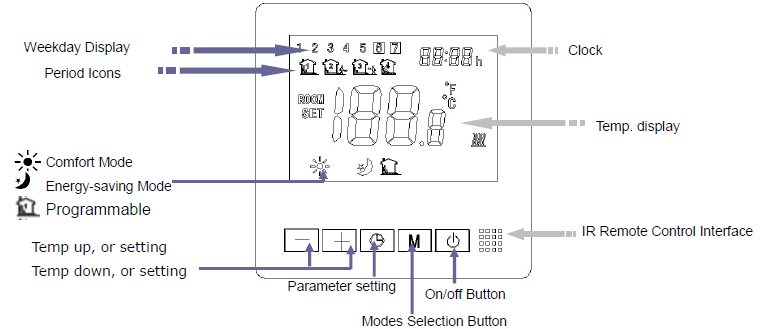
Parameter Settings
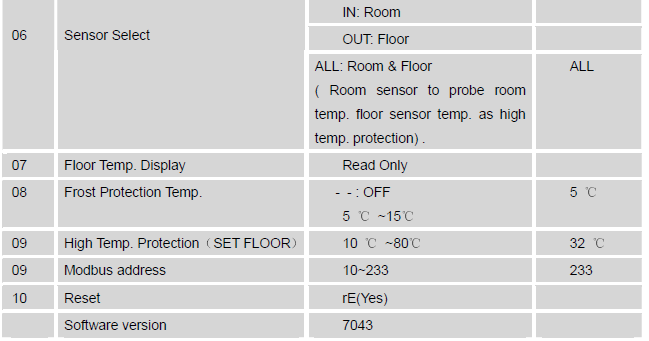
Under power off mode, to access MENU mode, please press M and + buttons simultaneously for 3 seconds until the MENU appear showing 01 which is menu 1 and Each press of the M button will go to the next MENU.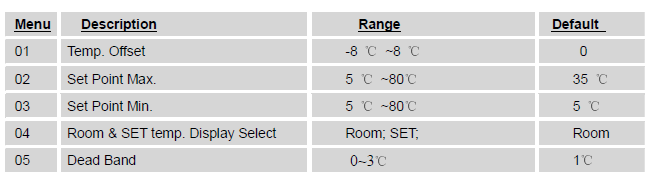
Working modes selection
Please press “M” button to select comfort mode , energy-saving mode
 , and Programmable mode Then thermostat can run at your desired mode.
Clock & 5+1+1 Programmable mode setting
- Long press “
 ” button for 5 seconds to enter clock time setting and 5+1+1 programmable mode setting
 - press “+” and “-“to adjust the clock (min-hour-weekday), each press of will go into next time setting
After clock adjustment, press to 5+1+1 mode setting. By pressing “+” and “-“, you can set the desired time and temp. of each period and each mode. (Weekday- period- time- temp.) Each press of a button will go into next item setting.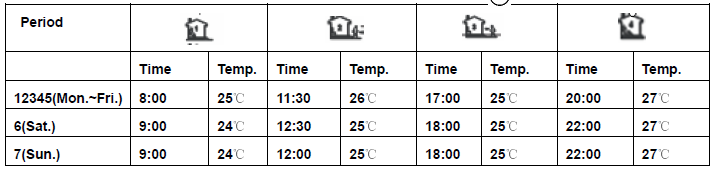
Wiring Diagram

Lock/Unlock Explanation
- This thermostat has two lock modes, the user can press M and simultaneously to unlock after lock.
- Mode 1:All buttons are locked except “+” and “-” button(factory default set)
- Mode 2:All buttons can be Locked/Unlocked from RS485 Modbus.
Dimension & Installation
MODBUS RTU
IN OFF Mode, press M and + buttons simultaneously for 10 seconds to get the Modbus address
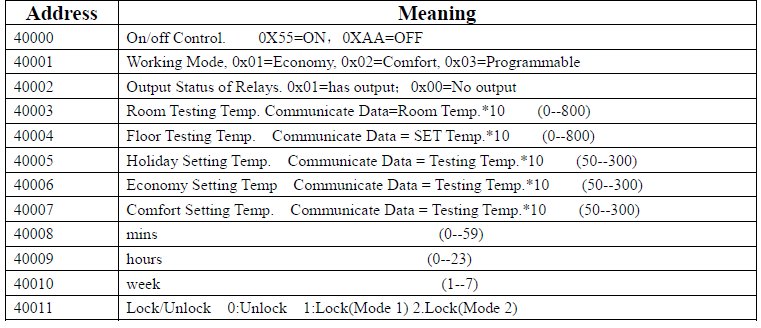
For example:
- On commander code: id 06 9c 40 00 55 CRC1 CRC2
- Off commander code: id 06 9c 40 00 aa CRC1 CRC2
- Read Temp. commander code: id 03 9c 43 00 01 CRC1 CRC2
- Write Eco-Setting Temp. commander code : id 06 9c 46 TH TL CRC1 CRC2
REFERENCE:
DOWNLOAD MANUALS:
Hotowell HTW-31-H17 Under-Floor Heating Thermostat User Manual

Hotowell HTW-31-H17 Under-Floor Heating Thermostat User Manual