HONEYWELL TheraPro HR90 ELECTRONIC Digital Programmable Radiator Thermostat
OVERVIEW
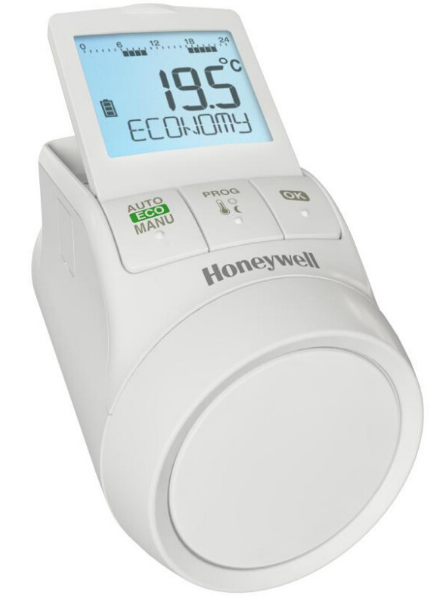
This programmable digital thermostatic radiator valve (TRV) is the first of its kind and will work on most radiator models. The TheraPro HR90 provides a superior solution for temperature control, cost savings, and ease of use for customers using radiator heat via universal control that features programmable ECO functionality to automatically reduce energy costs, a backlit display for easy reading, and an adjustable display position.
Different operating modes and particular day functions can be selected if required:
- Automatic, ECO and Manual
- Holiday, Party and Day off
The particular Day off is a separate daily program which can be activated for special days like public holidays.
Energy saving features:
- With the auto-window function, the radiator valve is closed when ventilating the room.
- In ECO mode, the room temperature is lowered by 5°F.
- Optimized control of the room temperature by start/stop the radiator controller calculates when to open or closing the valve in order to achieve the desired room temperature at the set time.
Radiator controller operating parameters are selectable.
- Select local language
- Preset time programs
- Backlight
- Summer/winter time changeover
- Duration of the window function
- Sensitivity of the window function during dropping room temperature
- Sensitivity of the window function during rising room temperature
- Setting the valve stroke
- Temperature representation in the display
- Upper-temperature limit
- Lower temperature limit
- Optimization function
- Temperature offset
- Battery type
- Display valve position
- Valve exercise day
- Window open function
- Temperature unit
- Restore to factory setting
MAIN FEATURES
- Adjustable backlit display: Flip-up display with background lighting can be easily read in nearly any location and all details are clearly legible.
- Easy Programming: Can be removed for easy programming.
- Frost-proof function: If the temperature drops below 41°F, the radiator valve opens until the temperature rises to 43°F again, and can prevent the radiator from freezing
- Child/Safety lock: Can be locked to prevent unauthorized access.
- ECO saver mode: In the ECO saver mode, the ambient temperature is lowered by 5°F.
- Convenient Programming: Up to six switch points can be set per day and three different temperatures (7 days a week).
- Additional operating modes: Easily set different operating modes, such as “Dinner Party”, “Game Night”, and “Vacation”.
- Copying time programs: Simply program the schedule into one thermostat, and transfer via cable to any additional thermostats in the home. NOTE: the Resideo ACC90 cable must be used to copy programs; Use of any other cable will damage the device.
- Temperature Offset: The thermostat will adjust for temperature readings nearest the thermostat to ensure comfort in the rest of the room.
- Temperature Limitation: Ability to set minimum and maximum temperature ranges.
Description

- Heating period/setback period in hours
- Day of the week 1 … 7 (Monday … Sunday).
- Displayed only while the time program is being programmed
- Temperature display: e.g. set point temperature (factory setting) or measured temperature, if configured in Parameter 9
- Text display with 9 characters
- Button OK: Confirm settings
- Button PROG: Select the operating modes, set the time program;
- Press button >10 seconds): access to the parameter menu;
- Programming: Back to next level up
- Adjustment dial: Change the set point, navigate menu
- Button AUTO/ECO/MANU: Change between automatic, ECO and manual mode
- In programming mode: Exit (without storing) 9 Battery status
- Operation lock
- Symbol for Comfort temperature

- Comfort temperature 2
 , Setback temperature
SPECIFICATION
Electrical Data
- Power supply:
- Battery or chargeable batteries
- Battery Type:
- LR6, AA, AM3
- 2x Mignon 1.5V
- Alternative:
- 2x Lithium 1.5V
- 2x NiMH 1.2V chargeable batteries
Display
- Backlight Display:
- Text based display 9 characters 1-3/16” x 1-1/32” (BxH)
Environmental and Standards
- Environmental temperature: 32 ….. +122 ºF
- Storage temperature: -4 …+131 ºF
- Humidity: 10-90% relative humidity
Certification
- Standards: CE Konformität, RoHS
- Temperature Control
- Internal Sensor: NTC
Mechanical Data
- Dimensions (HxWxD): 2-23/64” x 2-1/8” x 3-25/32” Material: PC
- IP Class: IP 30
- Valve connection: M30 x 1.5
Option
- Voltage Input: 9….24V AC/DC
- Copy cable: ACC90*
INSTALLATION HR90
- Insert Batteries: 2x 1.5V Typ: LR6, AA, AM3 Set language, date and time.
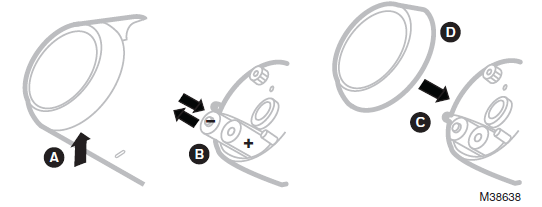
- Remove Thermostat.
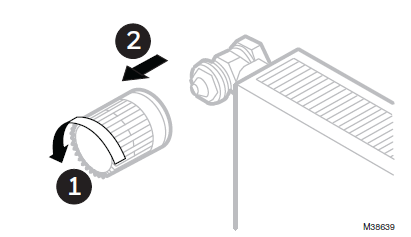
- Remove the valve baseplate.
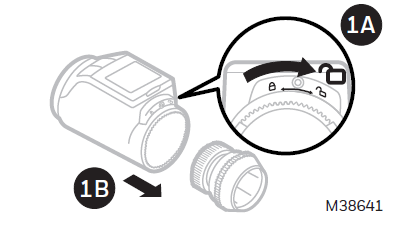
- Put the Valve baseplate on the valve use adapter if necessary.
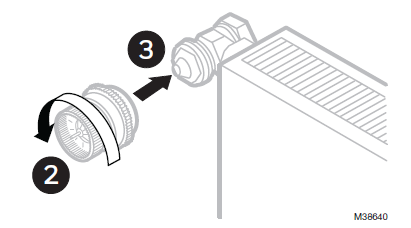
- Connect the valve baseplate with the controller.

Copy Time Program to other HR90 Controllers
If several HR90 radiator controllers are to operate with the same time program, the time program only has to be created at one device (master) and can then be copied to further radiator controllers. The controllers are connected with the cable ACC90
OPTIONS
- The radiator controller and the batteries can be secured against stealing by using the supplied screws.
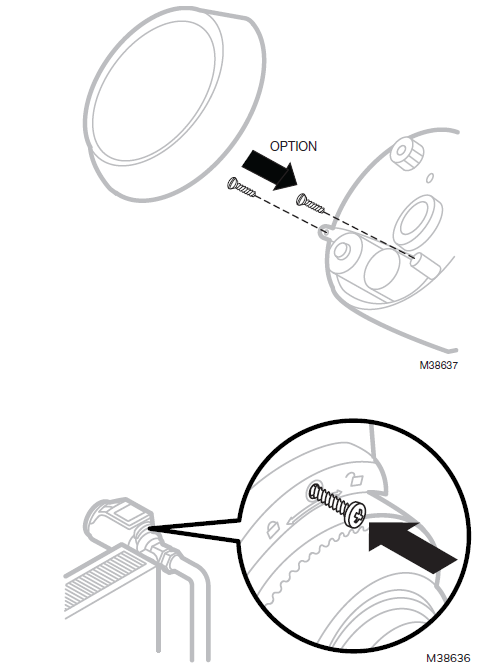
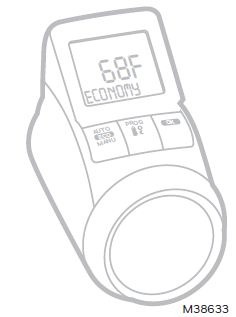
- The color of the front cover can be replaced with chromed cover. The HR90 can be secured to the valve body via the supplied locking screw, with the HR90 in the locked position.
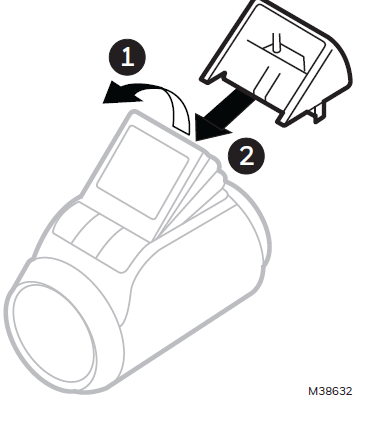
- The display can be fixed with display holder (angle 40°).
REFERENCE
DOWNLOAD MANUALS:
HONEYWELL TheraPro HR90 ELECTRONIC Digital Programmable Radiator Thermostat PRODUCT DATA

HONEYWELL TheraPro HR90 ELECTRONIC Digital Programmable Radiator Thermostat PRODUCT DATA