
Honeywell T4600 Electronic Programmable Thermostat
 APPLICATION
The T4600 Chronotherm® Electronic Programmable Line Voltage Thermostat provides line voltage control of resistance-rated heating equipment. The patented CoolSwitch™ thyristor commutator design provides long service life. Depending on local climate, night and day setback of space temperature can save up to 23% of the energy used to heat a controlled space. The precise temperature control of the T4600 also provides 12% energy savings during most comfort periods as compared to electromechanical wall thermostats
FEATURES
- Digital temperature sensing and control for energyefficient and precise (1.0°F) temperature control.
- Liquid crystal display shows temperature and load status.
- Attractive contemporary styling.
- Temperature range selectable between 45°F to 80°F (7°C to 27°C).
- Simple, pushbutton programming.
- Weekday-weekend (5-2) programming for permanent home (normal) operation.
- Optional unoccupied low limit setting for seasonal residence (cottage) operation.
- Temporary temperature override.
- Program override for seasonal temperature setback.
- Permanent override for seasonal shutdown.
- Rugged molded thermoplastic housing with captive mounting screws.
- Suitable for electric heaters such as connectors, radiant cable, and non-inductive-rated, fan-forced heaters.
- Directly replaces two-wire, 240 Vac resistive-rated (up to 10.4A of maximum 8 ft baseboard heater length) line voltage thermostats.
- Patented, long-life electronic switch and power supply with nonpolarized leadwire connections.
- Convenient 10-year program retention protects against loss of program settings during seasonal setback periods
SPECIFICATIONS
IMPORTANT
The specifications given in this publication do not include normal manufacturing tolerances. Therefore, this unit might not exactly match the listed specifications. Also, this product is tested and calibrated under closely controlled conditions, and some minor differences in performance can be expected if those conditions are changed.
TRADELINE® Models
TRADELINE® models are selected and packaged to provide ease of stocking, ease of handling, and maximum replacement value.
TRADELINE® Models Available:
T4600A Chronotherm® Electronic Programmable Line Voltage Thermostat with spst switching; makes heating circuit on temperature fall.
- Features:
- TRADELINE® pack.
- Temperature Ratings:
- Operating Range: -22° to 104°F (-30° to +40°C).
- Control Range: 45° to 80°F (7° to 27°C) in 1°F increments;
- factory set at 60°F (16°C).
- Electrical Ratings (Non-inductive):
- 10.4A maximum, 3.1A minimum at 240V, 60 Hz (750 to
- 2500W). (Maximum of 8 ft of connected baseboard heater per thermostat.)
- Wiring Connections:
- 6 in. (150 mm) stranded copper leads suitable for connecting to aluminum wiring when approved special service CO/ALR connectors are used.
- Switching:
- Patented CoolSwitch™ thyristor commutator with relay conductor
- Sensing Element:
- Electronic thermistor.
- Time constant: ten seconds.
- Patented digital sensing.
- Performance Specifications:
- Precision: ±1°F temperature swing (±0.4°C differential).
- Features electronic anticipation.
- Accuracy: 2°F (1°C) maximum droop with 2500W load.
- Conforms to NEMA Standard DC3 for scale accuracy.
- Programming:
- Menu-driven data entry.
- Value selections: Up (+) and down (-) keys with rapid slewing action.
- User-selectable temporary and permanent override modes.
- Time-of-Day format: Selectable for 12-hour (AM/PM) or 24-hour.
- Temperature scale: Selectable for °F or °C.
- Liquid Crystal Display:
- Room Temperature: 35° to 95°F (2° to 35°C).
- Setpoint Temperature: Displayed when up (+) or down (-) keys are pressed.
- Battery Backup:
- Time-of-Day: 48 hours minimum.
- Programs: Accumulated total of 80 weeks minimum.
- Battery type: 270 mA-h, 3 Vdc lithium button cell (included). 10-year normal life.
- Dimensions:
- See Fig. 1.
- Mounting:
- Mounts directly on vertical 2 in. x 3 in. flush-mount or
- 2 in. x 4 in. surface-mount junction box, or on 4 in. x 4 in. junction box with mud ring.
- Approvals:
- Underwriters Laboratories Listed: E47434.
- Canadian Standards Association Certified: LR1322.
ORDERING INFORMATION
When purchasing replacement and modernization products from your TRADELINE® wholesaler or your distributor, refer to the TRADELINE Catalog or price sheets for complete ordering number, or specify:
- Order number.
- Switching.
- Accessories.
If you have additional questions, need further information, or would like to comment on our product or services, please write orphone:
- Your local Home and Building Control Sales Office (check white pages of phone directory).
- Home and Building Control Customer Logistics
- Honeywell Inc., 1985 Douglas Drive North
- Minneapolis, Minnesota 55422-4386
In Canada—Honeywell Limited/Honeywell Limiteé, 35 Dynamic Drive, Scarborough, Ontario M1V 4Z9. International Sales and Service Offices in all principal cities of the world. Manufacturing in Australia, Canada, Finland, France, Germany, Japan, Mexico, Netherlands, Spain, Taiwan, United Kingdom, U.S.A.

INSTALLATION
When Installing this Product…
- Read these instructions carefully. Failure to follow these instructions could damage the product or cause a hazardous condition.
- Important! Check the ratings on the product to make sure the product is suitable for your application. Use only on:
- 240V, 60 Hz supply
- Loads up to 10.4A (8 ft of connected baseboard heater per thermostat).
- Installer must be a trained, experienced service technician.
- After installation is complete, check out product operation as provided in these instructions.
- Follow local codes and ordinances.
WARNING
- Electrical Shock Hazard.
- Power supply can cause property damage, severe injury, or death.
- Disconnect the power supply before handling to prevent electrical shock or equipment damage.
Equipment Damage Hazard. Improper wiring connections can damage thermostat.
- Do not use on circuits protected by higher-rated, overcurrent protection devices. This thermostat is rated for normal full load current on a dual residential 20A circuit breaker or fuse block.
- Make sure thermostat is connected to equipment with the same electrical rating.
- Use a separate limit control in the heating appliance.
Location
To mount the thermostat, install a vertical outlet box about 5 ft (1.5m) above the floor in an area with good air circulation at room temperature. Do not install the thermostat where it can be affected by:
- drafts or dead spots behind doors, in corners or under cabinets.
- hot air from convectors.
- radiant heat from sun or appliances.
- concealed pipes and chimneys.
- unheated (uncooled) areas such as an outside wall behind the thermostat.
Wiring and Mounting
Refer to Fig. 2 for typical wiring connections.
Fire Hazard.
- Improper wiring connections can cause property damage, severe injury or death.
- Avoid fire hazard. Use CO/ALR solderless wire connectors when connecting with aluminum conductors.
Equipment Damage Hazard. Improper wiring connections can cause thermostat damage.
- Do not short the 240V supply wires inside the thermostat.
- Use wires with solderless connectors approved for the size and number of wires to be connected, and make line voltage connections directly to leadwires on the thermostat.
- Make sure that all wiring connections are tight.
- Determine the load.
- New installation:
- If the T4600/ET1650 is used in a new installation, read the wattage rating on each baseboard heater connected to the individual thermostat and add up the total wattage. The total wattage must not exceed 2500W. If the thermostat is applied to greater than 2500W, a potential fire hazard may exist.
- Replacement installation:
- Turn off all electric baseboard heaters. Turn on the thermostat to be replaced. Go around the room and feel each baseboard to determine if any are getting warm or hot. Measure the length of the baseboard heaters that have started to heat.
- New installation:
- The maximum load per thermostat must not exceed 2500W (8 ft of baseboard heater).
- Disconnect power to the thermostat to prevent electrical shock or equipment damage. All wiring must comply with local electrical codes and ordinances.
- Remove the T4600 cover at the top or bottom edge with a slotted screwdriver.
- Remove the old thermostat from the wall, taking care not to damage the wiring insulation.
- Check the old wiring insulation for cracks, nicks or fraying. Apply approved electrical tape to insulate wires or replace wires as necessary.
Electrical Shock Hazard.
- Power supply can cause property damage, severe injury, or death.
- Disconnect power before handling. Battery can be linked to line voltage.
- Install the battery.

- a. Remove the battery cover on the thermostat back. Depress the cover tab and lift out.
- b. Insert the battery into the battery slot, noting the correct polarity indicated above the battery slot.
- c. Replace the battery cover when the battery is properly installed.
- Prebend and push the solid wires into the outlet box.
- Mount the thermostat on the outlet box Secure the thermostat by tightening the two mounting screws.

- Replace the thermostat cover.
- Turn on the power.
PROGRAMMING
When the thermostat is first powered or if the battery is drained, the display briefly shows all segments: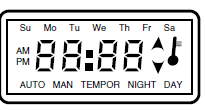
Then it shows 00E for 15 seconds followed by a flashing 12:00 AM (midnight) to indicate that the thermostat needs to be programmed. If the time and day program is not entered, the thermostat controls to the default setpoint, 60°F (16°C). If the ambient temperature is below freezing, the display does not operate until the power supply warms up the thermostat to the operating temperature. There will be a clicking from the relay, indicating the thermostat is working even though the display is not restored.
The T4600 is programmed similar to other digital devices:
- Press the PROG key to scroll through the program menus.
- Press the up (+) and down (-) arrow keys to change the values in the menus.
- Press the AUTO key to select optional functions.
If no keys are pressed for ten seconds, the T4600 goes to programmed operation and the room temperature is displayed. Automatic operation is activated during programming by holding down the PROG key for four seconds or until the display shows the room temperature
| ACTIVITY | RESULT | DISPLAY | |||
| SET THE TIME AND DAY
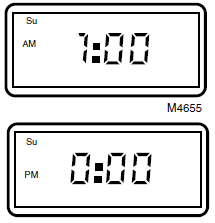
Hours: Press and release the PROG key. |
The hour display flashes in the 12-hour (AM/PM) format. |
|
 |
||
| Press and release the AUTO key for 24-hour display, if desired. Press the up (+) and down (-) keys to select the correct hour. | Midnight is displayed as 0:00 in 24-hour format. |
Su
PM |
|
|
M4655 |
| Press and release the PROG key to enter the hour. |
M4789 |
||||
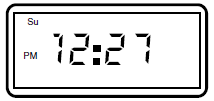
| Minutes:
Press the up (+) and down (-) keys to select the correct minutes. Press and release the PROG key to enter the minutes. |
The minute display flashes. |
Su
PM |
|
|
M4651 |
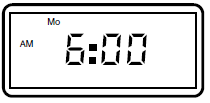
| Day:
Press the up (+) and down (-) keys to select the correct day of the week. Press and release the PROG key to enter the day. |
The current day flashes along the top of the display. |
Su AM |
Mo
|
|
M4790 |
| PROGRAM THE TEMPERATURE SETTINGS
Press and release the AUTO key for the Celsius temperature display, if desired.
Comfort Setpoint: Press the up (+) and down (-) keys to select the temperature for desired comfort setpoint. Press and release the PROG key to set the comfort setpoint. |
The display flashes the comfort setpoint. |
NIGHT DAY
M4648 |
|||
| Economy Setpoint:
Press the up (+) and down (-) keys to select the desired economy (setback) setpoint. Press the PROG key to enter the economy temperature. |
The display flashes the economy setpoint. |
NIGHT DAY
M4650 |
|||
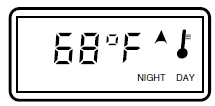
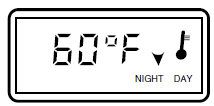
| ACTIVITY | RESULT | DISPLAY |
| PROGRAM THE NIGHT SETBACK AND MORNING RECOVERY TIMES
Night Setback: Press the up (+) and down (-) keys to select the desired night setback time.
Press and release the PROG key to enter the time. |
The display flashes the NIGHT setback time. The display shows the time in 10-minute increments (eg, 10:10, 10:20, etc). |
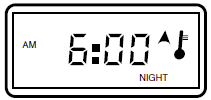
PM NIGHT
M4646 |
| Morning Recovery:
Press the up (+) and down (-) keys to select the desired morning recovery time. Press and release the PROG key to enter the time. |
The display flashes the morning recovery (warm-up) time. |
AM
NIGHT
M4647 |
| PROGRAM THE DAY SETBACK AND AFTERNOON RECOVERY TIMES
Day Setback: Press the up (+) and down (-) keys to select the desired day setback time. |
The display flashes the DAY setback time. |
AM
AUTO MAN TEMPOR NIGHT DAY
M4649 |
| Afternoon Recovery:
Press the up (+) and down (-) keys to select the desired afternoon recovery time. Press and release the PROG key to enter the time. |
The display flashes the afternoon recovery (warm-up) time. |
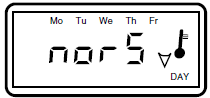
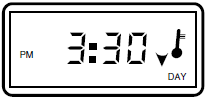
PM AUTO MAN TEMPOR NIGHT DAY
M4791 |
| SELECT PERMANENT HOME (NORMAL) OR SEASONAL RESIDENCE (COTTAGE) OPERATION
Press and release the AUTO key to switch between the NORMAL and COTTAGE modes of operation. Using the COTTAGE program overrides the NORMAL program. |
|
|
| Set Normal (5-2) Programs:
Press the up (+) and down (-) keys to select the day setback for weekdays or each day of the week. |
The display flashes nor5. In the NORMAL program, the setpoint can be set back each day of the week (nor7), weekdays only (nor5), or zero days (nor0). If the setpoint is nor0, night setback is the only active program. |
Su Mo Tu
AUTO MAN TEMPOR NIGHT DAY M4656 |
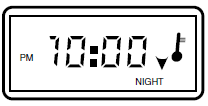
| ACTIVITY | RESULT | DISPLAY |
| Set Cottage Programs: CAUTION:
Before using the COTTAGE program, make sure there are no water pipes along outside walls, sealed in cabinets or installed in a manner that can cause them to freeze when the room temperature falls to 45°F (7°C).
Press the up (+) and down (-) keys to select the desired COTTAGE program.
Press the up (+) and down (-) keys to select the desired COTTAGE program.
After selecting the NORMAL or COTTAGE program, press and release the PROG key to enter the program. |
In the COTTAGE program, the thermostat sets back to 45°F (7°C), which is preprogrammed and not adjustable. The DAY setback program does not operate in the cot0 mode. The temperature is controlled at 45°F (7°C) from the NIGHT setback time on Sunday to the morning recovery time on the following Saturday.
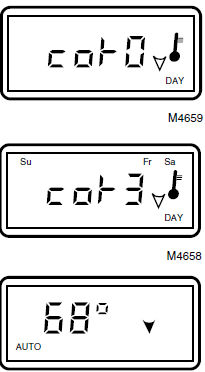
The display flashes cot0, indicating that the day setback program will not operate.
In the cot3 mode, the DAY setback program operates on Friday, Saturday and Sunday. The temperature is controlled at 45°F (7°C) from the NIGHT setback time on Sunday to the afternoon recovery time on the following Friday.
The thermostat enters the programmed mode, displays the room temperature and AUTO. The up arrow indicates the comfort period; the down arrow indicates the economy period. |
AUTO MAN TEMPOR NIGHT DAY
M4659
Su Mo Tu We Th Fr Sa
AUTO MAN TEMPOR NIGHT DAY
M4658
AUTO
M4663 |
| TEMPORARILY OVERRIDE THE PROGRAM
Press the up (+) and down (-) keys to temporarily change the temperature setpoint. |
The current setpoint is displayed on the first press of the up or down key. The setpoint can be changed by pressing the up or down keys again. The display also flashes TEMPOR (temporary). This temporary program override changes back to AUTO operation when the next program change occurs. |
AUTO MAN TEMPOR
M4662 |
| PERMANENTLY OVERRIDE THE PROGRAM
Press and release the AUTO key. |
MAN (manual) is displayed. The program change remains in effect until the PROG or AUTO key is pressed. |
AUTO MAN
M4653 |
CHECKOUT
When the thermostat is first powered or if the battery is drained, the display shows all segments briefly:
Then it shows 00E for 15 seconds followed by a flashing 12:00 AM (midnight) to indicate that the thermostat needs to be programmed. If the time of day program is not entered, the thermostat controls to the default setpoint, 60°F (16°C). If the ambient temperature is below freezing, the display does not operate until the power supply warms up the thermostat to the operating temperature. There will be a clicking from the relay, indicating the thermostat is working even though the display is not restored.
Check out the thermostat operation by simulating normal operation as follows:
- Press and hold the up (+) key to raise the setpoint above the ambient room temperature, calling for heat. The temperature degree symbol flashes and the electric heater warms up.
- Press and hold the down (-) key to lower the setpoint below the ambient room temperature. The temperature degree symbol stops flashing and the electric heater starts to cool down.
- To determine the appropriate setpoint, set the temperature at 68°F (20°C). Let the system operate for at least one hour and adjust the setting as necessary.
Honeywell
- Home and Building Control
- Honeywell Inc.
- Honeywell Plaza
- P.O. Box 524
- Minneapolis MN 55408-0524
- Honeywell Latin American Region
- 480 Sawgrass Corporate Parkway
- Suite 200
- Sunrise FL 33325
Reference
Download Manual:
Honeywell T4600 Electronic Programmable Thermostat User Manual
Honeywell T4600 Electronic Programmable Thermostat User Manual