
Honeywell RTHL221 Home Programmable Thermostat
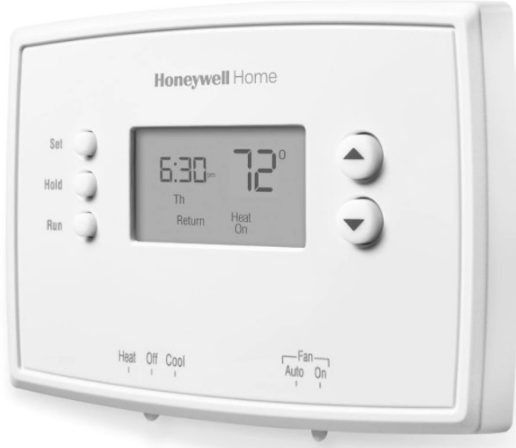
Identify System Type
This thermostat is compatible with the following systems:
- Gas, oil or electric furnace
- Central air conditioner
- Hot water system with or without pump
- Millivolt system
- Central heating and cooling system
- Heat pump without auxiliary/backup heat
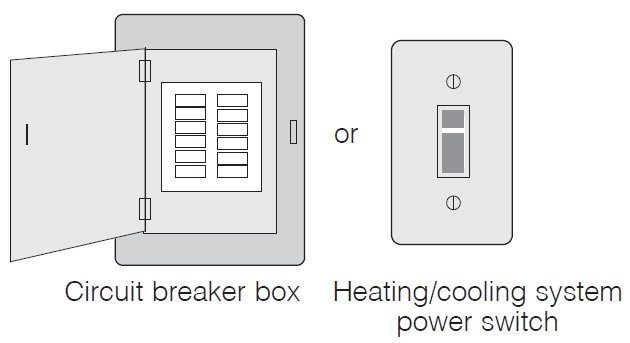
Turn Off Power to Heating/Cooling System
Remove Old Thermostat
Remove old thermostat but leave the wallplate with wires attached
Label Wires with Tags
Label the wires using the supplied wire labels as you disconnect them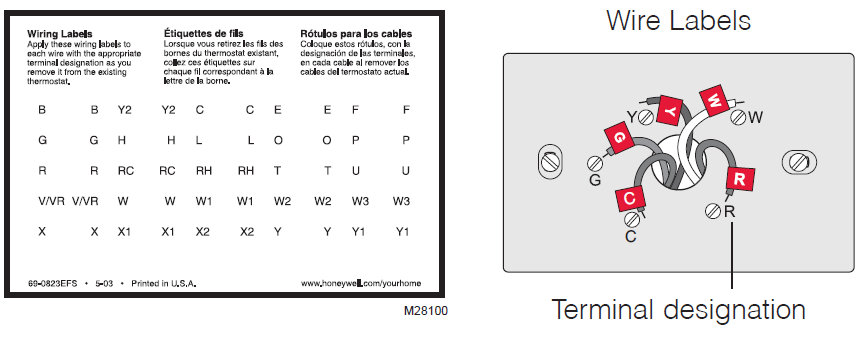
Separate Wallplate from New Thermostat
Remove wallplate from the new thermostat and mount it onto wall.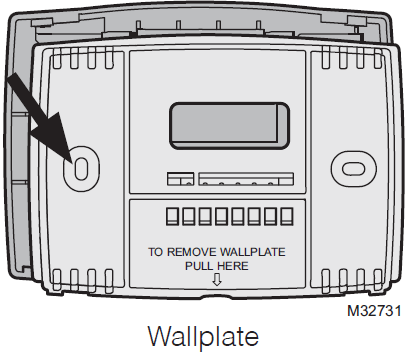
Mount Wallplate
Mount the new wallplate using the included screws and anchors.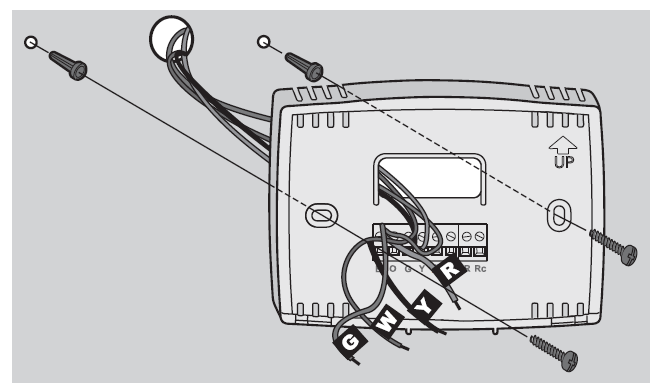
Connect Wires
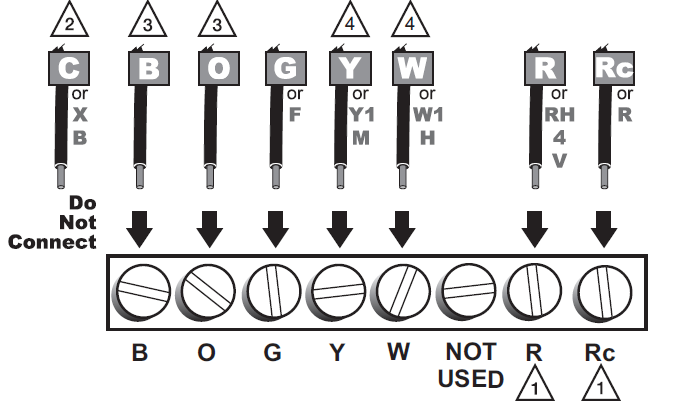
Simply match wire labels. If labels do not match the letters on the thermostat, check “Alternate Wiring” on page 6 and connect to the terminal as shown (see notes, below)
Alternate Wiring
- If wires will be connected to both R and Rc terminals, remove metal jumper.
- Do not use C or X. Wrap bare end of wire with electrical tape.
- If you have a heat pump without auxiliary/backup heat connect O or B, not both. If you do not have a heat pump, do not connect
- Wrap bare end of wire with electrical tape.
- Place a jumper (piece of wire) between Y and W if you are using a heat pump without auxiliary/backup heat.
Install Batteries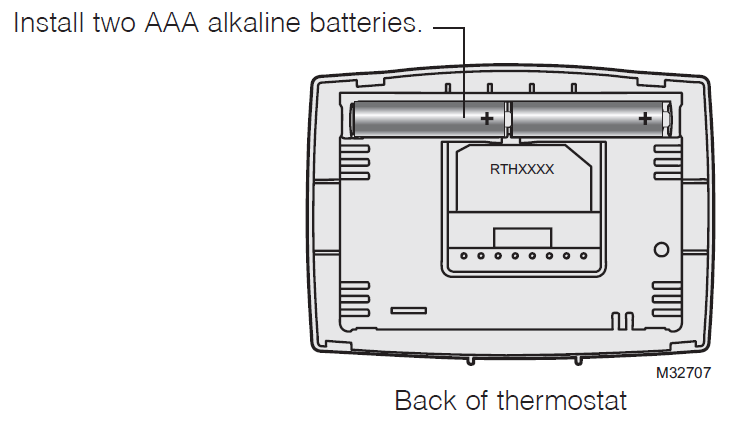
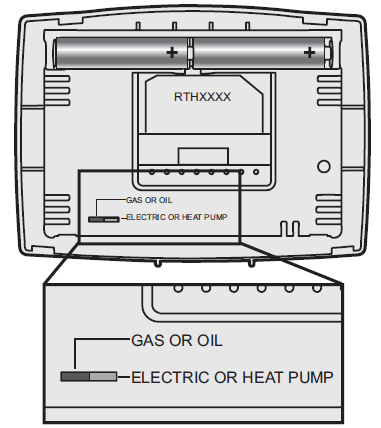
Set fan operation switch
Move the switch to the proper setting:
- Gas or Oil: For gas or oil heating systems, leave the fan operation switch in this factory-set position (for systems that control the fan in a call for heat).
- Electric or Heat Pump: Change the switch to this setting for heat pump or electric heat systems. (This setting is for systems that allow the thermostat to control the fan in a call for heat, if a fan wire is connected to the G terminal.)
Install Thermostat onto Wallplate
Install thermostat onto the wallplate on the wall.
Turn Power Back On
Turn the power back on to the heating/cooling system
If your system type is:
- Single Stage Heat and Cool
- Heat Only or Cool Only
- Heat pump
- High efficiency furnace
- Hot water
- Electric furnace
- Gas/oil steam
- Gravity system
Advanced Installation
Enter System Setup
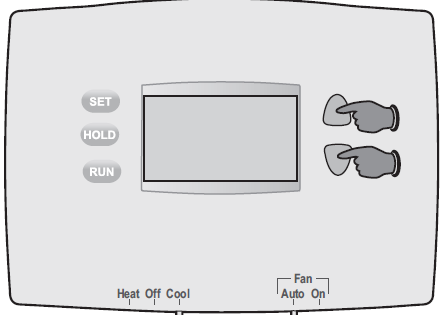
To enter system setup, press and hold both the  buttons until the display changes (approximately 5 seconds
Changing Settings
- Press the button to change the setting.
- Press the buttons simultaneously for one second to advance to the next function.
- Press the RUN button to exit and save settings.
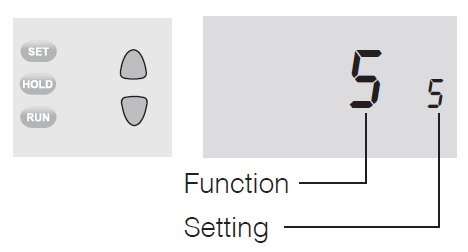
NOTE: If you do not press any button for 60 seconds while you are in the setup menu, the thermostat automatically saves any changes made and exits the menu.
About your new thermostat
- Your new Honeywell thermostat has been designed to give you many years of reliable service and easy-to-use, push-button climate control.
- Backlit display on RTHL2310
- Displays ambient (measured) temperature at all times
- One-touch access to setpoint temperature
- Preset program settings
- Temporary and permanent override of schedule
- Built-in compressor protection
Thermostat controls
Display screen

Set the time and day
- Press the SET button, then press s or t to set the clock time.
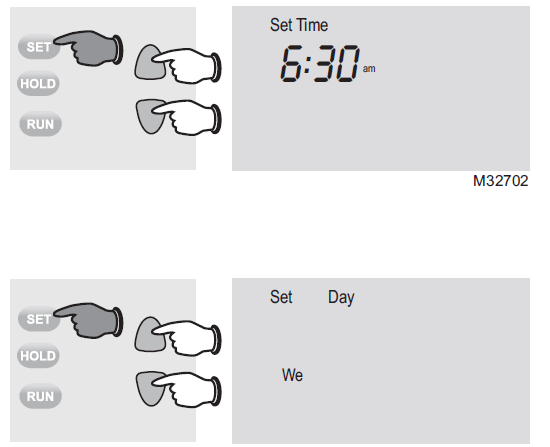
- Press the SET button, then press s or t to select the day of the week.
- Press RUN to save & exit
Program Schedule
You can program four time periods each day, with different settings for weekdays and weekends. We recommend the pre-set settings (shown in the table below), since they can reduce your heating/cooling expenses.
- Wake – Set to the time you awaken and the temperature you want during the morning, until you leave for the day.
- Leave – Set to the time you leave home and the temperature you want while you are away (usually an energy-saving level).
- Return – Set to the time you return home and the temperature you want during the evening, until bedtime.
- Sleep – Set to the time you go to bed and the temperature you want overnight (usually an energy-saving level).
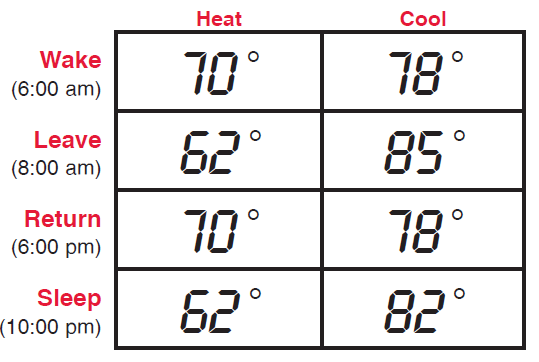
NOTE: Leave and Return periods can be canceled on weekends
To adjust program schedules (RTHL2310
- Press SET until Set Schedule is displayed.
- Press s or t to set your weekday Wake time (Mo-Fr), then press SET.
- Press s or t to set the temperature for this time period, then press SET.
- Set time and temperature for the next time period (Leave). Repeat steps 2 and 3 for each weekday time period.
- Press SET to set weekend time periods (Sa & Su), then press RUN to save & exit.
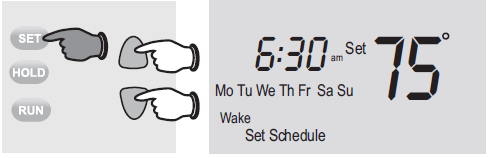
To adjust program schedules (RTHL221
- Press SET until Set Schedule is displayed.
- Press s or t to set your Wake time (Mo-Su), then press SET.
- Press s or t to set the temperature for this time period, then press SET.
- Set time and temperature for the next time period (Leave). Repeat steps 2 and 3 for each time period.
- Press RUN to save & exit.
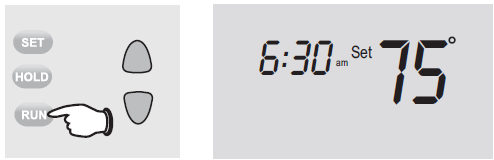
Program schedule override (temporary
- Press s or t to immediately adjust the temperature. This will temporarily override the temperature setting for the current time period.
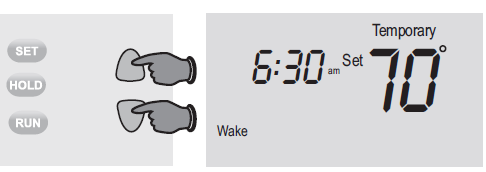
- “Temporary” will appear on the display and the current program period will flash.
- The new temperature will be maintained only until the next programmed time period begins (see page 11).
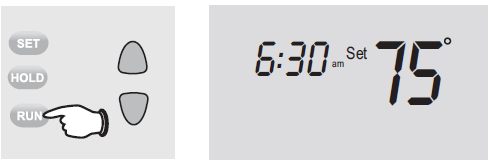
- To cancel the temporary setting at any time, press RUN
Program schedule override (permanent
- Press HOLD to permanently adjust the temperature. This will override the temperature settings for all time periods.
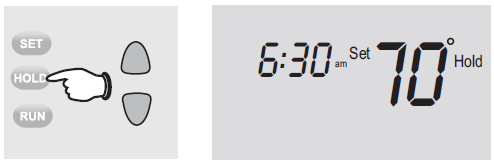
- The “Hold” feature turns off the program schedule and allows you to adjust the thermostat manually, as needed.
- Whatever temperature you set will be maintained 24 hours a day, until you manually change it, or press RUN to cancel “Hold” and resume the program schedule.
Built-in compressor protection
- This feature helps prevent damage to the compressor in your air conditioning or heat pump system.
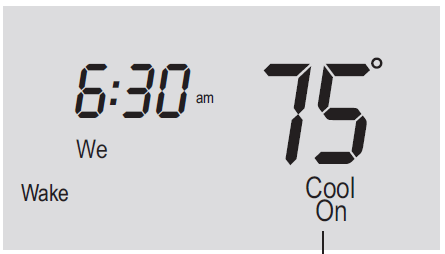
- Damage can occur if the compressor is restarted too soon after shutdown. This feature forces the compressor to wait 5 minutes before restarting.
- During the wait time, the display will flash the message Cool On (or Heat On if you have a heat pump). When the safe wait time has elapsed, the message stops flashing and the compressor turns on.
Battery replacement
- Install two fresh AAA batteries when Lo Batt flashes on the screen. Lo Batt appears for 60 days before the batteries are depleted.
- Replace batteries once a year, or when you will be away for more than a month.
- Most settings are stored in non-volatile (permanent) memory. Only the clock and the day must be set after you replace the batteries.
Troubleshooting
- Display is blank
- Check circuit breaker and reset if necessary.
- Make sure power switch at heating & cooling system is on.
- Make sure furnace door is closed securely.
- Make sure fresh AAA alkaline batteries are correctly installed.
- Heating or cooling system does not respond
- Set system switch to Heat. Make sure the temperature is set higher than the Inside temperature.
- Set system switch to Cool. Make sure the temperature is set lower than the Inside temperature.
- Wait 5 minutes for the system to respond.
- Temperature settings do not change
- Make sure heating and cooling temperatures are set to acceptable ranges:
- Heat: 40° to 90°F (4.5° to 32°C).
- Cool: 50° to 99°F (10° to 37°C).
- Make sure heating and cooling temperatures are set to acceptable ranges:
- “Cool On” or “Heat On” is flashing
- Compressor protection feature is engaged. Wait 5 minutes for the system to restart safely, without damage to the compressor.
- “Heat On” is not displayed
- Set the System switch to Heat, and set the temperature level above the current room temperature.
- “Cool On” is not displayed
- Set the System switch to Cool, and set the temperature level below the current room temperature
warranty
1-year limited warranty
Honeywell warrants this product, excluding battery, to be free from defects in the workmanship or materials, under normal use and service, for a period of one (1) year from the date of purchase by the consumer. If at any time during the warranty period the product is determined to be defective or malfunctions, Honeywell shall repair or replace it (at Honeywell’s option). If the product is defective, (i) return it, with a bill of sale or other dated proof of purchase, to the place from which you purchased it; or (ii) call Honeywell Customer Care at 1-800-468-1502. Customer Care will make the determination whether the product should be returned to the following address: Honeywell Return Goods, Dock 4 MN10-3860, 1885 Douglas Dr. N., Golden Valley, MN 55422, or whether a replacement product can be sent to you. This warranty does not cover removal or reinstallation costs. This warranty shall not apply if it is shown by Honeywell that the defect or malfunction was caused by damage which occurred while the product was in the possession of a consumer. Honeywell’s sole responsibility shall be to repair or replace the product within the terms stated above. HONEYWELL SHALL NOT BE LIABLE FOR ANY LOSS OR DAMAGE OF ANY KIND, INCLUDING ANY INCIDENTAL OR CONSEQUENTIAL DAMAGES RESULTING, DIRECTLY OR INDIRECTLY, FROM ANY BREACH OF ANY WARRANTY, EXPRESS OR IMPLIED, OR ANY OTHER FAILURE OF THIS PRODUCT. Some states do not allow the exclusion or limitation of incidental or consequential damages, so this limitation may not apply to you. THIS WARRANTY IS THE ONLY EXPRESS WARRANTY HONEYWELL MAKES ON THIS PRODUCT. THE DURATION OF ANY IMPLIED WARRANTIES, INCLUDING THE WARRANTIES OF MERCHANTABILITY AND FITNESS FOR A PARTICULAR PURPOSE, IS HEREBY LIMITED TO THE ONE-YEAR DURATION OF THIS WARRANTY. Some states do not allow limitations on how long an implied warranty lasts, so the above limitation may not apply to you. This warranty gives you specific legal rights, and you may have other rights which vary from state to state. If you have any questions concerning this warranty, please write Honeywell Customer Relations, 1985 Douglas Dr, Golden Valley, MN 55422 or call 1-800-468-1502.
Automation and Control Solutions
- Honeywell International Inc.
- 1985 Douglas Drive North
- Golden Valley, MN 55422
- yourhome.honeywell.com
- ® U.S. Registered Trademark.
- © 2015 Honeywell International Inc.
- 33-00124EF—01 M.S. 07-15
- Printed in U.S.A.
Do you need assistance? We are here to help.
- Call 1-800-468-1502 for wiring assistance before returning the thermostat to the store.
- This thermostat cannot be used on heat pumps with backup heat or on multistage systems.
ATTENTION: MERCURY RECYCLING NOTICE
This product does not contain mercury. However, this product may replace a product that contains mercury. Mercury and products containing mercury should not be discarded in household trash.
- For more information on how and where to properly recycle a thermostat containing mercury in the United States, please refer to the Thermostat Recycling Corporation at
www.thermostat-recycle.org. - For mercury thermostat recycling in Canada, please refer to Switch the Stat at www.switchthestat.ca
Customer Assistance
- For assistance with this product, please visit https://www.honeywellhome.com/us/en/support/.
- Or call Honeywell Customer Care toll-free at 1-800-468-1502.
- To save time, please note your model number and date code before calling.
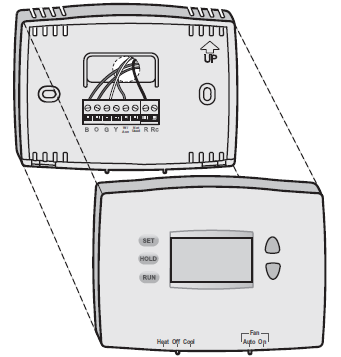
- Pull at bottom to remove the thermostat from wallplate.
- Turn thermostat over to find model number and date code.
Reference
Download manual:
Honeywell Home RTHL221 Programmable Thermostat Owners Manual
Other Manuals:
Honeywell Home RTHL221 Programmable Thermostat Operating Manual
Honeywell RTHL221 Home Programmable Thermostat Owners Manual