
Honeywell Home CM927 Programmable Thermostat

Description
The Honeywell CM927 is a ‘wireless’ programmable room thermostat designed to control you heating system efficiently, providing comfortable temperatures when you are at home and energy savings when you are away. With ‘wireless’ communication there is no need to provide a wired connection between the thermostat and boiler.
The following instructions explain how to set up, program and operate your Honeywell CM927 Programmable Room Thermostat.
Features
- Wireless connection to the boiler allows you to mount the Chronotherm in your room without decor disruption
- Armchair programming feature lets you program your Chronotherm while resting comfortably in your armchair
- Ergonomic User Interface features an ‘OK-button’ making the CM927 very easy to use so you always stay in control.
- LoT Technology provides informative ‘on-screen’ feedback and operational assistance to the user.
- Extra Large LCD (Liquid Crystal Display) Screen with Backlight provides added user friendliness and clearer viewing – even in the dark.
- 7-day heating program lets you set the CM927 independently for each day of the week to match your lifestyle, whilst maximizing energy savings.
- 6 independent temperature levels per day lets you set any 6 temperatures you require (from 5 to 35°C) so you can enjoy economical comfort every day
- Holiday button saves energy by letting you reduce the temperature for 1 to 99 days while you are away from home, resuming normal operation on your return.
- Party button lets you temporarily maintain (or adjust) the current temperature for 1 – 23 hours. Useful when you have guests or leave the house for a short period.
- Day Off button copies Sunday’s program into any other day of the week, so that you can make the CM927 follow this program if you have a day or days off.
- Automatic Summer/Winter Time Change will adjust the clock automatically for ‘Daylight Saving Time’.
- Built-in Memory holds the user program indefinitely so that it is never lost – even if you remove the batteries.
- Optimum Start option is an advanced feature which ensures that the optimum temperature conditions are achieved at the required times (option set by your installer).
Controls Layout
- Day / Date Display
- Time Display
- LoT Technology Display
- Heating On Indicator
- Battery Low Indicator
- Temperature Display
- Temperature Change Buttons
- Temperature Enquiry Button
- Slider Switch
- Green OK Button
- Program Buttons
- Battery Compartment Lid
- Battery Compartment
- Holiday Function Button
- Party Function Button
- Day Off Function Button
- Copy Day Button
- Day Select Button
- Time Change Buttons
WHAT IS A PROGRAMMABLE ROOM THERMOSTAT?
…an explanation for householders
(The following explanation applies to heating applications only)
A programmable room thermostat is both a programmer and a room thermostat. A programmer allows you to set ‘On’ and ‘Off’ time periods to suit your own lifestyle. A room thermostat works by sensing the air temperature, switching on the heating when the air temperature falls below the thermostat setting, and switching it off once this set temperature has been reached.
So, a programmable room thermostat lets you choose what times you want the heating to be on, and what temperature it should reach while it is on. It will allow you to select different temperatures in your home at different times of the day (and days of the week) to meet your particular needs.
Turning a programmable room thermostat to a higher setting will not make the room heat up any faster. How quickly the room heats up depends on the design of the heating system, for example, the size of boiler and radiators.
Neither does the setting affect how quickly the room cools down. Turning a programmable room thermostat to a lower setting will result in the room being controlled at a lower temperature, and saves energy.
The way to set and use your programmable room thermostat is to find the lowest temperature settings that you are comfortable with at the different times you have chosen, and then leave it alone to do its job. The best way to do this is to set low temperatures first, say 18°C, and then turn them up by one degree each day until you are comfortable with the temperatures. You won’t have to adjust the thermostat further. Any adjustments above these settings will waste energy and cost you more money.
If your heating system is a boiler with radiators, there will usually be only one programmable room thermostat to control the whole house. But you can have different temperatures in individual rooms by installing thermostatic radiator valves (TRVs) on individual radiators. If you don’t have TRVs, you should choose a temperature that is reasonable for the whole house. If you do have TRVs, you can choose a slightly higher setting to make sure that even the coldest room is comfortable, then prevent any overheating in other rooms by adjusting the TRVs.
The time on the programmer must be correct. Some types have to be adjusted in spring and autumn at the changes between Greenwich Mean Time and British Summer Time. You may be able to temporarily adjust the heating programme, for example, ‘Override’, ‘Advance’ or ‘Boost’. These are explained in the manufacturer’s instructions. Programmable room thermostats need a free flow of air to sense the temperature, so they must not be covered by curtains or blocked by furniture. Nearby electric fires, televisions, wall or table lamps may prevent the thermostat from working properly.
Manufactured for and on behalf of the Environment and Combustion Controls Division of Honeywell Technologies Sàrl, Ecublens, Route du Bois 37, Switzerland by its Authorised Representative Honeywell International Inc.
GETTING STARTED WITH THE CM927
This section shows you how to setup and run the thermostat in 3 simple steps:
STEP 1: Installing the Batteries
Note: Please follow the instructions in this section only if the thermostat screen is blank (no symbols or digits are displayed). If the screen displays some information move on to STEP 2: Setting the Date and Time.
To install the Batteries:
- Lift up the front cover of the thermostat to reveal the battery cover and product controls.
- Remove the battery cover by pressing down and sliding out.
- Insert the 2 x AA LR6 Alkaline Batteries supplied with the thermostat, ensuring the correct orientation (see ‘Controls Layout’ on page 2).
- After a short pause the thermostat will display information on the screen and is now ready for use.
- Replace the battery cover by sliding it firmly back into the front of the thermostat.

PLEASE RESPECT YOUR ENVIRONMENT! Take care to dispose of used batteries carefully.
STEP 2: Setting the Date and Time
To set the Date and Time:
- Move the slider switch to the DATE position. ‘SET THE DAY’ will be displayed on the screen and the day digits will be flashing.
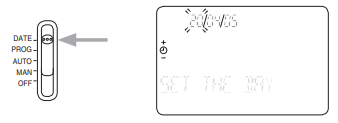
- Use the
 buttons to set the correct day. When either of these buttons are pressed ‘DAY OK?’ will be displayed. Once the correct day is reached, press the green
 button to confirm.
 - Now the month digits will start flashing and ‘SET THE MONTH’ will be displayed. Change the month and then the year using the buttons, pressing the green button to save any changes made. (If an invalid date has been entered you will be returned to the start of the date setting mode).
- After setting a valid date, the time digits will begin flashing and ‘SET THE TIME’ will be displayed.
- Use the buttons to set the correct time. Each press of the button will change the time by one minute and holding the button down will change the time slowly at first and get progressively quicker. Once the correct time is set, press the green button to confirm then ‘CHANGES SAVED’ will be displayed for a moment followed by ‘DATE COMPLETE’.
Note: If the slider switch is moved at any time before ‘DATE COMPLETE’ is displayed the changes to the date and time will NOT be saved.
STEP 3: Running the Built-in Heating Program
The thermostat is now ready for operation. Move the slider switch to the AUTO position and the built-in heating program will start running. The built-in heating program has been designed to provide normal comfort requirements, but if you want to customise the default settings (as shown on the next page) please see the next section ‘PROGRAMMING THE CM927’.
The Built-in Heating Program
The built-in heating program has 6 temperature level changes per day that can be set between 3.00am and 2.50am the following day – allowing you to maintain the evening temperature after midnight. Each temperature level can be set between 5°C and 35°C, and adjusted in 0.5°C increments. The factory default program for heating is as follows:
Monday to Friday
| Period | 1 | 2 | 3 | 4 | 5 | 6 |
| Time | 6:30 | 8:00 | 12:00 | 14:00 | 18:00 | 22:30 |
| Temperature | 21°C | 18°C | 21°C | 18°C | 21°C | 16°C |
Saturday & Sunday
| Period | 1 | 2 | 3 | 4 | 5 | 6 |
| Time | 8:00 | 10:00 | 12:00 | 14:00 | 18:00 | 23:00 |
| Temperature | 21°C | 21°C | 21°C | 21°C | 21°C | 16°C |
Reviewing the Heating Program
To review or edit the heating program move the slider switch to the PROG position then use the or
or  buttons to navigate between the 6 individual programming periods for Monday. Use the DAY button to step through each day of the week, so the complete 7 day heating program can be reviewed or edited.
Modifying the Heating Program
To change the heating program:
- Set the slider switch to the PROG position, entering programming mode. ‘SET TIME 1’ will be displayed and the time settings for period 1 on Monday (MON) will be flashing. The active period is highlighted by a flashing square symbol around the numbers at the bottom of the screen and the selected day is flashing in the top left hand corner of the screen.

- To adjust the period start time press the buttons and ‘TIME 1 OK?’ will be displayed. Holding the button down will change the time quickly.
Note: If you are pressing the buttons and the display flashes the next change period, it means the next change will be pushed forward if you continue to press or buttons). - Press the green button to confirm the setting. ‘CHANGES SAVED’ is displayed for 1.5 seconds then ‘SET TEMP 1’ will be shown.
Note: If the original time setting did not require adjustment press the green button to move on to step ‘d.’ - The next time and temperature period will now be active. Adjust this by repeating steps b – e above until all 6 periods are set for Monday or move the slider switch to the AUTO position to run the program as set, at any time.
- After setting period 6 ‘CHANGES SAVED’ will be displayed as before, followed by ‘DAY COMPLETE’.
You now have a choice of how to set the program for the next day: - To COPY the Monday’s program to another day:
Press the COPY DAY button to copy Monday’s program into Tuesday. The display will go blank apart from ‘COPY MON TO’, indicating the program for Monday will be copied to the selected target day, which is flashing in the top left corner of the display. To select a different target day press the DAY button to cycle through the days. Once the required day is flashing accept it by pressing the green button. Note: Once the target day is confirmed it becomes the day that is copied if the COPY DAY button is pressed again.
OR
To program a different day:
Press the DAY button to select the next day, which is displayed in the top left corner of the display. The program for that day can then be adjusted by following steps b – g above. Programs for the remaining days can be set in the same way, using the DAY button to move to the next day. - To exit the programming mode move the slider switch to the desired operating mode – AUTO, MAN or OFF. Note: To run the adjusted program select the AUTO mode.
Note: If the unit is left in programming mode for more than 10 minutes without the slider being moved or any buttons pressed, ‘MOVE THE SLIDER’ will be displayed. Press a button to finish programming the thermostat or move the slider to select the desired operating mode.
Disabling / Enabling Time Periods
The thermostat has 6 periods each day that can be programmed, but you may not need all of these switch points for your heating requirements. Therefore, any period from 2 to 6 can be disabled or enabled as follows:
To disable time periods:
Go to the desired period ( 2 to 6 ) by moving the slider switch to the PROG position, then using the , and DAY buttons to navigate, ensuring the correct period is highlighted with the flashing square symbol. Press and hold the button for at least 2 seconds and the display will indicate the period has been removed from the program.
To enable time periods:
Navigate to the disabled period by moving the slider switch to the PROG position, then using the or and DAY buttons. Once selected ‘DISABLED’ will be displayed. Press and hold thebutton for at least 2 seconds and ‘ENABLED’ will be displayed for a moment before returning to normal programming mode.
OPERATING THE CM927
Choosing the Operating Mode
The thermostat can operate in three different modes: Automatic, Manual or Off. To set the operating mode move the slider switch to the desired position. The screen indicates which mode is currently active by displaying AUTO, MAN or OFF.
- AUTO (automatic) mode
Automatic mode sets the thermostat to follow the temperature program (default or personalised). Operating the thermostat in this mode is the best way to maintain a high level of temperature comfort whilst maximising your energy savings. - MAN (manual) mode
Manual mode sets the thermostat to act as a simple thermostat with a fixed setpoint throughout the day. The setpoint can be adjusted from 5°C to 35°C by using the buttons. The thermostat will continue to maintain this temperature until another operating mode or temperature is selected.
 - OFF mode
Off mode sets the thermostat to control to a minimum temperature setting of 5°C (default) that acts as a frost protection measure for your home. This value can be adjusted by calling your installer.
During Normal Operation
- Temperature Enquiry
In AUTO and MAN operating modes the thermostat will display the current room temperature, which is indicated by the text ‘ROOM TEMP’ displayed on the screen. To review the programmed ‘target’ temperature (the temperature which the thermostat is trying to maintain) press the button. This ‘target’ temperature value will be displayed flashing and the text ‘TARGET TEMP’ will be shown for 5 seconds before returning to the current room temperature value.
In OFF operating mode the thermostat again displays the current room temperature, as above, but whenthe button is pressed the text ‘FROST TEMP’ is displayed indicating the set value to protect your home. To modify this value please contact your installer. - Temperature Override
During normal operation (AUTO mode) the programmed temperature can be adjusted manually by pressing thebuttons. The ‘target‘ temperature will be displayed and flash for 5 seconds – during this time thebuttons can be used to modify the set value. - Note: This temperature override is cancelled at the next programmed temperature change.
Using the Special Functions
HOLIDAY Function
The holiday function allows you to set a constant temperature (default = 10°C) for a specified number of days (from 1 – 99 days). This lets you save energy and related costs when you are away from home, but resumes normal operation on the day of your return.
To set the Holiday function:
- Move the slider switch to the AUTO or MAN position.
- Press the
 button to display the holiday days counter and temperature setting, along with the holiday indicator.
 - The day after the current day will be selected and ‘RETURN DATE OK?’ will be displayed. Press the time buttons to set the holiday time (1 – 99 days).
Note: (The day and date will update according to the number of days selected). - Press the green
 button to confirm the setting.
 - ‘CHANGES SAVED’ will be displayed for a moment followed by ‘TEMP OK?’.
Press the buttons to set the holiday temperature (5°C – 35°C) - Press the greenbutton to confirm the setting. ‘HOLIDAY MODE’ will now be displayed on the screen until the return date is reached or the holiday mode is cancelled.
The thermostat will now control to the new temperature for the set number of days that your home is vacant. At midnight the holiday counter will be reduced by one until the selected number of days have passed. The thermostat will then return to normal operation as set by the slider switch position (AUTO or MAN position). To cancel the HOLIDAY setting or to exit the function at any time press thebutton a second time or move the slider switch to a different position.
PARTY Function
The party function allows you to extend your heating program by a specified number of hours at a particular temperature before resuming with the normal temperature program. This is especially useful when you want to maintain or increase the temperature during a special occasion such as a party or when entertaining guests.
This function can also be used to reduce the temperature when you leave the house for a short period (shopping, visiting friends, etc) thus saving energy and saving you money.
To set the Party function:
- Move the slider switch to the AUTO or MAN position.
- Press the
 button to display the party hours counter and temperature setting, along with the party indicator.
 - The text ‘PARTY DURATION’ will now be displayed on the screen. Use the or buttons to set the number of hours (1 – 23 hours).
- Press the green button to confirm the setting.
- ‘CHANGES SAVED’ will be displayed for a moment followed by ‘TEMP OK?’ Use thebuttons to set the desired temperature (5°C – 35°C).
- Press the green button to confirm the setting. ‘PARTY MODE’ will now be displayed on the screen until the timer reaches zero or the party mode is cancelled.
The unit will now control to the new temperature for the set number of hours then return to normal operation as set by the slider switch position (AUTO or MAN position). To cancel the PARTY setting or to exit the function at any time press thebutton a second time or move the slider switch to a different position.
DAY OFF FUNCTION
The day off function allows you to temporarily run Sunday’s heating program for as many days as you desire. This is useful when you have a day off during your normal week or will, unintentionally, be at home on a workday due to illness, etc.
To set the Day Off function:
- Move the slider switch to the AUTO position.
- Press the
 button to display the days off counter, ‘DAYS OFF’ will be displayed and the day off indicator displayed and the day off indicator will appear.
 - Press the buttons to set the number of days (1 – 99 days) you would like the alternative heating program to run for.
Note: (The day and date will update according to the number of days selected). - Press the green button to confirm the setting.
- On confirmation ‘CHANGES SAVED’ will be displayed on the screen for a moment and then will return to the normal display, with the days off indicator displayed.
The thermostat will now control to the alternative heating program for the set number of days before resuming with the normal heating program. To cancel the DAY OFF mode or to exit the function at any time press thebutton a second time or move the slider switch to a different position.
Adjusting the Time
To adjust only the time during normal operation use the buttons to adjust the time and press the green button again to confirm any changes.
FINE TuNING THE CM927
Changing the User Parameters
The user mode allows you to modify some basic settings of the thermostat to meet your personal preferences. You can change the time display format (24hr or AM/PM), reset the heating program to the built-in settings and disable or enable the summer/winter time change feature.
To change any of these user’s parameters:
- Move the slider switch to the OFF position, then press and hold the button for approximately 5 seconds. button for approximately 5 seconds.

- Once entered the following information will be shown on the screen:

- Now choose which one of the following parameters you would like to change:
- Change the time format
‘CLOCK SELECT’ should be displayed on the screen – press the buttons to select the preferred time format (12=AM/PM format, 24=24hr format) and the display will flash, indicating a change has been made. To confirm this change press the greenbutton. - Reset the built-in program to the factory default
Press the
 time button once. The display will show ‘RESET PROGRAM’. Press the buttons to select the preferred setting (0=user program, 1=factory program) and the display will flash, indicating a change has been made. To confirm this change press the greenbutton.
 - Enable or disable summer/winter time change
Press the time button twice. The display will show ‘AUTO CHANGE’. Press the buttons to select the preferred setting (0=disabled/Off, 1=enabled/On) and the display will flash, indicating a change has been made. To confirm this change press the green button.
- Change the time format
- To exit the user mode move the slider switch to the AUTO, MAN or OFF position.
Troubleshooting Guide
| Symptom | Possible Cause | Remedy |
| The thermostat has a blank LCD screen. | Batteries not installed. | Check to see if there are batteries in the battery compartment and the paper tab has been removed. |
| Incorrect battery orientation. | Check that the batteries have been installed in the correctorientation. | |
| Exhausted batteries. | Replace with new batteries. | |
The thermostat shows a flashing  symbol on the LCD screen. symbol on the LCD screen. |
Batteries are exhausted and need replacing. | Replace with new batteries. |
The thermostat’s LCD display shows a  symbol but the heating does not switch on. symbol but the heating does not switch on. |
The heating is not required at this moment. | The heat demand is send to the HC60NG as a value between 0-100%. The HC60NG will adjust the boiler on time to meet this requirement. That is why the heating will be off sometimes even if the symbol is displayed. To check if RF system is communicating properly press the button to increase the set temperature a few degrees above the current temperature. The heating should come on after a few seconds. |
The thermostat shows a flashing symbol on the LCD screen. symbol on the LCD screen. |
Fault in thermostat | Remove and re-insert the batteries in the thermostat. If the symbol does not clear itself in a few minutes call the installer. |
FAQ’S & TROUBlESHOOTING
| Symptom | Possible Cause | Remedy |
| The thermostat’s LCD display works but the heating does not switch on (HC60NG LEDs are off or green one is on). | No power to heating system. | Check that there is power to the heating system. |
| Program does not call for heat. | Move the slider switch to MAN and press  or to increase the temperature a few degrees above the current room temperature. The heating should come on after a few seconds. or to increase the temperature a few degrees above the current room temperature. The heating should come on after a few seconds. |
|
| Wrong electrical connection. | Call electrical installer to check the boiler and HC60NG power supply as well as the connection between the boiler and the HC60NG. | |
| The red LED on the HC60NG is constantly on or flashing. | RF communication lost due to the wrong location of the thermostat. | Hook the thermostat back on the wall bracket or replace the thermostat on the table stand in the position where RF communication was reliable. |
| RF communication fault. | Call installer.
NOTE: You can control the boiler manually when the RF communication is lost: Press the HC60NG push button to switch the boiler on and off. When the green LED is on – the boiler is on. |
|
| Heating switches ON or OFF too slowly or quickly. | The thermostat not set correctly for your system. | Call Installer. |
| Temperature swings between too hot and too cold. | The thermostat not set correctly for your system. | Call Installer. |
How do I change the batteries on the CM927 when they run out?
The thermostat constantly monitors the battery power level, which typically last for about 2 years before needing replaced. When the power is running low a flashing symbol will be displayed on the screen. To change the batteries follow the steps in the above section (‘STEP 1: Installing the Batteries’ on page 3), replacing the used batteries with new ones in step c.
Note: While changing the batteries your program settings will be stored but you may need to adjust the time and date settings to be correct.
How do I set one temperature for the whole day?
To operate as a simple thermostat with one temperature for a period of time, move the slider switch to the MAN position. Adjust the manual temperature by pressing the
or buttons. This can be set anywhere from 5°C to 35°C in 0.5°C steps. The thermostat will continue to maintain this temperature until another operating mode is selected or the temperature is adjusted.
What is Optimum Start?
Optimum Start is a program which ensures that the optimum temperature conditions are achieved at the required times. This is an Energy Efficiency feature that adjusts the start time of your heating system depending upon how cold it is. For example, on cold days your heating system will be started earlier to ensure that your home is warm when you get up (at the target temperature) and on warmer days the heating system will be started later to save energy. So, if the Optimum Start Feature is used, then the time/temperature settings which are entered into the thermostat should be set to when you want to be warm by and not when you want the heating system to start.
I want to use the table stand instead of wall mounted bracket. Where can I position the room unit?
It is important to keep the room unit in a location where reliable RF communication was proven. Advise your installer where would you like to position the room unit and he will check if the RF communication is reliable in the selected location(s).
Important: The Room Unit measures the temperature of the room where it is located. It is important that the placement of the Room Unit within the room is away from; draughts, direct sunlight and other heat sources. As this is a wireless device certain objects could interfere with the RF signal – Leave at least 30cm distance from any metal objects (including wall boxes) and at least 1 metre from any other electrical equipment eg. radio, TV, PC, etc.
How do I remove the thermostat from the table stand or wall bracket?
After programming is finished always replace the thermostat back on the wall holder or table stand.
HC60NG Relay Box Controls Layout
What does it mean when the HC60NG relay box green LED is ON?
Green LED indicates normal operation of the radio frequency system. When the green LED is ON the boiler is also ON. When the LED is OFF the boiler is OFF.
Can I use my CM927 to control my air-conditioning system?
Yes, if your system has been set up correctly you can use your thermostat to control the cooling. To switch the thermostat between heating and cooling modes press the buttons together for 5 seconds in any of the product operating modes (AUTO, MAN or OFF). The text ‘COOLING’ will be displayed for a moment on the screen to indicate the cooling operation is now active. The factory default program for cooling is specified in the table below, but this can be modified in the same way as the default heating program:
Monday to friday
| period | 1 | 2 | 3 | 4 | 5 | 6 |
| Time | 6:30 | 8:00 | 12:00 | 14:00 | 18:00 | 22:30 |
| Temperature | 24°C | 28°C | 24°C | 28°C | 24°C | 24°C |
Saturday & Sunday
| period | 1 | 2 | 3 | 4 | 5 | 6 |
| Time | 8:00 | 10:00 | 12:00 | 14:00 | 18:00 | 23:00 |
| Temperature | 24°C | 24°C | 24°C | 24°C | 24°C | 24°C |
If something happens to my heating system how can I check that the thermostat is working?
Refer to the Troubleshooting Guide on page 17. If you still need assistance after this call your installer. The thermostat should only be opened or removed by a qualified professional to prevent possible injury from electric shock and/or damage to the product.
Reference
Download manual:
Honeywell Home CM927 Programmable Thermostat User Guide
other manuals:
Honeywell Home CM927 Programmable Thermostat Product Specification Sheet