Hexa CONTROL RT226-R4-B Fan Coil Digital Thermostat
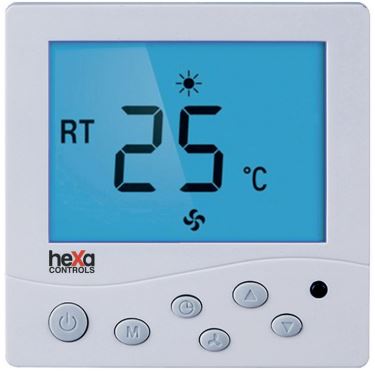
Specification
- Specification:2 and 4 pipe FCU systems
- Heat / Cool mode
- 3-speed thermostatic fan control
- Motorized valve On/Off control
- Energy-saving function
- Power Source:AC220V±10%, 50/60 Hz
- Temperature Operation:5-35 °C
- Accuracy:±1 °C
- Load Current:2A (200W)
- Installation:Surface mounting
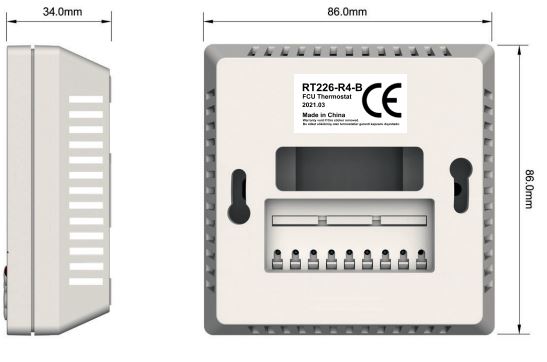
- Dimensions:86X86X34 mm
- Warranty:2 years
- Brand: Hexa Controls
- Origin: People’s Republic of China (PRC)
DIMENSION
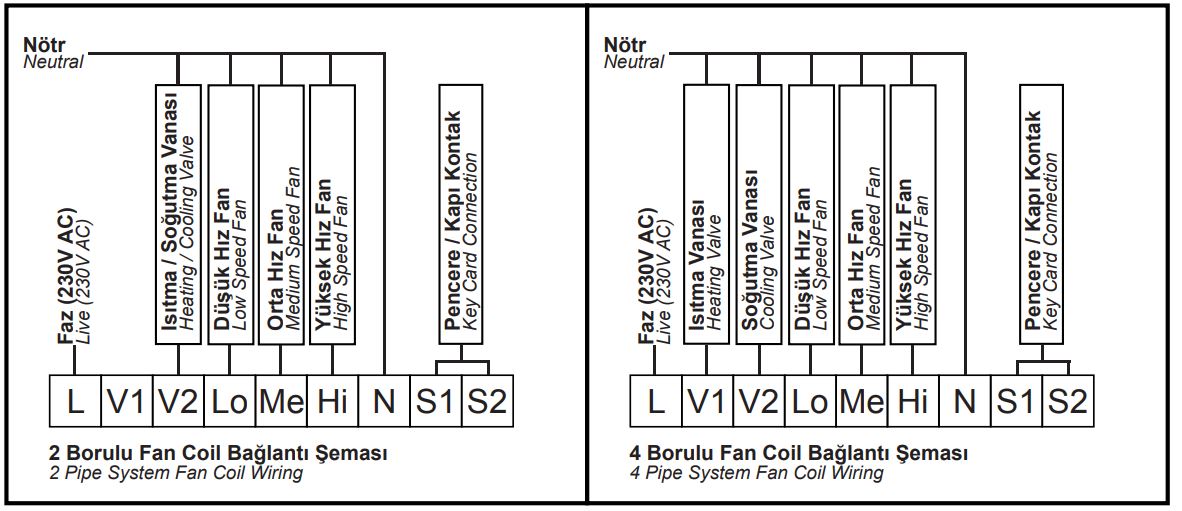
Wiring
When the thermsotat is off, press fan speed button ( ) for 3secs to enter the parameter setup menu. You can shortly press fan button each time to see the menu list. ) for 3secs to enter the parameter setup menu. You can shortly press fan button each time to see the menu list. |
||
| 1 | Sensor Calibration | You can callibrate the room temperature by pressing up and down buttons. |
| 2 | Restart Temp. Setup | if the setup TEMP ≥ Room Temp+ Restart TEMP in heating mode, it will stop heating. The restart
TEMP range is 1°C to 5°C. The default value is 1°C |
| 3 | Cool °C Limiting | Thermostats will off fan and valve at the same time based on the real limit setup temperature. For
example; the setup temperature is 10°C and the limit setup temperature is 25°C, thermostats will not work when it reaches 25°C. |
| 4 | Heat °C Limiting | Thermostats will off fan and valve at the same time based on the real limit setup temperature. For
example; the setup temperature is 30°C and the limit setup temperature is 25°C, thermostats will not work when it reaches 25°C. |
| To activate 3rd and 4th parameters, press and hold M and Up buttons for 5 sec when thermostat is on. It will appear “hr” icon on the screen. | ||
| 5 | Thermostatic Control | With this function you may choose to off fan with valves when the thermostat reaches the setup temperature or to keep the working fan when valves are off.
Valves and fan stop at the same time (default mode) |
| 6 | Memory Function | When power loses or turns off the thermostat, you may choose to memorize the set values and keep runing them when the thermostat on again.
This function is on, thermostat keeps memorizing. |
| 7 | Key Card Function | You can activate the key card function by pressing up and down buttons. Key card output is normally open (NO) Key card output is normally closed (NC) The key card is disabled (default mode) |
| 8 | System Selection | You can sellect the right system for your fan coil system. 2 pipe fan coil system 4 pipe fan coil system |
Timer setup
You can choose the time when you turn off or turn off the thermostat. When you press on ( ) button it will show “TIMER OFF” on the screen. You can choose the hour you want it to be turned off by clicking on up and down buttons. Pressing on ( ) button again, it will show “TIMER ON” on the screen. You can choose the hour you want it to be turned on by clicking on up and down buttons.
You may get more information about the usage and setup of this model thermostat on our Youtube channel. Search for RT226-R4-B.
REFERENCE
DOWNLOAD MANUALS:
Hexa CONTROL RT226-R4-B Fan Coil Digital Thermostat Product Data Sheet

Hexa CONTROL RT226-R4-B Fan Coil Digital Thermostat Product Data Sheet