Hexa CONTROL RT226-A FAN COIL THERMOSTAT
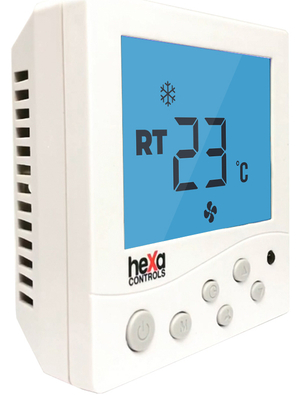
Application
RT226-A Series series fan coil thermostat is suitable for controlling central air conditioning and fan coil unit. By comparing the indoor temperature and setting temperature, to adjust fan coil unit and turn on /off electric valve . to realize adjusting temperature and saving energy purpose. RT226-A Series adopts microcomputer control technology, large-screen display, and have following display status: working state (cooling, heating, ventilation), fan speed (high, medium, low, automatic), indoor temperature, setting .temperature, clock, seven days and four time periods Time programming, timing switch, etc
Technical data
- Voltage: AC200~240V
- Output: On/off type
- Current: 3A
- IP: IP20
- Accuracy: 0.5°C
- Display temperature range: 0~70°C
- Setting range: 5°C – 35°C
- work environment: -10~60°C
- Sensor: NTC(10k)1%
- Size: 86*86mm
- Mounted: in-the-wall type
Button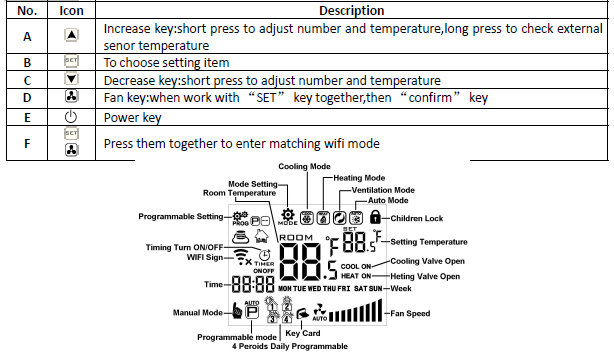
Operation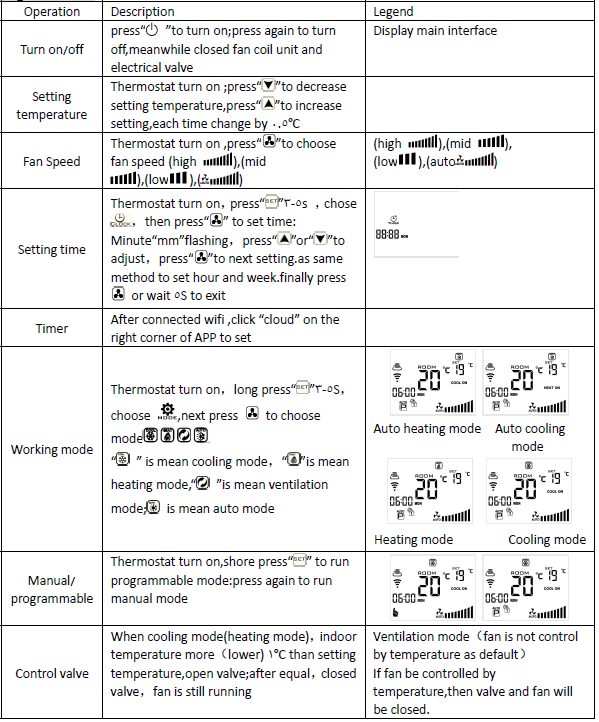
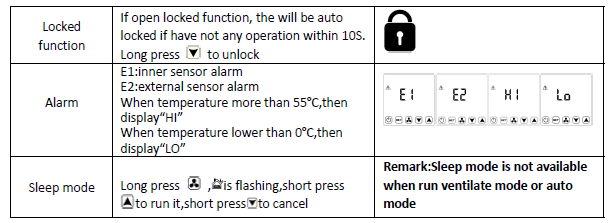
Set Programmable
HY08AC thermostat support set different time and different temperatures Compatible with 5+2,6+1,7 days Programmable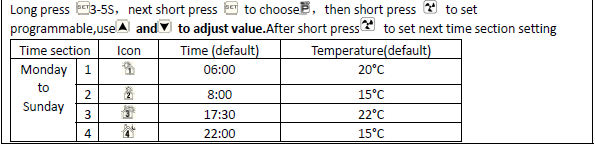
Advance setting
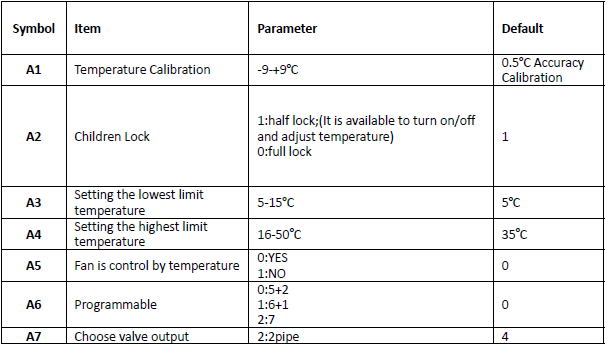
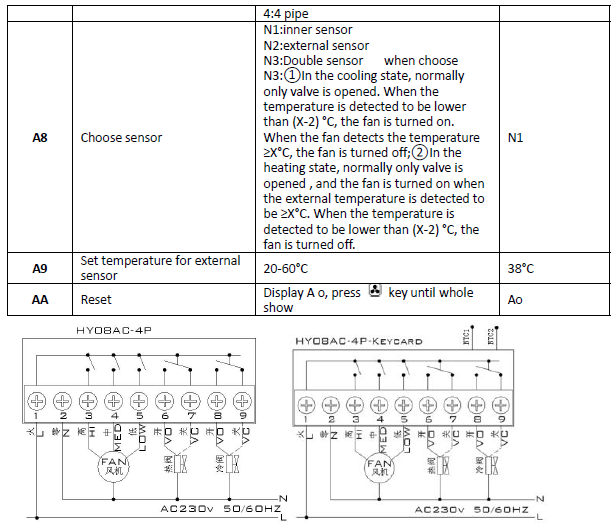
Turn off the thermostat , long press & for 5S to enter press” A” or” V” to set the item. Short press to set the next item.
Cautions on Installation
- To prevent the thermostat display from high fluctuation, special treatment has been made to the program. Therefore, it is normal that the thermostat cannot immediately display a sudden change of temperature.
- The thermostat was installed 1.5m above the ground.
- For the thermostat installed, please take care not to install it to the wall corner, door/window side or behind the door or in such unheated areas as the exterior wall. Avoid hot cold air ducts, radiators, flue or thermal pipe
- When installing the power supply, make sure that the power cable is well insulated.
- Don’t open the internal circuit board..
- HY08AC series thermostat design for the standard 75x75x 35mm wall mount box installed. Follow the instructions to open the rear cover base, mount it on the wall and wire it.
- Before installing the thermostat, make sure that the system is disconnected. The maximum voltage of the system shall meet the requirements specified in the Instruction Manual (Max. AC Voltage: 250V).
WIFI APP Download And Sign Up And Pair Thermostat
Preparation required for Wifi Connection:
A 4G mobile phone and wireless router, reconnect the wireless router on the mobile phone WLAN interface, and record the WIFI password [need to be used when the thermostat is paired with the Wifi.
Note: Wifi from the router must be 2.4G, 4G wifi from the other mobile phone hotspot is also ok, 5G router wifi is not ok.
Step 1 Download your APP
- Scan the following QR code and download the APP through a browser(Android also can search
- “Smart RM” or “Smart Life” at Google Play, iPhone also can search for “Smart RM” or “Smart Life” at App Store

Step 2 Register your account
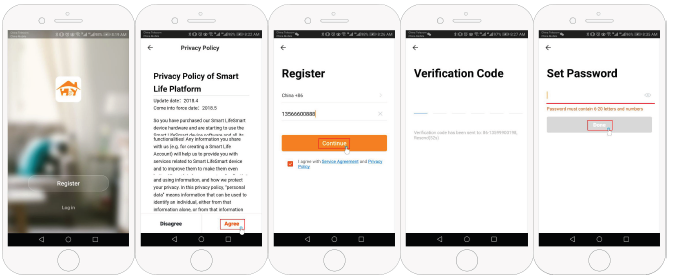
- After installing the APP, click “register”
- Please read the Privacy Policy and press Agree to proceed to the next step.
- Registration account name uses your available Email Or mobile phone number, and please select
- The region, then click “Continue”
- You will receive a 6-digit verification code from your email or SMS and enter your phone
- Please set the account password, Password must contain 6-20 letters and numbers. click “Done”
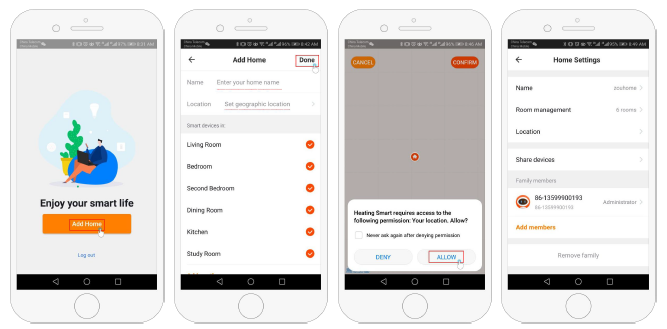
Step 3 Create family information
- Fill in the family name
- Select or add a room
- 3. Set location
Step 4 Connect your Wi-Fi signal
- In the power-on state, press and hold the button ger
 at the same time, the icon
 ” flashes to indicate the EZ distribution mode, the icon
 flashes to indicate the ap distribution mode, the icon
  indicates that the phone has been disconnected from the device.
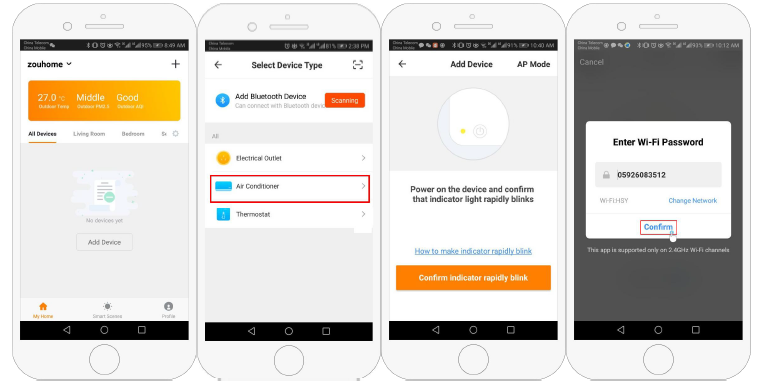
 - Press “Add Device” or “+” in the upper right corner to add the device and select the device type “Thermostat”
- On your thermostat, Click Confirm icon rapidly blink. then select your network and back to your app to enter the password of your wireless router and confirm.
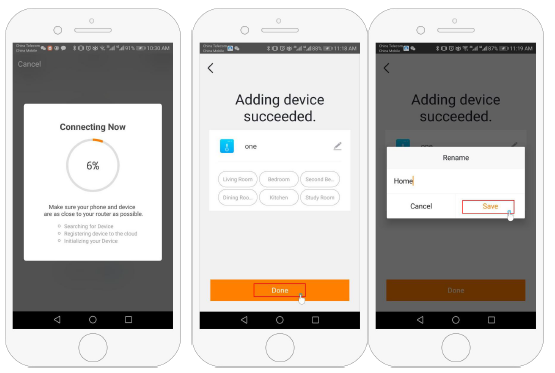
- The app will connect automatically
- This may typically take up to 5~90 seconds to complete. This is Ez mode which provides fast network connection between your app and your device.
- Your room name could be edited when the device is connected, And you can choose the corresponding room location. For example, bedroom, kitchen, living room, etc
Step 5
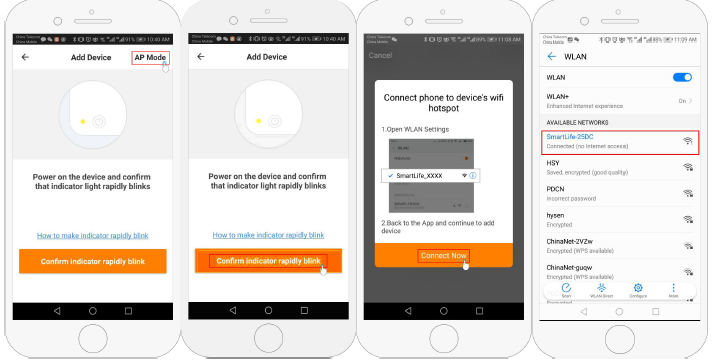
- If your router doesn’t support it or your wifi signal is weak or you can not connect by EZ mode, press the
- AP Mode on the upper right corner in. If you have connected your thermostat successfully, please ignore the app setting as blow On your thermostat
- Click Confirm& icon rapidly blink then select your network and back to your app to enter the password of your wireless router and confirm.The app will go into the page
- Press Connect now to select the wifi signal Smartlife-XXXX of your thermostat
- Go back to your app and click Connect now then the app will connect automatically
- This may typically take up to 5~90 seconds to complete.
Step 6 APP Device interface operation and How to create a group
- Power on/off button
- Mode key: Manual mode, Auto mode, Holiday mode.
- Child lock: After the child lock turned on, the APP cannot be operated.
- Set key: After clicking on, you can select the programmed mode (5+2, 61, 7 days) and set the 5. temperature and time for the six periods of the weekday and weekend.
- Basic information page
Device name: The device name can be modified according to your demand.
Device location
- Share device: Share the device to the mobile phone or email account of the registered family member
- Create Group: Add all the devices which need to operate at the same time to the created group for convenient operation.
- Device information: Contains virtual ID: IP address: Mac address: Device time zone
- Remove device: After deleting the device, you need to reconnect the network if you want to use
- Third-party controls supported: amazon alexa/google assistant/IFTTT, click to enter, you will see the steps
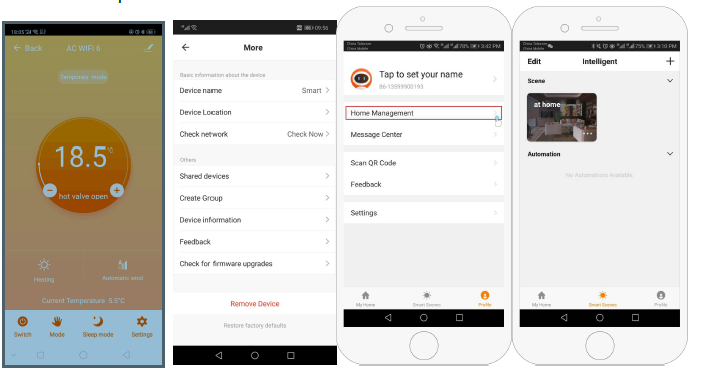
Step 7 Family management
Add family: Family naming; family location setting; select room name, you can also add room name, upon completion, it will enter the Home Setting interface.
Step 8 What is your Smart Scene and How to Use it?
set your home to automatically turn on the thermostat on when you are back home(fig ). Press + button on the setting
- Step 1: You can set conditions for tasks like Temperature below 21 degrees, then click save (condition: temp., Humidity, weather, PM2.5, Air Quality, Sunrise/Sunset, Device)
- Step 2: Add a task. Press + to Select Device (Power, Set Temp, Lock Mode) to act, then Save. If you want to delete the scene, you can press Delete in the end.
NOTE: The room sound could be turned on/off in PROFILE-SETTING- SOUND. The sound is matched with the default of your system
REFERENCE:
DOWNLOAD MANUALS:
Hexa CONTROL RT226-A FAN COIL THERMOSTAT User Manual