
Herschel T-BT Wireless Thermostat
Technical Information
- Power Supply: 2 x AA Batteries (not included)
- Installation: Free-standing or wall-mount
- Setpoint Range: 5-40°C
- Protection Class: IPX0
- Wireless (RF): 433Mhz
- Wireless Range: 35m
- Accuracy: +/- 0.1°C
- Hysteresis (control lag): +/- 0.5°C
- Programming: 7 day program, 4 periods per day
- Energy Saving: Open Window, Adaptive Start, Energy Monitoring
- Warranty: 2 years
- Certifications: CE, RoHS, EMC, RED, LOT20
Compliance
Hereby, Herschel Infrared Ltd declares that the radio equipment type T-BT Wireless Thermostat is in compliance with Directive 2014/53/EU. The full text of the EU declaration of conformity is available here.
T-BT Battery powered wireless thermostat
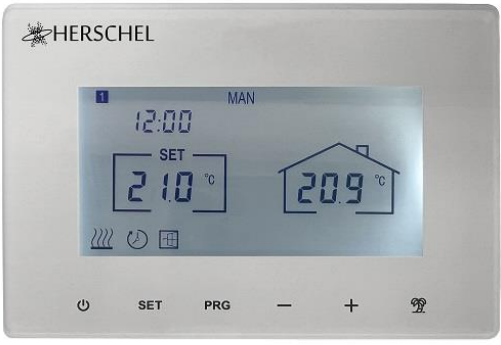
- Herschel T-BT is a compact battery-powered thermostat control designed to work exclusively with Herschel XLS heaters with their built-in SMART-R receiver.
- T-BT features a manual temperature mode, a 7×1 day program mode and a holiday (or Away) mode. All modes will operate your Herschel heater(s) by turning them ON if the room temperature is lower than the desired temperature and will turn them OFF once the desired temperature is reached or exceeded.
- The T-BT is designed to be easy to operate and incorporates the latest energy-saving features including Herschel’s open window technology and an adaptive start function ensuring your room is always at the right temperature with the least energy use. There is also a simple energy monitoring function that records recent consumption.
- The T-BT can be paired to more than one heater meaning multiple heaters within the room can be controlled with the same T-BT thermostat.
- The T-BT is not wifi enabled and will not work with the Smartlife App.
- Please read these instructions in conjunction with the Herschel XLS panel instructions.
- This appliance is battery operated but must be installed outside of the splash zones in bathrooms.

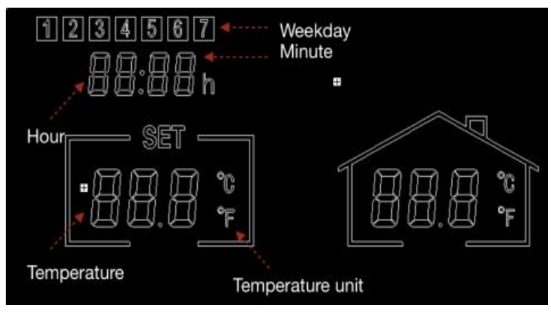
- Day of week
- Time
- Temperature
- Heating on symbol, Adaptive Start Symbol, Window Open Enabled Symbol, Window Open Alert Symbol
- Operating Modes
- Holiday (Away) Days remaining
- Program number being run
- Power On / Off
- SET button
- PRG Program button
- Minus ‘-’ button
- Plus ‘+’ button
- Holiday Mode
Installation
T-BT can be wall-mounted or free-standing. If possible, position the T-BT at least 2m away from the Herschel XLS heater.
Wall Mounting
- Gently open the T-BT case using a flat headed screw driver.
- Use the rear of the casing as a template for marking your mounting holes and drill the holes.
- Insert rawlplugs (not supplied).
- Gently screw the rear casing of the T-BT onto the wall. The vents in the rear casing must be at the bottom. (See diagram below).
- Insert 2 x AA Batteries & 1 x CR1220 lithium battery (not supplied).
- Place the front face of the T-BT over the rear casing and snap shut.
Free Standing
For free-standing use (for example placing on a shelf):
- Gently open the T-BT case using a flat headed screw driver.
- Insert 2 x AA Batteries (not supplied).
- Place the front face of the T-BT over the rear casing ensuring the vents on the rear casing are at the bottom (see diagram below) and snap shut.

Operating Instructions
Pairing the T-BT with the Heater
- Double press the Pairing button on the SMART-R box of the heater. The green pairing status LED will start to flash and the heater is ready for pairing.
- Ensure the batteries are installed in the T-BT, but that the power button on the unit is switched off. “OF” is shown on the display.
- Long-press the SET button on the T-BT and the word “PAIR” will flash on the display.
- When pairing has completed successfully, the green pairing status LED on the SMART-R box will become a steady green and the word “PAIR” on the T-BT will disappear.
- You should not experience any difficulty in pairing, but in case you do, please ensure the T-BT and Heater are within range of each other and try the above process again.
- Press the Power button on the T-BT to start using it to control the heater.
Setting Time & Calibration
- Press the SET button on the T-BT for 3 seconds to enter the settings mode. Day 1 of the week will begin to flash on the display.
- Use the + or – keys on the T-BT to set the day of the week. (e.g. if 1 is Monday and today is Wednesday, press + until 3 flashes in the display.)
- Press SET again to advance to change the minutes and use the + or – keys to adjust.
- Press SET again to advance to change the hour and use the + or – keys to adjust (it is a 24 hour clock).
- Press SET again to Calibrate the temperature of the T-BT to match another thermostat. Calibration is not usually necessary and we explain its use later. If you need to Calibrate, perform this step here.
- Press SET again to change the temperature scale from Celsius to Fahrenheit.
- The T-BT automatically saves your changes as you enter them.
Selecting & using operating modes
- Your Herschel Select XLS heater works most efficiently when it is set up to run against a program controlled by the T-BT thermostat. This program will always ensure your room reaches the temperature you want at the time you want it, each day of the week.
- Usually you will want to set up and run the unit in Program (PRG) mode. You can always override the programmed set temperature to be higher or lower by using the + or – keys to change the temperature and the T-BT will maintain this override temperature until the next programmed period starts (when the next programmed temperature will be set).
- Selecting Manual (MAN) mode allows you to set and maintain a constant temperature that does not vary with the time of day.
- There is also a Holiday (HOL) mode which allows you to save energy by setting a lower temperature while you are away. The HOL mode has a day-counter feature allowing you to set the number of days you are away.
Selecting the Operating Mode
To select Manual or Programming modes, press the PRG button until the mode you require is shown at the top of the display.
Manual Mode
Select the Manual mode by clicking the PRG button until MAN is shown on the display. Use the + or – buttons to set the temperature you want the T-BT to maintain in the room. Note that the T-BT will maintain this temperature 24 x 7 until you switch to another mode.
Program Mode
The T-BT comes with the following program defaults which you can keep or change.
Programming the T-BT
To change the program defaults, proceed as follows.
Set time & temperature for each day

Long-press PRG and the display will change to enable input of the time and temperature of the 4 periods for each day of the week, starting with the first period on day 1. Change the day of the week using + or – buttons. Press “PRG” again. The Time will flash at the top left of the display. Use + or – buttons to change the time. Press PRG to advance to the temperature setting which will then flash. Use + or – buttons to change the temperature. (This will not change Celsius or Fahrenheit, only the set temperature digits). Press PRG to advance to the next period. Repeat the above steps to complete the 4 periods for each day. The next day will automatically then be available to set. For 7 days of the week this means a total of 28 programming steps. After the final programming entry, the next click of PRG will return the unit to normal operation.
Holiday Mode
Holiday (Away) mode allows you to set a cooler fallback temperature to maintain in the house to save energy but avoid frozen water pipes. The mode has a countdown timer in which you can set up to 99 days away. The T-BT will revert to a fixed 18 ̊C setting when holiday mode completes. To set the Holiday countdown timer, long press on the Holiday (Palm Tree) button on the key pad. The “HOL” Mode is displayed and the set temperature will begin to flash. Set the temperature to be maintained while you are away using the + and – keys. Press the Holiday button again to adjust the number of days you are away using + and – keys. Press the Holiday button again to save and exit. The days number will count down daily until your entered number of days has elapsed. The unit will return to a target temperature of 18 ̊C at the end of the countdown period. To quit an active holiday mode, press the “PRG” button and select Manual or program modes.
Function
Open Window Function
If the T-BT detects a temperature drop of more than 3°C within 15 minutes, the controller will power-off the heater. “OF” will appear on the screen and the text “Alarm! Open Window!” will be displayed. Pressing the Power button on the unit will resume normal operation, or waiting for 30 minutes will also restore normal operation.
- Open Window detection will only work if the feature is activated and shown as an
- Open Window icon on the display (see display schematic on page 2). To activate the
- Open Window function, press “SET” and ‘+’ together for 3 seconds. To deactivate the
- Open Window function, repeat the process.
Adaptive Start
Adaptive start is an intelligent energy-saving feature which will turn on the heating in advance of the next scheduled time if the current temperature is more than 5°C below the next target temperature. (This avoids wasteful loads on the heater). Adaptive Start will only work if the feature is activated and shown as a Timer icon on the display (see display schematic on page 2). To activate the Adaptive Start feature, press “SET” and ‘-’ together for 3 seconds. To deactivate, repeat the process.
Keypad Lock
To activate the keypad lock, press SET and Holiday Mode buttons together for 3 seconds. A shut padlock icon will appear on the screen. Press SET and Holiday Mode buttons together again for another 3 seconds to deactivate the keypad lock.
Energy monitoring
The T-BT can monitor the energy consumption of the heaters paired with it. To set up energy monitoring:
- Power off the thermostat
- Press and hold the “+” button until the “SET” digits flash on the screen.
- Adjust the number to match the total power (in kW) that this thermostat connects to. (e.g. if more than one heater, add their power together). Click “Off” again to store the figure.
You can always check current consumption details by pressing the “-” and “+” button together for 3 seconds. The display will show: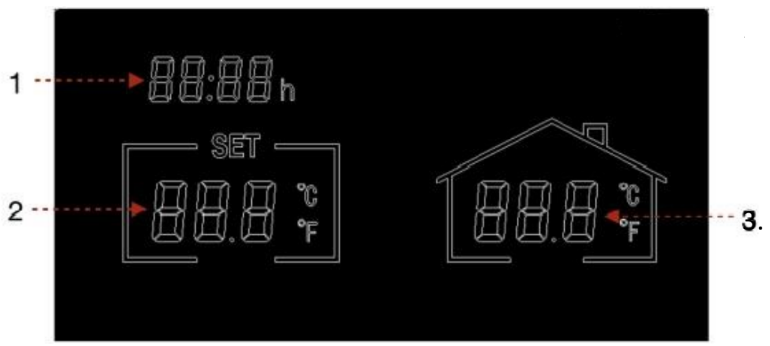
- Heating hours today
- Energy consumption yesterday (in kW)
- Energy consumption today (in kW).
Factory Settings
To restore to factory settings, power off the thermostat, press and hold the “Holiday” button for 5 seconds until the screen starts to flash.
Calibration
- Calibration is a process to alter the temperature of the T-BT up or down in order to align the unit with another thermostat.
- The T-BT can be calibrated 5°C up or down from the default of 0 (no calibration). You can calibrate in steps of 0.5°C.
- Calibrating UP (i.e. +1 °C etc) means the T-BT will display a higher temperature than the present one being shown. Use this when you think the T-BT is under-reading compared with another thermostat.
- Calibrating DOWN (i.e. – 1 °C etc) means the T-BT will display a lower temperature than the present one being shown. Use this when you think the T-BT is over-reading compared with another thermostat.
- When adjusting the T-BT Time & Temperature settings using the SET button, calibration is the final setting you can change. The default is 0. Use + or – keys to adjust this figure up or down.
2 Year Warranty
Register your product at the Help & FAQs section of your local Herschel website. Within two years from date of purchase Herschel will repair or replace the T-BT where the fault is due to defects in materials or workmanship. This warranty is for standard domestic use only and excludes commercial uses. In the event of a warranty claim please visit the Customer Service area of the Herschel Website and follow the Warranty Claim process. You will need proof of purchase.
Note your serial number here.
Reference
Download Manual:
Herschel T-BT Wireless Thermostat Installation and Operating Instructions
Herschel T-BT Wireless Thermostat Installation and Operating Instructions