
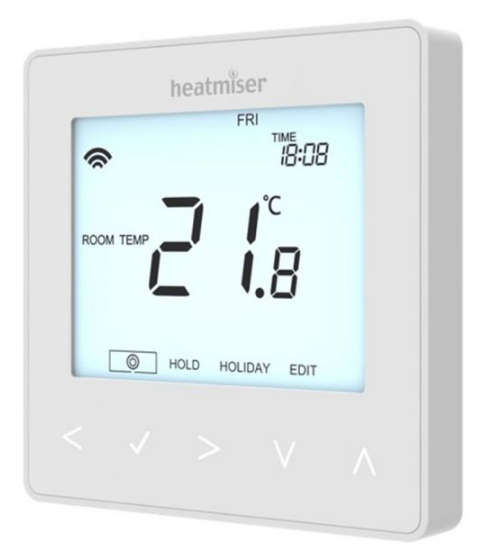
Heatmiser neoStat-hw V2 – Hot Water Programmer THERMOSTAT
Installation Procedure
 Do
Do
- Mount the time clock at eye level.
- Read the instructions fully so you get the best from our product.
 Don’t
Don’t
- Do not install near to a direct heat source as this will affect functionality. Do not push hard on the LCD screen as this may cause irreparable damage.
This neo Stat-hw V2 is designed to be flush mounted and requires a back box of 35mm (minimum depth) to be sunk into the wall prior to installation.
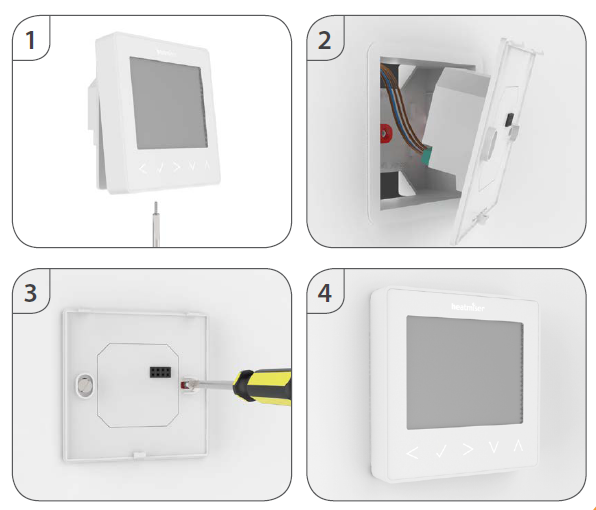
- Step 1 Remove the screw from the bottom face of the time clock then carefully separate the front half from the back plate.
- Step 2 Place the time clock front somewhere safe. Terminate the time clock as shown in the diagrams on pages 18-19 of this booklet.
- Step 3 Screw the time clock back plate securely into the back box.
- Step 4 Clip the front of the time clock onto the back plate, securing it in place with the retaining screw.
Pairing the neoHub
- Connect the neoHub to your router with the Ethernet cable provided.
- Connect the power supply to the neoHub.
- The router will automatically assign an IP address to the neoHub, the Link LED will light up RED once the neoHub has connected to your network.
- Once connected to the Heatmiser cloud server, the Link LED will turn GREEN.
- Connect your smartphone or tablet device to the same WiFi network as your router.
- Download the FREE Heatmiser neoApp from the Apple App Store or Google Play Store and register an account.
- Once you have registered your account, press Sign In, then press Add Location.
- Press the connect button on the neoHub to add the location to your account.
- When successfully connected, enter a title for the location (e.g. Home)
Pairing the neoStat
The next step is to join the neoStat V2 to the neoHub, we recommend joining the neoStat V2 located nearest to the neoHub first.
To add a neoStat V2, follow these steps;
- In the app, select ADD NEOSTAT, enter a preset or custom title, then press NEXT.
- You now have two minutes to join the neoStat V2 to the neoHub.
- On the neoStat V2, use the Left / Right keys to select
 , press and hold Tick ………..
- SETUP will be highlighted, now press the tick key once ……………………………………………..

- Feature 01 is displayed on screen.
- Press the Tick key once again to pair the neoStat to the neoHub ……………..
- The MESH symbol appears flashing on the display.
- When the neoStat V2 successfully connects to the neoHub the
- MESH symbol will be permanently displayed.
- Press ADD ANOTHER for addtional zones or press FINISH to complete setup.
What is a Mesh Network.
NeoStats work using a mesh network, meaning neoStats have the ability to send & receive signals via other thermostats on the network. This signal is relayed from one thermostat to another until it reaches its destination. This communication method extends the communication range whilst offering increased network stability when compared with standard RF thermostats. The Mesh symbol is shown when the device is communicating with the neoHub, if the mesh symbol disappears this indicates connection to the neoHub has been lost.
Approach Sensor
The neoStat V2 uses proximity to detect when you are about to use the touch keys. As you approach the neoStat V2, the touch keys and backlight will light up. This can be useful if you need to adjust the set temp or timer in a dark room.
Mode 2 – Time Clock
LCD Display
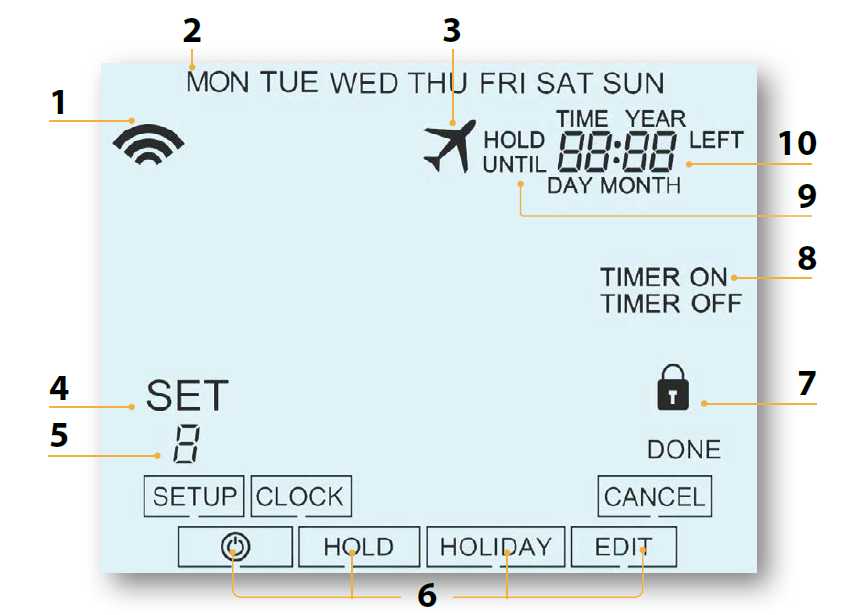
- Mesh Symbol – Displayed when connected to the neoHub.
- Day Indicator – Displays the day of the week.
- Holiday – Displayed when the time clock is in holiday mode.
- Set – Displayed when changes are being made to the current set point.
- Program Indicator – Displayed during programming to show which level is being altered.
- Main Menu – Displays which option is currently selected.
- Keypad Lock Indicator – Displayed when the keypad is locked.
- Timer Status – Displays the current state of the timed output.
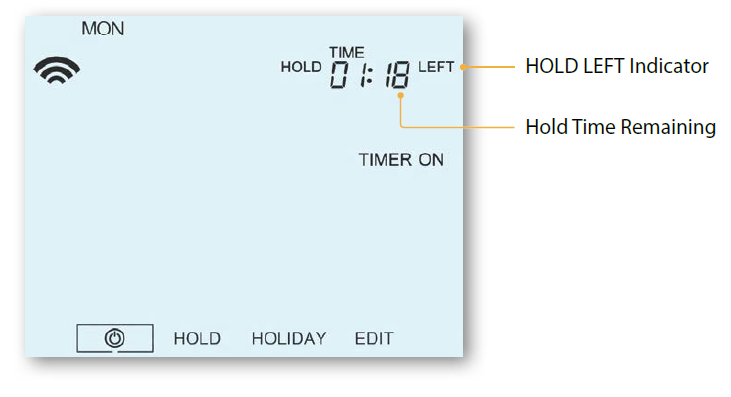
- Hold Left – Displayed when a timer hold is active, the remaining time will be shown.
- Time/Day/Month/Year – Displays when setting the Clock/Calendar or a Holiday Period.
Locking /Unlocking
Locking the neoStat-hw V2
- Use the ‘Left/Right’ keys to scroll to ‘HOLD’ & press for 10 seconds………
- The display will show 0000. At this point enter a four-digit PIN.
- Use the Up / Down keys to enter the first two digits …………………………………..

- Press to confirm ……………………………………………………………………………………………………
- Use the Up / Down keys to enter the second two digits …………………………….
- Press to confirm ……………………………………………………………………………………………………
- The display will return to the main screen and display the keypad lock indicator

Unlocking the neoStat-hw V2
- Use the Up / Down and keys to enter the first two digits……………………….
- Use the Up / Down and keys to enter the second two digits ………………..
- Use the Left / Right keys to scroll to …………………………………………………………………
- Press and hold Tick to turn off the display …………………………………………………………..
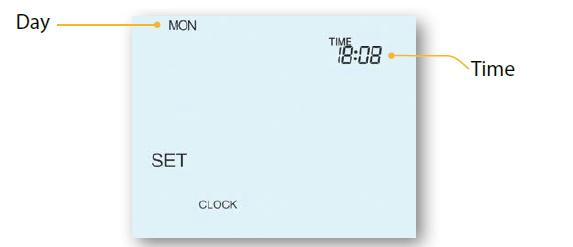
- Use the right arrow key to select CLOCK ……………………………………………………………..

- Press Tick to confirm selection ……………………………………………………………………………….
- Use Up / Down keys to set the year ………………………………………………………………………
- Press Tick to confirm selection ……………………………………………………………………………….
- Repeat the steps to set the Month, Date & Time …………………………………………………

- Press Tick to confirm the new clock settings ………………………………………………………
- Use the down arrow to scroll to ……………………………………………………………………….
- Press Tick to turn the display on …………………………………………………………………………….
Setting the Switching Times
- To program the switching times, follow these steps.
- Use the Left / Right keys to scroll to EDIT and press Tick ……………………………
- Use the Left / Right keys to select day/period of the week ………………………..
- Press Tick to confirm selection ………………………………………………………………………..
- will now flash and the current ON time will be displayed.
- The OFF time can be viewed by pressing the Down key ……………………………
- Select a switching time and press the Tick key …………………………………………….
- Use the Up / Down keys to select the ON time HOURS and press Tick …….
- Use the Up / Down keys to select the ON time MINUTES …………………………..
- Press Tick to confirm selection ……………………………………………………………………….
- Use the Up / Down keys to select the OFF time HOURS and press Tick …..
- Use the Up / Down keys to select the OFF time MINUTES …………………………
- Press Tick to confirm selection ……………………………………………………………………….
- Press the Right arrow key ………………………………………………………………………………..
- will now flash and the current ON time will be displayed.
- Repeat the steps above to set all periods. For any unused periods enter — : –
- When complete, use the Left / Right keys to scroll to DONE and press
- Tick to confirm all changes …………………………………………………………………………….
Timer Override
- To override the timed output on, follow these steps.
- Use the Up / Down keys to set the override duration e.g. 02:00 hours ……….
- Press Tick to confirm settings and return to main display …………………………….
Standby
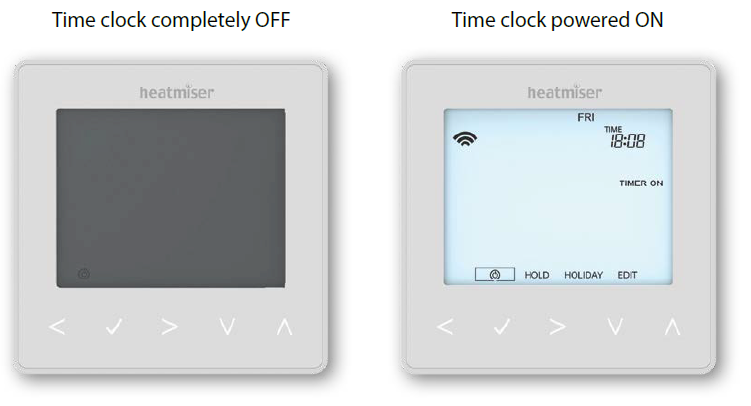
- To turn the time clock off completely, scroll to the Power Icon and hold the
- Tick key for approximately 3 seconds until the display goes blank ………………………..
- The timed output will be turned OFF during Standby mode.
- To turn the time clock back ON, press the Tick key once ………………………………………………………..
Holiday
In thermostat mode, the holiday function reduces the set temperature in your home to the frost protection temperature setting (see page 23). The thermostat will maintain this temperature for the duration of the holiday and will then automatically return to the program mode on your return. In time clock mode, the holiday function maintains the timed output as OFF. Set a date & time for the holiday period to end, using the steps below
- Use the Left / Right keys to scroll to HOLIDAY and press Tick ……………………….
- Use the Up / Down keys to set the year …………………………………………………………………
- Press Tick …………………………………………………………………………………………………………………………….
- Use the Up / Down keys to set the month……………………………………………………………..
- Press Tick …………………………………………………………………………………………………………………………….
- Repeat the steps to set the Date & Time…………………………………………………………………
- Pressing Tick to confirm selection…………………………………………………………………………………..
- Use the Left / Right keys to scroll to HOLIDAY and press Tick …………………………….
- CANCEL will be highlighted, Press Tick to cancel ………………………………………………………..
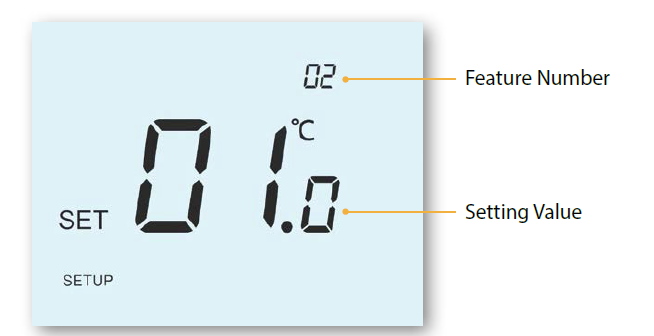
Adjusting the Optional Settings
- Use the Left / Right keys to scroll to …………………………………………………………………
- Press and hold the Tick button for 3 seconds ………………………………………………………
- SETUP will be highlighted, now press the tick key once ……………………………………
- Use the Up / Down keys to scroll through features ……………………………………………
- Use the Left / Right keys to adjust the setting within each feature …………………
- Press Tick to confirm and exit setup menu ………………………………………………………….
Optional Features Explained
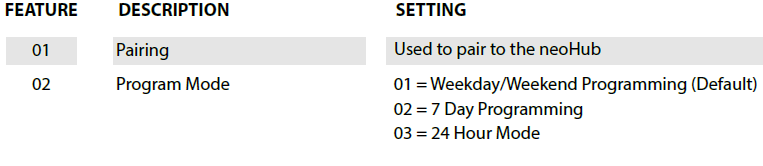
- Feature 01 – Pairing to neoHub: This function is used to connect the time clock to the neoHub.
- Feature 02 – Weekday/Weekend (5/2), 7 Day Programming or 24 Hour Mode:
- The time clock offers three programming methods;
- Weekday/ Weekend (5/2) – Allows you to program 4 on/off switching times for the weekdays and 4 on/off switching times for the weekend.
- 7 Day Program Mode – Each day has 4 on/off switching times that can be programmed independently.
- 24 Hour Mode – All days are programmed with the same on/off switching times
Optional Settings – Feature Table
Factory Reset
To reset the device to factory default settings, follow these steps:
- Use the Left / Right keys to scroll to …………………………………………………………….
- Press and hold Tick to turn the display OFF …………………………………………………….
- SETUP will be highlighted ………………………………………………………………………………….
- Press and hold the Tick key for 10 seconds ……………………………………………………..
- All of the icons on the display will appear for 2 seconds, then you will see the number 1 or 2 flashing.
- Use the Left / Right keys to scroll between modes…………………………………………
- Mode 1 = Thermostat
- Mode 2 = Time Clock
- Press the Tick key to confirm selection …………………………………………………………….
- The neoStat will revert to the main display screen for the selected mode.
Note: Factory reset will cancel all parameters that were entered during the set-up and pairing operations. These processes must be repeated after factory reset is completed.
Wiring Diagram
neoStat-hw (S Plan)
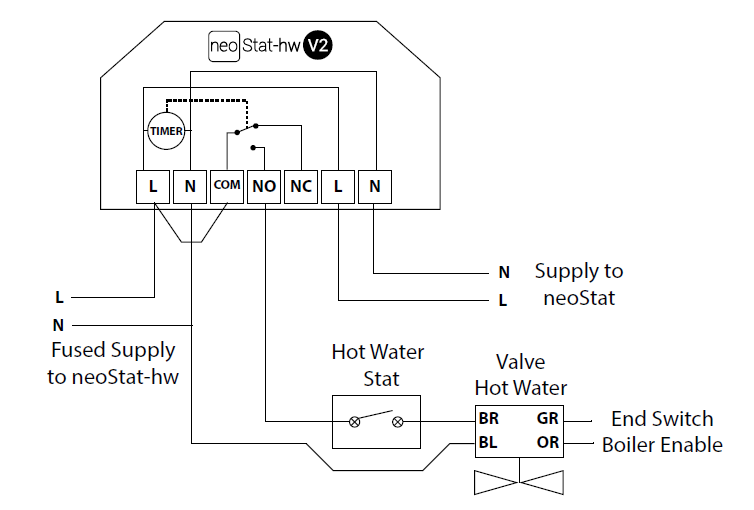
neoStat-hw (mid position valve

Heatmiser
Want More Information?
Call our support team on: +44 (0)1254 669090 Or view technical specifications directly on our website: www.heatmiser.com
- Heatmiser UK Ltd
- Units 1-5 Hurstwood Court, Mercer Way
- Shadsworth Business Park, Blackburn,
- Lancashire, BB1 2QU, United Kingdom
- Twitter: @heatmiseruk
- Facebook: facebook.com/thermostats
Reference
Download manual:
Heatmiser neoStat-hw V2 – Hot Water Programmer THERMOSTAT USER MANUAL
Other Manual:
Heatmiser neoStat-hw V2 Hot Water Programmer THERMOSTAT PRODUCT SPECIFICATION GUIDE
Heatmiser neoStat-hw V2 – Hot Water Programmer THERMOSTAT USER MANUAL