Heatit 5430599 Z-Wave Thermostat

Introduction
Heat it Z-TRM3 is an electronic thermostat for electrical floor heating, designed to be mounted in a standard flush box. The thermostat has a built-in Z-Wave chip that can be connected with Home Automation systems. Heatit Z-TRM3 has SmartStart. This feature allows the user to include all devices with SmartStart by scanning the QR codes on the devices. On startup, all the devices will automatically be included in the gateway (requires SmartStart compatibility). This saves the installer a lot of work.
Heat it Z-TRM3 is equipped with a single pole switch and fits into System 55 frames. The thermostat can withstand a load of max 16A /3600W at 230VAC. At higher loads, the thermostat must control a contactor. The thermostat may be connected to two wired external sensors. The thermostat has a capacity of up to 5 associations (relays, wall plugs, etc.).
The thermostat is designed for electrical heating.
DIMENSION

FUNCTIONS
- Floor sensor
- Firmware update (OTA)
- Internal room sensor
- Power metering
- External room sensor (wired)
- Relay status LED
- Temperature limiter
- Single pole switch
- SmartStart
- Lock mode/child lock
- Weekly program/setback via a gateway)
- Calibration
- 5 associations
- The temperature is shown in the gateway
- Supports encryption mode: S0, S2 Authenticated Class, S2 Unauthenticated Class
This product is a security-enabled Z-Wave Plus product with encryption. The product must be used with a security-enabled Z-Wave Controller in order to fully utilize the product.
TECHNICAL DATA
- Protocol Z-Wave
- Chip Z-Wave 500 chip
- Rated voltage 230VAC 50/60Hz
- Max load 3600W (resistive loads only) Recommends contactor for loads higher than 13A
- Max current 16A
- Power consumption <2.0W
- Ambient temperature 2°C to 40°C (during operation)
- Temperature range 5°C to 40°C
- Hysteresis 0.3°C to 3.0°C (default 0.5°C)
- Compatible with NTC
- sensors with values 10, 12, 15, 22, 33, and 47 kΩ @ 25°C
- IP Code IP 21
- Approvals Z-Wave Plus, CE
- EN 60730-1, EN 60730-2-9, EMC 2014/30/EU, RoHS 2011/65/EU,
- LVD 2014/35/EU
Approved for use in bathrooms.
TERMINAL
- Use 1.5mm² or 2.5mm² according to load.
MAINTENANCE
The product is maintenance-free, but must not be covered
WARRANTY
2-years
The product is also available in other Z-Wave frequency versions on request.
Product specifications may change without further notice. All electrical installations must be carried out by a licensed electrician.
The product must be installed in accordance with national building codes and our installers manual.
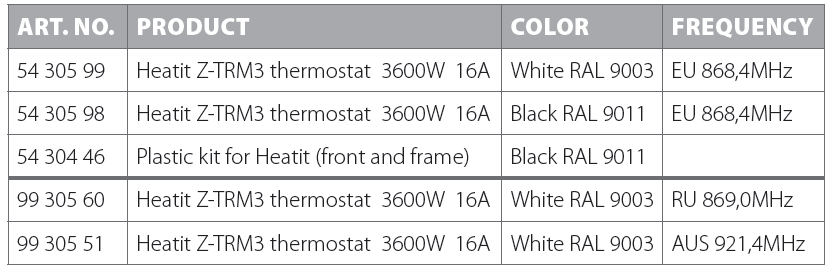
Reference
Download Manual:
Heatit 5430599 Z-Wave Thermostat Product Specifications Guide
Other Manual:
Heatit 5430599 Z-Wave thermostat Quick Start Guide
Heatit 5430599 Z-Wave thermostat Installation Manual

Heatit 5430599 Z-Wave Thermostat Product Specifications Guide