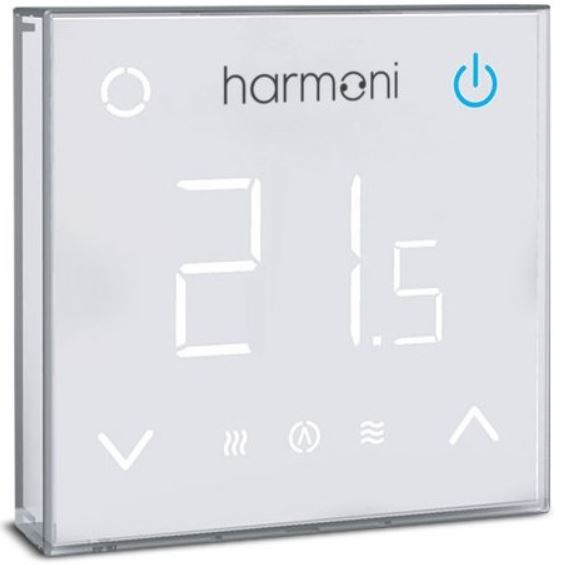
Harmoni IP21 Touch Digital Thermostat
Download the App
The Harmoni Touch+ is Wi-Fi enabled and can be controlled via an app on a smartphone. The app is compatible with iOS & Android, and can be downloaded using the QR code opposite.

Introduction
The Harmoni Touch is an intuitive programmable thermostat range used to control either electrical or water underfloor heating systems. It will keep the room at a comfortable temperature whilst minimising energy use. The Touch+ is Wi-Fi enabled and the heating system can be controlled remotely via the app installed on a smart phone.
Technical specifications
| Electric | Water | |
| Supply voltage | 85 –265Vac 50/60Hz | 85 –265Vac 50/60Hz |
| Standby power | <2W | <2W |
| Max load | 16A | 3A |
| IP class | IP21 | IP21 |
| Cable specification | ≤2.5mm² | ≤2.5mm² |
INSTALLATION
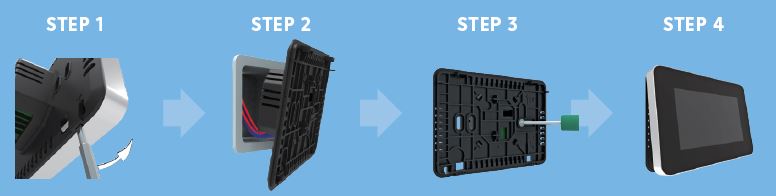
- Separate the panel from the back section: insert a screwdriver into the two holes at the bottom of the backplate and prise it open
- Connect the thermostat according to the wiring instructions on page 6
- Insert the back panel into the wall box and fix with the screws provided
- Re-install the front panel whilst ensuring the pins engage properly in the circuit board socket
Wiring instructions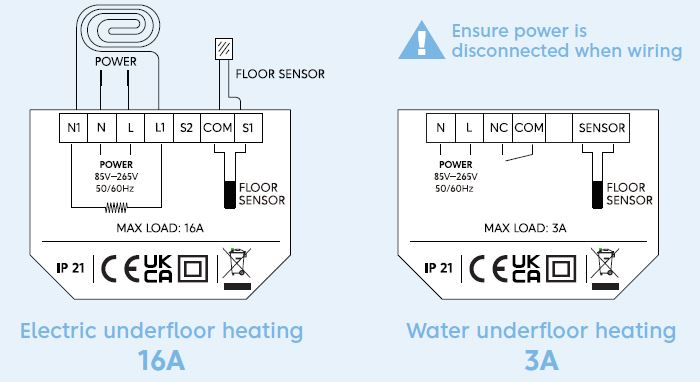
Thermostat symbols & buttons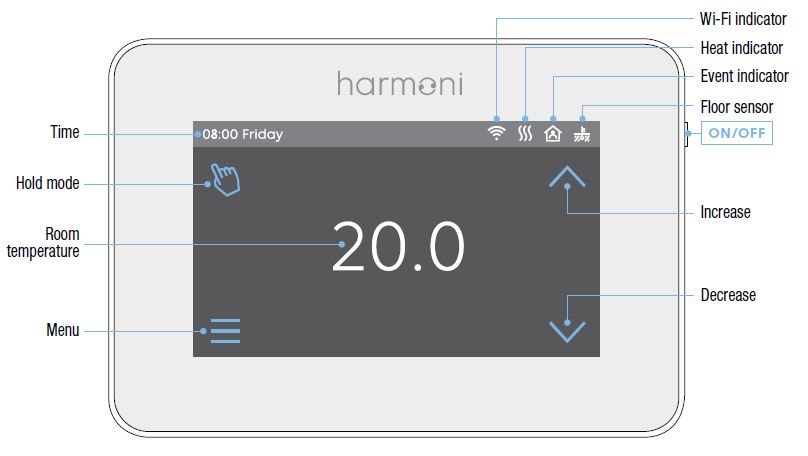
Wi-Fi connection
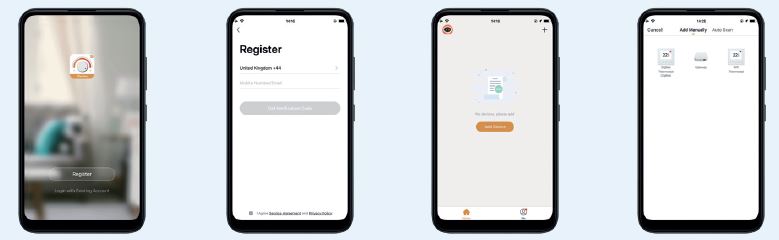
- Scan the QR code or download from the APP store/Google Play
- Register and log in to the APP with mobile number/email address
- Click ‘Add Device’ or ‘+’ on the top-right to add device
- Click ‘Wi-Fi thermostat
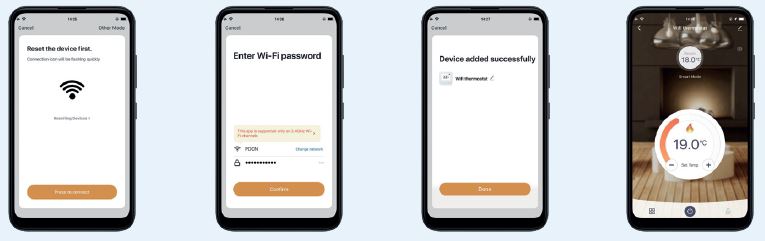
- Operate thermostat. If the Wi-Fi icon flashes quickly, Click ‘Press to connect
- Enter Wi-Fi password then click ‘Confirm
- If device is successfully added, device name can be changed and region set. Then click ‘Done
- Check the actual temperature and set temperature etc., on the control interface
Operation & functions
ON/OFF
Press the button on the right edge of the thermostat to turn on/off
TEMPORARY OVERRIDE TEMPERATURE
With the screen displaying room temperature, press  to change the current event temperature setting. The thermostat will revert to the scheduled parameters at the start time of the next event in auto mode.
MODE SELECTION
In the page of detected temperature, press the key in the up-left corner to select the mode.
There are 3 modes:
 Auto mode: It is the default mode. Thermostat runs according to event parameters set in Edit Setting to save energy
 Manual mode: Runs with the set temperature until altered. Follow these steps:
- Press Manual Mode to enter temperature setting
- Press or to set the temperature
- Press to confirm and return to the screen displaying room temperature
 Holiday mode: Runs with the set temperature until the holiday period ends. Follow these steps:
- Press Holiday Mode to enter holiday setting
- Press or to set the days of holiday
- Press to confirm and enter holiday temperature setting
MENU With the screen displaying room temperature, press in the bottom left corner to enter Menu.
Time
- Day and clock are set here.
- Press Time to enter day setting
- Press the day you want to enter hour setting
- Press to set hour
- Press
 to confirm and enter minute setting
 - Press to set minute
- Press to confirm and go back to Menu
- Press
 to return to the screen displaying room temperature
Key lock
Lock all keys to prevent settings from being changed.
Lock Steps
- Press Key Lock to enter key lock setting
- Press to select lock
- Press to confirm and return to the screen displaying room temperature
Unlock steps:
- On the screen displaying room temperature, press any key then the
 in the bottom right corner will flash 3 times
 - Press and hold for 3 seconds to unlock
Brightness
- This option allows the brightness of the display to be changed.
- Press Brightness to enter brightness setting
- Press
 to move up/down or touch any part of the line to set the brightness
 - Press to confirm and back to the Menu
Edit setting
Edit Setting can set and change the parameters. If Holiday Mode or Hold Mode isn’t chosen, the thermostat runs according to the parameters of Edit.
- Press Edit Setting to enter days selection
- Press the required day to set
- Press to enter event selection
- Press the required event to set and enter the start time hour setting
- Press or to set start time hour
- Press to confirm and enter the start time minute setting
- Press to set start time minutes
- Press to confirm and enter temperature setting
- Press to set temperature
- Press to confirm and return to event selection
- Press to return to the screen displaying room temperature
DEFAULT PARAMETERS IN EDIT MODE
The table below shows the default parameters.
| Day | Wake | Leave | Back | Sleep |
| Mon–Fri | 07:00 22.0°C | 08:30 19.0°C | 17:00 22.0°C | 22:00 19.0°C |
| Sat/Sun | 08:00 22.0°C | 08:30 22.0°C | 17:00 22.0°C | 22:00 19.0°C |
ADVANCED SETTING
The thermostat provides advanced settings to suit a range of special situations which are normally set by a technician during initial installation.
- Press Advanced Setting to enter the warning screen
- Press to enter the advanced setting screen
- Press to switch screen
- Press the item to set its parameters
| No. | Name | Default | Ranges |
| 1 | Room temperature calibration | 0°C | −5°C to 5°C |
| 2 | Floor temperature calibration | 0°C | −5°C to 5°C |
| 3 | Anti-freeze function | ON | OFF/ON |
| 4 | Anti-freeze temperature | 5°C | 5°C to 15°C |
| 5 | Floor temperature limit | 30°C | 20°C to 50°C |
| 6 | Temperature tolerance | 1°C | 0.5°C/1°C/2°C/3°C |
| 7 | Temperature unit | °C | °C/°F |
| 8 | Sensor selection | Floor sensor | Room/Floor/Both |
| 9 | Schedule | 5 +1+1 | 5+1+1/7 |
| 10 | Output delay | 0 seconds | 0/30/60/90 seconds |
| 11 | Adaptive function | OFF | OFF/ON |
| 12 | Open window | OFF | OFF/ON |
| 13 | Power set | 0W | 0W to 4500W |
| 14 | Energy use | ||
| 15 | Sensor type | 0: 3950 | 0: 3950
1: 3380 2: 3700 3: 3600 4: 3740 |
| 16 | Factory reset | NO | NO/YES |
- Room temperature calibration: Calibrate the temperature detected by the room sensor.
- Floor temperature calibration: Calibrate the temperature detected by the floor sensor.
- Anti-freeze function: This option is ideal for warming plants and pets with a lower temperature. displays when the thermostat is switched off.
- It can also protect the pipework from freezing when using a water heating system.
- Floor temperature limit: If both sensors are chosen, the maximum floor temperature value can be set and the system will stop heating if the floor temperature exceeds this value.
- Temperature tolerance: Default value is 1°C. The thermostat starts when the room temperature is 1°C lower than set temperature and stops when the room temperature is 1°C higher than set temperature.
- Temperature unit: °C and °F can be selected.
- Sensor selection:
- Room sensor: Run by room sensor
- Floor sensor: Run by floor sensor
- Both sensors: Run by room sensor with floor temperature limit
- Schedule: Select a weekly schedule for the Edit Setting. There are 2 options:
- Each weekday from Monday to Sunday can be set individually.
- 5+1+1: Weekdays, Monday to Friday have the same events; Saturday & Sunday can be set individually. 10 Output delay: This option helps avoid inadvertent operation on heating.
- Adaptive function: After several days of installation and use, the adaptive function learns that the required temperature has already been reached when the next event begins.
- Open window: This function only works when in Room Sensor or Both Sensors mode. When a window is opened, this function detects the sudden change in room temperature and automatically switches off the thermostat for 15 minutes.
- Energy use: This option allows various data to be
- entered and used to calculate energy use. Sensor type: This thermostat is compatible with the following five floor temperature sensors. The default sensor 0–3950 is in the box.
|
Temperature |
The resistance value of the floor sensor at the corresponding temperature point (Ω) | ||||
| 0–3950 | 1–3380 | 2–3700 | 3–3600 | 4–3740 | |
| 0°C | 32800 | 26050 | 30286 | 34423 | 34720 |
| 10°C | 19733 | 17630 | 19055 | 22217 | 22328 |
| 25°C | 10000 | 10000 | 10000 | 12000 | 12000 |
| 30°C | 7905 | 8331 | 8165 | 9869 | 9854 |
Troubleshooting
If you are experiencing problems with your Harmoni thermostat please call our technical department on 01473 559088.
COMMON ERROR CODES
- E1: Room sensor error
- E2: Room sensor error
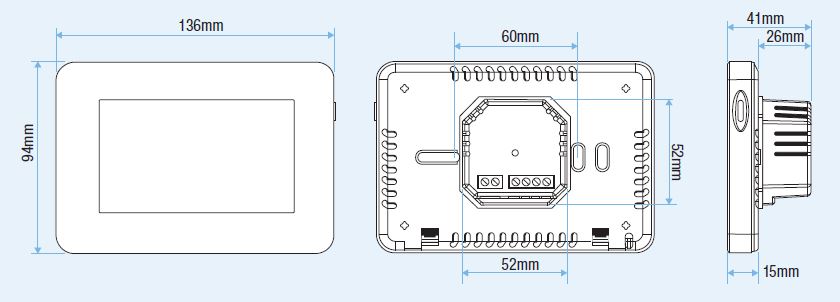
Dimensions
All dimensions are specified in mm
Harmoni product range
Discover Harmoni Heating’s premium range of energy-efficient, intuitive, and well-designed heating solutions with clean, energy-saving technology at the heart of every product.
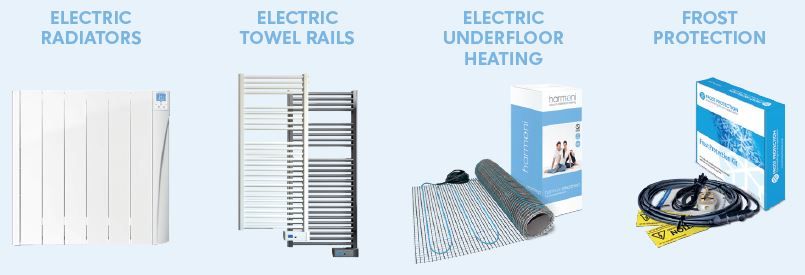
Visit www.harmoniheating.co.uk to see the full range of harmonic products
REFERENCE:
DOWNLOAD MANUALS:
Harmoni IP21 Touch Digital Thermostat INSTALLATION MANUAL
OTHER MANUALS:
Harmoni IP21 Touch Digital Thermostat Product Specification Guide