Hager 20301909 Room Controller Thermostat
Please note!
- The device may only be opened and installed according to the circuit diagram on the device or these instructions by a qualified electrician. The existing safety regulations must be observed.
- Appropriate installation measures must be taken to achieve the requirements of protection class II.
- This independently mountable electromechanical or electronic device is designed for controlling the temperature in dry and enclosed rooms only under normal conditions.
- The device confirms EN 60730, it works according to operating principle 1C.
- The permissible relative humidity of max. 95% must not be exceeded. Condensation is to be avoided.
- When starting up the room temperature controller, it must be noted that the thermo-bimetal requires a certain period of time to adapt itself to the room temperature.
- The switching point will therefore deviate from the room temperature immediately after installation or after switching off the night set-back.
- The switching point accuracy is ensured after approx. 1 to 2 hours of operation.
- To heat up faster in the beginning and shorten the compensation time in the beginning, we recommend setting the room temperature higher than actually desired.
- After attaining the temperature, the temperature setting can be set back to the desired setpoint value.
Applications
The room temperature controller controls the temperature in closed rooms, such as apartments, schools, halls, workshops, etc. subject to normal ambient conditions.
Installation location
- Preferably opposite the heating source on an inside wall.
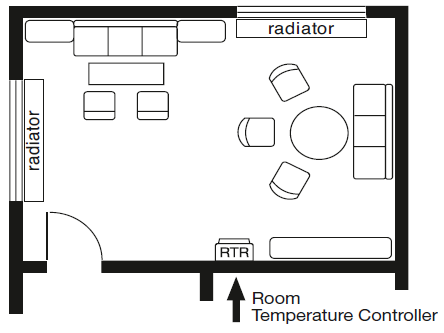
- Installation height: approx. 1.5 m above the floor
- Avoid outside walls and air drafts originating from windows and doors.
- Please observe that the normal convection air of the room must be able to reach the controller without hindrance.
- The controller should therefore not be installed between shelves, behind curtains or be covered in any way.
- The heat from other sources has a negative influence on controller accuracy.
Therefore you should avoid:
direct sunlight, installation in the vicinity of TVs, radios, heaters, lamps, chimneys, and heating ducts. Even a dimmer creates heat! If the controller and a dimmer are installed in a shared switch frame, the devices should be placed as far apart from each other as possible. If the devices are installed above each other, the controller must be below the dimmer on the bottom.
Installation on 58mm flush-type box (DIN 49 073)
- Remove casing cover:
- Pull off the adjustment knob
- Loosen the cover screw
- Pull off the cover
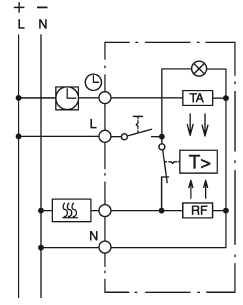
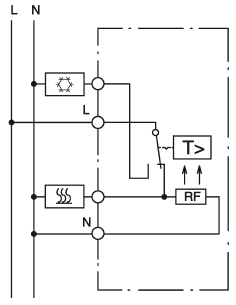
- E electrical connection according to circuit diagram (see below).
- Mount the device onto the socket using the thread-forming tapping screws for flush-type boxes.
- Mount the casing cover with a switch frame.
- The cover must latch into the bottom part of the casing before tightening the screw.
- Push the adjustment knob back on
- To facilitate dismantling, the casing cover and switch frame should be removed together.
Electrical connection
- Connect all lines exactly as shown in the relevant circuit diagram.
- Please observe that the neutral conductor N is connected to terminal N. If this is not the case, large temperature deviations will result since the controller will not be able to function properly.
- Conductor cross-section: 1 mm2 to 2.5 mm2 solid conductor
- No protective-conductor terminal is required since the device is completely insulated.
Brief description of the circuit diagram
- L= outer conductor (phase)
- N= neutral conductor (previously Mp)
 = terminal for clock signal for temperature setback
 = heating load terminal
 = cooling load terminal
- RF = resistance for thermal feedback
- TA = resistance for night set-back of room temperature
Technical data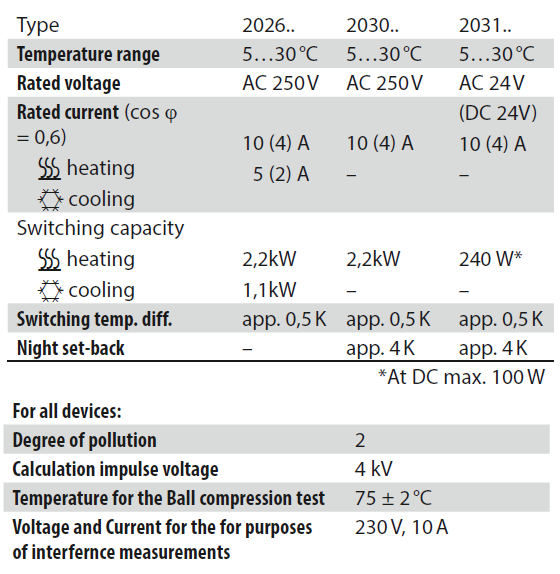
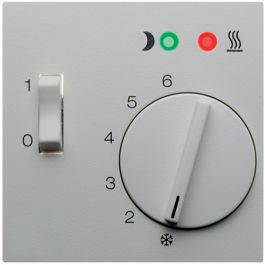
- Order No.: 2030. Room temperature controller 250V with NC contact, On/Off switch, and LED
- Order No.: 2031. Room temperature controller 24V with NC contact, On/Off switch, and LED
 Note: LED On = controller active
 - Order No.: 2026. Room temperature controller 250V with changeover contact
Narrowing down the temperature setting range
The controller is factory-set to a maximum setting range of 5 °C to 30 °C (see Fig. 1).
The controller is supplied with this setting Full range: 5°C to 30°C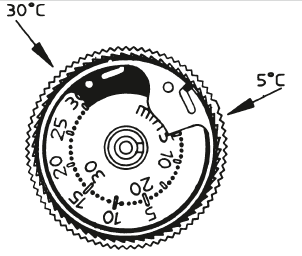
There are 2 ring gauges in the adjustment knob. These ring gauges can be used to narrow down the temperature setting range as required, for example to a range of 8 °C to 23 °C.
Setting procedure
- Select the temperature limits:
Example: max. 23°C min. 8°C - Note! First, turn the adjustment knob to the approximate average value in the middle of the desired setting range. Example: The average value between 8°C and 23°C is approx. 15°C
- Then pull off the adjustment knob.
- Set the red ring gauge to the max. temperature limit.
Example: 23°C
Rotate counter-clockwise. The numbers on the outside of the scale are valid! Place the tip of a pen into the hole and rotate the red ring counter-clockwise to 23°C (max. scale Fig. 2).
Red gauge ring (max.) set in direction of the arrow to 23°C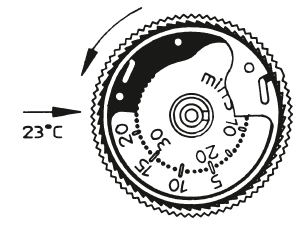
- Set the blue ring gauge to the minimum temperature limit.
Example: 8°C
Rotate clockwise. The numbers on the inside of the scale are valid! Place the tip of a pen into the hole and rotate the blue ring to 8°C (min. scale Fig. 3).
Blue gauge ring (min.) set in direction of the arrow to 8°C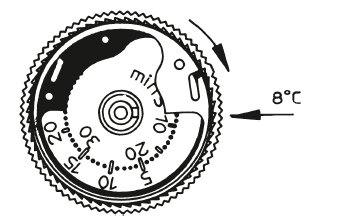
- Push the adjustment knob back on:
- The indicator must be approximately in the center of the new setting range;
Example: approx. 15°C
Temperature setting scales with flag digits
- = approx. 5°C
- 2 = approx. 10°C
- 3 = approx. 15°C
 = approx. 20°C
- 5 = approx. 25°C
- 6 = approx. 30°C
Symbols
 OFF
OFF ON
ON permanently set temperature
 permanently set set-back temperature
- switch-over between day and night temperature
Warranty
We reserve the right to make technical and formal changes to the product in the interest of technical progress. Our products are under guarantee within the scope of the statutory provisions. If you have a warranty claim, please contact the point of sale or ship the device postage free with a description of the fault to the appropriate regional representative.
This product should not be disposed of with household waste.
Please recycle the products where facilities for electronic waste exist. Check with your local authorities for recycling advice.
Reference
Download Manual:
Hager 20301909 Room Controller Thermostat Instruction Manual

Hager 20301909 Room Controller Thermostat Instruction Manual