General life THERMA 300S DIGITAL WIRED ROOM THERMOSTAT

GENERAL SPECIFICATIONS
THERMA 300S is a wired room thermostat. The user can adjust the room temperature with the required temperature and get more comfortable and economic heating/cooling
- Daily and Weekly Program (7×24)
- Different Mode Options (Comfort Mode and Economy Mode)
- Precise Temperature Measurement
ON/OFF Control - Heating Calibration
Wired Connection - Heating/Cooling Modes
TPI Algorithm
THERMA 300S AND EQUIPMENT
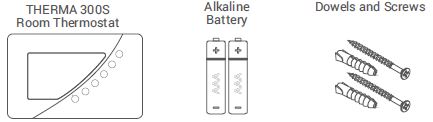
TECHNICAL DATA
| Dimensions | 100mm / 160mm / 18.2mm |
| Operating Current | 3V DC (2 x AAA alkaline battery) |
| Relay NO Switching Current | 2A (30VDC – Resistive load)
0.5A (125VAC – Resistive load) |
| Temperature Measurement Accuracy | 0.1oC |
| Operating Temperature Range | (5oC) – (30oC) |
| Battery Life | 1 Year (2 x AAA) |
| Operating Temperature | (-10oC) – (+50oC) |
| Storage Temperature | (-20oC) – (+60oC) |
ROOM THERMOSTAT
Button Functions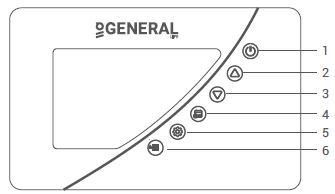
- On/Off Button
- Temperature Adjustment (To Increase)
- Temperature Adjustment (To Decrease)
- Weekly Program Button
- Setting Button
- Mode Button – Unlock Button
Screen Indicators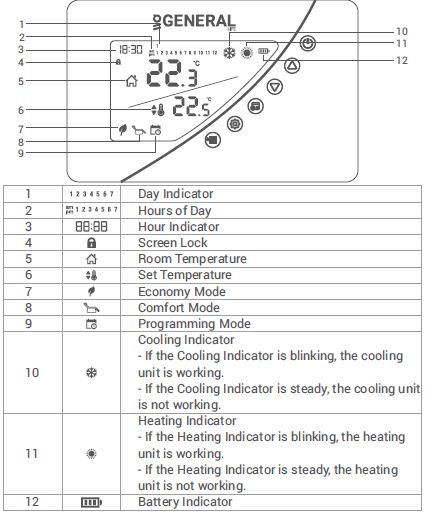
ROOM THERMOSTAT PLACEMENT
Room Thermostat needs to be placed in the room which is used most frequently. For instance; living room or lounge. Placing the Room Thermostat in a spot that have air circulation like entrance of a room or side of window should be avoided. Also anywhere close to heating/cooling units such as radiator, stove and spots which get direct sun lights would not be suitable. Room Thermostat needs to be located above the floor 150 cm height. Few trials may be made to find the most convenient spot
BATTERY PLACEMENT
Before starting, power off the device connected to the Room Thermostat and make sure that the energy is cut off. As shown in the picture above, press the screwdriver forward from the space shown, bend the tabs and separate the front cover. Insert 2 new AAA alkaline batteries in the battery housing with the correct battery direction. Replace both batteries at the same time. Then align the front part of your Room Thermostat to the back and squeeze it towards the back.
Low Battery Warning: When the “ ” icon appears on the screen, it means “low battery warning”. It is recommended to replace the batteries when this warning appears.
Warning: When the product is not used for a long period (more than 15 days), remove the batteries. Otherwise, malfunctions that may occur would be out of warranty. Please throw your dead batteries into the waste bin for batteries
ROOM THERMOSTAT WIRING DIAGRAM
Warning
Operations within the heating/cooling unit or the electrical installation must be carried out by professionally qualified persons.
ROOM THERMOSTAT TEMPERATURE CALIBRATION
Temperature sensors which are used in Room Thermostats are highly sensitive. You may need to calibrate your Room Thermostat if you would like to get the same temperature values with other thermometers in your living space.
- While your device is turned off, press and hold the “On/Off”button for 3 seconds.
- Press the “On/Off” button until the “ ” menu appers. In order to see the desired temperature, set the temperature difference by press the “Temperature Adjustment Buttons”. This value can be arranged between “-8oC” and “+8oC”.
- To save the settings and exit, press the “On/Off” button until the device turns off.
Note: Recommended tempreture calibration is “0.0oC”.
ROOM THERMOSTAT HEATING / COOLING MODES
- Your Room Thermostat has heating and cooling modes. In order to switch easily between heating and cooling modes:
- While your device is turned off, press and hold the “On/Off” button for 3 seconds.
- Press the “On / Off” button until the “ ” menu appears.
- You can switch between “ ” (heating) and “ ” (cooling) modes by using the “Up” or “Down” buttons in the “ ” menu.
- To save the settings and exit, press the “On / Off” button or wait 10 seconds until the device turns off.
- The settings you have made have been saved. Once you turned on your device, it will operate with the changed settings.
FACTORY SETTINGS RESET
You can reset your Room Thermostat to its default factory settings. This operation resets the mode temperature values, calibration setting and heating/coling modes to factory setting. To reset your Room Thermostat to factory setting:
- While your device is turned off, press and hold the “On/Off”button for 3 seconds.
- Press the “On/Off” button until “ ” menu appears.
- While in the “ ” menu, select the “ ” option by using “Up” or “Down” buttons and press the “On/Off” button.
- Your device will be turned off and reset to factory settings.
KEY LOCK
- In the Room Thermostat there is a key lock function to avoid any unintended contact.
- In order to unlock the Room Thermostat’s key lock “Mode” button should be pressed for 3 seconds. If buttons on Room Thermostat are not touched for 10 seconds, key lock will be reactivated.
DAY AND HOUR SETTINGS
- While your Room Thermostat is on, keep pressing ”Settings” button for 3 seconds.
- At the first screen that appears ”Hour” part will be blinking. You may set the time with “Up” and “Down” buttons.
- After setting the time, the ”Settings” button needs to be pressed once. For minute setting, minute part will be blinking. You may set the minute with “Up” and “Down” buttons.
- After setting the minute, the ”Settings” button needs to be pressed once to set the day of the week.
- Monday has set as the first day of the week and indicated with number “1″.
- Numbers indicates the following days respectively 2-Tuesday, 3- Wednesday, 4-Thursday, 5-Friday, 6-Saturday and 7-Sunday
- When setting is done you may exit by pressing for 3 seconds to “Settings” button.
Mode Setting
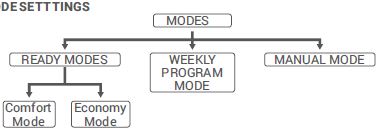
- Your Room Thermostat has 4 different modes. Two of them(Comfort and Economy Mode) are preset modes. Other modes are manual mode and programming mode.
- In preset modes, temperature values are based on user’s choices which has been set in the beginning. Manual mode provides to operate the Room
- Thermostat with temperature which user’s required and set directly.
- Programming mode continues to work according to the weekly program determined by the user.
- Temperature values of preset modes can be changed on “Settings” menu.
- In order to go to “Settings” menu, “Settings” button needs to be pressed for 3 seconds. Date and time settings would appear in first screen, to skip it “Settings” button should be pressed for 3 times.
- Comfort Mode’s “ ” temperature value would appear and temperature for Comfort Mode can be adjusted by pressing “Up” and “Down” buttons.
- When setting is done, by pressing “Settings” button, Economy mode can be set.
- Economy Mode’s “ ” temperature value would appear and temperature for Economy Mode can be adjusted by pressing “Up” and “Down” buttons.
- Pressing “Settings” button for 3 seconds again would close “Settings” screen.
- Manual mode temperature can be set by pressing “Up” and “Down” buttons while on home screen. When “Up” or “Down” buttons are pressed Room Thermostat will be set on Manual Mode.
- You can press the “Mode” button to switch to other modes.
PROGRAMMING MODE
- You may choose which mode will be active, individually for each hour of the day with programming mode. Weekly program mode includes 2 active modes. Those are Comfort Mode “ ” and Economy Mode “ ”.
- In order to arrange the weekly program ”Programming” button needs to be pressed for 3 seconds.
- On the screen there will be icons for the day which wants to be programmed, hours of the day and active mode.
- “By pressing “Mode” button, chosen mode for that specific hour may be changed.
- By pressing the up or down button, you can scroll through the hours of the day and program according to the active mode.
- Press the “Setting” button to change the day of the week while making a weekly program.
- After setting a weekly program press the ”Programming” button for 3 seconds to save it.
TPI ROOM THERMOSTAT WORKING LOGIC
Your Room Thermostat works with the TPI algorithm. Room Thermostats using TPI technology predict when the temperature of your home will rise above or below the set temperature and turn the heating / cooling unit on and off accordingly. This ensures that your home stays at the temperature you set without maximum deviations up and down.
What is TPI?
TPI technology is designed to ensure that you get the best possible energy efficiency from your heating/cooling system. It measures and applies the best possible timings to deliver and maintain your home at the set temperature level.
How does TPI work?
Thanks to the advanced artificial intelligence technology found in the software, it adapts to the temperature change of the environment in which it is located. By creating a general temperature map of your home, it learns how long it takes to reach the desired room temperature and how to maintain this temperature. In this way, it provides minimum energy consumption by calculating how long your heating / cooling unit should work for.
What is the difference?
In non-TPI room thermostats, the heating / cooling unit works and stops continuously until it exceeds the set temperature value. If the set temperature drops below a certain amount, the heating / cooling unit will work again. This creates greater temperature fluctuations and less energy control. TPI Room Thermostats, on the other hand, provide higher savings and comfort compared to On/Off room thermostats with the advantages it has.
Heating Mode
Your room thermostat takes the average room temperature of last 40 seconds as basis. With the TPI algorithm in the product by creating a general temperature map of your home, it learns how long it takes to reach the desired room temperature and how this temperature is maintained. Thus, it ensures that the room temperature remains within a certain range.
TPI ROOM THERMOSTAT HEATING MODE WORKING GRAPHIC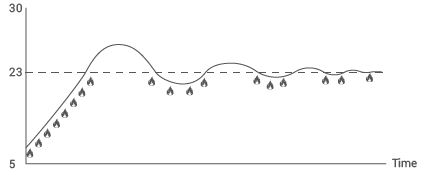
Cooling Mode
Your room thermostat takes the average room temperature of last 40 seconds as basis. With the TPI algorithm in the product by creating a general temperature map of your home, it learns how long it takes to reach the desired room temperature and how this temperature is maintained. Thus, it ensures that the room temperature remains within a certain range.
TPI ROOM THERMOSTAT COOLING MODE WORKING GRAPHIC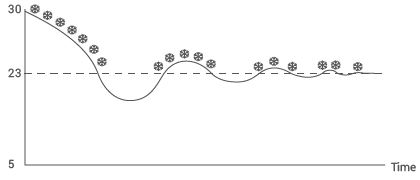
Your Room Thermostat sends the last status signal to the Receiver every 10 minutes. Thus, your Room Thermostat and Receiver work synchronously. If the signal cannot reach to the Receiver from the Room Thermostat for 22 minutes, it perceives that the connection is broken and stops the heating/cooling operation for safety reasons. Likewise, in cases where the electricity comes back after a power failure, the Receiver does not operate the heating/cooling unit until ‘operate’ signal reaches from the Room Thermostat. However, in this case, if the Room Thermostat continues to operate normally, it will continue to work properly without any need for intervention since it sends a status signal to the Receiver every 10 minutes.
WHAT TO KNOW ABOUT TPI ROOM THERMOSTAT
- If the placement of the TPI Room Thermostats is changed, the learning process will restart. The learning process should be considered as 7 days.
- If the TPI Room Thermostats are de-energized (battery replacement), the learning process will restart. The learning process should be considered as 7 days.
FREQUENTLY ASKED QUESTIONS
Is my Room Thermostat compatible with my heating/cooling unit?
If your heating/cooling unit has On-Off connections, your Room Thermostat is compatible. You can find information about your heating/cooling unit from your heating/cooling unit operating manual or from your heating/cooling unit service.
How will I connect my heating/cooling unit with my Receiver?
- We recommend that the connection between the Receiver and heating/cooling unit should be made by professionally qualified persons. 2×0.75 mm cable is sufficient for the Receiver – heating/cooling unit connection.
- Connect one end of the cable pair to the room thermostat connection terminals stated in the user manual of your heating/cooling unit.
- Connect the other end of the cable pair to COM and NO inputs of the terminal inside the Receiver as shown in the “RECEIVER WIRING DIAGRAM” section.
- The direction of the cable ends does not matter.
DECLARATION OF CONFORMITY
- ISIPARK İÇ VE DIŞ TİC. İNŞ. ISITMA SİSTEMLERİ OTO. SAN.A.Ş. which Head Office and production site is located on Fatih Mah. 1188 Sk.No:13/A Sarnıç – Gaziemir –
- İZMİR – TÜRKİYE confirms and declares that the product marked with CE and its specifications below is covered by the provisions of the mentioned directive.
- Brand: GENERAL Life
- Product Name: SOLARA 300S RF
- Product Type: Digital Room Thermostat
Compatible Directives:
- Radio and Telecommunications Terminal Equipment Regulation 2014/53/EU (R&TTE/RED EN 301 489-1 V2.1.1:2017,
- EN 300 220-1 V3.1.1:2017, EN 301 489-3 V2.1.1:2017,
- EN 300 220-2 V3.1.1:2017, EN 62479: 2010)
- Electromagnetic Compatibility Regulation 2014/30/EU (EMC EN 61000-6-3: 2007 + A1: 2011, EN 61000-6-1: 2007)
- Low Voltage Directive 2014/35/EU (LVD EN 60730-2-9:2010, EN 60730-1:2011)
Additional Information: The mentioned product can be used with heating/cooling units with On-Off output and compliance with the directives only covers the product. ISIPARK is not responsible for the entire system’s compliance with the directives. This statement is not valid if changes are made to the product without our approval.
WARRANTY CONDITIONS
- The warranty period starts from the invoice date and warranted against manufacturing defects for 5 years.
- Devices and apparatus are delivered to the customer in working condition in our company. On-site commissioning is subject to a service fee.
- The repair of the devices and apparatus covered by the warranty is carried out in our company factory and should send by contracted transportation company. In onsite services, the transportation and accommodation expenses of the service personnel belong to the customer. The shift fee during transportation is added to the service fee and collected in advance.
- The maintenance of devices and apparatus is done in our company. For the maintenance of the devices and apparatus, the round travel fares belong to the customer.
- In case of malfunctioning of the devices and apparatus whose warranty period continues, it is tested in our company whether the malfunction is caused by a customer or manufacturer fault, and it is reported with a report issued by our company.
- In case of detection of manufacturer-induced errors of devices and apparatus whose warranty period continues, the customer can request a replacement or repair of the devices and apparatus at full expense by the manufacturer, unless it’s higher than the product’s price.
- In the event that the faults of the devices and apparatus whose warranty period continues are determined as caused by the customer, all expenses would belong to the customer.
- Customers should be aware of damages (if there is any) of product and warn manufacturer since the day warranty duration starts. If customer do not warn manufacturer with knowledge of damage, customer lose the rights of article 6.
- Malfunctions resulting from the use of devices and apparatus contrary to the matters stated in the User Manual are not covered by the warranty.
- Devices and their apparatus are out of warranty if they are beaten, broken or scratched by the customer.
- Damages resulting from the use of devices and apparatus belonging to other brands and models without the approval of the manufacturer are not covered by the warranty.
- Battery leakage and errors due to rust, oxidation and liquid contact by working in acidic / humid environments are not covered by the warranty.
- When the product is not used for a long period (more than 15 days), remove the batteries. Otherwise, malfunctions that will occur are out of warranty.
- Damages that may occur during the transportation of devices and apparatus are not covered by the warranty. Customers can take transportation insurance.
- Damages caused by mains voltage / faulty electrical installation are not covered by the warranty.
- Devices and apparatuses are out of warranty for malfunctions caused by force majeure such as fire, flood, and earthquake etc.
- All of the devices and apparatuses, including all their parts, are under the warranty of our company.
- In case of malfunction of the devices and apparatuses within the warranty period, the time spent during repair period is added to the warranty period. The repair period of the product cannot exceed 20 working days. This period starts from the date of notification to the service station of the malfunction related to the product or, in the absence of a service station, to the seller, dealer, agency, representative, importer or manufacturer of the product. Consumer can report the problem by; phone, fax, e-mail, registered and reply paid letter or a similar way.
- However, in case of a conflict, responsibility of prove is belong to the customer. If the malfunction of the product is not repaired within 20 working days, the manufacturer-producer or importer; has to allocate another product with similar features to the use of the consumer until the repair of the product is completed,
- Although the consumer uses his/her repair rights, -If the product breaks down for 4 times in a year or 6 times in warranty duration and these problems effects main purpose of the product. (Starting from delivery time during warranty.) -Exceeding the maximum time required for repair, -In the event that the service station is not available, if it is determined that the repair of the defect is not possible with the report prepared (in order) by one of the seller, dealer, agency, representative, importer or manufacturer, a refund or a price discount at the rate of defect can be requested.
- The customer can make complaints and appeals to consumer courts or consumer arbitration committees.
- The warranty document must be kept by the customer during the warranty period. If the document is lost, a second document will not be issued. In case of loss, repair and replacement of devices and apparatus will be made for a fee.
Manufacturer
- Title: ISIPARK İÇ DIŞ TİC. A.Ş.
- Adress: Fatih Mah. 1188 Sk. No:13/A Sarnıç
- Gaziemir İzmir-TÜRKİYE
- Tel: +90 (232) 457 99 50
- Fax: +90 (232) 457 91 22
- E-Mail: [email protected]
- Authorised Signatory:
- Company Stamp:
Product
- Type: Digital Room Thermostat
- Brand: GENERAL Life
- Model: THERMA 300S
- Guarantee Period: 5 Years
- Max. Time to Repair: 20 Days
- Banderole and Serial Number
REFERENCE:
DOWNLOAD MANUALS:
Generallife THERMA 300S DIGITAL WIRED ROOM THERMOSTAT USER MANUAL

General life THERMA 300S DIGITAL WIRED ROOM THERMOSTAT USER MANUAL