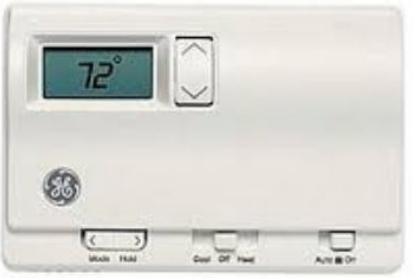
GE Appliances RAK348T1 Wireless Digital Thermostat
Introduction
This two-part wireless thermostat system is designed to provide remote temperature control. Powered by four AA batteries, the thermostat will operate for approximately 1 year and can be mounted in any suitable location that will ensure good temperature control. A large LCD display provides the user with current space temperature, set point temperature and system status information. The second part of the system is the receiver. The receiver interfaces with the desired HVAC equipment and communicates with its thermostat using unlicensed 900MHz radio frequency energy. At the time of installation, the thermostat is linked to one or more receivers. A thermostat and receiver that have been linked will not interfere with or be affected by any other thermostat or receiver in adjacent rooms, apartments or neighboring homes.
Important safety information
- RISK OF ELECTRIC SHOCK. Can cause injury or death: Turn off power at the main service panel by removing the fuse or switching the appropriate circuit breaker to the OFF position before installing the thermostat receiver.
- GE IS NOT RESPONSIBLE FOR ANY RADIO OR TV INTERFERENCE CAUSED BY UNAUTHORIZED MODIFICATIONS TO THIS EQUIPMENT. SUCH MODIFICATIONS COULD VOID THE USER’S AUTHORITY TO OPERATE THE EQUIPMENT. THIS EQUIPMENT
- COMPLIES WITH PART 15 OF THE FCC RULES. OPERATION IS SUBJECT TO THE FOLLOWING TWO CONDITIONS
- THIS DEVICE MAY NOT CAUSE HARMFUL INTERFERENCE,
- THIS DEVICE MUST ACCEPT ANY INTERFERENCE RECEIVED, INCLUDING INTERFERENCE THAT MAY CAUSE UNDESIRED OPERATION.
- Do not use air conditioning when the outdoor temperature is below 50 degrees; this can damage your A/C system and cause personal injuries.
- Use this thermostat only as described in this manual.
Specifications
Electrical ratings
- Thermostat: DC Power 3.0 VDC (4 “AA” batteries included)
- Receiver: 24 VAC (18–30 VAC); 120 mA
- Operating temperature range: 40°F–99°F (4°C–37°C)
- Temperature set range
- Heat mode: 50°F (10°C)–84°F (29°C)
- Cool mode: 64°F (18°C)–99°F (37°C)
- Resolution: ± 1°F (± 1.0°C)
System configurations
- RAK348R1 receiver – 2-stage heat (heat pump/resistance heat);
- RAK364R1 receiver – 1-stage heat (resistance heat); 1-stage cool
- Timing: Anti-short cycle: 3 minutes (minimum compressor off time)
- Terminals: R, GL, GH, B, Y, W, C
Introduction Overview
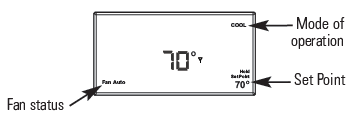
THERMOSTAT CONTROL – Front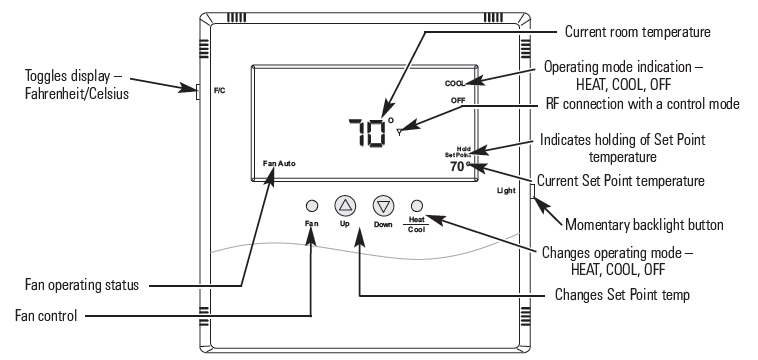
THERMOSTAT CONTROL – Back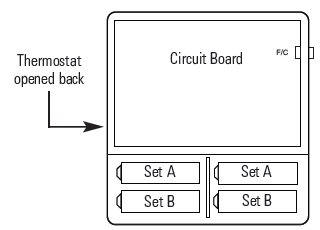
Batteries
Installing/Changing
A low-battery icon  will light on the thermostat display when the batteries are close to being exhausted. The thermostat is designed to use standard AA-size 1.5-volt batteries. If the batteries are depleted, the heating/cooling system will go to the OFF state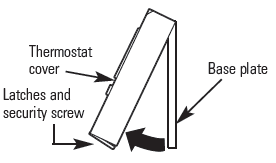
Replacing Batteries
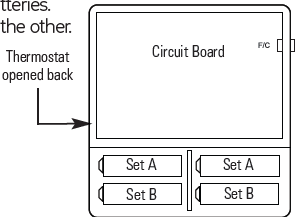
To open the thermostat, remove the security screw (#2 Phillips or #2 security screw). Using both hands, press the two push tabs on the bottom of the thermostat housing, while pulling the front of the thermostat away from the base. The thermostat operates with 4 AA batteries. Batteries are paired, one set on top of the other.
-
- A four-button cluster is located on the front of the thermostat
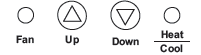
- These buttons are used in adjusting fan operation, changing the set point temperature up or down and changing the operating mode of the thermostat
- A four-button cluster is located on the front of the thermostat
Fan Control
There are three options regarding the fan control.
- Fan Auto – Unit adjusts the fan speed automatically as required
- Fan 1 – Low-speed fan
- Fan 2 – High-speed fan
Fahrenheit/Celsius
The button located on the left side of the thermostat controls the display of the temperature and allows you to toggle between Fahrenheit and Celsius. It is marked F/C on the left front
Backlight
A single button on the right side of the thermostat activates the display backlight. The backlight will illuminate the display for 5 seconds. Backlighting takes significant energy from the batteries and should be used sparingly. Frequent use of the backlight function will noticeably reduce battery life
Thermostat and receiver
The thermostat and receiver will not operate as a system until they are “linked” together through the installation process. The linking process binds one or more receivers to a thermostat so that they will communicate with each other as a control system. Up to eight (8) receivers can be linked to a single thermostat. Until linked, a control receiver will not operate. Once linked, a control receiver will only respond to its specific thermostat. A thermostat and receiver that have been linked will not interfere with or be affected by any other thermostat or receiver in adjacent rooms, apartments or neighboring homes. Linking information is stored in memory—it is not necessary to relink a thermostat and receiver if the thermostat batteries are removed or after a power outage. If multiple installation teams are installing and linking thermostats at the same time, coordinate the activity to avoid the possibility of installers simultaneously attempting to perform the linking process. Because this is an RF system, installers in nearby rooms/areas where it is possible RF overlap could exist run the risk of interfering with each other. Installation and linking activity going on around a system already installed will not interfere with it.
Linking the thermostat and receiver
- Press the SW4-INSTALL button inside the thermostat.
- Press the HEAT/COOL button on the front of the thermostat to select your choice.
- Press the UP button to set the receiver number (0–7) and press the HEAT/COOL button to set the receiver.
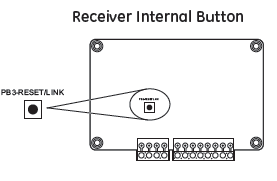
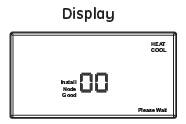
- press the SW9-LINK button inside the thermostat. Within 5 seconds, press the RESET/LINK button (PB3) on the receiver. “Good” will appear if linked. “Bad” will appear if not linked.
- Press the SW4-INSTALL button to complete the installation session
Thermostat Internal Buttons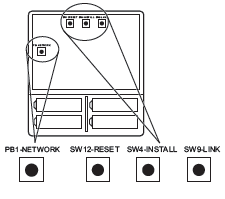
Receiver Internal Button
- PB1–NETWORK
- Used to uninstall the thermostat from receiver(s) it has been linked to.
- SW12–RESET
- Master Reset – Returns thermostat to all factory defaults.
- SW4–INSTALL
- Starts an installation session.
- SW9–LINK
- Used to link the thermostat to control receiver(s).
Removing or Delinking a Receiver
- Unlike installing a receiver, the procedure to remove or “delink” a receiver will uninstall all receivers installed to the thermostat at once. You cannot remove a single receiver at a time.
- Press the SW4-INSTALL button inside the thermostat. The ”Install“ icon will flash. Press the UP button to get the “Remove” choice and press the HEAT/COOL button to select. The “Heat” and “Cool” icons will be displayed and all display items will be on steady; nothing will be flashing.
- Press the SW9-LINK button on the back of the thermostat printed circuit board. Within 5 seconds, press the PB3 RESET/LINK button on the receiver. When the SW9-LINK button is pressed, the thermostat will display the “Please Wait” message in the bottom right corner of the LCD while it searches for a receiver. Once the thermostat finds its installed receiver(s), linking information is removed from the receivers and the thermostat, the “Please Wait” message is extinguished and a “Good” message will appear.
- To complete the process, press the SW4-INSTALL button.
Thermostat link reset
- Press the SW4-INSTALL button inside the thermostat. The ”Install“ icon will flash. You only need to begin the installation session to perform this reset.
- Press and hold the PB1-NETWORK button on the inside of the thermostat board for approximately 2 seconds.
- Press the SW4-INSTALL button to end the reset procedure.
Frequently asked questions
Where should I locate my thermostat?”
For best results, the thermostat should be located approximately 5 feet above the floor on an inside wall in an area with good air circulation. A thermostat should not be located where air is stagnating, such as behind doors, in corners or under cabinets. Hot or cold drafts from air ducts and windows should be avoided. Avoid direct heat from the sun, lighting fixtures, appliances, fireplaces, etc.
“What does the antenna symbol on the display mean?”
The thermostat displays the antenna symbol as an indication that it is communicating with its receiver(s). If, after several tries, communication is not established, the antenna symbol will go out.
“What do I do if the antenna symbol is no longer displayed?”
Check power to the HVAC equipment in which the receiver is installed. With power restored, force the thermostat to talk to the receiver(s) by pushing the FAN button or running the set point temperature above or below the room temperature (above in heating, below in cooling). The thermostat will also automatically try to communicate within a maximum of 10 minutes from the last attempt. If communication is successful, the antenna icon will turn back on. Coincidental RF interference could cause a temporary loss of communication. In virtually all such cases, the interference is temporary.
“Can I run multiple heating or cooling loads with one thermostat?”
Yes. In fact, one thermostat can control up to eight (8) different receivers. “Can I use another thermostat without interference?” Yes. This wireless thermostat and its receiver(s) will talk between themselves, but will never respond to or control another thermostat in adjacent rooms, apartments or neighboring homes.
“When my a/c turns off, why can’t I immediately make it run again?”
This is normal. What you are experiencing is called an anti short-cycle delay. Because of high pressure in the system, it is not a good idea to start your air conditioner immediately after it has just shut down. The thermostat automatically prevents this from happening by imposing a delay of approximately 3 minutes.
“I just installed the thermostat and the antenna symbol goes on and off. What should I do?”
A weak RF signal between the thermostat and one or more receivers is the cause. The further away the thermostat and receiver are from each other, the weaker the signal. Distance and/or something shielding or blocking the RF signal is the likely cause. Distance is typically not a problem. The most common cause for this is an object acting as a shield, such as sheet metal. Changing the position of the thermostat may be required.
NOTE: Always seek out a professional electrical and HVAC contractor when working with your heating and cooling system and the electrical wiring in your home or commercial property. Always consult with an HVAC contractor and/or original equipment manufacturer before modifying any equipment.
“The display on the thermostat is blank. What happened?”
A blank display indicates that your batteries are depleted. When the “Low Battery” icon comes on, there are only a couple of weeks of battery life remaining. We recommend that when you change batteries, always use batteries that you know are fresh. Use four (4) new high-quality AA batteries. If you are using the wireless thermostat to control a heating system, we recommend as a general practice putting fresh batteries in at the start of the heating season.
Troubleshooting tips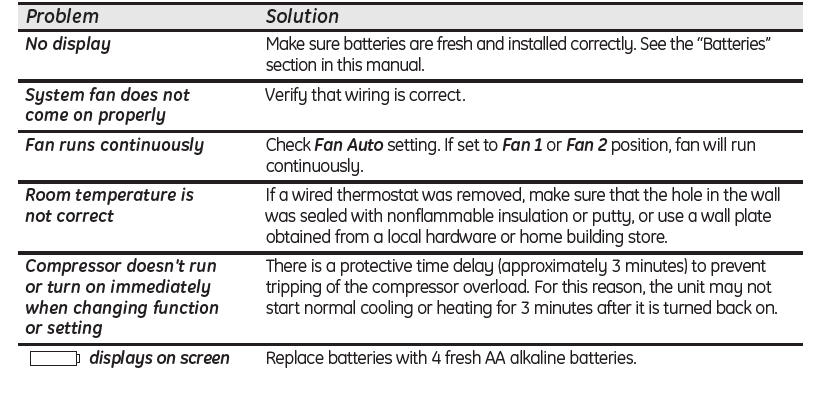
Warranty
Thermostat Warranty
All warranty service provided by our Factory Service Centers or an authorized Customer Care® technician. To schedule service, on-line, visit us at GEAppliances.com, or call 800.GE.CARES (800.432.2737). For service in Canada, contact Gordon Williams Corp. at 1.888.209.0999. Please have serial number and model number available when calling for service.
For The Period Of: One Year Limited From the date of the original purchase
GE Will Replace: Replacement of the thermostat which fails due to a defect in materials or workmanship.
What GE Will Not Cover:
- Service trips to your location.
- Improper installation. If you have an installation problem, contact your installer. You are responsible for providing adequate electrical connections to the product.
- Failure of the product resulting from modifications to the product or due to unreasonable use, including failure to provide reasonable and necessary maintenance.
- In commercial locations, the labor is necessary to move the unit, after it has been initially installed, to a location where it is accessible for service by an individual technician; or, if the instructions included in this manual have been disregarded.
- Replacement of location fuses or the resetting of circuit breakers.
- Batteries.
- Damage to the product caused by improper power supply voltage, accident, fire, floods or acts of God.
- Incidental or consequential damage caused by possible defects with this thermostat
Reference
Download Manual:
GE Appliances RAK348T1 Wireless Digital Thermostat Owner’s Manual
OTHER MANUALS
GE Appliances RAK348T1 Wireless Digital Thermostat Installallations Instruction
GE Appliances RAK348T1 Wireless Digital Thermostat Product Specifications Guide

GE Appliances RAK348T1 Wireless Digital Thermostat Owner’s Manual