
FINDER 1T.51 DIGITAL TOUCHSCREEN THERMOSTAT

TECHNICAL DATA
- Power supply: 2 Alkaline Batteries 1.5 V AAA
- WINTER temperature range: (+5…+37)°C
- SUMMER temperature range: (+5…+37)°C
- FROST protection temperature range: (+2…+8)°C
- Temperature differential ΔT: (0.1…0.9)°C
- Operating modes: 2 (day & night)
- Protection degree: IP20
- PIN lock: Yes
- Output: relay 1 CO (volt-free contact)
- Contact rating: 5 A 250 V AC
- Mounting: recess mount in wall or box
ADDITIONAL NOTES
There are 3 audible alerts:
- SHORT BEEP: confirmation that key is pressed
- 3 LONG BEEPS: confirmation that the information is saved
- TRILL: error
DIMENSIONS
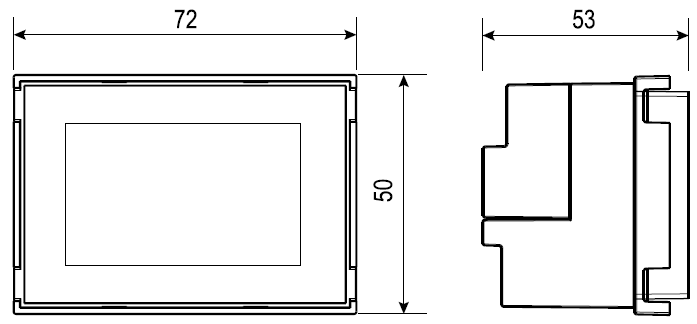
INSTALLATION
SAFETY REQUIREMENTS
The installation of electrical equipment must be performed by experienced staff. Before connecting the thermostat, make sure that the load (heater, pump, etc.) is not connected to the supply and that the load is within the ratings marked on the thermostat.
POSITIONING
- Install the thermostat away from sources of heat (heaters, direct sunlight, kitchens) and away from doors/windows.
- Mount at about 1.5 m above the floor.
PREPARATION
- Install the thermostat using the correct accessories (see the table in the following page).
CLEANING
- For cleaning – use only a damp cloth.
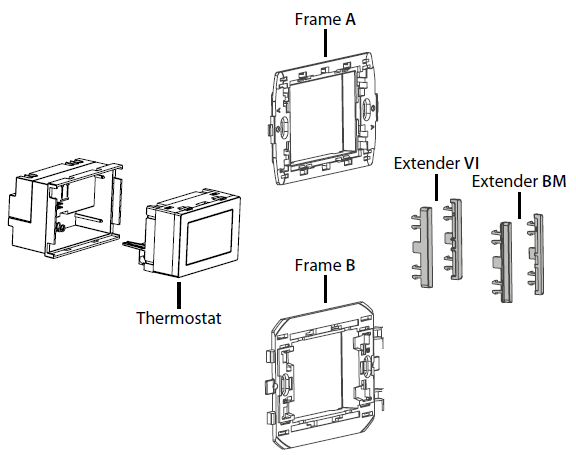
| Frame
A |
Frame
B |
Extender
VI |
Extender
BM |
|
| ABB: Chiara | ||||
| ABB: Mylos | ||||
| Ave: Serie 44 | ||||
| Bticino: Living, Light, Light Tech, Livinglight, Axolute | ||||
| Bticino: Matix | * | |||
| Gewiss: Chorus | * | |||
| Vimar: Arke | ||||
| Vimar: Eikon, Eikon Evo, Plana | ||||
| Vimar: Idea | ||||
| Bticino: Livinglight Air | with 01C.51 | |||
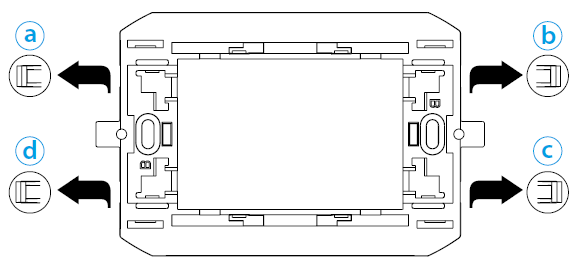
- *= remove the side supports (a – b – c – d)
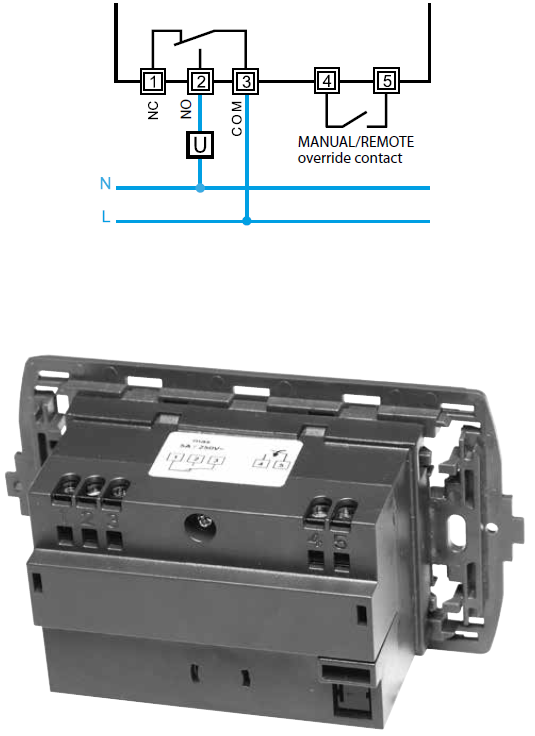
WIRING DIAGRAM
BATTERY
Insert the batteries into the compartment, observing the indicated polarities.
ATTENTION
- Incorrect placement of the batteries (reverse polarity) may damage the thermostat
- If the battery charge falls below the minimum level, the thermostat is placed in the OFF state and the output relay releases
- If the thermostat remains unused for long periods it is advisable to remove the batteries
The thermostat provides 3 different reports of battery condition
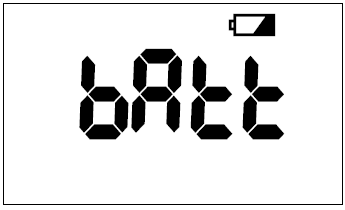
- With the battery
 ON (STEADY), operation of the thermostat will soon be compromised
 - With the battery FLASHING imminent replacement of batteries is necessary
- With the
 FLASHING the thermostat is in the OFF state and the output relay releases
NOTE: Replacing the batteries at the initial warning ON (STEADY) and taking no more than 40 seconds, the date and time will not be erased
STARTUP
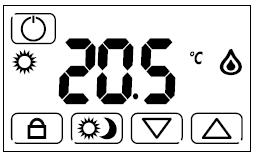
- Insert the batteries and the display will show all the symbols and the software version, for a few seconds.
- After that, the main screen will be displayed
NOTE: Touch the display to illuminate the backlight.
KEYS

- Thermostat ON/OFF key
- Selecting the temperature for night or for day
- Pressed for 3 seconds – activates or deactivates the display lock function
- Pressed for 3 seconds – enters the advanced menu
- Changes the data displayed (increase)
- Changes the data displayed (decrease)
- Press to confirm the information displayed on the display
- Returns to the previous setting
- Press for 3 seconds to exit the function
- Returns to the previous setting (in the advanced menu)
- Press for 3 seconds to exit the advanced menu
SYMBOLS

- Administrator set limits
- Frost protection ON
- Temperature differential
- Remote control
- Low battery
- Display only, or full thermostat, locked
- Day mode
- Night mode
- Heating ON (in WINTER mode)
- Cooling ON (in SUMMER mode)
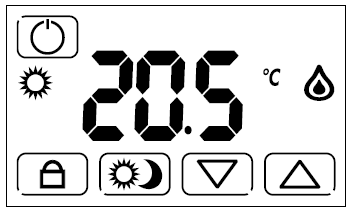
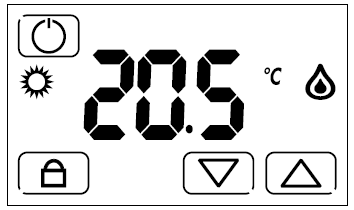
MAIN SCREEN
The main screen showing the operational keys for everyday use. They are, the temperature control keys , the
, the key (if enabled in the advanced menu), the
 key to lock the product and the
  key, to turn off.
with key
without key
SETTING
DAY SETTING
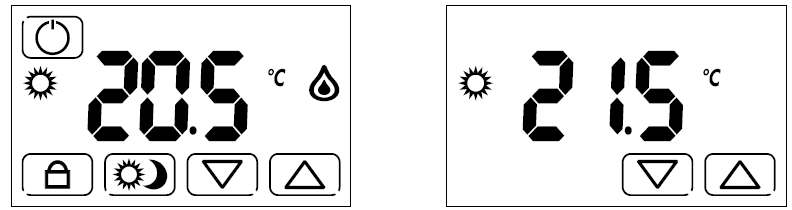
- The key followed by the sun icon
 allows the setting of the day temperature.
 - Within the main screen, using the keys allows the desired temperature to be set
NOTE
- When switching from night to day with the key (and vice versa), the set temperature will be displayed momentarily.
- This is then followed by the current measured temperature.
NIGHT SETTING
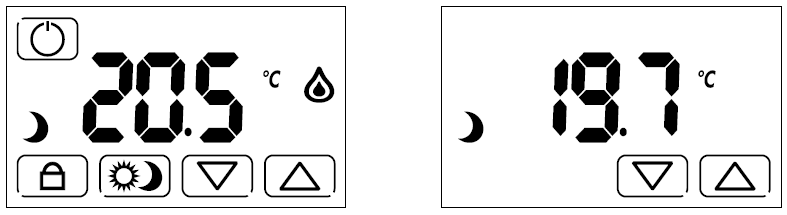
- The key allows you to set a different temperature from the Day temperature.
- The the moon symbol
 shows that the night temperature can now be set using the keys.
NOTE
- When switching from day to night with the key (and vice versa), the set temperature will be displayed momentarily.
- This is then followed by the current measured temperature.
DISPLAY LOCK
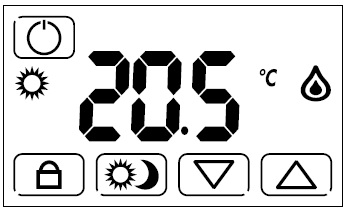
- This function protects the thermostat from accidental touch, blocking ONLY the display.
- To activate, press for 3 seconds.
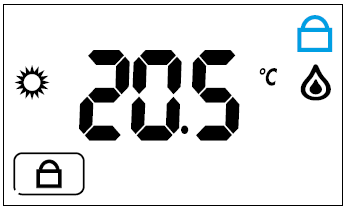
- The symbol will then appear on the display and 3 beeps will indicate its activation.
- To deactivate, press for 3 seconds.
NOTE: To use the DISPLAY LOCK function, the PIN set in the FULL LOCK MODE (with PIN) in the advanced menu, must be set to 000.
FULL LOCK MODE (WITH PIN)
This advanced feature is used to lock the thermostat completely. To activate it, you must set a 3-digit PIN that will be required every time you want to lock or unlock the thermostat.
To set the PIN:
- Switch off the thermostat with the key
- Press
 for 3 seconds to access the ADVANCED MENU
 - Press
 until you see the screen
 that will permit entry of the desired PIN code
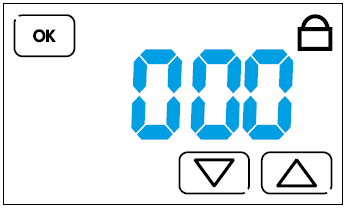
- Then, press the
 or
or  keys until the desired PIN number is reached and confirm with ok.
 - It is now possible to exit the advanced menu by pressing ok several times or by pressing
 for 3 seconds until you hear three beeps confirming the PIN registration.
 - Turn on the thermostat, and the main screen will be displayed.
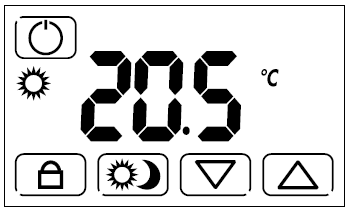
- To activate the FULL LOCK MODE (with PIN), hold down the key for 3 seconds. The following screen will appear.
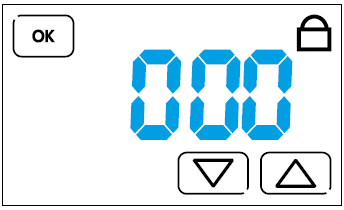
- Use the or keys to enter the PIN previously set in the advanced menu and press ok. 3 beeps will confirm the lock, and the display that will show the following screen:
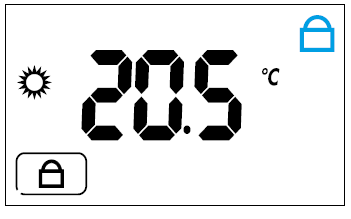
- To unlock the thermostat, hold down for 3 seconds.
- The display will show .
- Enter your PIN and confirm with ok.
- 3 beeps confirm that the device has been unlocked.
CAUTION
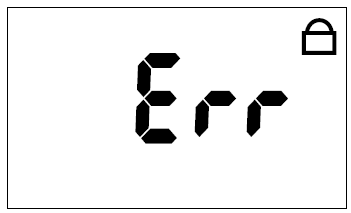
- After 3 failed attempts you will not be able to enter any further PIN for 20 seconds. Err will remain on the display.
NOTE
- By removing and inserting the batteries, the thermostat will remain with the display locked.
- If you forget your PIN enter the il codice di sblocco 513.
- Once unlocked, it is recommended that you go back to the advanced menu to verify and/or modify your previously entered personal PIN.
FROST PROTECTION FUNCTION
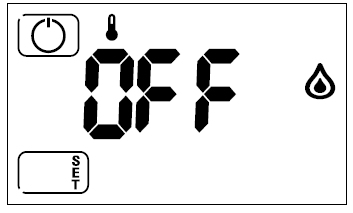
- FROST PROTECTION function is active when the thermostat is set to WINTER and it is off.
- It is used to protect plant and equipment from low temperatures.
- When the set threshold is reached, the function will be activated and the display will show the
 symbol.
- At any time, press to turn on the thermostat and for the main screen to appear.
NOTE: When the thermostat is off and then turned OFF, you can:
- Press the key for a few seconds to access the advanced menu
- By pressing the center of the display for 5 seconds, you enter the “ADMINISTRATOR” menu, through which you can enter values for the minimum and maximum temperature settings.
The advanced settings are useful for customizing the thermostat. The settings are:
- SUMMER-WINTER MODE
- FROST PROTECTION FUNCTION
- TEMPERATURE DIFFERENTIAL
- ANTI-SEIZE PUMP FUNCTION
- FULL LOCK MODE (with PIN)
- EXTERNAL FORCING CONTACT
- ENERGY SAVING E1
- RESET
- To enter the advanced menu, starting from the main screen, press to turn off the thermostat.
- Hold down for 3 seconds.
- SUMMER-WINTER MODES
- The display shows one of the following screens
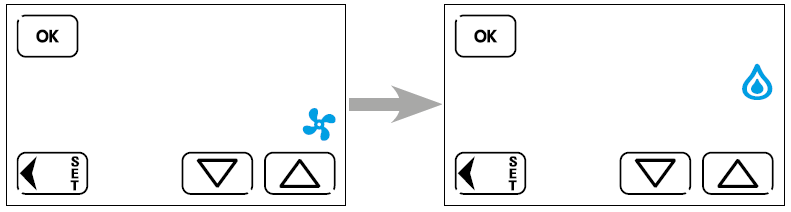
- The
 symbol indicates the winter mode (heating) whilst
 indicates the summer mode (cooling).
 - You can set the desired mode using theor keys.
- Confirm with ok to proceed to the next menu.
- To exit the menu, press or the ok repeatedly until the OFF screen appears.
- If something has been changed, 3 beeps will confirm the change.
- The
- The display shows one of the following screens
- FROST PROTECTION FUNCTION
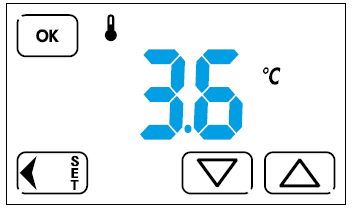
- After setting the Summer or Winter mode, pressing ok will show the following screen.
- With or it is possible to set the desired value, between 2°C and 8°C.
- Press ok to confirm and proceed to the next menu.
- To step back in the menu, press, whilst to exit the advance menu hold down for 3 seconds, or press ok repeatedly until OFF appears on the screen.
- If something has changed, 3 beeps will confirm the change.
- THERMAL DIFFERENTIAL
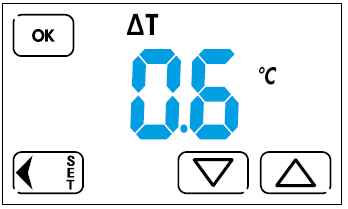
- After confirming the desired frost protection value with ok, the following screen appears.
- The thermal differential influences the way the thermostat regulates – according to the type of heating or cooling plant to be controlled.
- Use or to set the desired thermal differential value between 0.1 and 0.9.
- Confirm with ok, and proceed to the next menu.
- To return to the previous menu, press whilst to exit the advanced menu hold down for 3 seconds, or press ok repeatedly, until you see the OFF screen.
- If something has changed, 3 beeps will confirm the change.
- ANTI-SEIZE PUMP FUNCTION
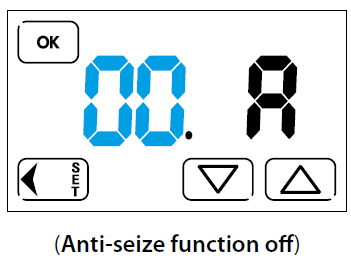
- After programming the thermal differential, pressing ok will bring up the following screen.
- The anti-seize pump function is a function that will configure the thermostat as an asymmetrical timer. By setting a value between 1 and 99 hours, the thermostat will close the output contact for 30 seconds, every time the set time value has elapsed.
- Example:
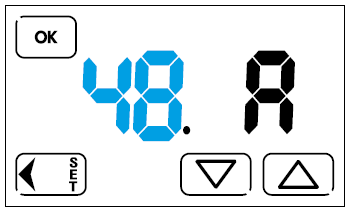
- By setting with keys or the value 48 (48 hours = 2 days) and confirming with ok, the thermostat will close the relay contact for 30 seconds, every 2 days.
- After enabling the function in the menu, the count will start after the last switching off of the relay.
- To step back in the menu press whilst to exit the Advanced Menu, press and hold for 3 seconds, or press ok repeatedly, until the screen shows OFF.
- If something has been changed, 3 beeps will confirm the successful change. Se qualcosa è stato modificato, 3 beep confermeranno l’avvenuta modifica.
- By setting with keys
- FULL LOCK MODE (with PIN)
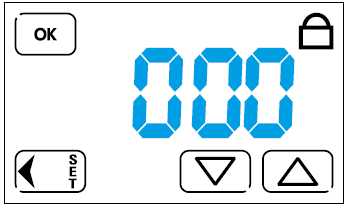
- With this mode it is possible to lock the display, using a PIN code – preventing tampering.
- In the advanced menu, press ok until the following appears on the screen:
- To lock the display only, you must set the PIN to 000 using the keys or. Whereas locking the entire thermostat (thus preventing tampering) you will have to enter a PIN number between 001 and 999.
- Whenever you want to activate the display lock; on the main screen you will have to press for 3 seconds.
- Whereas, to activate the anti-tamper lock, you have to press the key for 3 seconds, enter the PIN previously set, and confirm with ok.
- You will have to repeat the same procedure, for the unlock phase.
- NOTE: If you forget the PIN, enter the unlock code 513.
- Once unlocked, it is recommended that you go back to the advanced menu to verify and/or modify the personal PIN previously entered.
- EXTERNAL FORCING CONTACT
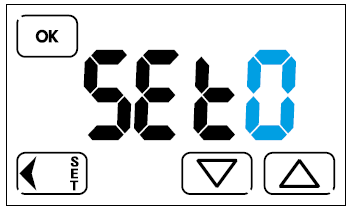
- This setting allows you to force the thermostat by means of an external contact connected to terminals 4 and 5. The function is useful for forcing the system off during certain hours (by using a time-switch) or for turning it OFF remotely.
- SET= 0 Unlock the night button and the forcing can be done by a command External (eg: clock)
- SET= 1 1 The night button is present and the forcing can be executed ONLY by the button on the display
- SET= 2 2 Remote On / Off Forcing (The night button is present).
- ENERGY SAVING E1
- With the E1 (ECO1) energy saving function the thermostat automatically controls the ON/OFF cycle of the heating/cooling system through mathematical calculations to take into account the effects of thermal inertia – enhancing perceived comfort levels and feelings of well-being, while delivering remarkable energy savings.
- Entering the advanced menu press ok until you get to function E1. Use the and to select the appropriate function.

- E1 = 0 Function off
- E1 = 1 Function on
- E1 = 2 Function on for heating system equipped with zone valves with opening times greater than 10sec and less than 90 sec
- RESET
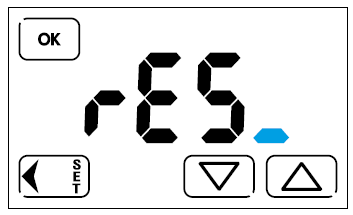
- This will restore all factory settings.
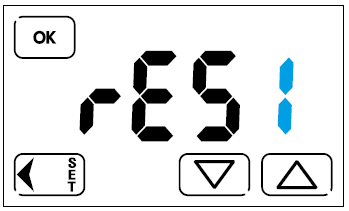
- Using or, set
 .
. - Confirming with ok the thermostat will turn off completely and then turn back on showing first, the software version and then the screen main. The product will then be reset to the factory settings.
- This will restore all factory settings.
ADMINISTRATOR FUNCTION
From the OFF position and while holding down the center of the display for about 1 second you can enter the “ADMINISTRATOR” configuration. This is used to set the maximum and minimum user-adjustable temperature values that can be set for the selected season, ie WINTER and SUMMER.
Setting the “ADMINISTRATOR” PIN can no longer be selected in Menu mode Summer or Winter mode, or use the function of calibration. Log in for the first time in administrator setup NO code is requested input. If a PIN is subsequently set (other than “000”), the code is requested. Entering an incorrect code displays ERR for a few moments and returns to OFF. After 3 failed attempts you will not be able to enter any PIN for 20 seconds. Err will remain on the display.
CAUTION
- The PIN code, if lost, can not be recovered even by performing a thermostat reset. It is advisable to write down the entered code.
NOTE
The RESET function, with ADMINISTRATOR PIN = 000, restores ALL data and factory settings, including maximum and minimum temperature values set within the ADMINISTRATOR function. With ADMINISTRATOR PIN other than zero, ALL will be reset – except for the values set within the ADMINISTRATOR function.
ADMINISTRATOR PIN “000”
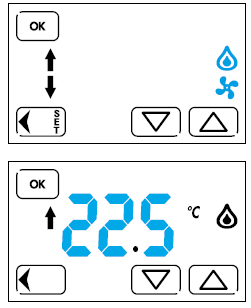
- From the OFF position press and hold the center of the display for a few seconds.
- Then select SUMMER or WINTER mode. Confirm with ok and proceed to the next menu.
- Set the maximum value of user-adjustable temperature.
- Confirm with ok and proceed to the next menu.If you want, you can enter a lock code.
Confirm with and proceed to the OFF
screen.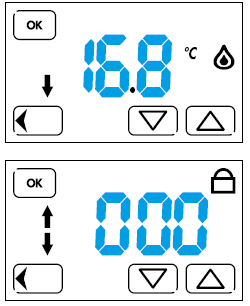
- Set the minimum value of user-adjustable temperature.
- Confirm with ok and proceed to the next menu.
- If you want, you can enter a lock code.
- Confirm with ok and proceed to the OFF screen.
ADMINISTRATOR PIN other than “000”
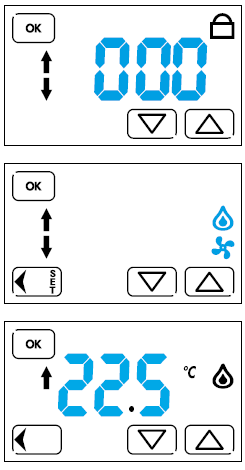
- From the OFF position, hold down the center of the display for a few seconds.
- Set the code with the arrows (if previously entered) and press OK.
- Confirm with ok and proceed to the next menu.
- Select SUMMER or WINTER mode.
- Confirm with ok and proceed to the next menu.
- Set the maximum value of user-adjustable temperature.
- Confirm with ok and proceed to the next menu.
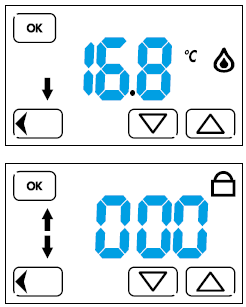
- Set the minimum value of user-adjustable temperature.
- Confirm with ok and proceed to the next menu.
- If you want, you can enter a lock code.
- Confirm with ok and proceed to the OFF screen.
CALIBRATION
- The thermostat is supplied already calibrated by the factory.
- If you want to change the measured temperature value as displayed on the display, proceed as follows.
- Starting from the main screen, press the (OFF) button for 4 seconds,
- On the
 screen will appear and then: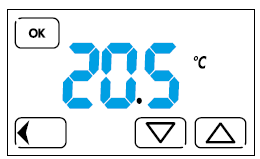
- Use or set the desired value and then press ok to confirm the change and exit the calibration.
- If you do not touch any key; after a few seconds the product will come out of the menu of its own accord – again displaying the main screen.
- If you want to restore the factory settings, enter the advanced menu and reset the thermostat.
Finder S.p.A.
- con unico socio – 10040 ALMESE (TO) – ITALY
Reference
Download Manual
FINDER 1T.51 DIGITAL TOUCH SCREEN THERMOSTAT Instruction Manuals
FINDER 1T.51 DIGITAL TOUCH SCREEN THERMOSTAT Instruction Manuals