FASTWARM HM-01-16A Digital Programmable Thermostat

What is a programmable room thermostat?
A programmable room thermostat is both a programmer and a room thermostat. A programmer allows you to set “On” and “Off” periods to suit your own lifestyle. A room thermostat works by sensing the air temperature, switching on the heating when the air temperature falls below the thermostat setting, and switching it off once this set temperature has been reached. So a programmable room thermostat lets you choose what times you want the heating to be on, and what temperature it should reach while it is on. It will allow you to select different temperatures in your home at different times of the day (and days of the week) to meet your particular needs and preferences. Setting a programmable room thermostat to a higher temperature will not make the room heat up any faster. How quickly the room heats up depends on the design and size of the heating system. Similarly reducing the temperature setting does not affect how quickly the room cools down. Setting a programmable room thermostat to a lower temperature will result in the room being controlled at a lower temperature, and saves energy. The way to set and use your programmable room thermostat is to find the lowest temperature settings that you are comfortable with at the different times you have chosen, and then leave it alone to do its job. The best way to do this is to set the room thermostat to a low temperature – say 18°C, and then turn it up by 1°C each day until you are comfortable with the temperature. You won’t have to adjust the thermostat further. Any adjustment above this setting will waste energy and cost you more money. You are able to temporarily adjust the heating program by overriding or using the temperature hold feature. These features are explained further on pages 16 and 17 of this manual. Programmable room thermostats need a free flow of air to sense the temperature, so they must not be covered by curtains or blocked by furniture. Nearby electric fires, televisions, wall or table lamps may also prevent the thermostat from working properly.
Installation Procedure
- Do
- Mount the thermostat at eye level.
- Read the instructions fully so you get the best from our product.
- Don’t
- Do not install near to a direct heat source as this will affect functionality.
- Do not push hard on the LCD screen as this may cause irreparable damage
Installation
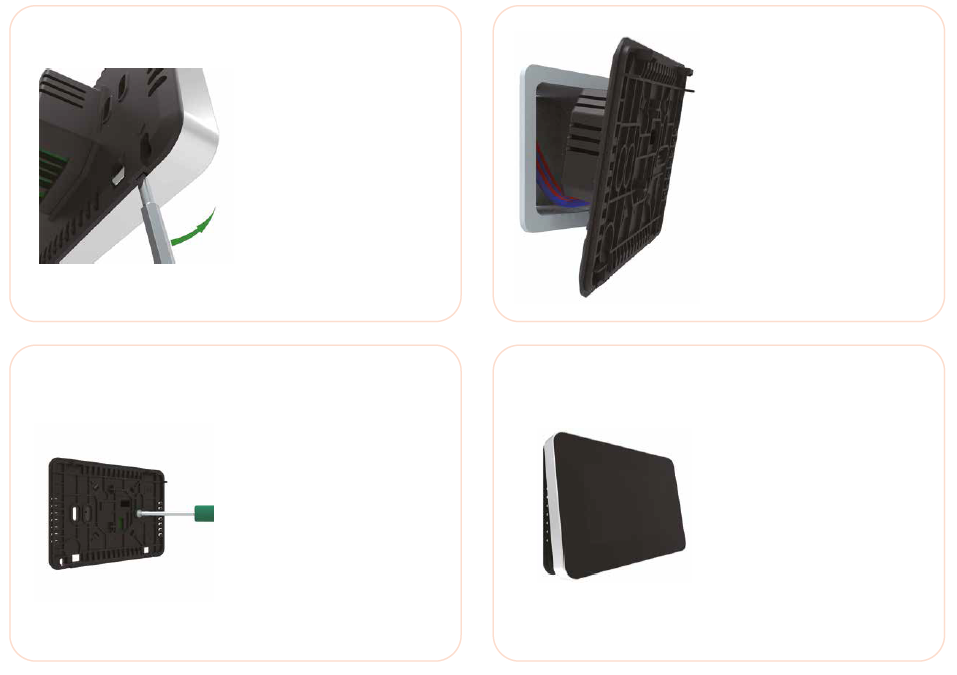
- Step 1 Using a small screwdriver, slightly loosen the screw from the bottom face of the thermostat. You can then carefully separate the front half from the back plate.
- Step 2 Place the thermostat LCD front plate somewhere safe. Terminate the thermostat as shown in the diagram on page 26 of this booklet.
- Step 3 Screw the thermostats back plate securely into the back box.
- Step 4 Replace the front of the thermostat onto the back plate, by locating the pins in the socket then insert the top edge first. Now push in the bottom edge, securing it in place with the retaining screw.
Mode Select
- ProDigital™ can either be used as a thermostat or a time clock. The thermostat mode is the default setting. To change between thermostat & time clock modes, follow these steps.
- Use the ‘Left/Right’ arrow keys
 to highlight
 then press and hold the ✓ button for 3 seconds. At this point the screen will go blank showing only ‘SETUP’ and ‘CLOCK’.
 - Tap either of the ‘Up’ or ‘Down’ arrow keys
 to highlight ‘SETUP’, then hold the ✓ key for 10 seconds. The ProDigital™ will factory reset then provide 2 select table mode options.
 - Use the Left / Right keys to scroll between modes
- Mode 1 = Thermostat. Mode 2 = Time Clock. Note: the selected option will flash.
- Press the ✓ key to confirm selection.
- The ProDigital™ will reset all parameters and restart in the selected mode.
Mode 1 Thermostat
LCD Display
- Day Indicator – Displays the day of the week.
- Flame Symbol – Displayed when the thermostat is calling for heat and flashes when optimum start is active.
- Clock – Time displayed in 24 hour format.
- Holiday – Displayed when the thermostat is in holiday mode.
- Until & Hold Left – ‘Until’ displayed during a temperature override. ‘Hold Left’ appears when a temperature hold is active, plus the remaining time will be shown.
- Frost Icon– Displayed when frost protection is enabled.
- Floor/Room Temp & Set – Indicates the displayed sensor mode and when changes are being made to the current set point.
- Program Indicators – Displayed during programming to show which period is being altered.
- Main Menu – Highlighted text indicates selected option.
- Keypad Lock Indicator – Displayed when the keypad is locked.
- Temperature – Displays the current sensor temperature.
- Temperature Format – Degrees Celsius or Fahrenheit.
- Floor Limit Symbol – Displayed when the floor probe has reached the floor temperature limit configured in the setup menu.
- Time/Day/Month/Year – Displays when setting the Clock/Calender or a Holiday Period.
Power On/Off
The heating is indicated ON when the flame icon is displayed. When the Flame Icon is absent, there is no requirement for heating to achieve the set temperature but the thermostat remains active.
- To turn the thermostat off completely, scroll to the Power Icon and hold the ✓ key for approximately 3 seconds until the display goes blank
- The display and heating output will be turned OFF.
- To turn the thermostat back ON, press the ✓ key once.
Setting the Time and Date
- To set the clock, follow these steps.
- Use the ‘Left/Right’ arrow keys to highlight then press and hold the ✓ button for 3 seconds. At this point the screen will go blank showing only ‘SETUP’ and ‘CLOCK’.
- Use the ‘Left/Right’ arrow keys
- Tap the ‘Up’
 followed by ‘Right’ keys
 to highlight ‘CLOCK’.
 - Press ✓ to confirm selection (‘Hour’ digits will now flash).
- Use the ‘Up/Down’ arrow keys followed by ✓ to set the ‘Hours’.
- Use the ‘Up/Down’ arrow keys followed by ✓ to set the ‘Minutes’ Repeat the previous two steps to set the date (‘Day, Month & Year’).
- Display will go blank once completed.
- Press the ‘Down’ arrow key
 followed by ✓ to return to the main display
Temperature Display
This thermostat can be configured for different sensor options such as built sensor, floor sensor or both. The display will clearly indicate which sensor is being used by showing either ‘ROOM TEMP’ or ‘FLOOR TEMP’ to the left the actual value When the ProDigital™ is set to use both the air & the floor sensor, the room temperature will be displayed by default. To view the current floor temperature, press and hold the Left and Right arrow keys for 5 seconds, the floor temperature will then be displayed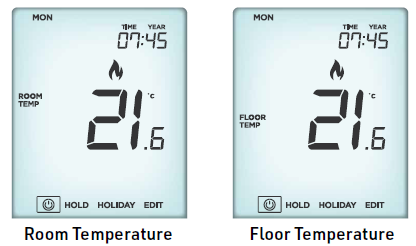
Edit the Comfort Levels
- The ProDigital™ offers three program mode options; Weekday/Weekend, 7 Day and 24
- Hour programming. There is also the option to use the ProDigital™ as a manual thermostat
- The thermostat is supplied with comfort levels already factory programmed, but these can be changed easily.
- The default times and temperature settings are; 07:00 – 21°C Wake (1) 09:00 – 16°C Leave (2) 16:00 – 21°C Return (3) 22:00 – 16°C Sleep (4)
- Unused levels must be set to –:– so that the thermostat will skip these and continue on to the next programmed time.
- For Weekday/Weekend programming, the four comfort levels are the same for Mon-Fri, but can be different for Sat-Sun.
- For 7 Day programming each day of the week can have four different comfort levels. In 24 Hour mode, all days are programmed with the same comfort levels.
To program the ‘Comfort Levels’, use the ‘Left/Right’ keys to scroll to ‘EDIT’ .
- Press ✓ to confirm selection .
- Use the ‘Left/Right’ keys to select the day/period of week (the selection will flash) .
- Press ✓ to confirm selection ‘Level 1’ will now flash and the current time and temperature setting will be shown.
- Press ✓ to alter ‘Wake (1)’ settings
- Use the ‘Up/Down arrow keys to set the hours.
- Press ✓ to confirm
- Use the ‘Up/Down’ keys to set the ‘Minutes’
- Press ✓ to confirm
- Use the ‘Up/Down’ keys to set the temperature
- Press ✓ to confirm the settings
- Press the ‘Right’ arrow key. ‘Level 2’ will now flash and the current settings will be displayed.
- Press ✓ to alter ‘Leave (2)’ settings
- Repeat these steps to set all comfort levels.
- For any unused periods set time to –:–
- Use the ‘Left/Right’ keys to scroll to ‘DONE’ and press ✓
Temperature Control
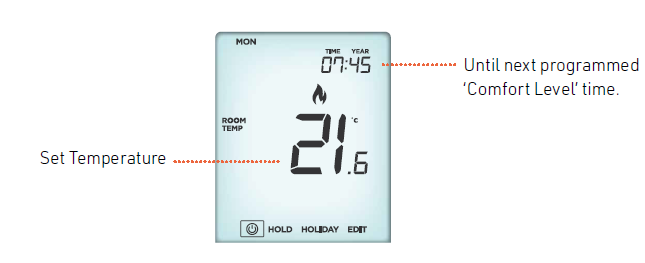
- The ‘Up/Down’ keys allow you to adjust the set temperature
- When you press either key, you will see the word ‘SET’ and the desired temperature value.
- Use the ‘Up/Down’ keys to adjust the ‘SET’ value
- Press ✓ to confirm settings and return to the main display
Temperature Hold
The temperature hold function allows you to manually override the current operating program and set a different temperature for a desired period.
- Use the ‘Left/Right’ keys to scroll to ‘Hold’ and press ✓
- Repeatedly tap the ‘Up/Down’ keys to set the desired ‘Hold’ time (Hours) then press ✓
- Minutes will now flash.
- Repeatedly tap the ‘Up/Down’ keys to set the desired ‘Hold’ time (Minutes) then press ✓
- Use the ‘Up/Down’ keys to set the desired ‘Hold’ temperature
- Press ✓ to confirm selection
You will see the ‘HOLD LEFT’ indication is displayed on screen. The time will countdown the set duration and then revert to the normal program.
Cancel/Edit Temperature Hold
- Use the ‘Left/Right’ keys to scroll to ‘Hold’ and press .
- While ‘CANCEL’ is highlighted press to cancel ‘Hold’ and return to normal operation .
- Alternatively, press the ‘Left’ arrow key
 ’ to highlight ‘EDIT’ then press ✓ to adjust current ‘Hold’ settings.
 - To edit ‘Hold’ settings follow the same procedure as indicated in the steps at the top of this page.
Frost Protection
- Use the ‘Left/Right’ keys to scroll to the ‘Power Icon’
- The frost icon will toggle ON/OFF each time is ✓ pressed .
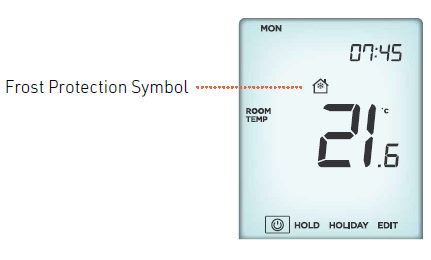
- Frost Protection Symbol.
- In this mode, the edge-e will display the frost icon and will only turn the heating ‘ON’ should the room temperature drop below the set frost temperature. If the heating is turned ‘ON’ whilst in frost mode, the flame symbol will be displayed.
- To cancel the frost protect mode, navigate to the ‘Power Icon’ again, then press ✓
Locking the Thermostat
- The ProDigital™ has a keypad lock facility. To activate the lock follow these steps.
- Use the ‘Left/Right’ keys to scroll to Hold & press for ✓ 7 seconds. The display will show 0000. At this point enter a four digit pin number.
- Use the ‘Up/Down’ keys to enter values.
- Use the ‘Left/Right’ keys to move between digits.
- Press ✓ to confirm
- The display will return to the main screen and display the keypad lock indicator

Note: The keypad lock indicator is only displayed when the lock is active.
Unlock the Thermostat
- To unlock the ProDigital™ press ✓ once .
- The display will show 0000. At this point enter the four digit pin number you set previously.
- Use the ‘Up/Down’ keys to enter values
- Use the ‘Left/Right’ keys to move between digits
- Press ✓ to confirm. The display will unlock and return to the main screen.
Holiday
In time clock mode; the timed output will be turned off during the holiday period, then return to the programmed settings once the holiday period finishes. In thermostat mode; the holiday function reduces the set temperature in your home to the frost mode temperature setting that is configured in the setup menu. The ProDigital™ will maintain this temperature for the duration of the holiday and will then automatically return to the program mode on your return
To set a ‘Holiday’
- Use the ‘Left/Right’ keys to highlight ‘HOLS’ then press ✓ .
- Enter the return time (hours) by using the ‘Up/Down’ keys then press ✓ to confirm .
- Enter the return time (minutes) by using the ‘Up/Down keys then press ✓ to confirm .
- Repeat these steps to set ‘Day’, ‘Month’ & ‘Year’.
- The display will now show
 and indicate ‘Frost Protection Active’.
 - To view or change the ‘Set’ frost temperature while in ‘Holiday’ mode, press the ‘Up/Down’ keys followed by ✓ to confirm
Optional Settings Explained
The following settings are optional and in most cases need not be adjusted. Temperature Format: This function allows you to select between °C and °F. Switching Differential: This function allows you to increase the switching differential of the thermostat. The default is 1°C which means that with a set temperature of 20°C, the thermostat will switch the heating on at 19°C and off at 20°C. With a 2°C differential, the heating will switch on at 18°C and off at 20°C. Condition: Whilst “Optimum Start” is in effect the ‘Switching Differential’ shall default to 1ºC/F. Output Delay: To prevent rapid switching, an output delay can be entered. This can be set from 00 – 15 minutes. The default is 00 which means there is no delay. Condition: Output delay will not be in effect while ‘Optimum Start’ is running. Temperature Up/Down Limit: This function allows you to limit the use of the up and down keys. This limit is also applicable when the thermostat is locked and so allows limited control of the heating system. Sensor Selection: On this thermostat, you can select which sensor should be used. You can select between air temperature only, floor temperature, or both. When you enable both sensors, the floor sensor is used as a floor limiting sensor and is designed to prevent the floor from overheating.
Floor Temp Limit: When the Floor Sensor has been enabled in feature 05, you can set a floor limiting temperature between 20-45°C, this protects the floor from overheating. (28°C is the default). Note: ‘Air Sensor Only’ MUST NOT be used to control electric underfloor heating. Floor Sensor or Both should be used. Optimum Start: Optimum start will delay enabling of the heating system to the latest possible moment avoiding unnecessary heating and ensure the building has reached its desired temperature at the programmed time. The thermostat uses the rate of change information to calculate how long the heating needs to raise the building temperature 1°C.
Rate of Change: Number of minutes to raise the temperature by 1°C.
Note: The user cannot change this feature and is for information only.
Programming Mode
The following program modes are available;
- 5/2 Day Programming – 4 levels for the weekdays and 4 different levels for the weekend.
- 7 Day Programming – 4 levels for each day.
- 24 Hours – 4 levels over a 24 hour period.
- Non-Programmable – Basic up/down override temperature control.
- Daylight Saving Time (DST): is where the thermostat sets the clocks forward one hour from
- ‘Standard Time’ during the summer months, and back again in autumn, in order to make better use of natural daylight.
- Program Type: You can select between 4 or 6 program/comfort levels.
Optional Settings – Feature Table
| FEATURE | DESCRIPTION | SETTING |
| 01 | Temperature Format | 00 = °C, 01 = °F (00 = Default) |
| 02 | Switching Differential | 00 = 0.5°C, 01 = 1.0°C (Default)
02 = 2.0°C, 03 = 3.0°C |
| 03 | Output Delay | 00 – 15 Minutes (00 = Default) |
| 04 | Up/Down Temperature Limit | 00° – 10°C (00° = Default) |
|
05 |
Sensor Selection |
00 = Built in Sensor
01 = Floor Sensor Only (Default) 02 = Built in Sensor with Floor Sensor |
| 06 | Floor Temperature Limit | 20°C – 45°C (28°C Default) |
| 07 | Optimum Start | 00 = Disabled (Default), 01 = 1 Hour, 02 = 2 Hours,
03 = 3 Hours, 04 = 4 Hours, 05 = 5 Hours |
| 08 | Rate of Change | Information Only |
| 09 | Program Mode | 00 = 5/2, 01 = 7 Day, 02 = 24 Hour (Default),
03 = None programmable |
| 10 | (DST) Daylight Saving | 00 = Disabled, 01 = Enabled (Default) |
|
11 |
Program Type |
00 = 4 Comfort Levels (Default)
01 = 6 Comfort Levels |
Adjusting the Optional Settings
- Use the ‘Left/Right’ arrow keys to highlight then press and hold the ✓ button for 3 seconds. The display will go blank showing only ‘Setup’ and ‘Clock’
- Press the ‘Up’ key followed by ✓ to access main feature menu.
- Use the ‘Up/Down’ keys to scroll through features.
- Use the ‘Left/Right’ keys to change feature setting.
- When all required changes have been made press ✓ to confirm settings and return to the blank display.
- Use the ‘Down’ key to select then press ✓ once to power on.
Re-calibrating the Thermostat
This thermostat is factory set and need not re-calibrating under normal operation! To calibrate, follow the step below.
- Use the ‘Left/Right’ keys to scroll to the Power Icon .
- Press and hold ✓ to turn the display ‘OFF’ .
- Press and hold the ✓ and ‘Down’ keys together for 10 seconds.
- The current temperature will appear on the display.
- Use the ‘Up/Down’ keys to configure the new temperature value.
- Press the ✓ key to confirm the change and the display will go blank .
- Press the ✓ key once to turn the thermostat ‘ON’.
Error Codes
The ProDigital™ will display an error code if there is a fault with the temperature sensor, these error codes are explained below.
- E0 = The internal sensor has developed a fault.
- E1 = The remote FLOOR probe has not been connected.
- The remote FLOOR probe has not been wired correctly.
- The remote FLOOR probe is faulty.
Wiring Diagram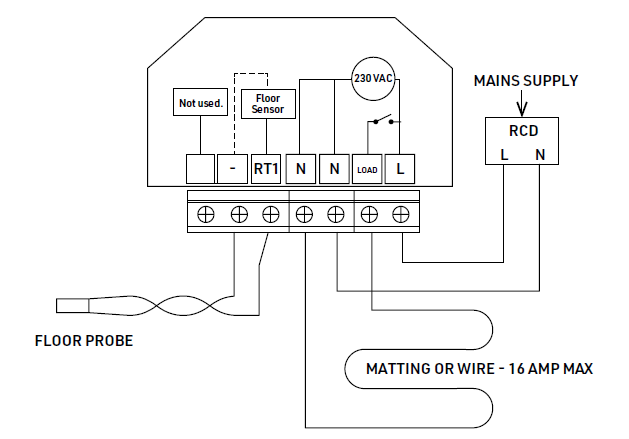
Mode 2 – Time Clock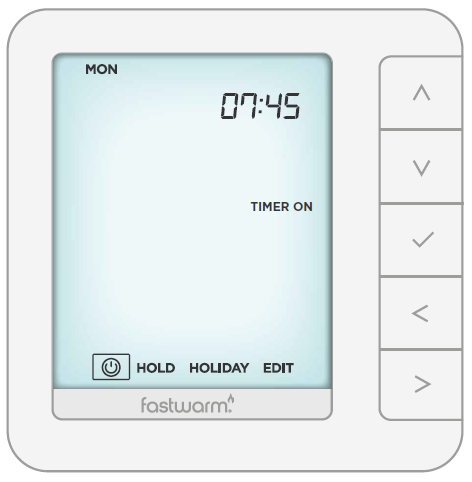
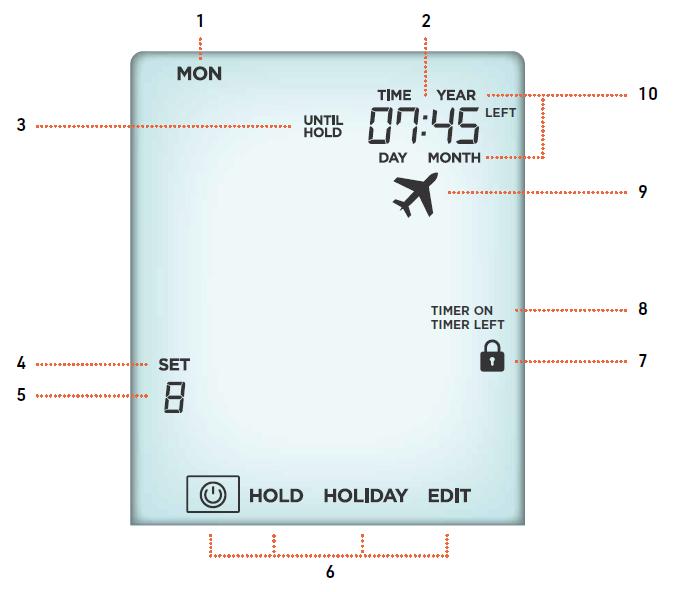
LCD Display
- Day Indicator – Displays the day of the week.
- Clock – Time displayed in 24-hour format.
- Until & Hold Left – ‘Until’ displayed during a timer override.
- ‘Hold Left’ appears when a hold is active, plus the remaining time will be shown.
- Set – Indicates when changes are being made.
- Program Indicator – Displayed during programming to show which period is being altered.
- Main Menu – Highlighted display indicates selected option.
- Keypad Lock Indicator – Displayed when the keypad is locked.
- Timer Status – Displays the current status of the timed output.
- Holiday – Displayed when the time clock is in holiday mode.
- Time/Day/Month/Year – Displays when setting the Clock/Calender or a Holiday Period.
Setting the Switching Times
To program the switching times, follow these steps.
- Use the ‘Left/Right’ keys to scroll to ‘EDIT’
- Press ✓ to confirm selection
- Use the ‘Left/Right’ keys to select the day/period to program
- Press ✓ to confirm the selection
- Level ‘1’ will now flash and the ‘ON’ time will be displayed.
- Press ✓ to alter Level ‘1’
- To set the ‘ON’ time, use the ‘Up/
- Down’ keys to set the hours, followed by ✓, then use ‘Up/Down’ to set the minutes
- Press ✓ to confirm
- To set the ‘OFF’ time, use the ‘Up/ Down’ keys to set the hours, followed by ✓ , then use ‘Up/Down’ to set the minutes
- Press ✓ to confirm the settings
- Press the ‘Right’ arrow key
- Level ‘2’ will now flash and the current settings will be displayed.
- Press ✓ to alter Level ‘2’ settings
- Repeat these steps to set all periods.
- To blank or set a switching level period to unused, first select the switching level then set –:– in place of the time.
- When all switching times have been programmed use the ‘Right’ arrow key to select ‘DONE’ and press ✓
Timer Override
To override the timed output ‘ON/OFF’, follow these steps.
- Use the ‘Left/Right’ keys to highlight ‘HOLD’ then press ✓
- Use the ‘Up/Down’ keys to set the hours then press ✓
- Use the ‘Up/Down’ keys to set the minutes then press ✓
- Use the ‘Up/Down’ keys to set output On or OFF then press ✓ to confirm
- Hold Left and the remaining time will now be displayed.
To cancel Timer Override
With ‘HOLD’ highlighted, press ✓ twice
Optional Settings Explained
- Programming Mode: The following program modes are available;
- 5/2 Day Programming – 4 On/Off switching times for the weekdays and
- 4 On/Off switching times for the weekend.
- 7 Day Programming – 4 individual On/Off switching times for each day.
- 24 Hours – 4 On/Off switching times over a 24 hour period.
- Manual – No switching times only countdown timer.
Daylight Saving Time (DST): is where the thermostat sets the clocks forward one hour from Standard Time during the summer months, and back again in autumn, in order to make better use of natural daylight
Optional Settings – Feature Table
| FEATURE | DESCRIPTION | SETTING |
|
01 |
Program Mode |
00 = 5/2,
01 = 7 Day, 02 = 24 Hour (Default), 03 = Manual Countdown Timer |
| 02 | Daylight Saving Time (DST) | 00 = Disabled, 01 = Enabled (Default) |
Adjusting the Optional Settings
- Use the ‘Left/Right’ arrow keys to highlight then press and hold the button for 3 seconds
- The display will go blank showing only ‘Setup’ and ‘Clock’
- Press the ‘Up’ key followed by ✓ twice to access main feature menu
- Use the ‘Up/Down’ keys to scroll through features
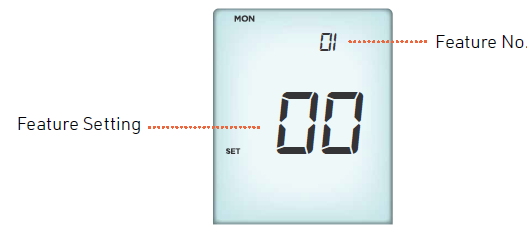
- Use the ‘Up/Down’ keys to scroll through features
- Use the ‘Left/Right’ keys to change feature setting
- When all required changes have been made press ✓ to confirm settings and return to the blank display
- Use the ‘Down’ key to select then press once to power on
Wiring Diagram – Time Clock Mode

REFERENCE:
DOWNLOAD MANUALS:
FASTWARM HM-01-16A Digital Programmable Thermostat Installation Instructions
OTHER MANUALS:
FASTWARM HM-01-16A Digital Programmable Thermostat Product Specification Guide

FASTWARM HM-01-16A Digital Programmable Thermostat Installation Instructions