FASTWARM 16AMP Touchscreen Thermostat
Introduction
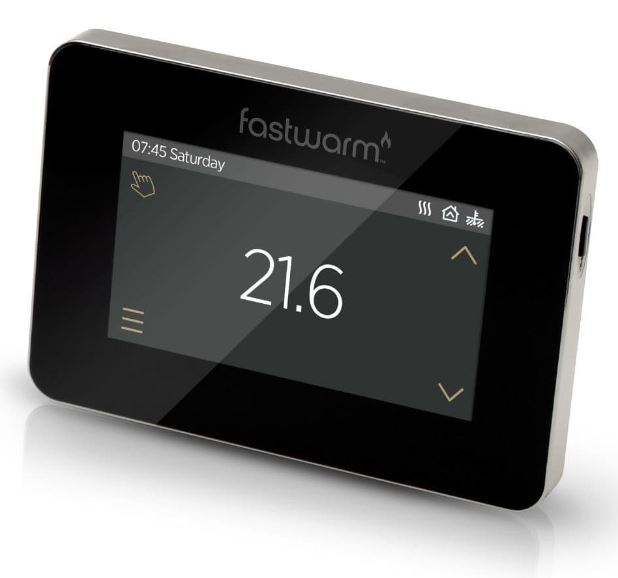
The Fastwarm™ touch smart thermostat series is a smart thermostat used to control your electric floor heating system or water heating system.
It will keep your home at comfortable temperature whilst minimizing energy use. Install the app on your smart phone to control your electric heating system remotely with the WiFi thermostat.
Main Functions
- Auto mode
- Hold Mode
- Holiday mode
- Anti-frozen function
- Floor temperature limit
- Open window detection function
- Key-lock
- Brightness
- Sensor selection
- Adaptive function
TECHNICAL SPECIFICATIONS
- Supply voltage: 85-265Vac 50/60Hz
- Standby power: <2W
- Max load: 16A(electric heating) 3A(water heating)
- IP Rating: IP20
- Wire Diameter: ≤2.5mm²
Installation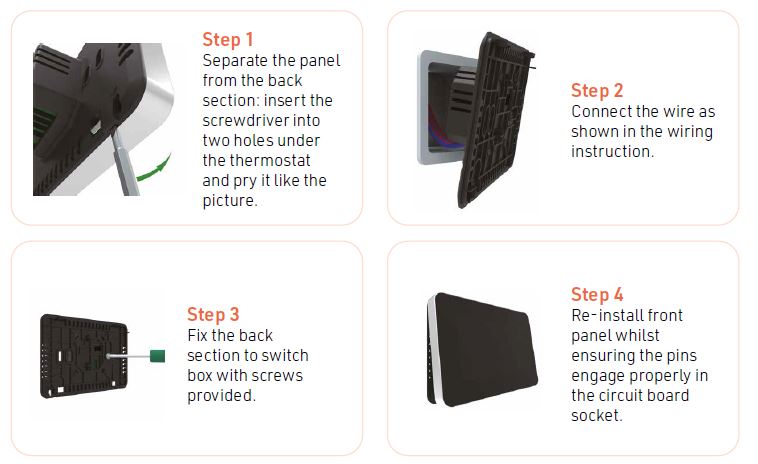
IMPORTANT: The thermostat should be mounted in a standard 86 type switch box.
Wiring Instructions
Suggestion:
Please keep the max load around 90% of 16A to prolong the lifetime.
CAUTION: Ensure power is disconnected when wiring!
Thermostat Symbols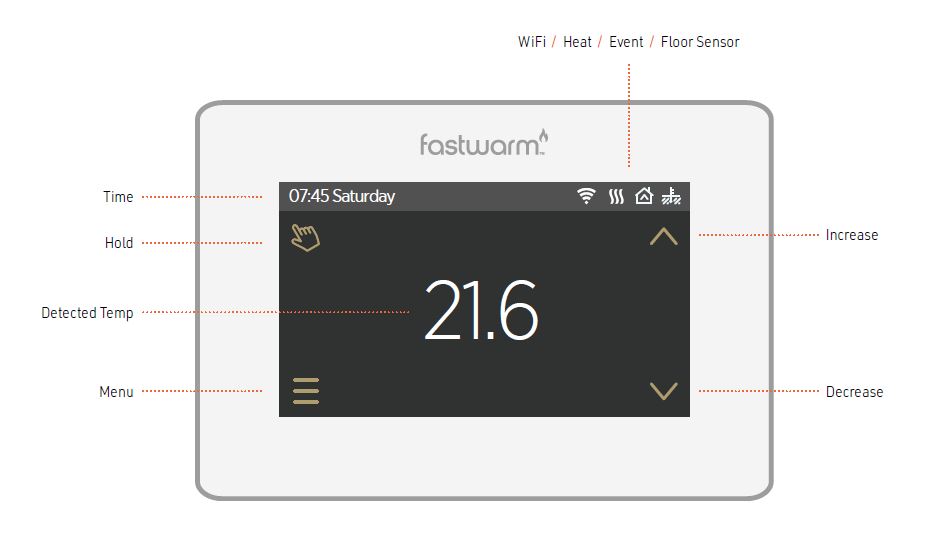
Function & Operation
ON/OFF
Press the button on the right side of the thermostat to turn on/off.
Note: When anti-frozen function is active, the thermostat will maintain the anti-frozen temperature when power off.
TEMPORARY OVERRIDE TEMPERATURE
In the page of detected temperature, press or to change the current event temperature setting. The thermostat will revert to the parameters of schedule at the start-time of the next event in auto mode.
MODE SELECTION
In the page of detected temperature, press the key in the up left corner to select the mode. There are 3 modes:
- Auto Mode
This is the thermostats default mode.
Thermostat will run according to event parameters set within the Edit Setting section. Press Auto Mode to confirm and revert to home screen. - Manual Mode
Will remain at the set temperature until changed.
Press Manual Mode to enter temperature setting.
Press to set the temperature.
Press ✓ to confirm and revert to home screen. - Holiday Mode
Thermostat will run with the set temperature until the holiday time ends.
Press Holiday Mode to enter holiday setting.
Pressto set the days of holiday.
Press ✓ to confirm and enter holiday temperature setting.
Pressto set the temperature.
Press ✓ to confirm and enter the page of detected temperature.
In the page of detected temperature, press the key to enter Menu. There are 5 parameter settings.
TIME
- The day and clock are set here.
- Press Time to enter day setting.
- Press the day you want to enter hour setting.
- Pressto set hour.
- Press ✓ to confirm and enter minute setting.
- Press to set minute.
- Press ✓ to confirm and go back to the menu.
- Press
 to back to the home screen.
Note: If the thermostat is WiFi version, it will update time automatically after connecting to WiFi.
KEY LOCK
Lock all keys to prevent the settings from being changed.
- Press Key Lock to enter key lock setting.
- Pressto select lock.
- Press ✓ to confirm and back to the home screen.
To unlock
- In the page of detected temperature, press any key then
 (in the down right corner) will flash 3 times.
 - Press and holdfor 3 seconds to unlock.
BRIGHTNESS
This option allows you to change the brightness of the display.
- Press Brightness to enter brightness setting.
- Press
 to move up/down or touch any part of the line to set the brightness.
 - Press ✓ to confirm and back to Menu.
EDIT SETTING
Edit setting can set and change the parameters. If you don’t choose Holiday Mode or Hold Mode. The thermostat runs according to the parameters of Edit.
- Press Edit Setting to enter days selection.
- Press the day you want to set.
- Press ✓ to enter event selection.
- Press the event you want to set and enter the start time hour setting.
- Press to set start time hour.
- Press ✓ to confirm and enter the start time minute setting.
- Press to set start time minute.
- Press ✓ to confirm and enter temperature setting.
- Press to set temperature.
- Press ✓ to confirm and back to event selection.
- Press to back to the home screen.
DEFAULT PARAMETERS
| Day | Wake | Leave | Back | Sleep |
| Mon-Fri | 07:00 22.0°C | 08:30 19.0°C | 17:00 22.0°C | 22:00 19.0°C |
| Sat/Sun | 08:00 22.0°C | 08:30 22.0°C | 17:00 22.0°C | 22:00 19.0°C |
ADVANCED SETTING
The thermostat provides advanced settings to suit various special situations. These are normally set by technicians during initial installation.
- Press Advanced Setting to enter the page of warning.
- Press ✓ to enter the page of advanced setting.
- Pressto switch page.
- Press the item to set its parameters.
| No. | Name | Default | Ranges |
| 1 | Room Temperature Calibration | 0.0°C | -5.0°C — 5.0°C |
| 2 | Floor Temperature Calibration | 0.0°C | -5.0°C — 5.0°C |
| 3 | Anti-Frozen Function | ON | OF(OFF) ON |
| 4 | Anti-Frozen Temperature | 5.0°C | 5.0°C — 15.0°C |
| 5 | Floor Temperature Limit | 30.0°C | 20.0°C — 50.0°C |
| 6 | Temperature Tolerance | 1°C | 0.5°C/1°C/2°C/3°C |
| 7 | Temperature Unit | °C | °C/ °F |
| 8 | Sensor Selection | Floor | Room/Floor/Both |
| 9 | Schedule | 5+1+1 | 5+1+1/7 |
| 10 | Output Delay | 0 Sec | 0S/30S/60S/90S |
| 11 | Adaptive Function | OFF | ON/OFF |
| 12 | Open Window | OFF | ON/OFF |
| 13 | Power Set | 0 W | 0W — 4500W |
| 14 | Energy Use | ||
| 15 | Factory Reset | NO | NO/YES |
- Room Temperature calibration: Calibrate the temperature detected by room sensor.
- Floor Temperature calibration: Calibrate the temperature detected by floor sensor.
- Anti-frozen function: If the Anti-frozen function opened, it will keep the room and floor at a lower temperature in order to protect the pets and plants in your house.
- Also, it can protect your pipe against freezing when using the water heating system.
- Floor temperature limit: When choose both sensors, you can set the maximum floor temperature value, system will stop heating if the floor temperature exceed this value.
- Adaptive function: After several days of installation and use, Adaptive function ensures that the required temperature has already been reached when the next event begins.
- Temp unit: °F and °C can be selected.
- Sensor selection
Room sensor: Run by room sensor.
Floor sensor: Run by floor sensor.
Both sensors: Run by room sensor with floor temp limit. - Schedule: Select a weekly schedule for the event.
7: each day from Mon to Sun can be set individually.
5+1+1: Mon to Fri have the same events, Sat and Sun can be set individually. - Output delay: This option help you avoid inadvertent operation on heating.
- Adaptive function: After several days of installation and use, Adaptive function ensures that the required temp has already been reached when the next event begins.
- Open window: This function only works when room sensor or both sensors is selected.
- The thermostat with this function will shut off automatically for 15 min when the window opens, as it can detect that the room temp plummets.
- Energy use: This option allows you to enter the various data used to calculate energy use.
- Factory Reset: All parameters are restored to default values.
Troubleshooting
Dimensions
If any products received within this package are damaged or defective, please feel free to contact us and we’ll be happy to assist.
REFERENCE:
DOWNLOAD MANUALS:
FASTWARM 16AMP Touchscreen Thermostat INSTRUCTION MANUAL
OTHER MANUALS:
FASTWARM 16AMP Touchscreen Thermostat Product Specification Guide