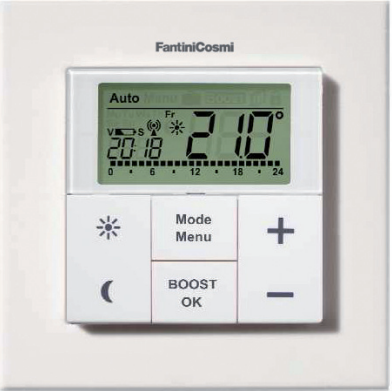
Fantini Cosmi C801 Wireless Programmable Thermostat
INTRODUCTION AND INTENDED USE
The weekly thermostat C801 can conveniently regulate the temperature in a room/zone. With the weekly thermostat up to 8 radiator thermostats, O81RF can be regulated in a room/zone. The weekly thermostat C801 has an internal sensor that measures the temperature in the room/zone and cyclically transmits it to the radiator thermostat O81RF.
Communication between weekly thermostats and radiator thermostats is bi-directional. This ensures that the information sent reaches the recipient.
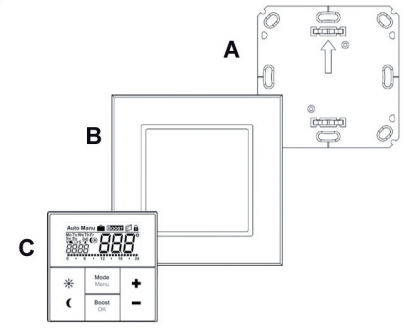
OVERVIEW
- A Mounting plate;
- B Attachment frame
- C Weekly Thermostat.
DISPLAY AND KEYBOARD DESCRIPTION
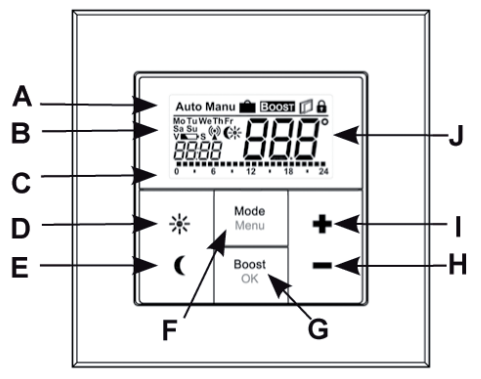
- Automatic operation (Auto), Manual operation (Manu), Holiday function (
 ), Boost function ( BOOST ), Open Window (
 ), Operating lock symbol (
  ).
). - B Weekday, Low battery symbol (
 ), Radioactivity (
 ), Comfort/Economy temperature (
 ), time/date.
 - C Bar chart of the programmed heating phases of the current day.
- D Comfort temperature button () for switching to comfort temperature.
- E Economy temperature button (
 ) for switching to Economy temperature.
 - F Mode/Menu button: to change the operating mode and open the configuration menu; exit/back in the menu.
- G BOOST/OK button: to confirm settings and activate the Boost function.
- H (-) button: to lower the nominal temperature, browse in the menu.
- I (+) button: to increase the nominal temperature, browse in the menu.
- J Nominal/Actual temperature.
SAFETY INSTRUCTIONS
Using this device for any purpose other than that described in this operating manual does not fall within the scope of intended use and shall invalidate any warranty or liability. This also applies to any conversion or modification work. This device is intended for private use only. The device may only be operated indoors and must be protected from the effects of dampness and dust, as well as solar or heat radiation.
INSTRUCTIONS FOR DISPOSAL
Do not dispose of the device with regular domestic waste! Electronic equipment must be disposed of at local collection points for waste electronic equipment in compliance with the Waste Electrical and Electronic Equipment Directive. Used batteries should not be disposed of with regular domestic waste! Instead, take them to your local battery disposal point.
INSERTING (REPLACING) BATTERIES
AS-DELIVERED CONDITION
When you are starting up the device for the first time, first remove the mounting plate (A) on the rear of the weekly thermostat (C). To do this, hold the weekly thermostat fi rmly in one hand and pull off the installation plate at one corner.
Once mounted, the weekly thermostat can easily be pulled out of the frame; Pull the device (C) off the wall together with the frame by pulling sideways at the frame.
CHANGE BATTERIES
- Turn the weekly thermostat (C) over to remove or insert the batteries according to the illustration. After removing the old batteries, please wait approx. 60 seconds before inserting the new ones.
- You can now enter two LR03 alkaline batteries (1,5V Micro/AAA) into the battery compartment, making sure they are the right way round according to the drawings
- Put the weekly thermostat (C) back into the frame (B).
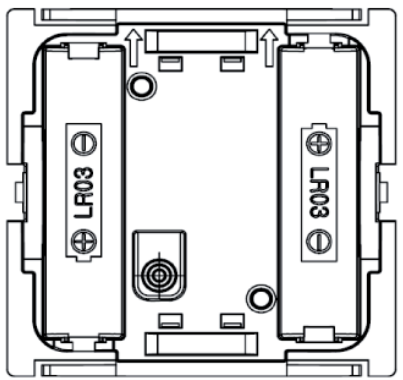
An empty battery symbol () indicates that the batteries need to be replaced. If, in addition, a “V” is displayed, the batteries of a taught-in radiator thermostat O81RF have to be replaced.
Important notice: Never recharge alkaline batteries. Doing so will present a risk of explosion. Do not throw the batteries into a fire. Do not short-circuit batteries.
DATE AND TIME SETTING (dAt)
After inserting or replacing batteries the firmware version number will be shown briefly. Accordingly, the date and time will be requested automatically. Settings can be changed with the (+) and (-) buttons and confirmed with the OK button.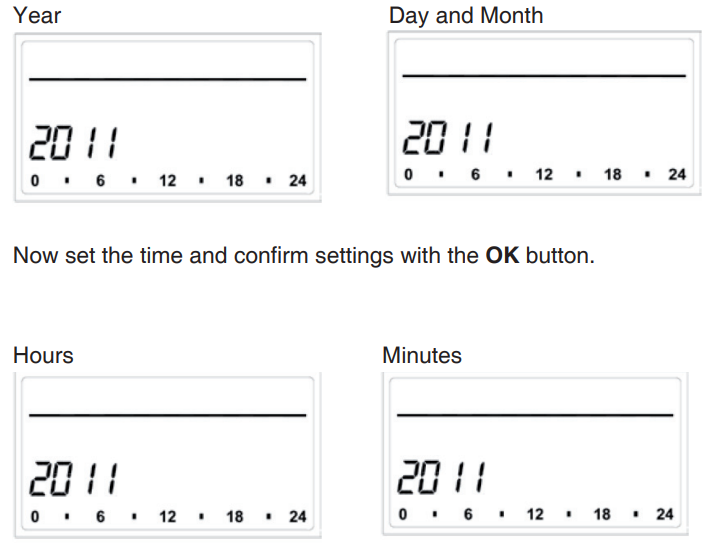
Once the time and date were entered, the weekly thermostat switches to normal operation. During operation Date and Time can be changed at any time via “dAt“ in the configuration menu (see section 6).
MOUNTING
You can either use screws or adhesive strips to mount the weekly thermostat to a wall in the frame supplied or integrate it into an existing switch.
- ADHESIVE STRIP MOUNTING:
Choose a site for installation. The surface on which you are mounting the weekly thermostat must be clean, dry, and greaseless. For mounting of the assembled weekly thermostat attach the adhesive strips to the back side of the mounting plate. You should be able to read the letters on the back side (according to the figure). Remove the protective film from the adhesive strip. Press the assembled weekly thermostat with the back side to the wall in the position where it should subsequently be attached.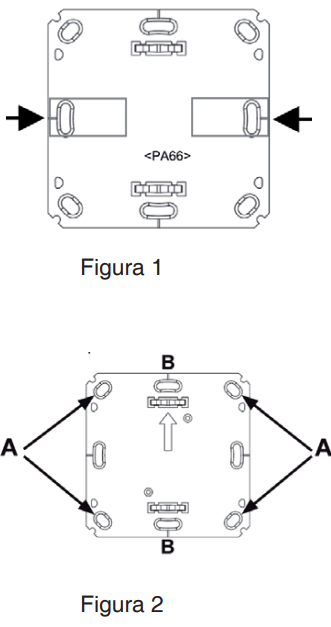
- SCREW MOUNTING:
Choose a site for installation. Make sure that electrical lines in the wall will not be damaged. Position the mounting plate on the desired site on the wall. Make sure that the arrow on the mounting plate is pointing upwards. Use a pen to mark the positions of 2 boreholes A (diagonally opposite) in the mounting plate on the wall. The boreholes B can be used for installation with a fl ush-mounting box.
Use the screws and plugs supplied to fasten the mounting plate to the wall. Attach the weekly thermostat with the frame on the mounting plate. Make sure that the arrows on the back side of the weekly thermostat point upwards and that the clips on the mounting plate latch into the openings on the weekly thermostat.
TEACHING-IN OF O81RF RADIATOR THERMOSTATS
The C801 weekly thermostat can control up to eight O81RF radiator thermostats. Therefore, all devices are taught-in to the weekly thermostat directly. These then take over the settings of the weekly thermostat (e.g. mode, temperature, week program). To teach in, proceed as follows:
- Start by switching the teach-in O81RF radiator thermostat to teach-in mode;
- Activate the teach-in mode of the C801 weekly thermostat.
- Press and hold down the OK button.
The antenna symbol “ ” and the remaining teach-in time (30 seconds) will be displayed. If the teach-in has been successful, the weekly thermostat will change back to normal operating mode.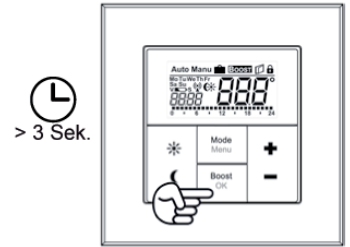
TEACHING-OUT OF WIRELESS COMPONENTS (UnL)
To unlearn, proceed as follows:
- Press and hold down the mode button for more than three seconds.
- Select the “UnL” menu item with the (+) and (-) buttons and confirm your entry using the OK button.
- “ACC“ (accept) appears on the display; confirm your entry using the OK button.
After the “UnL“ function all connected O81RF thermostats are deleted from the C801 weekly thermostat; the factory setting is not mandatory.
OPERATING MODES (AUTO / MANU / HOLIDAY / BOOST)
You can choose between the operating modes and functions:
- Auto: Week program – automatic temperature control according to the stored week program.
- Manu: Manual operation – the temperature is set manually with the (+) and (-) buttons.
- Holiday ( ): ): Setting a temperature that should be held until a fixed end time.
- BOOST: Setting a temperature that should be held until a fixed end time (see section 14.5).
- You can change between the functions by pressing the “Mode” button shortly
Note: If the operating mode or the temperature on one O81RF radiator thermostat in the room/zone is changed, all taught-in radiator thermostats will adjust to this setting.
CHILD-PROOF LOCK / OPERATING LOCK
Operation of the device can be locked to avoid unintended changes through involuntary touch. To (de)activate the operating lock proceed as follows:
- Briefly press the “Mode” and the “BOOST/OK” button simultaneously.
Once activated, the operating lock symbol ().
SETTING HEAT PAUSE (ON)
Battery life can be prolonged by switching the heating off in summer.
To achieve this, the valve is opened fully and the calcification protection function continues to run. To activate proceed as follows:
- In manual operation (Manu) press the (+) button until “ON” is shown on the display.
To end proceed as follows: - Exit manual operation (Manu) or press the (-) button until the desired temperature is set.
Note: if this operation is set, all taught-in radiator thermostats will adjust to this setting.
SETTING VALVE PROTECTION FUNCTION (OFF)
If the room/zone does not need to be heated, the valve can be closed.
The valve is only opened if there is a risk of frost. The calcification protection function continues to run.
To activate this, proceed as follows
- In manual operation (Manu) press the (-) button until “OFF” is shown on the display.
- To finish, exit the manual operation (Manu) or press the (+) button until the desired temperature is set
Note: if this operation is set, all taught-in radiator thermostats will adjust to this setting.
When using the weekly thermostat, the settings can be made in the confi guration menu.
The menu items are selected with the (+) and (-) button and confi rmed with the “OK” button. A subsequent pressing of the “Mode” button reverts to the previous level.
- Pro: Set the week program (see section 14.1)
- dAt: Change date and time (see section 6)
- bOS: Set valve opening and length of “Boost” function (see section14.5)
- AEr: Set “Open window temperature” for automatic temperature decrease during airing (see section 14.8)
- dEC: Set valve protection function (see section 14.7)
- t-d: Switch time and date display (see section 14.2)
- S-A: Change display of nominal and actual value (section 14.3)
- dSt: Set automatic switching hour between summer and winter (see section 14.9)
- tOF: Set temperature offset (see section 14.10)
- UnL: Teach-out wireless componets (UnL) (see section 9)
- rES: Reset factory setting (see section 15)
- : Set economy and comfort temperature (see section 14.4)
- : Set Holiday function (see section 14.6)
- Note: The menu closes automatically after 60 seconds of inactivity.
SET THE WEEK PROGRAM (Pro)
In the weekly program, for each weekday up to 6 heating phases (13 change settings) can be set separately. The programming is carried out for the days chosen, whereby temperature settings have to be set for the entire period between 00:00 and 23:59.
- Press the Mode button for more than 3 seconds. The display will show “Pro”.
- Confi rm the setting with the OK button. The display will show “dAy”.
- Select an individual weekday, all weekdays, the weekend, or the entire week with the (+) and (-) buttons (i.e. weekdays).
- Confi rm setting with the OK button.
- Now set the end time of the first time period (i.e. 6:00 am for the period 0:00 – 6:00 am).
- Confi rm setting with the OK button.
- With the (+) and (-) buttons select the chosen temperature for the previously chosen time period (i.e. 17.0°C).
- Confi rm setting with the OK button.
- Repeat this procedure until temperatures are stored for the entire period between 0:00 and 23:59.
E.g.: 00:00÷06:00 time period with economy set-point at 17.00°C., applied at all work days of the week (from Monday to Friday).
In “Auto” mode the selected week program will be automatically adopted by all taught-in O81RF Radiator Thermostats. In “Auto” mode the temperature can be changed at any time with the (+) and (-) buttons or comfor ( ) and economy temperature buttons ( ). The adjusted temperature will be maintained until the next phase in the timer program starts.
WEEK PROGRAMMES: EXAMPLES
For each day of the week up to 6 heating phases (13 change settings) with individual temperature settings can be saved with the weekly thermostat. The factory settings are as follows: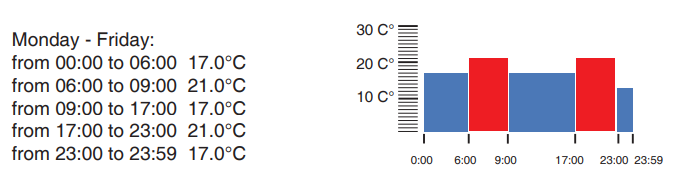
In the display, bars for heating phases are displayed whenever the set temperature for the period is higher than the set reduction temperature. If you want a room/zone (e.g. the living zone) to also be heated during lunchtime the programming could look as follows: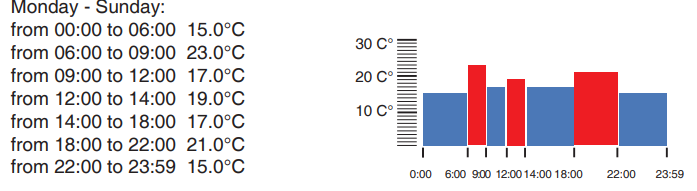
SWITCHING TIME/DAY (t-d)
The factory setting will show the time on the display. In the menu the display can be switched to the date.
- Open the configuration menu by pressing the menu button for more than 3 seconds.
- Select the “t-d” menu item with the (+) and (-) buttons and confirm with the OK button.
- Now set the format you want to show on the display (date and time will switch on the display) with the (+) and (-) buttons.
- Confi rm setting with the OK button.
SWITCHING NOMINAL/ACTUAL TEMPERATURE (S-A)
In the factory settings, the display will show the nominal temperature.
In the configuration menu, you can change the display setting from nominal to actual temperature.
- Open the configuration menu by pressing the Menu button.
- Select the (S-A) menu item with the (+) and (-) buttons and confirm with the OK button.
- Now set the format you want to show on the display (“SEt“ for the nominal temperature and “Act” for the actual temperature) with the (+) and (-) buttons.
- Confi rm setting with the OK button.
If the actual temperature is selected, the display will display “SEt“ for 5 seconds on a change of the nominal temperature (or on a change of mode). Afterward, the display automatically changes back to the actual temperature.
COMFORT AND ECONOMY TEMPERATURE
The comfort ( ) and economy ( ) temperature buttons make switching between comfort and Economy temperature simple and user-friendly. The factory setting for the comfort temperature is 21.0°C and the Economy temperature is 17.0°C.
- Press the comfort or economy temperature button for a few seconds.
- The display shows the respective symbol and the corresponding comfort or Economy temperature.
- Change the temperature with the (+) and (-) buttons.
- Confirm setting with the OK button.
Even in Auto mode, the temperature can be changed with this button at any time. However, the change will only be maintained until the next phase the timer program starts.
SET “BOOST” FUNCTION (bOS)
The Boost function can create the sensation of a rise in room/zone temperature to the human body. When activated the radiator valve will immediately be adjusted to 80% valve opening for 5 minutes (factory setting). The heating of a room/zone takes longer than 5 minutes but the radiated heat from a radiator can be sensed immediately.
- To activate the “Boost” function press the OK button. Once the Boost time has completed the Wall Thermostat will switch back to the previously active mode (Auto/Manu) and the previously set temperature.
- The Boost function can be deactivated at any time by a renewed press of the OK button.
The count-down in second intervals of the remaining functioning time (e.g “300” to “000”) and BOOST will be shown on the display.
The length and valve opening of the Boost function can be individually adjusted as follows:
- Press the Menu button for more than 3 seconds.
- Select the “bOS” menu item with the (+) and (-) buttons.
- Confirm the setting with the OK button.
- Use the (+) and (-) buttons to set the duration of the Boost from 0 to 30 minutes (0, 5, 10, 15, 20, 25, 30 mins.). Choosing 0 will deactivate this function.
- Confirm the setting with the OK button.
- Subsequently set the valve opening between 0 and 100% in 5% increments with the (+) and (-) buttons. The larger the valve opening, the higher will be the heat emitted by the radiator.
- Confirm the setting with the OK button.
NOTES:
If a long “Boost period” and a large valve opening have been set the radiator can get very hot. After changing the factory setting check that the radiator is not heated excessively.
If the duration of the “Boost function” is set so that 999 seconds are exceeded the display will show the duration in minutes.
SETTING THE “HOLIDAY” FUNCTION
If you want to maintain a fixed temperature during your holidays or a party, the holiday function can be used.
- Briefly press the Mode button repeatedly until the suitcase symbol ( ) appears on the display.
- Set the end time until which you want the temperature to be held and confirm the setting with the OK button.
- Set the end date until which you want the holiday function to be set and confirm the setting with the OK button.
- Set the temperature and press OK. The display will flash to confirm.
The set temperature will remain until the set end time. Afterward, the weekly thermostat will switch to Auto mode. Radio control commands like the weekly de-scaling run will still be performed.
SETTING VALVE PROTECTION FUNCTION (dEC)
To prevent the build-up of limescale in the valve a so-called “descaling run” will be performed weekly for the radiator thermostats. You can change the set time for this function (factory setting: Saturday, 12:00 p.m.) as follows:
- Press the Menu button for more than 3 seconds.
- Select the “dEC” menu item with the (+) and (-) buttons and confirm the setting with the OK button.
- Select the weekday with the (+) and (-) buttons and confi rm the setting with the OK button.
- Select the time with the (+) and (-) buttons and confi rm the setting with the OK button.
Note: While the “de-scaling run” is performed the display will show “CAL”.
OPEN WINDOW FUNCTION/AIRING (Aer)
This option is not included in this release of the product.
SETTING AUTO SUMMER/WINTER HOUR SWITCHING (dSt)
The weekly thermostat include a list of dates planned in the Europe Community for the summer and winter hour changes. You can disable the the automatic summer-winter switching (factory setting: automatic switching is ON/active) as follows:
- Press the Menu button for more than 3 seconds.
- Select the “dSt” menu item with the (+) and (-) buttons and confi rm the setting with the OK button.
- Select the OFF (disable) or ON (active) and confi rm the setting with the OK button.
SETTING THE OFFSET TEMPERATURE (tOF)
As the temperature is measured on the room/zone control unit the temperature distribution can vary throughout a room/zone.
To adjust this, a temperature offset of ±3.5°C can be set. If a nominal temperature of e.g. 20°C is set at the room/zone control unit but the room/zone presents with only 18°C an offset of -2.0°C needs to be set.
- Press the Menu button for more than 3 seconds.
- Select the “tOF” menu item with the (+) and (-) buttons and confirm the setting with the OK button.
- Set the offset temperature with the (+) and (-) buttons and confirm the setting with the OK button.
RESTORE THE FACTORY SET UP (rES)
As the temperature is measured on the room/zone control unit the temperature distribution can vary throughout a room/zone. To adjust this, a temperature offset of ±3.5°C can be set. If a nominal temperature of e.g. 20°C is set at the room/zone control unit but the room/zone presents with only 18°C an offset of -2.0°C needs to be set.
You can restore the factory setup as follows:
- Press the Menu button for more than 3 seconds.
- Select the “rES” menu item with the (+) and (-) buttons and confi rm the setting with the OK button.
- The display will show “ACC” (accept?), confi rm restored factory settings with the OK button.
Note: if you need to erase only the teach-in radiator thermostats, you can use the “UnL” function (see section 6).
TROUBLESHOOTING
- PROBLEM OR ERROR CODE: POSSIBLE CAUSE : PROPOSED SOLUTION
- Battery symbol :“ ”: Battery voltage too low Replace batteries
- F5:Temperature sensor is broken : Replace the weekly thermostat
- Slowly flashing “ ”symbol : Connection with teach-in O81RF thermostats lost. : Check the batteries of the teach-in O81RF radiator thermostats.
- Quickly flashing “ ” symbol :Duty cycle limit reached.: The device resumes the communication after a waiting time of approx. one hour.
TECHNICAL DATA
- Supply voltage: 3V (2×1,5V AAA batteries);
- Current consumption: 30mA (max.);
- Batteries life: about 2 years;
- Protection: IP20;
- Operating temperature: da + 5°C. a +55°C.;
- Dimensions: (W x H x D): 86 x 86 x 21,5 mm.;
- Weight: 168 g (without batteries);
- Transceiver frequency: 868,3 MHz;
- Receiver category: SRD Class 2;
- Open area RF range: >100 m.;
- RF duty cycle: <1%/h;
- Display: LCD Display.
DECLARATION OF CONFORMITY
Fantini Cosmi S.p.A. declares that the “C801 Wireless weekly thermostat” device conforms to the 1995/5/CE R&TTE Directive and rules EN60730-1 e 2nd part. The full EC Declaration is available for download from the “www.fantinicosmi.it” website.
Fantini Cosmi S.p.A. reserves the right to modify its products without notice.
FANTINI COSMI S.p.A.
Via dell’Osio, 6
20090 Caleppio di Settala, Milano
Tel. +39 02 956821 | Fax +39 02 95307006
[email protected]
[email protected]
www.fantinicosmi.it
REFERENCE
DOWNLOAD MANUALS:
Fantini Cosmi C801 Wireless Programmable Thermostat INSTRUCTION MANUAL
OTHER MANUALS:
Fantini cosmi C801 Wireless Programmable Thermostat Technical Data Sheet

Fantini Cosmi C801 Wireless Programmable Thermostat INSTRUCTION MANUAL