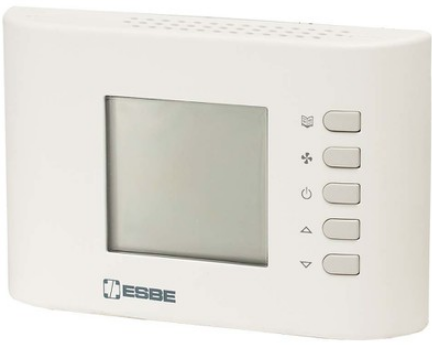
ESBE TPW114 Programmable Room Thermostats
INSTALLATION
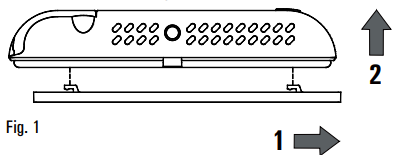
- Release the wall mount plate fitted under the base of the chronostat
- Fix the plate directly on the wall or onto 2 or 3 module junction boxes by means of the two holes for screws (distance between centres: 60 mm or 85mm), taking care to pass the wires through the opening
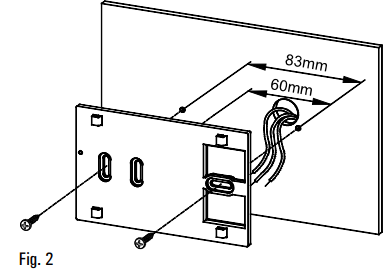
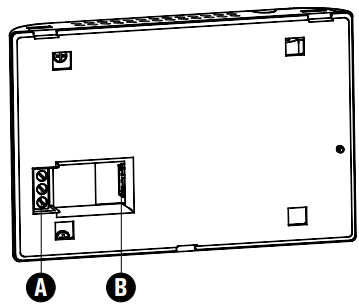
- Make electrical wirings by passing the wires through the rectangular opening in the wall plate
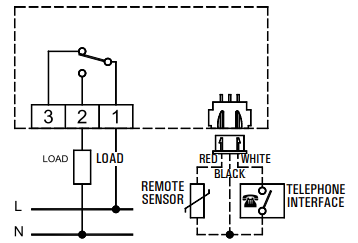
- Connect the remote sensor (if present) or the phone interface to connector ‘B’ shown in Fig. 4. The load must be wired to terminal block ‘A’.
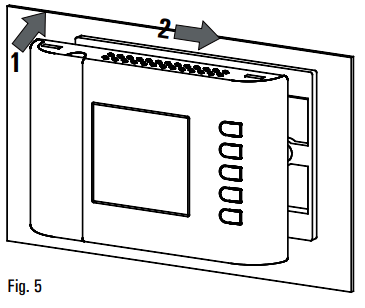
- Move the thermostat to the wall plate by fitting first the teeth of the base with the relevant holes of the plate and then exert a pressure on the device to the left side until the plastic teeth of the plate snap
- Secure the bodyof the programmable thermostat to the wall plate using the supplied screw that is located inside the battery compartment.
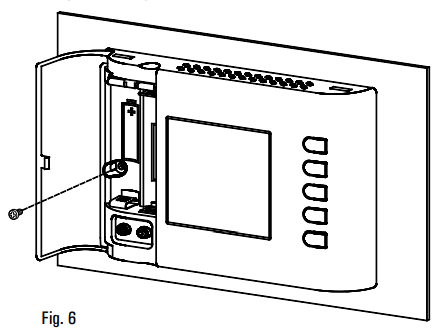
- Insert the batteries in the battery compartment; see paragraph ‘ HOW TO INSERT/REPLACE THE BATTERIES
DESCRIPTION OF CONTROLS
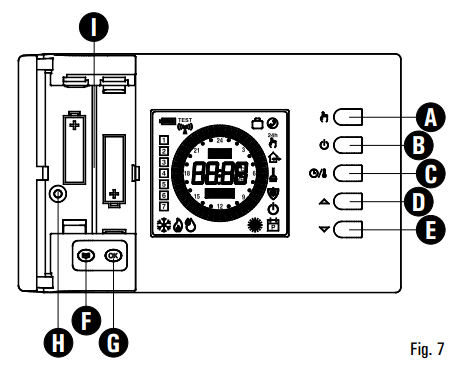
LEGEND
- A Button with a double function:
- In normal operation: activates the function 24 hours Manual / Permanent Manual | Automatic.
- In schedule programming: sets the regulation temperature into Economy mode.
- B Button with double function:
- In normal operation: turns on and off the chronostat.
- In schedule programming: sets the regulation temperature into Off / Antifreeze mode.
- Button with triple function:
- In normal operation: displays current time or temperature.
- In schedule programming: sets the regulation temperature into
- Comfort mode.
- In ‘Set Point temperatures settings’, shows either the Comfort or the
- Economy temperature
- D Changes the setpoint temperature and the configuration parameters (increasing the value).
- E Changes the setpoint temperature and the configuration parameters (decreasing the value).
- F Gives access to the user parameters list.
- G Button with double function:
- In normal operation updates the values sampled by the thermostat.
- In ‘User parameters settings’, enables the selected parameter modification and confirms the modified value.
- H Screw hole for fixing the chronostat body to the wall mount plate
- I Battery compartment
DISPLAY SYMBOLS
In the following is explained the meaning of some symbols which may appear on the display: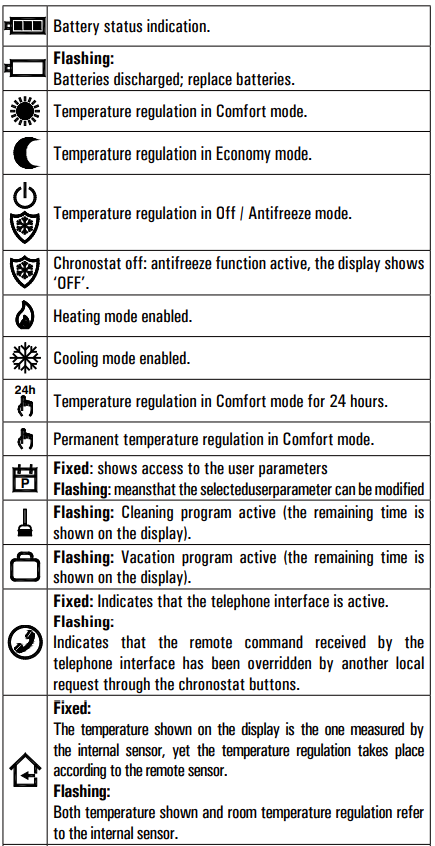
QUICK GUIDE FOR SETTING THE TIME SCHEDULE
- Press button ‘
 ‘.
‘. - The display shows ‘ PrOG’ with the icon ‘
 ‘ turned on.
 - Press key ‘ OK’: the display shows the word ‘ dAY’, the icon
- and the squares corresponding to the flashing days.
- Press buttons
 in order to choose one of the four days combinations available as pre-set.
 - Press button ‘ OK ‘ to confirm the choice.
- The display shows hour 00:00 with the relevant dash, in the upside right, flashing.
- Press one of the following buttons to select the temperature regulation level desired:
- Comfort mode: Press the ‘
 ‘ button.
 - Off / Antifreeze: Press the ‘
 ‘ button.
 - Economy mode: Press the
 button.
 - Moving the time cursor: Press button ‘
- Comfort mode: Press the ‘
- Each time the button which sets the regulation mode is depressed, the time cursor automatically jumps into the next half hour.
- Once the time schedule for the day or group of days selected has been set, press button ‘ OK’.
- The display will show the time schedule for the next day or group of days until the whole week has been covered.
- Once the time schedule for the whole week has been set, press button ‘ OK ‘ The chronostat will store the program in its memory and the word ” MEMO ‘ is shown on the display, then it will automatically quit the time schedule setting procedure.
GENERALITIES
This device is a battery-powered digital weekly chronostat for controlling room temperature on three levels: Comfort, Economy or Off/Antifreeze. The device can be used both in heating and air conditioning systems. The chronostat features a large backlit display that shows all functional indications, the program schedule, and the room temperature reading or, alternatively, the current time. Allows to set up to 7 different time schedules, each one different for each day of the week, with a minimum intervention time of 1/2 hour during 24 hours. In addition, the device offers the possibility of setting the Antifreeze temperature and the sensor Offset value.
STARTING UP
When starting up for the first time:
- Insert the batteries observing the polarity markings shown in the battery compartment
- Set the time and day of the current week.
- Set the operating mode of the thermostat user parameter ‘C-H’)
- Heating (factory set) or Cooling.
Setting the current time and day
To set the clock of the chronostat carry out the following steps:
- Open the flap of the battery compartment.
- Keep the ‘OK’ button pressed for at least 2 seconds; the hour digits will start flashing.
- Set the hour using buttons’
- Confirm by pressing ‘OK’; the minute digits will start flashing.
- Set the minutes using buttons ‘
- Confirm with ‘OK’; the display shows the word ‘dAY’ and the square symbol corresponding to the current day flashes.
- Set the current day of the week using buttons (the current day is highlighted by a box surrounding the number corresponding to the day of the week, 1 Monday .. 7 Sunday )
- Confirm by pressing ‘OK’; the output of the time and day setting is automatic.
Comfort and Economy temperatures adjustment
- During normal operation, the display shows the measured room temperature and the icon for the current setting mode ‘
 ‘ or “
 “.
“. - To display the relevant set-point temperature, press the button : the display shows the set-point temperature, the icon
- ‘SET °C‘ (meaning that you are viewing the setpoint temperature) and icon ‘ ‘ or ‘ ‘ depending on whether the thermostat is regulating in comfort mode or economy mode.
- Pressing the ‘ ’ and ‘ ’ buttons the displayed setpoint temperature can be changed.
- Pressing the ‘ ‘ while the display is showing the ‘Comfort’setpoint temperature, the display changes to show the ‘Economy’ temperature. Conversely, if the display was displaying the
- ‘Economy’setpoint, by pressing the ‘ ‘ button, the display changes to show the ‘Comfort’setpoint.
- Pressing the ‘ ‘ or after a few seconds of inactivity, the display returns to show the room temperature.
- Note: Usually, in order to get a temperature reduction in night, the economy temperature should have a value lower than that of comfort.
- The programmable thermostat will then adjust the temperature in comfort mode or economy mode according to the set time schedule (see ‘SET USER PARAMETERS’).
SETTING THE USER PARAMETERS
To enter the mode for setting the chronostat parameters, proceed as follows:
- Press the ‘ ‘ button; the display will show the ‘ ‘ icon (bottom right) and the word ‘ PrOG ‘.
- Press the ‘ ‘ button repeatedly to scroll through the user parameters:
- Schedule Programming ‘ PrOG ’
- Antifreeze Setting ‘ AFr ’
- HysteresisSetting ‘ HYS ’
- Optimization Function Setting ‘ OPt ’
- Internal sensor Offset setting ‘ OFS1 ’
- Remote sensor Offset setting ‘ OFS2 ’
- Regulation sensor choice setting ‘ rEG ’
- Household program Setting ‘ CLE ’
- Vacation program Setting ‘ HOL ’
- Heating/Cooling function Setting ‘ H-C ’
- Reset to default data ‘ dFLt ’
- Press the ‘OK’ button to modify the selected parameter; the ‘ icon flashes.
- Configure the data associated with each individual parameter as illustrated below.
- To quit from the user parameters setting, press key ” or wait 10 seconds without pressing any key.
‘PrOG*: SCHEDULE PROGRAMMING
Usually, the circular band of dashes in the display shows the operating mode (Comfort, Economy, Off I antifrost) of the thermostat, while the vertical strip on the left shows the current day of the week (1 – Monday .. 7- Sunday) high lighted with a square around the number to which it relates programming. To facilitate the programming operation it is sufficient to remember this rule:
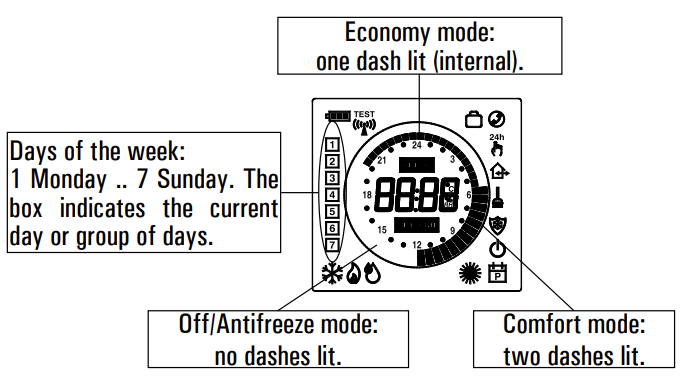
To set the program schedule to proceed as described below:
- Select the parameter ‘PrOG’ and press the button ‘OK’: the display shows the word ‘dAy’, icon ‘ ‘ and the square symbols corresponding to the current day or group of flashes.
- Press buttons to set the combination of davs to be programmed.
In the following the four available combinations are listed: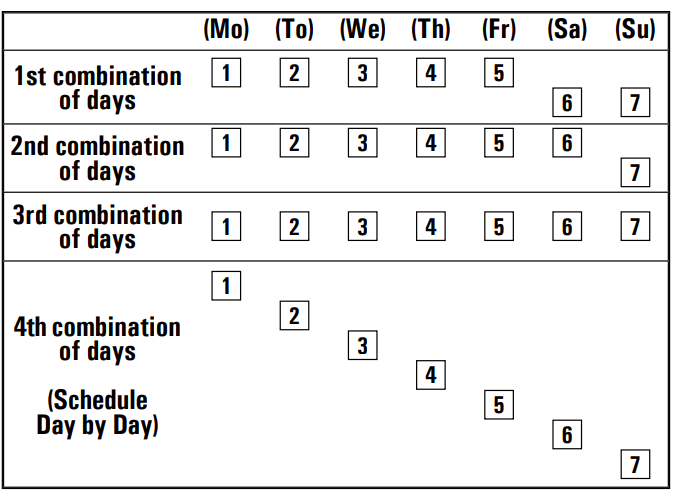
- Press the ‘ OK’ button to confirm the setting made; the display will show the schedule previously programmed for the set day or group of days and the time 00.00 (cursor flashing on the interval between 00.00 and 00.30).
- Set the operating mode.
To facilitate the programming operation, the thermostat is factory preset with the following time intervals:
TIME INTERVALS PRESET
- Comfort mode Economy mode
- 6.00 .. 8.00 8.00 .. 11.00
- 11.00 .. 13.00 13.00 .. 17.00
- 17.00 .. 23.00 23.00 .. 6.00
Alternatively, if the preset time interval doesn’t fit the required needs, you can change it manually as follows
- For every time interval (each dash corresponds to a half hour) set the operating mode by pressing one of the following buttons:
- Comfort mode: Press the ‘ ‘ button.
- Off / Antifreeze: Press the ‘ ‘ button.
- Economy mode: Press the ‘ ‘ button.
- Moving the time cursor: Press button
- Comfort mode: Press the ‘
Each time the button which sets the regulation mode is depressed, the time cursor automatically jumps into the next half hour.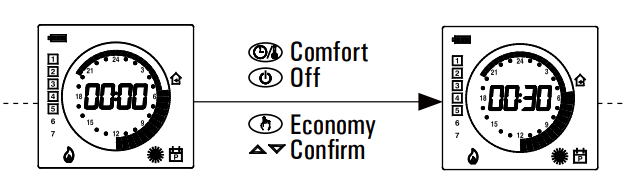
- After programming the schedule for the day or group of days selected, press the ‘ OK ’ button.
- The display will show the program schedule for the next day orgroups of days until the whole week is covered.
- After programming the schedule for the entire week, press the ‘OK’ button. The chronostat will memorize the schedule set and the word ‘MEMO’ will appear on the display; the device will automatically exit the schedule programming mode.
WARNING
- If you want to reset the time intervals to factory settings, please reach the user parameter ’dFLt’ (the default data); In this case, all user parameters will be reset to factory settings.
- If you exit the time programming without pressing the ’OK’ button, or you do not save the settings, the time program will NOT be saved in memory and the previous program will be restored.
- Changes are stored in memory only when the if you enable this operation with the phase characterized by the word ’MEMO’
AFr ’ ANTIFREEZE SETTING
The Antifreeze function allows you to select a minimum temperature to be maintained when the chronostat is off, so as to protect both the room and the equipment when the room temperature falls below the set value. The device leaves the factory with the Antifreeze function set on 3°C.
To set the Antifreeze temperature, carry out the following steps:
- Select the parameter ‘AFr’ and press the ‘OK’ button.
- The display shows the Antifrost temperature previously set and the icon flashes
- Press buttons to change the setting (between OFF, 0.5°C..25°C); every change will be automatically memorized.
- To return to the list of user parameters, press the ‘OK’ button.
- To exit the user parameters setting and resume normal operation, press the button or wait 10 seconds without pressing any key.
HYS’ SETTING THE HYSTERESIS
This parameter allows you to set the hysteresis, in °C, which is applied to the programmable thermostat.
To adjust the hysteresis perform the following steps:
- Select the parameter ‘HYS’ and press ‘OK’.
- The display shows the previously set temperature and the ‘ ‘
- Press the to change the value (between 0.1 °C .. 5.0 °C); each change is automatically saved.
- To return to the list of user parameters, press the ‘OK’ button.
- To exit the user parameter settings and resume normal operation, press the ‘ ‘ button or wait 10 seconds without pressing any key.
‘ OPt ’ OPTIMIZATION SETTING
The optimization function consists in the option of turning on the heating or cooling earlier than the scheduled time in order to reach the set temperature by the scheduled time. The chronostat calculates the time necessary in order to reach the desired temperature and turns on the heating in advance accordingly, by the amount of time necessary to achieve the target. The amount of time in advance may be 60 minutes at most and is calculated based on the average gradient of the previous 24 hours.
To set the optimization function carry out the following steps:
- Select the parameter ‘OPt’ and press the ‘OK’ button.
- The display shows ‘on’ or ‘Off’ and the ‘ icon flashes
- Press button ‘ ‘ to activate (On) or ‘ ‘ to deactivate (Off) the function; every change will be automatically memorized.
- To return to the list of user parameters, press the ‘OK’ button.
- To exit the user parameter settings and resume normal operation, press the ‘ ‘ button or wait 10 seconds without pressing any key.
OFS1 ’ INTERNAL SENSOR OFFSET SETTING
With this parameter it is possible to correct the temperature reading of the internal sensor by ±5°C in order to correct any systematic reading errors due to the positioning of the chronostat in areas unsuitable for measuring the room temperature. The device leaves the factory with the Offset set at 0.0°C.
To adjust the Offset value for the internal sensor, carry out the following steps:
- Select the ‘ OFS1 ’ parameter and press the ‘ OK ’ button.
- The display shows the Offset temperature previously set and the ‘
- Press buttons to modify the setting (range: -5.0°C .. +5.0°C); every change will be automatically stored in memory.
- To return to the list of user parameters, press the ‘OK’ button.
- To exit the user parameter settings and resume normal operation, press the ‘ ‘ button or wait 10 seconds without pressing any key. ‘El’ icon flashes.
“OFS2 ” REMOTE SENSOR OFFSET SETTING
With this parameter it is possible to correct the temperature reading of the remote sensor by + 5°C in order to correct any systematic reading errors due to the positioning of the remote sensor in areas unsuitable for measuring the room temperature. The device leaves the factory with the Offset set at 0.0°C. To adjust the Offset value for the remote sensor, carry out the following steps:
- Select the ‘ OFS1 ‘ parameter and press the ‘ OK ‘ button.
- The display shows the Offset temperature previously set and the
- Press buttons to modify the setting (range: 5.0°C .. + 5.0°C); every change will be automatically stored in memory.
- To return to the list of user parameters, press the ‘OK’ button.
- To exit the user parameter settings and resume normal operation, press the ‘ ‘ button or wait 10 seconds without pressing any key
‘rEG ‘ REGULATION SENSOR CHOICE SETTING
This parameter sets whether the room temperature regulation is made based on the chronostat internal sensor or the remote sensor connected to the connector ‘ B’ in Fig. 6. For this parameter setting please find these directions:
- Select parameter ‘ rEG ‘ then press key ‘ OK’
- The display shows ‘In’ or ‘Out’ and the icon ‘ flashes.
- Press keys to change the value (In: internal sensor
- Out: remote sensor); each change is automatically stored in memory.
- To return to the list of user parameters, press the ‘OK’ button.
- To exit the user parameter settings and resume normal operation, press the ‘ button or wait 10 seconds without pressing any key.
WARNING: When the regulation is set according to the remote sensor ‘ Out ‘ and in case this sensor is missing or broken, the temperature regulation will be performed according to the internal sensor, even if the parameter remains set on ‘Out ‘
‘CLE’ SETTING CLEANING PROGRAM
This program is useful when you are cleaning your house and the windows are open thus making unnecessary both the heating and cooling of the premises. In these conditions, the relay is stuck in Off for two hours.
Note: Access to the cleaning program is NOT allowed when the programmable thermostat is in holiday mode’.
- To activate the cleaning program, select the parameter ‘CLE and press the ‘OK’ button: the display shows the ‘ _ ‘ icon flashing and, in place of the clock, the time remaining before returning to normal operation is shown.
- The device will go back to the previous operating mode after two hours or if you press the ‘ ‘ button again.
‘HOL’ SET HOLIDAY PROGRAM
If you intend to be away for a relatively long period it is advisable to activate the Vacation Program, which will suspend the active operating mode for the desired number of hours (from 1 to 95) or days (from 1 to 99). At the end of the set number of hours or days, the chronostat will go back into the operating mode it was in prior to activation of the Vacation Program. While it is off, and in case the device has been set to Heating mode, the antifrost function will be in any case active, and the display will show the symbol’ ©’ and the countdown of the time remaining to the end of the program.
Note: Access to the vacation program will NOT be enabled while the “cleaning program’ is on.
To activate the vacation program proceeds as follows:
- Select the parameter ‘HOL’ and press ‘OK’; the display shows the symbol , the indication icon flashing.
- Press buttons to set the vacation time; every change will be automatically memorized.
- Up to 95 hours, the programming is indicated in hours and the display will show ‘h XX’
- Once that value is exceeded, the device will automatically switch to the mode for programming the vacation time in days and the display will show ‘It will be possible to increase or decrease the hour or day by one unit at a time, with values ranging from 1 .. 95 hours and 4 .. 99 days.
- To activate the holiday program for a given time, press again the OK’ button or wait 10 seconds without pressing any key; the display shows the ‘ ‘ icon flashing and the time remaining to the end of the holiday period.
- If you have not set the time duration of the holiday (h:00), you can exit the adjustment and return to normal operation by pressing the ‘OK’ or ‘ ‘or by waiting 10 seconds without pressing any key.
- To deactivate the vacation function and resume normal operation, press the button
‘H-C’ HEATING / COOLING SETTING
This setting is used to invert the operating logic of the relay according to whether a heating or air conditioning unit is being controlled.
IMPORTANT: The chronostat leaves the factory set in heating mode.
To modify the operating logic, carry out the following procedure:
- Select the parameter ’H-C’ and press ’OK’; the display shows the current adjustment mode and the
- Press the buttons to select the desired adjustment; each change is automatically saved.
- To return to the list of user parameters, press the ‘OK’ button.
- To exit the user parameter settings and resume normal operation, press the ‘ ‘ button or wait 10 seconds without pressing any key.
- During normal operation, if the heating mode is on, the ‘ ‘ icon will remain lit, whereas if the cooling mode is on, the ‘ ‘ will remain steadily lit.
‘dFLt’ SET DEFAULT DATA
With this parameter is possible to reset user parameters in order to bring back all the parameters to the factory defaults.
Proceed as follows
- Select the parameter ’dFLt’ and press ’OK’; the device automatically sets the default data and the display will show ’-dF-’ and the ‘ ICON FLASHES
- To quit the user parameter settings press the ‘ OK ’ button or wait 10 seconds without pressing any key.
- To reset the normal operation press the ‘ ‘ button.
WARNING
Restoring the Default Data will reset all settings made by the user, such as Time Program, Heating/Cooling, Set-Points and all other programmable data.
SWITCHING OFF – ANTIFREEZE FUNCTION
To deactivate the chronostat press the ‘ ‘ button The display will show the word ‘ OFF ’.If the chronostat has been set in the heating mode, the Antifreeze function will be active and the ‘  ‘ symbol will appear on the display; in such a case the room temperature will be controlled based on the value set for the Antifreeze temperature (see paragraph ‘SETTING THE USER PARAMETERS‘).
AUTOMATIC OPERATION / 24h MANUAL / PERMANENT MANUAL OVERRIDE FUNCTION
- With the key ‘ ‘, the thermostat may be forced to adjust the room temperature according to the Comfort temperature setting, regardless of the time programming settings.
- By pressing the ‘ ‘, button repeatedly you can switch from
- Automatic to 24 hour Manual, from 24 hour Manual to Permanent
- Manual and from Permanent Manual back to Automatic.
- During manual operation the display doesn’t show the time schedule, but only the room temperature, the state of relay (with possible symbols
 ‘), the symbol ‘ 24h ‘ (24h manual) or ‘ ‘ (permanent manual) and the symbol ‘ ‘.
 - Pressing the ‘ ‘ button once will activate the 24 hour Manual mode and the chronostat will remain in this mode until the time 23:59 is reached, after which it will go back into the Automatic mode.
Note: If the device is set in the 24h Manual mode and the Vacation program is activated, after the Vacation period has elapsed, if it is past the time 23.59, the chronostat will go back into the Automatic mode and follow the set program schedule. Pressing the ‘ ‘ button a second time will switch the chronostat into the Permanent Manual mode and it will remain in this mode until you press the ‘ ‘ button again.
TEMPERATURE / TIME DISPLAY
- By repeatedly pressing the key ‘ ‘ the display cycles on showing the current time, the room temperature measured by the internal sensor, explained with the icon ‘
 ‘, and the room temperature measured by the remote sensor (if wired) explained by the icon
 - ‘ ‘. The values of temperature displayed are shown adjusted with the set Offset value.
- In case the parameter ‘ rEG ‘ is set on ‘ Out ‘ but the remote sensor is not wired or is broken the display will show the words ‘ SEnS OPEN ‘ or ‘ SEnS SHrt ‘ with the icon ‘ ‘ turned on.
IMPORTANT: In order to optimize battery life, the chronostat reads the room temperature every 3 minutes and activates or deactivates the relay accordingly.
CONNECTION TO A TELEPHONE INTERFACE
The programmable thermostat allows to connect a telephone interface with continuous operation (latching relay) to the connector ‘ B’ in Fig. 6. Use of a suitable telephone interface does not require any setting to be made on the chronostat; for directions on using the telephone interface see the instruction manual provided.Via a telephone interface it is possible to turn the chronostat Off or turn it On in the Permanent Manual mode. Depending on the commands received from the telephone interface the chronostat will act according to the following operating logic:
- Telephone interface contact closed:
- The chronostat will switch into the ‘Permanent Manual’ mode: the “‘ and ‘
 ‘ symbols will be shown on the display.
- The chronostat will switch into the ‘Permanent Manual’ mode: the “
- Telephone interface contact open,
- After (and only after) a previous closure, if no buttons have been pressed (Manual/Off) The chronostat will be switched off and the word ‘OFF’ will be displayed along with the ‘ ‘ symbol. If the ‘Antifreeze’ function is active the ‘ ‘ symbol will be displayed.
- After (and only after) a previous closure, if no buttons have been pressed (Manual/Off) The chronostat will be switched off and the word ‘OFF’ will be displayed along with the ‘
IMPORTANT: the commands input by pressing the control buttons will always have priority over the commands received from the telephone interface.
- If you press the or button on the chronostat, the device will change its status and the ‘ ‘ icon will flash to indicate that the interface command has been overridden by a command input with a control button.
- The ‘ ‘ icon will stop flashing if the telephone interface sends the chronostat the same command as the one made with the button or if the telephone interface is reset. In such a case the status set by means of the control button will not be changed and the chronostat will be ready to receive a new command.
IMPORTANT
If an Off command is sent to the chronostat via the telephone interface (contact open), it is a good idea to check that the command has been executed by the chronostat by carrying out the following realignment procedure:
- Using the functions of the telephone interface, check that the contact is open, sending an Off command if necessary.
- Send a command to the telephone interface to close the contact (the chronostat will turn on).
- Using the functions of the telephone interface, check that the contact is closed.
- Send a command to the telephone interface to open the contact (the chronostat will turn off).
- During this sequence, no commands should be input with the control buttons as they have priority over the interface commands.
BACKLIGHTING
The display backlight turns on whenever and button is pressed. It turns off automatically 20 seconds after the last pressing of a button.
HOW TO INSERT | REPLACE BATTERIES
- The battery charge status is constantly displayed by means of the ‘
 ‘ symbol.
 - The battery charge is at a maximum if all three level indicators are lit inside the symbol.
- If the ‘
 ‘ symbol (completely empty) flashes, it means that the batteries are depleted and must be replaced.
 - In this case the relay is placed in a safe position (N.C.) and the display shows alternatively thetime (or temperature) and the word ‘BATT’.
- If the batteries are not replaced soon, also the symbols ‘ ‘ or ‘ ** ‘ will flash to indicate that the device is locked.
To replace the batteries proceed as follows:
- Open the flap of the battery compartment (Fig. 4).
- Remove the batteries, prying them out with the aid of a tool if necessary.
- Insert the new batteries, which must be alkaline 1.5V type AA.
- Check for correct time and date and eventually reset it.
TECHNICAL CHARACTERISTICS
- Power supply: 2 x 1.5V, alkaline batteries (Type AA)
- Battery life: >1 year
- Backlight turns off: 20 sec. after the last pressing of a button
- Setting range: comfort: 5°C .. 40°C
- economy: 5°C .. 40°C
- Asymmetrical differential: 0,1°C .. 5°C (Default 0,2°C)
- Antifreeze: OFF/0.5°C .. 25.0°C (Default 3.0°C)
- Offset internal sensor: ± 5.0°C. (Default 0.0°C)
- Offset remote probe: ± 5.0°C. (Default 0.0°C)
- Internal sensor type: NTC 10K Ohm ±1% @ 25°C
- Remote probe type (optional): NTC 10K Ohm ±1% @ 25°C
- Precision: ±1.0°C
- Resolution: 0.1°C. ( 0.0°C .. 50.0°C)
- 0.2°C. (-9.9°C .. -0.1°C)
- Contact rating: 5(1)A @ 250V~ SPDT
- Ext. Interface Input: On/Off type continuous signal.
- Protection rating: IP 30
- Type of action: 1CU
- Overvoltage category: II
- Pollution degree: 2
- Class of protection against
- electric shock: II
- Rated inpulse voltage: 2500V
- Number of manual cycles: 1,000
- Number of automatic cycles: 100,000
- Software class: A
- EMC test voltage: 3V
- EMC test current: 38mA
- Distances tolerances fault
- mode ‘short’ exclusion: ±0,15mm
- Operating temperature: 0°C .. +40°C
- Storage temperature: -10°C .. +50°C
- Humidity limits: 20% .. 80% RH non-condensing
- Enclosure: Material: ABS+PC V0 self-extinguishing
- Colour: Signal white (RAL 9003)
CLASSIFICATION UNDER REG. 2013.811.EC
- Class: 1%
- Contribution to energy efficiency: 1%
NORMATIVE REFERENCES
The product complies with the following standards (EMC 2014/30/UE and LVD 2014/35/UE):
- EN-60730-1 (2011)
- EN-60730-2-7 (2010)
- FN.0730.2.9 /2010
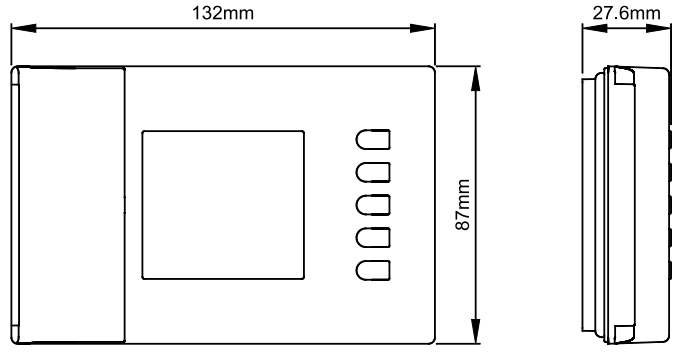
DIMENSIONS
WARRANTY
In view of the constant development of their products, the manufacturer reserves the right for changing technical data and features without prior notice. The consumer is guaranteed against any lack of conformity according to the European Directive 1999/44/EC as well as to the manufacturer’s document about the warranty policy. The full text of the warranty is available on request from the seller.
REFERENCE:
DOWNLOAD MANUALS:
ESBE TPW114 Programmable Room Thermostats Installation Instruction
OTHER MANUALS:
ESBE TPW114 Programmable Room Thermostats PRODUCT SPECIFICATION GUIDE

ESBE TPW114 Programmable Room Thermostats Installation Instruction