ESBE TPE214 Programmable Room Thermostats
INSTALLATION
- Push, with the help of a screwdriver, the plastic tooth located in the slot on the left side, then lift the plastic cover
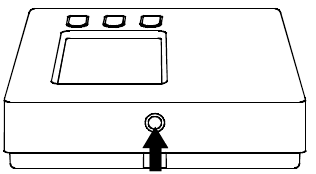
- Turn the cover, while pressing it slightly, until it is fully extracted
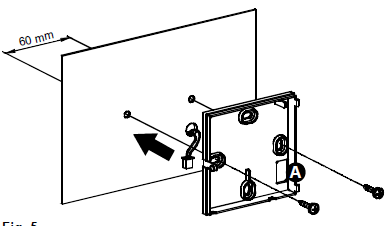
- Find the best location for the installation (see section ‘RADIO SYSTEM CONFIGURATION), then secure the thermostat base to the wall using the two screw holes with a 60mm. distance (use the screws and/or bolts supplied) after having passed the remote sensor wires (if present) through the rectangular opening
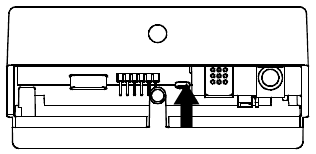
- Insert the batteries (respecting the correct polarity) in the battery compartment use only alkaline, brand-new batteries.
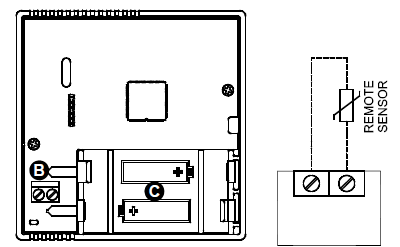 Connect the remote sensor (if present) using the ‘REMOTE SENSOR’ connector, according to the wiring diagram then remember to set properly the parameter P10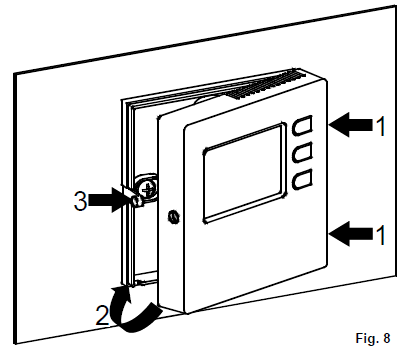
INSTALLER CONFIGURATION’
Close the thermostat as follows:
- Match the two teeth located on the right side of the plastic base with the two slots located on the plastic cover.
- Close the left side of the cover while slightly pressing with a finger, at the same time, the plastic tooth on the left side to the internal (see the arrow in Fig. 8). Complete the rotation of the cover until the plastic tooth on the base snaps into the relevant hole of the cover.
WARNING
- Make sure that the transmitted radio signals are correctly received by the receiving unit before installing the thermostat.
- Install the thermostat at about 1.5 m from the floor, away from heat sources, draught, and particularly cold walls (heat bridges), for the room temperature to be regulated correctly. These notes must be applied to place the remote sensor when this is used to acquire the room temperature.
- A remote sensor must be connected using wires having at least a 1.5 mm² section and no longer than 15 meters. Do not use the same pipes for sensor signals and mains voltage.
- The installation and electrical connection of the thermostat must be performed by qualified personnel and in compliance with current standards.
Default Data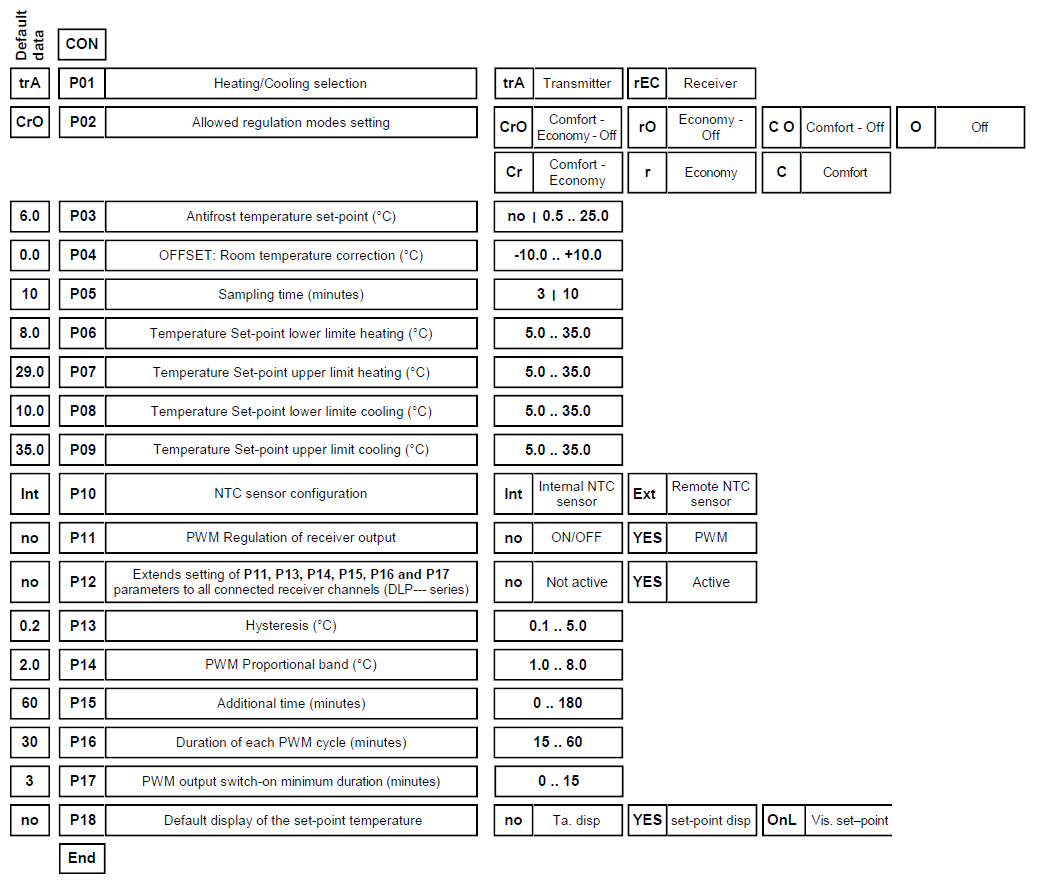
WIRELESS DIGITAL THERMOSTAT
- Operating frequency 868.150 MHz
- Blue backlight display
- Heating/Cooling switching can be controlled on the thermostat or on the receiver
- User limitations to set the Set-point temperatures
- An internal sensor and input plug for the remote sensor
- Low battery icon
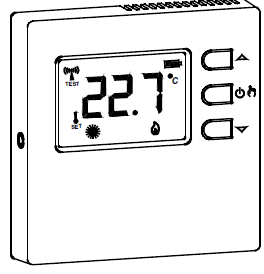
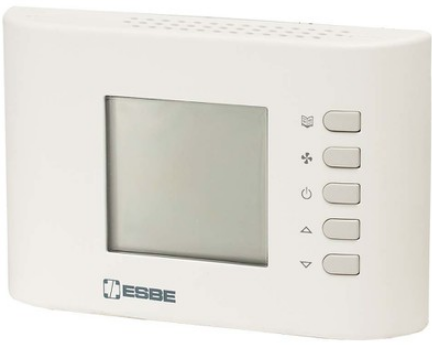
CONTROLS LAYOUT
- A Key ‘
 ‘: multifunction key
- Normal operation
- If pressed once shows the set-point temperature.
- If pressed repeatedly increases the set-point temperature.
- In setting mode
- If pressed once shows the set parameter.
- If pressed repeatedly changes the selected parameter (increases the value).
- Normal operation
- B Key ‘
 ‘: multifunction key:
- Normal operation
- Sets the regulation mode (according to parameter P02): Comfort => Economy => OFF/ANTIFROST.
- If pressed for more than 10 seconds, it reverses the operation logic: Heating Cooling.
- In setting mode
- Shows the parameters list
- Normal operation
- C Key ‘ ‘: Multifunction key
- Normal operation:
- If pressed once shows the set-point temperature.
- If pressed repeatedly decreases the set-point temperature.
- In configuration mode
- If pressed once shows the set parameter.
- If pressed repeatedly changes the selected parameter (decreases the value).
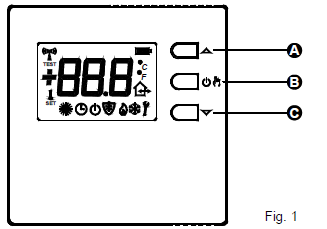
- Normal operation:
DISPLAY INDICATIONS
The meaning of the symbols appearing on the display is given below
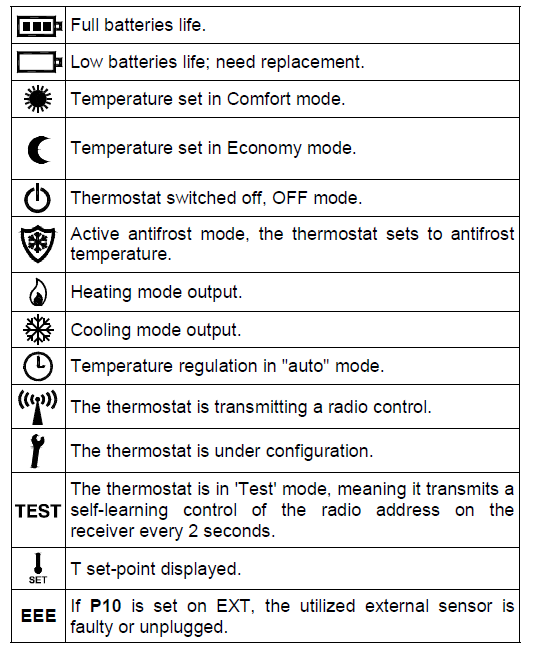
OVERVIEW
This device is a radio-controlled display thermostat to control the room temperature with the option to choose among different setting modes and related set-point temperatures: Comfort, Economy, Off/Antifrost. The thermostat is set by default to operate in Comfort, Economy, and Antifrost modes; it can be adapted to the different installation requirements by modifying the settings and the final user intervention can be restricted, aiming to optimize environment comfort and energy saving. The thermostat can be used in both heating and cooling systems and it is also suitable for floor heating systems.
START-UP
When activating for the first time, open the thermostat cover, as shown in paragraph ‘INSTALLATION’ in (C of Fig. 6), and insert batteries with the correct polarity. Batteries shall be 1.5V alkaline AA type.
Heating/Cooling Set-up
The thermostat is set by default in heating mode. Hold down ‘ ‘ for 10 seconds to modify the regulation mode.
- A. Cooling mode will be set if the thermostat was previously set on heating and the symbol ‘
 ‘ will flash on display for 8 seconds.
 - B. Heating mode will be set if the thermostat was previously set on cooling and the symbol ‘
 ‘ will flash on display for 8 seconds.
The lit icon ‘ ‘ Flame indicates that heating mode is on during normal operation; on the contrary, cooling activation is signaled by the Snow icon ‘ ‘. The heating/cooling mode setting cannot be modified if the thermostat is set to operate with a programmable thermostat in the New Wave radio system, as the setting is defined on the programmable thermostat or on the relay module.
Regulation mode set-up
There are 3 ways to set the room temperature that can either be selected by pressing ‘ ‘
- Comfort: The thermostat sets the room temperature in comfort mode; this is normally the preferred temperature during the daytime.
- Economy/Auto: The thermostat sets the room temperature according to the economy mode (this is usually the preferred temperature during nighttime), when parameter P01 is set on trA. When, on the contrary, parameter P01 is set on rEC the thermostat regulates the room temperature according to comfort mode or economy mode depending on the time program which has been set on the associated programmable thermostat.
- OFF / Antifrost: Turns off the thermostat. The display will show the icon ‘ OFF ‘. If the thermostat is set in heating mode the antifrost function will be active and the symbol ‘
 ‘ will appear on the display; in this case, the room temperature will be set according to the value set as the antifrost temperature in parameter P03 (see paragraph ‘INSTALLER CONFIGURATION’).
The thermostat is set by factory default to use OFF, Comfort, and Economy modes. Through the installer parameter P02 it is possible to deactivate the option to select one or more functions (see the ‘INSTALLER CONFIGURATION’ paragraph).
Pressing ‘ ‘ cyclically scroll among the different activated setting modes:
Once a setting mode is set, it remains so until the ‘ ‘ key is pressed again. See the ‘INSTALLER CONFIGURATION’ paragraph for further information on how to configure the setting modes.
Set-point Temperature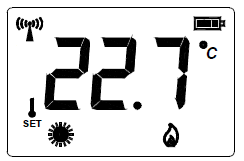
During normal operation, the display shows the room temperature detected and the icon for the selected operating mode. In order to show the relevant set-point temperature press any of the keys  : the display will show the set-point temperature and the icon ‘
 ‘ will turn on (thus showing that the value shown refers to the set-point temperature). The icon ‘
 ‘ turns on along with icon ‘ ‘ thus meaning that the display is showing the ‘Comfort’ set-point temperature or as an alternative, together with icon ‘
 ‘ thus meaning that the display is showing the ’Economy’ set-point temperature. Pressing the key results in modifying the current setpoint temperature. By pressing the keythe set-point temperature digits start flashing to point out that the set-point can be changed. Pressing the key ‘ ‘ while the display is showing the ‘Comfort’ set-point temperature results in switching to the ‘Economy’ set-point display. On the other hand when the display shows the ‘Economy’ setpoint pressing the ‘ ‘ key results in showing the ‘Comfort’ set-point. A further pressing of the ‘ ‘ key results in showing the room temperature, as well as after a few seconds of inactivity on the keys.
EXTERNAL NTC SENSOR
The thermostat features an input (‘REMOTE SENSOR’, B in Fig. 6) to connect an external NTC sensor (optional) alternatively the internal one. The external sensor can be used to measure the room temperature when the thermostat is installed in a position that does not allow a correct room temperature measurement. When the installation requires an installation with a remote sensor, it is necessary to set correctly the parameter P10 and connect a 4700 ohm at 25 °C NTC sensor. If there is any doubt about the type of sensor to be connected, please consult the manufacturer. The thermostat leaves the factory already set to operate with the internal sensor.
RADIO SYSTEM CONFIGURATION
Check if the receiver that must be paired with the thermostat is reported compatible in the ‘COMPATIBILITY WITH NEW WAVE RADIO SYSTEM’ paragraph. Check if the receiver correctly receives the wireless thermostat signals before installing the latter in the desired position. The operation is performed by activating the ‘Test’ function by simultaneously pressing ‘3’ and ‘4’ buttons. The thermostat displays the icon ‘TEST’ and continuously transmits switch-on and off controls to the receiver, with a 2-second pause between them, in ‘Test’ mode; the symbol ‘ ‘ on the display switches on every time the thermostat transmits a radio control. The ‘Test’ mode can be interrupted at any time by pressing ‘ ‘. However, the ‘Test’ mode automatically ends after approx.17 minutes. The ‘Test’ mode must be used to self-learn the thermostat address on the receiver and, consequently, the relative output relay in the receiver must be continuously switched-on and off every 2 seconds; the related LED also indicates the status. If so, the thermostat correctly communicates with the receiver. Make sure that the two devices still correctly communicate when positioning the thermostat in the destination area. The output relay always remains on or off if the thermostat is positioned too far from the receiver: if so, we recommend finding a better position, possibly closer to the receiver, and ensure it is not near metal screens or reinforced concrete walls that might weaken radio transmission. The signal quality can be checked with the receiver (see the relative documentation for further information).
ASSOCIATION WITH A PROGRAMMABLE THERMOSTAT
In a New Wave radio system made up by a multi-channel receiver module, a programmable thermostat, and several simple thermostats, it is possible, for the thermostats, to regulate the room temperature based on the hourly program set on the programmable thermostat. This can be achieved by associating the outputs controlled by the thermostats on the receiver, to the programmable thermostat ones. With this kind of configuration, a programmable thermostat and the thermostats associated to it form an ‘area’. For example, a day area and a night area can be created in a house, with different settings in multiple rooms based on the different programmable hourly bands on two programmable thermostats. The associated channels will receive from the programmable thermostat the information about which setting mode to use and therefore, which temperature to regulate, comfort or economy, but also off or antifrost. If the programmable thermostat is regulating at a Comfort temperature, the associated thermostats will regulate according to their Comfort set-point; whereas, if the programmable thermostat is regulating with an economy temperature, the associated thermostats will be set with their own economy temperature. Similarly, if the programmable thermostat is switched off with antifrost function at 5°C, the associated thermostats will also regulate the antifrost temperature of 5°C. The display thermostat can also have the output associated to a programmable thermostat and, when set in ‘Auto’ mode (symbol ‘  ‘ on), the receiver regulates with the setting mode received from the programmable thermostat. The P01 parameter must be set at ‘rEC’, when it is intended to use the thermostat in association with a programmable thermostat. See the receiver instructions for the association procedure.
INSTALLER CONFIGURATION
The installer configuration allows to define the thermostat operation to set it to the different kinds of rooms and systems. Hold ‘4’ and ‘ ‘ simultaneously pressed for a few seconds until the ‘ ‘ symbol and the word ‘ Con ‘ (configuration) appear on the display, to access the configuration parameter. From this moment, pressing ‘ ‘, will scroll among the different installer parameters identified with ‘P’ and by the parameter number, from P01 to P18. The end of the configuration is indicated with the word ‘End’. Press ‘ ‘ again to save the configuration and then the thermostat switches to normal operation. At any time, by pressing for a few seconds the ‘ ‘ key, the configuration menu is quit without saving any changes made. When scrolling through the parameters list, with keys ‘ the display shows the current value for that parameter. Use keys ‘ to modify the selected parameter configuration; the value is quickly increased or decreased by holding the keys ‘ pressed. The ‘ TEST ‘ procedure is automatically activated after configuration and saving phase are over. During this test, the thermostat communicates information on the output configuration to the receiver, which the latter saves in a versatile way and it is used to regulate the temperature in the desired mode. It is important, therefore, to run the self-learning procedure on the receiver before modifying the configuration; and it is important to check that the receiver correctly receives the ‘ TEST ‘ controls at the end of the configuration.
Reset installer configuration
To reset the installer configuration, in order to bring all the parameters to factory default values, access the configuration and, when the display shows ‘Con’, simultaneously press ‘3’ and ‘4’ for a few seconds until the screen goes back to normal mode.
Description of configuration parameters
The installer configuration parameters are shown in table 1 and explained below. Some installer parameters may not be displayed as only the parameters currently required by the configuration are shown (the configuration way of a parameter, may exclude one or more subsequent parameters).
- Allows using the thermostat (trA) or receiver (rEC) heating/ cooling mode. This parameter must only be modified to ‘ rEC ‘ (receiver) when it is desired to use the thermostat in association with a programmable thermostat in a New Wave radio system or the external heating/cooling selection input or economy input of the New Wave relay modules.
- Allows to customize the regulation modes that can be selected with the key ‘ ‘. The regulation modes available are Comfort, Economy, and OFF: each of these can be enabled or disabled by changing P02. Economy mode will be replaced by Auto mode if P01 is set as ‘rEC’. The OFF mode will be replaced by Antifrost mode in case P03 is set with an Antifrost temperature.
- By this parameter the Antifrost temperature can be set: this will be maintained when the thermostat is turned off. The antifrost temperature can be set in the range 0.5 .. 25 °C or disabled by setting the parameter until the value ‘no’ appears. By factory default, this parameter is set at 6 °C.
- Room temperature offset. The detected room temperature can be corrected by ±10.0 °C with the offset, in order to correct any systematic reading error due to thermostat positioning in unsuitable areas to detect the room temperature. By default, the device is set with 0.0 °C offset.
- Sampling time. To ensure the battery’s long life, the thermostat waits a period of time between two transmissions that can be selected with a 3 or 10 minutes value. Therefore, it’s normal that the temperature displayed is not immediately updated; moreover, for the same reason, it can be necessary to wait some minutes until the output is turned on or off. The 3 minutes option should be selected when the heating/ cooling system is fast, while with the common ‘slower’ heating systems based on radiators or floor heating, even the 10-minute option gives perfect accuracy and comfort. In any case, at any time, pressing the ‘ ‘ key forces an update of the system. Choosing the longest interval makes the battery life last longer.
- These two parameters set the temperature range within which the set-point temperature can be chosen when the thermostat is in heating mode. P06 is the lower limit and can be freely set from 5.0 .. 35.0 °C, while P07 is the higher limit that can be set in a range from the lower limit, chosen in P06, up to 35.0°C. Therefore, the widest temperature range is 5 .. 35 °C and can be easily reduced based on installation requirements.
- These two parameters configure the temperature range within which the set-point temperature can be set when the thermostat is in cooling mode, with the same logic of the previous two points.
The set-point temperature limits are re-defined upon changing the cooling/heating settings. In the event the cooling/heating selection is on the receiver (P01=rEC), these two parameters will not be used and, instead, parameters P06 and P07 will always be used as settings. - NTC sensor configuration. The thermostat is set by default and prepared to operate with the internal NTC (P10= Int). Alternatively, to the internal sensor, a remote sensor can be wired to the connector ‘REMOTE
SENSOR’, shown with B in Fig. 6, and set parameter P10 as
‘Ext’: this way the internal sensor is disabled while the external is enabled. Make sure to use the proper remote sensor type, and respect the maximum wire length allowed. - Output PWM regulation allows to choose whether the receiver output must be driven in ON/OFF or PWM (Pulse Width Modulation) mode. Customizable hysteresis setting on parameter P13 will be with ON/OFF regulation, while a proportional setting will be obtained with PWM regulation (YES) that can be adapted to the different room with the proportional band, additional time and cycle time parameters.
- It extends drive output mode to the other channels; this parameter makes sense to be set on only if the thermostat is paired with a multi-channel receiver (DLP —).
If this parameter is set on ‘YES’, all receiver channels will be configured with ON/OFF or PWM setting of parameter P11 and the related parameters from P13 to P17 hysteresis, proportional band, additional time, and cycle time. So, the thermostat can be used to configure the output drive mode on the channel on which self-learning was made and also on the other channels available on the receiver. The receiver hysteresis can, for example, be changed in this mode or make an output become
PWM, even if the channel will then be driven by a simple, not configurable, thermostat. - Hysteresis, it represents the hysteresis width used when an ON/OFF regulation (no) is set in P11.
- PWM proportional band, it is used for proportional setting when the output is configured in P11, to be driven with PWM (YES).
- Integrative time in minutes, it is used for proportional regulation when the output is configured in P11, to be driven with PWM. If it’s set to zero there will be no integrative action.
- P16: PWM cycle time, it is the duration of each PWM cycle in minutes, so after how many minutes the variable width impulse is repeated.
- Minimum time of PWM ON, meaning the minimum PWM impulse width or the minimum output switch-on time. This parameter must be set with the actuator opening time, if an electro-thermal actuator is connected, otherwise switch-ons for lower times with respect to the opening time, do not generate significant output actions.
- Set-point temperature displayed by default. The thermostat is set by factory default on “no” parameter, so the
thermostat shows the detected room temperature, but if this parameter s set on “YES”, the displayed temperature is the set point one, but the room temperature can be temporarily displayed after the set-point temperature is modified. Instead, if the parameter is set on “OnL”, “set-point only”, the thermostat shows only the set-point temperatures (set-point comfort, setpoint economy) and it is not possible to display the room temperature.
TEMPERATURE REGULATION
The thermostat can drive the output on the receiver, in ON/OFF or PWM mode. The valve drive in PWM mode allows proportional regulation and, therefore, to regulate the room temperature with perfect comfort and energy saving. However, different rooms require different settings to obtain precise regulation.
The parameters responsible for regulation quality are:
- P14 Proportional band
- P15 Integration time
The proportional band in °C is the difference between set point and room temperature that guarantees the valve is fully open. The narrower the proportional band is, the more reactive is the system upon varying of the room temperature. An excessively narrow proportional band setting can generate room temperature oscillations or system instability. An excessively large setting may fail to lead to the desired temperature set on the set point. No additional action is had when the integration time is set at zero and the regulation is of P (Proportional) type. If an integration time different from zero is set, the setting will be P + I (Proportional + Integral). The shorter the integral time is, the longer the integral action will be; vice-versa, a long integral time generates a mild integral action. A mild or missing integral action may prevent the set temperature on set point to be achieved in the room. An excessively strong integral action may cause the room temperature to oscillate. These parameters may require modifying, depending on the room being worked on, in order to obtain the best regulation.
DISPLAY BACK-LIGHTING
Switch-on of the display Switch-off is automatic after 20 seconds from last button pressure.
BATTERIES INSERTION/REPLACEMENT
- The display permanently shows the battery’s charge state by means of the symbol ‘
 ‘. Batteries are charged to maximum if all three level indicators inside the symbol are on.
 - On the contrary, the batteries are drained and must be replaced when the symbol appears completely empty ‘
 ‘.
‘. - The symbol ‘ ‘ flashes when the batteries are excessively drained to allow radio transmission.
- For battery replacement proceed as explained on points 1, 2, and 4 on page 3.
COMPATIBILITY WITH NEW WAVE RADIO SYSTEM
The thermostat works with the New Wave radio receivers with the following limits on the firmware versions (FW):
- DAPF84 (active antenna): all
- DAPF84 (repeater): from FW. 021023A1 and subs.
- DLP841M (8-channel module) from FW. 020842A1 and subs.
- DLP841M001 (8-channel module): all
- DLP8412 (8-channel module): all
- DLP241M (2-channel module): from FW. 020843A1 and subs.
- DLP241M001 (2-channel module): all
- DRPF84M01 (one channel receiver): from FW. 021057A1 and subs.
- DRPF84M011 (one channel receiver): all Subsequent firmware versions are identified with a higher number (excluding final A1).
TECHNICAL FEATURES
- Power supply: 2 x 1.5V alkaline AA-type batteries
- Duration of the batteries: 5 years with P05=10 minutes
- 3 years with P05=3 minutes
- Frequency: 868.150 MHz
- Modulation: GFSK
- Max. RF power transmitted: 1 mW
- Type of antenna: Internal
- Max. distance from receiver: >300 m in free field
- >50 m in buildings (depending on
- the building and environment)
- Temperature sensor (internal sensor or remote as alternative)
- Regulation range: 5.0 .. 35.0°C
- Hysteresis: 0.2°C configurable 0.1 .. 5.0 °C
- Type of sensor: NTC 4K7 Ohm ±1% @ 25°C
- Resolution: 0.1°C
- Range: -9.9°C .. +50.0°C
- Precision: ±1.0°C
- Maximum length of the wires
- to the remote sensor: 15 m
- Antifrost: 6.0°C adjustable OFF|0.5 .. 25.0 °C
- Offset: ± 10.0°C. (Default 0.0°C)
- Backlighting switch-off: 20 seconds from last pressing
- Protection rating: IP 30
- Type of action: 1
- Overvoltage category: II
- Pollution degree: 2
- Tracking Index (PTI): 175
- Class of protection against
- electric shocks: III
- Rated impulse voltage: 2500V
- Number of manual cycles: 50000
- Number of automatic cycles: unlimited
- Software class: A
- EMC test voltage: 3V
- EMC test current: 35mA
- Distances tolerances fault
- mode ‘short’ exclusion: ±0,15mm
- Ball pressure test temp.: 75° C
- Operating temperature: 0°C .. +40°C
- Storage temperature: -10°C .. +50°C
- Humidity limits: 20% .. 80% RH (non-condensing)
- Enclosure: Material: ABS+PC V0 self-extinguishing
- Colour: Signal White (RAL 9003)
- Weight: ~ 115 gr
CLASSIFICATION UNDER REG. 2013.811.EC
- Class: IV
- Contribution to energy efficiency: 2%
DIMENSIONS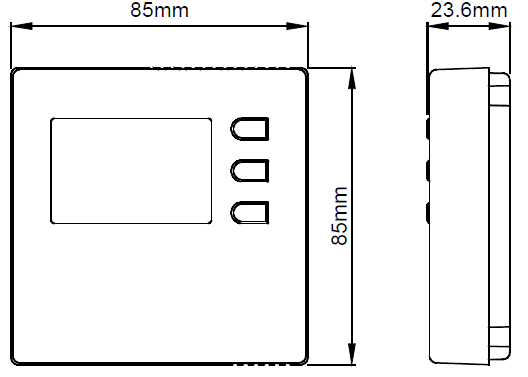
WARRANTY
In view of the constant development of their products, the manufacturer reserves the right to amend technical data and features without prior notice. The consumer is guaranteed against any lack of conformity according to the European Directive 1999/44/EC as well as to the manufacturer’s document about the warranty policy. The full text of the warranty is available on request from the seller.
REFERENCE:
DOWNLOAD MANUALS:
ESBE TPE214 Programmable Room Thermostats Installation Instruction

ESBE TPE214 Programmable Room Thermostats Installation Instruction