
EMOS GoSmart P56211 wireless room Thermostat

Wireless Thermostat
The P56211 wireless thermostat is designed for controlling heating and air- -conditioning systems
Important
Before the first use, make sure to carefully read the instruction manual for the thermostat, as well as the manual for the boiler or air-conditioning equipment. Turn off power supply before installing the thermostat! Installation should be carried out by a qualified person! Follow applicable standards during installation.
Technical specifications
- Switched load: max. 230 V AC; 16 A for resistive load; 4 A for inductive load
- Temperature measurement: 0 °C to 40 °C with 0.1 °C resolution; accuracy
- ±1 °C at 20 °C
- Temperature setting: 5 °C to 35 °C in 0.5 °C increments
- Temperature differential setting: 0.2 °C to 2 °C in 0.1 °C increments
- Operating temperature: 0 °C to 40 °C
- Unit interconnection: via 868 MHz radio signal, 25 mW e.r.p. max.
- Transmitter unit range: up to 100 m in an open space
- WiFi frequency: 2.4 GHz, max. 25 mW e.i.r.p.
- Power supply:
- Control unit (transmitter): 5 V/1.5 A
- Switching unit (receiver): 230 V AC/50 Hz
- Includes: USB adapter 5 V/1.5 A, micro USB cable 1.5 m
Dimensions
- Control unit: 40 × 138 × 96 mm
- Switching unit: 37 × 86 × 86 mm
Description
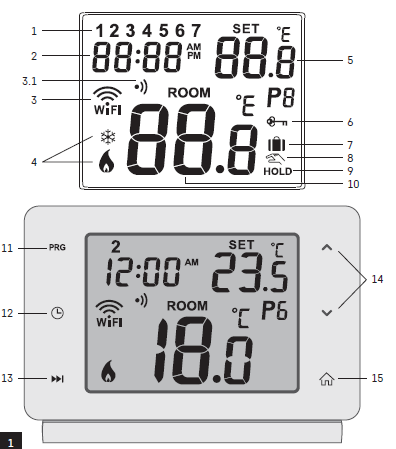
Thermostat (Transmitter Unit) – Icons and Buttons
- day number
- time
- WiFi signal reception
- wireless communication with receiver
- cooling
 /heating
 mode
mode - set temperature
- menu lock
- holiday mode
- – temporary change of temperature
- – HOLD mode
- – current room temperature
- – programme settings
- – data and time settings
- function selection, confirmation
- temporary change of temperature; navigation in the settings
- return to main menu
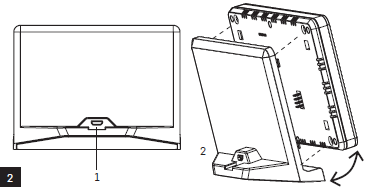
Thermostat Stand
- micro USB socket for connecting the power cable
- removing the thermostat from the stand (start with the bottom of the thermostat first)
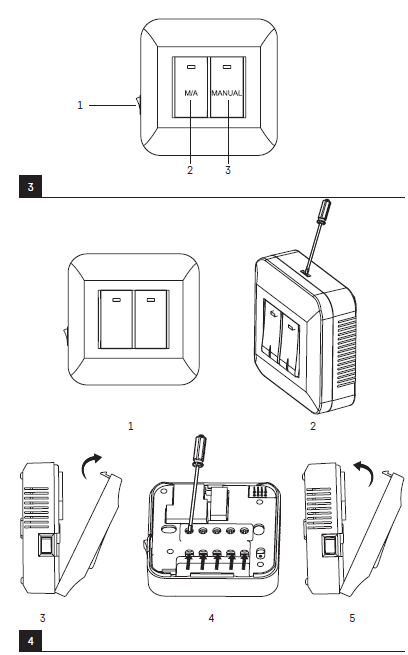
 Description of the Receiver (Switching Unit)
- main switch
- position – off
- position – on
- M/A button (red LED)
- MANUAL button (green LED)
Procedure for Removing the Front of the Switching Unit
- 2, 3 – Use a screwdriver to press down and hold the inner lock, remove the front cover.
- 4, 5 – Connect the wires to the labelled terminals according to the wiring diagram, click the cover back in place.
Mobile Application
- The thermostat can be controlled using a mobile application for iOS or Android.
- Download the EMOS GoSmart app for your device.
QR code for downloading the Android app

QR code for downloading the iOS app

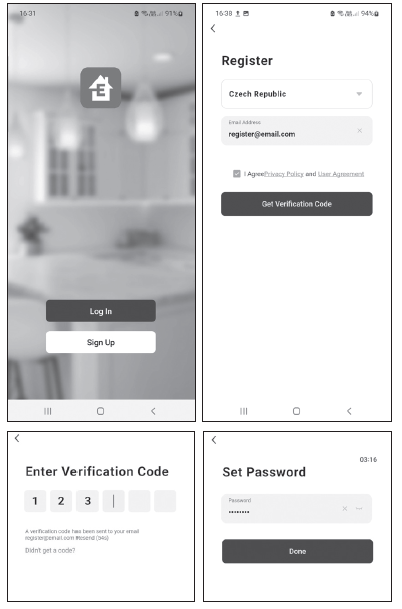
Description of Registering and Logging into the Application
- To use the mobile application, you must first register by tapping the Sign Up button.
- Enter your country and e-mail address, check off your consent with the end user licence agreement and tap Get Verification Code.
- Enter the verification code sent to your e-mail.
- Then, set the password for your account and tap Done.
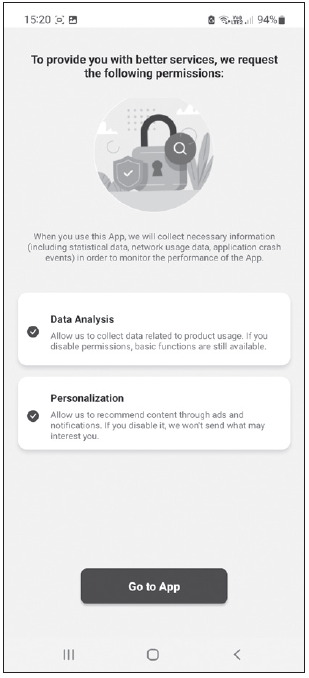
- Choose whether you want to enable Data Analysis/Personalisation and tap Go to App.
Connecting the Thermostat to a Wi-Fi network for Control via the Mobile App
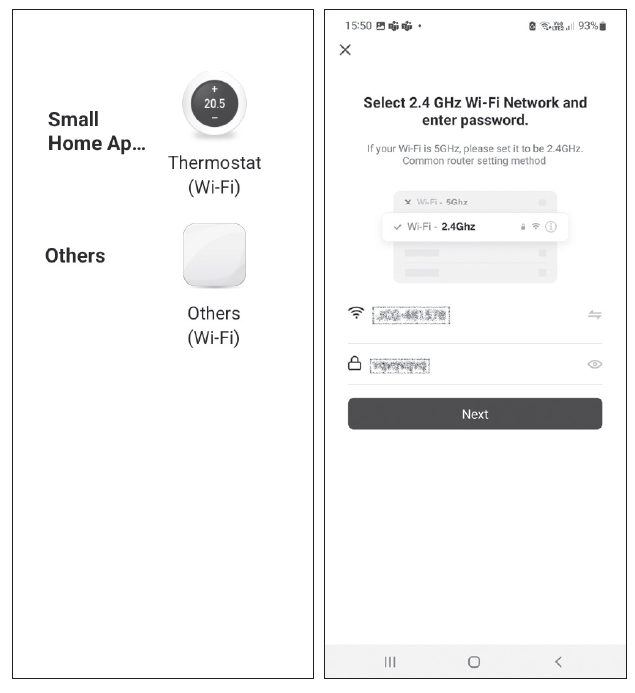
- Tap Add Device in the app and enable location access. Choose add manually and select Small Home Appliances – Thermostat (Wi-Fi) or Others – Others (Wi-Fi).
- Select a 2.4 GHz Wi-Fi network, enter the password and tap Next.
- Check off Confirm that the indicator is flashing rapidly and tap Next.
- The chosen thermostat should appear in the app within 2 minutes.
- Tap the green arrow on the right; the thermostat will be added into the app.
- Then tap the thermostat icon in the app to open the main control menu.
Note:
If the thermostat fails to pair, repeat the process. 5 GHz Wi-Fi networks are not supported. The thermostat can only be controlled via the app by 1 user at a time. If another user wants to control the thermostat, the previous user must log out.
Description of the Main Menu of the Mobile App (see fig. 7)
- Tap the thermostat icon in the app to open the main control menu.
- Thermostat status (ON/OFF) – Anti-freeze mode, temperature fixed to 5 °C
- Work mode setting (detailed information in the WORK MODES chapter of this manual)
Automatic
- Manual – see HOLD mode

- Temporary – see Temporary change mode

- Boost – see Timed temporary change mode

- Holiday – see Holiday mode

Schedule
- 1 – add a time period
- 2 – delete a time period
- 3 – day display
- 7 days (Mon → Sun)
- 5+2 days (Mon → Fri + Sat → Sun)
- 24-hour
Setting (see fig. 10)
- – reset the thermostat to factory settings
- – key lock
- – correction of ambient temperature (-3 °C to +3 °C in 0.5 °C increments)
- – heating/cooling system mode
- – calendar mode (7 days, 5+2, 24 h)
Thermostat mode icon heating cooling off
- Work mode icon
- Adjust temperature
- Current room temperature
- Current set temperature
- Adjust temperature
- Network information about the device, change the name in the app, location information, add an icon to the home screen and other similar settings
Deleting the Thermostat from the App
Long-press the thermostat icon, check off the thermostat and tap the dustbin icon to delete the thermostat.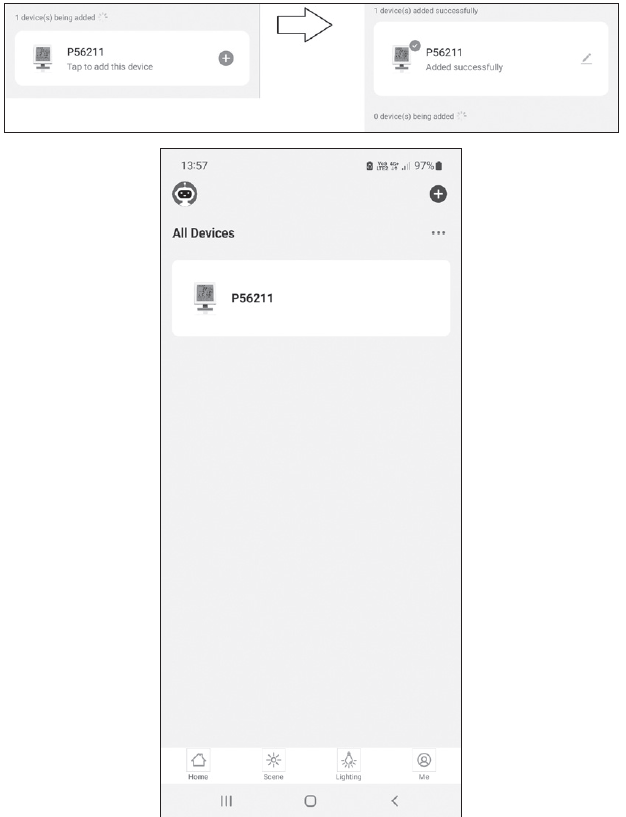
User Overview/Password Change/App Update
Tap the icon in the bottom right and then the
 icon in the top right. This will open a new menu with settings.
INSTALLATION
Before changing the thermostat, disconnect the heating system from the mains power in your home. This will prevent potential injury by electric current.
Installing the Thermostat
- Place the thermostat in the stand included in the pack.
- Connect the USB power supply (included) with the connected micro USB cable to 230 V mains.
- Plug the micro USB cable into the bottom of the stand.
Placement of the Thermostat
- The placement of the thermostat (transmitter unit) significantly affects its functioning.
- Choose a location where members of the family spend most of their time, preferably near an inside wall where air circulates freely, with no direct sunlight.
- Do not place the thermostat in the vicinity of heat sources (such as TV sets, radiators, fridges), or close to a door. Failure to comply with these recommendations will prevent proper control over room temperature.
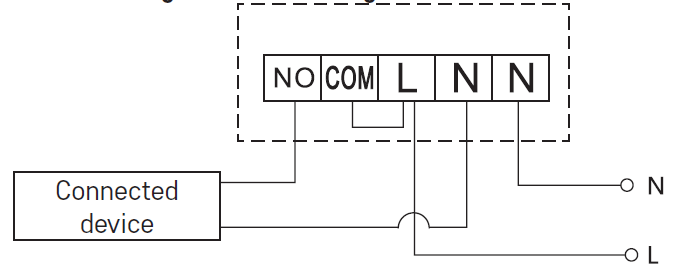
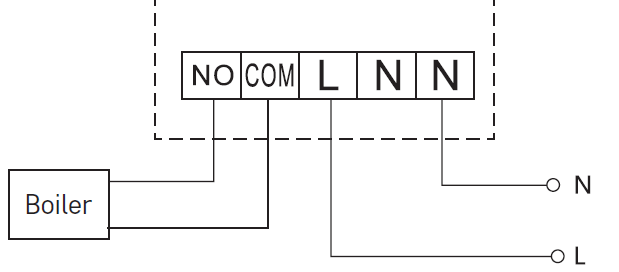
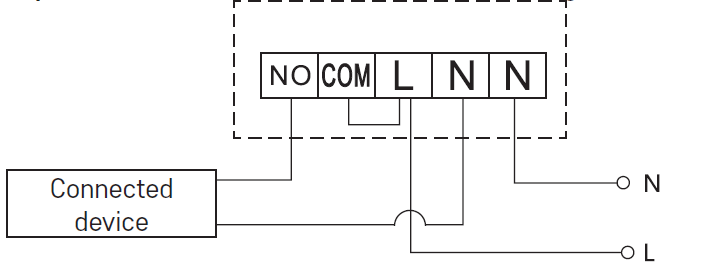
Switching Unit Wiring Diagram
Pump/Motorised Valve Connection Diagram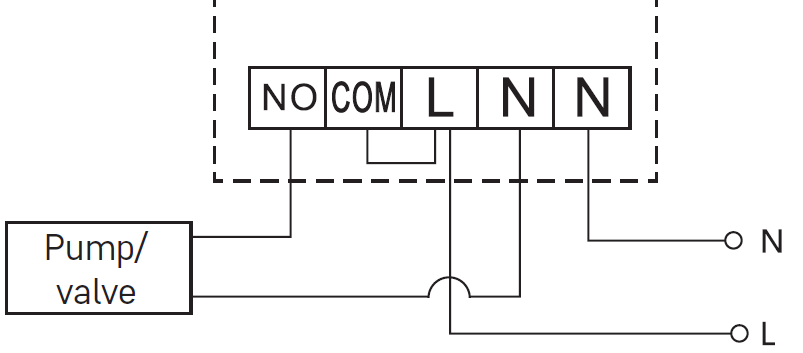 Floor Heating Connection Diagram
 Boiler Connection Diagram
 Expansion Valve/Electric Drive Connection Diagram
PUTTING THE DEVICE INTO OPERATION
Pairing the Control Unit with the Switching Unit
Both thermostat units must be paired before first use. Pairing enables transmission of information between the control unit and the switching unit. Setting is done via automated pairing (self-learning).
- Fit the thermostat gently onto the stand.
- Connect the USB power supply with micro USB cable to 230 V mains and plug the cable into the stand.
- Correctly connect the switching unit to voltage supply, turn the main switch to the position and long press (for at least 10 seconds) the M/A button; a green LED will begin flashing on the MANUAL button.
- Long-press the
 and
and buttons on the thermostat (transmitter) for about 5 seconds
 the icon will start flashing.
 - Both units will be paired within 1 minute and the green diode on the switching unit will stop flashing.
- If you want to change the pairing code of the two units or the thermostat does not function properly, repeat the entire pairing procedure from step 1 – the pairing code will be rewritten automatically.
Testing Wireless Communication between the Units
- Use the
 button on the thermostat or use the app to set a temperature several degrees higher than the current room temperature.
 - The red LED on the switching unit will light up.
- If the LED does not light up, move the control unit closer to the switching unit.
- The maximum range between the control and switching unit is 100 m in an open space.
- The range may decrease indoors as the signal has to pass through walls and other obstacles.
Main Switch
To turn on the switching unit, set the switch to the position. If the heating system is not used for an extended period of time, it is recommended to turn the switching unit off (switch the main switch to the position).
LED Indicators
Automated Mode
In automated mode, a red LED will glow when the thermostat switches on the output relay.
Manual Mode
- Press the MANUAL button; a green LED will light up.
- The receiver will switch to manual mode and will not respond to commands from the thermostat.
- To switch on the output relay (turn on the connected device), press the M/A button; a red LED will light up on it.
- To turn off manual mode, press the MANUAL button again; the green LED will switch off.
Setting the Clock, Calendar
- Press the button; the values will start flashing.
- Use the
 buttons to set the following values (holding the button down accelerates the value change):
 - Day – Month – Year – Hour – Minute.
- Confirm the set value by pressing

- To end setting, press the button or wait 30 seconds.
- After setting is complete, the current day number will be displayed:
- Monday
- Tuesday
- Wednesday
- Thursday
- Friday
- Saturday
- Sunday
WORK MODES
Holiday Mode
- Sets a constant temperature for an extended period of time.
- Long-press (5 seconds) the button; the time value will start flashing.
- Release the button and press it again for 5 seconds.
- The icon will appear and the number of days will start flashing.
- Repeatedly press the button to set the number of days (from 1 to 99).
- Confirm the set number of days by pressing the temperature value will begin flashing.
- Repeatedly press the button to set the temperature.
- Confirm by pressing the icon will appear.
- If you want to go back and change the temperature for holiday mode, press the button repeatedly.
- You can cancel holiday mode by pressing or

Temporary Change Mode
- Short-term manual change of temperature.
- While in Auto mode, use the buttons to change the temperature setting; the value will be saved automatically.
- The icon will appear.
- This mode will be automatically cancelled by the first programmed temperature change (the time remaining until the change + clock will be alternating in the top left corner) or it can be cancelled manually by pressing
OFF Mode
- Anti-freeze mode, temperature fixed to 5 °C.
- While in Auto mode, press the button 2×; a temperature of 5 °C will appear in the top right corner.
- To cancel the mode, press
Timed Temporary Change Mode
- Temporary manual change in temperature for 1 to 9 hours.
- While in Auto mode, long-press the button; the time setting will start flashing in the top left corner.
- Use the buttons to set the duration of the temperature change, from 1 to 9 hours, with 1 h resolution.
- Confirm by pressing Then set the temperature of choice using the buttons.
- The remaining set time + the clock will be alternating in the top left corner; you can cancel the mode prematurely by pressing .
HOLD Mode
- Permanent manual temperature change.
- While in Auto mode, press the button; the HOLD will appear in the bottom right.
- Set the temperature of choice using the buttons; the value will be saved automatically.
- The set temperature will be maintained until HOLD mode is cancelled.
- Any programmed temperature change will not be carried out.
- To cancel HOLD mode, press
Heating Programme Setting Mode
- Sets temperature over the course of the whole day (6 temperature changes in the day).
- Press the PRG button. The day number will start flashing (1–7 = Monday to Sunday).
- Press repeatedly to select the days of the choice.
- Different each day program – the number of the selected day flashes
- Monday to Friday program – flashes
- Saturday to Sunday programme – flashes
- All week programme – flashes
- Select your programme of choice and confirm with
- The time of the first temperature change will be flashing; you can set the time by repeatedly pressing (10 minute increments), then confirm with
- The temperature value will begin flashing; set by repeatedly pressing
- P1 will appear below the set temperature, indicating the 1st temperature change in the day.
- Confirm by pressing Continue by setting the start of the second temperature change (P2 will appear under the temperature).
- Set the time and temperature by following the same steps as when setting the 1st temperature change.
- Continue the process until all 6 temperature changes (P1 to P6) are set.
- Factory pre-set times and temperatures are as follows
Monday to Friday
| Temperature change | Time | Temperature |
| P1 | 6:30 | 20 °C |
| P2 | 8:30 | 16 °C |
| P3 | 12:00 | 16 °C |
| P4 | 14:00 | 16 °C |
| P5 | 16:30 | 21 °C |
| P6 | 22:30 | 7 °C |
Saturday to Sunday
| Temperature change | Time | Temperature |
| P1 | 7:30 | 20 °C |
| P2 | 9:30 | 20 °C |
| P3 | 11:30 | 20 °C |
| P4 | 13:30 | 20 °C |
| P5 | 16:30 | 20 °C |
| P6 | 22:30 | 15 °C |
Screen Illumination
Pressing any button will illuminate the screen for 15 seconds.
Other Technical Settings
- Long-press the button for about 5 seconds.
- Repeatedly pressing the button selects from the functions below, values are adjusted using the buttons.
Connecting the Thermostat to WiFi (COFI)
- Long-press the button for about 5 seconds.
- Then press and hold the button for 3 seconds.
- E2 will appear on the screen and the
 icon will be flashing.
 - Complete the pairing of the thermostat in the mobile app.
- See instructions for Connecting the Thermostat to a WiFi Network for Control via the Mobile App.
Switching Heating/Cooling Mode
- Long-press the button for about 5 seconds.
- Press the button once.
- Use the buttons to switch to heating (HEAT) or cooling (COOL) mode.
- Confirm with
Setting the Temperature Differential
- The temperature differential (hysteresis) is the difference in temperature required for switching the system on and off. If, for example, you set the temperature in the heating system to 20 °C and the differential to 0.2 °C, the thermostat activates heating as soon as room temperature drops to 19.8 °C and switches heating off when temperature reaches 20.2 °C.
- Long-press the button for about 5 seconds.
- Press the button 2× and use the buttons to set the temperature differential value (0.2 °C to 2 °C in 0.1 °C increments).
- Confirm with
Ambient Temperature Calibration (CAL)
- The temperature sensor in the thermostat is calibrated from production, but additional calibration can be done to optimise the thermostat further, for instance by comparing the measured room temperature with a reference thermometer.
- Long-press the button for about 5 seconds.
- Press the button 3× and use the buttons to set the calibration value (-3 °C to +3 °C in 0.5 °C increments).
- Confirm with
- Time Synchronisation (SYNC)
- Long-press the button for about 5 seconds.
- Press the button 4× and use the buttons to set:
- ON – time will be automatically synchronised with the Wi-Fi network;
- OFF – time will not be synchronised with the Wi-Fi network and the time you set manually will be used.
- Confirm with
Software Version
- Long-press the button for about 5 seconds.
- Press the button 5×; the software version of the thermostat will be displayed.
- Return by pressing
Resetting the Thermostat (rESE)
- Long-press the button for about 5 seconds.
- Press the button 6×; rESE will appear on the screen.
- Press the PRG button; — — will be displayed.
- Press the PRG button again; the thermostat‘s menu will be reset and all set values will be deleted.
Key Lock
- Long-press the PRG button for about 3 seconds.
- All buttons will be locked, the thermostat will flash LOC in the top left of the screen and
 the icon will be displayed.
 - To cancel the lock, hold the PRG button again for about 3 seconds; UNLO will flash on the screen.
- Setting the lock in the mobile app:
- – lock activation, – lock deactivation
Attention:
- If you activate the lock in the app, the lock can also be cancelled using the PRG button on the thermostat.
Upkeep and Maintenance
The product is designed to serve reliably for many years if used properly. Here are some tips for proper operation:
- Read the manual carefully before using the product.
- Do not expose the product to direct sunlight, extreme cold and humidity and sudden changes in temperature. This would reduce measuring accuracy.
- Do not place the product in locations prone to vibration and shocks – may cause damage.
- Do not subject the product to excessive force, impacts, dust, high temperatures or humidity – doing so may cause malfunction, shorten battery life, damage batteries and deform plastic parts.
- Do not expose the product to rain or high humidity, dropping or splashing water.
- Do not place any open flame sources on the product, e.g. a lit candle, etc.
- Do not put the product in places with inadequate air flow.
- Do not insert any objects into the product‘s vents.
- Do not tamper with the internal electrical circuits of the product – doing so may damage the product and will automatically void the warranty. The product should only be repaired by a qualified professional.
- To clean the product, use a slightly moistened soft cloth. Do not use solvents or cleaning agents – they could erode the plastic parts and cause corrosion of the electric circuits.
- Do not immerse the product in water or other liquids.
- In the event of damage or defect of the product, do not perform any repairs by yourself. Have it repaired in the shop where you bought it.
- This device is not intended for use by persons (including children) whose physical, sensory or mental disability or whose lack of experience or knowledge prevents them from using it safely. Such persons should be instructed in how to use the device and should be supervised by a person responsible for their safety. Children must always be supervised to ensure they do not play with the device.
ATTENTION: The contents of this manual may be changed without prior notice due to printing limitations, the symbols shown may differ slightly from those on the screen – the content of this manual may not be reproduced without the manufacturer‘s permission.
DISPOSAL
Do not dispose with domestic waste. Use special collection points for sorted waste. Contact local authorities for information about collection points. If the electronic devices would be disposed on landfill, dangerous substances may reach groundwater and subsequently food chain, where it could affect human health. Hereby, EMOS spol. s r. o. declares that the radio equipment type P56211 is in compliance with Directive 2014/53/EU. The full text of the EU declaration of conformity is available at the following internet address: http://www.emos.eu/download
REFERENCE
DOWNLOAD MANUAL
EMOS GoSmart P56211 wireless room Thermostat Installational Manual.
EMOS GoSmart P56211 wireless room Thermostat Installational Manual