elm leblanc TRL 7.26 RF Room Thermostat

Explanation of symbols
Warnings
In warning paragraphs, signal words characterize the type and extent of the possible consequences if the measures necessary to avoid the danger are not observed.
General safety instructions
Instructions for users
- This instruction manual is intended for the user operating the heating installation.
- The instructions in all notices must be followed. Failure to follow these instructions may result in property damage, bodily injury Or fatal accidents.
- Read the user manuals (heat generator, regulation, etc.) before use and keep them.
- Observe the safety and warning instructions.
Intended use
- This product must be used exclusively to regulate heating installations in single-family homes Or apartment buildings.
- Any Other use is not intended. Any resulting damage is excluded from the warranty.
Inspection and maintenance
- Regular inspection and maintenance are prerequisites for safe and environmentally friendly Operation Of the heating system.
- We recommend concluding an annual inspection contract and having maintenance carried out as required by an authorized specialist company. y Have this work carried Out exclusively by a professional approved.
- Remedy any detected faults immediately.
Frost damage
- If the installation is not in operation, there is a risk Of freezing: y Observe all instructions relating to frost protection.
- The installation must always remain in Operation for the function’s additional features such as domestic hot water production Or anti-blocking protection. y Have detected defects rectified immediately.
Product Information
Declaration of Conformity
The manufacture Of this product comply with the European directives in force as well as the additional conditions required by the country concerned. Conformity has been proven by CE marking. The declaration Of conformity Of the product is available on request. By contacting the address on the back Of this notice.
Product data relating to the consumption of energy
The data given below meets the requirements Of EU regulation no. 811/2013 in addition to Directive 201 0/30/ EI_J. The class Of the thermostat is necessary for the calculation Of the energy efficiency for the combi product and can be found in the system datasheet.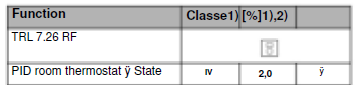
Characteristics
- Wireless communication by radio signal from the TRL (transmitter) with the receiver connected to the installation. Operating distance Of approximately 30 meters in residential areas.
- 7-day programming
- 9 pre- established factory programs
- 4 user programs
- Graphic display Of the program
- Ambient temperature and Time displayed
- Comfort / Reduced / Frost protection temperatures
- Temporary temperature Override
- Automatic Or Manual operation
- Holiday function
- Keypad lock (child protection)
- BatteryOperation, duration >2 years
- Low battery indicator
- Battery replacement without memory loss except for the time
- Reset function
- «O/I» switch for standby mode
Display
- Heating on
- Temperature override
- Holiday function activated
- Operation mode menu
- Low Battery
- Weekdays
- 0’clock
- Program graph
- If present [1 0] displays ambient temperature
- Setpoint or room temperature

Description of the modes
- Use the y or keys to change the mode in the operating mode menu.
- For all modes, the receiver must be in automatic mode.
CLOCK adjustment menu
- Adjusts the TRL’s clock to the current time.
- Adjust the minutes using the + or – buttons.
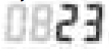
- Press the 0K button.
- Adjust the hours using the + or – buttons.
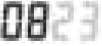
- Press the 0K button.
- Adjust the days using the + or – keys.
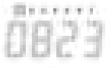
- Press the 0K button.
 COMFORT temperature operating mode
Forces the comfort temperature indefinitely (if you wish to temporarily force the comfort temperature y HOLIDAY function, page 6). Pressing the 0K button displays the programmed comfort temperature. y By pressing the + or – buttons the comfort temperature flashes and can be adjusted. The ambient temperature eappears after a few seconds. The TRL now follows the comfort temperature.
“Auto” AUTOMATIC mode
- The TRL follows the chosen program according to the current time.
- Pressing the 0K button displays the temperature.
- By pressing the + or – buttons it is possible to temporarily modify the desired temperature; this will be effective until the next scheduled change. is posted.
- The symbol Adjust the desired temporary temperature using the + or – buttons.
- At the next program change the symbol goes out and the program returns to the preset temperatures.
 REDUCED temperature operating mode
- Forces the reduced temperature indefinitely (if you wish to temporarily force the reduced temperature HOLIDAY function, page 6).
- Pressing the 0K button displays the programmed reduced temperature.
- By pressing the + or – buttons the reduced temperature flashes and can be adjusted.
- The ambient temperature appears after a few seconds. The TRL now follows the reduced temperature.
Frost protection operating mode
- Prevents the installation from freezing (if you wish to temporarily force the Frost protection temperature y HOLIDAYS function, page 6).
- Pressing the 0K key displays the programmed Frost protection temperature.
- By pressing the + or – buttons the temperature of the Out gel flashes and can be adjusted.
- The ambient temperature appears after a few seconds. The TRL now maintains room temperature to prevent freezing.
 Standby
- Use this mode if your heating needs to be switched off.
- To put the TRL in Standby mode:
- Set the switch to “O”.
- The screen turns off to reduce power consumption to a minimum.
- The programs are saved, the clock continues and consumption is greatly reduced.
- The 4, -, y, y keys are inactive.
- By pressing the 0K button, the symbol, and the room temperature are displayed.
- This information remains displayed as long as the 0K key is held down.

To wake the TRL from sleep mode:
- Set the switch to “l”
- For 3 seconds the software version number is displayed.
- The TRL then reverts to the operating mode chosen before switching to Standby mode.
« P » Menu PROGRAMME
- Program
- Program weekdays
- Chart of the day’s program
- Change the program using the + or – buttons. Use the y or keys to see the other days of the program.
- The schedule chart for the day is displayed. y By selecting a program Pl to P9 then 0K this program will be followed in “Auto ” mode. By selecting a user program
- Ul to U4 then 0K you will enter editing mode (Y see Editing a user program, page 5).
Description of the factory preset programs:
- Pl Morning, Evening & Weekend
- P2 Morning, Noon, Evening & Weekend
- P3 Day & Weekend
- P4 Evening & Weekend
- P5 Morning, Evening (Bathroom)
- P6 Morning, Afternoon & Weekend
- P7 7h- 19h (Bureau)
- P8 8h-19h, Samedi (Commerce)
- P9 Weekend (Secondary house)
Editing a user program
- The — key activates a temperature from to position of the cursor
- The + key activates a temperature from to the position of the cursor
- Cursor time [4] Days of the week of the program Use the or y buttons to move the flashing cursor to the day. y Modify or correct the program using the + keys
- When the programming of the day is correct, press the 0K button to validate it.
- The program moves to the next day.
- Modify or correct the day as before.
- By validating day 7 you return to the editing menu of the program.
- Your user program will now follow if you place the TRL in “Auto ” mode.
Special functions
 HOLIDAY function
- Use the y or y keys to switch to mode. Then use the + or – buttons to select the duration in hours (H) if less than 24 hours then in days (d).
- Then select mode or.
- The symbol the number of hours/days remaining is displayed until the TRL returns to “Auto” mode and continues to follow the program.
- To cancel the HOLIDAYS function:
- Using the y or y keys, go to mode.
- Then press or – buttons until the is displayed. text no
- Press the 0K button.
KEYPAD LOCK
In the “Auto “node, or key the K key is pressed, and simultaneously press the + or – key to lock (Loc codE) or unlock (Un Loc) the keypad.
RESET function
- Clears all programs and restores factory default settings. Go to 0K key modes.
- then press for 10 seconds on the
- All the segments of the display light up showing that the TRL has been erased and restarted with the default factory parameters (temperatures 170@ 60C, Ul all comfort ) .
- Then readjust the time and reprogram the TRL as
Summary of the instruction manual A
summary of the instruction manual is available on the side of the TRL.
Changing the batteries
- When the low battery indicator is displayed, must be changed.
- Press the clip on the left side and pull the front panel to remove it.

- You now have access to the batteries.
- Replace the batteries with 2 LR03 AAA 1.5V alkaline batteries new.
- The clock flashes.
- Readjust the time value after changing the batteries (Y see 4 “Description of the modes”, page 4).

- Press on the front panel so that it locks onto the bottom of the case. You can make it easier to lock by pressing the clip on the left side.

Using the receiver
- Key: pressing for 5 seconds gives access to the radio configuration of the receiver (9 page 7)
- Receiver power-on indication
- Operation mode indication


Troubleshooting
- Check the batteries of the transmitter.
- Check transmitter/receiver range.
- Check that there is no interference from another device less than 50 cm from the receiver.
- Check that there is no interference from a device on the 868.3 MHz frequency (permanent emission).
- If the yellow LED [2] does not light up
- Check the connection of the receiver.
- Check the mains supply (230 VAC).
Radio configuration of the TRL with the receiver for
- On the TRL, select the “Auto” mode.
- Then press the 0K button for 5 seconds; this will enter the radio configuration mode ( ).
- The TRL now sends its configuration address by radio signal 4 times per second, y On the receiver, press the —seconds.
- The green LED [4] should light up and start flashing with each radio signal received from the TRL (4 flashes per second).
- You can now perform a dis-check radio operating time.
- Place the TRL in the room where you want to regulate the temperature and leave it in radio configuration mode
- Close the doors and return to the receiver. y Check that the green LED [4] flashes with each signal radio :
- If it flashes several times per second, the installation of the TRL and the receiver is correct.
- If it flashes irregularly, you are at the range limit. Install the TRL closer to the receiver.
- If there is no flashing, you are out of range. Install the TRL closer to the receiver. On the TRL press the 0K key to exit the radio configuration mode.
- Now the TRL drives the receiver.
Technical data
- Environmental protection and recycling Environmental protection is a core value of the Bosch Group.
- We attach equal importance to the quality of our products, their profitability and the protection of the environment. Laws and regulations concerning environmental protection are strictly observed.
- For the protection of the environment, we use, while respecting the economic aspects, the best possible technologies and materials.
Used devices
- When it comes to packaging, we participate in country-specific recovery systems, which aim to ensure optimum recycling.
- All packaging materials used are environmentally friendly and recyclable.
Used electrical and electronic devices
Electrical and electronic devices that are no longer in use must be collected separately and subject to environmentally sound disposal (European directive on used electrical and electronic devices). For the disposal of used electrical and electronic devices, use the country-specific return and collection systems. Batteries must not be recycled with household waste. Used batteries must be collected in local collection systems..
REFERENCE:
elm leblanc TRL 7.26 RF Room Thermostat User Manual
