
ELEKTROBOCK PT 32 GST ROOM Thermostat
INTRODUCTION
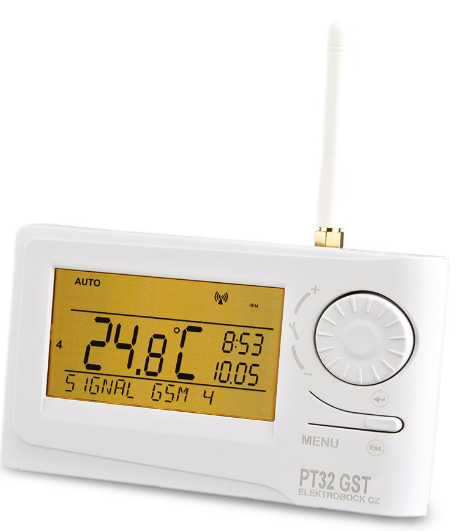
A sophisticated thermostat which can be remotely controlled by means of SMS messages from your mobile phone. The thermostat includes two devices, temperature controller and GSM module, which co-operate, thus increasing the comfort of the heating system control. Simple control elements are used for setting; intuitive navigation in the selected language (CZ/PL/EN/DE/RU/SVK). Remote control is executed by means of brief SMSs which enable you, for example, to change the required temperature or turn off the system. This unique thermostat with a big backlit display and intelligent PID-control offers a wide variety of usage in residential houses, offi ces as well as recreation areas
DESCRIPTION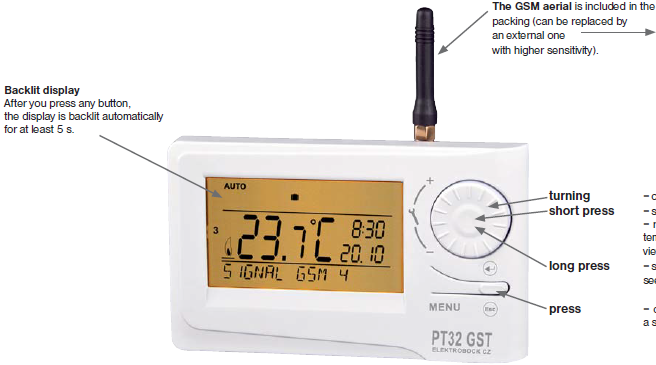
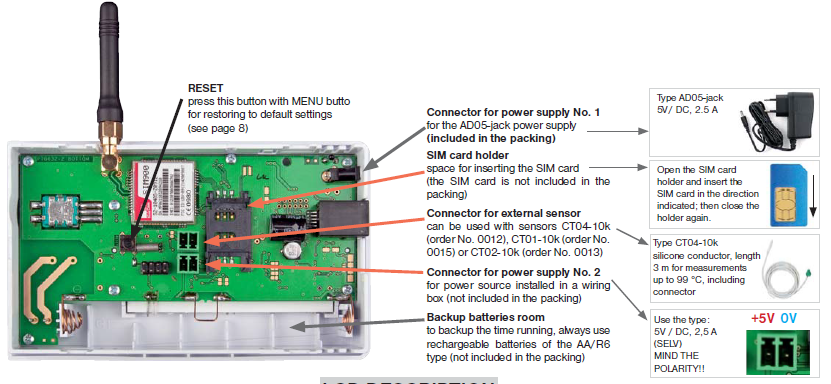
LCD DESCRIPTION
- Current day (in the Prog mode, selection of days to be programmed)
- Heating on indication
- Current room temperature
- Anti-freeze temperature
- Modes for setting programs (PROG) and constants (CONST) (page 4 and 5)
- Automatic mode (page 3)
- Manual mode (page 3)
- Clock setting mode (page 3)
- Holiday mode (page 3)
- Permanent shut-off (page 3)
- Summer mode (page 6)
- Boiler inspection indication (page 8)
- External sensor connection indication (see page 7)
- Current time
- Current date (various parameters in the CONST mode; for details, see page 5)
- Status line, dynamically changing according to the process running
- Key lock indication (page 8)
- Low battery indication
INSTALLATION
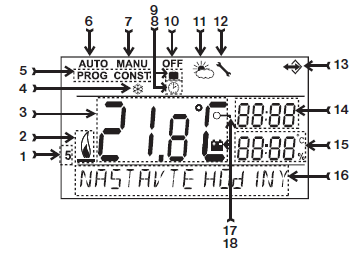
Install the thermostat at a suitable place where its operation will not be affected by direct fl ow of hot air from a heating source, by sunshine or other disturbing effects. Do not install it on an external wall either. The installation height should be at least 1.5 m above the ground. Locate the thermostat in the so-called reference room, such as the living room (the heat source will be switched according to the temperature in this room).
- Switch off the main circuit breaker.
- Remove the control part from the bottom cover of the device
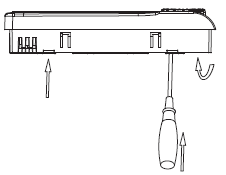
- Chip off the plastic piece in the middle of the bottom cover to lead in the conductors.
- Run the conductors through the hole and connect them to the terminal board, see the wiring diagram.
- Fasten the bottom cover to the wiring box by means of screws .
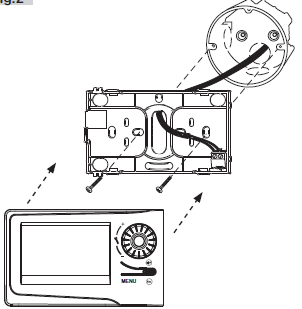
- Insert the activated SIM card into the SIM card holder at the back of the control part.
- If you want to back up the time, install the fully charged rechargeable batteries
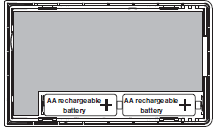
- Mount the control part onto the bottom cover
- Connect the power supply to connector No. 1 or No. 2 (see page 1). ATTENTION PT32 GST MUST BE POWERED FROM ONE SOURCE!!
- Switch on the main circuit breaker and test the thermostat for correct connection, see page 3 (TEST).
- Upon the first start (or reset), the thermostat shows the “SET CLOCK”, “ENTER PIN” messages; set the current time and date acc. to the instructions on page 3, enter the PIN acc. to page 7 and select language acc page 5.
Wiring diagram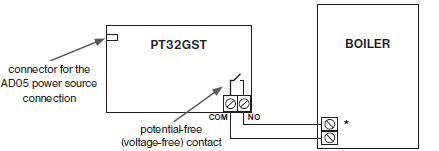
FIRST SWITCH-ON
After you switch on PT32GST first, the following message appears on the LCD; follow the instructions to make the corresponding settings (INSERT SIM CARD BEFORE POWER CONNECTION):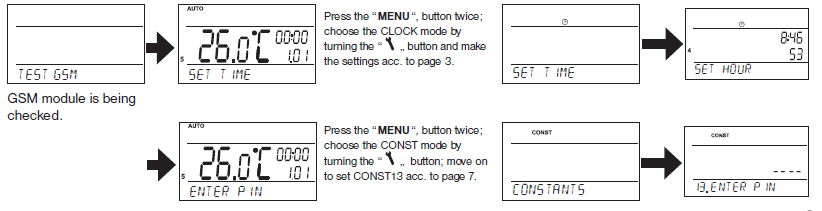
OPERATING MODES
- Pressing any button fi rst, you activate the display backlit. By another short press of the “ MENU “ button, you open the main menu in which
- you can choose operating modes.
AUTO (the Pr3 weekly program set by default, see page 4)
- The thermostat works according to the weekly program settings (this program can be changed; for detailed description, see PROG, page 4)
- Press twice the “ MENU “, choose the AUTO mode by turning the “
 “ and press the “
 “ button to confi rm. SMS form: Auto
 - Change of the mode to AUTO. Thermostat will be work acc. last setting weekly program.
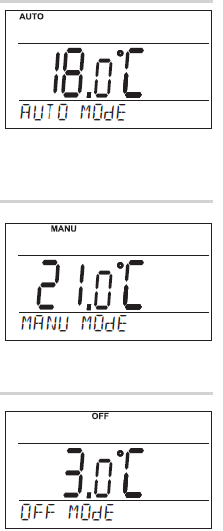 MANU (default temperature setting of 21°C)
- The thermostat works according to the temperature setting until the next manual change.
- Press twice the “ MENU “, choose the MANU mode by turning the “ “. “ and press the “ “ button to confi rm. SMS form: Manu
- Change of the mode to MANU. Thermostat will keep last setting temperature.
OFF (the anti-freeze temperature of 3 °C is kept – cannot be changed)
- The thermostat is permanently switched off until the next manual change of the mode.
- Press twice the “ MENU “, choose the OFF mode by turning the “ “ and press the “ “ button to confi rm. SMS form: Off
- Change of the mode to OFF. You can cancel the mode by the SMS: Temp xx or Auto or Manu
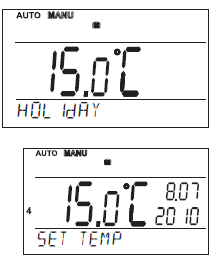
HOLIDAY
- The thermostat maintains the preset temperature until the preset date and selected time. After expiry of the preset period, it automatically returns to the AUTO/ MANU mode last selected before the holiday.
- Press twice the “ MENU “ button, choose the mode by turning the “ “ and press the “ “ button to confi rm.
- Step by step, set the temperature which the thermostat should keep during the holiday, date and time of your return from the holiday.
- Change the values by turning the “ “ button and confi rm each change by pressing the “ “ button.
- After making the settings, press the“ “ button to return to the basic screen.
Note: The holiday mode can be canceled any time by selecting another AUTO or MANU mode.
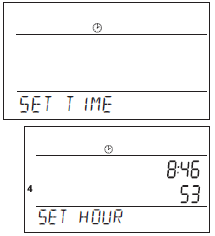
CLOCK SETTING
Setting the current time and date.
Press twice the “ MENU “ button, and choose the CLOCK mode by turning the “ “ “ button to confirm. Change the values by turning the “ “ button and confi rm each change by pressing the “ “ button (the parameter modifi ed is always fl ashing); pressing the “ “ button, you return to the menu).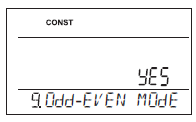
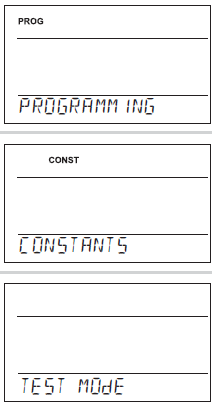
(PROGRAMMING)
You can set 9 weekly programs with 6 temperature changes per day. The Pr1 and Pr2 programs are empty; Pr3 to Pr7 programs are set by default. The PrU and PrL are also set by default, intended for the EVEN/ODD week option (for details, see pages 4 and 6).
(CONSTANTS)
Setting the control parameters. For a detailed description, see page 5. Press twice the “ MENU “ button, choose the CONST mode by turning the “ “ button, and press the “ “ button to confirm.
TEST
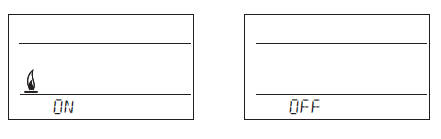
- Testing the correct connection to boiler. Press twice the “ MENU “, choose the TEST mode by turning the “ “ button, and press the “ “ button to confi rm (RELAY TEST is showed on LCD).
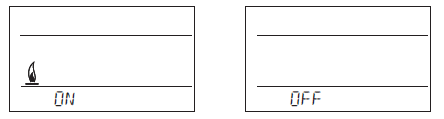
- Turn the “ “ button to start testing. The output relay will be switched on/off several times (the ON/OFF messages appear on the LCD).
(PROGRAMMING)
You can set 9 weekly programs with 6 temperature changes per day. The Pr1 and Pr2 programs are empty; Pr3 to Pr7 programs are set by default. The PrU and PrL are also set by default, intended for the EVEN/ODD week option (for details, see page 6).
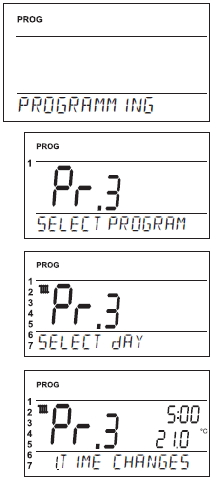
Change in the program settings:
- Press twice the “ MENU “ button, choose the PROG mode by turning the “ “ button, and press the “ “ button to confirm.
- The selected program number is fl ashing on the display. Turning the “ “ button, choose the program which you want to change and press the “ “ button to confirm.
- Turning the “ “ button, choose the number of days to be programmed (you can program day-by-day or 1-5 = Mon-Fri, 6-7 = Sat-Sun or 1-7 = Mon-Sun) and press the “ “ button to confirm.
- The 1st change time starts flashing; set the time by turning the “ “ button and press the “ “ button to confirm. Set the temperature for this time by turning the “ “ button and press again the “ “button to confirm.
- The 2nd change time appears on the display. Proceed in the same way as with the first change setting.
- In this way, you can set up to 6 temperature changes per day. To return one step back, shortly press the “ “ button; to return to the main menu, press the “ “ button long.
- After changing the preset program, check whether all the changes made conform to your requirements! It is not necessary to apply all six changes to one day
Tables of temperature programs
| program No.1 | ||||||
| Monday | ||||||
| Tuesday | ||||||
| Wednesday | ||||||
| Thursday | ||||||
| Friday | ||||||
| Saturday | ||||||
| Sunday |
| program No.2 | ||||||
| Monday | ||||||
| Tuesday | ||||||
| Wednesday | ||||||
| Thursday | ||||||
| Friday | ||||||
| Saturday | ||||||
| Sunday |
| program No.2 | ||||||
| Monday | ||||||
| Tuesday | ||||||
| Wednesday | ||||||
| Thursday | ||||||
| Friday | ||||||
| Saturday | ||||||
| Sunday |
| program No.4 |
| Monday |
| Tuesday |
| Wednesday |
| Thursday |
| Friday |
| Saturday |
| Sunday |
| program No.5 |
| Monday |
| Tuesday |
| Wednesday |
| Thursday |
| Friday |
| Saturday |
| Sunday |
| program No.6 |
| Monday |
| Tuesday |
| Wednesday |
| Thursday |
| Friday |
| Saturday |
| Sunday |
| Monday |
| Tuesday |
| Wednesday |
| Thursday |
| Friday |
| Saturday |
| Sunday |
Even or odd week selection:
This setting is suitable, for example, for shift operation (the requirements on thermal comfort in the object change every week). The PrU and PrL programs will alternate automatically. The programs can also be modified according to your requirements. Press twice the “ MENU “ button, choose the CONST mode by turning the “ “ button, and press the “ “ button to confirm. Repeat pressing the“ “ button until the constant No. 9 appears on the LCD. Set YES by turning the “ “ button, and press the “ “ button to confirm.
| U | ||||||
| Monday | ||||||
| Tuesday | ||||||
| Wednesday | ||||||
| Thursday | ||||||
| Friday | ||||||
| Saturday | ||||||
| Sunday |
|
| U | ||||||
| Monday | ||||||
| Tuesday | ||||||
| Wednesday | ||||||
| Thursday | ||||||
| Friday | ||||||
| Saturday | ||||||
| Sunday |
CONSTANTS)
ENGLISH
Language selection (CZ/PL/EN/DE/RU/SVK). Choose the language by turning the “ “ button and pressing the “ “ button to confirm.
MINIMUM CONTROL TEMPERATURE
Setting the limit of the minimum temperature which can be set. If using the GSM module, you will be informed by an SMS that the room temperature has dropped below this value (check CONST tEL nO, page 7). Choose within the range from 3 °C to 10 °C (by 0.5 °C).
MAXIMUM CONTROL TEMPERATURE
Setting the limit of the maximum temperature which can be set. If using the GSM module, you will be informed by an SMS that the room temperature has risen above this value (check CONST tEL nO, page 7).Choose within the range from 15 °C to 39 °C (by 0.5 °C).
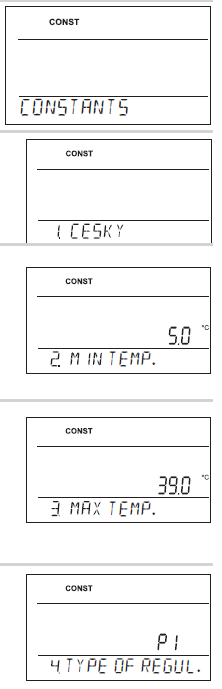
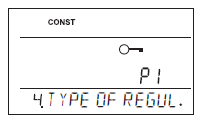
CONTROL TYPE
Selection of the control type:
- Choose the type of control by turning the “ “ button and press the “ “ button to confirm.
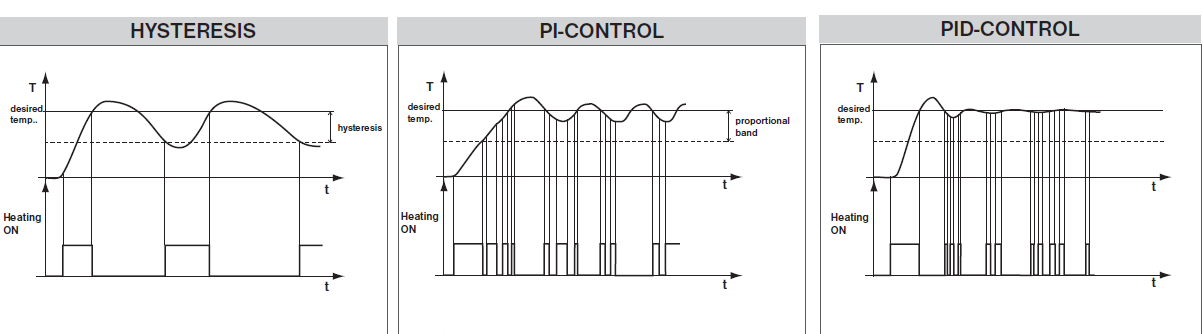
HS = Hysteresis
- Difference between the desired and current temperature.
- If the hysteresis is 1 °C and the desired temperature is 20 °C, the thermostat switches off at 20 °C, and on at 19 °C (see the graph).
- For correct hysteresis function, set the parameters according to the heating system type; see CONST 5.
- Note: If hysteresis is selected, CONST 6 is skipped automatically
- PI = proportional-integral control
- The PI-control principle consists in comparison of the current room temperature with the desired temperature.
- The PI-control aims at achieving and maintaining the desired temperature without overshooting (see the graph). For correct function of the
- PI-control, set the control parameters according to the type of the heating system with respect to the room thermal inertia; see CONST 6.
- Note: If the PI-control is selected, CONST 5 is skipped automatically.
- PID = proportional-integral-derivative control
- The PID-control principle consists in continuous comparison of the current room temperature with the desired temperature, and automatic adaptation of the controller to the given conditions.
- This is the most perfect continuous control; you can achieve not only short control time, but also high accuracy without permanent control deviation. The minimum switch-on time is internally set to 2 minutes, the proportional band is 2 °C, the time interval is automatically recalculated according to current temperature conditions.
Note: If the PID control is selected, CONST 5 and CONST 6 are skipped automatically
CAUTION! ONLY IN CASE OF LOCKING BY PASSWORD (see CONST19)
If the “ “ key symbol appears on the LCD, the constant selected cannot be modified and you must know the PASSWORD (see CONST 19, page 8). You can change the constant after entering the password. After you exit the CONST mode, the security lock of the constants related to the control will be activated automatically
SETTING HYSTERESIS PARAMETERS
HYSTERESIS
Set from 0.1 to 6 °C. According to the value preset, the thermostat switches on at the temperature:
- T switching = T required – HYSTERESIS
Set the hysteresis by turning the “ “ button, and confirm with the “ “ button
MINIMUM SWITCH-ON TIME
Here you can set the minimum switch-on time of the boiler in minutes at hysteresis. Select within the range from 1 to 5 minutes according to the type of heating system used (see the table).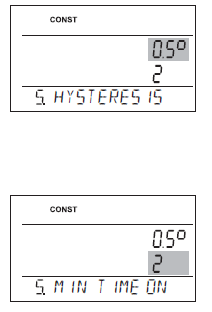
SETTING PI-CONTROL PARAMETERS
PI-CONTROL INTERVAL (factory setting of 10 min.)
Select according to the object’s thermal inertia. The optimum setting usually falls within the range of 10 to 15 min. The adjustable range is 5 min to 20 min (by 1 min).
MINIMUM SWITCH-ON TIME
Select within the range of 1 to 5 minutes. The setting is given by the heating system type, and depends on the PI-control time period selection. Setting according to the table is recommended
PI-CONTROL BAND
This value determines the temperature at which the PI control starts functioning. For example, the desired temperature is 22 °C, and the proportional band is 1.5 °C. Up to 20.5 °C, the source heats fully. When this value is reached, the PI control starts. The PROPORTIONAL band can be set within the range of 0.5 to 3.0 °C (by 0.1 °C).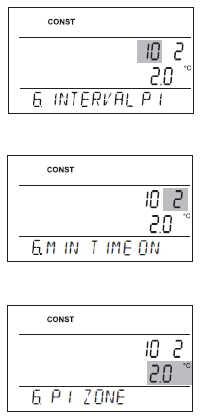
PRELIMINARY SWITCH-ON OF HEATING
This function guarantees you the required temperature at the required time. You need not consider when to switch the heating on in order to be warm when getting up in the morning without heating unnecessarily long in advance. You just program the time at which you want the desired temperature. Within two operating days, the program ascertains the thermal constants of the room and then it switches the heating on in advance suffi ciently. The preliminary switch-on time is limited to 2 hours.
SUMMER MODE
In this mode, you are not allowed to switch the heating on. It can particularly be used in the summer period, when you need not heat. After you enable this mode, the “ “ symbol appears on the display.
Note: The anti-freeze protection (3 °C) is still enabled. In this mode, you cannot change the temperature or set the holiday mode
EVEN-ODD WEEK SELECTION
If you choose “YES”, the PrU and PrL programs will alternate automatically according to the current week (even/odd). This setting is suitable, for example, for shift operation (the requirements on thermal comfort in the object change every week).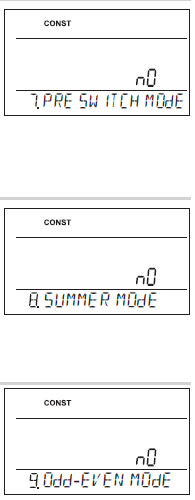
HEATING / COOLING SELECTION
- HEATING = the output relay (for heating systems) switches if the current temperature drops below the desired value
- COOLING = the output relay (for cooling systems) switches if the current temperature rises above the desired value
TEMPERATURE CORRECTION
This is used for correcting the temperature measured by the thermostat. The setting can only be done after 12 hours of operation, when the internal sensor temperature has settled. Measure the room temperature with a thermometer; if it is different from the temperature on the thermostat, set the correction within the range of -5 °C do +5 °C.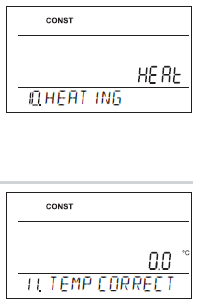
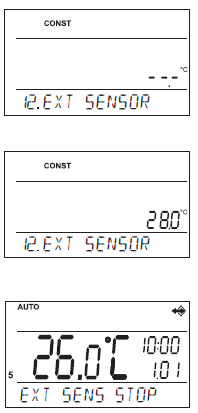
EXTERNAL SENSOR SELECTION
The external sensor can be used for:
- control according to the room temperature – the sensor is located in the room ( – – – option)
- control according to the fl oor temperature – the sensor is located in the fl oor (- – – option)
- maximum fl oor temperature monitoring – the sensor is located in the fl oor (selection of 15 to 99,5°C)
- 15…99,5°C If connected, the external sensor monitors the fl oor temperature; the maximum temperature allowed for fl oor heating must be set (control according to the room temperature, with simultaneous fl oor temperature monitoring
PHONE NUMBER SETTING
Allows the following options:
- TO SENdER = SMS will be sent back to the telephone number from which the message was sent.
TO ANOTHER NR = SMS will be sent back to the telephone number entered in the thermostat. - bOTH NUMbERS = SMS will be sent back to both telephone numbers (combination options 1 and 2).
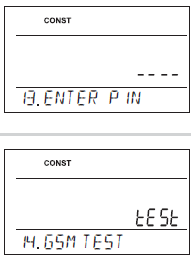
PIN CODE SETTING
Enter the PIN code of the SIM card inserted in the thermostat.
PIN CODE SETTING
Turning the “ “ button, enter 4 digits stepwise; confi rm each setting with the “ “ button
GSM TEST
- After setting the PIN code of the SIM card inserted in the thermostat is performed to test the GSM module and PIN validation.
- Turning the “ “ button to start test of GSM module and checking of PIN code.
- The“ “ button displays the next constant,; pushing “ “ you return to the main menu

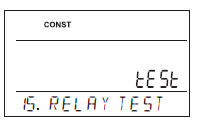
RELAY TEST
- Testing the correct connection the thermostat to boiler (this function is identical with the TEST mode in the main menu).
- Start the test by turning the “ “ button. The output relay is switched on/off several times (the ON/OFF messages appear on the LCD). The “ “ button displays the next constant; pushing “ “ you return to the main menu
KEY LOCK
- This is used for locking the controls as protection against undesirable interference of a foreign person.
- Set YES/NO by turning the “ “ button and press the “ “ button to confirm.
KEY CODE
- This constant can be set if CONST 16 = YES. It is used for setting the code by which you will be able to activate the controls. Set a four-digit combination (range from 0 to 9).
- The keys will be locked within 1 minute (after opening the basic display).
- The “ ” symbol appears on the LCD. If you press the “ “ or “ “ button, the LCD asks you to enter the key code; after entering the correct code, you are able to make any changes (the controls are functional again).
- The controls will automatically be locked again after you finish the setting (within approx. 1 min). Gradually set 4 digits by turning the “ “ button; confirm each setting with the “ “ button.
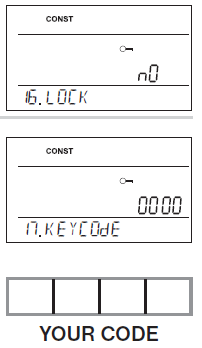 RECOMMENDATION: – Record the key code in the table
- You can cancel the code by setting CONST 16 to NO, or by restoring the default settings of the thermostat (see CONST 20).
- in case of loss of the code, it is necessary to bring the thermostat to factory settings using pressing buttons RESET (see page 1) and MENU (will erase all settings changes).
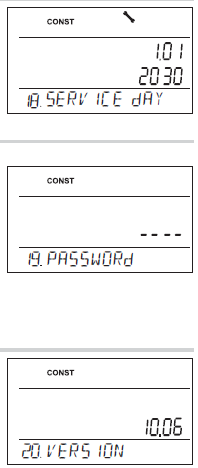
BOILER INSPECTION REMINDER
Set the date on which you want to be informed about the necessity of the prescribed boiler service. At the required time, the “MAINTENANCE NECESSARY” message and the “ ” symbol will appear on the bottom line of the LCD (you can cancel the message by setting a new date for the next boiler maintenance!).
PASSWORD
- It is used for locking the constants related to the given control settings. Suitable for service technicians.
- After a numerical code has been entered, the user cannot change constants No. 4, 5, 6 and 10.
- If you open the CONST mode and browse the constants, the “ ” symbol appears next to the constants locked; if you turn the “ “ button, the password is required! Unless you enter the password, the constants remain locked.
- To try to unlock them again, you must exit the CONST mode and browse up the constant locked again.
- Turning the “ “ button, gradually enter four digits and confirm each setting with the “ “.
VERSION
- Firmware version, informative parameter only.
- If you press the “ “ button long (for about 3 s), the RESET message appears shortly on the LCD and the thermostat returns to the default settings
USER TIPS
QUICK CHANGE OF REQUIRED TEMPERATURE / PROGRAM IN THE AUTO MODE
Press twice the “ “ ; the required temperature starts fl ashing on the display. Change the required temperature by turning the “ “ button and press the “ “. The change will last until the next program change.
QUICK CHANGE OF REQUIRED TEMPERATURE IN THE MANU MODE
Press twice the “ “; the required temperature starts flashing on the display. Change the required temperature by turning the “ “ button and press the “ “. The change will last until the next manual temperature change
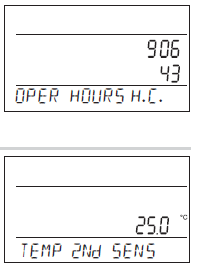
OPERATIONAL HOURS
Push the “ “ button four times. The boiler operating hours appear on the LCD. The figure on the picture means 906 hours 43 minutes.
Resetting the counter
When operational hours are displayed, turn the “ “ button anti-clockwise
EXTERNAL SENSOR TEMPERATURE
Push the “ “ button five times. The current temperature of the external sensor appears on the LCD; the value is only informative, and appears only if the external sensor is monitoring the maximum floor temperature (see CONST 12, page 7).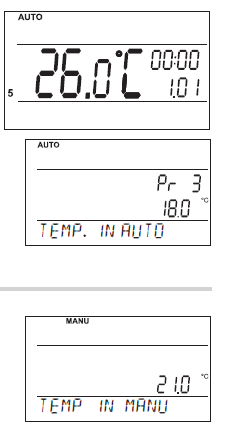
INFORMATION IN THE LCD DYNAMIC LINE
| SIGNAL GSM x | Determines the signal strength at the place where the thermostat is located; where x is a value within the range from 0 to 5:
0..undeterminable or no signal detected 1..worst level 5..best level of signal |
| REQUIR TEMP | Information on the desired temperature preset |
| PROGR 3 PERIOd 2 | Information on the program preset (e.g., 3) and the time interval running
(interval 2) |
| SMS RECEIVEd | Information the thermostat received new SMS |
| HOLIdAY IN 22.7 | Only displayed in the holiday mode; informs on the end of holiday when the
thermostat restores the last selected AUTO/MANU mode. |
| T EXT SENS 25.0 | Current temperature of the external sensor, displayed only if the sensor is
connected |
| EXT SENS STOP | If the preset limit temperature of the external sensor in the maximum floor temperature monitoring function is exceeded (see page 7), the thermostat is
switched off |
FORMS OF MESSAGES SENT
| Info | Information on the heating system status |
| Auto | Setting AUTO mode, thermostat will be work acc. last setting weekly program |
| Manu | Setting MANU mode, thermostat will be keep last setting temperature |
| Off | Heating system switched off permanently. ; to cancel the function, use the
Temp xx message, thermostat will automatically enter into the MANU mode with the given temperature or SMS message Auto (for AUTO mode) or Manu (for MANU) |
| Temp xx | Required temperature change (only integer numbers can be entered, they must fall within the permitted range of maximum and minimum temperatures –CONST2 and
CONST3). |
| Call | Back call |
FORMS OF BACK MESSAGES FROM THE THERMOSTAT
| Requir: xx.x | Temperature required (user set) |
| Act: xx.x | Current room temperature |
| Set on
Set off |
Heating system On
Heating system Off |
| AUTO MANU OFF | Thermostat in automatic AUTO mode
Thermostat in manual MANU mode Thermostat in the OFF mode (permanently off) |
| Sig: x | Signal strength at the place where the module is located; where x is the value within the range of 0 to 5:
0..undeterminable or no signal detected 1..the worst strength 5..the best signal strength |
| Sens 2: xx.x | Current temperature of the external sensor |
| Battery! | Low batteries in the thermostat |
| Noakcept! | Error indicated (wrong SMS format, etc.) |
PRACTICAL EXAMPLES OF CONTROL BY SMS
Information about the heating system:
Send SMS „Info“. The thermostat will reply with an SMS, which provides information about the current state of the heating system.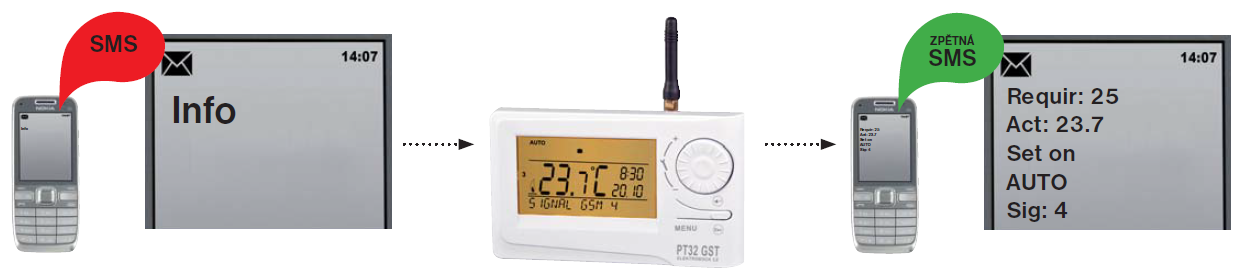
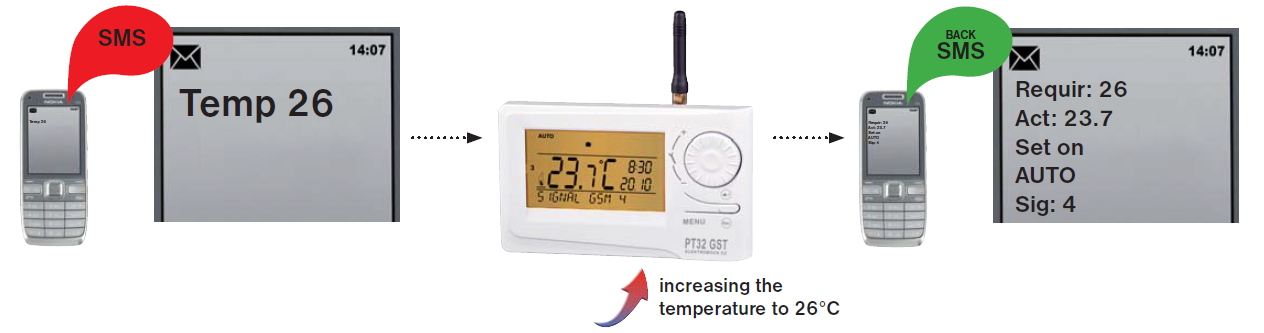
Change the desired temperature
Send SMS „Temp 26“. The thermostat changes the temperature and sends a reply SMS, with information about the current state of the heating system.
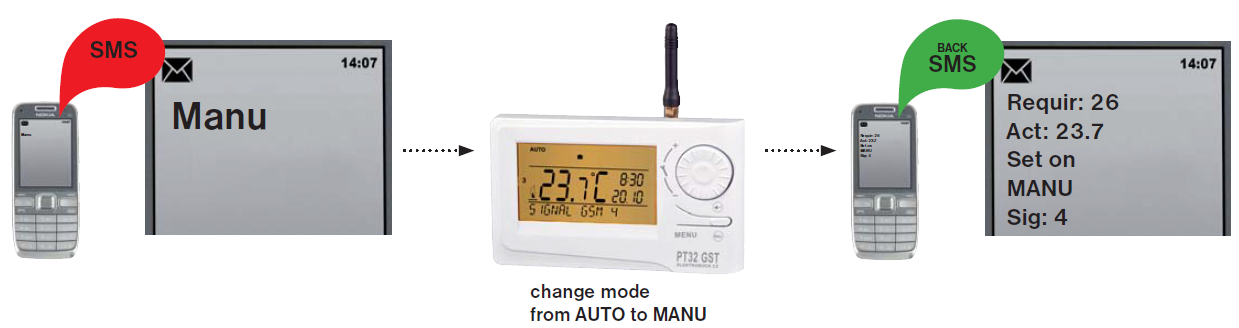
Change the mode of the thermostat from AUTO to MANU
Send SMS „Manu“. The thermostat changes the mode and sends a reply SMS with information about the current state of the heating system.
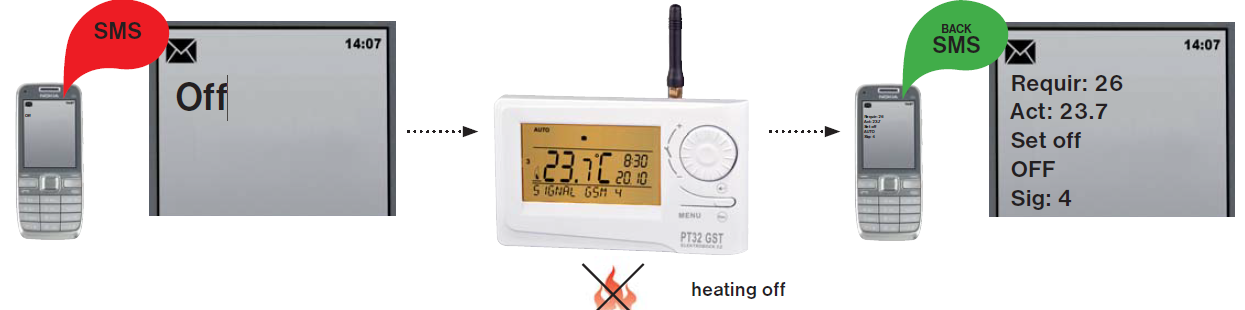
Turn off the heating system
Send SMS „Off“. The thermostat switch off the heating system and send a reply SMS, with information about the current state of the heating system (to permanently shut down the system. Send an SMS eg „Temp 20“ to return to the last preset mode
Properties
- control by means of a mobile phone
- 9 weekly programs
- 6 temperature changes per day
- programming by 10 minutes and 0.5 °C
- programming “day-by-day” or Mon-Fri, Sat-Sun or Mon-Sun
- big backlit graphic display
- selection from three types of control: PID, PI or
HYSTERESIS
- preliminary heating start function
- short-term change in the required temp.
- manual mode (MANU)
- permanent switch-off (OFF)
- HOLIDAY mode
- summer mode
- even-odd week selection
- heating/cooling mode selection
- possibility of connecting an external sensor
- current temperature correction
- key lock
- boiler operating hours total
- boiler maintenance indication
- service safeguard by a password
- anti-freeze protection (3 °C)
- TEST function
- automatic SUMMER / WINTER time change
- clock backup in case of power failure, approx.
- 7 days if rechargeable batteries are used (not included in the packing)
Accessory
Power source
- included in the packing type AD05-Jack, 5V/ DC, 2.5 A
- not included in the packing type AD05-KU68, 5V/ DC, 2.5 A (change design reserved)
External sensor
not included in the packing type CT04-10k, CYXY 2 x 0.5 mm, 10 k, lenght 3 m, plastic case PVC (CT01-10k and CT02-10k sensors can also be used)
Dimensions
Technical parameters
DECLARATION OF CONFORMITY
We, ELEKTROBOCK CZ s.r.o., herewith declare that the product PT32 GST conforms to the basic requirements and other corresponding provisions of the Directive 1999/5/EC. Issued: 10.02.2012
ELEKTROBOCK
- ELEKTROBOCK CZ s.r.o.
- Blanenská 1763
- Kuřim 664 34
- Tel.: +420 541 230 216
- www.elbock.cz
Reference
Download Manual:
ELEKTROBOCK PT 32 GST ROOM Thermostat User Manual