Ecobee EB-STATE5-01 Programmable Wifi Thermostat
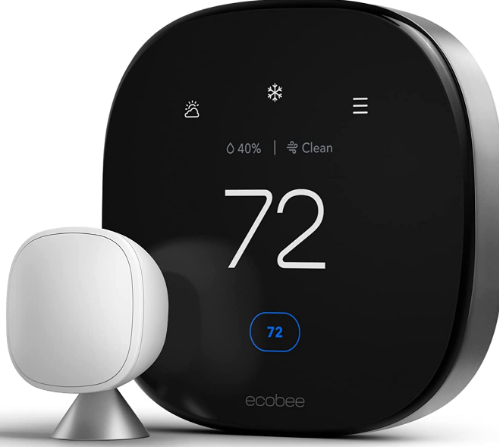
Download the ecobee app
The ecobee app has instructions, step-by-step videos, and diagrams customized to your wiring setup. Register your ecobee after installation to unlock smart features like Amazon Alexa.

Important Information
Look out for these icons at the bottom of each step. They indicate useful tips and important reminders
Tools Required
First things first. Here’s what you’ll find in the box: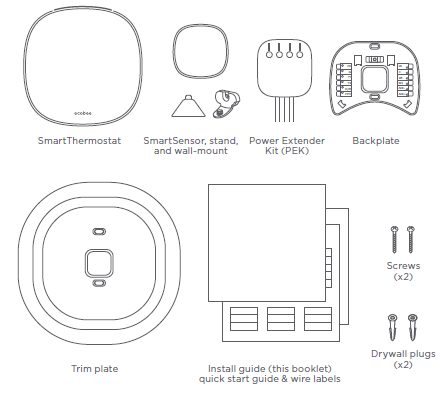
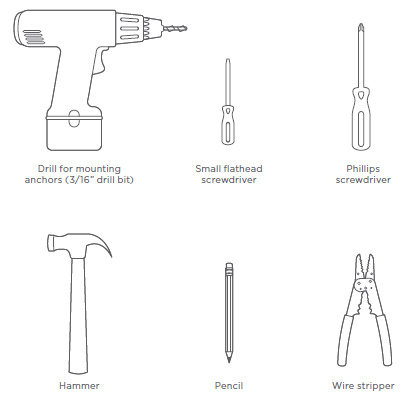
You may also need these tools:
Installation
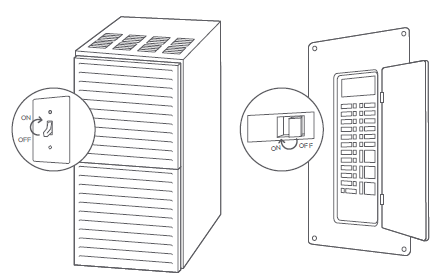
- STEP 1 Power off your Heating, Ventilation, and Air Conditioning (HVAC) system by using the master switch or circuit breaker box. This is important for your safety
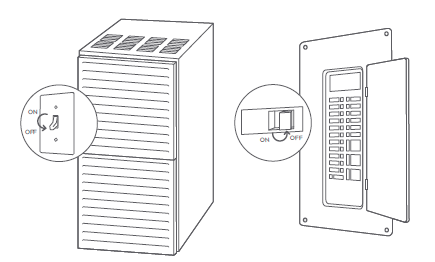
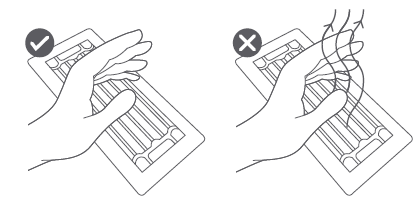
- STEP 2 Confirm your system is off by turning on your heat (during winter) or your AC (during summer). Wait a few minutes—you should not feel air coming from your vents
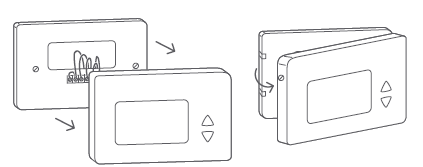
- STEP 3 Remove your old thermostat cover from the wall.
CHECKPOINT: COMPATIBILITY
Does your old thermostat’s backplate have any of these indicators?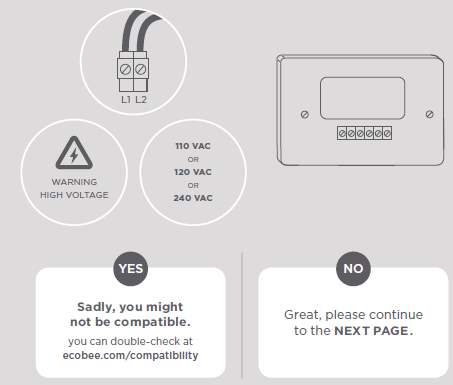
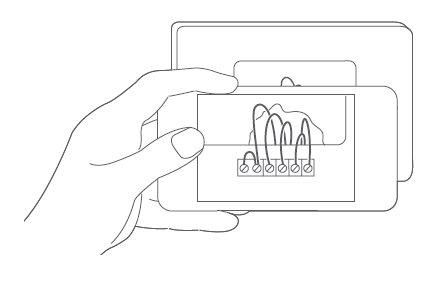
- STEP 4 Take a picture of the wires connected to the terminals of your old thermostat. You may need to reference this photo later on.
CHECKPOINT: C WIRE
Do you have a C wire connected to your old thermostat?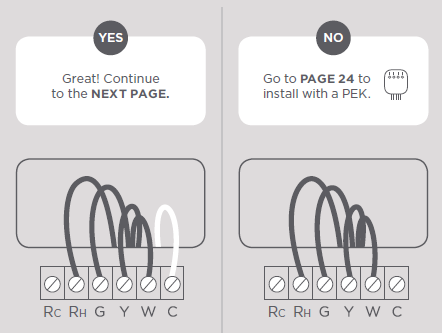
Install your ecobee with a C wire
If you have a C wire, it will power your ecobee. You won’t need the Power Extender Kit (PEK) included in the box
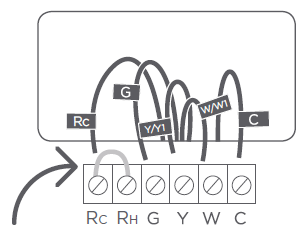
- STEP 5 Carefully disconnect and label the wires from your old thermostat one at a time, using the labels provided.
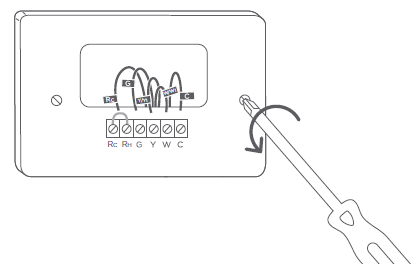
- STEP 6 Unscrew the mounting plate of your old thermostat to remove it from the wall.
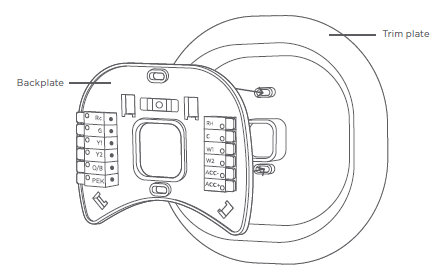
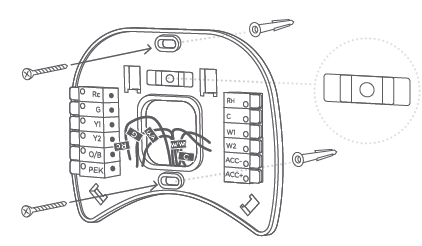
- STEP 7 Decide if you want to use the trim plate with your ecobee. The trim plate is useful if you want to hide marks or holes left on the wall by your old thermostat. If using the trim plate, align the mounting holes on the trim plate and backplate and press them into place together.
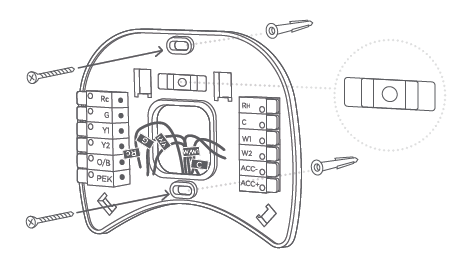
- STEP 8 Pull the wires through the hole in the middle of the backplate and then attach the backplate to the wall using the drywall anchors and screws provided
CHECKPOINT: INSERT YOUR R WIRE(S)
Do you have more than one R wire? (That includes R, RC, and RH)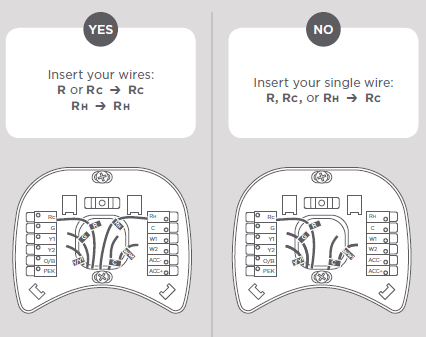
- STEP 9 Insert your remaining wires into the side (not the front) of their corresponding terminal blocks
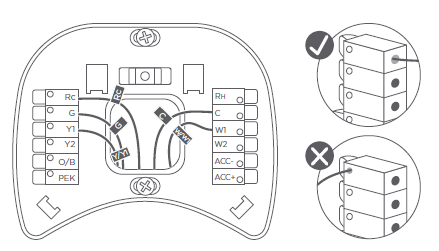
- STEP 10 Tug on the wires gently to ensure they are securely connected.
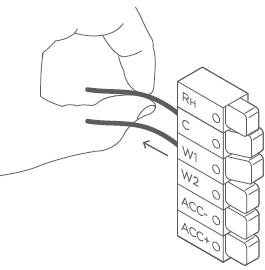
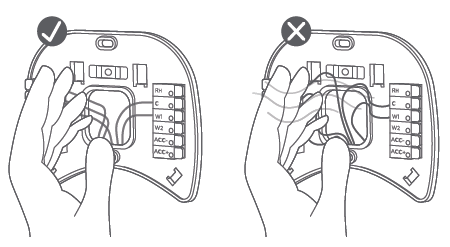
- STEP 1 1 Carefully push any excess wires back into the hole and ensure there are no drafts coming from the hole(s) in the wall.
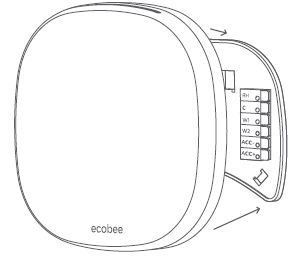
- STEP 12 Gently press your ecobee into the backplate until it ‘clicks’ into place
- STEP 13 Turn the power to your HVAC system back on using the master switch or at the circuit breaker box.
Congratulations, you did it!
Say hi to your new ecobee! To complete your setup and registrations, follow the instructions on your ecobee screen
We can help you find a pro
Installation with the Power Extender Kit (PEK) will require you to handle electrical wiring. If you’d rather leave it up to a professional, we can help you find one quickly. ecobee.com/proinstall
Install your ecobee without a C wire
If you don’t have a C wire, you’ll need to use the Power Extender Kit (PEK) included to reliably power your ecobee.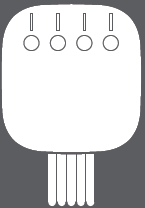
CHECKPOINT: 3 OR 4 WIRES
The Power Extender Kit requires your system to have either of the following: 4 wires W/W1, Y/Y1, G, and R (or RC or RH) or 3 wires Y/Y1, G, and R (or RC or RH)
Do you have these wires?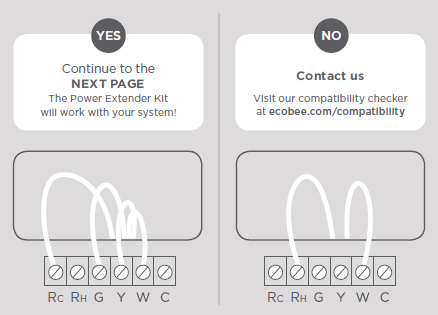
- STEP 5 Take your Power Extender Kit, wire labels, tools, your smartphone, and go to your HVAC system.
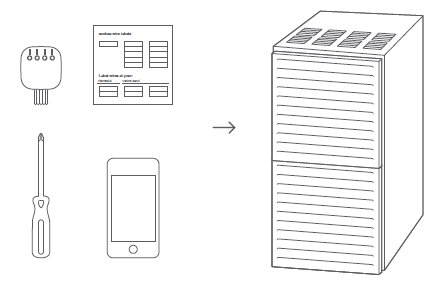
- STEP 6 Open your HVAC system’s cover to reveal the control board.
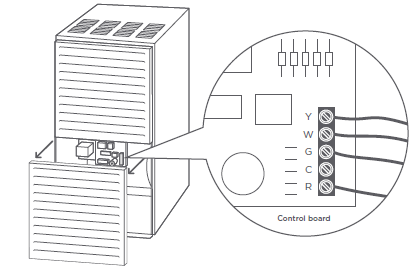
- STEP 7 Take a picture of the wires connected to your control board. You may need to reference this photo later on.
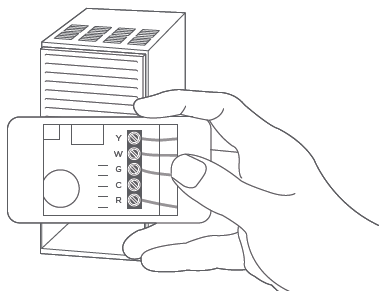
- STEP 8 Label only the R, Y or Y1, G, and W or W1 wires with the matching labels provided. If you have more than one wire going into these terminals, only label those going to your thermostat.
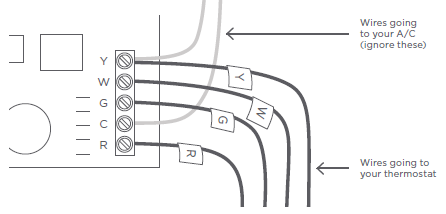
- STEP 9 Disconnect the wires labeled R, Y, G, and W from the control board
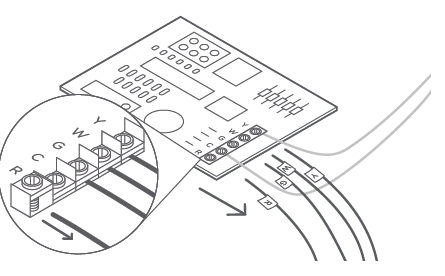
- STEP 10 Connect the wires you disconnected from the control board into their matching gray terminal blocks on the Power Extender Kit.
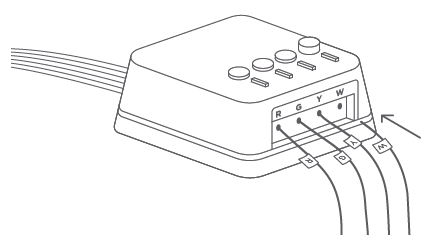
- STEP 11 Tug on the wires gently to ensure they are securely connected.
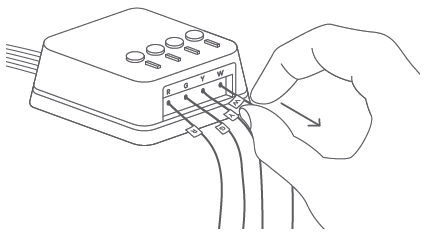
- STEP 12 Connect the five white wires coming out of your Power Extender Kit to their corresponding terminals on the control board.
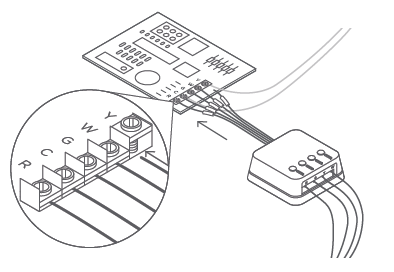
CHECKPOINT: POWER EXTENDER KIT
Check that you have installed the Power Extender Kit correctly. It should be installed between your thermostat wiring and your control board
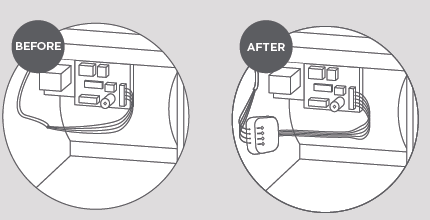
- STEP 13 Mount the Power Extender Kit inside your HVAC system, taking care not to strain the wires. Close the HVAC cover panel securely and return to your thermostat
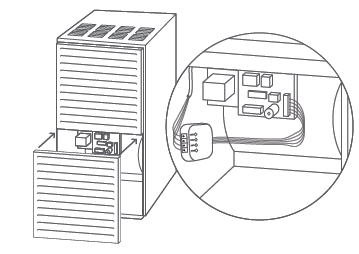
- STEP 14 Back at your thermostat: Carefully disconnect and label the wires from your old thermostat one at a time, using the labels provided
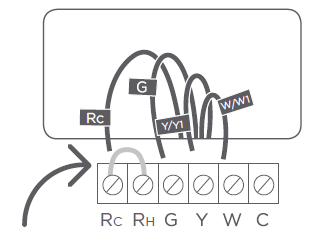
- STEP 15 Unscrew the mounting plate of your old thermostat to remove it from the wall.
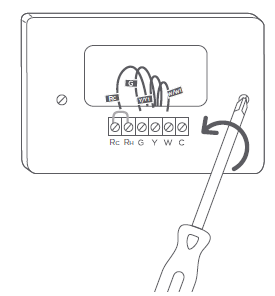
- STEP 16 Decide if you want to use the trim plate with your ecobee. The trim plate is useful if you want to hide marks or holes left on the wall by your old thermostat. If using the trim plate, align the mounting holes on the trim plate and backplate and press them into place together
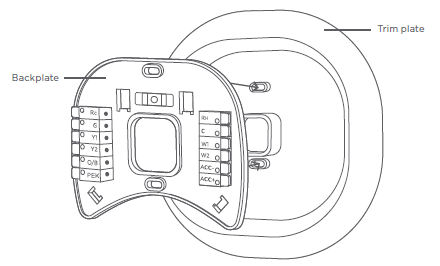
- STEP 17 Pull the wires through the hole in the middle of the backplate and then attach it to the wall using the drywall anchors and screws provided
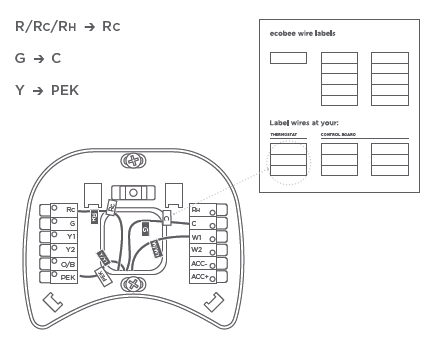
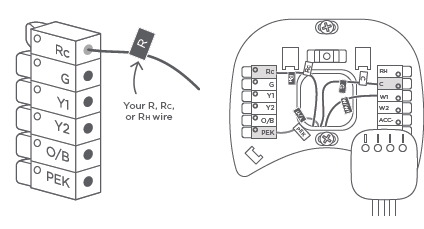
- STEP 18 Remove the Rc, C, and PEK labels from the label sheet and attach them to the wires as shown below
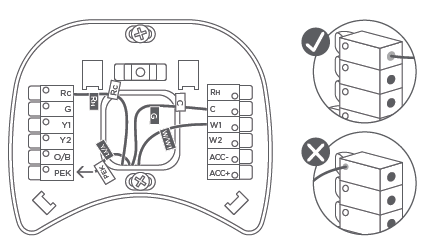
- STEP 19 First, connect these 3 wires as shown: RC, C, PEK. Then, connect any remaining wires to their corresponding terminal.
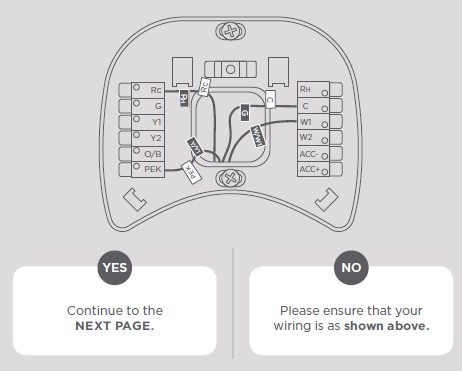
CHECKPOINT: DON’T SKIP AHEAD
Did you connect the correct wires to the RC, C, and PEK terminals, as shown below?
- STEP 20 Tug on the wires gently to ensure they are securely connected
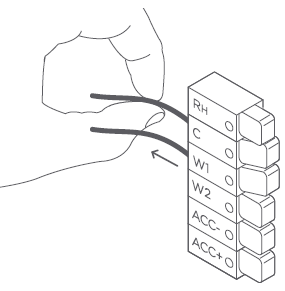
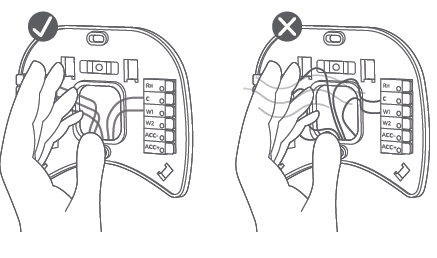
- STEP 21 Carefully push any excess wires back into the hole and ensure there are no drafts coming from the hole(s) in the wall
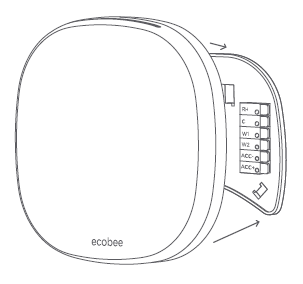
- STEP 22 Gently press your ecobee into the backplate until it ‘clicks’ into place.
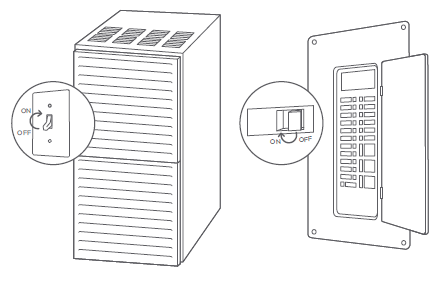
- STEP 23 Turn the power to your HVAC system back on using the master switch or at the circuit breaker box
Congratulations, you did it!
Say hi to your new ecobee! To complete your setup and registrations, follow the instructions on your ecobee screen
Troubleshooting
If your ecobee doesn’t turn on, please try these steps:
- Check that all wires are properly inserted into the terminal blocks at the thermostat. Tug on the wires to ensure they are not loose
- Make sure your HVAC cover panel is closed. Some systems will not turn on if the cover panel has not been closed properly.
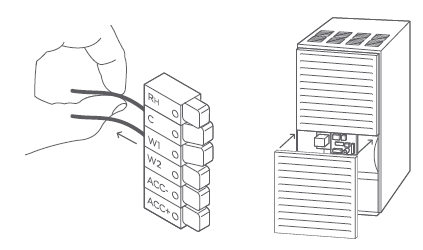 If you have only one R wire (either R, Rc, or Rh), make sure it’s inserted into the Rc terminal
- If you installed the Power Extender Kit, make sure you inserted the wires into the correct terminals
Still need help?
WE’RE HERE FOR YOU
Have questions or concerns? Get in touch. 1.877.932.6233 ecobee.com/support
WE CAN HELP YOU FIND A PRO
Installation requires you to uninstall your old device and handle electrical wiring. If you’d rather leave it up to a professional, we can help you find one quickly. ecobee.com/proinstall
INSTALLING ACCESSORIES?
To install accessories (humidifier, dehumidifier or ventilator) please refer to the wiring diagrams at ecobee.com/wiring
FCC Compliance Statement
This equipment has been tested and found to comply with the limits for a Class B digital device, pursuant to part 15 of the FCC Rules. These limits are designed to provide reasonable protection against harmful interference in a residential installation. This equipment generates, uses and can radiate radio frequency energy and, if not installed and used in accordance with the instructions, may cause harmful interference to radio communications. However, there is no guarantee that interference will not occur in a particular installation. If this equipment does cause harmful interference to radio or television reception, which can be determined by turning the equipment off and on, the user is encouraged to try to correct the interference by one or more of the following measures:
- Reorient or relocate the receiving antenna.
- Increase the separation between the equipment and receiver.
- Connect the equipment into an outlet on a circuit different from that to which the receiver is connected.
- Consult the dealer or an experienced radio/TV technician for help.
This device complies with part 15 of FCC rules. Operation is subject to the following two conditions:
- This device may not cause harmful interference.
- This device must accept any interference received, including interference that may cause undesired operation.
RF Exposure Information:
This equipment complies with FCC radiation exposure limits set forth for an uncontrolled environment. In order to avoid the possibility of exceeding the FCC radio frequency exposure limits, human proximity to the antenna shall not be less than 20cm during normal operation. Industry Canada (IC)
Compliance Notice:
This device complies with Industry Canada license-exempt RSS standard(s). Operation is subject to the following two conditions:
- This device may not cause interference.
- This device must accept any interference, including interference that may cause undesired operation of the device.
RF Exposure Statement:
This equipment complies with IC RSS-102 radiation exposure limits set forth for an uncontrolled environment. This transmitter must be installed to provide a separation distance of at least 20 cm from all persons and must not be collocated or operating in conjunction with any other antenna or transmitter.
We’re here to help.
- ecobee.com
- [email protected]
- 1.877.932.6233
Reference:
DOWNLOAD MANUALS:
Ecobee EB-STATE5-01 Programmable Wifi Thermostat User Manual

Ecobee EB-STATE5-01 Programmable Wifi Thermostat User Manual