EARUELETRIC K2H-B WiFi Smart Thermostat
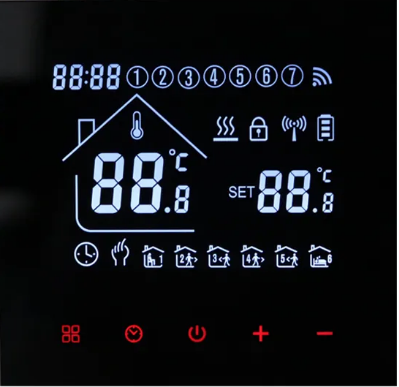
INTRODUCTION
The EARUELETRIC K2H-B WiFi Smart Thermostat is a programmable thermostat that allows you to control your home’s heating and cooling systems from anywhere using your smartphone or tablet. This thermostat features a large, easy-to-read digital display, and it is compatible with most HVAC systems, including gas, oil, electric, and heat pumps.
One of the key features of the EARUELETRIC K2H-B is its WiFi connectivity, which allows you to control the temperature of your home from anywhere with an internet connection. This feature is especially useful for people who are away from home for extended periods, as it allows them to adjust the thermostat remotely and ensure that their home is comfortable when they return.
The EARUELETRIC K2H-B also has a number of programmable settings, allowing you to set different temperatures for different times of the day. This can help you save money on your energy bills by reducing heating and cooling when you don’t need it, such as when you’re away at work or sleeping.
Overall, the EARUELETRIC K2H-B WiFi Smart Thermostat is a convenient and energy-efficient solution for controlling your home’s heating and cooling systems.The EARUELETRIC WiFi Smart Thermostat is a cutting-edge device designed to provide a convenient and efficient way to control your home’s heating and cooling systems. With this smart thermostat, you can easily adjust the temperature of your home from anywhere using your smartphone or another internet-connected device.
Packing order
- Thermostat: 1
- One (1) probe sensor (sensor cable only included with electric floor heating)
- for screws’ sake
- Instructional guide
Specification
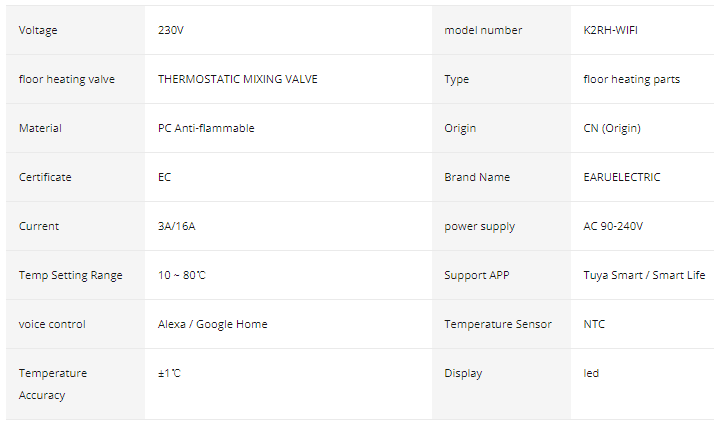
- Component: Nonflammable PC
- AC 230V, 50/60Hz voltage
- 3A/16A Maximum Current Load
- Precision of temperature: 1 °C Temperature Range: 10–80 °C
- Item Dimensions: 86x86mm/3.4×3.4in Power Consumption: 1w
- NTC’s temperature sensor
HOW TO USE
The EARUELETRIC K2H-B WiFi Smart Thermostat is a programmable thermostat that can be controlled using your smartphone or tablet via WiFi. Here are the steps to use the thermostat:
- Install the thermostat: Follow the manufacturer’s instructions to install the thermostat onto your wall and connect the wires.
- Connect to WiFi: Press the “WiFi” button on the thermostat to activate the WiFi setup. Use the EARUELETRIC App to scan the QR code on the thermostat to connect it to your home WiFi network.
- Set up the thermostat: Use the EARUELETRIC App to set up your desired temperature schedule. You can also adjust the temperature manually by using the “+” or “-” buttons on the thermostat.
- Control the thermostat: You can control the thermostat remotely using the EARUELETRIC App on your smartphone or tablet. You can adjust the temperature, change the schedule, and turn the thermostat on or off.
- Monitor energy usage: The EARUELETRIC App allows you to monitor your energy usage and provides reports on your energy consumption.
- Troubleshoot issues: If you encounter any issues with the thermostat, consult the manufacturer’s troubleshooting guide or contact their customer support for assistance.
Note: It is important to read and follow the manufacturer’s instructions carefully to ensure safe and proper use of the EARUELETRIC K2H-B WiFi Smart Thermostat.
Operator action
- To turn the thermostat on or off, press the
 Key.
Key. - Push the M key. m Key to change between automatic and manual modes.
- To access the temporary automatic mode that only lasts a few minutes, hit the A or arrow keys while in automatic mode.
- Press the Key🔼 key to set the clock and the Keys 🔽 key to change the value of each parameter.
- Keep in mind that WiFi models will immediately receive internet time.
- The factory sets the child lock to be off by default. You must select the advanced option to turn on the child lock feature if you wish to use this feature. 5 seconds of long pressing the button will momentarily turn it off.
- mode explanation
 + Additional details Manual floor heating mode
- 🕐+ Information Mode for automatic floor heating
HOW TO OPERATE
The EARUELETRIC K2H-B WiFi Smart Thermostat is a device that allows you to control the temperature of your home remotely using a smartphone app or voice control. Here are the steps to operate the thermostat:
- Install the thermostat: Follow the manufacturer’s instructions to install the thermostat in your home.
- Connect the thermostat to Wi-Fi: Use the app to connect the thermostat to your home Wi-Fi network. This will allow you to control the thermostat from your smartphone.
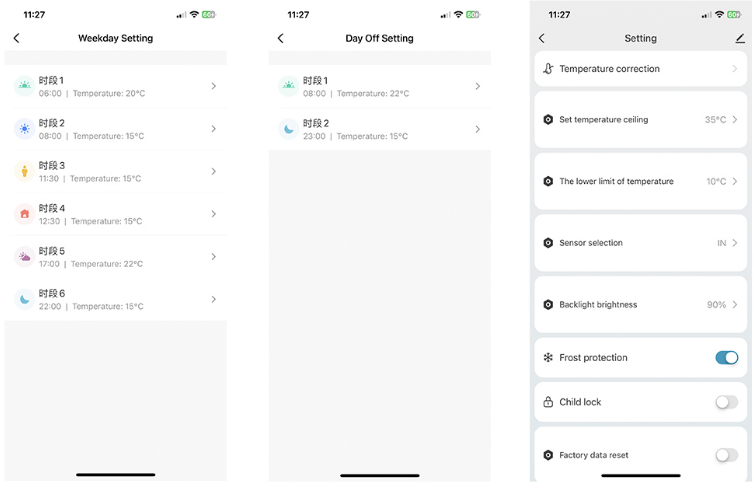
- Set up a schedule: You can set up a schedule for when the thermostat should turn on and off, and what temperature it should be set to. This will help you save energy and money.
- Control the thermostat using the app: Use the app to change the temperature, adjust the schedule, or turn the thermostat on or off.
- Control the thermostat using voice commands: If you have a voice assistant like Amazon Alexa or Google Assistant, you can control the thermostat using voice commands.
- Monitor energy usage: Use the app to monitor your energy usage and see how much you’re saving.
Overall, the EARUELETRIC K2H-B WiFi Smart Thermostat is an easy-to-use device that can help you save money and energy by allowing you to control the temperature of your home remotely.
Programming guidelines during the period
When in shutdown mode, long-press the M. m. key + More Info key, then press the M. m. key to switch options, the🔼 A or key 🔽to change the settings, and the key to exit with economy.
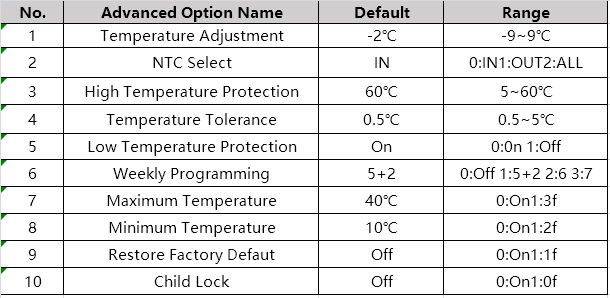
Advanced setup options
To access advanced option setting while in shutdown mode, press the M. m. key 🔽 and the key simultaneously for 5 seconds.
Hit the M key. Press the m Key to access the following option, the A key🔼 and 🔽 the Key to adjust, and the 🔽Key to leave the advanced option.
PRODUCT PARAMETERS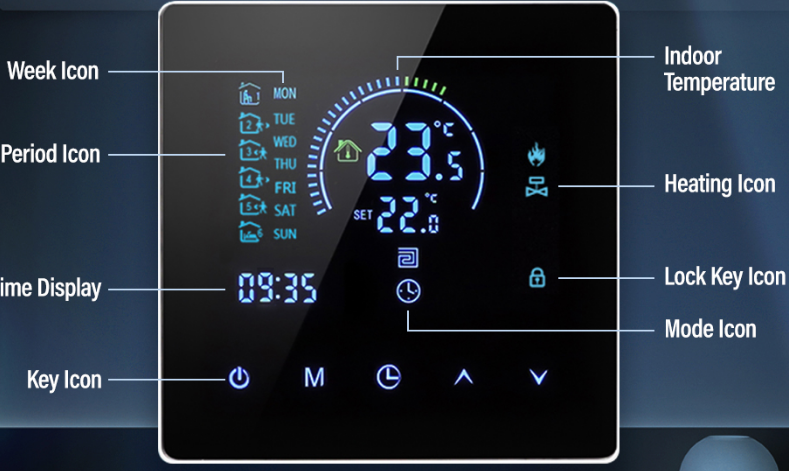
Programming Features
111 5+216+1/7 Days, Supports Various Time Period Settings, And Regulates Temperature In 6 Periods Daily.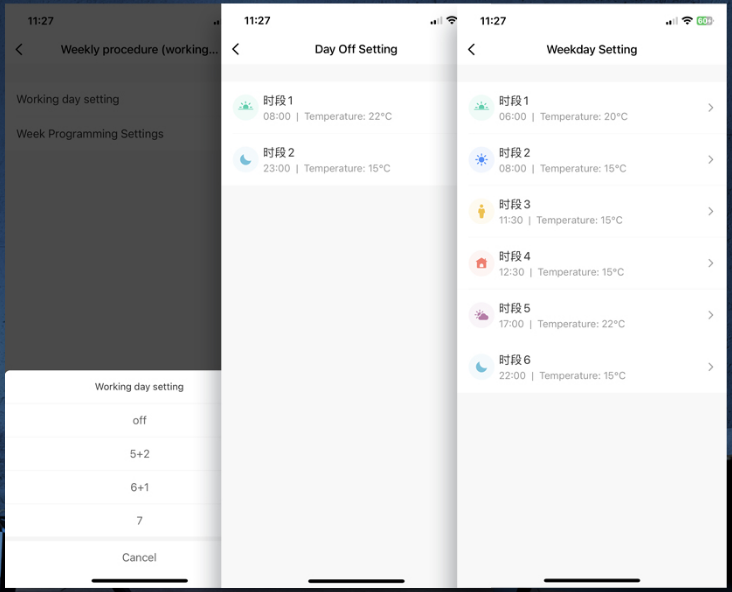
Freel Controllable Relaxing Temperature Intelligent Wifi Floor Heating Thermostat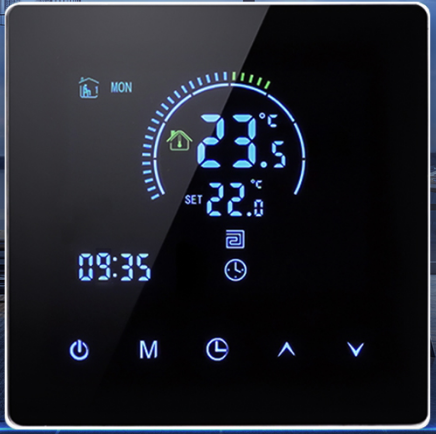
Small Voice Control and the Graffiti App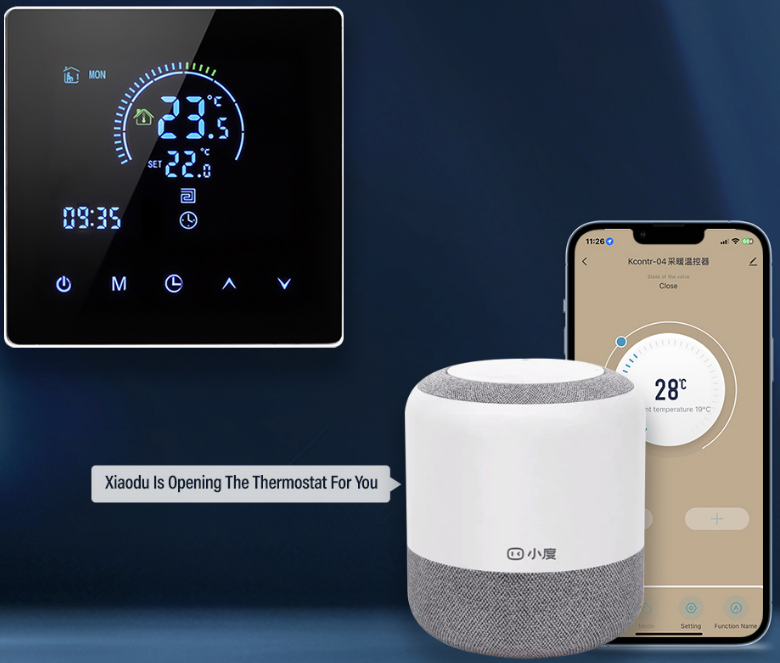
Internet connection
Once the WiFi icon has been visible on the thermostat display for five seconds by pressing and holding the🔽🔼 button, the icon🔼 will flash (slow flash) and the thermostat will enter the code matching state.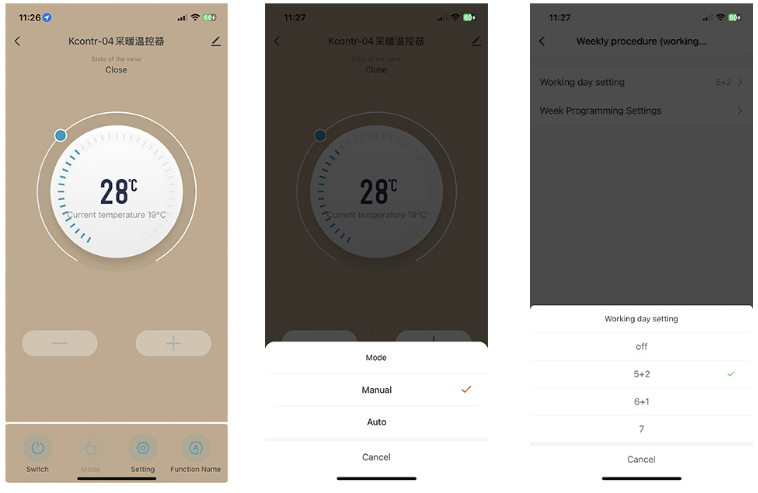
Dimensions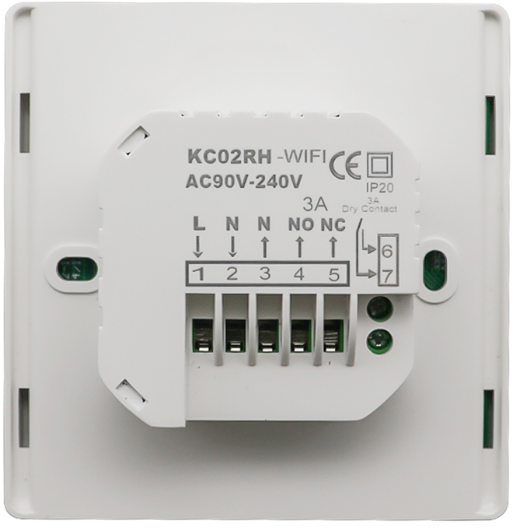
FAQS
- What is the EARUELETRIC WiFi Smart Thermostat?
The EARUELETRIC WiFi Smart Thermostat is a smart home device that allows you to control the temperature of your home remotely using your smartphone, tablet, or computer. - How does the EARUELETRIC WiFi Smart Thermostat work?
The EARUELETRIC WiFi Smart Thermostat works by connecting to your home’s WiFi network and allowing you to control your home’s temperature using the EARUELETRIC app. - What are the features of the EARUELETRIC WiFi Smart Thermostat?
The EARUELETRIC WiFi Smart Thermostat has a variety of features, including the ability to set schedules, control your home’s temperature remotely, and receive alerts when your home’s temperature changes. - Is the EARUELETRIC WiFi Smart Thermostat compatible with my heating and cooling system?
The EARUELETRIC WiFi Smart Thermostat is compatible with most heating and cooling systems, including gas, oil, electric, and radiant heating systems. However, it is always recommended to check the compatibility of your system before purchasing a smart thermostat. - Does the EARUELETRIC WiFi Smart Thermostat require professional installation?
The EARUELETRIC WiFi Smart Thermostat can be installed by anyone with basic electrical knowledge. However, if you are not comfortable with installing it yourself, it is recommended to hire a professional electrician. - Can I control multiple EARUELETRIC WiFi Smart Thermostats in different rooms?
Yes, you can control multiple EARUELETRIC WiFi Smart Thermostats in different rooms using the EARUELETRIC app. - Is the EARUELETRIC WiFi Smart Thermostat compatible with voice assistants like Amazon Alexa or Google Assistant?
Yes, the EARUELETRIC WiFi Smart Thermostat is compatible with Amazon Alexa and Google Assistant, allowing you to control your home’s temperature using voice commands. - Can the EARUELETRIC WiFi Smart Thermostat save me money on my energy bills?
Yes, the EARUELETRIC WiFi Smart Thermostat can help you save money on your energy bills by allowing you to set schedules and adjust your home’s temperature remotely, which can help reduce energy waste.
