E-TOP HT-09 16A Smart Wifi Digital Thermostat

INTRODUCTION
Thermostat HT-09 is a smart, voice-activated WiFi programmable thermostat that can be managed by Amazon Alexa and Google Assistant. The intelligent thermostat will automatically start or stop the controlled item, such as a valve, a heating floor, a heating wall, an electric heater, etc., depending on the current temperature. A contemporary and clever gadget created to manage and regulate the temperature of your heating and cooling systems is the E-TOP HT-09 16A Smart Wifi Digital Thermostat. For your home or workplace, it offers simple and effective temperature control with to its smart features and WiFi connection.
SPECIFICATION
| Display | LCD display |
| Protocol | WIFI, Zigbee, Modbus,RS485, Bacnet |
| Power Supply | 230Vac,50/60Hz |
| Set Temp. Range | 5~35 ℃ |
| Ambient Temp. | 0~50 ℃ |
| Relative Humidity | 85% |
| Accurancy | ±0.5 ℃ |
| Backlight | White |
| Sensor | NTC 10K |
| Programmability | 7 days 4 periods ( Customizable) |
| Optional Function | Clock, Keycard, External Sensor etc. |
| Protection Class | IP30 |
| Max Load | 16A |
| Material | ABS+PC (Rohs certificated) |
| Certificate | CE(RED/EMC/LVD), Rohs |
| Housing | ABS to UL94-5 fire retardant plastic |
| OEM & ODM | 1. Customized logo and package |
| 2. Customzied software ( change to customer’s user interface and control logic) | |
| 3. Customized hardware ( change the PCB and schematic based on the request) |
FEATURES
The E-TOP HT-09 16A Smart Wifi Digital Thermostat has the following notable features:
- WiFi Connectivity: You may use a smartphone app or other compatible devices to operate the thermostat remotely by connecting it to your home or workplace WiFi network. This function gives you the freedom and convenience to change the temperature settings from any location.
- Digital Display: The thermostat has a clear, easily readable digital display that displays the set temperature, the current temperature, and other pertinent data. Usually, the display has backlighting to improve viewing even in dim light.
- Temperature Programming: To fit your daily schedule, you may program the thermostat with a preferred temperature schedule. To ensure comfort and energy economy, this function enables you to program various temperatures at certain periods of the day. You may, for instance, reduce the temperature while you’re gone then boost it when you get back.
- Energy Efficiency: The thermostat has energy-saving functions that may help you use less energy and pay less for utilities. Based on your preferences and occupancy patterns, it can change the temperature automatically to maximize energy efficiency without sacrificing comfort.
- The E-TOP HT-09 16A Smart Wifi Digital Thermostat is suitable for use with a variety of heating and cooling systems, including electric, water, and gas boilers. It is appropriate for a variety of settings since it supports both single-stage and multi-stage systems.
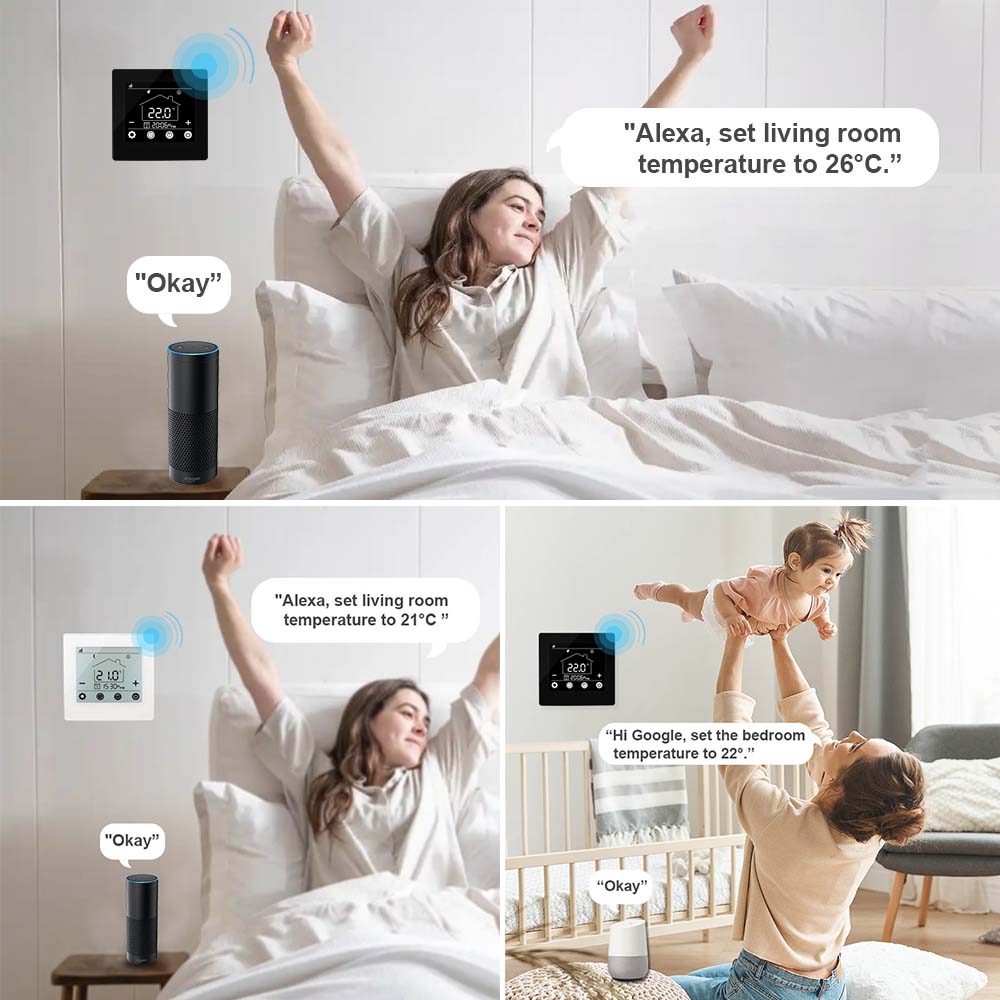
- Speech Control: The thermostat often works with well-known speech assistants like Google Assistant or Amazon Alexa. Giving you voice commands to regulate the temperature settings, enhances the ease of your smart home environment. The thermostat normally has an intuitive and user-friendly interface that makes it simple to go through the settings and make any changes.
- For a smooth user experience, several versions have touchscreen capabilities.
- The E-TOP HT09 16A Smart Wifi Digital Thermostat may often be combined with other smart home products and platforms in addition to voice control.
- This enables you to design automation scenarios and routines, such as changing the thermostat when you enter or leave your house or coordinating with other smart devices for improved comfort and energy savings.
- It’s important to keep in mind that the E-TOP HT-09 16A Smart Wifi Digital Thermostat’s precise model and manufacturer may affect its unique features and functionalities.
- It is advised to refer to the product manual or the manufacturer’s website for comprehensive details and guidelines on how to operate the thermostat correctly.
Alexa Voice Mode
- Remote voice control temperature.
- Bring you a more comfortable and convenient life.
- Ultra-high-precision temperature control brings you the ultimate enjoyment
Wifi Remote Control
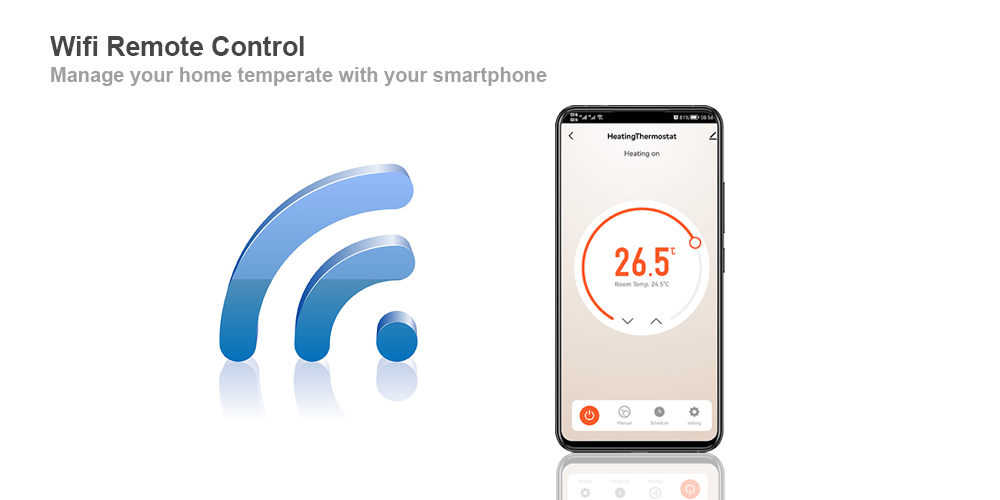
Mobile APP remote one-key control
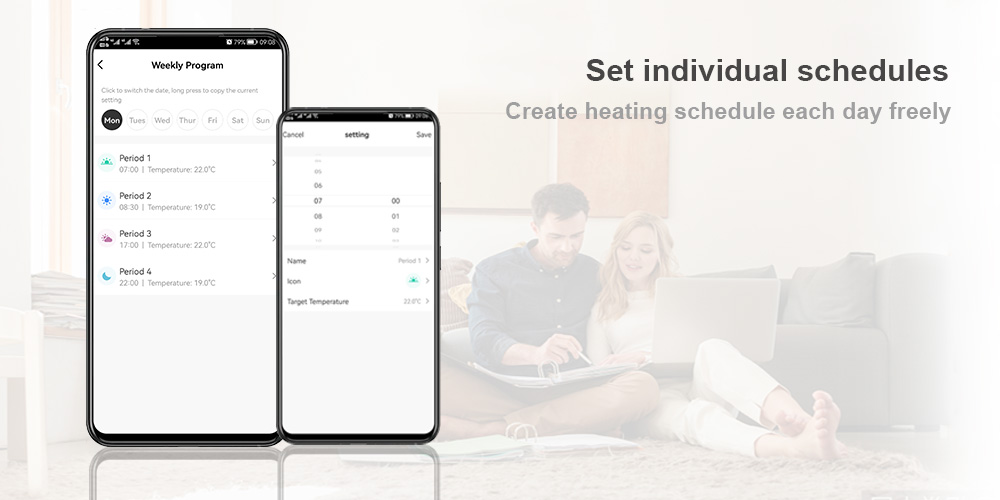
- Customize different schedules according to your habits
- One phone, to adjust all the temperatures
Open Window Detection
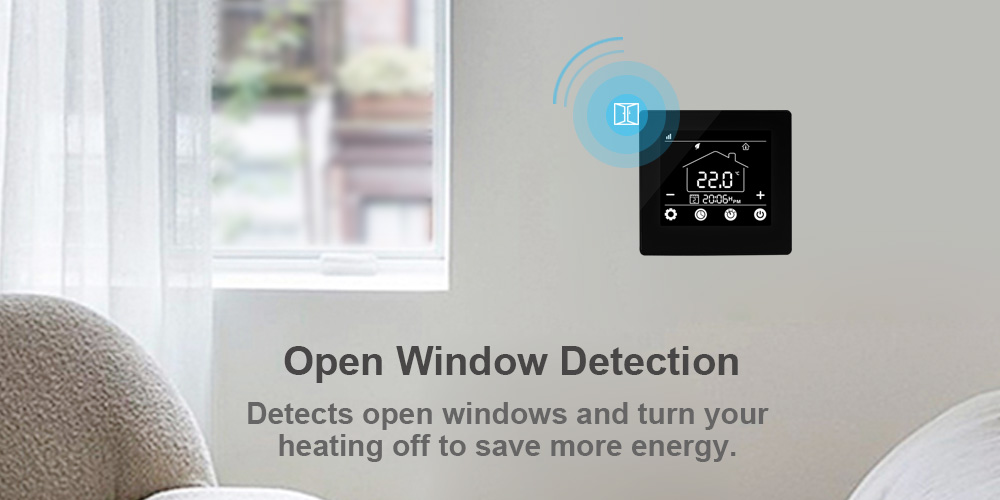
- Details determine success or failure
- Worried about accidentally touching it?
Child Lock Helps you
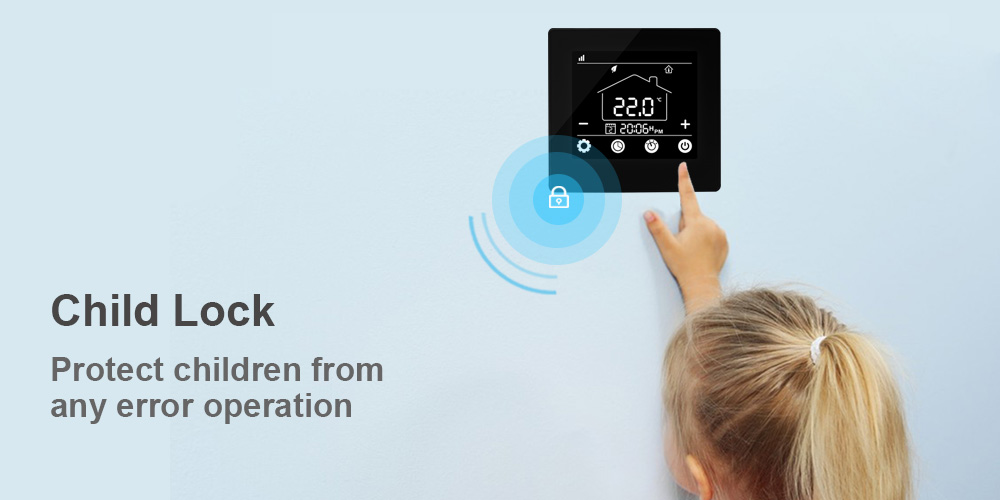
Intelligence is not just talk, we are committed to every detail and hope to bring you the most comfortable home environment.
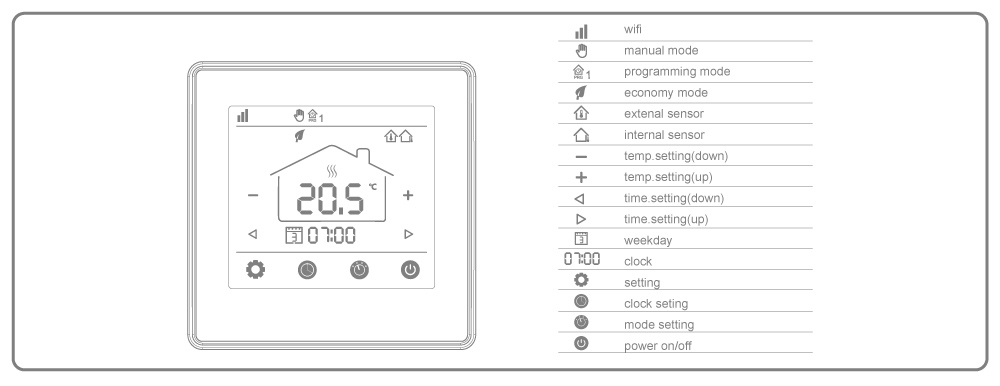
Product Display
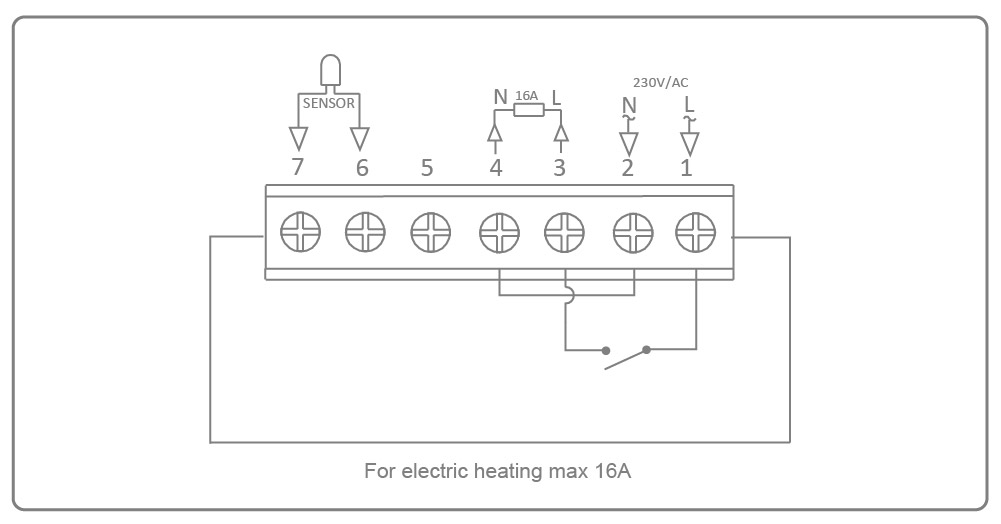
Wiring Diagram
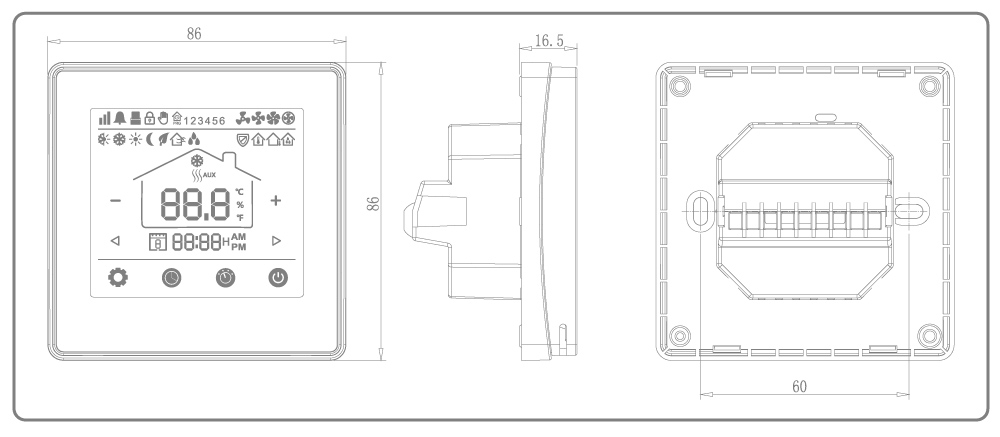
DIMENSION
HOW TO OPERATE
Please follow these instructions to use the E-TOP HT-09 16A Smart WiFi Digital Thermostat:
- Installation: Check that the thermostat is installed properly and in accordance with the manufacturer’s instructions before moving on. Make sure the power supply is connected and that it is firmly fixed on the wall.
- Power up: Start the thermostat’s power supply. Install the thermostat’s companion mobile app from the App Store or Google Play Store to set up WiFi. Open the app and register if necessary. To link the thermostat to your home WiFi network, according to the instructions in the app. During this procedure, make sure your tablet or smartphone is logged onto the same WiFi network.
- Pairing: Use the app to link your smartphone or tablet with the thermostat when it has connected to your WiFi network. You may use this to remotely regulate the thermostat.
- Temperature settings: To select the preferred temperature, use the app or the actual buttons on the thermostat. The UI of the app will normally allow you to change the temperature up or down using a slider or buttons. The physical thermostat often has buttons or a touch screen for temperature adjustment. Establish a heating or cooling schedule in accordance with your preferences. The majority of smart thermostats let you select various temperatures for various times of the day or days of the week. By doing this, you may maximize your use of energy while maintaining a cozy atmosphere when you need it.
- Remote control: You can operate the thermostat remotely if it is WiFi-connected and synced with your smartphone.
- Utilize the mobile app to modify the schedule, alter the temperature, or check the humidity and temperature levels. Explore any other features or settings that the thermostat may provide. This can include activating geofencing to automatically alter the temperature depending on your location, creating a vacation mode, or connecting with other smart home appliances.
- Troubleshooting: Refer to the user manual or get help from the manufacturer if you run into any problems. They will be able to provide you with more information or walk you through particular troubleshooting techniques.
FAQS
The E-TOP HT-09 16A Smart WiFi Digital Thermostat is what, exactly?
A WiFi connection is used by the E-TOP HT-09 16A Smart WiFi Digital Thermostat to let you configure and manage the temperature settings of your heating and cooling system.
How does the E-TOP HT-09 thermostat establish a WiFi connection?
The mobile app that comes with the E-TOP HT-09 thermostat is used to connect it to WiFi. To remotely operate it, you may link it to your home WiFi network. What kinds of heating and cooling systems are compatible with the E-TOP HT-09?
The majority of typical heating and cooling systems, including electric, gas, oil, and air conditioning systems, are compatible with the E-TOP HT-09 thermostat.
Can I use my smartphone to operate the E-TOP HT-09 thermostat?
You may use the specialized mobile app on your smartphone to operate the E-TOP HT-09 thermostat.
You may remotely change the temperature settings and make routines.
Do you have voice control capabilities for the E-TOP HT-09 thermostat?
The voice control feature is supported by the E-TOP HT-09 thermostat. You can use it with voice commands thanks to its compatibility with well-known voice assistants like Amazon Alexa and Google Assistant.
Can I program several temperature schedules for various days of the week?
Yes, you may set up several temperature programs for each day of the week using the E-TOP HT-09 thermostat. The settings may be altered to suit your tastes.
A built-in display is included on the E-TOP HT-09 thermostat, correct?
A built-in digital display that indicates the current temperature, the set temperature, and other pertinent data is included on the E-TOP HT-09 thermostat, thus the answer is yes.
The E-TOP HT-09 thermostat’s vacation mode, does it have one?
The E-TOP HT-09 thermostat does indeed include a vacation mode. To conserve energy, you may set it at a certain temperature while you’re gone for a long time.
Can I use the E-TOP HT-09 thermostat to keep an eye on how much energy I’m using?
You can track your energy use with the E-TOP HT-09 thermostat’s mobile app. It gives you information about your heating or cooling habits and aids in maximizing energy efficiency. Is there a function for calibrating the temperature on the E-TOP HT-09 thermostat?
The E-TOP HT-09 thermostat has a temperature calibration function that enables you to precisely match the displayed temperature to the interior space’s real temperature.
Are 2.4 GHz and 5 GHz WiFi networks compatible with the E-TOP HT-09 thermostat?
2.4 GHz WiFi networks are the only ones that function with the E-TOP HT-09 thermostat. For effective connection, verify that the frequency of your home network is configured appropriately. Can I use a single mobile app to operate numerous E-TOP HT-09 thermostats?
Multi-zone heating and cooling systems may benefit from the mobile app’s straightforward simultaneous control and management of several E-TOP HT-09 thermostats.
Does the E-TOP HT-09 thermostat have a display backlight?
A backlight for the display enables viewing even in dim lighting on the E-TOP HT-09 thermostat.
Is the E-TOP HT-09 thermostat compatible with other smart home appliances?
Integration with other smart home appliances is supported by the E-TOP HT-09 thermostat. It may be controlled using automation procedures in addition to other suitable devices.
Does a professional installation of the E-TOP HT-09 thermostat need to be done?
The majority of consumers can install the E-TOP HT-09 thermostat on their own without expert help. To guarantee correct setup and performance, it’s advised to obtain expert assistance if you are uncertain about or uncomfortable with the installation procedure.
