DWYER TLVT1 Digital Touchscreen Programmable Thermostat
Introduction
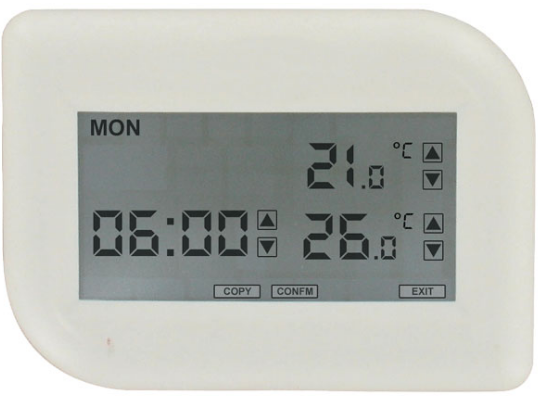
- Weekday and weekend programs; 4 events per day
- Large touch LCD display
- Two-stage heating and cooling control
- Security code setting protection
- Filter and energy use timer
Commercial or residential indoor temperature control
| MODEL CHART | |
| Model | Description |
| TLVT1 | LCD touch screen programmable thermostat |
| ACCESSORIES | |
| Model | Description |
| TG-1 | Large thermostat cover |
| TG-2 | Small thermostat cover |
Specification
- Turn off any electrical devices (e.g. heater, cooler) that are connected to the unit before installation and maintenance.
- The installer must be a trained service engineer.
- Disconnect the supply before battery replacement.
- Do not dispose the used up battery with the household waste. Please refer to your local area for proper disposal.
- It must be mounted on a dry clean indoor plac
- Thermostat / Heat-pump Selection (software selectable)
- Fan On / Auto
- Battery Powered (2 “AA” alkaline batteries)
- 7-day (Monday to Sunday), 4-timezone section and temperature program settings
- Temperature display in oF or oC
- Temperature Measurable Range : 32 ~ 99oF / 0 ~ 40oC
- Program Copy for fast programming
- EEPROM stores heat and cool program settings
- Program Override Mode (Temporary / Permanent)
- Real clock in 12 hr / 24 hr
- Filter, energy and UV lamp usage record
- Adjustable interval time for filter, energy and UV usage
- Energy Saving Index
- Defrost function
- Cleaning Screen mode
- Calendar
- Holiday Mode
- Security Mode
Wiring
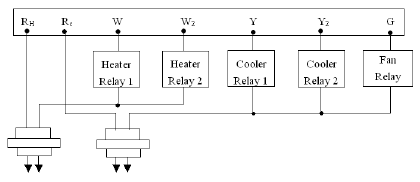
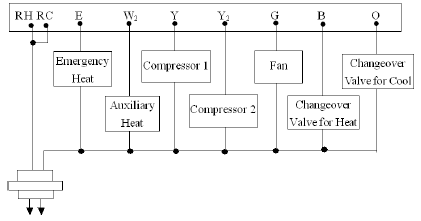
- When two-transformer system is used, connect the wires to RH and RC accordingly to the diagram shown.
- When single-transformer system is used, connect RH and RC together.
- There are two wiring configurations: thermostat or heat-pump.
- Please select the configuration to be used and then connect the appliances accordingly
Thermostat
| Terminals | Device |
| RH | 24Vac supply for heater |
| RC | 24Vac supply for cooler |
| W | 1st stage heating |
| W2 | 2nd stage heating |
| Y | 1st stage cooling |
| Y2 | 2nd stage cooling |
| G | Fan |
Heat-pump
| Terminals | Device |
| RH | 24Vac supply |
| RC | |
| E | Emergency Heat |
| W2 | Auxiliary Heat |
| Y | 1st stage compressor |
| Y2 | 2nd stage compressor |
| G | Fan |
| B | Changeover valve for heat |
| O | Changeover valve for cool |
Mounting
Base housing
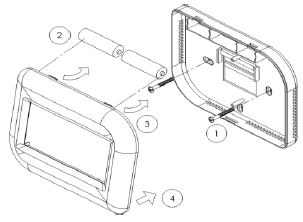
- Adjust the base on the wall or junction box and ensure the base is at surface level and cover the junction box comfortably.
- If necessary, pull the cables out at the middle hole of the base.
- If necessary, place the 2 pcs of wall anchors at the wall.
- Fasten the base with the 2 pcs of long screws.
- Place the cables at the hole near the terminal block.
- Insert 2 AA batteries into the battery case on the thermostat (Please observe polarity).
- Hold the thermostat on the base. Align the screw blocks with the pins on the back of the thermostat.
- Push the thermostat straight onto the base until snaps into place.
Setup Mode
There are 10 settings in the setup mode:
- Calendar
- 12 / 24 hour selection
- oC / oF display selection
- HE / HG selection
- Thermostat / Heat-pump selection
- Control system selection
- Span and Differential selection
- Delay / Long Delay selection
- DST (Daylight Saving Time) Selection
- Screen lock selection
To enter setup mode, press and hold SYSTEM for 5 seconds. In setup mode, press EXIT to discard changes made to current setting and exit setup mode. Press CONFM to apply changes and proceed to next setting.
Set Calendar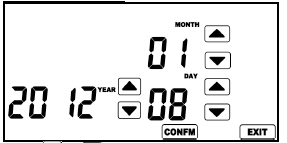
- Press
 to change year, month and day accordingly.
 - Press CONFM to apply changes and proceed to next setting.
12/24 hour
- Press to toggle between 12 and 24 hour mode.
- Press CONFM to apply changes and proceed to next setting.
oC / oF Selection
- Press to toggle between oC or oF temperatuire unit.
- Press CONFM to apply changes and proceed to next setting.
HE / HG Selection
- Press toggle between HE / HG selection.
- Press CONFM to apply changes and proceed to next setting.
- When fan is in auto mode and HE is selected, fan will be turned on as long as heater / cooler is turned on.
- When fan is in auto mode and HG is selected, fan will only be turned on during cool mode.
| HE | HG | |
| Heat On | Fan On | Fan Off |
| Cool On | Fan On | Fan On |
Thermostat / Heat-pump
Press to toggle between thermostat and heat-pump selection.
- “th” represents thermostat.
- “HP represents heat-pump.
- Press CONFM to apply changes and proceed to next setting.
Control System Selection
- Press / to toggle between control system selection.
- Press CONFM to apply changes and proceed to next setting.
- Selectable configurations are shown as follow
Thermostat
| Configuration | Display | Terminal Conection |
| 1 heat 1 cool | 1H1C | RH, RC, W, Y |
| 1 heat 2 cool | 1H2C | RH, RC, W, Y, Y2 |
| 2 heat 1 cool | 2H1C | RH, RC, W, W2, Y |
| 2 heat 2 cool | 2H2C | RH, RC, W, W2, Y, Y2 |
Heat-pump
| Configuration | Display | Terminal Conection |
| 1 heat 1 cool | 1H1C | RH, RC, Y,, B, O |
| 2 heat 2 cool | 2H2C | RH, RC, Y, Y2, B, O |
| 2 heat 2 cool Axuliary heat |
3H2C |
RH, RC, W2, Y, Y2 |
Span and differential Selection
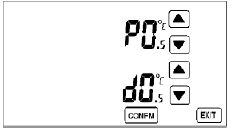
- P” represents span setting.
- “d” represents differential setting.
- Span and differential setting units will be changed according to the temperature unit selected by user.
- The selectable values are 0.5°C(1°F) / 1.0°C(2°F) / 1.5°C(3°F).
- The default span and differential settings are 0.5oC / 1oF.
- Press to change the values. Press CONFM to apply changes and proceed to next setting.
Delay / Long Delay Selection
- Press to toggle between delay and long delay selection.
- Press CONFM to apply changes and proceed to the next setting.
- Delay for heat / cool on to prevent short cycling of system that may damage the appliance.
- “dE” represents delay. “L dE” represents long delay
| Delay | Long delay | |
| Heat mode | 5~10 sec | 4~5 min |
| Cool mode | 4~5 min | 4~5 min |
DST (Daylight Saving Time)
- Press to toggle on/off of the DST function.
- The DST used is based on USA time-zone
Secure Lock Selection
- Press to enable(ON) or disable(OFF) the security lock. If it is enabled, user is required to input a 4-digits password
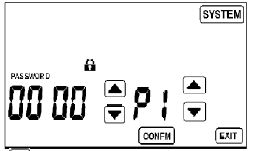
- Press on the left to change the password. P1 indicates that the 1st digit password (read from left) is selected. Press on the right to select the digit
- After setting all 4 digits, press CONFM to activate the security mode.
- When security mode is activated, “ ” is shown on the LCD and all keys are disabled expect SYSTEM.
- If the password is 8888, all settings will restore to default upon pressing CONFM.
Disable the security lock
- Press SYSTEM and user is required to enter the correct password.
- If the password is correct, the security lock will be disabled.
- Otherwise, it remains locked.
- Security Lock cannot be maintained once power is lost
View Calendar
- Press the current weekday to view current date.
- Press EXIT to exit the viewing.
Clock Setting
- Press CLOCK to enter the clock setting mode.
- Firstly, the hour is shown. Press to change the hour. Press CONFM to save the setting.
- Then, the minute is shown. Press to change the minute. Press CONFM to save the setting and exit clock setting.
Clean Screen Mode
- Press CLEAR to enter the cleaning screen mode.
- The screen will show a 20-second countdown immediately after the key press.
- During countdown, all keys are disabled.
- When countdown reaches zero, press EXIT to exit clean screen mode, or press CLEAR to repeat the countdown
Usage
TLVT1 can record the Filter, UV and energy usage. These counters count hourly. Each count is 4 digits long (0~9999). Filter usage counts when the fan is turned on; UV usage counts as long as TLVT1 is powered on. Energy usage counts when heater / cooler is turned on. When the counts reach the set limit, the corresponding usage icon will be shown on the screen.
View Usage
- Press USAGE to enter the usage mode.
- Filter, UV and Energy counter are shown alternatively by pressing USAGE.
- Press CLEAR to clear the current counter records.
- Press EXIT to exit the usage mode.
Adjusting Usage limit
- Press and hold USAGE for 3 seconds during the usage mode.
- Press to change the internal time (0~9999).
- Press CONFM to save the setting.
- Press EXIT to exit the limit setting.
Defrost
When the room temperature is below 5 oC / 41 oF, HEATER will always be turned ON and COOLER will be turned OFF irrespective of the current control temperature set. 2nd stage heater, emergency and auxiliary heater may be turned on depending on the control system configuration. “  ”Defrost indicator will be shown on screen.
Program mode
Default programs are as the below:
Heat settings :
| Wake | Out | Back | Sleep | |
| Mon | 6:00
(21 oC/70 oF) |
8:00
(16 oC /61 oF) |
18:00
(21 oC /70 oF) |
22:00
(16 oC /61 oF) |
| Tue | 6:00
(21 oC /70 oF) |
8:00
(16 oC /61 oF) |
18:00 (21 oC /70 oF) | 22:00 (16 oC /61 oF) |
| Wed | 6:00
(21 oC /70 oF) |
8:00
(16 oC /61 oF) |
18:00 (21 oC /70 oF) | 22:00 (16 oC /61 oF) |
| Thu | 6:00
(21 oC /70 oF) |
8:00
(16 oC /61 oF) |
18:00 (21 oC /70 oF) | 22:00 (16 oC /61 oF) |
| Fri | 6:00
(21 oC /70 oF) |
8:00
(16 oC /61 oF) |
18:00
(21 oC /70 oF) |
22:00
(16 oC /61 oF) |
| Sat | 6:00
(21 oC /70 oF) |
10:00 (16 oC /61 oF) | 18:00 (21 oC /70 oF) | 23:00 (16 oC /61 oF) |
| Sun | 6:00
(21 oC /70 oF) |
10:00 (16 oC /61 oF) | 18:00 (21 oC /70 oF) | 23:00 (16 oC /61 oF) |
Cool setting:
| Wake | Out | Back | Sleep | |
| Mon | 6:00
(26 oC /79 oF) |
8:00
(29.5 oC /85 oF) |
18:00
(26 oC /79 oF) |
22:00
(28 oC /82 oF) |
| Tue | 6:00
(26 oC /79 oF) |
8:00
(29.5 oC /85 oF) |
18:00
(26 oC /79 oF) |
22:00
(28 oC /82 oF) |
| Wed | 6:00
(26 oC /79 oF) |
8:00
(29.5 oC /85 oF) |
18:00
(26 oC /79 oF) |
22:00
(28 oC /82 oF) |
| Thu | 6:00
(26 oC /79 oF) |
8:00
(29.5 oC /85 oF) |
18:00
(26 oC /79 oF) |
22:00
(28 oC /82 oF) |
| Fri | 6:00
(26 oC /79 oF) |
8:00
(29.5 oC /85 oF) |
18:00
(26 oC /79 oF) |
22:00
(28 oC /82 oF) |
| Sat | 6:00
(26 oC /79 oF) |
10:00 (29.5 oC /85 oF) | 18:00 (26 oC /79 oF) | 23:00 (28 oC /82 oF) |
| Sun | 6:00
(26 oC /79 oF) |
10:00 (29.5 oC /85 oF) | 18:00 (26 oC /79 oF) | 23:00 (28 oC /82 oF) |
- Press PROG to enter the program mode.
- Default start from “MON” and “WAKE”.
- Current program of setting is without
- Press / to change the time, heat and cool setting temperature.
- Press EXIT to go back to normal mode.
- Press CONFM to save setting and go back to normal mode.
- Press COPY to copy the program.
- During copying, the heat and cool setting temperatures are not set but still can be checked by pressing WAKE, OUT, BACK and SLEEP.
- Press the other days to copy the program. The days that are copied will also be without
Override mode
- Press to select permanent override, temporary override and program.
- Default heat and cool setting temperature for override and permanent override mode is 26 oC / 79 oF.
- Press to change the override setting temperature in heat and cool mode respectively.
- Temporary override mode returns to normal mode when new program starts if override time does not set.
Holiday Mode
- Select system to temporary override.
- Press and hold OVERRIDE for about 3 seconds to enter holiday mode setting.
- User may set the time interval for the holiday mode duration. Value on the left refers to number of hours and that on the right refers to number of days.
- Press to adjust the values.
- Press CONFM to apply changes, or EXIT to discard changes.
- When holiday mode is activated, OVERRIDE flashes.
- The thermostat will keep using the current setting temperature until the holiday time duration reaches zero. It then returns to program mode.
- To disable holiday mode, any one of the three methods can be done.
- Change system to permanent override mode.
- Change system to normal mode.
- Set the holiday time interval to zero.
System setting
- In Normal mode, press and release SYSTEM to enter system mode.
- User may set the system used by pressing SYSTEM.
It follows the sequence below:
| (HEAT EM) à HEATà COOLà AUTOà OFFà HEAT | |
| HEAT
EM |
It is the same as HEAT mode, except that it would turn
on emergency heat instead of compressor ( Heat-pump |
| MODE | only ). |
| HEAT MODE | Heating appliances will be activated when the room temperature is lower than the setting temperature. |
| COOL MODE | Cooling appliances will be activated when the room temperature is higher than the setting temperature. |
| AUTO
MODE |
The unit will use the current heat and cool setting
temperature to turn on heating or cooling appliances. |
| OFF
MODE |
No heating and Cooling will be activated at any
temperature. |
- LO” will be shown on the screen when room temperature is below 0 oC / 32 oF.
- “HI” will be shown on the screen when room temperature is above 40 oC / 99 oF.
- When one appliance is turned on, will be shown on the screen as indication.
- Similarly, will be shown on the screen when second appliance is turned on.
Emergency Heat
When it is activated, “EM.” will be shown on the screen.
Auxiliary Heat
When it is activated, “AUX” will be shown on the screen
FAN mode
- Press FAN to enter fan mode. In the fan mode, press FAN to toggle the Fan controls (FAN ON or FAN AUTO).
- FAN ON: Fan stays on all the time.
- FAN AUTO: Fan turns ON whenever heating or Cooling is on (Depends on HE/HG setting
Energy saving index
The energy saving index is calculated based on the setting of your program. It is used as a reference for the user to know how likely the program is to conserve energy or consume more. If the user sets a comfort program setting, the appliances are likely to be turned on a lot and “LOSE” may be shown on the screen. If the appliances are less likely to be turned on, “SAVE” may be shown on the screen. The likelihood of saving energy or losing energy is converted to a percentage value for reference. If the value is higher than 99%, “HI” will be shown instead.
Low battery
If the voltage batteries drop below 2.7V, icon will be on.
Electrical Interface
- Temperature measurement: 0~40 oC / 32~99 oF
- Control temperature range: 5~35 oC / 41~95 oF
- Temperature resolution: 0.5 oC 1 oF
- Temperature accuracy: ±0.5 oC / ±1 oF
- Battery: 2 AA alkaline battery
- Relay contact Voltage: 24Vac 50/60Hz
- Relay contact Current: 1A Max
REFERENCE
DOWNLOAD MANUALS:
DWYER TLVT1 Digital Touchscreen Programmable Thermostat User Manual

DWYER TLVT1 Digital Touchscreen Programmable Thermostat User Manual