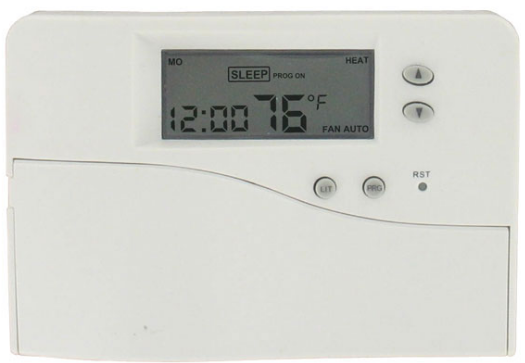
DWYER LVT2 Digital Programmable Thermostat
Installation
Installation Location
The thermostat is restricted to be used indoors only. It should be mounted on an inner wall about 1.5m above the floor at a position where it is readily affected by changes of the general room temperature with freely circulating air. Avoid mounting above or near hot surfaces or equipment (e.g. TV, heater, refrigerator). Avoid mounting where it will be exposed to direct sunshine, drafts, or in a laundry room or other enclosed space. Do not expose this unit to dripping or splashing.
Wiring
- Be sure main switch is at the middle (OFF) position, and fan switch is at the (FAN AUTO) position.
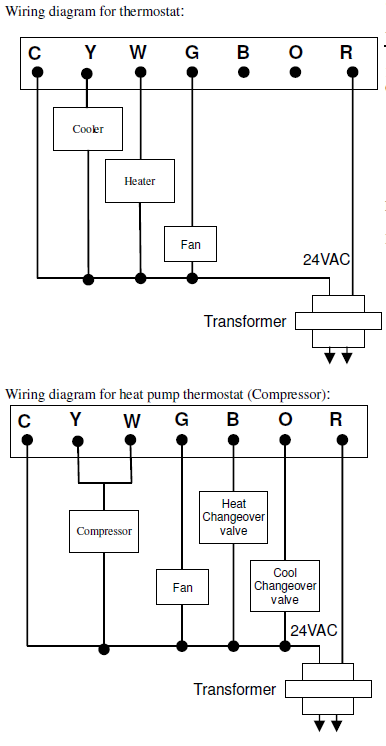
- Wire the proper cables at the terminal block according to the circuit diagram.
- Afterward, push all cables back into the wall.
- Do not use metal conduit or cable provided with a metal sheath.
- It is recommended to add fuse or protective device in the line circuit
Mounting:
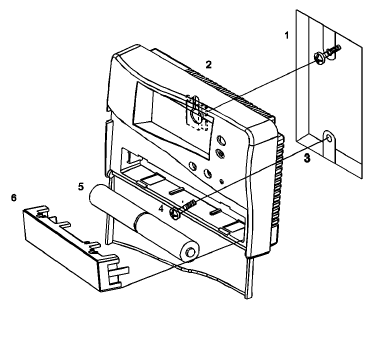
Using the accessory screws and wall anchors provided, mount the thermostat with the key-hole at the back. The thermostat should be mounted on the wall
Electrical Interface:
| Terminals | Symbol |
| Switched Side, 24 VAC | R |
| Reversing Valve (Cool) | O |
| Reversing Valve (Heat) | B |
| Fan | G |
| Heating Output | W |
| Cooling Output | Y |
| Unswitched Side,24 VAC | C |
Feature list
- Operates on 1 stage Heat and 1 stage Cool
- 2 programs (Mo-Fr, Sa-Su)
- 4 Separate Time and Temperature Settings for each program
- Heat and Cool set-points for each program
- Battery powered (2 “AA” alkaline batteries)
- Low battery indicator
- EEPROM stores heat and cool program settings
- Temperature display in °F or °C
- Temporary program override
- Permanent program override
- Short cycle protection
- Adjustable filter usage counter
- Adjustable energy usage counter
- Adjustable temperature control span
- LCD backlighting
- Defrost function
User Interface
Slide switch select System Mode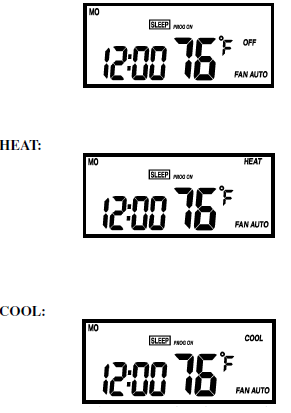
Push Button
| Symbol | Description |
| ▲ | Up |
| ▼ | Down |
| PRG | Enter to Program & Permanent Override
mode, Release Temporary Override |
| LIT | To turn on the LCD backlight |
| D/T | Set time and date |
| TEMP | Read and Set temperature control options |
| USAGE | Read and Set System Usage time |
| RTN | Confirm and Return |
Select Fan Mode
Use the Fan slide switch to select Fan mode.
FAN AUTO
Fan turns on whenever Heating or Cooling is on.
FAN ON:
Fan stays on all the time.
Jumpers
Remove the bottom housing; the jumpers are at the circuit board. Press the[RST] button, the thermostat is required if the jumper is changed.
- Temperature Unit Selection (C/F)
- C – temperature unit displays °C.
- F – temperature unit displays °F.
The program will be restored to default setting when the setting is changed.
- Electric Heat (HE) / Gas Heat (HG) Selection
- HE – fan auto control for electric heat.
- HG – fan auto control for gas heat.
Delay Switch
Delay / No Delay switch at the back:
- Heater Cooler
- No Delay 10 sec 4 mins
- Delay 4 mins 4 min
Operation
Normal Mode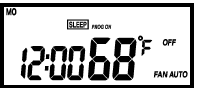
Time Setting
- Press [D/T], the day icon starts flashing. Use the [
 ] keys to set the day.
 - Press [D/T], the hour digits start flashing. Use the [] keys to set hour.
- While hour digits are flashing, press the [TEMP] key to toggle between 12-hour and 24-hour time mode.
- Press [D/T], the minute digits start flashing. Use the [] keys to set minute.
- Press [RTN] to confirm time settings; Press [D/T] to loop back to set minutes.
Programming
| Event | Time | Heat | Cool | |
| MO – FR | WAKE | 6:00 AM | 70 °F (21°C) | 78 °F (26°C) |
| OUT | 8:00 AM | 62 °F (17°C) | 85 °F (29.5°C) | |
| BACK | 6:00 PM | 70 °F (21°C) | 78 °F (26°C) | |
| SLEEP | 10:00 PM | 62 °F (17°C) | 82 °F (28°C) | |
| SA – SU | WAKE | 6:00 AM | 70 °F (21°C) | 78 °F (28°C) |
| OUT | 10:00 AM | 62 °F (17°C) | 85 °F (29.5°C) | |
| BACK | 6:00 PM | 70 °F (21°C) | 78 °F (26°C) | |
| SLEEP | 11:00 PM | 62 °F (17°C) | 82 °F (28°C) |
To modify the program settings:
- Press [PRG], and all 4 event icons and day icon representing the program number start flashing, indicating that is the program setting mode. Time and temperature digits become blank.
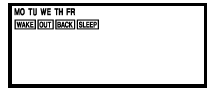
- Use the [] / [] to select the program to be changed.
- Press [PRG] to advance to set the WAKE time; the hour and minute digits will flash. Minute is set in steps of 10 minutes. Press [D/T] to set the program on or off for each event, the display will show “ –:– ” when it is off.
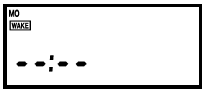
- Press [PRG] to set the heat temperature. Temperature and the “HEAT” icon starts flashing. Temperature is set in steps of 1 °F / 0.5 °C
- Press [PRG] to set the cool temperature.
- Press [PRG] to continue setting the next three events.
- Repeat step 3 – 5, when all programming is finished, the operation will return to step 1.
- Select the next program to be modified, or press [RTN] to exit.
To copy a program
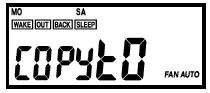
- At normal mode, press [PRG], and all 4 event icons and the day icon representing the program number start flashing, indicating that is the program setting mode.
- Use the [] keys to select the program to be copied, then press [USAGE].
- The program number and all 4 event icons stay on. The program number next to the program number to be copied starts flashing. Time and temperature digits will show “COPY tO”.
- Use the [] keys to select the program to be written on, then press [USAGE]. The operation will resume to step 1 after the program is copied.
- If the [USAGE] key is accidentally pressed during programming, press [PRG] to go back to program setting mode.
Reading the Setting Temperature
- At normal mode, when the system slide switch is at the Heat position, press [TEMP] to display the heat setting temperature for 10 seconds. All system icons will momentarily turn off, except the “HEAT” icon turns on. After 10 seconds, the display will resume to show room temperature.
- If the system slide switch is at the cool position, press [TEMP] to display the cool setting temperature instead. All system icons will momentarily turn off, except the “COOL” icon turns on.
Temporary Program Override
- When program is on, the program set-point can be temporarily overridden by pressing []. The “OVERRIDE” icon will turn on.
- If the system slide switch is at heat position, the heat set-point and “HEAT” icon will start flashing; while if the system slide switch is at cool, the cool set-point and “COOL” icon will start flashing.
- There is no reaction if System switch is at OFF mode.
- Use the [ keys to adjust. Press [RTN] to confirm.
- Temporary program override will be cancelled automatically when the next event’s time is met; or it can be manually released by pressing [PRG] normal mode.
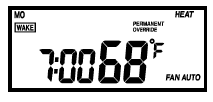
Permanent Override
- When program is on, press and hold [PRG] for 2 seconds to permanently override the program. The “PERMANENT OVERRIDE” icon will show on the display. “PROG ON” icon turns off.
- To adjust the override set-point, press the [] keys. The Heat set-point and “HEAT” icon will start flashing if the system slide switch is at heat position; cool set-point and “COOL” icon will start flashing if system slide switch is at cool position. There is no reaction if the System switch is at Off mode.
- Use the [] keys to adjust; press [RTN] to confirm.
- To switch back to program mode, press and hold [PRG] for 2 seconds. The “PERMANENT OVERRIDE” icon will disappear and “PROG ON” icon will switch on.
Low Battery Indicator
When the battery power is running low, the warning icon is shown on display. Insert fresh batteries and press [RST] button on the front plate. Be sure main switch is at the middle (OFF) position and fan switch is at the (FAN AUTO) position.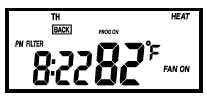
Filter and System Usage Indicator
- The thermostat can record the filter usage and system usage hours.
- When the number of filter usage hours reaches the set interval time, the “FILTER” icon will show; while for system usage hours, the “USAGE” icon will show.
- Filter usage counts when the fan is on; System usage counts when either heating or cooling is on.
- To read the usage hours, press [USAGE], the “FILTER” icon is shown on the display, and the number of filter usage hours is shown on the time digits.
- Press [USAGE], the “USAGE” icon is shown on the display, while the number of system usage hours is shown on the time digits.
- After 10 seconds, the operation will resume to display the time.
Adjusting the Filter and System Usage Interval Time
- Press and hold [USAGE] for 2 seconds, the “FILTER” icon and the filter usage interval time (default: 700 hours) will flash on the screen.
- Use the] keys to modify the interval time. The interval time is set in step of 100 hours, ranging from 0-5000 hours.
- Press [USAGE] to continue, the “USAGE” icon and system usage interval time (default: 2000 hours) will flash on the screen.
- Use the ] keys to modify the interval time. The interval time is set in steps of 100 hours, ranging from 0-5000 hours.
- Press [USAGE] to loop back to filter usage setting; press [RTN] to confirm setting and resume to normal operation.
- Filter and system usage function can be disabled by setting the interval time to 0 hour.
To Clear the Filter and System Usage counter
- To read the usage hours, press [USAGE], and the “FILTER” icon is shown on the display, while the number of filter usage hours is shown on the time digits.
- Press and hold for 2 seconds; the filter usage counter will be cleared.
- When the “USAGE” icon is shown on the display, the number of System Usage hours is shown on the time digits.
- Press and hold for 2 seconds, so the system usage counter will be cleared.
Temperature Control
- LCD displays “LO” when room temperature is below 32 °F / 0 °C.
- LCD displays “HI” when room temperature is above 99 °F / 40 °C.
- First stage activation is indicated by “HEAT” icon or “COOL” icon.
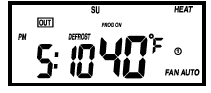
Defrost Function
When the room temperature falls to 40°F / 5°C or below, the heater will be on, regardless of the set-point. The “DEFROST” icon will be shown on the display
Adjusting Temperature Control Span
- Press and hold [TEMP] for 2 seconds, “P1” (default) is flashing at the time digits.
- Use the [] keys to select .
- Press [RTN] to confirm new control span.
| Setting | Description |
| P1 | Span 2°F |
| P2 | Span 4°F |
| P3 | Span 6°F |
Reset Program Memory
Reset the all program to default setting.
- Press and Hold ]; press the [RST].
- Hold [ key until the normal mode is displayed.
Operating Specifications
- Temperature measure range: 32 – 99 °F / 0 – 40 °C
- Setting Temperature range: 40-95 °F / 5-35 °C
- Temperature Resolution: 1 °F / 0.5 °C
- Battery: 2 x AA alkaline battery
- Relay Contact Voltage: 24 VAC 50/60 HzRelay Contact Current: 1A Max. (inductive)
- Temperature Accuracy: +/- 1 °F
- Operating Temperature: 32 – 104 °F / 0 – 40 °C
- Storage Temperature: 32 – 122 °F / 0 – 50 °C
- Operating Humidity: 5-95%RH non-condensing
REFERENCE
DOWNLOAD MANUALS:
DWYER LVT2 Digital Programmable Thermostat Installation Manual

DWYER LVT2 Digital Programmable Thermostat Installation Manual