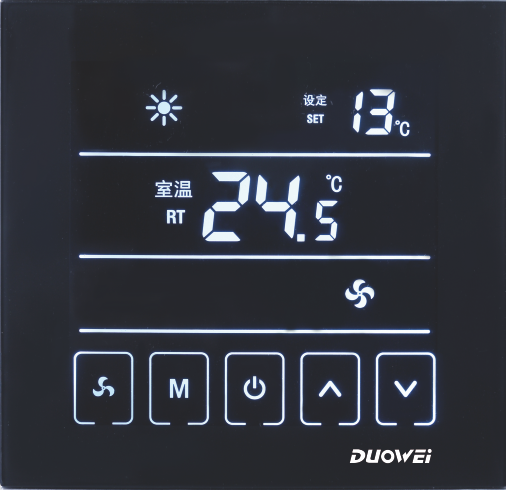
Duowei DW-T901-4 Touch Screen Room Thermostat
SPECIFICATION
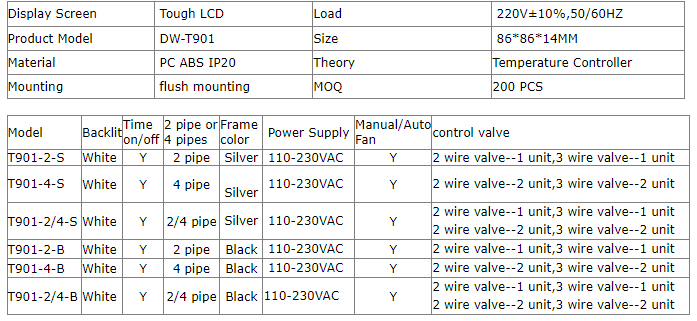
- Place of Origin: China
- Model Number: DW-T901-4
- Color: Black
- Power supply: 95~250VAC, 50/60HZ
- Mouting: flush mountain
- Suitable place: Hotel, KTV, Restaurant, Household&Other big place
- Brand Name: Duowei
- Size: 86*86*14mm
- Type: HVAC Systems
- Rated output power: <200W
- Material: Best quality fresh PC ABC plastics
- Load: fan & motorized valve
INTRODUCTION
The Duowei DW-T901-4 Touch Screen Room Thermostat is an electronic device used to control room temperature in heating, cooling, or ventilation systems. It features a large touchscreen display with an easy-to-use interface and supports various programming options for temperature control, including weekly programs and holiday modes. The thermostat is designed with a sleek and modern look, making it a great addition to any room. It is compatible with most HVAC systems, including gas, oil, and electric heating and cooling systems, as well as heat pump systems. Other features of the Duowei DW-T901-4 include a built-in sensor that measures the ambient temperature, a backlight display for easy visibility in low light conditions, and a lock function to prevent unauthorized access and tampering.
WHAT IS IN THE BOX
- Thermostat
- External Sensor
- Screws
- User Manual
HOW TO WORK
- Power on the thermostat: The thermostat needs to be connected to a power source to work. Ensure that the power supply is connected, and the thermostat is switched on.
- Set the temperature: The touch screen allows you to set the desired temperature. Simply press the “+” or “-” buttons to increase or decrease the temperature.
- Choose the mode: The thermostat has different modes that you can choose from. These modes include “heat,” “cool,” and “auto.” Press the “mode” button to choose the mode that you want.
- Set the fan speed: The thermostat has different fan speeds, including “low,” “medium,” and “high.” Press the “fan” button to choose the fan speed that you want.
- Set the timer: The thermostat has a built-in timer that you can use to turn the system on or off at a specific time. Press the “timer” button to set the timer.
- Save settings: Once you have set the desired temperature, mode, fan speed, and timer, press the “save” button to save the settings.
- Monitor the temperature: The thermostat has a temperature sensor that monitors the temperature of the room. The display shows the current temperature, so you can monitor it and adjust the settings as needed.
INSTALLATION
- Turn off the power supply to the heating or cooling system that you want to connect the thermostat to.
- Remove the old thermostat and disconnect any wires that are attached to it.
- Connect the wires from the heating or cooling system to the corresponding terminals on the back of the Duowei DW-T901-4 thermostat. The terminals should be labeled with the letters R, W, Y, and G. Note that the color of the wires may not match the terminal labels, so refer to the wiring diagram in the manual to make sure you connect the wires correctly.
- Mount the thermostat onto the wall using the screws and anchors provided in the package. Make sure the thermostat is level.
- Attach the thermostat faceplate onto the baseplate by aligning the tabs and pressing down firmly.
- Turn on the power supply to the heating or cooling system and test the thermostat to make sure it is working correctly.
- Follow the instructions in the manual to set up the thermostat and program it according to your preferences.
HOW TO OPERATE
- Press the “Menu” button on the touch screen to access the main menu.
- Use the arrow buttons to scroll through the menu options and select “Program.”
- Press the “OK” button to enter the programming mode.
- Use the arrow buttons to select the day of the week that you want to program.
- Use the “+” and “-” buttons to set the temperature for different times of the day. For example, you can set the temperature to be 68 degrees Fahrenheit in the morning, 72 degrees Fahrenheit in the afternoon, and 65 degrees Fahrenheit at night.
- Press the “OK” button to save the program for that day.
- Repeat steps 4-6 for each day of the week that you want to program.
- Press the “Menu” button to exit the programming mode.
- Use the arrow buttons to select the “Manual” mode if you want to manually adjust the temperature. Use the “+” and “-” buttons to set the desired temperature.
- Press the “Menu” button to access the main menu and select “Settings” to adjust other settings such as the backlight, time, and temperature units.
- Press the “Menu” button again to exit the settings menu.
Wiring diagram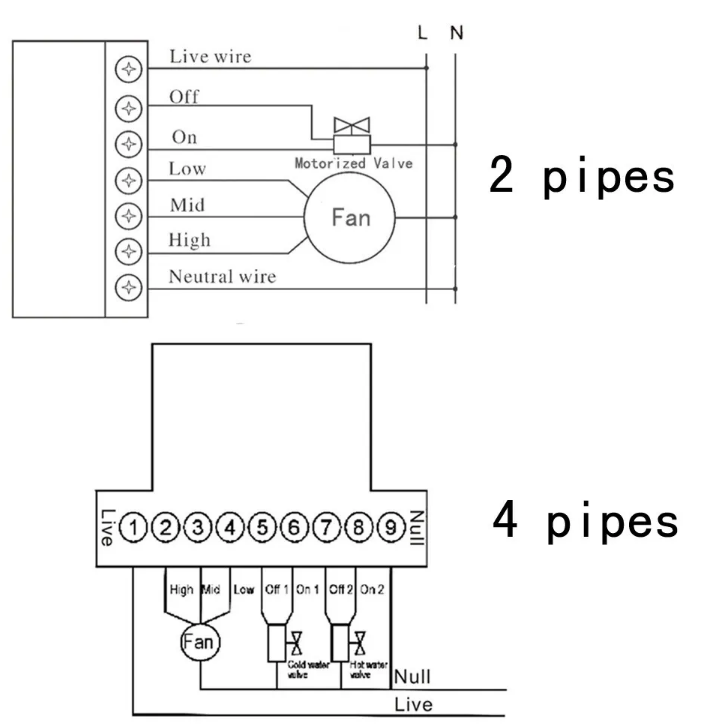
FAQS
What is the Duowei DW-T901-4 Touch Screen Room Thermostat?
The Duowei DW-T901-4 is a touchscreen room thermostat designed for controlling heating and cooling systems in residential and commercial buildings.
How does the Duowei DW-T901-4 Touch Screen Room Thermostat work?
The Duowei DW-T901-4 works by monitoring the temperature in the room and activating the heating or cooling system when the temperature falls outside the desired range. The user can set the desired temperature using the touchscreen interface.
What features does the Duowei DW-T901-4 Touch Screen Room Thermostat have?
The Duowei DW-T901-4 features a large touchscreen display, programmable scheduling, a vacation mode, and a range of temperature control options. It also has a child lock function to prevent accidental changes to the settings.
What types of heating and cooling systems is the Duowei DW-T901-4 compatible with?
The Duowei DW-T901-4 is compatible with most heating and cooling systems, including electric and gas systems, as well as HVAC systems with fan coils and hydronic systems with radiator valves.
Is the Duowei DW-T901-4 easy to install?
The Duowei DW-T901-4 is designed to be easy to install and comes with detailed instructions. However, it is recommended that the installation is carried out by a qualified technician.
Can the Duowei DW-T901-4 be controlled remotely?
The Duowei DW-T901-4 does not have built-in Wi-Fi or remote control capabilities. However, it can be connected to an external relay module, which can be controlled remotely using a smartphone or other compatible device.
What is the warranty period for the Duowei DW-T901-4 Touch Screen Room Thermostat?
The Duowei DW-T901-4 comes with a one-year warranty from the date of purchase.
What should I do if I have a problem with my Duowei DW-T901-4 Touch Screen Room Thermostat?
If you experience any problems with your Duowei DW-T901-4, refer to the user manual for troubleshooting advice. If the problem persists, contact the manufacturer or a qualified technician for assistance
Is the Duowei DW-T901-4 Touch Screen Room Thermostat compatible with my HVAC system?
The Duowei DW-T901-4 Touch Screen Room Thermostat is compatible with most heating and cooling systems, including gas, oil, electric, and heat pump systems. However, it’s important to check the specifications and compatibility information provided by the manufacturer before purchasing.
Can I use the Duowei DW-T901-4 Touch Screen Room Thermostat if I don’t have Wi-Fi?
Yes, you can use the thermostat without Wi-Fi. However, you won’t be able to access the thermostat remotely through a mobile app or other connected devices. You’ll need to manually adjust the temperature using the touchscreen interface.
Can I program the Duowei DW-T901-4 Touch Screen Room Thermostat to automatically adjust the temperature at different times of the day?
Yes, you can program the thermostat to adjust the temperature at different times of the day. This allows you to save energy and reduce your heating and cooling costs by adjusting the temperature when you’re not home or sleeping.
Does the Duowei DW-T901-4 Touch Screen Room Thermostat have any additional features?
Yes, the thermostat has several additional features, including a vacation mode that allows you to set the temperature for an extended period when you’re away from home, a filter replacement reminder, and a temperature calibration function.
