
DIGITEN TTC-1501 Reptile Temperature Controller Thermostat
Introduction
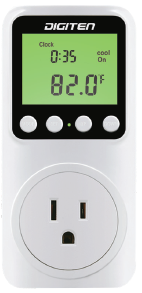
The thermostat displays the measured temperature and the current time. It can set the time period and the target temperature to control the heating or cooling equipment. This scientifically designed and easy-to-operate thermostat is suitable for reptile markets, fish tanks, greenhouses, incubators, and refrigerators, where constant temperature control is required.
Specifications
- Power supply: 100-240VAC 50/60HZ
- Timing function: Setting the time period (Day/ Night)
- Temperature control range: -40-80°C/-40-176°F
- Time format: 24hr/12hr
- Control accuracy: ± 1 •c / °F
- Display accuracy: ± 0.1 •c I °F
- Maximum load: 15A
- Working mode: Heating/Cooling
- SENSOR: NTC 3950 R25=10K 2m
- Calibration range: -10~1 o•c / °F (increase ± 0.1 •c / “F)
- Diff: 1°c ~1D°C I °F (increase ± 1°c / °F)
Clock Setting
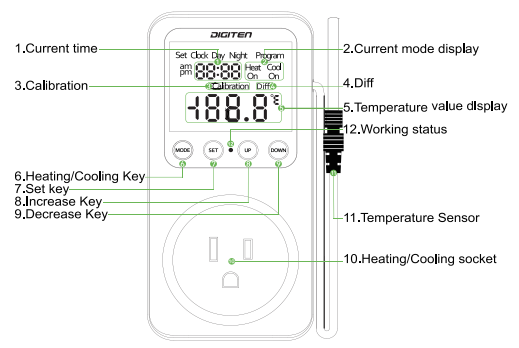
- Long press and hold the SET button to enter setting mode.
- Press the UP and DOWN to switch 2′-l H.- or 12 H.-.
- Then short press the SET button to set the current time.
- Press the UP and DOWN to adjust the number.
- Long press the SET button to save and exit.
C/F conversion
Press UP and DOWN button simultaneously to switch C/F
Mode Switch
Short press the MODE button to switch heating or cooling mode.
Programming
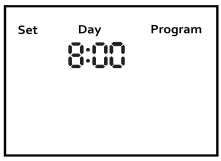
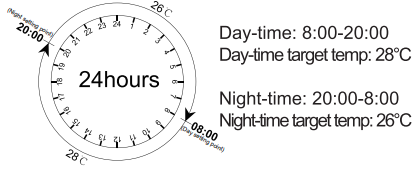
- Short press the SET button to start program the day/night and the target temperature.
- When Day time flash and you can short press the UP or DOWN buttons to set Day time.
- Each interval is 15 minutes
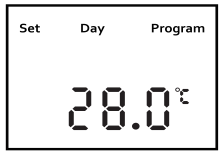
- After you have set the Day time. Then short press the SET button to set the day-time ‘s temperature.
- The day temperature flash and then press the UP or DOWN buttons to set it. Each interval is 1 ° C/ °F
- Then short press the SET button to set the Nighttime.
- When Night time flash and you can short press the UP or DOWN buttons to set Night time
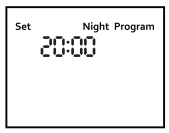
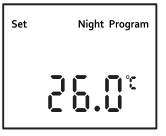
- Short press the SET button to set the night temperature.
- The temperature flash and then press the UP or DOWN buttons to set it.
- Press the SET button to save your settings and back to the current temperature and clock display. Then the unit will be set well.
Temperature difference
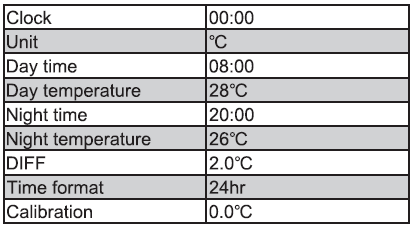
Press the SET and MODE buttons simultaneously until the LCD display Diff. The default DIFF is 2°C /2 °F. You can adjust the DIFF (Temperature Difference) value while the icon DIFF flashes, then press the UP or DOWN key to adjust the ideal temperature difference you want.
Backlight Function
Press any key to wake up the LCD backlight. The backlight will automatically turn off after the 30s.
Restore factory settings
Long press and hold the SET button when connecting to the load to restore the factory setting.
Defaults
Memory function
All the data will be saved after power off. This thermostat has memory function, you don’t need to worry about power failure.
NOTE: When the built-in battery is dead, the clock will not be saved.
How to work
| Function | Output ON | Output OFF |
|
Heating |
MeasuredTemp <
TargetTemp – DIFF |
Measured Temp >
Target Temp |
|
Cooling |
Measured Temp >
TargetTemp+ DIFF |
Measured Temp
< TargetTemp |
Calibration
When there is a deviation between the current temperature and the actual temperature, use the temperature calibration function to correct the current temperature. Corrected Temperature = Temperature (beforeCalibration) +calibration value (calibration value could be a positive value, 0 or negative value)Long press the SET and UP buttons simultaneously for about 3s until the LCD display Calibration, and press UP and DOWN to adjust it. Press SET to save and exit.
Low battery
When the low battery symbol appears, you need to unscrew the screw, open the case, and replace the battery inside.
- Unscrew the case screws.
- Please disassemble and handle carefully.
- Replace the battery and close the case.
warranty
Limited warranty
This thermostat carries a 12-month limited warranty from the date of purchase. If there is any quality-related issue, please contact technical support at [email protected].
REFERENCE:
DOWNLOAD MANUALS:
DIGITEN TTC-1501 Reptile Temperature Controller Thermostat User Manual
DIGITEN TTC-1501 Reptile Temperature Controller Thermostat User Manual