Control4 CCZ-T1-W Wireless Thermostat
Important Information
Graphical Symbols in this Guide
The following symbols and their descriptions draw your attention to important safe practices and additional information that can help you avoid injury, death, or loss of material or time.
CAUTION! This indicates a potentially hazardous situation that, if not avoided, may result in minor or moderate injury. DO NOT IGNORE A CAUTION!
IMPORTANT! This indicates information that will help you avoid damage to your equipment, loss of materials, or loss of time. PAY ATTENTION TO THESE
IMPORTANT STATEMENTS!
NOTE: This indicates a note on related information about the current topic.
TIP: This indicates a tip that might save you time or effort.
Safety Instructions
- Read these instructions.
- Keep these instructions.
- Heed all warnings.
- Follow all instructions.
- Clean only with a dry cloth.
- Install in accordance with the manufacturer’s instructions.
- Do not install near any heat sources such as radiators, heat registers, stoves, or other apparatuses that produce heat.
- Only use attachments/accessories specified by the manufacturer.
Battery Replacement Safety Rules
- Keep battery contacts and compartment clean.
- Remove the battery if thermostat use is not expected for several months.
- Ensure that you insert the CR123A (3V) battery (included with the product) in the Control4 thermostat faceplate according to the polarity labels, POS (+) and NEG (-), on the thermostat circuit board.
CAUTION! To prevent battery shorting, leakage, or rupture:
- Use CR123A (3V) Battery.
- Do not attempt to recharge a battery unless the battery is specifically marked “rechargeable.”
- Never dispose of batteries in a fire.
Additional Resources
- The following resources are available to provide you with additional support:
- Your authorized Control4 reseller.
- Control4 Web Site: http://www.control4.com.
- Composer online help.
Introduction
Congratulations on your purchase of the Wireless Thermostat from Control4. This intelligent programmable thermostat works as an integral part of the Control4 system. Having the thermostat integrated with the Control4 system allows you to control the temperature either using the Wireless Thermostat or any of the Control4 navigation control options: the 10.5” Wireless Touch Screen, the Mini Touch Screen, the System Remote Control (On-Screen display or LCD display), or the LCD Keypad. You can use some of these navigation control options to program the schedule. This Wireless Thermostat goes beyond typical programmable thermostats. It features ZigBee (802.15.4) mesh networking for two-way wireless communication. In mesh networking, each node acts as a repeater so there are multiple paths that a signal can take. If there is trouble communicating on one path due to interference, the signal automatically takes a different path, making this network topology very robust and reliable. The Wireless Thermostat also includes the following features:
Beautiful On Any Wall
- Compact design – Sophisticated, sleek profile fits beautifully in any home.
- Backlit LCD – Easy to read and make adjustments.
- User-friendly icons – Intuitive icons for common features make the thermostat easy for everyone to use.
Intelligent From Front to Back
- Ultimate climate control – Program the thermostat to follow a schedule of up to six Program Events per day.
- Manual override – Three levels of manual hold settings using the Wireless Thermostat or remote control navigation devices or displays.
- Bi-directional communication – A home automation system can perform automated functions based on the temperature.
- Flexible control – Automatic changeover between heating/cooling and manual temperature override.
- Wireless – Intelligent, reliable, wireless connectivity using ZigBee mesh networking.
This document covers the following main sections:
- Features. See the next page.
- Display. See the next page.
- Options of Control.
- Options for Program Scheduling.
- Additional Programming.
- Battery Maintenance.
- Regulatory Compliance.
Features
- Heat Point and Cool Point. The Wireless Thermostat works with your heating and cooling system to maintain a consistent temperature called a set point. With the Wireless Thermostat, you can specify separate heating and cooling set points. The Wireless Thermostat automatically engages the appropriate heating or cooling system until the room reaches the desired temperature. The Wireless Thermostat follows a programmed temperature-change schedule or temperature changes that you set manually.
- Navigation control options. The Wireless Thermostat gives you the ability to control your heating and cooling system from the comfort of your couch using multiple navigation control options, including the Wireless Touch Screen, the Mini Touch Screen, the System Remote Control (On-Screen display or LCD display), and the LCD Keypad.
- Navigation device programming. The Wireless Thermostat is programmable through navigation control options, including the Wireless Touch Screen, the Mini Touch Screen, and the System Remote Control (On-Screen display). You can program the Wireless Thermostat’s schedule using up to six Program Events per day (seven days a week), including Wake, Away, Return, Sleep, Custom 1, and Custom 2.
- Communication with a Control4 controller. The Wireless Thermostat communicates with your Control4 controller to obtain scheduling commands. Along with scheduling, the Wireless Thermostat receives time (date, day of week, and time) data from the Control4 controller and displays it accordingly. The Wireless Thermostat also displays the temperature, the mode (Off, Heat, Cool, and Auto), whether the fan is operating, whether its buttons are locked, and whether the battery needs replacing.
- External temperature sensors are available. Through your authorized reseller, external temperature sensors are available that allow you to install the Wireless Thermostat in an inconspicuous location. You can then place the easily hidden remote sensor where you want to measure the temperature for your best comfort level.
- Additional programming. Your authorized reseller can also help you with a variety of configuration changes. See “Additional Programming” on page 22.
Display
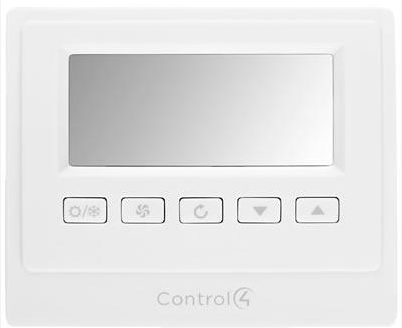
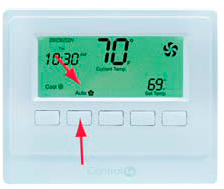
The Wireless Thermostat size is approximately 3 1/2 inches high by 4 1/2 inches wide. It displays an easy-to-read screen and has five manual control buttons. Each of the buttons controls a different aspect of your comfort control system.
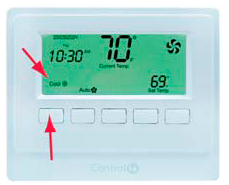
- Button 1: System Mode — Changes the mode of operation to Off, Heat, Cool, Auto, and Emergency Heat (for heat pumps). See “Change Heating and Cooling System Mode” on page 8.
- Button 2: Fan — Turns Fan On or sets it to be automatically controlled by the heating and cooling system. See “Change Fan Settings” on page 11.
- Button 3: Hold — Holds a temperature adjustment for a specified duration (On, 2 Hours, or Permanent), or turns off the Hold feature (see “Change Hold Options” on page 13).
- Button 4 or Button 5: Temperature Down or Up — Adjusts temperature down or up in one-degree increments and sets an automatic hold for 2 hours. See “View or Change Temperature Heat and Cool Points” on page 16.
Options of Control
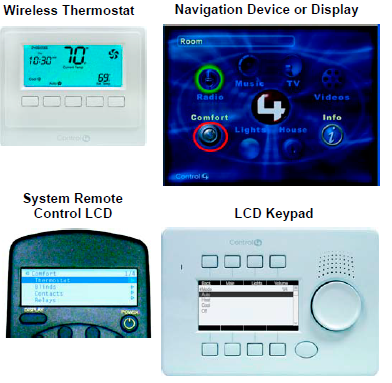
You can change the comfort settings using the following devices or displays:
- Wireless Thermostat
- Wireless Touch Screen
- Mini Touch Screen
- System Remote Control (On- Screen display or LCD display)
- LCD Keypad
From either the Wireless Thermostat or one of the navigation control options, you can do the following tasks:
- Change Heating and Cooling
- System Mode. See the next section.
- Change Fan Settings.
- Change Hold Options.
- View or Change Temperature Heat and Cool Points.
Change Heating and Cooling System Mode
The Wireless Thermostat allows you to select the mode of operation for the climate control system. Using modes can help with efficiency.
Modes include:
- Off. When in the Off state, the Wireless Thermostat does not make any requests to the heating or cooling system.
- Heat mode. During cold winter months, if you do not want to run your air conditioning system, set the Wireless Thermostat mode to Heat. The system then uses the furnace exclusively.
- Cool mode. During hot summer months, if you do not want to run your furnace, set the Wireless Thermostat mode to Cool. The system then uses the cooling system exclusively.
- Auto. During spring and fall when your home might need to be warmed at times or cooled at other times, set the Wireless Thermostat mode to Auto to automatically switch between heating and cooling based on the desired set points.
To change the Thermostat Mode using one of the navigation control options, see the following sections:
- Change Thermostat Mode using Wireless Thermostat. See the next section.
- Change the Thermostat Mode using Navigation Device or Display.
- Change the Thermostat Mode using System Remote Control LCD.
- Change the Thermostat Mode using LCD Keypad.
Change Thermostat Mode using Wireless Thermostat
- Press Button 1 repeatedly until the desired mode appears (Off, Heat, Cool, or Auto). The desired mode change is immediately reflected.
- Leave it on the desired mode when it appears
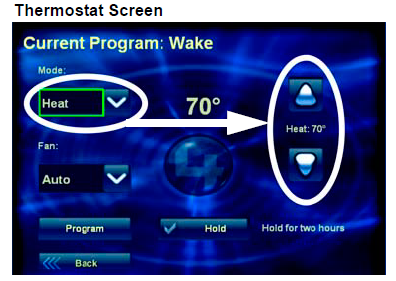
Change the Thermostat Mode using Navigation Device or Display
- From the Main Navigator screen, select Comfort.
- From the options that appear, select Thermostat (name can vary and some navigation devices skip this step).
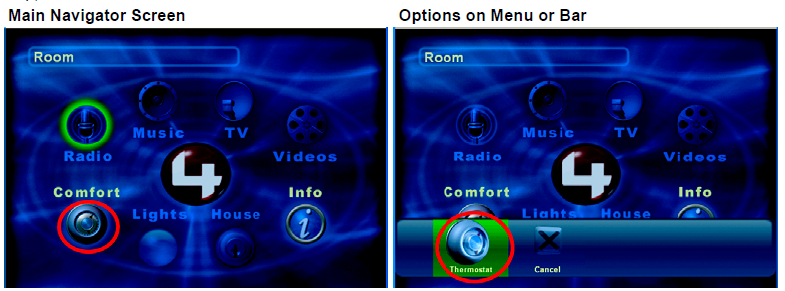
- From the Thermostat screen, select Mode.
- From the pull-down menu, select one of the mode options: Off, Heat, Cool or Auto.
- The screen updates immediately to reflect the new mode and set temperature.
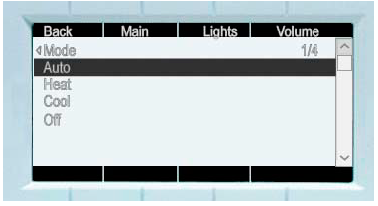
Change Thermostat Mode using System Remote Control LCD
- Press the Comfort button.
- Press the Down or Up Arrow buttons to highlight the Thermostat on the LCD screen, then press the Select button to view the thermostat’s current settings.
- Press the Down or Up Arrow buttons to highlight the Mode option and press the Select button to view the mode options.
- Press the Down or Up Arrow buttons to highlight a mode option: Auto, Heat, Cool, or Off.
- Press the Select button to apply the option you have highlighted.
- Press the Left Arrow button to go back to view the previous screen to verify that the mode change is applied.

Change Thermostat Mode using LCD Keypad
- From the Main LCD screen, select Comfort.
- Turn the Select Dial to highlight Thermostat and press the Select Dial to view the thermostat options.
- Scroll down to the Mode option and press the Select Dial.
- From the Mode options that appear, select one of the mode options: Auto, Heat, Cool or Off. The screen updates immediately to reflect the change
Change Fan Settings
You can turn the fan on manually or set it to be automatically controlled by the HVAC system. When you turn the fan manually to On, it stays on through the programmed schedule, creating more circulation. (The next preprogrammed time does not overcome the change you made.) You can set the fan to:
- On — Turns fan on manually and it will continue to run until turned off manually.
- Auto — Allows heating and cooling system to control turning the fan on and off as necessary to maintain the temperature Heat Point or Cool Point.
NOTE: The system displays the large fan icon in the upper right corner whenever the fan is operating.
To change the Fan Settings using one of the navigation control options, see the following sections:
- Change Fan Setting using Wireless Thermostat. See next section.
- Change Fan Setting using Navigation Device or Display. .
- Change Fan Setting using System Remote Control LCD.
- Change Fan Setting using LCD Keypad. See page 12.
Change Fan Setting using Wireless Thermostat
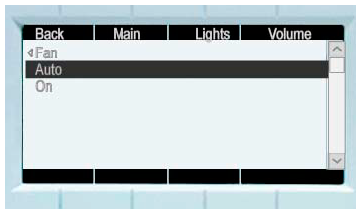
- Press Button 2 to toggle between the On or Auto fan setting appear.
- Leave it on the desired fan setting when it appears.
Change Fan Setting using Navigation Device or Display
- From the Main Navigator screen, select Comfort.
- From the options that appear, select Thermostat (name can vary and some navigation devices skip this step).
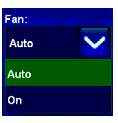
- From the Thermostat screen, select Fan.
- From the Fan screen, select one of the fan options: Auto or On. The Fan mode immediately changes to selected mode.
Change Fan Setting using System Remote Control LCD
- Press the Comfort button.
- Press the Down or Up Arrow buttons to highlight Thermostat on the LCD screen, then press the Select button to view the thermostat’s current settings.
- Press the Down or Up Arrow buttons to highlight the Fan option and press the Select button to view the fan options.
- Press the Down or Up Arrow buttons to highlight a fan option: Auto or On.
- Press the Select button to apply the option you highlighted.
- Press the Left Arrow button to go back to view the previous screen to verify that the mode change is applied.

Change Fan Setting using LCD Keypad
- From the Main LCD screen, select Comfort.
- Turn the Select Dial to highlight Thermostat and press the Select Dial to view the thermostat options.
- Scroll down to the Fan option and press the Select Dial.
- From the Fan options that appear, select one of the fan options: Auto or On. The screen updates immediately to reflect the change.
Change Hold Options
The Thermostat Hold options allow you to hold a desired temperature setting, overriding the programmed schedule. You can set the system to hold the temperature (1) until the next programmed event, (2) for two hours, or (3) permanently.
To change the Hold options using one of the navigation control options, see the following sections:
- Change Thermostat Hold Option using Wireless Thermostat. See next section.
- Change Thermostat Hold Option using Navigation Device or Display. See page 14.
- Change Thermostat Hold Option using System Remote Control LCD. See page 15.
- Change Thermostat Hold Option using LCD Keypad. See page 15.
Change Thermostat Hold Option using Wireless Thermostat
- Press Button 4 (adjusts set point down) or Button 5 (adjusts set point up) to desired setting. When you change the temperature it automatically sets a two-hour hold.
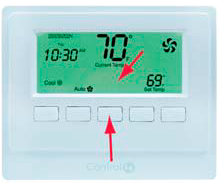
- Press Button 3 to select the desired setting:
- On — Holds setting until next programming event.
- 2 Hrs — Holds setting for two hours.
- Perm — Holds setting permanently.
- (No display) — Cancels the current hold setting and returns Wireless Thermostat to follow the programmed schedule.
Change Thermostat Hold Option using Navigation Device or Display
- From the Main Navigator screen, select Comfort.
- From the options that appear, select Thermostat (name can vary and some navigation devices skip this step).
- From the Thermostat screen, select Hold.
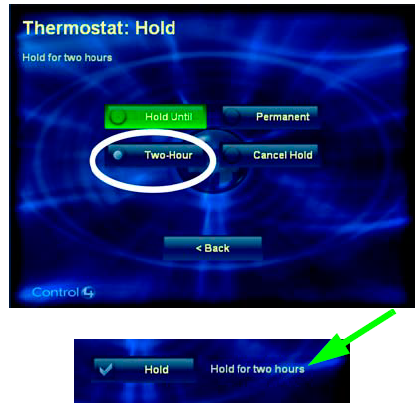
- From the Thermostat Hold screen, select one of the options:
- Hold Until — Holds setting until next programming event.
- Two-Hour — Holds setting for two hours.
- Permanent — Holds setting permanently.
- Cancel Hold — Cancels the current hold setting and returns Wireless Thermostat to follow the programmed schedule
Change Thermostat Hold Option using System Remote Control LCD
- Press the Comfort button.
- Press the Down or Up Arrow buttons to highlight Thermostat on the LCD screen, then press the Select button to view the thermostat’s current settings.
- Press the Down or Up Arrow buttons to highlight the Hold option and press the Select button to view the hold options.
- Press the Down or Up Arrow buttons to highlight a hold option: Off, On (Until next event), 2 Hours, Permanent or Hold Cancel.
- Press the Select button to apply the option you have highlighted.
- Press the Left Arrow button to go back to view the previous screen to verify that the mode change is implemented.
Change Thermostat Hold Option using LCD Keypad
- From the Main LCD screen, select Comfort.
- Turn the Select Dial to highlight Thermostat and press the Select Dial to view the thermostat options.
- Scroll down to the Hold option and press the Select Dial.
- From the Hold options that appear, select one of the hold options: Off, On (Until next event), 2 Hours, or Permanent. The screen updates immediately to reflect the change.
View or Change Temperature Heat and Cool Points
You can set the system to hold a temperature adjustment that varies from the programmed schedule. When you manually set a temperature, the system automatically sets a two-hour hold.
NOTE: The system automatically makes sure that the Heat Point (the setting that turns the furnace on) is at least two degrees lower than the Cool Point (the setting that turns the air conditioning on). This keeps the two systems from competing with each other.
To view or change the Temperature Heat and Cool Points using one of the navigation control options, see the following sections:
- View or Change Temperature using Wireless Thermostat. See next section.
- View or Change Temperature using Navigation Device or Display. See page 17.
- View or Change Temperature using System Remote Control LCD. See page 18.
- View or Change Temperature using LCD Keypad. See page 18
View or Change Temperature using Wireless Thermostat
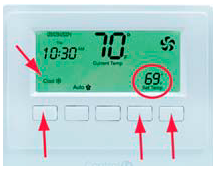
- Press Button 1 to toggle between Cool or Heat icons that appear above Button 1.
- Press repeatedly Button 4 to decrease or Button 5 to increase the temperature in one degree increments until the desired temperature is reached.
- When you change the temperature, it sets an automatic hold for 2 hours.
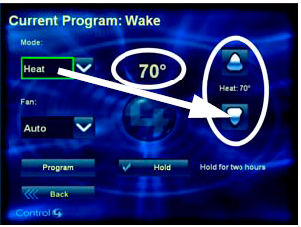
View or Change Temperature using Navigation Device or Display
- From the Main Navigator screen, select Comfort.
- From the options that appear, select Thermostat (name can vary and some navigation devices skip this step).
- The current temperature and current-mode settings appear.
- Press the Down or Up Arrows repeatedly to decrease or increase the temperature in one degree increments.
- When you change the temperature, the thermostat sets an automatic hold for 2 hours.
- As you select the arrow buttons, the screen automatically updates.
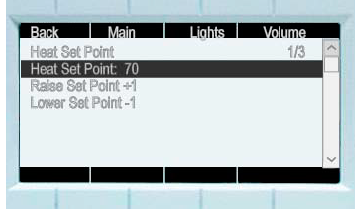
View or Change Temperature using System Remote Control LCD
- Press the Comfort button.
- Press the Down or Up Arrow buttons to highlight Thermostat on the LCD screen, then press the Select button to view the thermostat’s current settings.
- Press the Down or Up Arrow buttons to highlight either the Heat Set Point or Cool Set Point and press the Select button to view the option you have highlighted.
- Press the Down or Up Arrow buttons to highlight the Lower Set Point -1 to decrease or Raise Set Point +1 to increase the mode’s temperature.
- Press the Select button repeatedly to change the temperature down or up in one degree increments until you have the desired set point.
- Press the Left Arrow button to go back to view the previous screen to verify that the mode change is applied.

View or Change Temperature using LCD Keypad
- From the Main LCD screen, select Comfort.
- Turn the Select Dial to highlight Thermostat and press the Select Dial to view the thermostat options.
- Scroll down to the Heat Set Point or Cool Set Point option and press the Select Dial.
- From the Heat Set Point or Cool Set Point options that appears, scroll down to the Raise Set Point +1 or the Lower Set Point -1 and press the Select Dial repeatedly to adjust the temperature down or up as desired. The screen updates immediately to reflect the change
Options for Program Scheduling
The Wireless Thermostat comes with a pre-programmed schedule. Using any of the navigation programming options, you can modify this pre-programmed schedule to meet individual needs. Navigation programming options include: Wireless Touch Screen, the Mini Touch Screen, and the System Remote Control (On-Screen display). There are six Program Events per day for each day of the week. For each Program Event, you can enable, set a time, and set unique set points for heat and cool.
The default pre-programmed schedule applies to every day of the week as follows:
- MTuWThFSaSu Wake: Enabled 6:00 AM Heat Point: 70 Cool Point: 78
- MTuWThFSaSu Away: Enabled 8:00 AM Heat Point: 62 Cool Point: 85
- MTuWThFSaSu Return: Enabled 6:00 PM Heat Point: 70 Cool Point: 78
- MTuWThFSaSu Sleep: Enabled 10:00 PM Heat Point: 62 Cool Point: 82
- MTuWThFSaSu Custom 1: Disabled 11:00 PM Heat Point: 62 Cool Point: 85
- MTuWThFSaSu Custom 2: Disabled 11:00 PM Heat Point: 62 Cool Point: 85
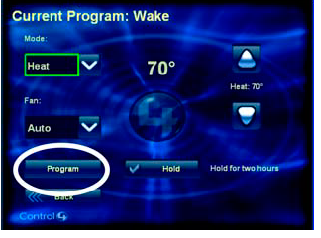 To Program a schedule:
- From the Main Navigator screen, select Comfort.
- From the options that appear, select Thermostat (name can vary and some navigation devices skip this step).
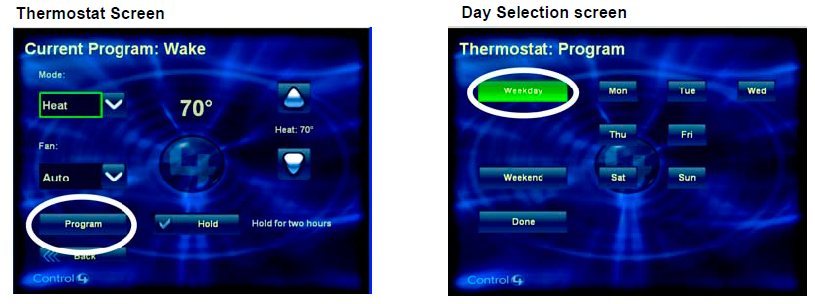
- At the Thermostat screen, select the Program button.
- From the Day Selection screen that appears, select the day or set of days you want to program.
- Weekday (Monday through Friday) — Allows you to program the Wireless Thermostat for the 5-day week.
- Weekend (Saturday and Sunday) — Allows you to program the Wireless Thermostat for the 2-day weekend).
- Mon through Sun (Mon, Tue, Wed, Thu, Fri, Sat, and Sun) — Allows you to program the Wireless Thermostat for individual days.
TIP: New schedule changes automatically override any conflicting existing schedule. six events as needed, beginning with Wake: Wake, Away, Return, Sleep, Custom 1 and Custom 2.
- When you chose a day (or set of days) in Step 4<StepNumber>, a programming wizard displayed the
- Wake event screen (like the example on the right). This is the first of six screens you can choose to edit. You can edit the Wake program event or select Next one or more times to skip to another program event (such as Away).
- If you want to edit the program event currently displayed (such as Wake) for the day(s) selected (such as Weekday), then:
-
- Select Enable to make this program event active.
- Set a time for this program event.
- Set a Heat Point and a Cool Point for this program event.
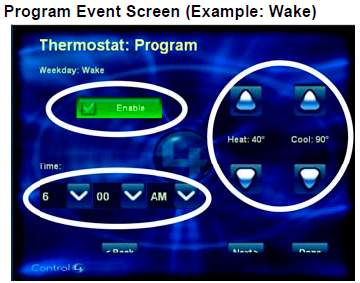
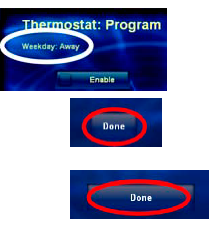
- If you want to edit another program event (Away, Return, Sleep, Custom 1 or Custom 2), select Next one or more times until the event displays on the screen (as shown), then repeat Step a<StepNumber>
- If you are done programming events, select Done to save your changes and exit the programming wizard.
-
- From the Thermostat screen, select Done.
Additional Programming
Your authorized reseller can help you configure additional preferences for your Wireless Thermostat or Control4 system. These include:
- The use of Celsius, instead of default setting Fahrenheit.
- The use of the Remote Sensor, instead of the default setting On-board Temperature Sensor.
- The use of a Custom Overshoot and Undershoot settings.
- The use of Locked buttons to disable use of buttons, instead of default setting Unlocked buttons.
- The use of the 24 hour clock, instead of the default setting 12 hour clock.
- The use of Date-listed first format — DD/MM/YYYY, instead of Month-listed first format — MM/DD/YYYY.
- The ability to define interaction between the Wireless Thermostat and the other devices on the Control4 system.
Battery Maintenance
NOTE: The Wireless Thermostat requires power from the heating and cooling system to maintain regular communication with the controller. The battery is intended to provide supplemental or backup power only.
- Keep battery contacts and compartment clean.
- Remove battery if thermostat use is not expected for several months.
- To prevent battery shorting, leakage or rupture, when replacing the battery:
- Use a CR123A (3V) Battery only.
- Do not attempt to recharge a battery unless the battery is specifically marked “rechargeable.”
- Never dispose of batteries in a fire
Low Battery
When battery is low, a battery icon indicating a low battery power appears right of the temperature on Wireless Thermostat LCD screen.
Battery Replacement
To replace battery:
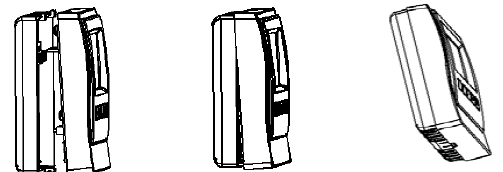
- Detach front faceplate by releasing the latch at the bottom of the Thermostat and sliding the faceplate up and off.
- Remove old battery. See “Battery Replacement Safety Rules” on page 3.
- Install new battery by ensuring that you insert the battery into the thermostat according to the polarity labels, POS (+) and NEG (-), on the thermostat circuit board.
- Replace the Thermostat faceplate.
Disclaimer
Control4® makes no representations or warranties with respect to any Control4 hardware, software, or the contents or use of this publication, and specifically disclaims any express or implied warranties of merchantability or fitness for any particular purpose. Control4 reserves the right to make changes to any and all parts of Control4 hardware, software, and this publication at any time, without any obligation to notify any person or entity of such changes.
Trademarks
Control4 is a registered trademark of Control4 Corporation. Other product and company names mentioned in this document may be the trademarks or registered trademarks of their respective owners.
Copyright
Copyright © 2005-2006 Control4 Corporation. All rights reserved. No part of this publication may be reproduced, photocopied, stored on a retrieval system, or transmitted without the express written consent of the publisher.
- Control4 Corporation
- 11734 S. Election Road, Suite 200
- Salt Lake City, UT 84020 USA
- http://www.control4.com
- Wireless Thermostat User Guide
- Part Number: 21-0171 Rev A
- Model Number: CCZ-T1-W
Warranty
This device has a limited one (1) year warranty on parts from the date of installation. Control4 will replace or repair any defective unit. Return unit to the place of purchase for replacement. For any damages incurred, the warranty will never exceed the purchase price of the device. This warranty does not cover installation, removal, or reinstallation cost. The warranty is not valid in cases where damage was incurred due to misuse, abuse, incorrect repair, or improper wiring or installation. It does not cover incidental or consequential damage. This warranty gives you specific legal rights, and you might also be entitled to other rights that vary from state to state. Some states do not allow limitations on how long an implied warranty lasts or the exclusion or limitation of incidental or consequential damages. In these cases, the above-mentioned limitations might not apply to you.
FCC
FCC ID: R33CCZT11: This device complies with Part 15 of the FCC Rules. Operation is subject to the following two conditions:
- this device may not cause harmful interference, and
- this device must accept any interference received, including interference that may cause undesired operation.
This equipment has been tested and found to comply with the limits for a Class B digital device, pursuant to Part 15 of the FCC Rules. These limits are designed to provide reasonable protection against harmful interference in a residential installation. This equipment generates, uses, and can radiate radio frequency energy and, if not installed and used in accordance with the instructions, may cause harmful interference to radio communications. However, there is no guarantee that interference ‘not occur in a particular installation. If this equipment does cause harmful interference to radio or television reception, which can be determined by turning the equipment off and on, the user is encouraged to try to correct the interference by one or more of the following measures:
- Reorient or relocate the receiving antenna.
- Increase the separation between the equipment and receiver.
- Connect the equipment into an outlet on a circuit different from that to which the receiver is connected.
- Consult the dealer or an experienced radio/TV technician for help.
IMPORTANT! Changes or modifications not expressly approved by Control4 could void the user’s authority to operate the equipment.
Regulatory Compliance
This product complies with standards established by the following regulatory bodies:
- Federal Communications Commission (FCC)
- Industry Canada
REFERENCE:
DOWNLOAD MANUALS:
Control4 CCZ-T1-W Wireless Thermostat User Guide
