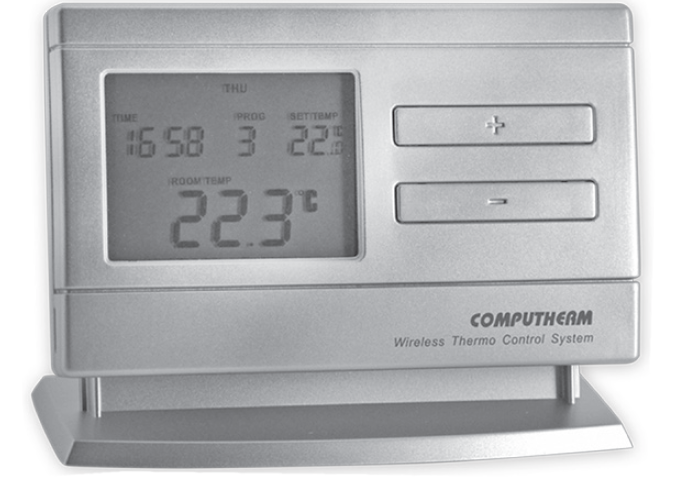
COMPUTHERM Q8RF(TX) Programmable Digital Room Thermostat
You can watch the most important aspects of the usage of this thermostat on our video presentation at www.computherm.info
GENERAL DESCRIPTION OF THE THERMOSTAT
- The COMPUTHERM Q8RF (TX) type switched-mode room thermostat is suitable to regulate the overwhelming majority of boilers and air conditioners. It can be used together with the COMPUTHERM Q5RF and Q8RF multi-zone thermostats to complement the two thermostats in the basic package, to increase the number of zones regulated, and to control the COMPUTHERM Q1RX wireless (radio-frequency) thermostat-controlled socket.
- You can find detailed information and recommended usage of the COMPUTHERM Q1RX socket and COMPUTHERM Q5RF and Q8RF multizone thermostats on our website: www.computherm.info.
- Because there is a wireless (radio-frequency) connection between the COMPUTHERM Q8RF (TX) thermostat and the receiver unit of the COMPUTHERM Q5RF/Q8RF thermostat and/or the COMPUTHERM Q1RX socket, no cable is required between the thermostat and the receiver and/or the socket.
- The device can be programmed according to customer-specific requirements so that the heating/cooling system heats/cools your residence or office to the required temperature at the times specified by the customer, to reduce energy costs while maintaining comfort.
- Separate temperature programs can be prepared for each day of the week. For each day, besides 1 fixed switching time (PROG ), 6 adjustable switching times (PROG ‒ PROG ) can be set (at 10-minute intervals) and different temperatures (in 0.5 °C increments) can be assigned to all switching times.
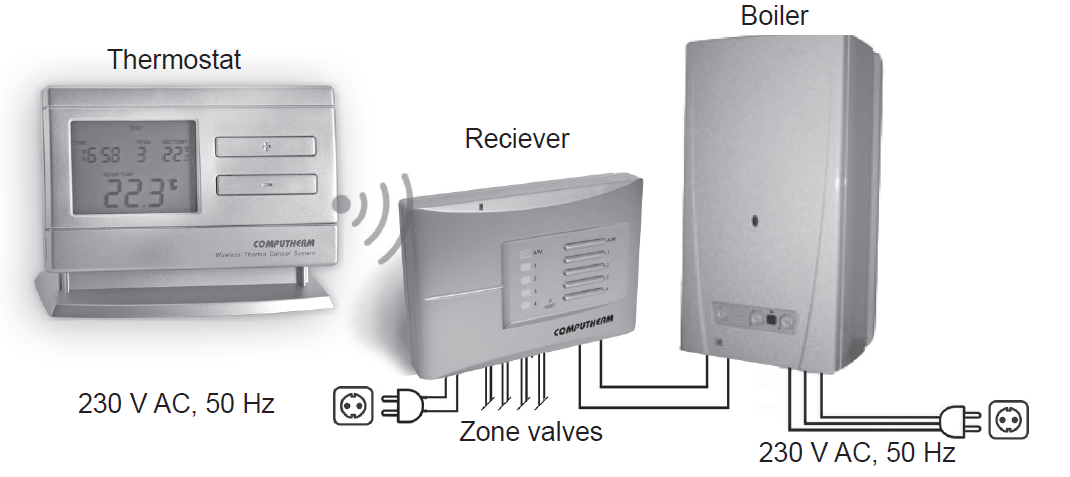
To increase the lifetime of the batteries, the thermostat will not transmit signals continuously. Instead, it will repeatedly transmit the actual signal every 8 minutes. Therefore, the regulation of heating or cooling will continue even after a blackout.
The portability of the thermostat offers the following advantages:
- no need to lay a cable, which is especially advantageous when old buildings are being modernized,
- the optimal location of the device can be selected during operation.
The effective range of the transmitter incorporated in the thermostat is approximately 50 m in open terrain. This distance may become considerably shorter within a building, especially when a metal structure, reinforced concrete or adobe wall stands in the way of radio waves.
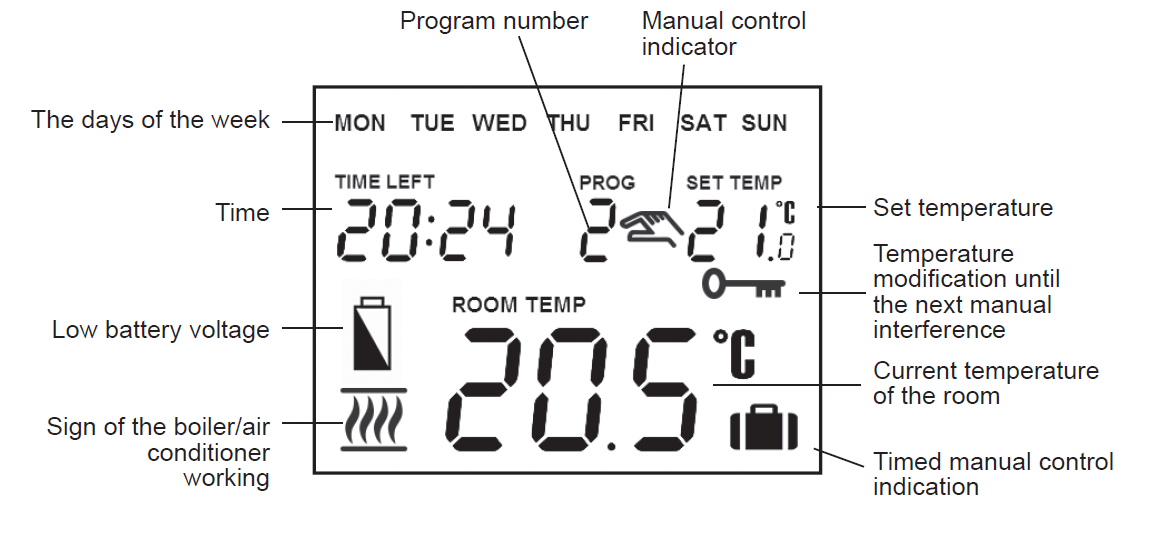
The information shown on the liquid crystal display of the thermostat includes the following:
LOCATION OF THE DEVICE
The thermostats of the COMPUTHERM Q8RF (TX) multi-zone programmable wireless type device can be freely moved in your residence. It is reasonable to locate them in rooms used regularly or for many hours per day so that they are in the direction of natural ventilation in the room but protected from drought or extreme heat (e.g. direct sunlight, refrigerator, chimney, etc). Do not use in wet, chemically aggressive or dusty environments. Their optimal location is 0.75 – 1.5 m above floor level. They can be placed on their own stand or can be mounted on a wall.
IMPORTANT WARNING! If the radiator valves in your flat are equipped with a thermostatic head, adjust it to maximum temperature or replace the thermostatic head of the radiator valve with a manual control knob in the room where the room thermostat is to be located, otherwise, the thermostatic head may disturb the temperature control of the flat.
PUTTING THE THERMOSTAT INTO OPERATION, BASIC SETTINGS
Warning! The device must be installed and connected by a qualified professional.
Inserting batteries
Pressing the lock on the upper side of the housing of the thermostat, remove the back cover of the thermostat as shown in the figure below.
The battery compartment is in the inner side of the front panel of the housing. Insert 2 AA alkaline batteries (LR6 type) in accordance with the diagram in the battery compartment.
Warning! Good quality alkaline batteries may only be used for this appliance. Carbon-zinc batteries known as durable or long-life batteries and chargeable accumulators are not suitable for the operation of this appliance. Icon  appearing on the display to indicate low battery voltage warns reliably that the batteries should be replaced only when good quality alkaline are used.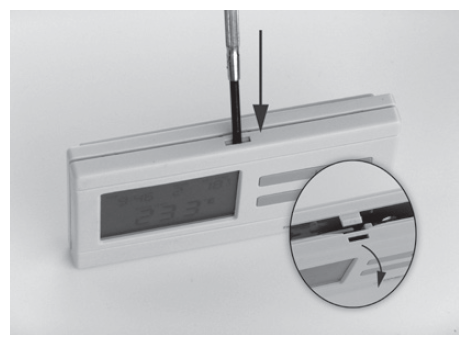
After the batteries have been inserted, the display flashes the day, time and program number as well as the adjusted and measured temperatures. (If this information fails to appear on the display, press the “RESET” button located on the main panel of the thermostat. After the batteries have been inserted, snap the front panel of the device into the rear panel and press the “SET” button. After the “SET” button is pressed, the display stops flashing, the thermostat goes to the main screen and the setting process can be started.
Setting the current day and time
- Press the “SET” button to go to the main screen, then press the “DAY” button. At this time only the 1st three letters of the current day will flash on the display of the thermostat and the hour and minute values can be seen.
- Using the large
 and
and buttons on the front panel of the device, set the current day (Monday MON; Tuesday TUE; Wednesday WED, etc.). Press the “DAY” button again. At this time the contraction indicating the day stops flashing and becomes visible continuously while the abbreviation indicating the hour will flash on the display. Using the large andbuttons on the front panel of the device, set the hour value of the current time. Press the “DAY” button again. At this time the numbers that indicate the hour stop flashing and become visible continuously, while the numbers indicating the minute will begin flashing.
 - Using the large andbuttons on the front panel of the device, set the minute value of the current time.
- When you wish to continue modifying the settings, please press the “DAY” button again. If you wish to finish settings, confirm them by pressing the “SET” button. At this point, adjusted data are recorded and the device goes back to the main screen (if no buttons are pressed for at least 15 seconds, the settings are automatically confirmed and the device goes back to the main screen).
Switching between the heating and cooling mode
- There is a possibility to easily switch between the heating and cooling mode of the thermostat. The output terminals of the receiver unit NO – COM and the zone outputs are turned on below the set temperature in heating mode and above the set temperature in cooling mode. (Taking the switching sensitivity into account).
- To switch between the two modes, 1st press the “SET” button to go to the main screen. Then press the “SET” button again and hold it down and press the “COPY” button, too. After this, the notice “ ” or “ ” appears in place of the time characters, according to the selected mode. Following this, switch between the modes using the large andbuttons, then confirm it by pressing the “SET” button (if no buttons are pressed for at least 15 seconds, the setting is automatically confirmed). After this confirmation, the device goes back to the main screen.
Setting the switching sensitivity (accuracy)
- There is a possibility to change the switching sensitivity. The switching sensitivity means the temperature difference between the adjusted value and the actual temperature measured during the switching process.
- A smaller switching sensitivity results in steadier room temperature and therefore in higher comfort. The heat loss of the room (building) does not depend on the switching sensitivity.
- If higher comfort is needed, the switching sensitivity should be set so that it provides a steadier room temperature. On the other hand, please also take into account that the boiler should not switch on and off multiple times in an hour’s time except at low outside temperatures (e.g. -10 °C), since the frequent on and off switches of the boiler reduce its efficiency and hence increases the gas consumption.
- We recommend using the ±0.1 °C switching sensitivity for heating systems with high thermal inertia (e.g. underfloor heating), the ±0.2 °C (factory default setting) and ±0.3 °C switching sensitivity for heating systems with low thermal inertia (e.g. flat panel radiators).
- To change the switching sensitivity, 1st press the “SET” button to go to the main screen. Then press the “DAY” and “COPY” buttons one after the other. Following this, select the desired switching sensitivity using the large andbuttons. The notices “ ”, “ ” and “ ” indicate ±0.1 °C, ±0.2 °C and ±0.3 °C, respectively. Finally, confirm the setting by pressing the “SET” button (if no buttons are pressed for at least 15 seconds, the setting is automatically confirmed). After this confirmation, the device goes back to the main screen. You can read more about switching sensitivity in Section 3.
Activation of the pump protection function
- According to the factory default settings, the pump protection function is inactive. In order to activate or deactivate it, 1st press the “SET” button to go to the main screen. Then press the “DAY” and “PROG” buttons one after the other. Following this, activate or deactivate this function by using the large andbuttons. The notices “HP:ON ” and HP:OF” indicate activated and deactivated state, respectively.
- Finally, confirm the setting by pressing the “SET” button (if no buttons are pressed for at least 15 seconds, the setting is automatically confirmed). After this confirmation, the device goes back to the main screen.
- To prevent the pump from sticking, the activated pump protection function switches on the connected device for one minute period at 12:00 p.m. every day, if no switching has taken place on the given day or the previous day (e.g. during the heating-free period).
- The pump protection function can accomplish its task only if the boiler is in working order in the summer, too. It is reasonable to set a low-temperature level, e.g. +10°C, on the thermostat for this period, to prevent the boiler from unnecessary start-ups when the weather turns cold temporarily.
Calibrating the thermometer of the thermostat
- There is a possibility to calibrate the thermometer of the thermostat (to correct the measured temperature). In order to do this, 1st press the “SET” button to go to the main screen. Then press the “DAY” and “HOLD” buttons one after the other. After this, the notice “appears in place of the time characters, and the correction value appears in place of the measured temperature ( 0,0°C by default).
- Following this, set the desired correction value using the large andbuttons between -3.0 °C and +3.0 °C, in 0.1 °C increments. Finally, confirm the setting by pressing the “SET” button (if no buttons are pressed for at least 15 seconds, the setting is automatically confirmed). After this confirmation, the device goes back to the main screen. The correction of the measured temperature takes effect a couple of seconds after the confirmation
OPERATION OF THE INSTALLED THERMOSTAT
The thermostat controls the device connected to it (e.g. gas boiler or pump) based on the temperature measured by it and the currently set temperature, taking into account the switching sensitivity of the thermostat (factory default ±0.2 °C). This means that if the thermostat is set to heating mode and 22 °C, then with a switching sensitivity of ±0.2 °C the connection points NO and COM of the receiver output relay are closed at temperatures below 21.8 °C (heating is turned on) and 230 V AC is displayed on the output for that zone. The NO and COM connection points are opened at temperatures above 22.2 °C (heating is turned off) and the 230 V AC voltage at its output for that zone is turned off. In cooling mode, the relays switch exactly the opposite way.
The closed status of the output relay terminals NO and COM is indicated by the or
or icon in the lower-left corner of the display, depending on the selected operating mode.
PROGRAMMING THE THERMOSTAT
A brief introduction to Programming
- Programming means the setting of switching times and the selection of accompanying temperature levels. The device can be programmed for a one-week period. Its operation is automatic, and it will cyclically repeat the programs that have been keyed in. For each day, besides 1 fixed (PROG 0 ) switching time, 6 adjustable (PROG 1 ‒ PROG 6) switching times can be set. For all switching times, a different temperature can be assigned between 5 and 40 °C, in 0.5 °C increments. The temperature set for a given switch will remain valid until the start time of the next switch. Accordingly, the thermostat will keep the temperature set for switching time PROG until switching time PROG is reached. After switching time PROG 1 the temperature selected to switch PROG will be valid until the time of the next switch (PROG 2).
- The start time of switch PROG is, which cannot be changed, only its temperature can be adjusted. So under the factory default settings, the thermostat performs only one switch (PROG ) every day, which is in effect until the next day.
Note: Setting just one switch for a day (factory default setting) is reasonable only if a constant temperature is needed all day. (For example, if for every weekday a constant 16 °C, and for every weekend a constant 22 °C is needed.) Otherwise, from both a comfort and an energy-efficiency point of view, it is recommended to activate more than one switch each day. Furthermore, it is advised that a comfortable temperature is used only those times when the room or building is in use since every 1 °C decrease of temperature saves approximately 6% energy during a heating season. - The PROG 1 ‒ PROG 6 switches are deactivated by factory default (their start time is ), but they can be activated at need. Their start time can be freely set between 00:10 and 23:50 at 10-minute intervals given the constraint, that their start time should be in increasing order and a difference of at least 10 minutes should be between them. This minimum 10-minute difference is going to be preserved even if a previously activated switch is modified, in order to avoid co-occurring or overlapping switches. In such a case, the device automatically increases the start time of the affected switches until a difference of at least 10 minutes between them is reached. If the start time of a switch would be later than because of this automatic modification, then that switch is deactivated instead.
- In order to enter the programming mode, press the “SET” button and hold it down and press the “PROG” button, too. During the programming, the values are adjusted are flashing on the display. The modification of these values can always be done using the large andbuttons. The confirmation of a value is always done by pressing the “PROG” button, after which the next value can be adjusted. The program can be saved by pressing the “SET” button. A more detailed description of the programming steps can be found in Section 4.3.
- If there are days, for which the same program is needed than it is sufficient to create that program only once, since it can be easily copied to another day using the “COPY” button as described in Section 4.4. If the same program is needed for every day, then there is also a possibility to create the program of all the days together (by selecting MON TUE WED THU FRI SAT SUN together during the selection of days). But be aware: if the program of all the days are created together, then their program can only be modified together. Therefore, if a different program is needed for at least one day, then the program of the days should be created separately, and the repeated programs should be copied using the “COPY” button.
- A separate program can be created for the heating and cooling mode, and these programs are preserved when switching between the modes. Therefore, if the thermostat is used for both heating and cooling, then there is no need to modify the program of the thermostat every time a switch between these modes is performed.
Recommendations for creating a heating program
The average comfort needs of a person can usually be satisfied by a temperature of 19-21 °C during the night, and a temperature of 22-23 °C during the day. During that time of the day, when the family is at work or school, only a lower temperature is needed. As heating up and cooling down usually takes a long time, it is reasonable to set the start time of the switches 0.5-1 hour before the desired time of the modified temperature. The programmability of the thermostat provides a perfect solution for this.
For an average working family, a program similar to the one below is recommended: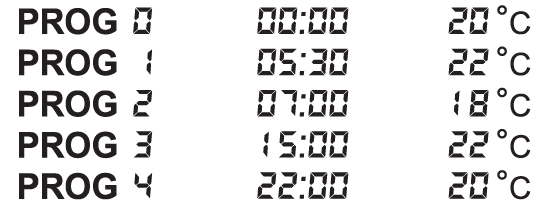
Programming steps
- Press the “SET” button to go to the main screen.
- Press the “SET” button again and hold it down and press the “PROG” button, too. At this point the device gets into programming mode and the abbreviations indicating the days of the week (MON TUE WED THU FRI SAT SUN) are flashing on the display.
- Select the day to be programmed using the large andbuttons on the front panel of the device (MON indicating Monday, TUE indicating Tuesday etc.). If you wish to create the same program for each day of the week, it is reasonable to choose all days of the week simultaneously (by selecting MON TUE WED THU FRI SAT SUN together), this way there is no need to perform separate programming of the days. After selecting the desired day(s), press the “PROG” button.
- At this point, the temperature of switch PROG should be set, which is indicated on the display of the device by flashing the temperature value to be set (20 °C by default). Set the desired temperature using the large andbuttons, then press the “PROG” button.
- Then, the start time of switch PROG should be adjusted, which is indicated on the display of the device by flashing the time value to be adjusted ( by default). Set the desired time using the large andbuttons, then press the “PROG” button.
- Following this, the temperature of switch PROG should be set, which is indicated on the display of the device by flashing the temperature value to be set (°C by default). Set this temperature level of switch PROG using the large andbuttons, then press the “PROG” button.
- The next step in programming is the adjustment of the start time of switch PROG, which is indicated on the display of the device by flashing the time value to be adjusted ( by default). The adjustment process of switches PROG‒ PROG can be done (the same way as switch PROG is adjusted) by repeating the “e”-“f ” steps.
- If you do not want to activate any more switches for the selected day(s), then press the “PROG” button without changing the start time of the next switch from the default This way the programming of the selected day(s) is finished, the thermostat offers another day to be programmed and the programming can be continued from step “c ”.
If all the switches (PROG ‒ PROG ) are activated for the selected day(s), then after setting the temperature value of PROG , the programming of the selected day(s) is finished, the thermostat offers another day to be programmed and the programming can be continued from step “c ”. - The adjusted program can be saved by pressing the “SET” button. After approximately 1 minute, the adjusted program is automatically saved. Afterward, the device goes back to the main screen.
If you wish to copy the program of the day(s) selected in step “c ” to other days, you can easily do so using the “COPY” button as described in Section 4.4.
Using the “COPY” function (Copying the program of a day to other days)
- 1st, press the “SET” button to go to the main screen. Then press the “COPY” button for approximately 3 seconds to activate the “COPY” function. The notice “” appearing in place of the time characters and the flashing abbreviation MON indicating Monday shows that conditions are ready for copying a program.
- Select the day whose program you wish to copy to another day or other days using the large andbuttons on the front panel of the device
- Press the “COPY” button to copy the program of the selected day. After this, the flashing of the abbreviation indicating the day that has been copied stops, and it will be visible continuously hereafter.
- Select the day to which you wish to copy the program of the day copied beforehand using the large andbuttons. The abbreviation of the active day is flashing during this selection process.
- After selecting the abbreviation that indicates the day to which you wish to copy the program, press the “COPY” button to copy the program. Hereafter, the abbreviation indicating the day to which the program was copied will be visible continuously. Following this, you can select further days using the large andbuttons and copy the program to those days too by pressing the “COPY” button.
- Finally, press the “SET” button to save the modifications (if no buttons are pressed for at least 15 seconds, the modifications will be automatically saved). Afterward, the device goes back to the main screen. If required, the program of further days can be freely copied by repeating the above steps.
ATTENTION! The “COPY” function is only available, if the days of the week were programmed separately!
Modifying the program
- The previously set program can be modified any time by repeating the steps of programming.
- The number of activated switches can be increased at will as described in Section 4.3.
- A previously activated switch can be deactivated by setting its start time to using the large andbuttons (or by pressing the “DAY” button once) and then pressing the “PROG” button. After this, if the deactivated switch was an intermediate one, then the serial numbers of the remaining switches will be updated.
- If you wish to finish modifying the program of the selected day, then press the “PROG” button and hold it down for at least 3 seconds. After this, the modification can be continued by selecting another day. When finished with all the modifications, press the “SET” button to save them. After approximately 1 minute, they are automatically saved. Afterward, the device goes back to the main screen.
- If a completely different program is needed, then press the “RESET” button located on the main panel of the thermostat to reset the device (it deletes both the program and the basic settings). Following this, adjust the basic settings of the thermostat again and create the new program, as described in Sections 2 and 4.
Program inspection
- 1st, press the “SET” button to go to the main screen, then press the “PROG” button. At this point, the abbreviation indicating the day(s), the symbol of switch PROG and the time and temperature level set for switch PROG of the selected day(s) will appear on the display (none of the values is flashing).
- Repeatedly press the “PROG” button to check the values of switch PROG 1, PROG 2, etc. Use the large andbuttons to change the day(s). If all the days were programmed together (MON TUE WED THU FRI SAT SUN), then their common program can only be viewed together.
- After checking the program, press the “SET” button to go back to the main screen (if no buttons are pressed for at least 15 seconds, the thermostat will automatically go back to the main screen).
TEMPORARY MODIFICATION OF THE TEMPERATURE CORRESPONDING TO THE PROGRAM
- If you wish to operate your device in a way that differs temporarily from the program that has been set (e.g. on bank holidays or the winter holidays), you can choose among the options described in Sections 5.1- 5.4.
- To simplify manual temperature modifications, with factory default settings temperatures of °C and °C are assigned to the large and buttons, respectively. When modifying the temperature manually, pressing the andbutton once, the temperature will immediately jump to the factory value of the button. For example, if the current switch PROG ensures a temperature of °C, it can be modified to a standard temperature that ensures °C when needed by pressing thebutton only once, without having to press the button several times in increments of 0.5 °C.
- Following this, using the large andbuttons, the temperature can be further modified in increments of 0.5 °C, in accordance with current requirements.
The economy and comfort temperature values assigned to buttons andcan be modified as follows
- To set the economy temperature, press the “SET” button and keep it depressed and press the button, too. Following this, with the help of the buttons and, set the economy temperature selected by you. After the temperature has been set, press the “SET” button to save the modification (after approximately 15 seconds, it is automatically saved). Afterward, the device goes back to the main screen.
- To set the comfort temperature, press the “SET” button and keep it depressed and press the button, too. Following this, with the help of the andbuttons, set the comfort temperature selected by you. After the temperature has been set, press the “SET” button to save the modification (after approximately 15 seconds, it is automatically saved). Afterward, the device goes back to the main screen.
Temperature modification until the next program switch
- Set the required temperature using the large andbuttons on the front panel of the device. After the temperature modification, the program number disappears, and the icon
 appears on the display, indicating that the thermostat is operated with manual control. The device will control the boiler according to the set value until the time of the next switch specified in the program is reached.
 - During this temporary modification, the segments indicating the time on the display alternately show the exact time (TIME) and the time remaining (TIME LEFT) in manual control (for example, that is, 4 hours and 2 minutes). After this time has elapsed, the icondisappears and the device resumes the program that has been set. If you wish to return to the set program before the time of the next switch is reached, please press the “SET” button.
Temperature modification for 1-99 hours (party program)
- Set the required temperature using the large andbuttons on the front panel of the device. After the temperature modification, the program number disappears, and the iconappears on the display, indicating that the thermostat is operated with manual control.
- Then press the “DAY” button. At this time, the icondisappears and the icon
 appears on the display, along notice place of the exact time, which indicates the duration of modification in hours (the number which indicates the hour’s flashes, showing that it can be modified). Adjust this time to the desired length (between 1 and 99 ) using the large andbuttons.
 - During this temporary modification, the segments indicating the time on the display alternately show the exact time (TIME) and the time remaining (TIME LEFT) in manual control (for example, that is, 3 hours and 20 minutes). After this time has elapsed, the icon disappears and the device resumes the program that has been set. If you wish to return to the set program before the time set for temperature modification has expired, please press the “SET” button
Temperature modification for 1-99 days (holiday program)
- Set the required temperature using the large andbuttons on the front panel of the device. After the temperature modification, the program number disappears, at this time the icon appears on the display, indicating that the thermostat is operated with manual control. Then press the “HOLD” button and hold it down for at least 2 seconds. At this time, the icon
 disappears, and for 2 seconds the icon appears, then the icon appears in the place of the icon. This time the notice appears in place of the time characters indicating the duration of the manual control in days (this number flashes, showing that the duration can be changed).
 - Adjust this time to the desired length (between 1 and 99) using the large andbuttons (1 day means 24 hours).
- The holiday program will start approximately 10 seconds after the adjustment. Following this, the device will keep the modified temperature for the given period of time. The adjusted temperature can be freely changed during the holiday program without exiting it.
- During this temporary modification, the segments indicating the time on the display alternately show the exact time (TIME) and the days remaining (TIME LEFT) in manual control (e.g., that is, 3 days).
- After this time has elapsed, the icon disappears and the device resumes the program that has been set. If you wish to return to the set program before the time set for temperature modification has expired, please press the “SET” button.
Temperature modification until the next manual interference
- Set the required temperature using the large andbuttons on the front panel of the device. At this time, the icon appears on the display, indicating that the thermostat is operated with manual control. Then, press the “HOLD” button briefly, after which the icon appears and the icon disappears.
- The device will then control the boiler according to the set value until the next manual interference. During this time, the thermostat acts exactly the same way as a non-programmable thermostat.
- The adjusted temperature can be freely changed by using the large and buttons during this temporary modification without exiting it.
- If you wish to return to the set program, please press the “SET” button.
TURNING ON THE BACKLIGHT
- When you press the “LIGHT” button, the backlight of the display will turn on for 15 seconds. When you press another button while the display is illuminated, the backlight will turn off only after 15 seconds have elapsed since the last button had been pushed.
- If you would like the backlight to turn on automatically after a button is pressed, then press the “LIGHT” button for 5 seconds. After this, the backlight will automatically turn on after any button is pressed and will turn off 15 seconds after the last button had been pressed. Turning the automatic backlight function on is shown on the display after pressing the “LIGHT” button for 5 seconds: in the place of the exact time the notice “ ” appears for 3 seconds. If you press the “LIGHT” button for 5 seconds again then this automatic backlight function turns off and the “ ” notice is shown on the display for 3 seconds.
LOCKING THE CONTROL BUTTONS
The thermostat enables you to lock its control buttons. With this function, you can prevent unauthorized modification of the program or the set temperature. To activate the lock, 1st press the “SET” button to go to the main screen, then press the andbuttons together and hold them down for at least 5 seconds. After the control buttons have successfully been locked, the notice “” appears in place of the time characters for a couple of seconds. Until the control buttons are locked, their normal function do not work; if any button is pressed, then only the notice “appears and nothing else happens. To unlock press the andbuttons together and hold them down for at least 5 seconds. After unlocking the buttons, the notice “” appears in place of the time characters for a couple of seconds, whereupon all the buttons can be used normally again.
CHANGING THE BATTERY
The average lifetime of the batteries is 1 year, but frequent use of the background light may shorten this time considerably. If the icon indicating low battery voltage appears on the display, the batteries should be replaced (see Section 2.1). The exact time should be set again after the batteries have been replaced, but the device saves the program and settings that have been loaded even without batteries therefore there is no
need to reprogram the device.
Warning! Good quality alkaline batteries may only be used for this appliance. Carbon-zinc batteries known as durable or long-life batteries and chargeable accumulators are not suitable for the operation of this appliance. Icon appearing on the display to indicate low battery voltage warns reliably that the batteries should be replaced only when good quality alkaline batteries are used.
RESETTING THE THERMOSTAT TO ITS FACTORY DEFAULT SETTINGS
By pressing the “RESET” button located on the main panel of the thermostat, the thermostat can be reset to its factory default settings. This results in deleting the day, exact time, basic settings, and the set program. Do not use electrically conductive material to press the button, e.g. graphite pencil. After resetting the device, adjust the basic settings of the thermostat again and create the new program, as described in Sections 2 and 4.
TUNING THE COMPUTHERM Q8RF (TX) THERMOSTAT AND THE RECEIVER UNIT OF THE COMPUTHERM Q5RF/Q8RF THERMOSTAT AND/OR THE COMPUTHERM Q1RX SOCKET TOGETHER
- COMPUTHERM Q8RF (TX) – COMPUTHERM Q5RF/Q8RF
If you would like to use the COMPUTHERM Q8RF (TX) thermostat to complement the COMPUTHERM Q5RF multi-zone thermostat, then follow the tuning steps described in Section 7.2 of the manual of the COMPUTHERM Q5RF thermostat or to complement the COMPUTHERM Q8RF multi-zone thermostat, then follow the tuning steps described in Section 10.2 of the manual of the COMPUTHERM Q8RF thermostat. - COMPUTHERM Q8RF (TX) – COMPUTHERM Q1RX
- Press the “ON/OFF” button of the COMPUTHERM Q1RX socket and keep it depressed (for approximately 10 seconds) until the green LED starts flashing. After this, press the “SET” button of the thermostat and keep it depressed then press the “DAY” button (for approximately 10 seconds) until the green LED on the socket/sockets stops flashing. After being tuned together, the thermostat controls the socket according to the set temperature program.
- After receiving the “on” signal from the thermostat, 230 V AC, 50 Hz mains voltage appears on the output socket/sockets of the COMPUTHERM Q1RX device.
- For more information of tuning, refer to the operating instruction of the COMPUTHERM Q1RX socket.
TRANSMISSION DISTANCE INSPECTION
With the help of the “TEST” button of the thermostats, you can check whether the selected thermostat and the receiver unit are within the transmission distance of the radio-frequency connection. To perform the test, press the “TEST” button for approximately 3 seconds. Following this, the thermostat will send, alternating every 5 seconds, switch-on and switch-off control signals to the receiver for 2 minutes (the signal appears and disappears alternately on the display). When detecting the ON and OFF control signals, associated with the thermostat on the receiver unit, and on the COMPUTHERM Q1RX socket the red LED switches on and off respectively. When the receiver unit/socket fails to receive signals sent by the thermostat, then the receiver unit/socket is outside the transmission distance of the wireless (radio-frequency) transmitter, thus they have to be placed closer to each other.
ATTENTION! If the two parts of the device can only be placed on the edge of the wireless (radio-frequency) range or out of it (due to the floor plan of the house or the shading effect of its structure), to guarantee the safe wireless connection, place a COMPUTHERM Q2RF wireless repeater between the two parts.
FREQUENTLY ASKED QUESTIONS
When you think that your appliance is operating incorrectly or encounter any problem while the appliance is being used then we recommend that you read Frequently Asked Questions (FAQ) available on our website, where we collected the problems and questions that most frequently occur while our appliances are being used, along with the solutions thereto:
http://www.computherm.info/en/faq
The vast majority of the problems encountered can be solved easily by using the hints available on our website, without seeking professional help. If you have not found a solution to you problem, please pay a visit to our qualified service.
Warning! The manufacturer does not assume responsibility for any direct or indirect damages and loss of income occurring while the appliance is being used.
A BRIEF DESCRIPTION OF PROGRAMMING
- Setting the date and time: press the “DAY” button, then adjust values using the “DAY”, andbuttons.
- Programming: press and hold down the “SET” button, while pressing the “PROG” button too, then adjust values with the “PROG”, andbuttons; use the “COPY” button to copy repeated programmes.
- Program inspection: using the “PROG”, andbuttons.
- Returning: using the “1”, “2”, “3”, “4” or “ON/OFF” and “SET”, and “DAY” buttons (see Section 10.2).
- Transmission distance control: press the “TEST” button for more than 3 seconds.
- Temporary modification of the temperature set in the program:
- until the next switch in the program: set the temperature using the andbuttons.
- for a period of 1 to 99 hours: set the temperature using the and buttons, then press the “DAY” button, andfinally set the duration using the and buttons.
- for a period of 1 to 99 days: set the temperature using the and buttons, then press the “HOLD” button and hold it down for 2 seconds, and finally set the duration using the andbuttons.
- until the next interference: set the temperature using the andbuttons, then press the “HOLD” button briefly.
- until the next switch in the program: set the temperature using the
PRODUCT INFORMATION DATASHEET
- Trademark: COMPUTHERM
- Model identifier: Q8RF (TX)
- Temperature control class: I. class
- Contribution to the efficiency of seasonal space heating: 1%
Remark:
In addition to using modern temperature regulators, the following up-to-date regulation methods also contribute significantly to the improvement of the comfort provided by the heating network, the energy efficiency of the heating network, and the coefficient of performance:
- By dividing the heating network into sections or zones and with their separate regulation we can ensure that every room (zone) is heated only when it is necessary. (You can obtain information on the establishment of the heating network and apparatuses and fittings needed for division into zones in our publication titled “Energy Savings and Comfort” which is also available on our website www.computherm.info/en).
- Using programmable thermostats you can ensure that every room (zone) is just heated according to a timetable preset in accordance with the demands. (You can obtain information on the services provided by COMPUTHERM Q7; Q7RF and Q8RF programmable room thermostats on our website).
- Using modern modular heating devices equipped with an external temperature sensor the boiler can be operated at a higher efficiency.
- Using low-temperature heating networks (e.g. 60/40 °C) and condensing boilers the temperature of the flue gas leaving the boiler can be reduced, and this way fuel efficiency can be improved significantly
Technical data of the thermostat
- temperature measurement range: 3 to 45 °C (in 0.1 °C increments)
- adjustable temperature range: 5 to 40 °C (in 0.5 °C increments)
- temperature measurement accuracy: ±0.5 °C
- temperature calibration range: ±3 °C (in 0.1 °C increments)
- selectable switching sensitivity: ±0.1 °C; ±0.2 °C; ±0.3 °C
- battery voltage: 2 x 1.5 V ALKALINE batteries (LR6 type; AA size)
- power consumption: 1.3 mW
- battery lifetime: approx. 1 year
- protection against environmental impacts: IP30
- operating frequency: 868.35 MHz
- transmission distance: approx. 50 m in open terrain
- storage temperature: -10 °C to +40 °C
- operating humidity: 5% – 90% (without condensation)
- dimensions: 130 x 80 x 23 mm (without holder) (W x H x D)
- weight: 112 g
- temperature sensor type: NTC 3435 K 10 kΩ ±1% at 25 °C
The COMPUTHERM Q8RF (TX) type thermostat complies with the requirements of directives RED 2014/53/EU and RoHS 2011/65/EU
Manufacturer: QUANTRAX Ltd. Fülemüle u. 34., Szeged, H-6726, Hungary
Phone: +36 62 424 133 • Fax: +36 62 424 672
E-mail: [email protected]
Web: www.quantrax.hu
www.computherm.info
Origin: designed in the EU, made in China
Please watch our video presentation of the most important aspects of the usage of this thermostat on our websites!
Copyright © 2020 Quantrax Ltd. All rights reserved.
REFERENCE:
DOWNLOAD MANUALS:
COMPUTHERM Q8RF(TX) Programmable Digital Room Thermostat Operating Instruction

COMPUTHERM Q8RF(TX) Programmable Digital Room Thermostat Operating Instruction