Comfortheat MCD4 Hydronic Programmable Thermostat
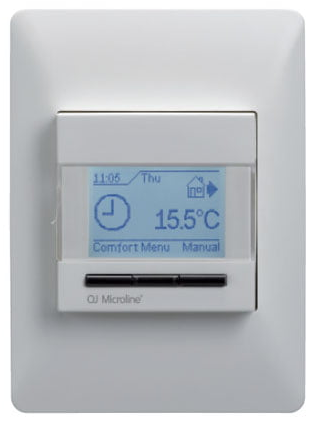
Operations Manual
A Comfort Heat floor heating system has been installed in your floor. Under floor heating will warm from the floor up giving you unparalleled feeling of comfort. This heating system is controlled by an electronic thermostat that has a floor or air sensor for optimum temperature control.
PRIOR TO TURNING ON
The sub-floor slab or screed has to be fully cured before turning the heating on.When turning on the floor for the first time,increase the floor temperature gradually over 2-3 days The MICROTEMP RANGE of electronic thermostats are specifically designed for underfloor heating systems. The thermostats are vertically flush mounted and have a 2pole isolator with 16A output relay.
WARRANTY
THERMOSTAT & SENSOR – 2 years
TEMPERATURE SETTINGS
- FLOOR TEMPERATURE [CERAMIC] – 23°C ~ 25°C
- FLOOR TEMPERATURE [CARPET] – 23°C ~ 25°C
- FLOOR TEMPERATURE [TIMBER] – 24°C max.
MCD4 – The MCD4 thermostat has a built in programmable time-clock to automatically turn the floor heating system
ON and OFF at selected times with the addition of an air sensing option with floor limit mode or floor sensor only.
During the OFF periods the floor does not turn OFF but programs the floor temperature to your selected ‘set back
temperature’.When the appears on your screen, the floor is heating. If you see ‘E1’ or‘E2’ there is an error
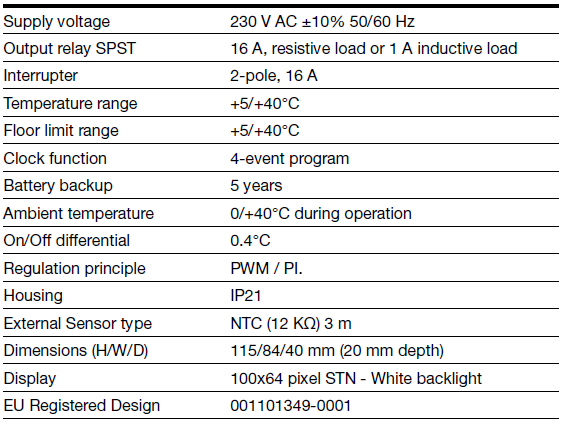
TECHNICAL DATA
- Supply Voltage: 240Vac, 50/60hz
- Output Relay: 16A SPST, 3600W max
- Switching Differential: 0.4 degC
- Built-in Switch: 2 pole 16A
- Temperature Range: 0/+50 degC
- Housing/protection: IP20 & IP21
- Dimensions (HxWxD): 115mm x 84mm x 58mm
- Sensor Length: 3m
- Mounted: Vertically/Flush Mounted
TURNING ON FOR THE FIRST TIME [Factory Reset]
- >Press ‘MENU’ button
- >Press the ‘Arrow’ button until you see ‘Engineer Settings‘ > Press OK
- >Press the ‘Arrow’ button until you see ‘Factory Reset‘ > Press OK
- >Press the ‘Arrow’ button until you see ‘RESET‘ > Press OK
- The thermostat will turn off and on.
- Set language>OK Set time>OK Set date>OK
- The thermostat is now set to ‘factory default’ settings and is fully operational in auto
- mode. Default settings can be changed as detailed below.
FLOOR WITH AIR LIMIT
- >Press ‘MENU’ button
- >Press the ‘Arrow’ button until you see ‘Engineer Settings‘ > Press OK
- >Press the ‘Arrow’ button until you see ‘Application‘ > Press OK
- >Select from either 5:2 6:1 or 7:0 > Press OK > Press Exit
PROGRAMMING
- >Press ‘MENU’ button
- >Press the ‘Arrow’ button until you see ‘User Settings‘ > Press OK
- >Press the ‘Arrow’ button until you see ‘4-Event Schedule‘ > Press OK
- >Select from either 5:2 6:1 or 7:0 > Press OK > Press Exit
- >Press ‘MENU’ button
- >Press the ‘Arrow’ button until you see ‘4-Event Schedule‘ > Press OK
- >Set day(s) of the week> Press OK
- >Set Morning > Press OK
- >Press the ‘Arrow’ button to set Morning ‘ON’ time > Press OK
- >Press the ‘Arrow’ button to set Morning ‘ON’ temperature > Press OK
- >Set Daytime > Press OK
- >Press the ‘Arrow’ button to set Daytime ‘OFF’ time > Press OK
- >Press the ‘Arrow’ button to set Daytime ‘OFF’ temperature > Press OK (normal setting is 20°C – do not set to 0°C)
- >Set evening > Press OK >Press the ‘Arrow’ button to set Evening ‘ON’ time > Press OK
- >Press the ‘Arrow’ button to set Evening ‘ON’ temperature > Press OK
- >Set Night > Press OK
- >Press the ‘Arrow’ button to set Night ‘OFF’ time > Press OK
- >Press the ‘Arrow’ button to set Night ‘OFF’ temperature > Press OK (normal setting is 20°C – do not set to 0°C)
- Repeat the process depending on your weekly configeration
MANUAL MODE SETUP
- Override of the auto on /off programmed setting.
- >Press ‘MANUAL’ button
- >Set temperature> Press OK – Hand will appear with set temperature
- To change the thermostat back to automatic mode – press the ‘AUTO’ button
COMFORT MODE
Comfort mode will temporary override auto seettings for a single length of time. Once the time expires the thermostat will revert to the auto programmed setting.
- >Press ‘COMFORT’ button
- >Set temperature > Press OK
- >Set lengh of time > Press OK
Understanding Adaptive Function?
- Adaptive function allows the thermostats to predict when the floor heating should be turned on. A thermostat set to 28°C at 6am will turn on hours before (based on the last few days temperature) in an attempt to be at 28°C at 6am. Time of use meter
- The Smart Power Meter varies the power tariff rate at different times of the day. Overnight the rate is at ‘Off Peak’ rates and during the evenings there is the ‘Peak’ rate. At the times between these there are ‘Shoulder’ rates. The exact times of these rates should be confirmed from your power provider.
- As the cost of electricity during ‘Peak’ times is more expensive than during the ‘Off Peak’ or ‘Shoulder’ times the adaptive function on the MCD4 thermostat should be programmed to ‘OFF’.
- Benefits of Adaptive Function (for gas installations)
- As the weather becomes cooler or warmer, your thermostat will predict what time to turn on your system so your floors will always be warm and at your set temperature, as programmed.
- Set the Adaptive Function to ‘Off’ (default setting for MCD4 is ‘ON’)
- Press MENU button
- Press the ‘Arrow’ button until you see ‘Engineer Settings‘ > Press OK
- Press the ‘Arrow’ button until you see ‘Adaptive Function‘ > Press OK
- Press the ‘Arrow’ button until you see ‘OFF‘ > Press OK
4 Event Clock Thermostat
- An “all-in-one” clock thermostat for electric underfloor heating control where optimum comfort temperature and minimum energy consumption are required.
- The thinnest clock thermostat on the market, only 20 mm, making it easy for the installer.
- Easy animated menu navigation and programming in 8 different languages.
- The programming is now child’s play, ensuring the fastest and easiest set-up.
- Set and forget! Adaptive control ensuring comfort temperature at the required time.
- Compatible with existing floor sensors, making it the best thermostat for renovation purposes.
PRODUCT PROGRAMME
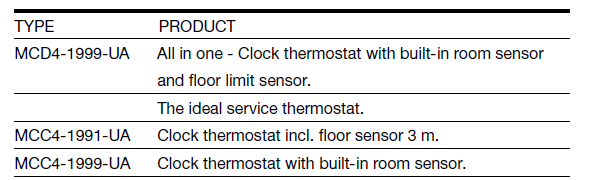
Thermostat control
Electronic thermostat for control of temperature by means of a sensor placed either externally in the floor or built into the thermostat. MCD4 can also operate in regulator mode (option). This is useful for renovation purposes where it is not possible to use a floor sensor.
Built-in clock – calendar with power backup
Comes with built-in 4-event program for automatic comfort and setback temperature. The clock and calendar have built-in battery backup, so the user never has to care about setting the clock after power interruption.
Graphical display
Unique user interface with new animated graphical menus and button based navigation for easy programming and readout of data.
Monitoring of energy consumption
Total switch-on time in percent and calculated cost can be read out for the last 2 days, 30 days or 365 days. Overall energy consumption can thus be monitored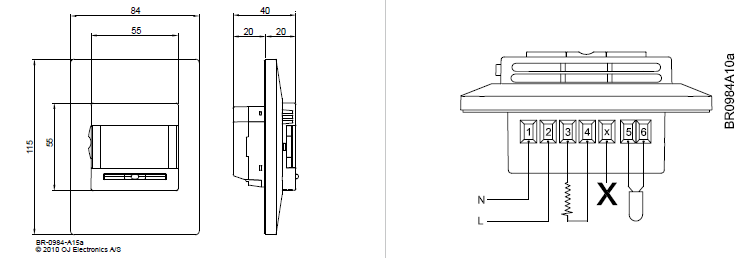
Factory-set events
The thermostat is delivered with factory-set programs as detailed below: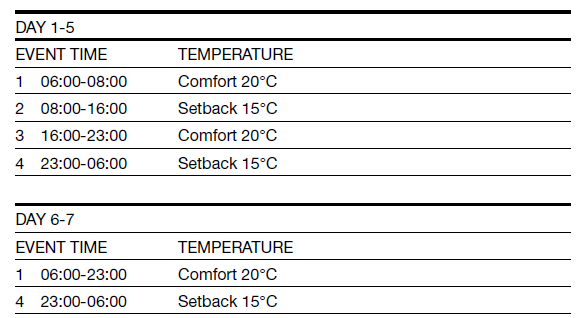
Individual programming of events:
- The factory-set periods and/or temperatures can be changed according to requirements.
Furthermore, the following programs can be selected:
- 4 events for 5 days and 2 events for days 6+7
- 4 events for 6 days and 2 events for day 7
- 4 events per day
Comfort mode
The room temperature can be temporarily changed for a single event. The comfort mode temperature is reset after a user selected a number of hours. The thermostat will then return to the scheduled event program.
Manual mode
The scheduled event program can be cancelled, e.g. during holidays, and the temperature set for frost protection purposes instead, e.g. to 5°C. The new setpoint will remain active until manual mode is cancelled.
TECHNICAL DATA
Comfort Heat
- Comfort Heat Australia Pty Ltd
- www.comfortheat.com.au
- [email protected]
- p: 02 9979 8600 f: 02 9979 7706
REFERENCE:
DOWNLOAD MANUALS:
Comfortheat MCD4 Hydronic Programmable Thermostat Operating Manual
OTHER MANUALS:
Comfortheat MCD4 Electric Programmable Thermostat Setup Manual
Comfortheat MCD4 THERMOSTAT Wiring Diagram
Comfortheat MCD4 Programmable Thermostat User Manual

Comfortheat MCD4 Hydronic Programmable Thermostat Operating Manual