Cn-hysen HY06RF-BW WIFI Digital Thermostat
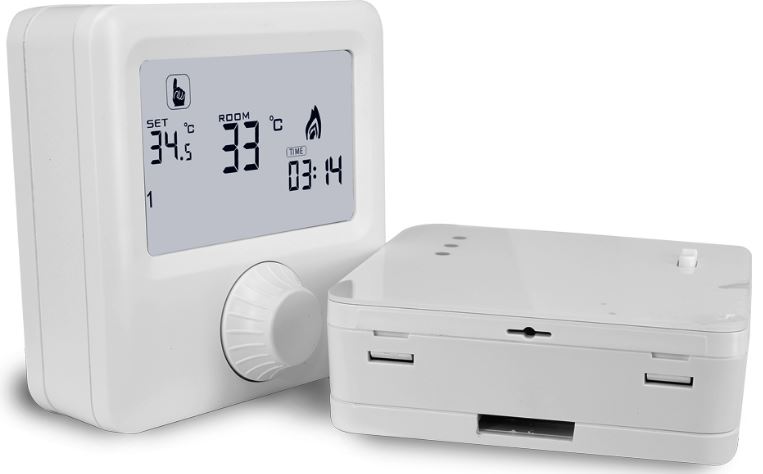
Packing
- Thermostat 1pc
- Screws 2pcs
- User Guide 1pc
- Floor Sensor(3m) 1pc(Optional)
About Your Thermostats
HY06RF series range has been developed to control electric underfloor, water heating, or water/gas boiler systems, all designs have a backlight function
Features
- The standard total Size is 86*86mm
- Display size is 64*64mm
- Touch buttons to make simple operation
- Color: white, black, champagne golden
- The visible thickness above the wall is only 13mm
- 86mm hidden box and 60mm European box
- Flat mounting, it is easy to install
- Including built-in sensor and external sensor
- 0.5°C accuracy keeps the temperature within the level you set.
- Children lock to prevent misoperation by children
- Data memory when power is off.
- 5+2 days programmable and it can be DIY programmable;2 preset programmable modes for your choice, it is most convenient for your use.
- Holiday mode make you enjoy a more comfortable temperature on holiday
- The temperature of the external sensor can be checked
Product Specifications
- Power: two AA* 1.5V alkaline batteries
- Display accuracy::0.5℃
- Probe sensor::NTC(10k)1%
- Contact capacity::5A/230V
- Working environment temperature::0~50°C
- Range of temperature adjustment::5~35°C
- Range of temperature display::0~40°C
- Output: Switch relay
- Insulating condition: Normal environment
- Running program: Set per 1 week as a cycle
- Installation: Wall mounted or on battery seat
- Size(mm):86*86*23
Before wiring and installing
- Read these instructions carefully. Failure to follow them could damage the product or cause a hazardous condition.
- Check the ratings given in the instructions and on the product to make sure the product is suitable for your application.
- Installer must be a trained experienced service technician.
- After installation is complete. check out the product operation as provided in these instructions
Wiring
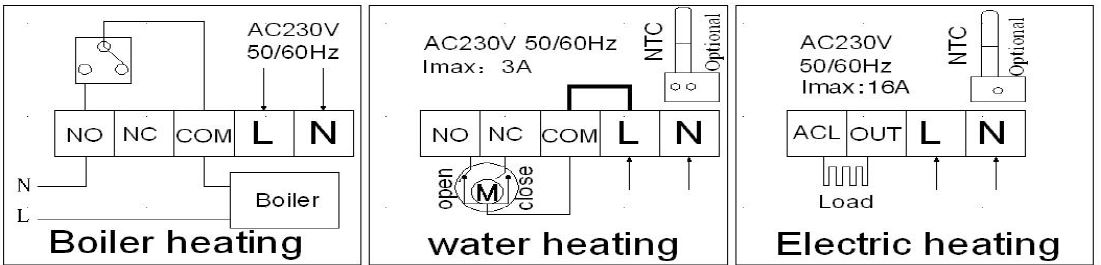
Displays
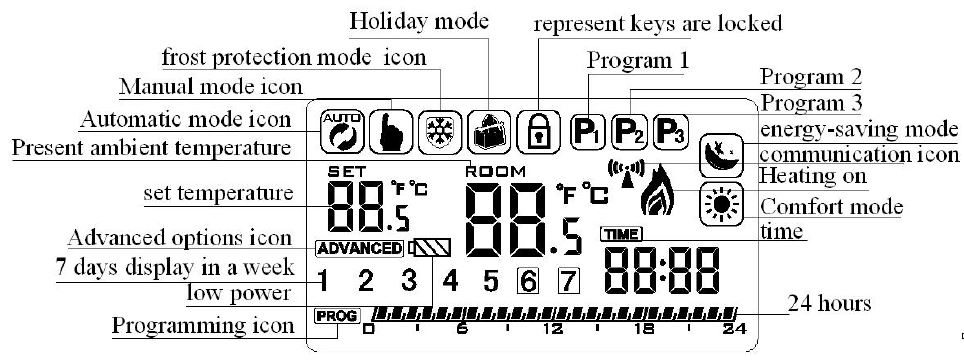
Description of icon
 Auto mode; run the preset program
 Manual mode
 Temporary manual mode
 Holiday mode
 The heating disappears to stop heating
 Clock
Clock Temperature for external sensor
 Energy-saving mode
 Comfortable mode
 Run programmable mode
- P1:Run DIY 7 days 6 periods programmable
- P2:Run preset 7 days 2 periods program
- P3:Run preset 5+2 days 4 periods program
- P1, P2, P3 can be chosen on setting interface
 Press the power key about 3~5S to lock/unlock
 Advanced Options
 programmable mode
Operation key
- Power off state, short press the rotary button to switch and
- Power on state, long press the button for 3s to enter the setting interface and choose an icon, then press the button to confirm
- The increasing key, clockwise
- Decreasing key, anticlockwise
 power key: on the right side of bottom
Quick Operation
- Press to power on/power off
- Power on state, and long press the rotary button for 3 seconds to enter the setting interface. You can rotate the button to choose an icon, press the rotary button to enter into it and set the value, and press the rotary button to confirm.
- Setting time: flashing, then you can orderly set minutes, hours, and weeks., adjust the value by rotating the button, pressing the button to confirm, and entering to next setting
Programmable
HY06RF wireless thermostat has 3 kinds of programmable modes (P1, P2, P3) for choice. Here below is the default for P1, P2, and P3 P1 programmable mode is a DIY setting Long press the rotary button for 3s, rotate the button to choose, and press the button to enter the setting interface. then you can orderly week, temperature and time. By rotating the button to adjust the range and pressing a button to confirm and enter the next setting Time and temperature can’t be adjusted for P2, P3 programmable mode
P1 manual programmable(default)
| week | period | Default period | Default temperature |
|
7 days per days |
1 | 0:00-6:00 | 15℃ |
| 2 | 6:00-9:00 | 21℃ | |
| 3 | 9:00—12:00 | 15℃ | |
| 4 | 12:00—14:00 | 21℃ | |
| 5 | 14:00—17:30 | 15℃ | |
| 6 | 17:30—23:59 | 21℃ |
P2 setting, default is 7 days programmable
| week | period | Default period | Default temperature |
| 7 days per week | 1 | 6:00-22:00 | 21℃ |
| 2 | 22:00-6:00 | 17℃ |
P3 setting, default is 5+2 days programmable
| week | period | Default period | Default temperature |
|
Working days |
1 | 22:00—6:00 | 17℃ |
| 2 | 6:00—8:00 | 21℃ | |
| 3 | 8:00—16:00 | 17℃ | |
| 4 | 16:00—22:00 | 21℃ | |
| weekend | 1 | 6:00-22:00 | 21℃ |
| 2 | 22:00-6:00 | 17℃ |
Holiday mode
Long press the rotary button for 3s, rotate the button to choose, and press the button to enter into holiday mode. then you orderly set days and temperatures. Rotate the button to adjust the range, and press the button to confirm. when finished, press the button to exit. The set temperature range is 5~15℃(default temperature is 10℃)for holiday mode. In the interface of holiday mode, it can be canceled by press
Evening-saving mode
Long press the rotary button for 3s, rotate the button to choose, press the button to enter into the evening-saving mode, rotate the button to set the temperature(default temperature 17℃), press the rotary button to confirm, and return to the last interface,it will skip to next setting icon automatically.
Comfortable mode
Rotate the button to choose, and press the button to enter into comfortable mode. then you can set the temperature(default temperature 17℃), press the rotary button to confirm, and return to the last interface, it will skip to the next setting icon automatically.
Query temperature
It will appear when the thermostat detects an external sensor. then you can choose by rotating the button and pressing the button to query floor temperature(temperature of receiver’s external sensor) . This function is only suitable for electric /water floor heating, and boiler heating no this function.
Setting IP code
- Power off state, long press button for 3s to enter into setting interface
- IP high Setting: rotate the button to adjust IP high address ( 1 ~ F F ), and press the button to IP low address setting
- IP low setting: rotate the button to adjust IP low address ( 1 ~ F F ), and press the button to the next interface
- Write transceiver IP address: show adjusted IP high address and IP low address, within 10 seconds after the transceiver power is on, press the button to send the IP address
- Display “55” means that matched successfully
- Communication instruction, be long bright display in normal communication and blinking display in abnormal communication
Transceiver tips
Transceiver LED display instruction
- Power light (green light): it’s bright when powered on Signal light(orange light): it’s long and bright within 10s after power on (match IP), the signal light is off when it receives match, the signal light is blinking within 10s when power off.
- Load light/fault light (red light):
- When no fault: light on when load output, lights off when no load output
- When fault: light is blinking and indicate when a fault
- IP is fault(IP: FFFF), light blink 2 times (light on 0.25 seconds light off 0.25 seconds), spacing out the light for 2 seconds
- Light blink 3 times when it does not receive a wireless signal for 1 hour (light on 0.25 seconds light off 0.25 seconds), spacing out the light for 2 seconds
- Light blink 4 times when the built-out sensor is faulty (light on 0.25 seconds light off 0.25 seconds), spacing out the light for 2 seconds
External sensor temperature Alarm for electric/ water floor heating:
- Detected temperature by the external sensor is above the setting temperature of A5(Advanced options), then trigger high-temperature protection and will flash
- The detected temperature by the external sensor is below the set temperature of A6( Advanced option ). then trigger low-temperature protection.,and apparently, it will auto open relay to heat and appears
Advanced options
Long press the rotary button for 3s to enter into the advanced options setting, rotate the button to choose, and press the button to choose the value of the option (from A1 to AA), rotate the button to set the value, press the button to enter into next option setting, after finished, no any operation for 5s to exit.
| Symbol | Setting item | Setting parameter | Default |
|
A1 |
Measuring temperature calibration |
-9-+9℃ | Accuracy is 0.5°C |
| A2 | Temperature control return
difference setting |
0.5-5℃ | 0.5 |
| A3 | Children lock | 0:half lock
1:full lock |
0 |
| A4 | Programmable choice | –:non programmable
01:programmable |
01 |
| A5 | Limit value of high temperature
for external sensor |
–:cancel high temperature protection
35°C-70℃ |
— |
| A6 | Limit value of low temperature
for external sensor |
–:cancel low temperature protection
5℃-10℃ |
5℃ |
| A7 | Lowest temperature limit setting | 1-10℃ | 5℃ |
| A8 | Highest temperature limit setting | 20-70℃ | 35℃ |
|
A9 |
Descaling function |
0:Closed
1:Open(thermostat will auto run 3min if have not be used over 100 hours) |
0 |
| AA | Restore factory defaults | Display A o, press rotary button, whole
show |
Reference:
DOWNLOAD MANUALS:
Cn-hysen HY06RF-BW WIFI Digital Thermostat User Manual