Celect DRF4 Wireless Programmable Thermostat
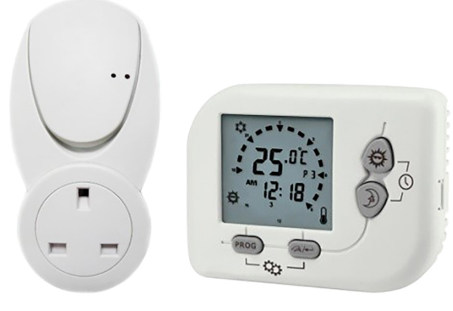
Instruction Manual
the receiver. Select the cooler option when a cooler is connected to the receiver.
Address setting
In transmitter and receiver, there are dip switches to select the addresses. The receiver ignores the message which is sent by the transmitter with different address setting.
Terminal block connecting Label
Specification
- Temperature measurement: 0.0 – 40°C(0.1°C/step) Accuracy: ± 0.5°C
- Temperature control range: 5.0 – 35.0°C (0.5°C/step)
- Terminals: 2.5mm2 cable
- Electronic control: Type 2.B action
- Transmitter — Battery: 2 x 1.5V AAA alkaline battery
- Receiver — Input voltage: 240Vac
- Receiver Output voltage: 24..240Vac 50/60Hz 10(3)A max
- Operating temperature: 0 – 50°C
DRF4 RF Programmable Thermostat
- The system includes one wireless thermostat controller plus one RF receiver.
- Transmits up to 20 meter indoor.
- Communicates at 868MHz(Europe Standard) and designed for unlicensed operation under FCC Part 15.
Warning
- If there is a dead zone in the RF communication. That means the receiver may not be able to receive the message from the transmitter. Before the installation, check the communication first. If the communication fails, relocate the receiver and transmitter location.
- If the receiver has interference, set another transmitter address. Reset the transmitter and follow the set up instruction to reset the receiver.
- It is recommended locate at least 30com distance from any metal objects (including the metal box) and at least 2 meter from any electronic devices e.g. radio TV, PC etc. The metal objects or electronic devices maybe interfere with the RF communication, so maximum distance will be shorter.
- Do not mount onto metal wall boxes.
Installation, Mounting
Installation Location
The thermostat (Receiver and Transmitter) should be mounted on an inner wall 1.5m above the floor in position where it is readily affected by changes of the general room temperature with freely circulating air. Prevent direct exposure to sunlight; dripping or splashing area. Do not place this unit at a location where air circulation is low, or where it has great temperature changes (e.g. near door irrespective of the current setting temperature.
Control Off mode
The LCD is fully turned off. The heater/ cooler is switched off, irrespective of the current control temperature setting
Jumper selection
Delay / No Delay jumper
- Heater-Cooler
- No delay 10sec 4mins
- Delay 4mins 4mins
Choose the Delay option if compressor heat is connected.
12-hours / 24-hour mode jumper
When the 12-hour option is selected, the time is shown in 12-hours mode. Otherwise, the time is shown in 24-hours mode.
Heater / Cooler jumper
Select the heater option when a heater is connected to
Temporary Override Mode
Temporary Override mode maintains until next program time is met.
Permanent Override Mode
The room temperature will be maintained at the Override temperature until Override mode is released. Press <PRG> to release the Permanent Override mode.
Control Off / Sleep mode:
- Press the
 to select the sleep mode and control off mode.
 - The sequence is as below:
- Normal Mode
 Sleep Mode Control Off Mode Normal Mode …
 - Press any other keys to exit the control off / sleep mode and return normal mode.
Sleep Mode
At sleep mode,  icon is displayed. The transmitter stops measuring and displaying the temperature. Only the Do not place the thermostat near heat/cool generating sources.
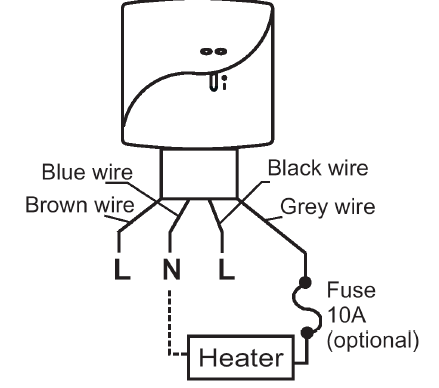
Wiring
Caution: Turn off the electrical devices and receiver before wiring. There is a 4-wire cable provided
| Color | Connection |
| Brown | 240Vac Live |
| Blue | 240Vac Neutral |
| Black | 240Vac Live |
| Grey | Device’s power input |
Mounting
Using the accessory screws and wall anchors provided, mount DRF4 with the key-hole at the back. The transmitter and receiver should be mounted on the wall and install the covers on them.
Install or replace the battery for the transmitter
Caution: Turn off the electrical devices and disconnect the supply to the appliances before replacing the batteries. Replace only with the same or equivalent type of batteries. Do not dispose the used batteries with household waste. Refer to your local area for the proper disposal
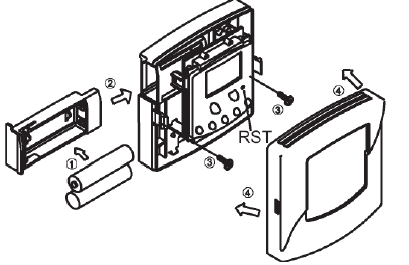
- Pull out the battery drawer
- Place the new batteries according to the marking on the battery drawer.
- Dispose of the old batteries properly.
- Slide the battery drawer back to its position.
- Check if the thermostat works properly or not. Press Normal Temporary Override Permanent Override Normal…
Selecting the Temporary/ Permanent Override Mode
- Press
 to change the mode from normal to Temporary Override
  icon will be displayed.
 - Press again, the mode changes from Temporary Override to Permanent Override mode
 icon will be displayed.
 - Press once, the mode changes from Permanent Override to normal mode.
- Review and adjust the Override temperature:
- Press
 the Override temperature is shown.
 - Hold the for 2 seconds, the Override temperature will flash.
- Press to adjust the Override temperature.
- Press
 to exit the Override temperature setting.
 - Or transmitter will auto-return to normal mode after 10 seconds.
Set Program
- Press <PRG>, the hour will flash, press to change the hour setting.
- Press <PRG>, the minutes will flash, pressto change the minutes setting.
- Press <PRG>, temperature will flash, press to change the setpoint.
- Press <PRG> to set the next program.
- The program setting sequence is as below:
- Mon~Fri (P1 P2 P3 P4P5P6) Sat (P1 P2 P3 P4P5P6) Sun (P1 P2P3 P4P5P6)…
- Mon~Fri (P1
- Press < > to exit the program setting mode and return to the normal mode.
- Or the transmitter will auto-return to normal mode after 10 seconds.
Temporary / Permanent Override Mode:
- There are two modes in the override mode (Temporary override and Permanent override mode).
- The sequence is as below: “Reset” if necessary.
Start/Reset:
- After wiring and mounting, switch off all the connected devices. Place 2 new AAA 1.5V alkaline batteries according to the polarities marked. LCD display will be switched on.
- Press ‘RST’ to reset. The DRF4 will be ready to control the heater / cooler.
- Switch ON the heater/cooler and receiver. The heater/cooler will remain OFF until the transmitter activates the output ON with
 displayed on LCD.
Normal Time Mode:
- Temperature detection starts and LCD displays the room temperature.
- If Battery is LOW,
 will be flashing. The old batteries must be replaced with a new one immediately.
 - Defrost function is activated with
 displayed when the temperature is 5°C or below. The output will be forced to ON @ Heat & OFF @ Cool.
 - Below 0°C, transmitter will display LO.
- Above 40°C, transmitter will display HI.
Normal Time Setting Mode
- Press
 , the Day of Week (1-7) will flash, press to select the current Day of Week.
 - Press, the Hour will flash, press to set the Hour.
- Press , the Minute will flash, press to set the Minute.
- Press will jump back to the step 1.
- Press to confirm the settings and return to
- Normal Mode.
- Or transmitter will auto-return to normal mode after 10 seconds.
- Normal Mode.
Factory Defined Programs:
- The heater/cooler turns on according to the activated program and the control temperature setting. When the heater/cooler is On. Program number and icons are shown. The pre-defined programs are as below:
Heater mode
| Mon ~ Fri | Sat | Sun | |
| P1 | 06:00 (21°C) | 08:00 (21°C) | 08:00 (21°C) |
| P2 | 08:00 (16°C) | 10:00 (16°C) | 10:00 (16°C) |
| P3 | 12:00 (21°C) | 12:00 (21°C) | 12:00 (21°C) |
| P4 | 15:00 (16°C) | 15:00 (16°C) | 15:00 (16°C) |
| P5 | 18:00 (21°C) | 18:00 (21°C) | 18:00 (21°C) |
| P6 | 22:00 (16°C) | 23:00 (16°C) | 23:00 (16°C) |
Cooler mode
| Mon ~ Fri | Sat | Sun | |
| P1 | 06:00 (24°C) | 08:00 (24°C) | 08:00 (24°C) |
| P2 | 08:00 (29.5°C) | 10:00 (29.5°C) | 10:00 (29.5°C) |
| P3 | 12:00 (24°C) | 12:00 (24°C) | 12:00 (24°C) |
| P4 | 15:00 (29.5°C) | 15:00 (29.5°C) | 15:00 (29.5°C) |
| P5 | 18:00 (24°C) | 18:00 (24°C) | 18:00 (24°C) |
| P6 | 22:00 (26°C) | 23:00 (26°C) | 23:00 (26°C) |
REFERENCE:
DOWNLOAD MANUALS:
Celect DRF4 Wireless Programmable Thermostat Instruction Manual

Celect DRF4 Wireless Programmable Thermostat Instruction Manual