CARBONWARM 1 Smart WiFi Fan Coil Thermostat

INTRODUCTION
To regulate the temperature of fan coil units, you can rely on the CARBONWARM 1 Smart WiFi Fan Coil Thermostat. Smart technology and wireless connectivity are combined to make controlling the temperature in homes and businesses easy and efficient. The CARBONWARM 1 thermostat may be controlled from anywhere with an internet connection and a smartphone. This is a useful and convenient addition, as it allows you to control the temperature of your building even while you’re not there.
FEATURES
Features of Particular Interest:
- The thermostat can be connected to your Wi-Fi network via a smart connection, allowing for remote access and control via a mobile app.
- Adjustable Temperature It allows you to precisely adjust the temperature of your fan coil units to achieve and sustain your ideal indoor climate.
- You can program your thermostat to heat and cool at specific times each day, week, or month to save money on utilities while still maintaining a comfortable environment.
- The thermostat’s energy-saving settings and smart algorithms allow you to save money without sacrificing comfort.
- Installation and integration into preexisting systems is simplified by its compatibility with a wide range of fan coil units and HVAC systems.
- The thermostat’s digital display and straightforward menu structure make it a breeze to adjust the temperature and set schedules.
- When linked with other smart home systems like Amazon Alexa or Google Assistant, it enables voice commands to manage the thermostat.
- When it comes to managing the temperature inside your home, the CARBONWARM 1 Smart WiFi Fan Coil Thermostat has you covered in every respect.
- It improves comfort and cuts costs by combining smart technology with a conventional thermostat.
SPECIFICATION
|
Operating Voltage
|
AC95~255V 50/60Hz
|
|
Load current
|
16A
|
|
Output Power
|
3520W
|
|
Power consumption
|
<1W
|
|
IP rating
|
IP20
|
|
Temperature control program
|
Working day + rest day or manual setting
|
|
Temperature Sensor
|
Built-in sensor + external sensor
|
|
shell material
|
PC+ABS flame retardant
|
|
Temperature setting
|
Adjustable and programmable, temperature control
|
|
Accuracy
|
± 0.5 ℃
|
|
APP
|
WI-FI network, download Smart Life, which can realize Baidu, Tmall and other language assistance control
|
DIMENSION
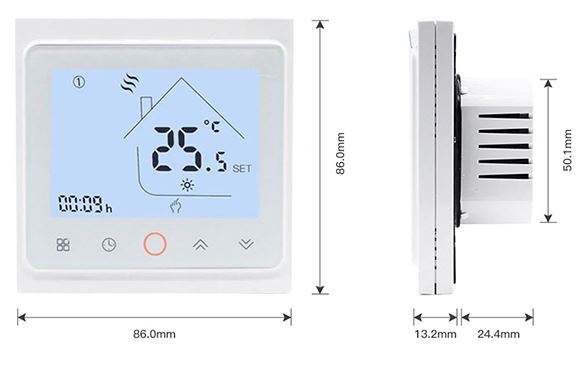
WHAT IS IN THE BOX
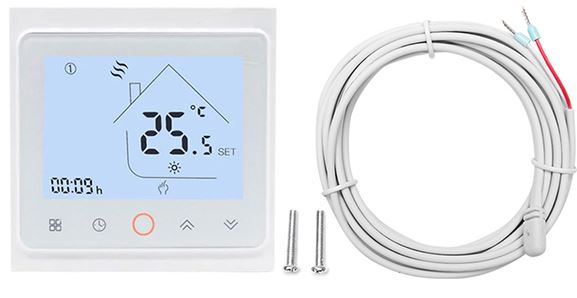
PRODUCT DISPLY
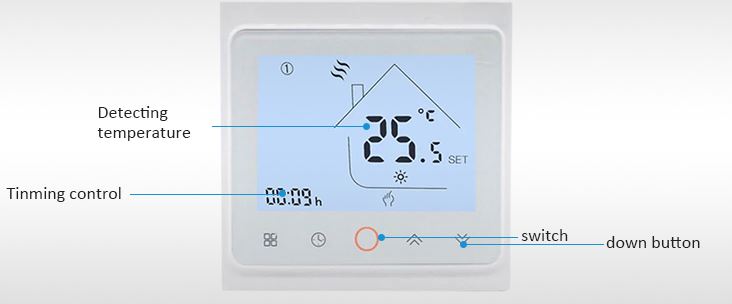
HOW TO OPERATE
Here’s how to use your new Carbonwarm 1 Smart WiFi Fan Coil Thermostat:
- First, follow the thermostat’s installation instructions to get it up and running. Typically, this entails attaching it to the wall and plugging it into the fan coil unit’s power supply.
- After the thermostat has been placed, it should be activated by plugging it into an electrical outlet. Thermostats can be battery-operated or hardwired into a building’s electrical system.
- You can link the thermostat to your wireless network through its user interface. Selecting the WiFi network and inputting the password is typical. The thermostat will provide on-screen directions, so just stick to those.
- Get the free mobile app here: Locate the Carbonwarm 1 app in your mobile device’s app store (like the Google Play Store or the Apple App Store, for example) and install it..
- Sign up for something: Launch the program and sign up for an account if you haven’t already. Your email address and password may be required pieces of information.
- After creating an account, the thermostat can be added by following the app’s instructions. To do this, most thermostats have a QR code or other identifier that must be scanned or entered.
- Customize the thermostat to your needs by setting up schedules and adjusting its settings once you’ve installed it.
- The temperature, fan speed, and other parameters should all be modifiable via the app. Typically, you can make various schedules for various times of the day or different days of the week.
- After initial setup, the thermostat can be managed via a smartphone app.
- You may turn the system on and off, change the temperature, modify the fan speed, and check the current temperature and humidity levels.
- Incorporate a voice assistant like Amazon Alexa or Google Home (if compatible) to operate your Carbonwarm 1 thermostat hands-free.
- To set up voice control, just follow the thermostat’s and voice assistant’s setup instructions.
- If you have any problems or concerns about how to utilize a certain function, please refer to the user manual or get in touch with the manufacturer for assistance.
- The exact procedure for setting up your Carbonwarm 1 Smart WiFi Fan Coil Thermostat will vary depending on your model.
FAQS
Can you tell me about the CarbonWarm 1 WiFi fan-coil thermostat?
If you have a fan coil system, you may make use of WiFi access and the CarbonWarm 1 Smart WiFi Fan Coil Thermostat to manage the temperature and other settings.
How can I set up a WiFi connection on my CarbonWarm 1 thermostat?
You can connect your CarbonWarm 1 thermostat to your home’s WiFi network by following the instructions in the user manual. Usually, you have to connect the thermostat to your WiFi network by downloading a companion app to your smartphone, then following the on-screen instructions. Exactly what makes the CarbonWarm 1 thermostat so special? The CarbonWarm 1 thermostat can be controlled from afar with a smartphone app and is compatible with voice assistants like Amazon Alexa and Google Home. Other features include programmable schedules, temperature presets, an energy-saving mode, humidity regulation, and a humidistat.
Can I use a single controller for several CarbonWarm 1 thermostats?
The answer is yes, you may use the same smartphone app to manage many CarbonWarm 1 thermostats at once. As a result, you can control all of the fan coils in your house from a centralized control panel.
Is there a touchscreen interface on the CarbonWarm 1 thermostat?
The CarbonWarm 1 thermostat does, in fact, come with a built-in touchscreen display for making manual adjustments and checking the current temperature, mode, and other data. Can I use my voice to control the CarbonWarm 1 thermostat?
The CarbonWarm 1 thermostat can be used with third-party smart home voice assistants.
If you have a compatible device, you can use voice commands to do things like set the temperature, switch settings, and more.
The CarbonWarm 1 thermostat allows for user-defined schedules to be stored for later use. The CarbonWarm 1 thermostat, in fact, supports custom temperature regimens that may be tailored to individual needs. To maximize convenience and savings, you can program different temperatures during different times of the day.
Is there a vacation setting for the CarbonWarm 1 thermostat?
The CarbonWarm 1 thermostat does, in fact, include a vacation setting. If you turn on this option, the thermostat will automatically adjust to a more cost-effective setting while you’re away. Can the CarbonWarm 1 thermostat be managed from afar?
You can manage your fan coil from the palm of your hand with the CarbonWarm 1 thermostat’s WiFi connectivity and accompanying smartphone app. You can do things like check the temperature or make adjustments from afar.
Does the CarbonWarm 1 work with other smart home thermostats?
CarbonWarm 1 thermostat compatibility with other smart home devices varies. However, many smart thermostats, CarbonWarm 1 included, are made to work with widespread smart home ecosystems and protocols. Is there a reminder to change the filter on the CarbonWarm 1 thermostat?
Whether or not the CarbonWarm 1 smart thermostat has a filter change reminder depends on the model and firmware version. To keep your fan coil unit operating at peak efficiency, it is recommended that you change or clean the air filter at regular intervals as indicated by these alerts. The CarbonWarm 1 thermostat allows for the tracking of energy consumption.
CarbonWarm 1 is one such smart thermostat that can track your energy usage. They report how much energy you use, so you can monitor trends and make adjustments to save money.
Does geofencing work with the CarbonWarm 1 thermostat?
The thermostat’s geofencing function uses your phone’s location to make temperature adjustments on the fly. Some smart thermostats, like the CarbonWarm 1, may have geofencing features, however, this is not always the case.
Do I need a professional to set up my CarbonWarm 1 thermostat?
In most cases, installing a CarbonWarm 1 thermostat only requires rudimentary technical knowledge on the part of the homeowner. To guarantee correct installation and wiring, however, a professional HVAC specialist should be hired if the installer lacks experience with thermostat installations. Do all fan coil units work with the CarbonWarm 1 thermostat?
The CarbonWarm 1 thermostat is compatible with the vast majority of commercially available fan coils. Before buying a thermostat, make sure it will work with your particular fan coil system. To learn more about the thermostat’s compatibility, read the manual or get in touch with the maker.
