Cadet SBFT2 SMArT-BASeTM Thermostat

IMPORTANT INSTRUCTION
When using electrical appliances, basic precautions should always be followed to reduce the risk of fire, electric shock, and injury to persons, including the following: Read all instructions before using this heater and thermostat. All electrical work and materials must comply with the National Electric Code (NEC), the Occupational Safety and Health Act (OSHA), and all state and local codes
WARNING
Turn the electrical power off at the electrical panel board (circuit breaker or fuse box) and lock or tag the panel board door to prevent someone from turning on power while you are working on the heater. Failure to do so could result in serious electrical shock, burns, or possible death. If you are uncomfortable working with electrical appliances, unable to follow these guidelines, or do not have the necessary equipment, consult a licensed electrician.
INSTALLATION INSTRUCTION
For All Applications
The thermostat needs to be mounted into the same junction box (wiring compartment) as the supplied electrical power. Both junction boxes are equipped with a ground screw. The installation of the SMART-BASE thermostat may require a slight adjustment of the panel across the front of the heater, to allow the thermostat to fit into the junction box unobstructed. To do so, remove both junction box covers and unlatch the bottom of the panel from its hangers. (Use a rubber-coated tool, or hammer handle to remove the panel. Carefully pry upward to remove.) Next, slide it back out of the junction box opening to be used for the thermostat until its edge is just hanging over the partition. Hold the panel and snap it back on to its hangers. The thermostat will now have enough room to fit into the junction box opening
Replacing Existing BTF Thermostat Control
- Remove screw attaching the existing BTF assembly (thermostat and plate) to the baseboard case and carefully pull it back to expose the wiring and connections. (Test with meter or circuit tester to verify that no electrical power is present before proceeding.)
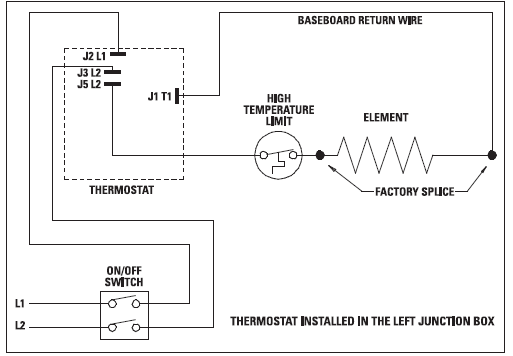
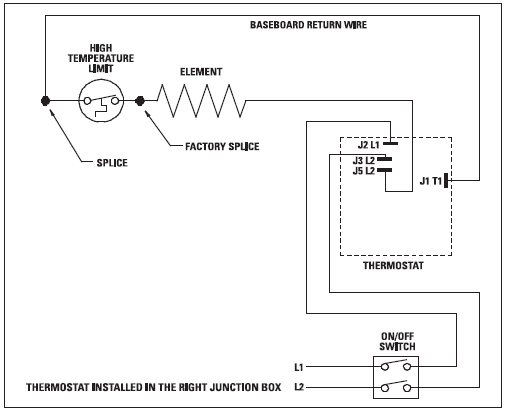
- If the power supply has been brought into the baseboard at this junction box, undo the wiring connections and remove the old thermostat assembly. Follow the appropriate wiring diagram (“FIGURE A” for left end attachment, “FIGURE B” for right end attachment) and the following instructions “Baseboard/Thermostat Wiring” below to connect the SBFT2 to the baseboard and power supply
- If the power supply has not been brought into the baseboard at this junction box, remove the old thermostat assembly by removing the wiring connections. The new thermostat (SBFT2) must be located in the same junction box as the supplied electrical power; therefore, strip 1/2” of insulation from the two loose leads (created when the thermostat was removed) and join the two wires back together using a wire connector. Remove the end plate from the other junction box and apply it to the junction box where the thermostat was removed. Follow the appropriate wiring diagram (“FIGURE A” for left end attachment, “FIGURE B” for right end attachment) and the following further instructions “Baseboard/Thermostat Wiring” to connect the SBFT2 to the baseboard and power supply
As Part of New Installation
Install the Cadet “F” series baseboard heater according to the installation instructions supplied with the product. Keep in mind the SBFT2 thermostat needs to be mounted into the same junction box (wiring compartment) as the supplied electrical power. Both junction boxes are equipped with a ground screw.
Baseboard/Thermostat Wiring Thermostat in left junction box: (Figure A)
- Locate and cut closed end splice of wires containing limit lead wire and return wire (wire behind deflector).
- Strip 1/2” of insulation from these two cut lead wires.
- Join the lead wire from the limit with the lead wire from thermostat terminal J5L2 with a connector.
- Join the return wire (wire behind the deflector) with the lead wire from thermostat terminal J1T1 with a connector.
- Connect the grounding lead of the power supply to the supplied grounding screw.
- Connect each of the remaining two power supply leads to each lead from the thermostat rocker switch with a wire connector.
- Be sure the panel does not interfere with the mounting of the thermostat plate.
- Move panel if needed. (Using a rubber-coated tool, or hammer handle; carefully pry upwards.)
- Carefully push wiring back into the junction box. Keep all wires away from the Smart-Base circuit board.
- These wires may interfere with the clock and thermostat’s performance.
- Hook upper edge of the faceplate under the lip of case.
- The lower the bottom edge of the faceplate to the junction box surface and secure the thermostat with a mounting screw.
- Rocker switch should be placed in the “O” (OFF) position. To finish see the “Completion of Installation” section below
The thermostat in right junction box: (Figure B)
- Cut closed end splice from the connection of element lead wire and return wire (wire behind deflector). Strip 1/2” of insulation from these two cut lead wires.
- Join the lead wire from the element with the lead wire from thermostat terminal J5L2 with a connector.
- Join the return wire (wire behind deflector) with the lead wire from thermostat terminal J1T1 with a connector.
- Connect the grounding lead of the power supply to the supplied grounding screw.
- Connect each of the remaining two power supply leads to each lead from the thermostat rocker switch with a wire connector.
- Be sure the panel does not interfere with the mounting of the thermostat plate. Move panel if needed. (Using a rubber-coated tool, or hammer handle; carefully pry upwards.)
- Carefully push wiring back into junction box. Keep all wires away from the Smart-Base circuit board. These wires may interfere with the clock and thermostat’s performance. Hook upper edge of faceplate under lip of case. Lower bottom edge of faceplate to junction box surface and secure thermostat with mounting screw.
- Rocker switch should be placed in the “O” (OFF) position. To finish see the “Completion of Installation” section below.
Completion of Installation
At this point, the baseboard should be securely mounted, and the SBFT2 thermostat wired and secured to the baseboard junction box. The other junction box should have the baseboard end plate/cover secured in place. Verify that the thermostat rocker switch is in the “O” (OFF) position before reestablishing the electrical power at the panel for power flow to the baseboard heater. Refer to the General Programming Operation Guide for the operation of the SBFT2 thermostat
OPERATING INSTRUCTION
See the “General Programming Operation” guide for complete operating instructions. The heater and thermostat must be properly installed before they are used.
Warranty
WARRANTY: Warranties are non-transferable and apply to original consumer only. Warranty terms are set out below.
LIMITED ONE-YEAR WARRANTY: Cadet will repair or replace any Cadet product, including thermostats, found to be defective within one year after the date of purchase.
THESE WARRANTIES DO NOT APPLY
- Damage occurs to the product through improper installation or incorrect supply voltage;
- Damage occurs to the product through improper maintenance, misuse, abuse, accident, or alteration;
- The product is serviced by anyone other than Cadet;
- If the date of manufacture of the product cannot be determined;
- If the product is damaged during shipping through no fault of Cadet.
- CADET’S WARRANTY IS LIMITED TO REPAIR OR REPLACEMENT AS SET OUT HEREIN. CADET SHALL NOT BE LIABLE FOR DAMAGES SUCH AS PROPERTY DAMAGE OR FOR CONSEQUENTIAL DAMAGES AND/OR INCIDENTAL EXPENSES RESULTING FROM BREACH OF THESE WRITTEN WARRANTIES OR ANY EXPRESS OR IMPLIED WARRANTY.
- IN THE EVENT CADET ELECTS TO REPLACE ANY PART OF YOUR CADET PRODUCT, THE REPLACEMENT PARTS ARE SUBJECT TO THE SAME WARRANTIES AS THE PRODUCT. THE INSTALLATION OF REPLACEMENT PARTS DOES NOT MODIFY OR EXTEND THE UNDERLYING WARRANTIES.
- REPLACEMENT OR REPAIR OF ANY CADET PRODUCT OR PART DOES NOT CREATE ANY NEW WARRANTIES.
- These warranties give you specific legal rights, and you may also have other rights which vary from state to state.
- Cadet neither assumes, nor authorizes anyone to assume for it, any other obligation or liability in connection with its products other than as set out herein.
- If you believe your Cadet product is defective, please contact Cadet
- Manufacturing Co. at 360-693-2505, during the warranty period, for instructions on how to have the repair or replacement processed.
- Warranty claims made after the warranty period has expired will be denied. Products returned without authorization will be refused.
Parts and Service
Visit http://support.cadetco.com for information on where to obtain parts and service.
Reduce-Reuse-Recycle
This product is made primarily of recyclable materials. You can reduce your carbon footprint by recycling this product at the end of its useful life. Contact your local recycling support center for further recycling instructions. ©2009 Cadet Manufacturing Co.
REFERENCE
DOWNLOAD MANUAL
Cadet SBFT2 SMArT-BASeTM Thermostat InstallatIon InstructIons

Cadet SBFT2 SMArT-BASeTM Thermostat InstallatIon InstructIons