Breeze33 BZ33-302Wifi Programmable Thermostat
INTRODUCTION
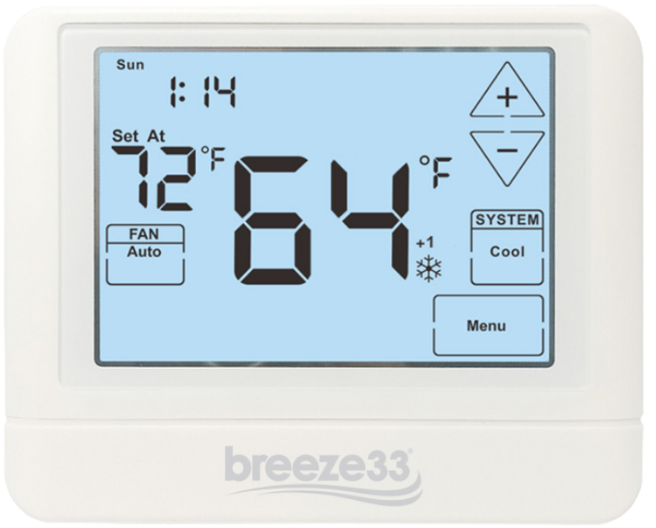
The WiFi digital programmable thermostat allows you to control the temperature anytime and anywhere. It features a large backlight display and LCD Touch Screen for ease of programming. Compatible with any Smartphone-iOS and Android.
Specifications
- The display range of temperature …………….. 32″F to 99″F co·c to 40″C)
- The control range of temperatur~—•41 “F to 90°F (5″C to 32°()
- Load rating __________ , amp per terminal, 1.5 amp maximum all terminals combined
- Swing (cycle rate or differential) ___ Heating is adjustable from 0.2· to 2.0·
- Cooling is adjustable from 0.2· to 2.0·
- Power source __________ , a to 30 VAC, NEC Class II, 50/60 Hz for hardwire
- Operating ambient——-32°F to+ 105°F (0°C to +41 °C)
- Operating humidity 90% non-condensing maximum
- Dimensions of thermostat 4.7″W x 4.4″H x 1 “D
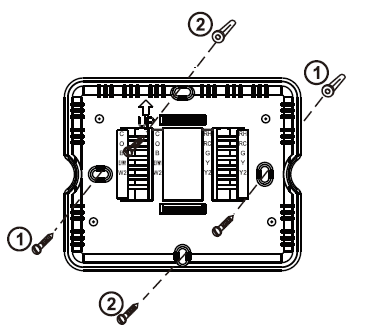
Subbase Installation
- Horizontal Mount
- Vertical Mount
Mount Thermostat
Align the 4 tabs on the subbase with corresponding slots on the back of the thermostat, then push gently until the thermostat snaps in place.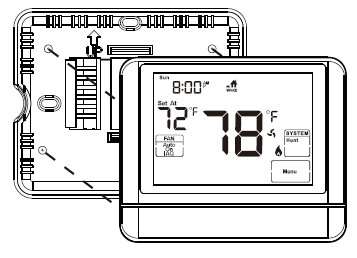
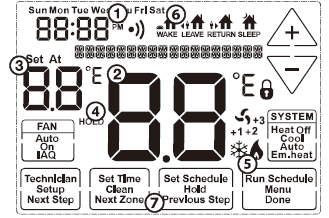
Getting to know your thermostat
- Fan Buttons
- Next step Buttons
- Set time Buttons
- Program Buttons
- Menu Buttons
- System Buttons
- Setpoint Buttons
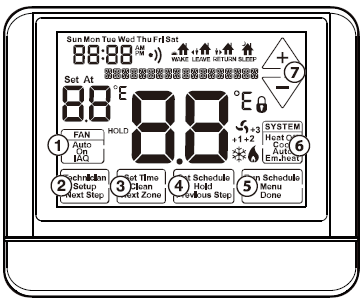
- Days of the week and time
- Indicates the current room temperature
- Displays the user selectable setpoint temperature
- Hold is displayed when thermostat program is permanently overridden.
- System Operation Indicators: The compressor delay is active if these are flashing.
- Programmable Time Periods: Residential uses 4 time periods – WAKE. RETURN, LEAVE and SLEEP.
- Program Menu Options: Shows different options during programming
Wiring
Caution:
Failure to disconnect the power before beginning to install this product can cause electrical shock or equipment damage.
- If you are replacing a thermostat, make note of the terminal connections on the thermostat that is being replaced.
- In some cases wiring connections will not be color coded.
- For example, the green wire may not be connected to the G terminal.
- Loosen the terminal block screws. Insert wires then retighten the terminal block screws.
- Place non-flammable insulation into the wall opening to prevent drafts.
Terminal Designations
The following terminals on the thermostat wall plate are wired according to the type of HVAC system connected to and how the thermostat is configured.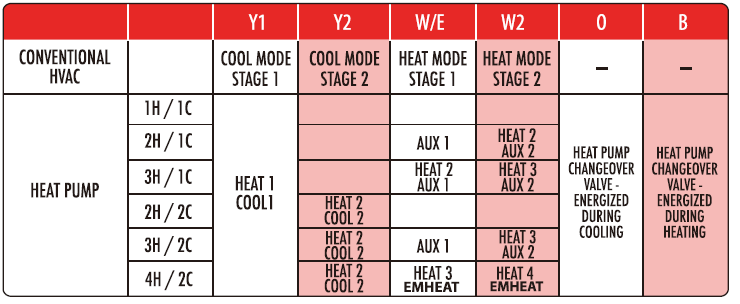
Wire Specifications
Use shielded or non-shielded 18-22 gauge thermostat wire.
Note:
In many heat pump systems with no emergency heat relay, a jumper can be installed between E and W2 to turn thermostat into a single-stage control for Emergency Heat Operation.
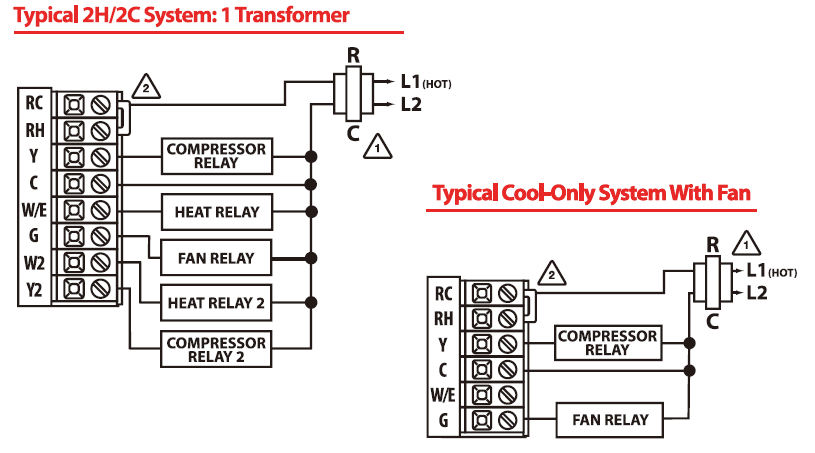
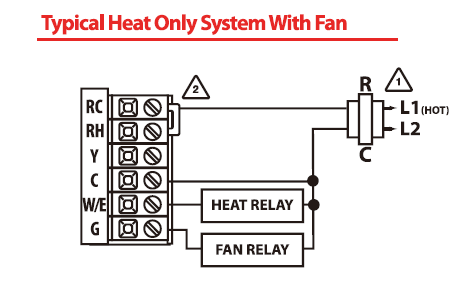
Wiring Diagrams
- Power supply
- Factory-installed jumper. Remove only when installing on 2-transformer systems
- Use either O or B terminals for the changeover valve

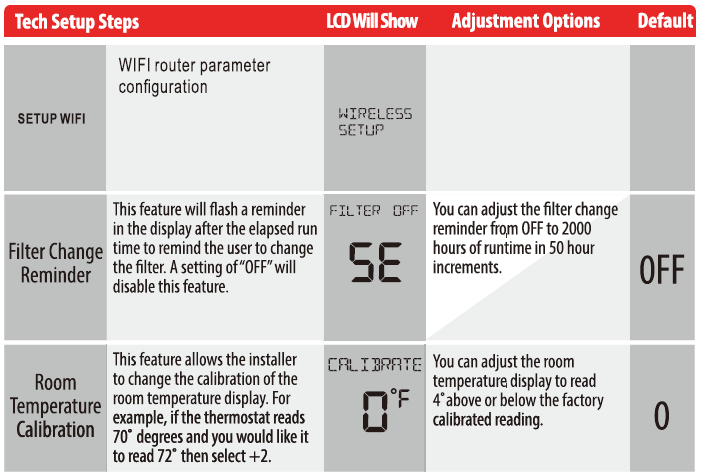
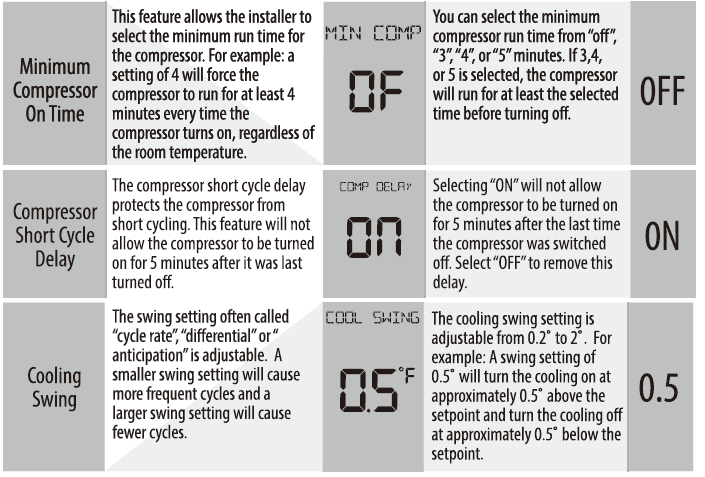
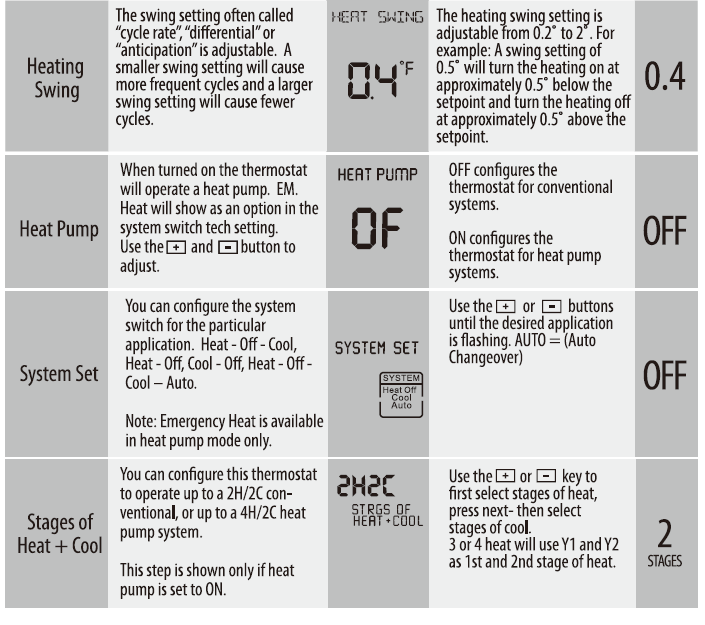
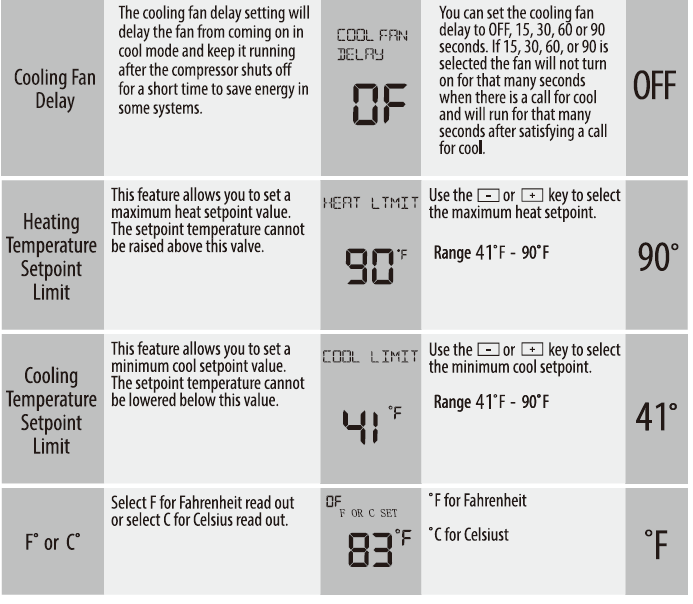
Technician Setup
- Press MENU button
- Press and hold the TECHNICAL SETUP button fur 3 seconds.
- This 3-second delay is designed so that homeowners do not accidentally access the installer settings.
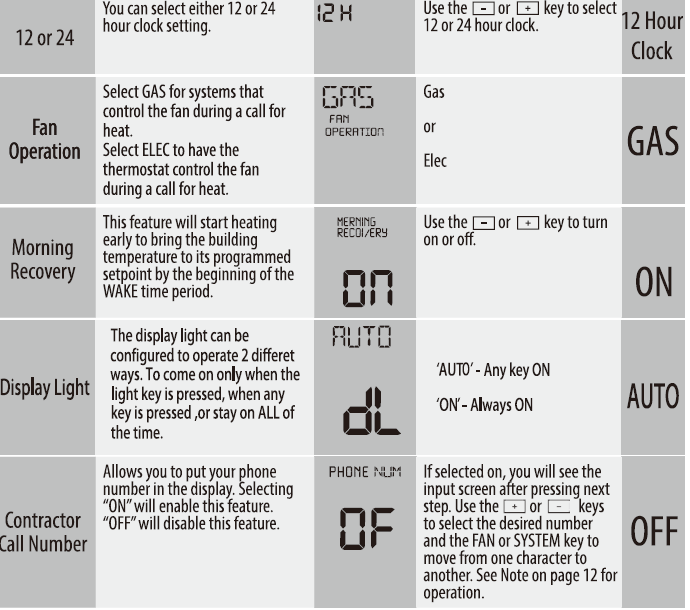
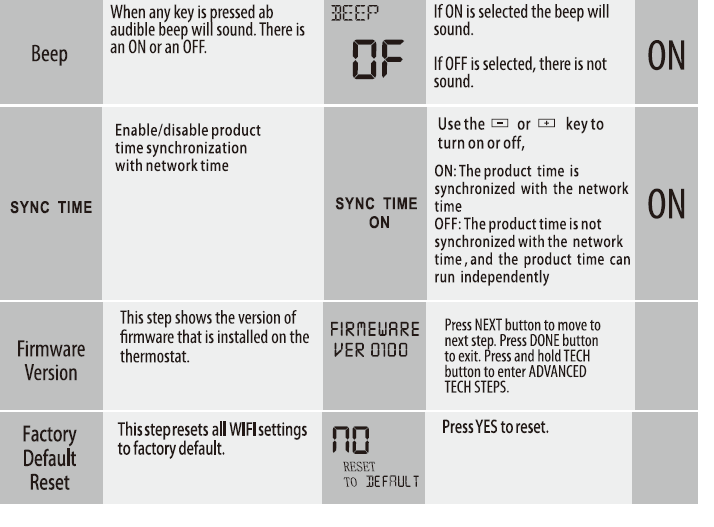
- Configure the installer options as desired
- Use D or G to change settings and the NEXTSTE P or PREV
- STEP key to move from one to another.
PROGRAMMING
Swing Setting Tip
The second stage will turn on at 2x the swing setting. The second stage will turn off when 1x the swing is reached. For example, if the swing setting is 0.5 degrees for heating and the thermostat is set at 70°F, the first stage will turn on at approximately 69.5 “F. The second stage will turn on at 69°F. The second stage will turn off at 69.s°F and the first will turn off at 70.5 °F. If the third stage is used, it will turn on at 68.5 °F and turn off a approximately 69°F.
A Note About Keypad Lockout:
The function of activating your lockout choice takes place after you have exited tech setup. To lock or unlock the keypad hold down the MENU for 3 seconds
Contractor Call Number Note:
If contractor call number is selected ON, your phone number will show in the display if there has been a continuous call for heating or cooling for 24 hours or if the FAN button is held down for 3 seconds. To remove the phone number from the display, hold the fan button down for 3 seconds
Set Time
- Press the MENU button
- Press SET TIME
- Day of the week will be flashing. Use the
 G key to select the current day of the week.
 - Press NEXT
- The current hour is flashing. Use the key to select the current hour. When using 12-hour time, make sure the correct a.m. or p.m. choice is selected.
- Press NEXT
- Minutes are now flashing. Use the key to select current minutes.
- Press DONE when completed
WI-Fl CONNECTION
ABOUT WIFI
Before using your WI-Fl thermostat for the first time, you must configure the Wi-Fi signal and settings through your smartphone or tablet. This will allow communication between your connected devices.
Step 1- Download your APP
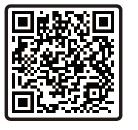
- For 10S devices, search for Smart Life in Apple Store and download it. Alternatively, scan the real event QR code here
- For Android devices, search for Smart Life in Google Play and download it. Alternatively, scan the real event QR code here
Step 2 – Register your account
Click “Sign Up” and read the Privacy Policy after it pops up.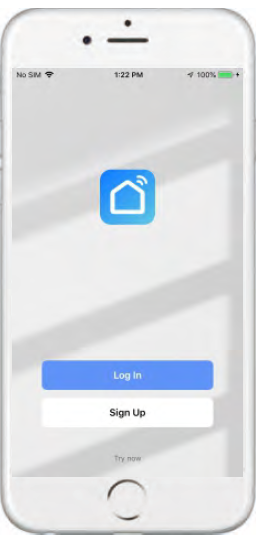
Creating Account
- You can use your email or mobile number as your account to register. The country/region of the APP will be the same as the phones. You can also change it by yourself when registering.
- ( You can not change the country/region after the registration). Enter your mobile number/email and click” Get Verification Code”.
z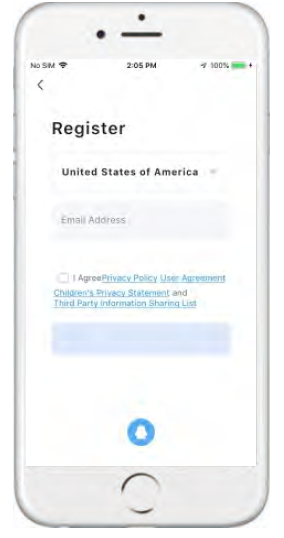
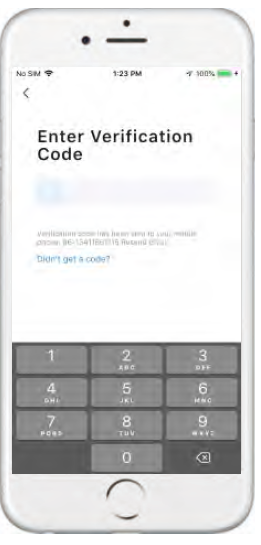
- Enter the verification code and turn to the password setting page.
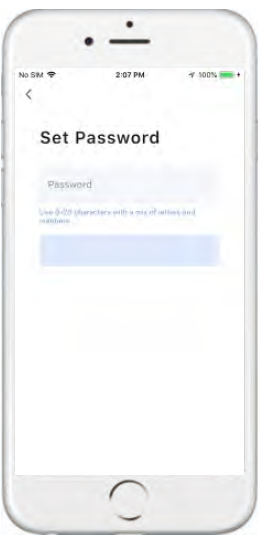
- Set your password as required and click “DoneH.If you already have an account, please log in.
Home Page
- Then, go back to the home page of your app Press the + on the upper right corner of the page to add your device
WIFI Configuration
- Click the icon in the upper right corner to scan the QR code.
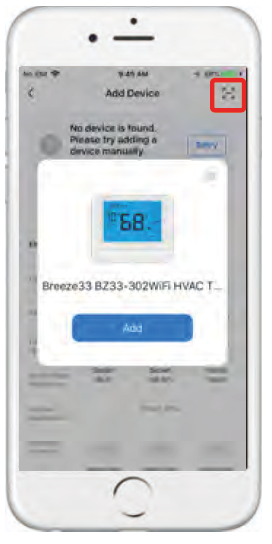
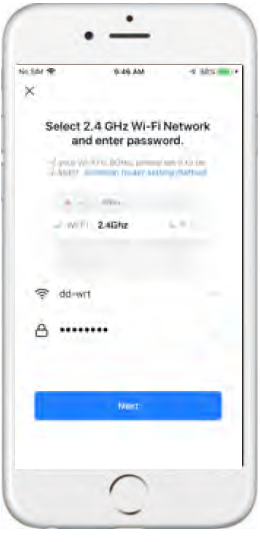
- Enter the password of your wireless router and confirm.
- Is the device on the main page?
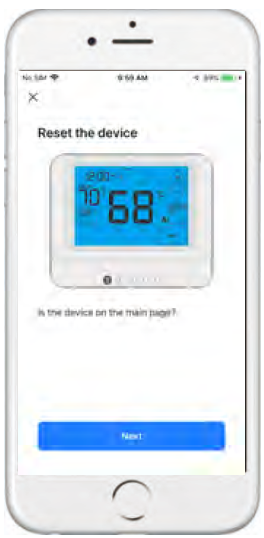
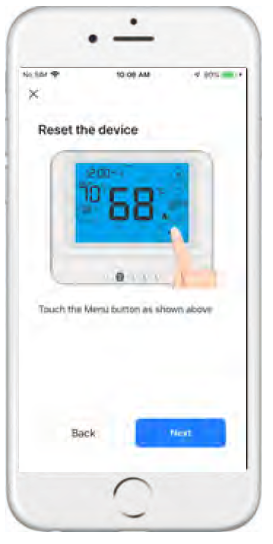
- Touch the Menu button
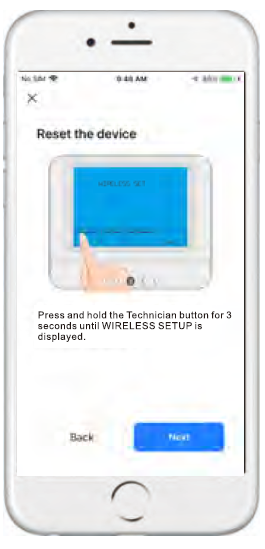
- Press and hold the Technician button for3 seconds until WIRELESS SETUP is displayed.
- Press and hold the FAN button for 3 seconds until the WiFi symbol is flashed

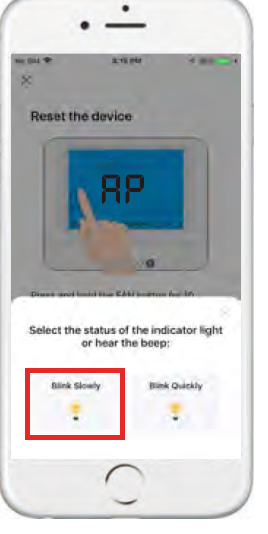
- Press and hold the FAN button for 10 seconds until AP is displayed onscreen. (** APP Select Blink Slowly)
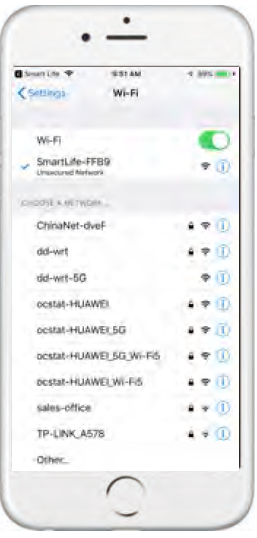
- After connecting to the ‘SmartliftXXXX’Network, please go back to the APP to continue the setup process.
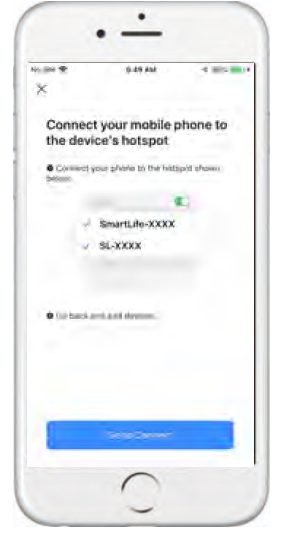
- After successfully connecting to the ‘Smart Lift -XXXX’ network , please go back to the APP to continue the setup process.
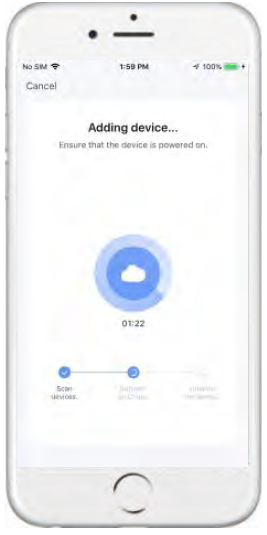
- This may typically take up to 5-90 seconds to complete
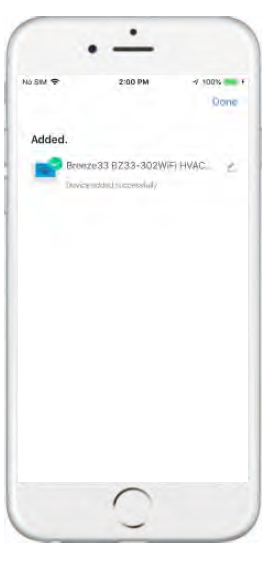
- Your room name can be edited when the device is connected
PROGRAMMING YOUR THERMOSTAT
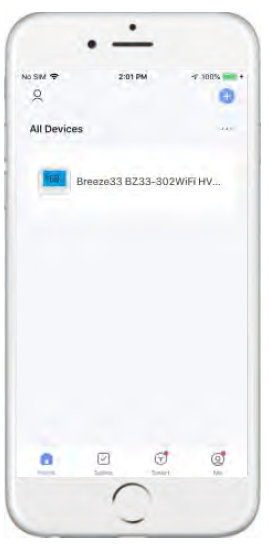
- When your room is established successfully, it will display on the home screen.
- Click the line into beginning programming your thermostat.
Control Screen Overview
- Room Temperature
- The current ambient temperature of the space
- Heat/Cool
- Display the status of Heat/Cool
- Fan
- Display the status of the fan .
- Set-point Heat Temperature
- Use the plus and minus buttons to set the desired temperature
- Set-point Cool Temperature
- Use the plus and minus buttons to set the desired cool temperature
- System Mode Setting
- Select your System mode (Off, Heat, Cool,Auto, and EMHeat)
- Run Mode Setting
- Select your Run mode (Manual, Program, and Temporary)
- Schedule Setting
- Program your custom daily schedule
- More Setting
- (Fan mode, Temperature scale.Maximum set-point limit, Minimum set-point limit,Temperature correction, Child lock, Morning Recovery, Backlight Switch, Time mode, Heat Swing, Cool Swing, Factory data reset).

- (Fan mode, Temperature scale.Maximum set-point limit, Minimum set-point limit,Temperature correction, Child lock, Morning Recovery, Backlight Switch, Time mode, Heat Swing, Cool Swing, Factory data reset).
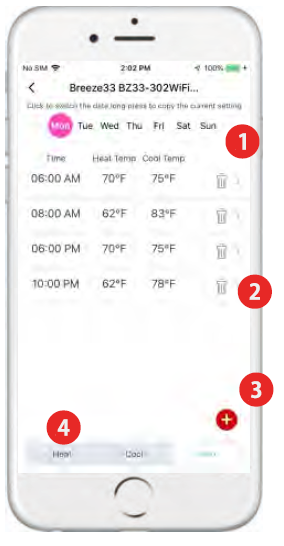
Scheduling Guide
- Select Days
- Select a day of the week
- Delete schedule
- Delete a time period
- Add schedule
- Add a time period
- Select System mode
- Select the specified system mode
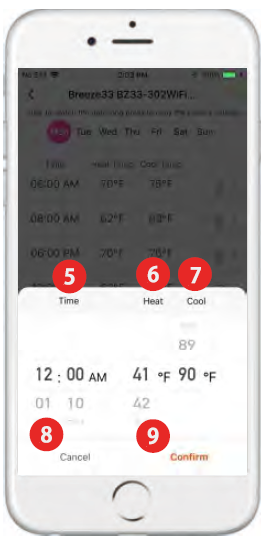
- Setting The Time
- Adjust the time you want to schedule by scrolling up or down.
- Setting The Heat Temperature
- Set the heat temperature you want to schedule by scrolling up or down.
- Setting The Cool Temperature
- Set the cool temperature you want to schedule by scrolling up or down
- Return To Schedule
- Press the Cancel button to return to main schedule screen
- Save Your Schedule
- Save the edited or deleted or added Schedule ..
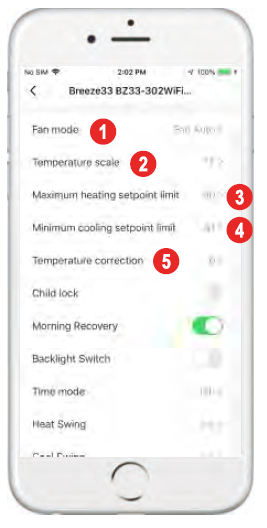
More Settings
- Fan Mode Setting
- Select your System mode (Fan Auto/Fan On)
- Temperature scale
- Select F for Fahrenheit temperature display or select C for Celsius display
- Heating Temperature Set-Point Limit
- This setting establishes a maximum value above which the set-point temperature value cannot be raised.
- Cooling Temperature Set-Point Limit
- This setting establishes a maximum value above which the set-point temperature value cannot be lowered.
- Temperature correction
- You can adjustthe room temperature display to read up to 3″above or below the factory-calibrated reading.
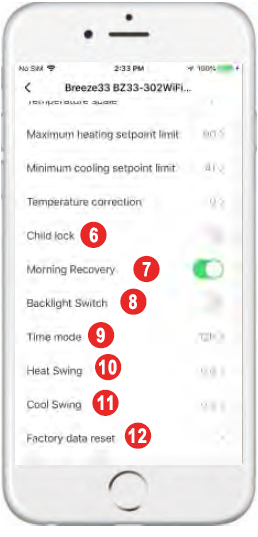
- Child lock
- Lock screen and unlock the screen.
- Morning Recovery
- This setting will start healing early to bring the building temperature to its programmed sat-point by the beginning of the WAKE tima period.
- Backlight Switch
- The display light can be configured to stay on all the time or come on when any key Is pressed.
- Time mode
- Select a 12 or 24 hour clock setting.
- HeatSwlng
- The heating differential setting Is adjustable from 0.2°F to 2°F.
- Cool Swing
The cooling differential setting is adjustable from 0.2’F to 2°F. e Factory data reset Reset to factory default
Manage Devices
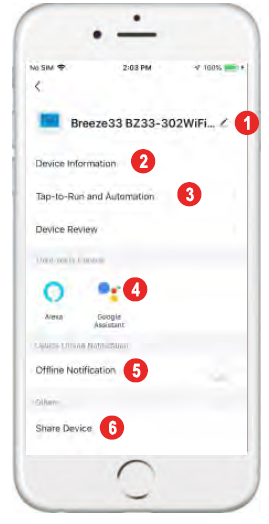
Click the icon
you can edit the icon, name, and location
Device Information
you can view the device’s ID, IP address, MAC address,time zone, and online status,etc
Tap-to-Run and Automation
you can turn on/off or edit the recommended Automation setting
Alexa Google Assistant
Binding your app account to your Amazon account allows you to control Alexa-enabled Devices through Amazon Echo speakers. After connecting your App account and Google Account,you can use Google Home Smart Speakers To control devices that work with Google Assistant.
Offline Notification
Turn on and off notifications when the device is offline
Share Device
You can share devices with others by entering a phone number/email
(Notes: the phone number/email must have been registered for Smart Life)
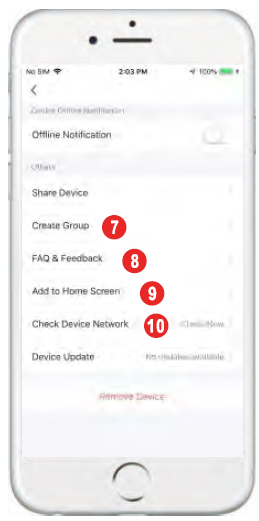
CreateGroup
After entering the page, all devices with the same type as this device that have been added under this account will be automatically displayed. By creating group for them, you can easily manage the devices with the same type (Built-in firmware must have the same version).
FAQ & Feedback
You can view the FAQ of this device to get help, and also give feedback if you have any problems
Add to Home Screen
You can enter the control panel of the device directly through your Home Screen
Check Device Network
check the device connection status, tap Check Device Network.
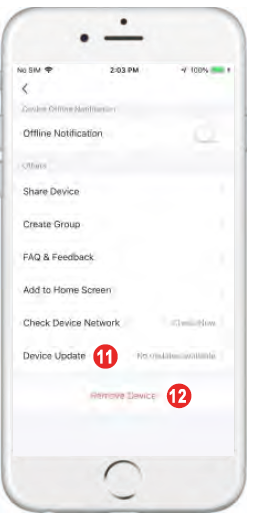
Check for Firmware Upgrade
check whether any firmware updates are available, tap Device Update.
Remove Devcle
- Remove the device, and tap Remove Device. Two options appear Disconnect and Disconnect and wipe data.
- If Disconnect is tapped, the device is removed from Iha device 11th, and automation scenes and tap-to-run scenes that are related to the device become unavailable.
- If Disconnect and wipe data Is tapped, the device is removed from the device list and all data related to the Iha device is erased
FCC
This device complies with Part 15 of the FCC Rules. Operation is subject to the following two conditions:
- This device may not cause harmful interference, and
- This device must accept any interference received, including interference that may cause undesired operation.
Warning: Changes or modifications not expressly approved by the party responsible for compliance could void the user’s authority to operate the equipment.
NOTE: This equipment has been tested and found to comply with the limits for a Class B digital device, pursuant to Part 15 of the FCC Rules. These limits are designed to provide reasonable protection against harmful interference in a residential installation. This equipment generates uses and can radiate radio frequency energy and, if not installedand used in accordance with the instructions, may cause harmful interference to radio communications. However, there is no guarantee that interference will not occur in a particular installation. If this equipment does cause harmful interference to radio or television reception, which can be determined by turning the equipment off and on, the user is encouraged to try to correct the interference by one or more of the following measures:
- Reorient or relocate the receiving antenna.
- Increase the separation between the equipment and receiver.
- Connect the equipment into an outlet on a circuit different from that to which the receiver is connected.
- Consult the dealer or an experienced radio/TV technician for help.
FCC Radiation Exposure Statement:
This equipment complies with FCC radiation exposure limits set forth for an uncontrolled environment. This equipment should be installed and operated with minimum distance 20cm between the radiator & your body
WARRANTY
Breeze33 Products LLC (Breeze33) warrants to the ORIGINAL PURCHASER that its thermostats shall be free from defects in material and workmanshipunder normal use and service for a five (5) years. This warranty cannot be transferred – it is extended only to the original Purchaser or First User of the Product. By accepting and keeping this Product you agree to all of the warranty terms and limitations of liability described below. Breeze33’s obligations under the warranty set forth above shall be to replaceany Breeze33 Thermostat which is defective.
WHAT IS NOT COVERED?
The warranty above does not cover and Breeze33 is not liable for, (i) installation, (ii) any labor charges or (iii) products which have been damaged as a result of any accident, misuse, abuse, neglect, improper installation or maintenance, the use of abrasive or organic solvent cleaners, modification, failure to use the register, grille, or diffuser in accordance with instructions provided by Breeze 33.
HOW TO OBTAIN WARRANTY SERVICE
Contact our warranty department at 740-314-4404 to report the defect. Return failed product with proof of purchase,your name, and address within 30 days of failure to:
- Breeze33 Products LLC
- 350 Courtney Road Sebring,
- Ohio44672 USA
LIMITATION OF LIABILITY
Breeze33’s liability on any claim of any kind, including, without limitation, warranty, negligence and/or breach of contract, shall in no case exceed the purchase price paid by the Customer. IN NO EVENT SHALL BREEZE33 BE LIABLE FOR ANY SPECIAL, INCIDENTAL, CONSEQUENTIAL (INCLUDING, WITHOUT LIMITATION, DAMAGE TO PROPERTY) OR PUNITIVE DAMAGES, DAMAGES IN THE NATURE OF PENALTIES OR SIMILAR OR RELATED DAMAGES OF ANY KIND.
DISCLAIMER OF WARRANTIES
BREEZE33 EXPRESSLY DISCLAIMS ALL WARRANTIES, EXCEPT AS EXPLICITLY STATED HEREIN, TO THE FULLEST EXTENT PERMITTED BY LAW, WHETHER WRITTEN, ORAL, EXPRESS OR IMPLIED, INCLUDING ANY WARRANTY OF PERFORMANCE, MERCHANTABILITY, FITNESS FOR A PARTICULAR PURPOSE, AND NON INFRINGEMENT. THIS DISCLAIMER INCLUDES ANY ORAL WARRANTIES OR REPRESENTATIONS MADE OR IMPLIED BY ANY AGENT, EMPLOYEE, SUBCONTRACTOR, MANAGER, DIRECTOR AND/OR REPRESENTATIVE OF BREEZE33
REFERENCE:
DOWNLOAD MANUALS:
Breeze33 BZ33-302Wifi Programmable Thermostat Installational Manual

Breeze33 BZ33-302Wifi Programmable Thermostat Installational Manual