BREEZE BC104-4 Touchscreen Fan Coil Thermostat
INTRODUCTION
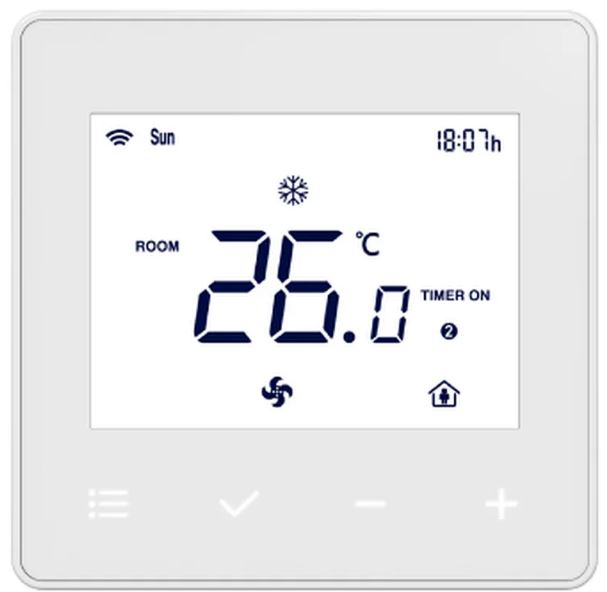
An easy-to-use thermostat for fan coil devices is the Breeze BC104-4 Touchscreen Fan Coil Thermostat. It has a touchscreen interface that makes navigating and setting adjustments simple. When fan coil units are installed for heating or cooling in a business or residential environment, the thermostat is commonly employed. Here are some of the Breeze BC104-4 Touchscreen Fan Coil Thermostat’s important characteristics and features:
- Touchscreen Display: The thermostat has a touchscreen display, which makes using it simple and convenient. The touchscreen makes navigating through menus and settings simple.
- Fan Coil Control: The BC104-4 thermostat is intended only for use in fan coil control applications. Fan speed, temperature, and mode (cooling, heating, or fan-only) may all be controlled precisely.
- The thermostat has programmable scheduling features that let you establish various temperature settings in accordance with your desired routine.
- By automatically regulating the temperature throughout the day or week, this function helps to maximize energy efficiency.
- Temperature Control: The touchscreen interface allows you to effortlessly modify and set the preferred temperature. With the help of the thermostat, you can regulate the temperature precisely for maximum comfort.
- Multiple Operating Modes: The thermostat BC1044 offers a number of operational modes, including a cooling mode for air conditioning, a heating mode for heating systems, and a fan-only mode for air circulation without heating or cooling.
- Backlight Display: The touchscreen display on the thermostat has a backlight, making it easier to see and use even in dim lighting.
- Energy Efficiency: The thermostat helps to increase energy efficiency and minimize energy consumption, which might result in cost savings. It does this by using programmed schedules and precise temperature control. The touchscreen interface and simple controls of the thermostat make it user-friendly and available to people of all ages.
- Installation Compatibility: A variety of fan coil units often used in residential and business settings are compatible with the Breeze BC104-4 Touchscreen Fan Coil Thermostat.
- HVAC System Compatibility: Various heating, ventilation, and air conditioning (HVAC) systems that use fan coil units are smoothly compatible with the thermostat.
SPECIFICATION
| Feature | NEW INTELLIGENT SMART THERMOSTAT | |
| Model No | BC104-2 | BC104-4 |
| Supply Voltage | 85~230Vac /24Vac. 50/60Hz | |
| Control Device | 2-pipe FCU | 2pipe/4-pipe FCU, DX Unit |
| Switch Rating | 5A (7A as optional) | |
| Max.Fan Load | 1A/3A inductive, 3A resistive | |
| Fan Control | Single or 3-speed and Auto | |
| Valve Control | On/Off | |
| Heat/Cool | Cool/Heat | Cool&Heat&Auto |
| Remote Sensor | Yes | |
| Communication | Modbus as option | |
| Hotel Card | Yes-Dry contact(window/door/PIR sensor) | |
| Backlight | Black&White | |
| Temperature Display | Celsius/Fahrenheit | |
| Programmable | Optional | |
| Setpoint Range | 5~35C | |
| Temperature Display | 0.5C | |
| Ambiente | Storage:-20C~60C, Operating: 0~50°C, Humidity:5~95% | |
| Product Color | White RAL9010 | |
| Cycling Fan | Yes | |
| Approval | EN60730-1, CE Standard | |
| Installation | Flush/Surface Mounting | |
| Housing Material | PC+ABS | |
| IP Grade | IP 30 | |
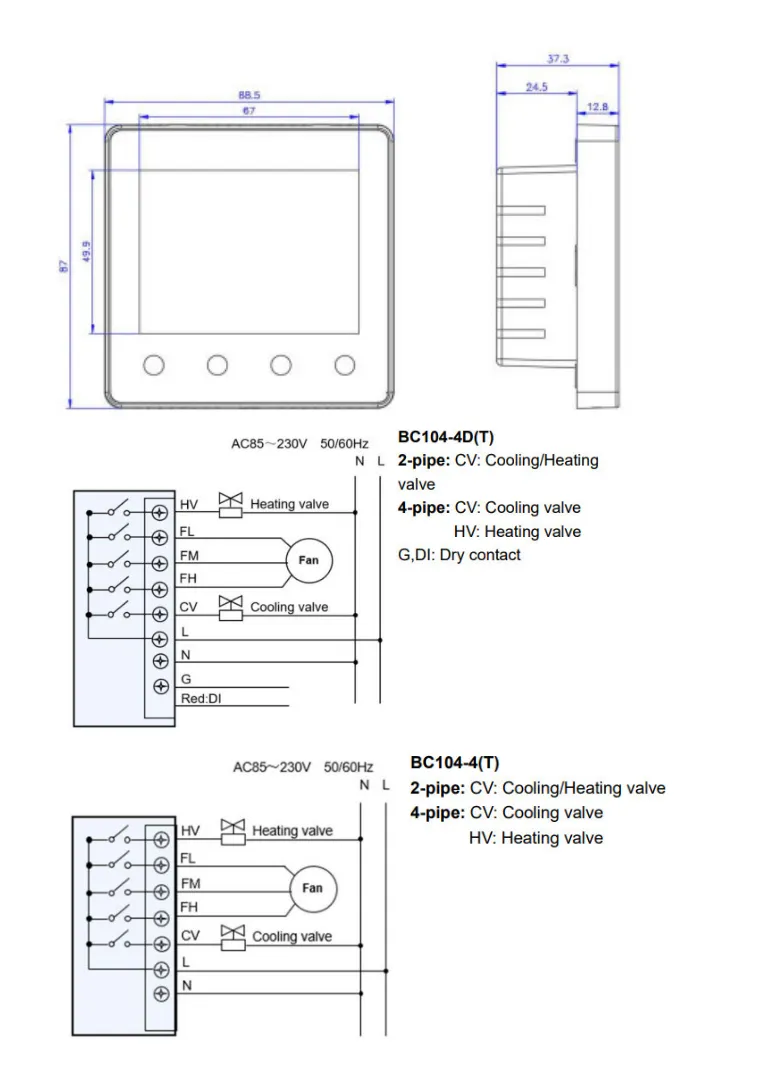
DIMENSION
HOW TO USE
Follow these basic guidelines to utilize the Breeze BC104-4 Touchscreen Fan Coil Thermostat. Please take notice that depending on the model and manufacturer, the precise instructions may change. For specific instructions designed for your thermostat, it is usually preferable to refer to the user handbook. Here is an overview: Make that the thermostat has electricity by turning it on. It could be battery-operated or attached to the power source. For information on the precise power needs, see the user handbook.
- Learn about the thermostat: Give the various buttons, touchscreen interface, displays, and symbols on the thermostat some thought.
- You can use the UI more skillfully if you do this. The thermostat may have many modes, including heating, cooling, and fan-only. Choose the appropriate option for your needs.
- Make your choice using the touchscreen selections or the mode button. The required temperature may be set using the touchscreen interface or the temperature control buttons.
- While some thermostats employ a single control dial or touchscreen slider, others use distinct buttons for raising and lowering the temperature.
- You may change the temperature to suit your preferences.
- Breeze BC104-4 Touchscreen Thermostat for Fan Speed Control: The fan speed of a fan coil unit may be controlled using this thermostat.
- It may have options for low, medium, high, or auto fan speed. Depending on your preferences or the needs of the environment, choose the right fan speed.
- Make your choice using the touchscreen selections or the fan speed buttons. Temperature schedules may potentially be programmed into the thermostat at various periods of the day.
- If this functionality is offered, go to the user guide for instructions on how to set up and modify the schedules.
- The touchscreen interface is often used to access the programming menu. Use the relevant controls on the thermostat to make changes if necessary to the temperature, fan speed, or other settings.
- Additionally, you may be able to change the timings, swing mode, sleep mode, or other characteristics.
- For comprehensive instructions on how to utilize these features, see the user handbook. To maintain optimal operation, regularly dust and clean the thermostat. I advise contacting the manufacturer if you have any problems or have special inquiries about the Breeze BC104 4 Touchscreen Fan Coil Thermostat or consulting the user manual for comprehensive guidelines unique to that model.
- Remember that these are just guidelines; for precise instructions on how to operate the Breeze BC1044
- Touchscreen Fan Coil Thermostat, please refer to the product’s user manual or other manufacturer-supplied literature.
FAQS
The Breeze BC104-4 Touchscreen Fan Coil Thermostat is what, exactly?
Fan coil units may be controlled and adjusted using the touchscreen interface of the Breeze BC104-4 fan coil thermostat.
What are the Breeze BC104-4 Touchscreen Fan Coil Thermostat’s main characteristics?
The Breeze BC1044 Touchscreen Fan Coil Thermostat has a touchscreen display, temperature and fan speed controls, customizable schedules, and is compatible with fan coil units, among other important features.
Is my fan coil unit compatible with the Breeze BC104-4 thermostat?
A variety of fan coil units may be used with the Breeze BC104-4 Touchscreen Fan Coil Thermostat. To verify compatibility with your particular fan coil unit, it is advised to review the product specifications or speak with the manufacturer.
What controls the touchscreen user interface?
The Breeze BC104-4 touchscreen interface makes it simple to access menus, change temperature settings, regulate fan speed, and establish schedules by just touching the screen.
Can I set separate temperatures for the weekdays and the weekends?
Yes, you may set different temperature regimens for the weekdays and weekends on the Breeze BC1044 Touchscreen Fan Coil Thermostat to suit your demands.
Does the thermostat include a backlight so that it can be seen well at night?
Yes, the Breeze BC104-4 Touchscreen Fan Coil Thermostat usually incorporates a backlight to make it possible to read the screen and make adjustments even in dim lighting.
Is there a remote thermostat control option?
Wi-Fi connection for remote control may or may not be included in the Breeze BC104-4 Touchscreen Fan Coil Thermostat. For exact information on the capabilities of the remote control, please refer to the product specifications or contact the manufacturer.
Is there a humidity sensor incorporated into the thermostat?
Whether or not the Breeze BC104-4 Touchscreen Fan Coil Thermostat has an integrated humidity sensor is unknown. For exact information on humidity-detecting capabilities, it is best to consult the product specifications or get in touch with the manufacturer.
Can I manually alter the timetable that was set up?
If you wish to change the temperature or fan speed outside of the preprogrammed parameters, you may manually override the schedule on the Breeze BC104-4 Touchscreen Fan Coil Thermostat.
Is there a lockout function on the thermostat to prevent illegal access?
Yes, the lockout option on the Breeze BC104-4 Touchscreen Fan Coil Thermostat usually enables you to stop unauthorized entry and modifications to the thermostat settings.
Thermostat: Is it Energy Star approved?
Energy Star certification for the Breeze BC104-4 Touchscreen Fan Coil Thermostat is possible or unlikely. It is advised to look at the product specs or get in touch with the manufacturer to find out whether a certain model has earned the Energy Star certification.
Does the thermostat provide information on energy consumption?
The Breeze BC104-4 Touchscreen Fan Coil Thermostat does not often provide information on energy use.
Thermostat battery backup—does it exist?
In order to maintain the preset settings during power outages, the Breeze BC104-4 Touchscreen Fan Coil Thermostat often features a battery backup.
Is the thermostat compatible with smart home or voice assistant systems?
Voice assistants and smart home systems may or might not be compatible with the Breeze BC104-4 Touchscreen Fan Coil Thermostat. For details on how to integrate a smart home, please refer to the product specifications or get in touch with the manufacturer.
How long is the Breeze BC104-4 Touchscreen Fan Coil Thermostat’s guarantee good for?
Depending on the manufacturer, the Breeze BC104-4 Touchscreen Fan Coil Thermostat’s warranty duration might change. For particular warranty information, it is recommended to consult the product’s paperwork or get in touch with the maker.
