Breeze BC102-2/4D Touch Screen Thermostat
INTRODUCTION
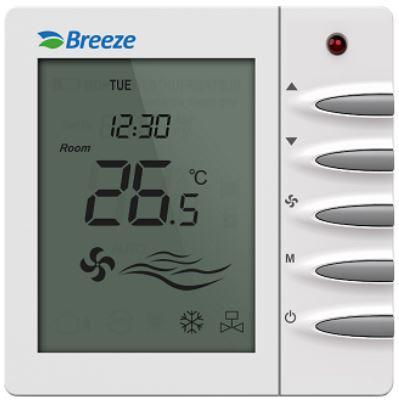
A cutting-edge and user-friendly programmable thermostat, the Breeze BC102-2/4D Touch Screen Thermostat is designed to provide accurate temperature control and energy efficiency for home and commercial HVAC systems. The thermostat’s user-friendly touchscreen interface makes it simple and comfortable to operate, and users may personalize the heating and cooling schedules to fit their tastes and way of life.
Key characteristics
- Touch Screen Interface: The Breeze BC102-2/4D has a stylish and responsive touchscreen interface that makes it easy for users to go through a variety of settings and choices.
- Programmable Scheduling: To maximize comfort and energy savings, users may build custom temperature plans for various times of the day, days of the week, and weekends.
- The thermostat is suited for the majority of home and business installations since it works with a broad variety of heating and cooling systems.
- Backlight Display: The touch screen has an integrated backlight that makes it easy to see and operate in low-light conditions.
- The thermostat enables customers preset temperature settings depending on their preferences and occupancy, which helps save energy and minimize utility costs.
- The Breeze BC102-2/4D has a lockout mechanism that guards against unauthorized entry and adjustments to the thermostat settings.
- Battery Backup: The thermostat has a battery backup that allows it to keep its set routines even when the power is gone.
- Dual Heating and Cooling Modes: The thermostat offers flexible temperature control for year-round comfort and supports both heating and cooling modes.
- Simple Installation: The Breeze BC102-2/4D is designed to be simple to install, and it is also simple to incorporate into existing HVAC systems.
- Temperature Range: To satisfy diverse climatic circumstances and heating/cooling requirements, the thermostat has a broad temperature range.
- Design: The thermostat has a sleek, contemporary look that blends in with any household style.
- Precise Temperature Control: Modern temperature sensors provide precise and reliable temperature measurements that help to keep the atmosphere pleasant.
- Users have the option to manually alter the predetermined timetable when quick temperature modifications are required.
- The thermostat is compatible with most popular HVAC systems, including electric heaters, heat pumps, central air conditioners, and gas furnaces.
- The Breeze BC102-2/4D Touch Screen Thermostat has earned Energy Star certification, ensuring both its energy efficiency and environmentally responsible functioning.
Overall, the Breeze BC102-2/4D Touch Screen Thermostat is a trustworthy and feature-rich product that gives customers access to simple controls, energy saving choices, and increased comfort, making it a great option for enhancing HVAC systems in home and commercial settings.
SPECIFICATION
| Feature | NEW INTELLIGENT THERMOSTAT | |
| Model No | BC102-2 | BC102-4/4D |
| Supply Voltage | 85~230Vac. 50/60Hz | |
| Control Device | 2-pipe FCU | 2pipe/4-pipe FCU |
| Switch Rating | 5A (7A as optional) | |
| Max.Fan Load | 1A/3A inductive, 4A resistive | |
| Fan Control | Single or 3-speed and Auto | |
| Valve Control | On/Off | |
| Heat/Cool | Cool/Heat | Cool&Heat&Auto |
| Remote Sensor | Yes | |
| Communication | Optional | |
| Hotel Card | Yes | |
| Backlight | Blue | |
| Temperature Display | Celsius | |
| Programmable | Optional | |
| Setpoint Range | 5~35C | |
| Temperature Display | 0.5C | |
| Ambiente | Storage:-20C~60C, Operating: 0~50°C, Humidity:5~95% | |
| Product Color | White RAL9010 | |
| Cycling Fan | Yes | |
| Approval | EN60730-1, CE Standard | |
| Installation | Flush Mounting | |
| Housing Material | PC+ABS | |
| IP Grade | IP 30 | |
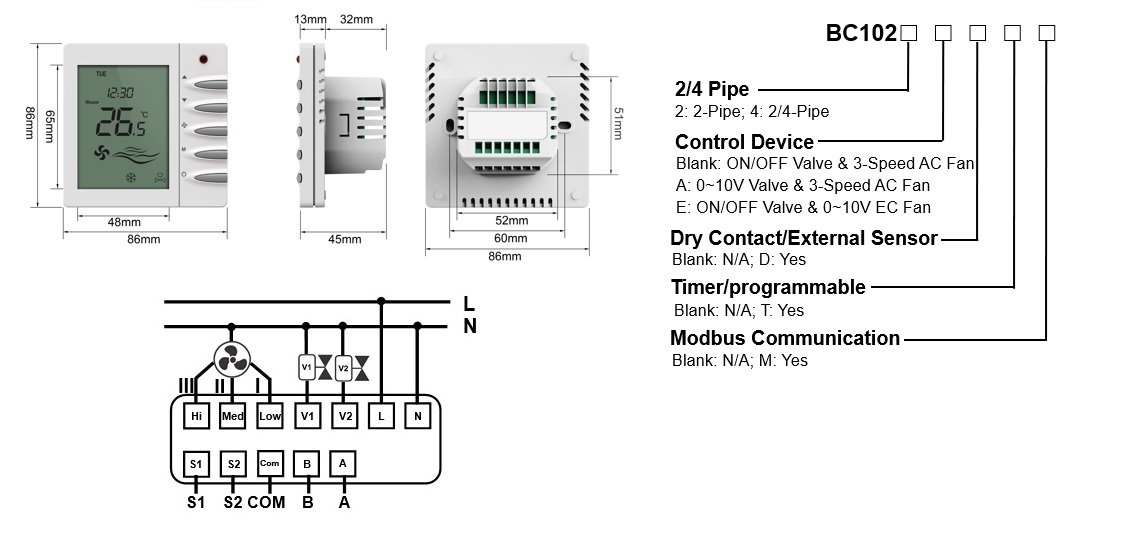
TERMINALS
HOW TO OPERATE
Follow these instructions to use the Breeze BC102-2/4D Touch Screen Thermostat: Make sure the thermostat is correctly powered and linked to your HVAC system before turning it on.
- Get comfortable with the touchscreen: A touchscreen interface is available on the Breeze BC102-2/4D for simple control and navigation. Spend a minute getting used to the touchscreen’s design and features.
- Set the time and date: If the thermostat doesn’t automatically set the time and date, you’ll need to do it by hand. To change the time and date settings, look for a menu choice and then follow the on-screen instructions.
- The thermostat’s primary purpose is to regulate the indoor temperature of your house. The current temperature reading and choices to change the preferred temperature should be shown on the main screen.
- To raise or lower the temperature setting as desired, use the touchscreen’s “+” and “-” buttons.
- Establish a schedule: You can customize temperature regimens for various times of the day with the Breeze BC102-2/4D Touch Screen Thermostat.
- To establish the preferred temperatures for certain times of day, such as mornings, afternoons, evenings, and nights, locate a scheduling option in the menu and follow the instructions.
- Typically, you may set up different workday and weekend plans.
- Enable vacation mode (optional): The Breeze BC102-2/4D thermostat has a vacation mode for longer absences. You may switch on vacation mode if you’re leaving town to save electricity.
- To choose the preferred vacation temperature and length, look for this item in the menu and follow the instructions. The thermostat may contain settings that allow you to manage the fan’s operation.
- Most fans have two operating modes: “Auto” (where the fan only operates when the heating or cooling is on) and “On” (where the fan runs constantly). Depending on your chosen level of comfort, choose your favorite fan setting.
- Use other features: The Breeze BC1022/4Dmay include extra features like as screen lockouts, filter replacement reminders, system mode selection (heating, cooling, or auto), and more depending on the exact model and features. To learn how to utilize these features, go through the menu and the user guide. You may modify the temperature manually if you wish to deviate from the preset timetable or make short-term modifications.
- To change the temperature to the desired setting, use the touchscreen.
- The manual changes normally remain in effect until the following period of the scheduled timetable or until you manually make another modification.
- Keep an eye on the thermostat’s display to keep track of the current temperature, specified schedules, and any other pertinent information.
- Review settings. By doing so, you can make sure the thermostat is operating properly and providing the level of comfort you need. Always refer to the user manual for your model of the Breeze BC102-2/4D Touch Screen Thermostat for complete instructions and any applicable extra features or functions.
FAQS
Breeze BC102-2/4D Touch Screen Thermostat: What is it?
The Breeze BC102-2/4D Touch Screen Thermostat is a touchscreen programmable thermostat.
What are the Breeze BC102-2/4D Touch Screen Thermostat’s main characteristics?
The Breeze BC102-2/4D Touch Screen Thermostat has a touchscreen display, customizable schedules, temperature control, and compatibility with different HVAC systems, among other important features.
Does my HVAC system work with the Breeze BC102-2/4D Touch Screen Thermostat?
Most common HVAC systems, including heating and cooling systems, are compatible with the Breeze BC102-2/4D Touch Screen Thermostat.
What controls the touchscreen user interface?
The Breeze BC102-2/4D Thermostat’s touchscreen interface enables simple menu navigation, temperature setting adjustments, and schedule programming.
Can I set separate temperatures for the weekdays and the weekends?
On the Breeze BC102-2/4D Touch Screen Thermostat, distinct temperature regimens for weekdays and weekends may be set.
Has a humidity sensor been included with the Breeze BC102-2/4D Thermostat?
A built-in humidity sensor is not included in the Breeze BC102-2/4D Touch Screen Thermostat.
Is there a remote thermostat control option?
Without extra accessories, remote operation of the Breeze BC102-2/4D Touch Screen Thermostat is not possible due to a lack of integrated Wi-Fi connection.
Does the thermostat include a backlight so that it can be seen well at night?
The Breeze BC102-2/4D Touch Screen Thermostat does, in fact, include a backlight that makes it simple to read and change settings even in dim lighting.
Is it possible to lock the thermostat so that nobody else may use it?
Yes, a lockout option is available on the Breeze BC102-2/4D Touch Screen Thermostat to prevent unauthorized entry and configuration changes.
Can I create numerous user profiles on the thermostat?
Multiple user profiles are not supported by the Breeze BC102-2/4D Touch Screen Thermostat.
Thermostat: Is it Energy Star approved?
It is possible or unlikely that the Breeze BC102-2/4D Touch Screen Thermostat is Energy Star certified. For correct information, it is essential to verify the product specifications or speak with the manufacturer.
Does the thermostat provide information on energy consumption?
The Breeze BC102-2/4D Touch Screen Thermostat doesn’t provide information on energy use.
Can I manually alter the timetable that was set up?
On the Breeze BC102-2/4D Touch Screen Thermostat, you may manually override the preset schedule if you wish to change the temperature in a way that is not predetermined.
Thermostat battery backup—does it exist?
In order to maintain the preset settings during power outages, the Breeze BC102-2/4D Touch Screen Thermostat normally incorporates a battery backup.
How long is the Breeze BC102-2/4D Touch Screen Thermostat’s warranty valid?
Depending on the manufacturer, the Breeze BC102-2/4D Touch Screen Thermostat’s warranty duration may change. For information on the warranty, it is advised to consult the product’s manual or get in touch with the maker.
