Boneco 7056 thermostat
General information
Physicians recommend a relative humidity level of 40%-60%. Our sense of well-being then tells us that the humidity of the air in the room is ideal. And this level is also ideal for our health, for the animals and plants in the room, for furniture, instruments and much more.
Functional Description
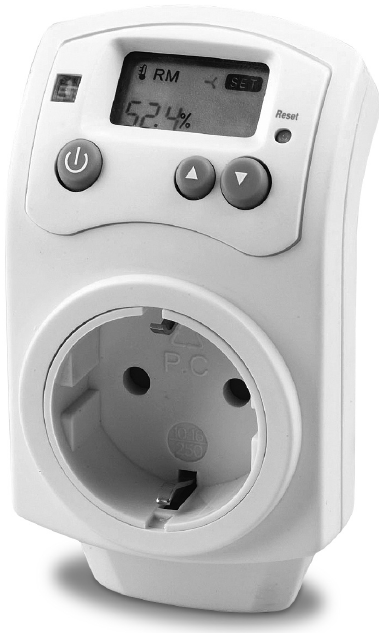
The hygrostat A7056 is used for the regulation of humidifiers and de-humidifiers. The hygrostat switches these devices off and on automatically depending on the programmed target air humidity (range 10 – 90%). In this way, unnecessary running time is avoided. For more information on this, see the following chapter.
Safety instructions
- Read the operating instructions carefully before using the appliance and keep them for later reference.
- Connect the unit only to alternating current with voltage according to the rating label.
- Only use the appliance indoors and within the specified technical data. If used for a purpose for which it is not intended it could cause serious danger to health and life.
- Children cannot recognise the hazards associated with the usage of electrical appliances. For this reason, always supervise children when they are near the unit.
- Persons who are not familiar with the operating instructions, as well as children and persons under the influence of medication, alcohol, or drugs are not permitted to operate the appliance, or are only permitted to operate it under supervision.
- Never use the appliance if there is any damage to the appliance or cable, after malfunction, after the appliance has been dropped or damaged in any other way.
- Only operate the unit when it is completely assembled.
- Repairs of electrical appliances are only to be made by qualified service engineers. Improper repair work can cause considerable danger to the user.
- Never pull the plug out of the socket by the cable or with wet hands.
Before Commissioning
Before using the hygrostat for the first time, you should charge the built-in storage battery overnight. This prevents settings from being lost during power failures. Plug the hygrostat into a plug socket WITHOUT connecting a humidifier or dehumidifier. Do not do this near any warming or cooling sources.
- ON/OFF switch

- UP control

- DOWN control

- RESET (pressing this key deletes all settings)
- LED
- green connected device is switched on
- red connected device is switched off
- no LED the connected device is NOT regulated by the hygrostat (= not programmed)
- Mode symbol for humidifier

- Mode symbol for dehumidifier

- Display – relative ACTUAL humidity (figure bottom left)
- Display – relative target humidity (figure bottom right)
Setting of the Operating Mode (Humidifier or Dehumidifier)
Press the button until the LED is no longer lit. Then press the two buttons and simultaneously during 3 seconds in order to select the appropriate mode (see symbols and in the display).
Setting of Humidity Value
Press the button. The LED lights up red and the mode symbols and go out. With the arrow keys , you can set the TARGET humidity that you wish.
Commissioning
First, switch to operational mode. Stick the mains plug of the desired device (humidifier or dehumidifier) into the provided opening on the hygrostat. After a few minutes, the connected device is switched on or off when the humidity exceeds or falls below the set relative TARGET humidity.
After the connected device is switched on, the LED lights up «green». You can also switch the connected device off early if you press on the key . In this case, the LED does not light up.
Disposal
Return your worn out appliance to your dealer for proper disposal. You can obtain information on other ways to dispose of the unit from your local council.
Warranty
The warranty conditions are defined by our representative in the country of sale. Please contact your dealer if, despite strict quality control, your appliance becomes defective. You must present the receipt when making a claim under the warranty.
Legal information
The appliance is CE-certified and complies with the Directives
- 73/23/EWG concerning for electrical safety
- 89/336/EWG and 92/31/EWG concerning electromagnetic compatibility
The right to make technical modifications is reserved. The instructions for use are protected by copyright.
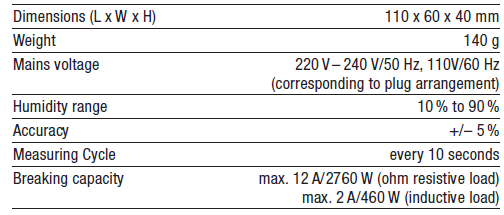
Technical data
Reference
Download Manual:
Boneco 7056 thermostat User Manual